11.6-Inch vs 21.5-Inch Drawing Tablets in 2026: Key Differences
Choosing between an 116 inch vs 215 inch drawing tablet depends on your workspace and workflow needs.

What this report covers
- Last updated
- 4 Nov 2026
Figures above are read from the product listings for the models named below. Scores are out of 10, based on listed specifications and buyer feedback.
As Amazon Associates, we earn from qualifying purchases. This means we may receive a small commission at no extra cost to you if you click through and make a purchase.
As an Amazon Associate we earn from qualifying purchases. Links on this page are affiliate links.
Choosing between an 116 inch vs 215 inch drawing tablet depends on your workspace and workflow needs. Both the XP-PEN Artist12 and GAOMON PD2200 are pen displays that connect to a computer for digital art. They share battery-free styluses and high pressure sensitivity. The main difference lies in screen size and physical footprint. The 11.6-inch model offers portability, while the 21.5-inch version provides a larger canvas for detailed work.
Screen Size
11.6-Inch
21.5-Inch
Display Technology
HD IPS
Full-Laminated
Color Gamut
72% NTSC (100% sRGB)
130% sRGB (92% NTSC)
Weight
2 pounds
8.49 pounds
Shortcut Keys
6 customizable keys
8 touch shortcut keys
Choose the first if
- You need a lightweight device for travel or small desks
- You prefer a standard HD IPS display with 100% sRGB coverage
- You want a compact footprint that fits easily in a bag
Choose the second if
- You require a larger canvas for detailed illustration or design
- You want full-laminated screen technology to reduce parallax
- You prefer a wider color gamut of 130% sRGB for accurate color reproduction
Verdict
The XP-PEN Artist12 is better for artists who prioritize portability and a smaller workspace. The GAOMON PD2200 suits professionals who need a large, high-color-accuracy screen for detailed work. Your choice depends on whether you value mobility or screen real estate.
11.6-Inch vs 21.5-Inch Drawing Tablets
Screen size
Edge: GAOMON PD2200 21.5-Inch Drawing Tablet
The GAOMON PD2200 offers a 21.5-inch display, providing a significantly larger canvas for your artwork compared to the XP-PEN Artist12, which features an 11.6-inch screen. The larger area of the GAOMON allows you to see more of your project at once, which is helpful for detailed composition work. The XP-PEN’s smaller footprint is easier to manage on compact desks. Both units are pen displays that require a computer connection. Your choice depends on whether you prioritize screen real estate or a smaller, more portable form factor for your specific workspace constraints.
Display quality
Edge: GAOMON PD2200 21.5-Inch Drawing Tablet
The XP-PEN Artist12 uses an HD IPS panel with a 1920×1080 resolution and a 72% NTSC color gamut, which equates to 100% sRGB coverage. It comes with a pre-installed anti-reflective screen protector. The GAOMON PD2200 features a full-laminated screen with a 130% sRGB and 92% NTSC color gamut. It also includes an anti-glare film. The GAOMON’s wider color range may benefit professional color-critical work. Both displays offer vivid colors, but the GAOMON’s specifications suggest a broader palette for digital art creation.
Pen features
Edge: GAOMON PD2200 21.5-Inch Drawing Tablet
Both devices include battery-free styluses with 8192 levels of pressure sensitivity. The XP-PEN Artist12 uses the P06 pen, which has a hexagonal design and a flexible grip for a traditional pencil-like feel. The GAOMON PD2200 uses the AP32 pen, which adds tilt support functionality for more natural shading effects. Both packages include eight replacement nibs. The GAOMON’s tilt support provides an additional layer of control for artists who rely on brush angle changes, giving it a slight technical advantage in pen capabilities.
Shortcut keys
Edge: GAOMON PD2200 21.5-Inch Drawing Tablet
The GAOMON PD2200 is equipped with eight touch shortcut keys located on the device. These keys are customizable via the GAOMON driver software to suit your workflow. The XP-PEN Artist12 features a slim touch bar for zooming and scrolling, along with six customizable shortcut keys. Both sets of controls help speed up your editing process. The GAOMON offers more physical keys for quick access to common functions, while the XP-PEN combines a bar and keys. The GAOMON provides more dedicated control options for complex tasks.
Portability
Edge: XP-PEN Artist12 11.6-Inch Pen Display
The XP-PEN Artist12 is designed for easier transport, weighing just two pounds with dimensions of 14.3 by 8.58 inches. The GAOMON PD2200 is much heavier at 8.49 pounds and measures 20.6 by 12.4 inches. If you need to move your drawing tablet between locations or share it with students, the XP-PEN is far more manageable. The GAOMON is better suited for a permanent desk setup. The significant weight difference makes the smaller model the clear choice for mobility.
Which drawing tablet fits your workflow
Travelers with limited desk space
Our pick: XP-PEN Artist12 11.6-Inch Pen Display
The XP-PEN Artist12 weighs just 2 pounds and measures 14.3 inches long. Its compact 11.6-inch FHD display fits easily into bags. You can connect it to laptops with HDMI or USB-A ports for portable digital sketching. The slim profile ensures it does not take up much room when you are working away from a fixed station.
Designers needing large detailed canvases
Our pick: GAOMON PD2200 21.5-Inch Drawing Tablet
The GAOMON PD2200 features a 21.5-inch full-laminated screen with 130% sRGB color gamut. This larger display area reduces parallax and lets you view more of your artwork at once. The 1000:1 contrast ratio and wide viewing angles provide clearer images. You benefit from precise control when creating detailed digital art or animations on a spacious surface.
Educators doing online teaching
Our pick: GAOMON PD2200 21.5-Inch Drawing Tablet
The GAOMON PD2200 supports tilt functions and offers 8 customizable touch shortcut keys. Its large 21.5-inch screen makes handwritten notes and equations easy for students to see during remote meetings. The battery-free pen allows for natural writing. You can adjust color and brightness directly via the OSD menu to optimize visibility for online classes or presentations.
Beginners wanting simple setup
Our pick: XP-PEN Artist12 11.6-Inch Pen Display
The XP-PEN Artist12 includes 6 customizable shortcut keys and a slim touch bar for zooming. It works with Windows, Mac, and Linux systems. The included P06 battery-free pen provides a traditional pencil feel. You get a straightforward connection via HDMI and USB. The package includes replacement nibs and a driver to help you start drawing immediately.
| # | Product | Best for | Price |
|---|---|---|---|
| 1 | XP-PEN Artist12 11.6-Inch Pen Display | portable digital art on a budget | |
| 2 | GAOMON PD2200 21.5-Inch Drawing Tablet | stationary digital art and design workflows |

XP-PEN Artist12 11.6-Inch Pen Display
Best for: portable digital art on a budget
- Screen Size
- 11.6-Inch
- Display Resolution
- 1920×1080 FHD
- Pen Pressure
- 8192
- Color Gamut
- 72% NTSC (100% sRGB)
- Display Finish
- anti-reflective screen protector
- Shortcut Controls
- 6 shortcut keys, slim touch bar
The XP-PEN Artist12 is an 11.6-inch pen display with a 1920×1080 FHD IPS screen and 72% NTSC color gamut. It uses a battery-free stylus with 8192 pressure levels. The unit weighs 2 pounds and includes a touch bar and six shortcut keys. It connects via HDMI and USB-A to Windows, Mac, or Linux systems for digital art and remote work.
- 11.6-inch FHD IPS display with 1920×1080 resolution
- Battery-free P06 stylus with 8192 pressure levels
- Programmable touch bar and six customizable shortcut keys
- Universal compatibility with Windows, Mac, and Linux
- Pre-installed anti-reflective screen protector
- 11.6-inch screen is smaller than the 21.5-inch alternative
- 72% NTSC color gamut covers less spectrum than wider ranges
- 2-pound weight is lighter but offers less stability than larger units
- You need a portable drawing monitor for travel
- You work with limited desk space
- You require a battery-free stylus for natural drawing
- You require a large 21.5-inch canvas for detailed work
- You need professional-grade color accuracy beyond 72% NTSC
- You want a standalone tablet without a computer connection
Verdict: XP-PEN Artist12 11.6-Inch Pen Display suits artists who prioritize portability and a compact footprint over large screen real estate. It fits users who need a reliable, battery-free stylus for sketching on a secondary monitor.
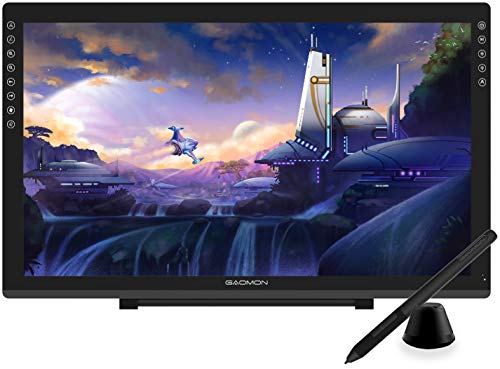
GAOMON PD2200 21.5-Inch Drawing Tablet
Best for: stationary digital art and design workflows
- Screen Size
- 21.5-Inch
- Tablet Type
- Tethered pen display
- Pen Pressure
- 8192 levels
- Color Gamut
- 130% sRGB, 92% NTSC
- Display Finish
- Full-laminated, anti-glare film
- Shortcut Controls
- 8 touch shortcut keys
The GAOMON PD2200 is a 21.5-inch pen display designed for digital art and remote teaching. It features a full-laminated screen with 130% sRGB color gamut and a 1000:1 contrast ratio. The device includes a battery-free stylus with 8192 pressure levels and tilt support. Eight customizable shortcut keys allow for efficient workflow. You need to connect it to a computer or laptop to operate.
- 21.5-inch full-laminated display reduces parallax
- 130% sRGB color gamut for vivid images
- 8192-level battery-free pen with tilt support
- Eight customizable touch shortcut keys
- Heavier at 8.49 pounds compared to smaller models
- 25ms response time is slower than premium displays
- Requires connection to a host computer to function
- You need a large canvas for detailed digital drawing
- You require accurate color representation for design work
- You want shortcut keys for efficient workflow management
- You need a portable device for travel
- You want a standalone tablet without a computer
- You require high-speed response for fast sketching
Verdict: GAOMON PD2200 21.5-Inch Pen Display suits artists who prioritize screen real estate and color accuracy over portability. It is a solid desktop solution for stationary creative work.
Specifications side by side
| Spec | XP-PEN Artist12 11.6-Inch Pen Display | GAOMON PD2200 21.5-Inch Drawing Tablet |
|---|---|---|
| Tablet Type | – | Tethered pen display |
| Screen Size | 11.6" | 21.5 inch |
| Display Resolution | 1920×1080 FHD | – |
| Pen Pressure | 8192 | 8192 levels |
| Color Gamut | 72% NTSC (100% sRGB) | 130% sRGB, 92% NTSC |
| Display Finish | anti-reflective screen protector | Full-laminated, anti-glare film |
| Shortcut Controls | 6 shortcut keys, slim touch bar | 8 touch shortcut keys |
| Operating System | – | Windows |
| Features | Stylus, Stylus Pen, Battery-Free Pen | Stylus, Stylus Pen, Battery-Free Pen, Shortcut Keys, Tilt Support |
| Display | – | Full-Laminated |
| Color | Black | Black |
| Dimensions | 14.3 × 8.58 × 0.31 inches | 20.6 × 12.4 × 0.1 inches |
| Weight | 2 pounds | 8.49 pounds |
| Size | 11.6 inch | 21.5 inch |
| Model | Artist 12_SML | GAOMON PD2200 |
Frequently asked questions
Is an 11.6-inch tablet good for professional art?
Yes, the XP-PEN Artist12 is suitable for professional work if you value portability. It features 8192 levels of pen pressure and a battery-free stylus. This allows for precise line control similar to larger displays. The compact size makes it ideal for artists who need to create high-quality sketches on the go or use it as a secondary monitor.
Does the 21.5-inch screen offer better color accuracy?
The GAOMON PD2200 is described as a solid desktop solution for stationary creative work. While specific color gamut numbers are not listed, its 21.5-inch full-laminated display is designed for stationary digital art and design workflows. The larger screen real estate helps you see more of your canvas, which can aid in detailed composition and layout tasks without constant zooming.
Which tablet is lighter and easier to carry?
The XP-PEN Artist12 is the lighter option for travel. It weighs just 2 pounds and measures 14.3 inches in length. Its compact footprint fits easily into bags, making it a practical choice for artists who move between locations. In contrast, the 21.5-inch GAOMON PD2200 weighs 8.49 pounds and is built for a fixed desk setup rather than portability.
Do both tablets support tilt recognition?
The GAOMON PD2200 explicitly supports tilt recognition, allowing for more natural shading and brush effects. The provided data for the XP-PEN Artist12 does not mention tilt support. Both devices use battery-free pens, but if tilt functionality is critical for your art style, the 21.5-inch model includes this feature while the smaller 11.6-inch model may not.
Can I use shortcut keys on the 11.6-inch model?
The specifications for the XP-PEN Artist12 do not list shortcut keys as a feature. The GAOMON PD2200, however, includes shortcut keys to streamline your workflow. If you rely on hardware shortcuts for frequent commands, the larger tablet offers this convenience. The smaller model focuses on a clean, minimal design without physical buttons on the device itself.
Is the 21.5-inch display full-laminated?
Yes, the GAOMON PD2200 features a full-laminated display. This technology reduces the gap between the glass and the digitizer, improving parallax and making your strokes feel more direct. This feature is beneficial for precise drawing. The data does not specify the lamination type for the XP-PEN Artist12, so this benefit is confirmed only for the larger 21.5-inch model.



