13.3-Inch or 21.5-Inch Drawing Tablets? Compared by Specs
Choosing between a 133 inch vs 215 inch drawing tablet depends on your workspace and creative needs.

What this report covers
- Last updated
- 4 Nov 2026
Figures above are read from the product listings for the models named below. Scores are out of 10, based on listed specifications and buyer feedback.
As Amazon Associates, we earn from qualifying purchases. This means we may receive a small commission at no extra cost to you if you click through and make a purchase.
As an Amazon Associate we earn from qualifying purchases. Links on this page are affiliate links.
Choosing between a 133 inch vs 215 inch drawing tablet depends on your workspace and creative needs. Both the XPPen Artist 13.3 Pro V2 and the GAOMON PD2200 are pen displays that require a computer to function. They share key features like full-laminated screens and battery-free styluses. The main difference lies in the display size. You must decide if the compact 13.3-inch panel or the expansive 21.5-inch screen better suits your workflow.
Screen Size
13.3-Inch
21.5-Inch
Pen Pressure Levels
16K Levels
8192 Levels
Color Gamut
123% sRGB
130% sRGB
Weight
4.41 pounds
8.49 pounds
Shortcut Controls
8 customizable keys and Red Dial
8 touch shortcut keys
Choose the first if
- You need a portable tablet that fits easily on smaller desks.
- You prefer higher pen pressure sensitivity for detailed line work.
- You want a device with a dedicated dial for zooming and adjusting brushes.
Choose the second if
- You want a larger canvas for expansive digital painting or design.
- You prioritize a wider color gamut for accurate color reproduction.
- You prefer touch-based shortcut keys for quick menu access.
Verdict
The XPPen Artist 13.3 Pro V2 is ideal for artists who value portability and high-precision pen input. The GAOMON PD2200 suits those who need a larger workspace and broader color coverage. Your choice depends on whether you prioritize screen real estate or drawing sensitivity.
13.3 vs 21.5 Drawing Tablet Specs
Screen Size
Edge: GAOMON PD2200 21.5-Inch Drawing Tablet
The XPPen Artist 13.3 Pro V2 features a 13.3-inch fully-laminated FHD display. This compact size fits easily on smaller desks and offers a 178-degree viewing angle. The GAOMON PD2200 steps up to a 21.5-inch full-laminated screen. This larger canvas provides a display area of 18.8 by 10.6 inches. The extra space allows you to see more of your artwork at once. You can zoom less often and work with larger brushes comfortably. The bigger screen is better for detailed layout work. The smaller tablet is more portable. Choose the size that matches your desk space. The GAOMON PD2200 wins here for creative freedom.
Color Accuracy
Edge: Tie
Color reproduction is vital for digital art. The XPPen Artist 13.3 Pro V2 covers 123% of the sRGB color gamut. It also reaches 91% of Adobe RGB and 88% NTSC. This wide range delivers vivid images and rich colors. The GAOMON PD2200 covers 130% sRGB and 92% NTSC. Both tablets offer excellent color fidelity for professional work. The GAOMON PD2200 has a slight edge in sRGB coverage. However, the XPPen includes Adobe RGB metrics, which is useful for print work. Both displays use full lamination to reduce parallax. You get accurate colors on either device. This is a tie for most users.
Pen Pressure
Edge: XPPen Artist 13.3 Pro V2
Both tablets use battery-free styluses for natural drawing. The XPPen Artist 13.3 Pro V2 supports 16K pressure levels. This high sensitivity captures subtle variations in line weight. It also offers 60 degrees of tilt support. The pen has a low initial activation force for a light touch. The GAOMON PD2200 uses a pen with 8192 pressure levels. It also includes tilt support. While 16K levels are technically higher, both devices provide smooth, lag-free experiences at 220 RPS for XPPen. The GAOMON pen is also battery-free. You get precise control with either tool. The XPPen has a slight technical advantage.
Shortcut Keys
Edge: XPPen Artist 13.3 Pro V2
Customizable keys speed up your workflow. The XPPen Artist 13.3 Pro V2 has eight customizable shortcut keys. It also includes a sleek Red Dial. This dial lets you zoom, adjust brush size, and flip the canvas easily. The placement supports natural drawing postures. The GAOMON PD2200 features eight touch shortcut keys. These are located on the side of the screen. They are fully customizable via the GAOMON driver. The touch keys offer quick access without reaching for a wheel. The XPPen combines keys and a dial for more options. The GAOMON relies solely on touch keys. The XPPen offers more versatile controls.
Portability
Edge: XPPen Artist 13.3 Pro V2
Weight and size matter for mobility. The XPPen Artist 13.3 Pro V2 weighs 4.41 pounds. Its dimensions are 15.4 by 9.84 inches. This makes it easy to carry to cafes or classes. The GAOMON PD2200 is heavier at 8.49 pounds. Its dimensions are 20.6 by 12.4 inches. The larger screen requires a sturdier stand and more desk space. The XPPen is much easier to move around. If you need a mobile setup, the smaller tablet is better. The GAOMON is best for a fixed workstation. The XPPen wins for portability.
Which drawing tablet fits your workflow?
Compact desk users and students
Our pick: XPPen Artist 13.3 Pro V2
The XPPen Artist 13.3 Pro V2 measures 15.4 by 9.84 inches and weighs 4.41 pounds. This smaller footprint saves valuable desk space. Its 13.3-inch display offers a 178-degree viewing angle and 123% sRGB coverage. The 16K pressure sensitivity and tilt function provide precise control for detailed digital art and animation work.
Designers needing large canvas space
Our pick: GAOMON PD2200 21.5-Inch Drawing Tablet
The GAOMON PD2200 features a spacious 21.5-inch screen with a display area of 18.8 by 10.6 inches. This larger surface is ideal for complex graphics design and 3D art. It includes 130% sRGB color gamut and 8 touch shortcut keys. The battery-free pen with tilt support ensures comfortable, long-duration drawing sessions on a wide canvas.
Educators and remote meeting users
Our pick: GAOMON PD2200 21.5-Inch Drawing Tablet
The GAOMON PD2200 is explicitly noted for use in online teaching and remote meetings. Its 21.5-inch screen provides ample room for annotating files in Excel, Word, or PDFs. The 8 customizable touch shortcuts streamline workflow during presentations. Compatibility with major drawing software and meeting programs makes it a versatile tool for professional digital collaboration and education.
| # | Product | Best for | Price |
|---|---|---|---|
| 1 | XPPen Artist 13.3 Pro V2 | Compact drawing with high color accuracy | |
| 2 | GAOMON PD2200 21.5-Inch Drawing Tablet | large canvas digital art and education |
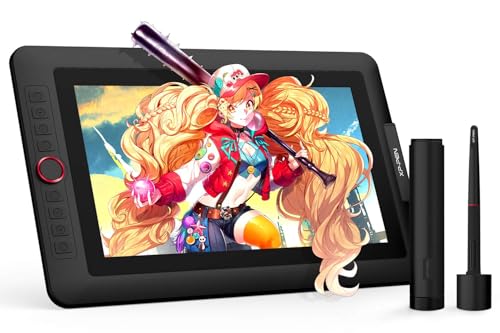
XPPen Artist 13.3 Pro V2
Best for: Compact drawing with high color accuracy
- Screen Size
- 13.3-Inch
- Tablet Type
- Tethered pen display
- Display Resolution
- FHD
- Pen Pressure
- 16384
- Color Gamut
- 88% NTSC, >=91% AdobeRGB, >=123% sRGB
- Display Finish
- Fully-laminated, anti-glare
The XP-Pen Artist 13.3 Pro V2 is a pen display with a 13.3-inch full-laminated screen. It offers 123% sRGB color coverage and 16K pressure levels. The device includes 8 customizable shortcut keys and a red dial for workflow control. It connects to computers via a 3-in-1 cable. This model suits beginners and animation creators who need a compact drawing surface with accurate color reproduction.
- 13.3-inch full-laminated display with 123% sRGB coverage
- 16K pressure levels with 60-degree tilt support
- 8 customizable shortcut keys and a red dial
- Battery-free stylus with low initial activation force
- Smaller 13.3-inch screen compared to the 21.5-inch alternative
- Heavier at 4.41 pounds than typical portable tablets
- Requires connection to a computer to operate
- You need a compact drawing tablet for limited desk space
- You prioritize high color accuracy for digital art
- You want shortcut keys for faster workflow
- You require a standalone tablet without a computer
- You need a screen larger than 13.3 inches
- You prefer a lighter device for frequent travel
Verdict: The XP-Pen Artist 13.3 Pro V2 fits artists who want precise color and a compact form factor. It is ideal for beginners and animation creators who work at a fixed desk.
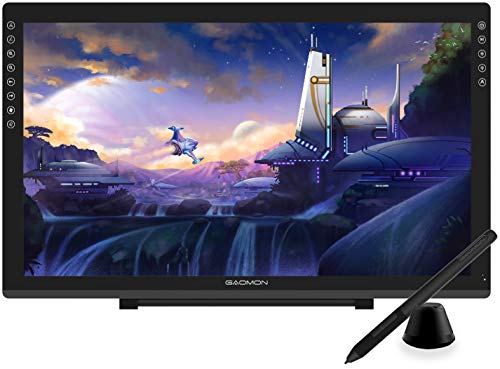
GAOMON PD2200 21.5-Inch Drawing Tablet
Best for: large canvas digital art and education
- Screen Size
- 21.5-Inch
- Tablet Type
- Tethered pen display
- Pen Pressure
- 8192 levels
- Color Gamut
- 130% sRGB, 92% NTSC
- Display Finish
- Full-laminated, anti-glare film
- Shortcut Controls
- 8 touch shortcut keys
This 21.5-inch pen display offers a large canvas for digital art and online teaching. It features a full-laminated screen with 130% sRGB color coverage and 8192 levels of pressure sensitivity. The battery-free stylus includes tilt support for natural drawing. Eight customizable touch shortcut keys sit on the side. You need a computer to use it, but it works with most major drawing software on Windows or Mac.
- 21.5-inch full-laminated screen reduces parallax
- 130% sRGB color gamut for vivid images
- 8192 pressure levels with tilt support
- Battery-free stylus for continuous use
- 8 customizable touch shortcut keys
- Heavier at 8.49 pounds compared to smaller models
- Requires connection to a laptop or computer
- 25ms response time is slower than premium displays
- You need a large 21.5-inch drawing area
- You want a full-laminated screen with high color accuracy
- You prefer a battery-free pen with tilt support
- You need a standalone tablet without a computer
- You want a portable device under 5 pounds
- You require a faster response time than 25ms
Verdict: GAOMON PD2200 21.5-Inch Pen Display fits artists who need a large, color-accurate workspace connected to a computer. It is best for stationary digital creation and online teaching.
Specifications side by side
| Spec | XPPen Artist 13.3 Pro V2 | GAOMON PD2200 21.5-Inch Drawing Tablet |
|---|---|---|
| Tablet Type | Tethered pen display | Tethered pen display |
| Screen Size | 13.3" | 21.5 inch |
| Display Resolution | FHD | – |
| Pen Pressure | 16384 | 8192 levels |
| Color Gamut | 88% NTSC, >=91% AdobeRGB, >=123% sRGB | 130% sRGB, 92% NTSC |
| Display Finish | Fully-laminated, anti-glare | Full-laminated, anti-glare film |
| Shortcut Controls | 8 shortcut keys, Red Dial | 8 touch shortcut keys |
| Operating System | Android | Windows |
| Features | Shortcut Keys | Stylus, Stylus Pen, Battery-Free Pen, Shortcut Keys, Tilt Support |
| Display | Full-Laminated | Full-Laminated |
| Color | Black / White | Black |
| Audience | Animation, Beginners | – |
| Length | 9.84 inches | – |
| Width | 15.4 inches | – |
| Weight | 4.41 pounds | 8.49 pounds |
| Dimensions | – | 20.6 × 12.4 × 0.1 inches |
| Size | 13.3 Inch | 21.5 inch |
| Model | Artist 13.3Pro | GAOMON PD2200 |
Frequently asked questions
Can I use a 13.3-inch drawing tablet for professional animation work?
Yes. The XPPen Artist 13.3 Pro V2 is ideal for animation creators. It features 16K levels of pen pressure for precise line control. Its compact 15.4 by 9.84-inch size fits well on fixed desks. The full-laminated display ensures accurate color representation for detailed digital art projects.
Is the 21.5-inch screen better for online teaching?
It is a strong option. The GAOMON PD2200 provides a large 21.5-inch workspace suitable for stationary digital creation and education. Its full-laminated screen offers clear visibility. The included tilt support allows for natural drawing angles, making it easier to demonstrate techniques to students or clients during sessions.
How much desk space does a 13.3-inch tablet take?
The XPPen Artist 13.3 Pro V2 measures 15.4 inches in width and 9.84 inches in length. It weighs 4.41 pounds. This smaller footprint saves valuable desk space compared to larger models. It is designed for users who need a compact form factor without sacrificing screen clarity.
Does the 21.5-inch tablet require a computer to work?
Yes. The GAOMON PD2200 is a pen display that requires a computer connection. It is not a standalone device. This setup ensures you can utilize the full power of your software. It is best for stationary digital creation where portability is less of a concern than screen real estate.
What is the weight difference between the two sizes?
The 13.3-inch XPPen model weighs 4.41 pounds. The 21.5-inch GAOMON model weighs 8.49 pounds. The larger tablet is nearly twice as heavy. This difference matters if you move your setup frequently. The lighter 13.3-inch option is easier to manage for users with limited desk space.
Do both tablets support tilt functionality for natural drawing?
The GAOMON PD2200 explicitly lists tilt support. This allows for more natural shading and line variation. The XPPen Artist 13.3 Pro V2 data does not mention tilt support. If this feature is critical for your workflow, the 21.5-inch model is the safer choice based on available specifications.
Which tablet is better for beginners starting digital art?
The XPPen Artist 13.3 Pro V2 is ideal for beginners. It offers a compact form factor that is less intimidating to set up. The 16K pressure levels provide responsive feedback for learning strokes. Its focus on precise color and ease of use makes it a practical starting point for new artists.
Are both screens fully laminated to reduce parallax?
Yes. Both the XPPen Artist 13.3 Pro V2 and the GAOMON PD2200 feature full-laminated displays. This technology reduces the gap between the glass and the display layer. It minimizes parallax, making your cursor appear closer to your pen tip. This results in a more accurate and intuitive drawing experience.


