15.6-Inch vs 21.5-Inch Drawing Tablets: Which Should You Buy?
Choosing between a 156 inch vs 215 inch drawing tablet depends on your workspace and workflow.

What this report covers
- Last updated
- 4 Nov 2026
Figures above are read from the product listings for the models named below. Scores are out of 10, based on listed specifications and buyer feedback.
As Amazon Associates, we earn from qualifying purchases. This means we may receive a small commission at no extra cost to you if you click through and make a purchase.
As an Amazon Associate we earn from qualifying purchases. Links on this page are affiliate links.
Choosing between a 156 inch vs 215 inch drawing tablet depends on your workspace and workflow. Both the XP-Pen Artist 15.6 Pro and the GAOMON PD2200 are pen displays that connect to computers. They share full-laminated screens and tilt support. The main difference is the display size. The 15.6-inch model offers a compact footprint, while the 21.5-inch version provides a larger canvas for detailed work.
Screen Size
15.6-Inch
21.5-Inch
Pen Pressure
16K Levels
8192 Levels
Color Accuracy
120% sRGB
130% sRGB
Shortcut Keys
8 Physical Keys + Red Dial
8 Touch Shortcut Keys
Weight
7.28 pounds
8.49 pounds
Choose the first if
- You prefer a compact device that saves desk space.
- You want higher pressure sensitivity for finer line control.
- You value a physical dial for zooming and scrolling.
Choose the second if
- You need a larger canvas for detailed illustrations.
- You prioritize wider color gamut coverage for design work.
- You prefer touch-sensitive shortcut keys over physical buttons.
Verdict
The XP-Pen Artist 15.6 Pro suits artists who value portability and precise pressure sensitivity. The GAOMON PD2200 is better for those who need a larger viewing area and broader color accuracy. Your choice depends on whether you prioritize screen real estate or compact efficiency.
Screen Size and Color Specs
Screen Size
Edge: GAOMON PD2200 21.5-Inch Drawing Tablet
The primary difference between these two devices is the display area. The GAOMON PD2200 features a 21.5-inch screen, providing a significantly larger canvas for your artwork. This extra space allows you to see more of your composition without frequent zooming or panning. In contrast, the XP-Pen Artist 15.6 Pro offers a 15.6-inch display. While smaller, this size is often easier to manage on compact desks. It reduces the need for large arm movements, which can be comfortable for long sessions. If you need maximum workspace, the larger GAOMON is the clear choice. However, the XP-Pen is more portable and fits smaller workspaces better.
Color Accuracy
Edge: GAOMON PD2200 21.5-Inch Drawing Tablet
Color reproduction is critical for digital artists, and these tablets differ in their coverage. The XP-Pen Artist 15.6 Pro boasts 120% sRGB and 88% NTSC color gamut. This wide range ensures vibrant and accurate colors for most design work. The GAOMON PD2200 specifies 130% sRGB and 92% NTSC coverage. While both exceed standard sRGB, the GAOMON offers slightly broader color gamut specifications. This means the PD2200 can display a wider variety of hues. For professionals requiring extensive color depth, the GAOMON has a slight edge. Both use full-laminated screens to reduce parallax, but the color specs favor the larger GAOMON model for precise color matching.
Pen Pressure
Edge: XP-Pen Artist 15.6 Pro Drawing Tablet
The stylus performance varies between the two devices. The XP-Pen Artist 15.6 Pro supports 16,384 levels of pressure sensitivity. This high resolution allows for very subtle variations in line weight and opacity, which is ideal for detailed sketching and painting. The GAOMON PD2200 offers 8,192 levels of pressure sensitivity. While this is sufficient for most users, it is half the resolution of the XP-Pen. For artists who require extreme precision in their strokes, the XP-Pen provides a technical advantage. Both pens are battery-free and support tilt, but the higher pressure levels on the XP-Pen offer more nuanced control.
Shortcut Keys
Edge: XP-Pen Artist 15.6 Pro Drawing Tablet
Customizable keys help streamline your workflow. The XP-Pen Artist 15.6 Pro includes eight fully customizable express keys. These physical buttons allow you to assign frequently used commands, speeding up your process. The GAOMON PD2200 features eight touch shortcut keys instead. These are integrated into the screen surface, offering a different tactile experience. Both sets of keys are customizable through their respective drivers. The choice between physical buttons and touch keys depends on your personal preference. However, the XP-Pen provides dedicated hardware controls, which some users find more reliable for quick access during intense drawing sessions.
Additional Controls
Edge: XP-Pen Artist 15.6 Pro Drawing Tablet
Extra controls can enhance your drawing experience. The XP-Pen Artist 15.6 Pro includes a dedicated Red Dial. This innovative interface allows for smooth zooming, scrolling, and other functions, fitting comfortably in your hand. It adds a layer of efficiency that touch keys or standard buttons cannot match. The GAOMON PD2200 does not list a rotary dial or similar additional control in its features. It relies solely on the eight touch shortcut keys for customization. For users who value precise navigation and efficient tool switching, the XP-Pen dial is a significant advantage. This feature is absent from the GAOMON model, making the XP-Pen more feature-rich in this category.
Choose Your Drawing Tablet
Need a compact, portable workspace
Our pick: XP-Pen Artist 15.6 Pro Drawing Tablet
The XP-Pen Artist 15.6 Pro is lighter at 7.28 pounds and thinner at 0.51 inches. Its 15.6-inch screen fits smaller desks. You get 16384 pressure levels and a programmable red dial for zooming. This setup offers high precision in a slim, manageable package for mobile artists.
Want a large canvas for detail
Our pick: GAOMON PD2200 21.5-Inch Drawing Tablet
The GAOMON PD2200 gives you a 21.5-inch display with 130% sRGB coverage. This larger area helps you view more of your composition at once. It includes 8192 pressure levels and tilt support. The extra screen real estate is ideal for complex designs and detailed digital painting workflows.
Prefer tactile shortcut controls
Our pick: XP-Pen Artist 15.6 Pro Drawing Tablet
The XP-Pen model features eight customizable express keys and a dedicated red dial. You can program the dial to zoom or scroll smoothly. This hardware layout keeps your hands on the device for faster adjustments. It supports full-laminated visuals and 178-degree viewing angles for accurate color checking.
Want a minimalist glass design
Our pick: GAOMON PD2200 21.5-Inch Drawing Tablet
The GAOMON PD2200 has a full glass front with no PVC frame on three sides. It includes eight touch shortcut keys that are customizable via driver software. The 1000:1 contrast ratio and 25ms response time enhance image clarity. This sleek design suits users who prefer a clean, modern aesthetic.
| # | Product | Best for | Price |
|---|---|---|---|
| 1 | XP-Pen Artist 15.6 Pro Drawing Tablet | artists seeking a compact, color-accurate pen display | |
| 2 | GAOMON PD2200 21.5-Inch Drawing Tablet | Large canvas digital art and design |

XP-Pen Artist 15.6 Pro Drawing Tablet
Best for: artists seeking a compact, color-accurate pen display
- Screen Size
- 15.6-Inch
- Display Resolution
- 1920×1080 FHD
- Pen Pressure
- 16384 levels
- Color Gamut
- 88% NTSC (120% sRGB)
- Display Finish
- Full-laminated
- Shortcut Controls
- 8 shortcut keys, Red Dial
The XP-Pen 15.6-Inch Artist 15.6 Pro is a pen display designed for connected workflows. It features a 15.6-inch full-laminated IPS screen with 1920×1080 resolution. The display covers 120% sRGB color space for accurate output. You get 16,384 levels of pressure sensitivity and tilt support from the battery-free stylus. Eight customizable shortcut keys and a programmable red dial help streamline your process. This unit requires a computer to operate.
- 15.6-inch full-laminated IPS display with 1920×1080 resolution
- 120% sRGB color gamut coverage for accurate colors
- 16,384 levels of pressure sensitivity with tilt support
- Eight customizable express keys for workflow efficiency
- Programmable red dial for zooming and scrolling
- 15.6-inch screen is smaller than the 21.5-inch option
- 7.28-pound weight is heavier than smaller tablet models
- Requires connection to a computer for operation
- You need a portable drawing tablet for laptop use
- You want a full-laminated screen with high color accuracy
- You prefer physical shortcut keys and a dial for control
- You require a standalone tablet without a computer
- You need a screen larger than 15.6 inches
- You prioritize a lighter device under 5 pounds
Verdict: The XP-Pen 15.6-Inch Artist 15.6 Pro suits artists who need a compact, high-color-accuracy pen display for desktop or laptop setups. It delivers precise control through its laminated screen and dedicated hardware controls.
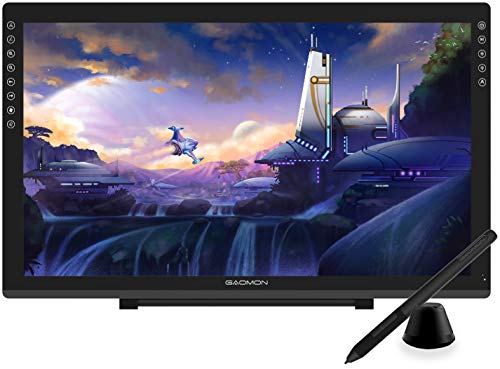
GAOMON PD2200 21.5-Inch Drawing Tablet
Best for: Large canvas digital art and design
- Screen Size
- 21.5-Inch
- Tablet Type
- Tethered pen display
- Pen Pressure
- 8192 levels
- Color Gamut
- 130% sRGB, 92% NTSC
- Display Finish
- Full-laminated, anti-glare film
- Shortcut Controls
- 8 touch shortcut keys
The GAOMON PD2200 is a 21.5-inch pen display designed for digital art and online teaching. It features a full-laminated screen with 130% sRGB color coverage and an 8192-level battery-free stylus with tilt support. The device includes eight customizable touch shortcut keys. It connects to Windows or Mac computers. This larger screen size suits users who need ample workspace for detailed drawing or annotation.
- 21.5-inch full-laminated screen reduces parallax
- 130% sRGB color gamut for vivid images
- 8192 pressure levels with tilt support
- Eight customizable touch shortcut keys
- Battery-free AP32 stylus included
- Heavier at 8.49 pounds than smaller models
- 25ms response time is slower than premium displays
- Requires connection to a computer to function
- You need a large canvas for detailed digital art
- You want customizable shortcut keys for workflow efficiency
- You require 130% sRGB color accuracy for design work
- You need a standalone tablet without a computer
- You prioritize ultra-fast response times for gaming
- You require portability with a lighter build
Verdict: GAOMON PD2200 21.5-Inch Pen Display fits artists who need a large, color-accurate workspace connected to their computer. It is ideal for those who value screen real estate and shortcut customization over portability.
Specifications side by side
| Spec | XP-Pen Artist 15.6 Pro Drawing Tablet | GAOMON PD2200 21.5-Inch Drawing Tablet |
|---|---|---|
| Tablet Type | – | Tethered pen display |
| Screen Size | 15.6" | 21.5 inch |
| Display Resolution | 1920×1080 FHD | – |
| Pen Pressure | 16384 levels | 8192 levels |
| Color Gamut | 88% NTSC (120% sRGB) | 130% sRGB, 92% NTSC |
| Display Finish | Full-laminated | Full-laminated, anti-glare film |
| Shortcut Controls | 8 shortcut keys, Red Dial | 8 touch shortcut keys |
| Operating System | – | Windows |
| Features | Stylus, Stylus Pen, Shortcut Keys, Tilt Support, Dial | Stylus, Stylus Pen, Battery-Free Pen, Shortcut Keys, Tilt Support |
| Display | Full-Laminated | Full-Laminated |
| Color | Red | Black |
| Dimensions | 17.4 × 11 × 0.51 inches | 20.6 × 12.4 × 0.1 inches |
| Weight | 7.28 pounds | 8.49 pounds |
| Size | 15.6 Inch | 21.5 inch |
| Model | Artist 15.6 Pro | GAOMON PD2200 |
Frequently asked questions
Is a 15.6-inch tablet good for professional art?
Yes, the 15.6-inch size suits artists seeking a compact, color-accurate pen display. The XP-Pen Artist 15.6 Pro delivers precise control through its laminated screen. It offers 16K pressure levels for detailed work. The dedicated dial and shortcut keys help you navigate software efficiently. This setup works well for desktop or laptop setups.
Does a 21.5-inch screen help with large designs?
A 21.5-inch screen provides a significantly larger canvas for your artwork. The GAOMON PD2200 fits artists who need more screen real estate. You can see more of your composition without zooming out. This extra space is ideal for digital art and design projects that require a broad workspace.
Which tablet is lighter and easier to move?
The XP-Pen Artist 15.6 Pro is lighter and thinner. It weighs 7.28 pounds and measures 0.51 inches thick. The GAOMON PD2200 weighs 8.49 pounds and is only 0.1 inches thick. If you need a portable workspace, the 15.6-inch model is the better choice for your desk.
Do these drawing tablets support pen tilt?
Yes, both devices support tilt functionality. The XP-Pen Artist 15.6 Pro includes tilt support for natural shading. The GAOMON PD2200 also features tilt support. This allows you to create varied line widths by tilting the stylus, mimicking traditional brush techniques.
Can I customize shortcut keys on these tablets?
Yes, both tablets offer customizable shortcut keys. The XP-Pen Artist 15.6 Pro includes a programmable red dial for zooming. The GAOMON PD2200 allows you to customize shortcuts for better workflow. These controls help you access tools quickly without using your mouse.
Are the screens fully laminated on both models?
Yes, both the XP-Pen Artist 15.6 Pro and the GAOMON PD2200 feature full-laminated displays. This technology reduces the gap between the glass and the display layer. It creates a more natural drawing experience with less parallax error. You get precise control whether you choose the smaller or larger model.
Is the pen battery-free on both tablets?
The GAOMON PD2200 uses a battery-free pen for hassle-free drawing. The XP-Pen Artist 15.6 Pro includes a stylus pen as well. Both devices provide reliable input for digital art. You do not need to charge the pen for the GAOMON model.


