7-Inch or 10.3-Inch E-Readers? Compared by Specs
This 7-Inch vs 103 inch e reader guide compares two distinct devices for your reading and writing needs.

What this report covers
- Last updated
- 4 Nov 2026
Figures above are read from the product listings for the models named below. Scores are out of 10, based on listed specifications and buyer feedback.
As Amazon Associates, we earn from qualifying purchases. This means we may receive a small commission at no extra cost to you if you click through and make a purchase.
As an Amazon Associate we earn from qualifying purchases. Links on this page are affiliate links.
This 7-Inch vs 103 inch e reader guide compares two distinct devices for your reading and writing needs. Both products use E Ink technology to provide a glare-free screen that mimics real paper, reducing eye strain during long sessions. The main difference lies in their intended use. One device focuses on portable reading with a compact form factor. The other offers a larger canvas designed for note-taking and document annotation with a stylus. You can choose based on whether you prioritize portability or workspace.
Screen Size
7-Inch
10.3-Inch
Storage
16GB
not listed
Use
Reading
Note-Taking
Features
Glare-Free
Stylus, Stylus Pen
Color
Black
Gray
Choose the first if
- You want a compact device for portable reading
- You need ample storage for a large library
- You prefer a lighter, thinner form factor
Choose the second if
- You need a larger screen for detailed documents
- You want to take handwritten notes with a stylus
- You prefer physical shortcut keys for navigation
Verdict
Choose the 7-inch model if your primary goal is reading books and you value portability and battery life. Pick the 10.3-inch tablet if you need a digital notebook for annotating PDFs, sketching, or taking meeting notes with a pen. The choice depends on whether you are primarily a reader or a note-taker.
7-Inch vs 10.3-Inch E-Reader Specs
Screen Size
Edge: Tie
The Amazon Kindle Paperwhite features a 7-inch glare-free display designed for portability and comfortable one-handed reading. Its compact form factor makes it easy to carry during travel or while commuting. In contrast, the Penstar eNote offers a larger 10.3-inch screen. This expanded canvas provides more space for reading documents and taking notes. The bigger display is better for viewing detailed PDFs or splitting screens. You should choose the 7-inch model if you prioritize a lightweight, pocketable device. The 10.3-inch option is superior if you need extra real estate for complex layouts or extensive note-taking sessions.
Storage
Edge: Amazon Kindle Paperwhite 7-Inch 16GB
The Amazon Kindle Paperwhite comes with 16GB of internal storage. This capacity allows you to hold a substantial library of e-books, including thousands of titles. It is sufficient for most casual readers who download books from the Kindle Store. The Penstar eNote does not list specific storage capacity in its provided specifications. Because this data is missing, we cannot directly compare the amount of space available for documents and notes. You should check the manufacturer's details for the Penstar model to understand its limits. The Kindle offers a clear, known quantity for your library size.
Use
Edge: Tie
The Amazon Kindle Paperwhite is built primarily for reading. It focuses on delivering an immersive book experience without distractions like social media or notifications. It is ideal for escaping into novels and long-form content. The Penstar eNote is designed for note-taking and writing. It supports stylus input and is marketed as a digital notebook for business meetings, academic conferences, and brainstorming. If your main goal is to annotate PDFs, sketch ideas, or take handwritten notes, the Penstar is the better tool. For pure reading, the Kindle is the dedicated choice.
Features
Edge: Tie
The Amazon Kindle Paperwhite includes physical and software features tailored for readers. It offers adjustable lighting from white to amber for reading in any light. It is also waterproof, allowing you to read by the pool or in the bath. The Penstar eNote focuses on productivity features. It includes nine reprogrammable physical shortcut keys for fast navigation. It also supports AI-powered voice-to-text conversion in 52 languages. The Penstar device lacks the waterproofing and ambient light adjustment found in the Kindle, but offers tools for active work and documentation.
Connectivity
Edge: Penstar 10.3" eNote Pen-Only Paper Tablet
The Amazon Kindle Paperwhite uses USB-C for charging, as noted in its battery life description. It connects to the Kindle Store for downloading books. The specific wireless connectivity options are not detailed in the provided data. The Penstar eNote offers robust connectivity for file management. It supports syncing via Google Drive, OneDrive, and Dropbox. It also allows sharing notes via email or direct PDF files. You can sync notes using the Penstar app on other devices. This makes the Penstar better for users who need to move documents between computers and tablets efficiently.
Which e-reader fits your needs?
Travelers wanting long battery life
Our pick: Amazon Kindle Paperwhite 7-Inch 16GB
The Amazon Kindle Paperwhite lasts up to 12 weeks on a single charge. Its 7-inch glare-free screen fits in one hand. You can read in bright sunlight or dark rooms by adjusting the display. It is waterproof for poolside use. This model offers weeks of battery life for your longest novel without frequent charging.
Professionals needing large note-taking space
Our pick: Penstar 10.3" eNote Pen-Only Paper Tablet
The Penstar eNote features a 10.3-inch screen ideal for detailed documents. It supports stylus input with 8192 levels of pressure sensitivity for natural handwriting. You can annotate PDFs and EPUBs directly. The device includes physical shortcut keys for faster navigation. It syncs files via cloud services or works fully offline for private workflows.
Users requiring voice-to-text conversion
Our pick: Penstar 10.3" eNote Pen-Only Paper Tablet
This device converts speech to text in real time across 52 languages. It uses AI to generate structured meeting summaries automatically. This feature supports business meetings and academic conferences. The 10.3-inch display provides ample room for reviewing these generated notes alongside your original handwritten input or imported documents.
Readers preferring compact portable devices
Our pick: Amazon Kindle Paperwhite 7-Inch 16GB
The 7-inch Paperwhite has an ultra-thin design for easy travel. Its compact size makes it comfortable for long reading sessions in various positions. You access millions of titles instantly. The device excludes social media distractions. Its smaller footprint ensures it remains lightweight and easy to carry compared to larger tablets.
| # | Product | Best for | Price |
|---|---|---|---|
| 1 | Amazon Kindle Paperwhite 7-Inch 16GB | portable, distraction-free reading | |
| 2 | Penstar 10.3" eNote Pen-Only Paper Tablet | detailed note-taking and document annotation |
Amazon Kindle Paperwhite 7-Inch 16GB
Best for: portable, distraction-free reading
- Screen Size
- 7-Inch
- Storage Capacity
- 16GB
- Display Type
- Paperwhite
- Battery Life
- Up to 12 weeks
- Water Resistance
- Waterproof
- Features
- Glare-Free
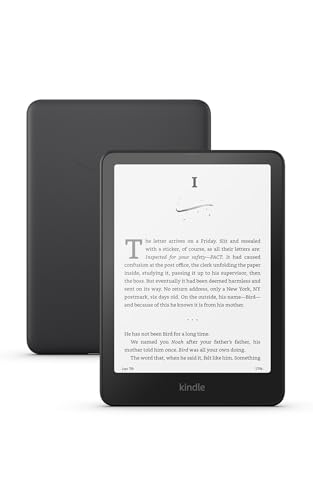
The Amazon Kindle Paperwhite is a 7-inch e-reader with 16GB of storage. It features a glare-free display that adjusts from white to amber for comfortable reading in any light. The device is waterproof and offers up to 12 weeks of battery life on a single USB-C charge. It is designed for distraction-free reading without social media or notifications. This model suits readers who want a compact, portable device with long battery endurance.
- 7-inch glare-free display with higher contrast ratio
- 25% faster page turns compared to previous models
- Up to 12 weeks of battery life on one charge
- Waterproof design for reading by the pool or bath
- 16GB of storage for thousands of books
- 7-inch screen is smaller than the 10.3-inch alternative
- 16GB storage capacity is lower than larger tablets
- Single color option of Black is available in this configuration
- You prefer a compact 7-inch screen for one-handed reading
- You want a waterproof device for bath or poolside use
- You need a single charge to last up to 12 weeks
- You need a larger 10.3-inch display for documents
- You require more than 16GB of local storage
- You want a device with note-taking pen support
Verdict: Amazon Kindle Paperwhite 7-Inch 16GB is a compact, waterproof e-reader with a 7-inch glare-free screen and 12-week battery life. It fits readers who prioritize portability and long battery life over large screens or stylus input.

Penstar 10.3" eNote Pen-Only Paper Tablet
Best for: detailed note-taking and document annotation
- Screen Size
- 10.3-Inch
- Pixel Density
- 300 PPI
- Use
- Note-Taking
- Features
- Stylus, Stylus Pen
- Display
- E Ink
- Color
- Gray
This Penstar tablet features a 10.3-inch E Ink display with 300 PPI resolution. It is designed primarily for note-taking using a stylus with 8192 pressure levels. The device includes 9 physical shortcut keys and supports over 30 document formats. It syncs with cloud services but also works fully offline. You should choose this if you need a large screen for detailed annotations or business meetings.
- 10.3-inch E Ink display with 300 PPI clarity
- Stylus with 8192 levels of pressure sensitivity
- 9 reprogrammable physical shortcut keys
- Supports over 30 document types including PDF and EPUB
- 10.3-inch screen is larger than the 7-inch options on this list
- Pen-only display lacks touch input functionality
- 0.22-inch thickness adds bulk compared to thinner tablets
- You need a large screen for detailed document annotation
- You prefer physical shortcut keys for faster navigation
- You require offline functionality for private workflows
- You want a compact 7-inch device for one-handed use
- You need a touchscreen for browsing or gaming
- You require a lightweight tablet for travel
Verdict: Penstar 10.3-Inch E-Ink Note Tablet suits professionals who need a large writing surface and physical controls for detailed note-taking.
Specifications side by side
| Spec | Amazon Kindle Paperwhite 7-Inch 16GB | Penstar 10.3" eNote Pen-Only Paper Tablet |
|---|---|---|
| Screen Size | 7" | 10.3" |
| Storage Capacity | 16GB | – |
| Display Type | Paperwhite | – |
| Pixel Density | – | 300 PPI |
| Battery Life | Up to 12 weeks | – |
| Water Resistance | Waterproof | – |
| Storage | 16GB | – |
| Use | – | Note-Taking |
| Features | Glare-Free | Stylus, Stylus Pen |
| Display | – | E Ink |
| Color | Black | Gray |
| Dimensions | – | 8.9 × 7.8 × 0.22 inches |
| Size | – | 10.3 inches |
Frequently asked questions
Which e-reader is better for one-handed reading?
The 7-inch model is superior for single-hand use. The Amazon Kindle Paperwhite features a compact 7-inch display that fits comfortably in one palm. Its small footprint allows you to hold it easily while commuting or relaxing. The larger 10.3-inch device requires two hands for stable handling due to its wider screen dimensions.
Can I use a stylus for note-taking on these devices?
Only the 10.3-inch Penstar eNote supports stylus input. It includes a dedicated stylus pen for detailed writing and document annotation. The 7-inch Amazon Kindle Paperwhite does not list stylus support in its specifications. It is designed primarily for reading rather than writing or drawing tasks.
How long does the battery last on a 7-inch e-reader?
The Amazon Kindle Paperwhite offers up to 12 weeks of battery life on a single charge. This duration applies to typical reading usage. The larger 10.3-inch Penstar tablet does not specify its battery duration in the provided data. You can rely on the 7-inch model for extended trips without frequent charging.
Is the screen glare-free on both models?
Yes, both devices provide glare-free displays. The Amazon Kindle Paperwhite explicitly lists a glare-free feature for its 7-inch screen. The Penstar 10.3-inch model uses E Ink technology, which naturally reduces glare. This ensures comfortable reading in bright sunlight or under direct indoor lighting for both options.
Which device has more internal storage?
The Amazon Kindle Paperwhite includes 16GB of storage. This capacity holds a substantial library of books. The Penstar 10.3-inch eNote does not list its storage capacity in the available specifications. You cannot compare storage amounts directly, but the 7-inch model guarantees 16GB for your documents.
What is the physical size difference between the two?
The Penstar 10.3-inch tablet measures 8.9 inches in length and 7.8 inches in width. The Amazon Kindle Paperwhite has a 7-inch screen, making it significantly smaller. The 7-inch model is designed for portability, while the larger Penstar offers a wider surface area for writing and viewing documents.