Amazon Kindle Scribe Colorsoft 11″ Review: Who It Fits and Who Should Skip It
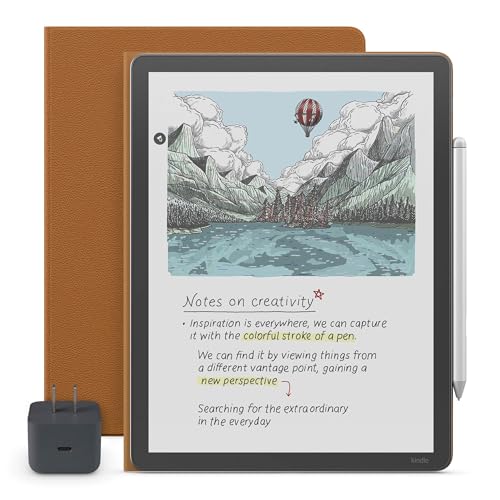
This amazon kindle scribe colorsoft 11 review covers the Essentials Bundle, which pairs the tablet with a Premium Pen and leather folio.
What this report covers
- Last updated
- 4 Nov 2026
Figures above are read from the product listings for the models named below. Scores are out of 10, based on listed specifications and buyer feedback.
As Amazon Associates, we earn from qualifying purchases. This means we may receive a small commission at no extra cost to you if you click through and make a purchase.
As an Amazon Associate we earn from qualifying purchases. Links on this page are affiliate links.
This amazon kindle scribe colorsoft 11 review covers the Essentials Bundle, which pairs the tablet with a Premium Pen and leather folio. The device centers on an 11-inch Colorsoft display and 32GB of internal storage. The oxide-based screen offers high-contrast, paper-like color without distracting flashes. A textured surface supports ultra-fast responsiveness for natural writing. You also get AI tools for summarizing notes and converting handwriting to text. This bundle provides a complete setup for reading and annotating documents from cloud services like Google Drive.
- 11-inch Colorsoft display with front light
- 32GB internal storage capacity
- Textured surface with ultra-fast responsiveness
- Built-in notebook with AI summarization tools
- Premium Pen requires no charging
Good fit for
This device suits readers and students who need a large canvas for annotating PDFs and textbooks. The 32GB storage holds ample documents and notebooks. The AI features help you search and summarize your notes quickly. If you rely on cloud services like OneDrive or Google Drive, you can import and export files seamlessly. The included folio and pen make it a ready-to-use package for journaling or study sessions.
Who can skip it
You should look elsewhere if you need high-performance app gaming or video editing. The Kindle Scribe is an e-reader and note-taking device, not a general-purpose tablet. It lacks the processing power for heavy multitasking. If you require a wide variety of third-party apps, this ecosystem is limited to reading and writing tools. The focus is strictly on document markup and note-taking.
Verdict
The Amazon Kindle Scribe Colorsoft 11 is a focused tool for reading and writing. It delivers a premium experience for document annotation and note-taking.
Key specs explained for Scribe
11" Colorsoft display
This screen size gives you ample space for reading documents and writing notes side by side. The Colorsoft technology uses an oxide-based panel to deliver high-contrast, paper-like color. This reduces eye strain during long sessions and minimizes distracting flashes while you write. It is ideal if you need a large canvas for detailed work or want a comfortable reading experience that mimics physical paper.
32GB storage
This capacity holds your library of e-books, downloaded documents, and handwritten notebooks. You can store thousands of titles and extensive note collections without needing external drives. If you primarily read and take notes locally, this is sufficient. Compare this with larger models if you plan to cache many high-resolution PDFs or offline videos for travel.
Premium Pen
This stylus is included in the bundle and requires no charging. It connects directly to the device for immediate use. The textured screen surface works with this pen to provide a natural writing feel. You benefit from a ready-to-use tool for annotating documents or sketching ideas. This simplifies setup compared to devices requiring separate, charged accessories.
Graphite color
This finish refers to the dark, neutral exterior of the device. It offers a professional appearance suitable for office or study environments. The Graphite option is one of the available styles, alongside Fig and Caramel. Choose this if you prefer a subdued look that blends with standard tech accessories or leather folios without drawing excessive attention.
Design and Build Quality
According to the listing, the Amazon Kindle Scribe Colorsoft 11 features a thin, light, and fast design. The device is available in Graphite and Fig colors, with the bundle shown here in Graphite. The tablet’s paper-inspired form factor is intended to feel comfortable in your hands. This ergonomic approach supports extended reading and writing sessions without causing fatigue. The large 11-inch display provides ample space for your notes and documents, allowing you to work without feeling cramped.
The bundle includes an Elegant Notebook Style Folio in premium leather. This book-style design allows you to seamlessly switch between reading and writing modes. The folio lays flat, which facilitates easier note-taking on a stable surface. A magnetic flap secures the included Premium Pen, keeping it within easy reach while protecting the stylus from damage. This layout ensures that your tools are organized and accessible during your workflow.
The device’s textured surface mimics the feel of paper, enhancing the natural writing experience. This finish helps reduce slippage and provides tactile feedback as you write. The Premium Pen requires no charging, which simplifies daily use by removing the need to manage battery levels for your primary input tool. The overall build focuses on practicality and durability, supporting your productivity whether you are at home or on the go.
Setup And Daily Use Guide
Setup begins with unboxing the Essentials Bundle, which includes the Kindle Scribe Colorsoft, Premium Pen, leather folio, and 20W power adapter. The device arrives with 32GB of internal storage. You connect the tablet to power using the included adapter. The setup process integrates the device with Amazon’s ecosystem. You can sign in to access your library and cloud services. The built-in notebook feature is ready for immediate use. You can import documents directly from Google Drive and Microsoft OneDrive. This allows you to mark up files without leaving the device. The folio cover has a magnetic flap for secure stylus storage. It also allows the device to lay flat for note-taking. Daily use centers on the 11-inch Colorsoft display. The oxide-based panel provides high-contrast, paper-like color. The textured surface offers ultra-fast responsiveness for writing. The Premium Pen requires no charging, so it is always ready. You can search your notes or ask questions using AI tools. The system can summarize notes and convert handwriting to text. You can also export notebooks to Microsoft OneNote. The large screen gives you space to read and write simultaneously. The thin, light design makes it comfortable to hold. The graphite finish is sleek and professional. The device supports popular cloud services for seamless file management. This setup supports a workflow focused on reading and annotating documents. It suits users who need a dedicated tool for note-taking and document review.
Before you buy Scribe Colorsoft
The Essentials Bundle includes a Premium Pen and leather folio, so you do not need to purchase these separately. However, you should verify that your cloud services, such as Google Drive or Microsoft OneDrive, are compatible with direct import. The device supports exporting notebooks to Microsoft OneNote, which may require a separate subscription. Since the screen is 11 inches, ensure you have adequate desk space for note-taking. The textured surface requires gentle cleaning; avoid harsh chemicals. This model sits alongside other e-readers by offering color and AI tools. If you only read text, a standard Kindle may suffice. If you need heavy video editing, this tablet is not suitable. Check if your current stylus workflow integrates with the built-in notebook features. The 32GB storage handles most documents, but large libraries may fill it quickly. Consider your daily reading habits and whether the color display adds value to your workflow.
Check before you buy
- Verify cloud service compatibility for document import
- Ensure desk space fits the 11-inch display
- Check if OneNote subscription is needed for export
- Confirm 32GB storage meets your document needs
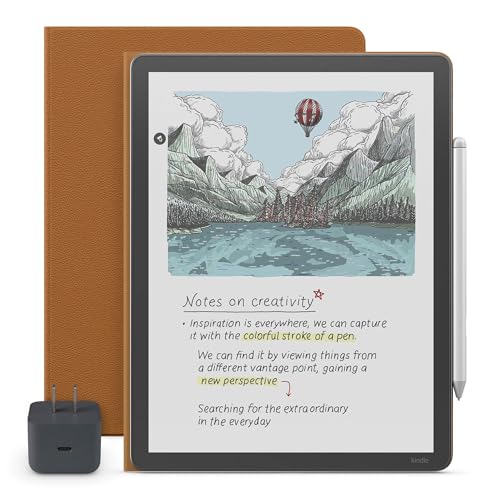
Amazon Kindle Scribe Colorsoft 11" Bundle
Best for: annotating color documents with AI tools
- Screen Size
- 11"
- Internal Storage
- 32GB
- Display Type
- Colorsoft
- Features
- Stylus, Stylus Pen
- Color
- Graphite
The Amazon Kindle Scribe Colorsoft 11 features an 11-inch Colorsoft display with front light and 32GB of storage. It offers a textured surface for natural writing and includes AI tools for note management. This device suits readers who want color annotations and seamless document import from cloud services like Google Drive and OneDrive.
- 11-inch Colorsoft display with front light
- 32GB internal storage
- Textured surface for natural writing
- Built-in AI tools for note summarization
- Premium Pen requires no charging
- 32GB storage limits large document libraries
- 11-inch screen size may feel bulky for one-handed reading
- You need color annotations for documents
- You want AI-powered note organization
- You prefer a textured writing surface
- You require more than 32GB of local storage
- You prioritize a lightweight device for travel
- You do not need color display capabilities
Verdict: Amazon Kindle Scribe Colorsoft 11 fits professionals who annotate color documents and value AI note tools. It is less ideal for those needing extensive local storage or minimal weight.
Specifications side by side
| Spec | Amazon Kindle Scribe Colorsoft 11" Bundle |
|---|---|
| Screen Size | 11" |
| Internal Storage | 32GB |
| Display Type | Colorsoft |
| Storage | 32GB |
| Features | Stylus, Stylus Pen |
| Color | Graphite |
Frequently asked questions
Who is the best audience for this tablet?
This device fits professionals who annotate color documents and value AI note tools. It is less ideal for those needing extensive local storage or minimal weight. The 32GB capacity supports basic workflows, but heavy users may find the space limiting. The included Premium Pen aids precise writing.
Does it support color annotation?
Yes, the 11-inch Colorsoft display supports color annotation. The oxide-based screen delivers high-contrast, paper-like color. This allows you to mark up documents with color precision. The technology minimizes eye strain during long sessions while maintaining readability for colored text and images.
What storage capacity does it have?
The Essentials Bundle includes 32GB of internal storage. This amount supports the operating system and essential apps. You should verify if this space suffices for your document library. Heavy users needing extensive local storage might find this capacity less ideal for their workflow.
Is the pen included in the bundle?
Yes, the Essentials Bundle includes the Premium Pen. You do not need to purchase it separately. The device pairs with this stylus for writing and annotating. The bundle also includes a leather folio, providing a complete setup for immediate use upon unboxing.
What color options are available?
The listing shows the device in Graphite. The tablet is also available in Fig. The bundle shown here features the Graphite color. You can choose the finish that best suits your aesthetic preferences while maintaining the same technical specifications and display quality.
How does the display reduce eye strain?
The Colorsoft technology uses an oxide-based panel. It offers high-contrast, paper-like color without distracting flashes. This design reduces eye strain during long reading and writing sessions. The screen minimizes glare and provides a comfortable viewing experience for extended periods of document annotation.
Can I import files from cloud services?
You should verify compatibility with your cloud services, such as Google Drive or Microsoft OneDrive. The device supports direct import for many formats. Ensure your workflow integrates smoothly before relying on it for daily document management. The setup process helps configure these connections.


