Looking Beyond the Amazon Like-New Amazon Kindle Scribe? 6 Alternatives Worth a Look
The Amazon Like-New Amazon Kindle Scribe 64GB offers a large 10.2-inch glare-free display and built-in AI tools for note conversion.

What this report covers
- Last updated
- 4 Nov 2026
Figures above are read from the product listings for the models named below. Scores are out of 10, based on listed specifications and buyer feedback.
As Amazon Associates, we earn from qualifying purchases. This means we may receive a small commission at no extra cost to you if you click through and make a purchase.
As an Amazon Associate we earn from qualifying purchases. Links on this page are affiliate links.
The Amazon Like-New Amazon Kindle Scribe 64GB offers a large 10.2-inch glare-free display and built-in AI tools for note conversion. Its premium pen feels like pen on paper, and the device supports active canvas for expanding margins while reading. You get months of battery life for reading and weeks for writing on a single charge. These specs make it a strong choice for document markup and distraction-free writing.
However, you might want different amazon like new amazon kindle scribe alternatives if you need color screens, smaller sizes, or physical keyboards. The list includes 6 options with overlapping specs like stylus support and e-ink displays. Some models offer 4G connectivity or Android operating systems for app flexibility. Others provide compact 7-inch form factors for portable note-taking. Each alternative addresses specific needs that the original does not cover, such as voice transcription or multilingual meeting sync. You can compare storage, weight, and screen sizes to find the best fit for your workflow.
How each alternative compares
Bigme 7-Inch Color ePaper Tablet with 4G
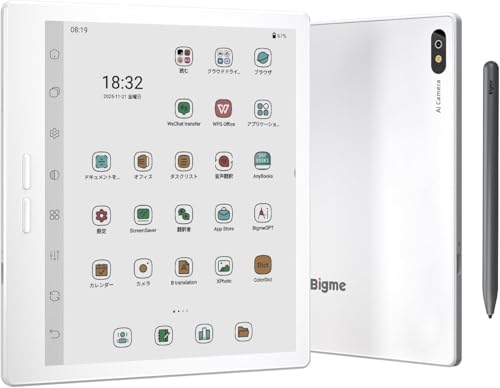
The Bigme B7 Pro shifts from a large monochrome screen to a compact 7-inch color display. You gain 256GB of storage and full Android flexibility, allowing you to install various apps beyond a closed ecosystem. It is significantly lighter at 6.17 ounces, making it easier to hold for long periods. However, you lose the 10.2-inch canvas space needed for detailed document markup. The built-in 4G connectivity adds independence from Wi-Fi, which the Scribe lacks. This device suits readers who prioritize color content and portability over a distraction-free, large-screen writing environment.
Bigme 7-Inch Color eReader with Stylus
The Bigme B751C-S offers a 7-inch color E Ink screen in a smaller form factor than the 10.2-inch Scribe. It runs Android, giving you access to a wider range of apps and audiobook support. The 64GB storage matches the Scribe, but the device is much lighter at 6.17 ounces. You sacrifice screen real estate and the specialized distraction-free writing experience of the Scribe. This alternative is ideal for users who want color comics or graphic novels and prefer a handheld device. It fits those who need Android app flexibility rather than a dedicated, single-purpose writing tool with AI note conversion.
Amazon Kindle Scribe 10.2" 16GB
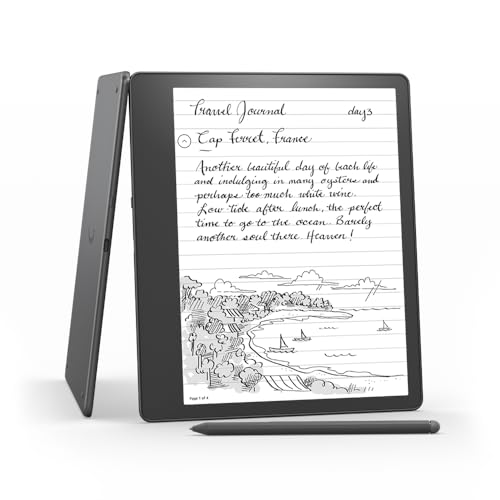
The Kindle Scribe 16GB keeps the same 10.2-inch glare-free display and premium pen experience as the 64GB model. You get identical writing performance and AI tools for note conversion. The main difference is the reduced 16GB storage capacity. This device is lighter and more affordable, though price details are not included here. It suits readers who annotate fewer documents and prioritize battery life and screen quality over ample storage. If you mainly read books and take brief notes, the smaller storage is sufficient. You give up space for large PDFs but keep the core writing and reading experience intact.
Penstar 10.3" eNote Pen-Only Paper Tablet
The Penstar 10.3-Inch tablet offers a slightly larger E Ink display than the Scribe’s 10.2-inch screen. It focuses on focused note-taking and includes voice transcription features. The device lacks the specific AI note conversion tools found in the Scribe. You get a physical shortcut experience, which may appeal to professionals who prefer hardware controls. The screen size is comparable, allowing for similar document annotation. However, it does not offer the same integrated ecosystem or active canvas margin expansion. This option fits users who value voice input and physical buttons over the Scribe’s AI-driven note management and seamless Kindle integration.
Musnap Ocean 7" 64GB E-Reader
The Musnap Ocean 7-Inch is a mid-sized Android e-reader with 64GB of storage. It is significantly smaller and lighter than the 10.2-inch Scribe, weighing less and fitting easily in one hand. You gain Android flexibility and access to various apps. The device does not include the stylus pen, which you must buy separately. You lose the large canvas space and the specialized distraction-free writing environment of the Scribe. This alternative suits readers who want a balance between screen size and portability. It is a good choice if you prioritize app flexibility and handheld comfort over a dedicated, large-screen writing tool with built-in AI features.
Iflytek AINOTE 2 10.65" Tablet with Keyboard
The Iflytek AINOTE 2 includes a physical keyboard, which the Scribe does not have. This device is designed for users who need typing speed alongside handwriting. It supports cross-device note syncing and multilingual meeting notes. The screen size is comparable to the Scribe, offering ample space for writing. You lose the seamless Kindle integration and the specific AI note conversion tools. The keyboard adds bulk and changes the writing experience. This alternative fits professionals who attend meetings and need to type notes quickly. It is a specialized tool for those who value physical input methods and syncing capabilities over a dedicated, distraction-free reading and writing environment.
| # | Product | Best for | Price |
|---|---|---|---|
| 1 | Kindle Scribe 64GB Refurbished Best overall | document markup and distraction-free writing | |
| 2 | Bigme 7-Inch Color ePaper Tablet with 4G Best premium | portable color reading and note-taking | |
| 3 | Bigme 7-Inch Color eReader with Stylus Best budget | color comics and Android apps | |
| 4 | Amazon Kindle Scribe 10.2" 16GB Best 16gb | annotating books and PDFs | |
| 5 | Penstar 10.3" eNote Pen-Only Paper Tablet Best 10.3-inch | Focused note-taking and voice transcription | |
| 6 | Musnap Ocean 7" 64GB E-Reader Also great | portable Android e-reading and note-taking | |
| 7 | Iflytek AINOTE 2 10.65" Tablet with Keyboard Best keyboard | Note-takers who need a physical keyboard |

Kindle Scribe 64GB Refurbished
Best for: document markup and distraction-free writing
- Screen Size
- 10.2"
- Storage Capacity
- 64GB
- Stylus Support
- Premium Pen included
- Pixel Density
- 300 ppi
- Battery Life
- Months reading, weeks writing
- Use
- Note-Taking
The Kindle Scribe 64GB is a 10.2-inch E Ink tablet built for writing and reading. It features a 300 ppi glare-free display and includes the Premium Pen for natural note-taking. With 64 GB of storage, you can keep many documents and books on hand. The device offers weeks of battery life and built-in AI tools to organize your thoughts. It is ideal for users who want a dedicated, distraction-free writing environment.
- 10.2-inch 300 ppi glare-free front-lit display
- 64 GB internal storage capacity
- Includes Premium Pen with no charging needed
- Built-in AI tools to summarize or convert handwriting
- Active Canvas expands margins for note-taking while reading
- 10.2-inch screen is smaller than the 10.3-inch and 10.65-inch displays found on other options
- 64 GB storage is less than the 64GB+4GB configuration available on the Musnap Ocean
- 15.3-ounce weight is heavier than the 7-inch competitors like the Bigme B7 Pro
- You need a large, high-resolution screen for detailed document markup
- You want built-in AI features to summarize or reformat your notes
- You prefer a device with no notifications or social media distractions
- You require a color E Ink display for graphics or comics
- You want a compact 7-inch tablet for maximum portability
- You need an Android operating system for third-party app installation
Verdict: Amazon Kindle Scribe 64GB delivers a premium writing experience with its 300 ppi display and AI tools. It fits readers and writers who value a distraction-free environment and ample storage for documents.
Bigme 7-Inch Color ePaper Tablet with 4G
Best for: portable color reading and note-taking
- Screen Size
- 7"
- Storage Capacity
- 256GB
- Display Type
- E Ink Kaleido 3
- Stylus Support
- Included
- Pixel Density
- 300 ppi
- Operating System
- Android
The Bigme B7 Pro is a 7-inch color E Ink tablet running Android 14. It features a 300 PPI Kaleido 3 display, an octa-core processor, and 256 GB of internal storage. The device supports 4G connectivity and includes a wireless charging stylus for borderless handwriting. With 8 GB of RAM and a 5-megapixel rear camera, it functions as both an e-reader and a versatile Android tablet for note-taking and media consumption.
- 7-inch 300 PPI color Kaleido 3 display with adjustable front light
- 256 GB internal storage expandable via microSD card
- Android 14 operating system with 4G connectivity
- Wireless charging stylus supporting borderless handwriting
- Octa-core processor with 8 GB RAM for smooth performance
- 7-inch screen is smaller than the 10.2-inch and 10.65-inch displays found in other list options
- 6.17-ounce weight is heavier than typical 7-inch e-readers in this category
- 5-megapixel rear camera resolution is lower than standard smartphone cameras
- You need a compact, portable device for reading and annotating documents on the go
- You want color E Ink technology in a lightweight, pocketable form factor
- You require 4G connectivity for staying connected without Wi-Fi
- You prefer a larger screen for detailed document editing or split-screen multitasking
- You are looking for a device with a high-resolution camera for photography
- You want a simpler, dedicated e-reader without the complexity of a full Android OS
Verdict: Bigme B7 Pro 7-Inch Color E-Ink Tablet is a compact, color-capable Android tablet that suits readers who prioritize portability and 4G connectivity. It fits users who need a lightweight device for on-the-go note-taking and color document viewing.

Bigme 7-Inch Color eReader with Stylus
Best for: color comics and Android apps
- Screen Size
- 7 Inch
- Storage Capacity
- 64GB
- Display Type
- Kaleido 3
- Stylus Support
- included
- Pixel Density
- 300PPI
- Battery Life
- few weeks
The Bigme B751C-S is a 7-inch Android e-reader with a color E Ink display. It features 64GB of storage and 4GB of RAM, supporting third-party apps and stylus input. The device includes a wireless charging stylus and a protective case. Its color screen and full Android OS set it apart from standard black-and-white e-readers, making it suitable for comics and color documents.
- 7-inch color E Ink Kaleido 3 display
- Android 14 operating system for third-party apps
- 64GB internal storage with 4GB RAM
- Includes wireless charging stylus and protective case
- 7-inch screen is smaller than the 10.2-inch and 10.65-inch options on this list
- 64GB storage capacity is lower than the 64GB+ options or larger capacities found in other entries
- Weight of 6.17 ounces is heavier than the 7-inch Musnap Ocean (4.9 oz) listed here
- You want a color E Ink display for comics or charts
- You need full Android access for third-party apps
- You prefer a compact 7-inch form factor
- You require a larger screen for detailed document work
- You prefer a black-and-white display for maximum battery life
- You want a lighter device under 5 ounces
Verdict: Bigme B751C-S 7-Inch Color E-Reader is a compact color tablet for readers who want Android flexibility and a stylus. It fits users who prioritize portability and color content over screen size.
Amazon Kindle Scribe 10.2" 16GB
Best for: annotating books and PDFs
- Screen Size
- 10.2"
- Storage Capacity
- 16 GB
- Display Type
- Paperwhite
- Stylus Support
- includes Premium Pen
- Pixel Density
- 300 ppi
- Battery Life
- months of reading, weeks of writing
This refurbished 16 GB Kindle Scribe combines a 10.2-inch 300 ppi display with note-taking tools. It features Active Canvas for writing in books and AI notebook tools for organizing thoughts. The 10.3-inch class screen offers a glare-free, front-lit experience. It weighs 15.3 ounces and measures 9.04 by 7.73 inches. This device suits readers who want to annotate documents and keep digital journals without carrying multiple devices.
- 10.2-inch 300 ppi glare-free display
- Active Canvas allows writing directly in books
- Built-in AI notebook tools for summarizing notes
- Months of battery life for reading
- 16 GB storage is smaller than the 64 GB option
- 15.3 ounces is heavier than 7-inch e-readers
- 10.2-inch screen is smaller than 10.3-inch tablets
- You want to annotate PDFs and books directly
- You prefer a single device for reading and writing
- You value long battery life over constant charging
- You need large storage for many documents
- You prefer a lighter, pocket-sized device
- You want a color display for media
Verdict: Like-New Kindle Scribe 16GB fits readers who need a dedicated tool for annotating texts and managing notes with AI assistance. It is ideal for those who prioritize battery life and a high-resolution black-and-white screen over high storage capacity.

Penstar 10.3" eNote Pen-Only Paper Tablet
Best for: Focused note-taking and voice transcription
- Screen Size
- 10.3"
- Pixel Density
- 300 PPI
- Use
- Note-Taking
- Features
- Stylus, Stylus Pen
- Display
- E Ink
- Color
- Gray
The Penstar eNote Paper Tablet offers a 10.3-inch E Ink display with 300 PPI resolution. It supports handwriting with an 8192-level pressure sensitive stylus. You get 9 physical shortcut keys for navigation and AI voice-to-text for 52 languages. The device handles over 30 document types and syncs via cloud services. It is designed for note-taking and focused writing tasks.
- 10.3-inch E Ink display with 300 PPI clarity
- Stylus with 8192 levels of pressure sensitivity
- 9 reprogrammable physical shortcut keys
- AI voice-to-text supporting 52 languages
- Compatible with over 30 document formats
- 10.3-inch screen is smaller than the 10.65-inch iflytek AINOTE 2
- No color display compared to Bigme B7 Pro and B751C-S
- 7-inch screens on other list items offer more portability
- You prefer physical keys over touch navigation
- You need AI voice-to-text for meetings
- You want a pen-only writing experience
- You require a color E Ink display
- You prefer a 7-inch portable form factor
- You need a larger 10.65-inch screen
Verdict: Penstar 10.3-Inch E Ink Tablet suits professionals who value physical shortcuts and voice transcription. It fits users prioritizing focused writing over multimedia consumption.

Musnap Ocean 7" 64GB E-Reader
Best for: portable Android e-reading and note-taking
- Screen Size
- 7"
- Storage Capacity
- 64GB
- Display Type
- E Ink
- Stylus Support
- supported (not included)
- Features
- Stylus, Stylus Pen
- Dimensions
- 6.2 × 5.46 × 0.27 inches
The Musnap Ocean is a 7-inch E Ink tablet running Android with an octa-core processor and 4GB of RAM. It offers 64GB of storage and supports handwriting via a compatible stylus. The glare-free display adjusts brightness and color temperature. This device suits readers who want multitasking capabilities and note-taking features in a compact, portable form factor.
- 7-inch E Ink display with adjustable brightness and color temperature
- Octa-core processor with 4GB RAM for multitasking
- 64GB internal storage capacity
- Supports Android and third-party apps
- 7-inch screen is smaller than the 10.2-inch and 10.65-inch options on this list
- Stylus pen is sold separately and not included with the device
- 7-inch size may feel cramped for detailed note-taking compared to larger tablets
- You prefer a compact 7-inch screen for portability
- You need Android support to install third-party apps
- You want a device with 64GB of storage for books and documents
- You require a large 10-inch or larger display for productivity
- You want a stylus included in the box
- You prefer a dedicated e-reader without Android complexity
Verdict: Musnap Ocean 7" E Ink Tablet is a capable mid-sized option for users who value Android flexibility and portability. It fits readers who want a balance between screen real estate and handheld comfort, provided you buy the stylus separately.

Iflytek AINOTE 2 10.65" Tablet with Keyboard
Best for: Note-takers who need a physical keyboard
- Screen Size
- 10.65"
- Display Type
- E Ink
- Stylus Support
- included
- Battery Life
- up to 14 days
- Use
- Note-Taking
- Features
- Stylus, Stylus Pen, Keyboard
The Iflytek AINOTE 2 Keyboard Bundle pairs a 10.65-inch E Ink display with a magnetic folio case that includes a physical keyboard. This configuration supports low-latency handwriting and multi-language transcription for meetings. You get a 4.2 mm thin device that fits easily into bags. The bundle includes a stylus and syncs notes across mobile and PC apps. It suits users who need a dedicated note-taking tool with typing capability.
- Includes a physical keyboard case for faster typing
- 10.65-inch E Ink display with frontlight-free viewing
- Supports 18-language transcription for meetings
- Ultra-thin 4.2 mm design for portability
- Syncs notes via AINOTE Mobile and PC apps
- Frontlight-free display requires external lighting for dark environments
- AI transcription features require an active internet connection
- Battery life drops significantly with heavy daily use
- You need a physical keyboard for long-form note-taking
- You attend meetings requiring multi-language transcription
- You want a dedicated device for handwriting and reading
- You frequently work in low-light conditions without lamps
- You need offline access to AI transcription services
- You prefer a color display for media consumption
Verdict: Iflytek AINOTE 2 Keyboard Bundle is a specialized tool for professionals who value typing speed alongside handwriting. It fits users who attend multilingual meetings and need cross-device note syncing.
Specifications side by side
| Spec | Kindle Scribe 64GB Refurbished | Bigme 7-Inch Color ePaper Tablet with 4G | Bigme 7-Inch Color eReader with Stylus | Amazon Kindle Scribe 10.2" 16GB | Penstar 10.3" eNote Pen-Only Paper Tablet | Musnap Ocean 7" 64GB E-Reader | Iflytek AINOTE 2 10.65" Tablet with Keyboard |
|---|---|---|---|---|---|---|---|
| Screen Size | 10.2" | 7" | 7 Inch | 10.2" | 10.3" | 7" | 10.65" |
| Storage Capacity | 64GB | 256GB | 64GB | 16 GB | – | 64GB | – |
| Display Type | – | E Ink Kaleido 3 | Kaleido 3 | Paperwhite | – | E Ink | E Ink |
| Stylus Support | Premium Pen included | Included | included | includes Premium Pen | – | supported (not included) | included |
| Pixel Density | 300 ppi | 300 ppi | 300PPI | 300 ppi | 300 PPI | – | – |
| Battery Life | Months reading, weeks writing | – | few weeks | months of reading, weeks of writing | – | – | up to 14 days |
| Storage | 64GB | 256GB | 64GB | 16GB | – | 64GB | – |
| Operating System | – | Android | Android | – | – | – | – |
| Use | Note-Taking | Note-Taking | Note-Taking | Note-Taking | Note-Taking | – | Note-Taking |
| Features | Stylus, Stylus Pen | Stylus, Stylus Pen | Stylus, Stylus Pen, Audiobooks | Stylus, Stylus Pen | Stylus, Stylus Pen | Stylus, Stylus Pen | Stylus, Stylus Pen, Keyboard |
| Display | – | Color E Ink | Color E Ink | – | E Ink | E Ink | E Ink |
| Color | Tungsten | Ivory White01 | White1 | Tungsten | Gray | B/W(Not Included Musnap Stylus Pen) | Black |
| Dimensions | 9.06 × 7.72 × 0.23 inches | 6 × 5.1 × 0.21 inches | 5.3 × 3.54 × 0.21 inches | 7.73 × 9.04 × 0.23 inches | 8.9 × 7.8 × 0.22 inches | 6.2 × 5.46 × 0.27 inches | 9.7 × 7 × 0.17 inches |
| Weight | 15.3 ounces | 6.17 ounces | 6.17 ounces | 15.3 ounces | – | – | – |
| Size | 64 GB | 7 Inches | 7 Inchs | 16 GB | 10.3 inches | 7 inches | AINOTE 2 Keyboard Bundle |
| Model | C4A6T4 | B7 | B7 | C4A6T4 | – | Ocean | – |
Frequently asked questions
Which Kindle Scribe alternative offers the most storage?
The Bigme B7 Pro provides 256GB of storage, which is the highest capacity on this list. This ample space suits users who store large libraries or extensive note collections. It pairs this capacity with a compact 7-inch color E Ink display and 4G connectivity for portable use.
Are there color e-paper tablets available besides the Kindle Scribe?
Yes, the Bigme B7 Pro and Bigme B751C-S both feature color E Ink displays. These devices allow you to view color comics, documents, and illustrations in grayscale-friendly color. The Bigme B751C-S is a budget-friendly 7-inch option, while the B7 Pro includes 4G connectivity.
Can I use an e-reader with a physical keyboard?
The Iflytek AINOTE 2 comes with a dedicated keyboard bundle. This setup is designed for users who need typing speed alongside handwriting input. It features a 10.65-inch E Ink display and supports cross-device note syncing, making it suitable for professionals attending multilingual meetings.
Which device is best for focused note-taking without distractions?
The Penstar 10.3-Inch E Ink Tablet is built for focused writing and voice transcription. It includes physical shortcuts to streamline your workflow. This device prioritizes note-taking over multimedia consumption, offering a distraction-free environment for professionals who need to capture ideas quickly and accurately.
Is there a lightweight option for portable note-taking?
The Bigme B7 Pro weighs only 6.17 ounces, making it highly portable. Its 7-inch size fits easily in a bag or large pocket. You get full Android flexibility and 4G connectivity in a device that is significantly lighter than the larger 10-inch Kindle Scribe models.
What are the differences between the 16GB and 64GB Kindle Scribe models?
The 16GB model is ideal for annotating books and PDFs without needing massive storage. The 64GB refurbished version offers more space for documents and AI tool usage. Both share the same 10.2-inch display and premium pen experience, allowing you to choose based on your storage needs.
Do I need to buy a stylus separately for the Musnap Ocean?
Yes, the Musnap Ocean 7-inch E Ink Tablet requires you to buy the stylus separately. The product listing explicitly notes that the stylus is not included. This mid-sized device offers Android flexibility and portability, but you must account for the additional cost of the writing instrument.
Which tablet supports voice transcription for notes?
The Penstar 10.3-Inch E Ink Tablet includes voice transcription features. This allows you to convert spoken words into text directly on your notes. It is designed for professionals who value physical shortcuts and need to capture information efficiently without relying on multimedia or complex app ecosystems.


