Apple Early 2022 iPad Air Review: Who It Fits and Who Should Skip It
This apple early ipad air review focuses on the 5th generation model released in early 2022.

What this report covers
- Last updated
- 4 Nov 2026
Figures above are read from the product listings for the models named below. Scores are out of 10, based on listed specifications and buyer feedback.
As Amazon Associates, we earn from qualifying purchases. This means we may receive a small commission at no extra cost to you if you click through and make a purchase.
As an Amazon Associate we earn from qualifying purchases. Links on this page are affiliate links.
This apple early ipad air review focuses on the 5th generation model released in early 2022. It features a 10.9-inch Liquid Retina display with True Tone and P3 Wide Color. The device is powered by the Apple M1 Chip with Neural Engine. This combination of screen quality and processing power defines its performance profile. You get a 12MP Wide Camera and a 12MP Ultra Wide Front Camera for video calls and photos. The tablet weighs 10.4 ounces and measures 0.24 inches thick. It includes Touch ID and a USB-C connector. This listing is for the Blue color variant with 64GB of storage.
- Apple M1 Chip with Neural Engine for fast performance
- 10.9-Inch Liquid Retina Display with True Tone and P3 Wide Color
- 12MP Wide and 12MP Ultra Wide Front Cameras
- Support for Magic Keyboard and Apple Pencil (2nd Generation)
- Up to 10 Hours of Battery Life
Good fit for
This iPad suits users who need desktop-class performance in a portable form factor. The M1 chip handles demanding apps and multitasking with ease. Students and professionals will appreciate the 10.9-inch screen for reading and productivity. The compatibility with the Magic Keyboard and Apple Pencil makes it a viable laptop replacement for light tasks. If you want a reliable device for media consumption and creative work, this model fits your needs well.
Who can skip it
You should look elsewhere if you require more than 64GB of storage, as this specific listing is limited to that capacity. The Wi-Fi only model lacks cellular connectivity, so you cannot use mobile data anywhere. If you need a larger screen for detailed work, the 10.9-inch display may feel small. Additionally, if you prefer a different color than Blue, Starlight, Space Gray, Purple, or Pink, you must check other variations. This renewed unit may not have the pristine condition of a new device.
Verdict
The iPad Air 5th Gen offers strong performance and a great screen for most users. It is a solid choice for those who value power and versatility in a slim design.
Key specs explained for iPad Air
10.9-Inch Liquid Retina Display
This screen size offers ample space for reading, browsing, and multitasking without feeling cramped. The Liquid Retina technology ensures sharp text and smooth images. You get better clarity than standard tablets. True Tone adjusts color temperature to match your environment. P3 Wide Color provides richer, more accurate hues. This makes it suitable for media consumption and creative work. It is larger than a standard 7-inch e-reader but more portable than a 12-inch laptop.
Apple M1 Chip
The M1 processor delivers desktop-level performance in a tablet form factor. It handles demanding apps, video editing, and gaming with ease. This chip ensures the device remains fast and responsive over time. You will experience minimal lag when switching between tasks. It is significantly more powerful than standard tablet chips. This makes the iPad Air a viable alternative to lightweight laptops for productivity. It supports complex workflows without slowing down.
64 GB Storage
This capacity holds a moderate number of apps, photos, and documents. You can store a decent library of books and some video files. However, large video projects or extensive game libraries may fill it quickly. If you rely heavily on cloud storage, this amount may suffice. For users who download many apps or keep files locally, consider higher options. It is sufficient for casual use but limited for professional media storage.
USB-C Connector
USB-C allows you to charge the device and connect accessories using a universal cable. It supports faster data transfer compared to older ports. You can connect monitors, drives, and docks easily. This standard is common on modern laptops and tablets. It simplifies your setup by reducing the need for multiple cable types. It also enables connectivity with keyboards and other peripherals for enhanced productivity.
10.4 ounces Weight
At 10.4 ounces, this tablet is light enough for comfortable one-handed use. You can hold it for extended periods without fatigue. It is easy to carry in a bag or tote. The weight balances portability with a substantial feel. It is lighter than most laptops but heavier than small e-readers. This makes it ideal for commuting or reading in bed. You get a stable device that is still easy to transport.
Design, Build and Dimensions
The Apple iPad Air 5th Gen features a 10.9-inch Liquid Retina display housed in a slim chassis. According to the listing, the device measures 9.74 inches in length and 7.02 inches in width. Its thickness is 0.24 inches. This profile allows the tablet to slide easily into bags and sleeves. The design prioritizes portability without sacrificing screen real estate for your tasks.
Weight is listed at 10.4 ounces. This light mass makes one-handed use feasible for short periods. You can hold it comfortably while reading or browsing. The Blue finish offers a distinct look among the available color options like Starlight, Space Gray, Purple, and Pink. The build feels solid for its class, supporting the internal Apple M1 Chip and Neural Engine components.
Controls are minimal to maintain the sleek aesthetic. A USB-C connector handles charging and accessory connections. Touch ID is integrated into the power button for secure authentication. This layout keeps your hands free for typing or drawing. The device supports the Magic Keyboard and Apple Pencil, which attach via the side or bottom. These accessories expand its utility for creative work or productivity, fitting seamlessly into the physical design.
Setup And Daily Use Guide
Setting up this iPad Air begins with powering on the device and connecting to a Wi-Fi network. The listing confirms support for 802.11AX Wi-Fi 6, which provides stable connectivity for downloading apps and streaming content. You will use the USB-C connector for initial charging and data transfer. This port allows you to attach various accessories directly without needing additional adapters. For security, the device relies on Touch ID. This sensor is integrated into the top button, allowing you to authenticate purchases and unlock the tablet quickly without entering a password every time. The 12MP Wide camera and 12MP Ultra Wide front camera are ready for video calls and document scanning immediately after setup. In daily use, the M1 chip handles multitasking efficiently. You can switch between apps with minimal lag, thanks to the processor’s performance. The 10.9-inch Liquid Retina display delivers sharp visuals, making it suitable for reading and media consumption. True Tone adjusts the screen color to match your ambient lighting, reducing eye strain during long sessions. The stereo landscape audio provides clear sound for videos and music. Battery life is rated at up to 10 hours, which supports a full day of typical use. You can also pair the device with the Magic Keyboard, Smart Keyboard Folio, or Apple Pencil (2nd Generation) for enhanced productivity. These accessories connect seamlessly, expanding the tablet’s functionality for writing, drawing, or typing. The 64GB storage option is sufficient for basic apps and media, though you may need to manage space carefully if you store many large files.
Before You Buy This iPad Air
You should consider what accessories fit this model before purchasing. The listing confirms support for the Magic Keyboard, Smart Keyboard Folio, and Apple Pencil (2nd Generation). Verify that your chosen accessories are compatible with the 5th generation design. Since this unit is a renewed product, inspect the screen for any scratches or discoloration. The 64GB storage may fill up quickly if you store many large files or games. You might need cloud storage or a USB-C drive for extra space. This tablet sits between basic entry-level devices and the more powerful Pro models. It offers strong performance for most daily tasks without the premium price tag. If you need cellular connectivity, check the variations carefully, as this specific listing is Wi-Fi only. Ensure your workflow matches these capabilities before finalizing your choice.
Check before you buy
- Confirm accessory compatibility with the 5th generation design.
- Inspect the renewed screen for visible scratches or marks.
- Verify if 64GB storage meets your file needs.
- Check if Wi-Fi only suits your connectivity requirements.
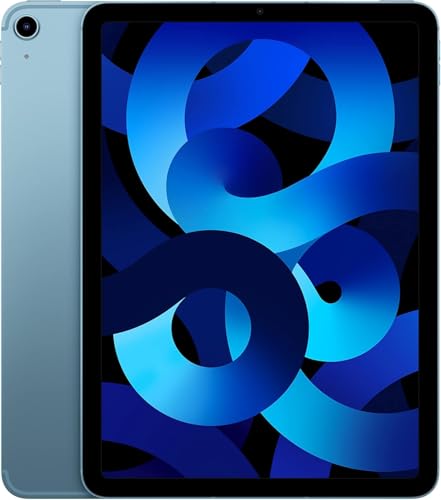
Apple iPad Air 5th Gen 10.9-inch Blue
Best for: M1 performance and Apple Pencil use
- Screen Size
- 10.9-inch
- Internal Storage
- 64GB
- Display Type
- Liquid Retina
- Color
- Blue
- Dimensions
- 9.74 × 7.02 × 0.24 inches
- Weight
- 10.4 ounces
This is the Apple Early 2022 iPad Air 5th Gen in Blue with 64GB storage. It features a 10.9-inch Liquid Retina display and the Apple M1 chip. The device weighs 10.4 ounces and measures 0.24 inches thick. It supports the Apple Pencil 2nd Generation and offers up to 10 hours of battery life. It suits users who need a capable tablet for media and light productivity.
- Apple M1 chip with Neural Engine for performance
- 10.9-inch Liquid Retina display with True Tone
- Supports Apple Pencil 2nd Generation
- Up to 10 hours of battery life
- 64GB storage capacity is the base option
- 10.4-ounce weight is standard for this size
- You want a tablet with the M1 chip
- You need support for the Apple Pencil 2nd Gen
- You prefer a 10.9-inch display size
- You require more than 64GB of storage
- You need a larger screen than 10.9 inches
- You prefer a lighter device under 10 ounces
Verdict: Apple iPad Air 5th Gen 64GB Blue fits users who prioritize the M1 chip and Apple Pencil support in a compact 10.9-inch form factor. It is ideal for those comfortable with the base 64GB storage limit.
Specifications side by side
| Spec | Apple iPad Air 5th Gen 10.9-inch Blue |
|---|---|
| Screen Size | 10.9-inch |
| Internal Storage | 64GB |
| Display Type | Liquid Retina |
| Storage | 64GB |
| Color | Blue |
| Dimensions | 9.74 × 7.02 × 0.24 inches |
| Weight | 10.4 ounces |
| Size | 64 GB |
| Model | MM9E3LL/A-cr |
Frequently asked questions
Is the 64GB storage enough for daily use?
The Apple iPad Air 5th Gen includes 64GB of storage. This capacity fits users who prioritize the M1 chip and Apple Pencil support. It is ideal for those comfortable with this base limit. You should manage your files carefully to stay within this space.
Does this model support the Apple Pencil?
Yes, this iPad Air supports the Apple Pencil (2nd Generation). The M1 chip enhances performance for drawing and note-taking. You can attach the pencil directly to the side of the device for charging. This makes it a strong choice for creative tasks.
What are the physical dimensions of the iPad Air?
The device measures 9.74 inches in length and 7.02 inches in width. Its thickness is just 0.24 inches. It weighs 10.4 ounces. These compact dimensions make it easy to hold and carry. The slim profile fits well in most bags.
Can I use a keyboard with this tablet?
This model supports the Magic Keyboard and Smart Keyboard Folio. You can connect these accessories to create a laptop-like experience. The listing confirms compatibility with both options. This allows for efficient typing and improved productivity when you need a physical keyboard.
Is the M1 chip a significant upgrade?
The Apple M1 Chip with Neural Engine powers this device. It delivers desktop-class performance for demanding apps. You will notice faster processing for multitasking and media editing. This chip ensures the tablet remains responsive over many years of use.
What color options are available for this version?
The featured model comes in a Blue color option. The listing specifies the 64GB Blue variant. Apple typically offers several color choices for this generation. You can select the shade that best matches your personal style and preferences.
How does the screen size affect usability?
The 10.9-inch display provides ample space for reading and browsing. It offers a good balance between portability and viewable area. You get sharp text and smooth images thanks to the Liquid Retina technology. This size is comfortable for both media consumption and productivity tasks.


