Best Drawing Tablets Under $500 in 2026: 12 Picks Ranked by Specs
Finding the best drawing tablets under $500 requires careful attention to technical details.

What this report covers
- Last updated
- 1 Nov 2026
Figures above are read from the product listings for the models named below. Scores are out of 10, based on listed specifications and buyer feedback.
As Amazon Associates, we earn from qualifying purchases. This means we may receive a small commission at no extra cost to you if you click through and make a purchase.
As an Amazon Associate we earn from qualifying purchases. Links on this page are affiliate links.
Finding the best drawing tablets under $500 requires careful attention to technical details. We compared 12 models ranked by their published specifications. The Wacom Cintiq 13HD leads because its compact 13-inch size fits desktop workflows without sacrificing screen real estate. Each pick is chosen based on data points like pen pressure levels, display type, and connectivity options rather than subjective opinions. This guide helps you decide which hardware matches your specific creative needs, whether you need a standalone device or a dedicated pen display.
Match Screen Size to Your Setup
You need to decide if you want a dedicated display or a standalone device. Pen displays like the Wacom Cintiq 13HD connect to a computer, while standalone units like the XP-Pen Magic Drawing Pad run Android independently. Choose based on whether you prioritize portability or a larger, fixed workspace for your creative software.
| # | Product | Best for | Price |
|---|---|---|---|
| 1 | Wacom Cintiq 13HD 13.3-Inch Pen Display Best overall | compact desktop pen display workflows | |
| 2 | HUION Kamvas 22 Plus 21.5" Pen Display Also great | artists needing large screen space and color accuracy | |
| 3 | HUION KAMVAS 22 Plus 21.5-Inch Drawing Tablet Best 8192 levels | Artists needing large, color-accurate screens with Android support | |
| 4 | XP-Pen Artist 22 2nd 21.5 Inch Pen Display Best windows | desktop artists needing large screen real estate | |
| 5 | HUION KAMVAS 16 Gen 3 15.8-Inch Pen Display Best budget | artists needing accurate colors in a compact size | |
| 6 | XPPen Magic Drawing Pad 12.2" 256GB Best premium | portable standalone digital art creation | |
| 7 | Wacom Intuos Pro Large Bluetooth Tablet Best bluetooth | Professional animators needing a large pen tablet | |
| 8 | XP-Pen Magic Drawing Pad 12.2 Standalone Also great | portable standalone digital art creation | |
| 9 | HUION Kamvas 16 Gen 3 15.8-inch Also great | color-accurate digital art on a compact screen | |
| 10 | Wacom MovinkPad 11 Android Tablet Best 128gb | Portable standalone Android drawing | |
| 11 | reMarkable Paper Pure 10.3-inch E Ink Tablet Best 10.3-inch | Focused note-taking and document annotation | |
| 12 | HUION KAMVAS Pad 12 Standalone Also great | portable standalone Android drawing |
The best fit for you
- You want the most compact pen display for your desk – Wacom Cintiq 13HD 13.3-Inch Pen Display – It weighs 2.64 pounds and measures 14.8 by 9.76 inches.
- You need a large screen for detailed studio work – HUION Kamvas 22 Plus 21.5" Pen Display – The 21.5-inch display offers ample space for complex designs.
- You want to draw without connecting to a computer – XPPen Magic Drawing Pad 12.2" 256GB – This standalone device includes 256GB of storage for your files.
- You prefer wireless freedom for your drawing tablet – Wacom Intuos Pro Large Bluetooth Tablet – Built-in Bluetooth connectivity lets you work without cables.
- You need a dedicated device for reading and writing – reMarkable Paper Pure 10.3-inch E Ink Tablet – Its E Ink display reduces eye strain during long sessions.

Wacom Cintiq 13HD 13.3-Inch Pen Display
Best for: compact desktop pen display workflows
- Screen Size
- 13.3"
- Display Resolution
- 1920 X 1080
- Pen Pressure
- 2048 levels
- Shortcut Controls
- four ExpressKeys, Rocker ring
- Features
- Stylus, Stylus Pen
- Color
- Black
The Wacom Cintiq 13HD is a 13-inch pen display designed for direct-on-screen drawing. It features an HD 1920×1080 resolution and 2048 levels of pressure sensitivity. The device includes a tilt-sensitive Pro Pen and four customizable ExpressKeys. Weighing 2.64 pounds, it offers a compact form factor for desktop use. This model suits artists who prefer a dedicated screen workspace over standalone tablets.
- 13.3-inch HD 1920×1080 display
- 2048 pressure levels with tilt support
- Four customizable ExpressKeys and rocker ring
- Lightweight 2.64-pound build
- HD 1080p resolution is lower than the QHD or 2.5K screens on other list picks
- 13-inch screen is smaller than the 16-inch and 22-inch options available elsewhere in this guide
- You want a dedicated pen display for desktop use
- You prefer a compact 13-inch form factor
- You need a reliable stylus with tilt support
- You require a high-resolution QHD or 2.5K screen
- You need a large 16-inch or larger canvas
- You are looking for a standalone tablet that works without a computer
Verdict: Wacom Cintiq 13HD Pen Display fits users who prioritize a compact, dedicated screen workspace over high resolution or large size. It is a practical choice for desktop artists who do not need standalone functionality.
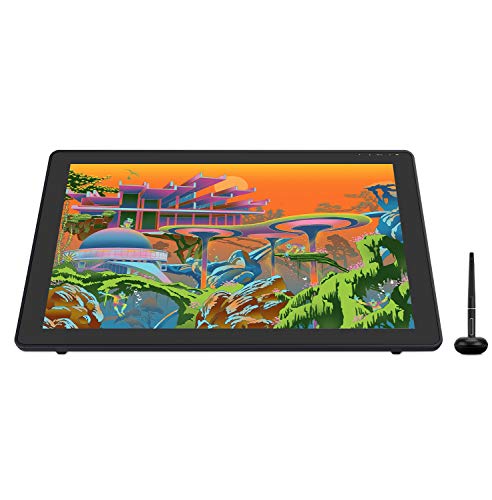
HUION Kamvas 22 Plus 21.5" Pen Display
Best for: artists needing large screen space and color accuracy
- Tablet Type
- Tethered pen display
- Screen Size
- 21.5 inch
- Display Resolution
- 1920 x 1080 FHD
- Pen Pressure
- 8192 levels
- Color Gamut
- 140% sRGB
- Display Finish
- Full-laminated, etched anti-glare glass
The HUION Kamvas 22 Plus is a 21.5-inch pen display designed for artists who need a large canvas. It features a full-laminated FHD screen with 140% sRGB color coverage and a 1200:1 contrast ratio. The battery-free PW517 stylus offers 8192 pressure levels and tilt support. It connects via dual USB-C ports to computers or Android devices. This setup suits those who prioritize color accuracy and screen real estate.
- 21.5-inch FHD display provides ample workspace for detailed artwork.
- Full-lamination technology reduces parallax for precise pen-to-cursor alignment.
- 140% sRGB color gamut ensures accurate color representation for digital art.
- PW517 battery-free stylus features 8192 pressure levels and ±60° tilt recognition.
- 7.5-pound weight makes it heavier and less portable than smaller tablets.
- 21.5-inch size requires more desk space than 12-inch or 15-inch models.
- 1200:1 contrast ratio is lower than the 3000:1 ratio found on some competitors.
- You need a large 21.5-inch screen for complex compositions.
- You require accurate colors with 140% sRGB coverage.
- You prefer a battery-free pen that is always ready to use.
- You need a standalone tablet that works without a computer.
- You want a portable device that fits easily in a bag.
- You require a high-contrast display with a ratio above 1200:1.
Verdict: HUION Kamvas 22 Plus 21.5-Inch Display is a solid choice for studio artists who value large screen space and color accuracy over portability. It fits users who connect to a PC or Android device and need a stable, high-resolution drawing surface.

HUION KAMVAS 22 Plus 21.5-Inch Drawing Tablet
Best for: Artists needing large, color-accurate screens with Android support
- Tablet Type
- Tethered pen display
- Screen Size
- 21.5"
- Display Resolution
- 1080p HD
- Pen Pressure
- 8192 levels
- Color Gamut
- 140% sRGB
- Display Finish
- Full-laminated, etched anti-glare glass
The HUION Kamvas 22 Plus is a 21.5-inch graphics tablet with a full-laminated QD LCD screen. It offers 140% sRGB color accuracy and 1080p resolution for detailed artwork. The PW517 battery-free pen supports 8192 pressure levels and tilt response. It connects to Android devices via USB-C, in addition to Mac, Windows, and Linux. This setup suits artists who need a large, color-accurate display with broad device compatibility.
- 21.5-inch full-laminated QD LCD screen with 140% sRGB coverage
- PW517 battery-free pen with 8192 pressure levels and tilt support
- Connects to Android, Mac, Windows, and Linux systems
- Includes adjustable stand and USB-A port for peripherals
- 8192 pressure levels are lower than the 16384 levels found in the HUION KAMVAS 16 (Gen 3)
- 1080p resolution is lower than the QHD or 2.5QHD displays on the HUION KAMVAS 16 (Gen 3) and XPPen Artist 22
- 21.5-inch size is smaller than the 22-inch screen on the HUION Kamvas 22 Plus QLED variant
- You need a large 21.5-inch canvas for detailed digital painting
- You work with Android devices and want direct screen connection
- You prioritize wide color gamut (140% sRGB) for accurate output
- You require higher pressure sensitivity than 8192 levels
- You need a resolution higher than 1080p for sharp text
- You want a standalone tablet that does not need a computer
Verdict: The HUION Kamvas 22 Plus 21.5-Inch Drawing Tablet fits professionals who value color accuracy and broad OS support over maximum resolution or pressure levels. It is a solid choice for desktop artists using Android or traditional computers.

XP-Pen Artist 22 2nd 21.5 Inch Pen Display
Best for: desktop artists needing large screen real estate
- Tablet Type
- Tethered pen display
- Screen Size
- 21.5"
- Display Resolution
- 1920 x 1080
- Pen Pressure
- 8192 levels
- Color Gamut
- 86% NTSC (Adobe RGB≥90%, sRGB≥122%)
- Operating System
- Windows
The XP-Pen Artist 22 2nd is a 21.5-inch pen display designed for Windows and Mac. It features a 1920×1080 resolution and 122% sRGB color gamut. The battery-free stylus offers 8,192 pressure levels and tilt support. Weighing 17.6 pounds, it includes an adjustable stand. This large screen suits users who need a spacious canvas for detailed digital art on a desktop.
- 21.5-inch 1920×1080 HD LCD screen
- 122% sRGB color gamut for vivid colors
- Battery-free stylus with 8,192 pressure levels
- Supports 60 degrees of tilt function
- Adjustable stand with 16 to 90 degree angle
- 17.6 pounds weight makes it heavy to move
- 1080p resolution is lower than 2K options
- 8ms response time is slower than premium models
- You need a large 21.5-inch canvas for detailed work
- You want a Windows-compatible pen display with high color accuracy
- You prefer a battery-free stylus for consistent performance
- You require a portable standalone tablet without a computer
- You need a 2K or higher resolution display
- You want a lightweight device for travel
Verdict: XP-Pen Artist 22 2nd 21.5 Inch Pen Display fits desktop artists who prioritize screen size and color accuracy over portability and ultra-high resolution.

HUION KAMVAS 16 Gen 3 15.8-Inch Pen Display
Best for: artists needing accurate colors in a compact size
- Tablet Type
- Pen display (not standalone)
- Screen Size
- 15.8"
- Display Resolution
- 2.5K QHD (2560×1440)
- Pen Pressure
- 16384 levels
- Display Finish
- Nano-etched glass, full lamination
- Shortcut Controls
- 2 dial controllers, 6 silent press keys
This 15.8-inch pen display connects to your computer or Android device. It features a 2.5K QHD screen with 186 PPI pixel density. The display covers 99% of sRGB and 90% of Adobe RGB. PenTech 4.0 provides 16,384 pressure levels and tilt support. You get dual dials and six customizable keys. This unit is not standalone and requires a host device.
- 2.5K QHD resolution with 186 PPI
- 99% sRGB and 90% Adobe RGB coverage
- 16,384 pen pressure levels with tilt support
- Dual customizable dials and six press keys
- Nano-etched anti-glare canvas glass
- Requires connection to a computer or Android device
- Heavier at 2.65 pounds
- 15.8-inch screen is smaller than the 22-inch options on this list
- You want high color accuracy for digital art
- You prefer a compact 15.8-inch workspace
- You need customizable dials for software shortcuts
- You need a standalone tablet without a computer
- You require a larger 22-inch display area
- You are looking for a lighter portable device
Verdict: HUION KAMVAS 16 (Gen 3) 15.8-Inch Pen Display fits artists who prioritize color accuracy and a compact footprint. It serves as a precise secondary monitor for creative software.

XPPen Magic Drawing Pad 12.2" 256GB
Best for: portable standalone digital art creation
- Tablet Type
- Standalone
- Screen Size
- 12.2-inch
- Display Resolution
- 2160*1440
- Pen Pressure
- 16,384 levels
- Color Gamut
- 97% sRGB
- Display Finish
- AG-etched
This standalone tablet runs Android 14, so you do not need a computer to draw. It features a 12.2-inch screen with 2160×1440 resolution and 97% sRGB color coverage. The included X3 Pro stylus offers 16K pressure levels and tilt support. You get 8 GB of RAM and 256 GB of storage. The 8000 mAh battery provides up to 13 hours of use. It weighs 599 grams, making it easy to carry.
- 16K pressure sensitive stylus with tilt recognition
- 12.2-inch screen with 2160×1440 resolution
- 8 GB RAM and 256 GB expandable storage
- 13 hours of battery life
- Runs Android 14 for app downloads
- 97% sRGB color gamut is lower than the 140% sRGB found on the HUION Kamvas 22 Plus
- 12.2-inch display is smaller than the 16-inch or 22-inch options on this list
- You want to draw without connecting to a computer
- You need a lightweight device for mobile work
- You prefer the Android app ecosystem
- You require a color gamut wider than 97% sRGB
- You need a screen larger than 12.2 inches
- You prefer a Windows or macOS environment
Verdict: XP-Pen Magic Drawing Pad 12.2 Standalone suits artists who need a portable, all-in-one drawing device with strong pen precision. It fits those who want to skip a computer and work directly on the screen.
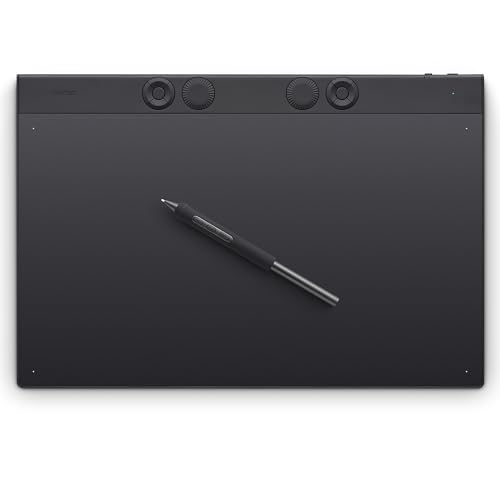
Wacom Intuos Pro Large Bluetooth Tablet
Best for: Professional animators needing a large pen tablet
- Pen Pressure
- 8192
- Shortcut Controls
- 10 ExpressKeys, 2 mechanical dials
- Features
- Stylus, Stylus Pen, Bluetooth, Shortcut Keys
- Color
- Black
- Tablet Type
- Pen Tablet
- Audience
- Animation
This is a large pen tablet designed for professional animation and digital art. It features the Pro Pen 3 with 8192 pressure levels and tilt support for precise strokes. The device includes 10 customizable ExpressKeys and two mechanical dials to streamline your workflow. You can connect wirelessly via Bluetooth or use a USB cable. The magnesium build keeps it sturdy while measuring just 4mm thick at its thinnest point.
- Pro Pen 3 offers 8192 pressure levels and tilt support
- Bluetooth connectivity for wireless use with multiple computers
- 10 customizable ExpressKeys and 2 mechanical dials for efficiency
- Magnesium body is only 4mm thick at its thinnest
- Larger active area requires more desk space than smaller models
- Heavier build at 1.46 pounds compared to lighter alternatives
- No built-in display requires a separate monitor for drawing
- You need a large drawing surface for detailed animation work
- You prefer wireless connectivity via Bluetooth
- You want customizable physical controls for faster workflows
- You need a tablet with an integrated screen
- You require a compact device for limited desk space
- You are looking for a standalone device without a computer
Verdict: Wacom Intuos Pro Large Bluetooth Tablet is a robust choice for animators who need a large active area and precise pen tracking. It suits professionals who prioritize physical controls and wireless freedom over having a built-in display.

XP-Pen Magic Drawing Pad 12.2 Standalone
Best for: portable standalone digital art creation
- Tablet Type
- Standalone
- Screen Size
- 12.2"
- Display Resolution
- 2160×1440
- Pen Pressure
- 16384
- Color Gamut
- 97% sRGB
- Storage
- 256GB
This standalone tablet requires no computer. It features a 12.2-inch screen with 2160×1440 resolution and 97% sRGB color gamut. The device includes 8GB RAM and 256GB storage for local projects. It offers 16384 pressure levels for precise input. The 8000mAh battery supports up to 13 hours of use. This unit suits artists who want a portable, all-in-one drawing solution.
- 12.2-inch display with 2160×1440 resolution
- 16384 levels of pen pressure sensitivity
- 8GB RAM and 256GB internal storage
- Up to 13 hours of battery life
- 97% sRGB color gamut coverage
- 12.2-inch screen is smaller than the 16-inch and 22-inch models on this list
- 97% sRGB gamut is narrower than the 140% sRGB found on competing units
- 13 hours of battery life is less than some standalone tablets in this category
- You need a portable device that works without a computer
- You want high storage capacity for local files
- You prefer a compact 12.2-inch form factor
- You require a screen larger than 12.2 inches
- You need professional-grade color accuracy beyond 97% sRGB
- You want a device with a longer battery life than 13 hours
Verdict: XP-Pen 12.2 Standalone Drawing Tablet provides a capable standalone experience with ample storage and pressure sensitivity. It fits artists who prioritize portability and local processing over large screen real estate.

HUION Kamvas 16 Gen 3 15.8-inch
Best for: color-accurate digital art on a compact screen
- Tablet Type
- Pen display
- Screen Size
- 15.8 inch
- Display Resolution
- 2.5K QHD (2560×1440)
- Pen Pressure
- 16384 levels
- Display Finish
- Nano-Etched Canvas Glass 2.0
- Shortcut Controls
- 2 dial controllers, 6 silent press keys
This pen display pairs a 15.8-inch screen with 2.5K QHD resolution for sharp, detailed artwork. It covers 99% of sRGB and 90% of Adobe RGB color gamuts, ensuring accurate color representation for professional projects. The device uses PenTech 4.0 with 16384 pressure levels and tilt support. Full lamination and nano-etched glass provide a natural drawing feel. You connect it to a computer or Android device via USB-C.
- 2.5K QHD resolution (2560×1440) for sharp visuals
- 99% sRGB and 90% Adobe RGB color coverage
- 16384 pen pressure levels with ±60° tilt support
- Full lamination and nano-etched canvas glass
- Dual dials and six customizable press keys
- Requires connection to a computer or Android device
- 15.8-inch screen is smaller than 22-inch competitors
- Weighs 2.65 pounds, adding bulk to your setup
- You need high color accuracy for digital art
- You prefer a compact 15.8-inch workspace
- You want customizable dials for software control
- You require a standalone tablet without a computer
- You prefer a larger 22-inch display area
- You want a lighter device for travel
Verdict: HUION KAMVAS 16 (Gen 3) 15.8-Inch Pen Display offers professional-grade color accuracy and a high-resolution screen for artists who connect to a computer. It suits creators who value precise control and a natural drawing surface in a compact form factor.

Wacom MovinkPad 11 Android Tablet
Best for: Portable standalone Android drawing
- Screen Size
- 11.45"
- Pen Pressure
- 8192
- Display Finish
- Matte etched glass
- Storage
- 128GB
- Operating System
- Android
- Features
- Stylus, Stylus Pen
The Wacom MovinkPad 11 is an 11-inch standalone Android tablet designed for drawing without a computer. It features 8GB of RAM and 128GB of storage for local app management. The device includes the Pro Pen 3 with 8,192 pressure levels and a matte etched glass display. Weighing 1.3 pounds, it offers a portable, all-in-one solution for artists who need a dedicated sketching device.
- 11.45-inch Android 14 standalone display with matte etched glass
- 128GB storage and 8GB RAM for app performance
- Pro Pen 3 delivers 8,192 pressure levels
- Lightweight 1.3-pound build for portability
- 11.45-inch screen is smaller than the 16-inch and 22-inch options on this list
- 128GB storage capacity is lower than the 256GB option found in the XPPen Magic Drawing Pad 12.2
- 1.3-pound weight is slightly heavier than the reMarkable Paper Pure
- You want a standalone Android tablet with no computer needed
- You prefer the tactile feel of a matte etched glass display
- You need 128GB of local storage for drawing apps
- You require a screen larger than 12 inches for detailed work
- You prefer a Windows or macOS operating system
- You need more than 128GB of internal storage
Verdict: Wacom MovinkPad 11 Android Tablet is a portable, standalone drawing device for artists who prioritize pen performance and a paper-like screen over large display real estate. It fits users who want an all-in-one Android system without external hardware.

reMarkable Paper Pure 10.3-inch E Ink Tablet
Best for: Focused note-taking and document annotation
- Screen Size
- 10.3"
- Use
- Note-Taking
- Display
- E Ink
- Length
- 8.98 inches
- Width
- 7.37 inches
- Weight
- 12.7 ounces
The reMarkable Paper Pure is a 10.3-inch black-and-white e-ink tablet designed for focused note-taking and document review. It features a high-contrast display with 21 ms ink response time, allowing for near-instantaneous writing. Weighing 12.7 ounces, it remains lightweight and portable. This device suits users who prioritize distraction-free writing and digital ink clarity over color graphics or multimedia capabilities.
- 10.3-inch E Ink display provides high contrast for clear text rendering
- 21 ms digital ink response time ensures immediate visual feedback
- Lightweight 12.7-ounce build enhances portability for on-the-go use
- Supports handwriting-to-text conversion and cloud storage via Connect
- Black-and-white display limits use for color-heavy design work
- 10.3-inch screen size is smaller than the 12- to 22-inch options on this list
- 12.7-ounce weight is heavier than some ultra-light competitors
- You need a distraction-free device for long writing sessions
- You primarily annotate PDFs and take text-based notes
- You value high contrast and fast ink response in a portable form
- You require a color display for digital art or graphic design
- You need a screen larger than 10.3 inches for detailed drafting
- You want a device with multimedia capabilities or app ecosystems
Verdict: reMarkable Paper Pure 10.3-inch E Ink Tablet is a focused tool for writers and students who prioritize clarity and speed. It fits those who want a dedicated writing surface without the distractions of a full-featured computer.
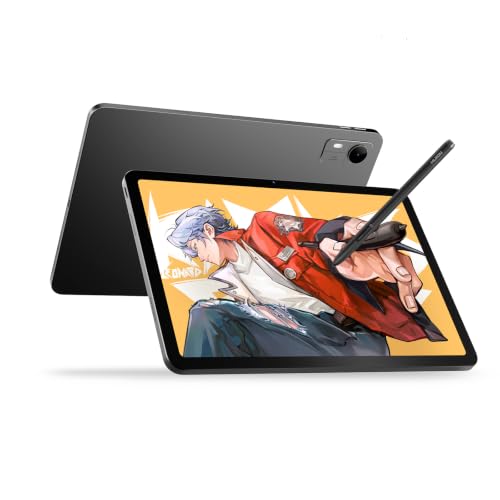
HUION KAMVAS Pad 12 Standalone
Best for: portable standalone Android drawing
- Tablet Type
- Standalone
- Screen Size
- 12.2"
- Display Resolution
- 2K+
- Pen Pressure
- 16384 levels
- Color Gamut
- 99% sRGB
- Refresh Rate
- 90Hz
The HUION KAMVAS Pad 12 is a standalone 12.2-inch drawing tablet running Android 16. It features a 2K+ display with 90Hz refresh rate and 99% sRGB color accuracy. The device includes 8GB RAM and 256GB storage, supporting up to 16,384 pressure levels. This compact unit suits artists who need a portable, self-contained screen for digital illustration without a computer.
- 12.2-inch 2K+ screen with 90Hz refresh rate
- Runs Android 16 for standalone app use
- 8GB RAM and 256GB expandable storage
- 16,384 pressure levels with tilt support
- 99% sRGB color coverage
- 12.2-inch screen is smaller than the 16-inch or 22-inch options on this list
- 1.47-pound weight is heavier than many lightweight portable tablets
- 8000mAh battery provides limited runtime compared to larger capacity devices
- You need a standalone Android tablet for drawing on the go
- You prefer a compact 12.2-inch screen for portability
- You want a high refresh rate for smooth stroke rendering
- You require a screen larger than 12.2 inches for detailed work
- You need a Windows or macOS pen display for professional software
- You prioritize a lighter weight under 1.5 pounds
Verdict: The HUION KAMVAS Pad 12 2K+ Android Tablet offers a compact, standalone Android experience with a smooth 90Hz display. It fits artists who value portability and standalone app access over a larger canvas.
Specifications side by side
| Spec | Wacom Cintiq 13HD 13.3-Inch Pen Display | HUION Kamvas 22 Plus 21.5" Pen Display | HUION KAMVAS 22 Plus 21.5-Inch Drawing Tablet | XP-Pen Artist 22 2nd 21.5 Inch Pen Display | HUION KAMVAS 16 Gen 3 15.8-Inch Pen Display | XPPen Magic Drawing Pad 12.2" 256GB | Wacom Intuos Pro Large Bluetooth Tablet | XP-Pen Magic Drawing Pad 12.2 Standalone | HUION Kamvas 16 Gen 3 15.8-inch | Wacom MovinkPad 11 Android Tablet | reMarkable Paper Pure 10.3-inch E Ink Tablet | HUION KAMVAS Pad 12 Standalone |
|---|---|---|---|---|---|---|---|---|---|---|---|---|
| Tablet Type | – | Tethered pen display | Tethered pen display | Tethered pen display | Pen display (not standalone) | Standalone | – | Standalone | Pen display | – | – | Standalone |
| Screen Size | 13.3" | 21.5 inch | 21.5" | 21.5" | 15.8" | 12.2-inch | – | 12.2" | 15.8 inch | 11.45" | 10.3" | 12.2" |
| Display Resolution | 1920 X 1080 | 1920 x 1080 FHD | 1080p HD | 1920 x 1080 | 2.5K QHD (2560×1440) | 2160*1440 | – | 2160×1440 | 2.5K QHD (2560×1440) | – | – | 2K+ |
| Pen Pressure | 2048 levels | 8192 levels | 8192 levels | 8192 levels | 16384 levels | 16,384 levels | 8192 | 16384 | 16384 levels | 8192 | – | 16384 levels |
| Color Gamut | – | 140% sRGB | 140% sRGB | 86% NTSC (Adobe RGB≥90%, sRGB≥122%) | – | 97% sRGB | – | 97% sRGB | – | – | – | 99% sRGB |
| Refresh Rate | – | – | – | – | – | – | – | – | – | – | – | 90Hz |
| Display Finish | – | Full-laminated, etched anti-glare glass | Full-laminated, etched anti-glare glass | – | Nano-etched glass, full lamination | AG-etched | – | – | Nano-Etched Canvas Glass 2.0 | Matte etched glass | – | Fully laminated nano-etched glass, AF |
| Shortcut Controls | four ExpressKeys, Rocker ring | – | – | – | 2 dial controllers, 6 silent press keys | – | 10 ExpressKeys, 2 mechanical dials | – | 2 dial controllers, 6 silent press keys | – | – | – |
| Storage | – | – | – | – | – | 256GB | – | 256GB | – | 128GB | – | 256GB |
| Operating System | – | Android | Android | Windows | Android | – | – | – | Android | Android | – | Android |
| Use | – | – | – | – | – | – | – | – | – | – | Note-Taking | – |
| Features | Stylus, Stylus Pen | Stylus, Stylus Pen, Battery-Free Pen, Tilt Support | Stylus, Stylus Pen, Battery-Free Pen, Tilt Support | Stylus, Stylus Pen, Battery-Free Pen, Shortcut Keys, Tilt Support | Stylus, Stylus Pen | Stylus, Stylus Pen, Tilt Support | Stylus, Stylus Pen, Bluetooth, Shortcut Keys | – | Stylus, Stylus Pen | Stylus, Stylus Pen | – | Stylus, Stylus Pen, Battery-Free Pen |
| Display | – | Full-Laminated | Full-Laminated | – | Full-Laminated | – | – | – | Full-Laminated | Anti-Glare | E Ink | Anti-Glare |
| Color | Black | Black | Black | Black | Silvery | Purple | Black | Black | Black | Light Gray | Ocean Blue Sleeve | Grey |
| Audience | – | – | – | – | – | – | Animation | – | – | – | – | – |
| Dimensions | 14.8 × 0.53 × 9.76 inches | 21.5 × 12.7 × 0.75 inches | – | 21.2 × 13.1 × 10.2 inches | 17 × 10 × 4.02 inches | – | – | – | 16.6 × 9.32 × 0.1 inches | – | – | 11.1 × 7.7 × 0.1 inches |
| Weight | 2.64 pounds | 7.5 pounds | – | 17.6 pounds | 2.65 pounds | 1.3 pounds | 1.46 pounds | 1.3 pounds | 2.65 pounds | 1.3 pounds | 12.7 ounces | 1.47 pounds |
| Length | – | – | – | – | – | 11.4 inches | 14.8 inches | – | – | 10.5 inches | 8.98 inches | – |
| Width | – | – | – | – | – | 7.48 inches | 9.96 inches | – | – | 7.17 inches | 7.37 inches | – |
| Size | 13" | 21.5 Inch | – | 21.5 Inch | 15.8 Inch | 279 x 192 x 6.9 mm | Large | 12.2 inch | 15.8 inch | 11 inch | – | – |
| Model | DTK1300 | GS2202-US | 22 Plus | ArtistCD220F | GS1563 | Magic Drawing Pad | PTK870K0A | X3 Pro | GS1563 | MovinkPad 11 Android All-in-One | RM95A-1000NW | KP1202 |
If you need everyday computing hardware rather than dedicated pen digitizers, compare specs across the best tablets under 500.
Check Pen Pressure and Tilt Support
Compare Pressure Sensitivity Levels
You need to check the pen pressure rating to ensure natural line variation. Higher levels provide smoother transitions between thick and thin strokes. The HUION Kamvas 16 Gen 3 offers 16K levels for precise control. Some models provide 8192 levels, which is sufficient for most digital artists. You should compare these numbers when selecting a device. More levels do not always mean better quality, but they offer finer granularity for detailed work.
Look for Tilt Functionality
Tilt support allows the stylus to detect angle changes for shading effects. This feature mimics real-world brush behavior. The HUION Kamvas 22 Plus includes tilt support for realistic rendering. The XP-Pen Artist 22 also supports this function for desktop artists. You should verify this spec if you plan to use brush tools. Devices without tilt support limit your artistic expression. Always check the attributes list for this specific capability before buying.
Choose Standalone or Pen Display
You must decide between a standalone tablet and a pen display. Standalone units like the XP-Pen Magic Drawing Pad run Android independently. They do not require a computer connection. Pen displays like the Wacom Cintiq 13HD need a PC or Mac. You should choose based on your workspace setup. Standalone devices offer portability and freedom. Pen displays provide larger screens and direct computer integration. Your choice depends on where and how you work.
Verify Operating System Compatibility
You need to check which operating systems the tablet supports. Some devices work with Android, while others require Windows. The Wacom Cintiq 13HD is a pen display for computers. The HUION Kamvas 22 Plus supports Android for standalone use. You should match the tablet to your existing hardware. Incompatible systems will prevent you from using the device. Always review the operating system specifications. This ensures seamless integration with your creative software.
Assess Screen Size and Portability
Screen size affects your workflow and portability. Larger displays like the 21.5-inch models offer more canvas space. The XP-Pen Artist 22 provides ample room for detailed designs. Smaller units like the 13-inch Wacom Cintiq 13HD are compact. You should consider desk space and mobility needs. Larger tablets are heavier and less portable. The Wacom Cintiq 13HD weighs 2.64 pounds. You need to balance screen real estate with physical convenience.
Frequently asked questions
Which drawing tablet is best for compact desktop workflows?
The Wacom Cintiq 13HD is the top pick for users who prioritize a compact workspace. It features a 13-inch pen display that fits easily on a desk. The unit weighs 2.64 pounds and measures 14.8 by 9.76 inches. This size allows you to maintain a focused drawing environment without taking up excessive space.
Do I need a standalone tablet or a pen display?
Choose a standalone tablet if you want to draw without a computer. The XP-Pen Magic Drawing Pad 12.2 runs Android independently and includes 256GB of storage. Select a pen display like the HUION Kamvas 22 Plus if you prefer connecting to a PC or Android device for a stable, high-resolution surface with tilt support.
Which model offers the highest pen pressure sensitivity?
Several models offer 16K levels of pressure sensitivity for smooth line variation. The HUION KAMVAS 16 Gen 3 and the XP-Pen Magic Drawing Pad both provide 16K levels. This high sensitivity ensures precise control over stroke thickness, making it suitable for detailed digital art and professional illustration work on compatible devices.
Is there a large screen option for studio artists?
The HUION Kamvas 22 Plus provides a 21.5-inch display for ample drawing space. It is ideal for studio artists who value color accuracy and large screen real estate. The unit weighs 7.5 pounds and supports tilt with a battery-free pen. It connects to PCs or Android devices for a stable workflow.
Can I use a drawing tablet for professional animation?
The Wacom Intuos Pro Large Bluetooth Tablet is designed for professional animators. It features a large active area for precise pen tracking and includes shortcut keys for efficient workflow. The device supports Bluetooth connectivity, offering wireless freedom. It is a robust choice for those who prioritize physical controls over a built-in display.
Which tablet is best for portable standalone art creation?
The XP-Pen Magic Drawing Pad 12.2 is optimized for portable standalone use. It weighs just 1.3 pounds and features a 12.2-inch screen with 256GB of storage. This compact design allows you to skip a computer and work directly on the screen. It supports tilt and offers 16K pressure levels for natural drawing.
Are there options with full-laminated displays for better precision?
The HUION Kamvas 16 Gen 3 and the HUION Kamvas 22 Plus both feature full-laminated displays. This technology reduces the gap between the pen tip and the cursor for a more natural drawing experience. These models offer 16K pressure levels and tilt support, ensuring precise control for detailed digital art projects.
What is the lightest drawing tablet available?
The XP-Pen Magic Drawing Pad 12.2 and the Wacom MovinkPad 11 are among the lightest options. Both weigh 1.3 pounds, making them highly portable. The XP-Pen model offers 256GB of storage, while the Wacom device provides 128GB. Their compact size suits artists who need to move their setup frequently.


