Best HUION Drawing Tablets Under $2000: 2 Spec-Based Picks
Finding the best HUION drawing tablets under $2000 requires a close look at published specifications.

What this report covers
- Last updated
- 4 Nov 2026
Figures above are read from the product listings for the models named below. Scores are out of 10, based on listed specifications and buyer feedback.
As Amazon Associates, we earn from qualifying purchases. This means we may receive a small commission at no extra cost to you if you click through and make a purchase.
As an Amazon Associate we earn from qualifying purchases. Links on this page are affiliate links.
Finding the best HUION drawing tablets under $2000 requires a close look at published specifications. We compared 2 models to help you choose based on hard data rather than marketing claims. The HUION KAMVAS Pro 27 27-inch 4K Pen Display leads this list because its 16K pressure levels offer precise control for professional digital art and design. Each pick is ranked strictly by its technical attributes. This guide helps you decide which device matches your workflow needs.
Choose screen size and features
Your main decision rests on display size and specific controls. The top pick offers a 27-inch 4K pen display for professional detail work. The second option keeps the 27-inch screen but adds a 144Hz refresh rate and a physical dial. Select the model that matches your need for high resolution versus fast response and manual controls.
| # | Product | Best for | Price |
|---|---|---|---|
| 1 | HUION KAMVAS Pro 27 27-inch 4K Pen Display Best overall | professional digital art and design | |
| 2 | HUION KAMVAS Pro 27 144Hz Best dial | Large canvas digital painting with dial controls |
The best fit for you
- You want the best overall large screen for art – HUION KAMVAS Pro 27 27-inch 4K Pen Display – Its 27-inch 4K display provides high resolution for detailed work.
- You need dial controls for precise digital painting – HUION KAMVAS Pro 27 144Hz – The built-in dial and 144Hz refresh rate improve workflow.
- You prefer a full-laminated display for drawing – HUION KAMVAS Pro 27 27-inch 4K Pen Display – The full-laminated screen reduces parallax for accurate pen placement.

HUION KAMVAS Pro 27 27-inch 4K Pen Display
Best for: professional digital art and design
- Tablet Type
- Tethered pen display
- Screen Size
- 27"
- Display Resolution
- 4K (3840×1260)
- Pen Pressure
- 16384 levels
- Color Gamut
- 98% Adobe RGB
- Display Finish
- Canvas Glass 2.0, etched glass
The HUION KAMVAS Pro 27 is a 27-inch pen display with 4K UHD resolution and a 144Hz refresh rate. It features PenTech 4.0 for precise pressure sensitivity and 98% Adobe RGB color coverage. The full-laminated screen with Canvas Glass 2.0 reduces eye strain. This tablet suits professionals needing high color accuracy and multi-touch gestures for detailed digital art and design work.
- 27-inch 4K UHD display with 144Hz refresh rate
- 98% Adobe RGB color space coverage
- PenTech 4.0 with 16K pressure levels
- Full-laminated Canvas Glass 2.0 screen
- Multi-touch gestures for panning and zooming
- Heavier at 17.6 pounds compared to smaller models
- Larger 27-inch footprint requires more desk space
- Requires USB-C connection for full functionality
- You need high color accuracy for print or video work
- You want a large canvas for detailed digital painting
- You prefer multi-touch gestures for navigation
- You have limited desk space for a 27-inch display
- You need a lightweight portable tablet for travel
- You do not require 4K resolution or 144Hz refresh
Verdict: HUION KAMVAS Pro 27 4K Pen Display is ideal for professional artists who need a large, color-accurate screen for detailed work. It fits those who value high resolution and smooth touch controls over portability.
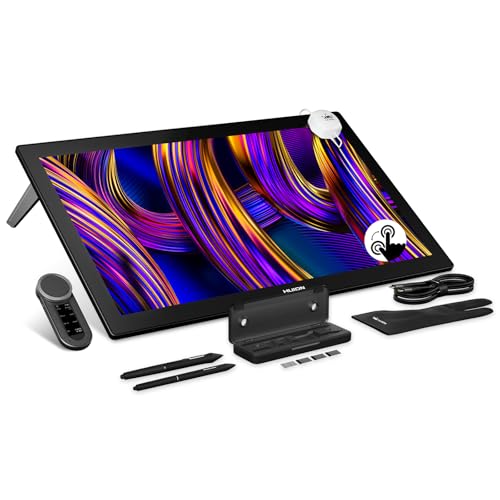
HUION KAMVAS Pro 27 144Hz
Best for: Large canvas digital painting with dial controls
- Tablet Type
- Tethered pen display
- Screen Size
- 27-Inch
- Display Resolution
- 4K UHD (3840×2160)
- Pen Pressure
- 16,384 levels
- Color Gamut
- 99% sRGB, 98% Adobe RGB, 98% DCI-P3
- Refresh Rate
- 144Hz
The HUION KAMVAS Pro 27 (144Hz) is a 27-inch pen display featuring a 4K UHD touchscreen. It includes a dedicated dial for shortcuts and supports multi-touch gestures. The screen covers 98% Adobe RGB with factory calibration. You get a 144Hz refresh rate for smooth visuals. This tablet suits professionals needing large, color-accurate workspace and fast response times.
- 27-inch 4K UHD (3840×2160) display
- 144Hz high refresh rate
- 98% Adobe RGB color gamut
- Includes physical dial for shortcuts
- 16,384 pen pressure levels
- Larger 27-inch size requires more desk space
- Heavier build due to 27-inch screen dimensions
- Touchscreen may attract more fingerprints
- You need a large canvas for detailed artwork
- You value high refresh rates for smooth drawing
- You want physical dial shortcuts for efficiency
- You have limited desk space
- You prefer a smaller 18-inch display
- You do not need touchscreen functionality
Verdict: HUION KAMVAS Pro 27 144Hz 4K fits artists who need a large, color-accurate workspace with fast response times. The dial and high refresh rate make it ideal for detailed digital painting.
Specifications side by side
| Spec | HUION KAMVAS Pro 27 27-inch 4K Pen Display | HUION KAMVAS Pro 27 144Hz |
|---|---|---|
| Tablet Type | Tethered pen display | Tethered pen display |
| Screen Size | 27" | 27-Inch |
| Display Resolution | 4K (3840×1260) | 4K UHD (3840×2160) |
| Pen Pressure | 16384 levels | 16,384 levels |
| Color Gamut | 98% Adobe RGB | 99% sRGB, 98% Adobe RGB, 98% DCI-P3 |
| Refresh Rate | – | 144Hz |
| Display Finish | Canvas Glass 2.0, etched glass | Fully laminated, Canvas Glass 3.0 |
| Shortcut Controls | – | Keydial Remote |
| Features | Stylus, Stylus Pen | Stylus, Stylus Pen, Dial |
| Display | Full-Laminated | Touchscreen |
| Color | Black | – |
| Dimensions | 25.8 × 15.9 × 0.1 inches | 25.8 × 15.9 × 0.1 inches |
| Weight | 17.6 pounds | – |
| Size | 27inch | 27-Inch |
| Model | GT270 | GT2702 |
How to Choose the Right HUION Tablet
Prioritize Screen Resolution
You should check the display resolution first. Higher pixel density ensures sharper lines and smoother curves. The top pick features a 4K screen, which provides exceptional clarity for professional digital art. This high resolution allows you to see fine details without pixelation. If you work on intricate designs, this spec is critical. Lower resolutions may appear grainy when you zoom in. Always verify the pixel count in the published specifications. A 4K display offers a significant advantage for detailed work compared to standard HD panels. This choice directly impacts the final quality of your digital creations.
Check Display Lamination
Look for a full-laminated display if you want precision. This feature reduces the gap between the glass and the image layer. The best overall model uses a full-laminated screen for accurate pen tracking. This construction minimizes parallax, making your strokes appear exactly where you draw. It creates a more natural writing experience. If the specifications do not mention lamination, assume there is a visible gap. This gap can cause visual disconnects during detailed drawing. Full lamination is a key spec for professional artists who demand accuracy. It is a practical difference you can feel while working.
Evaluate Pen Pressure
You need to compare the pen pressure levels. Both listed models offer 16K levels of pressure sensitivity. This high number allows for subtle variations in line weight. It mimics the behavior of traditional ink or charcoal tools. You can create thin hairlines or thick bold strokes with ease. This spec is essential for realistic digital painting. If the pressure levels are lower, your lines may look uniform and stiff. Always choose a tablet with at least 8K levels for professional work. The 16K spec in these HUION models supports detailed artistic expression.
Consider Refresh Rate
Check the screen refresh rate for smooth visuals. The second option includes a 144Hz refresh rate. This high rate reduces motion blur and lag. It makes the cursor feel more responsive to your pen movements. This spec is beneficial for fast-paced drawing or animation. If you prefer a standard experience, a lower rate may suffice. However, higher refresh rates provide a more fluid workflow. You should verify this number in the technical specs. A 144Hz display offers a noticeable improvement in drawing responsiveness. It helps maintain a consistent flow during creative sessions.
Review Physical Controls
Decide if you need physical dial controls. The second model includes a built-in dial for navigation. This feature allows quick access to tools and settings. You can adjust brush size or zoom without using the keyboard. This setup improves workflow efficiency for complex projects. If you prefer minimal hardware, the top pick lacks this dial. It relies on software shortcuts instead. Consider your personal preference for physical versus digital controls. The dial is a practical addition for artists who want tactile feedback. It simplifies frequent adjustments during your creative process.
Frequently asked questions
Which HUION tablet is best for professional digital art?
The HUION KAMVAS Pro 27 27-inch 4K Pen Display is ideal for professional artists. It features a 27-inch full-laminated screen with 4K resolution for high clarity. The device supports 16K pressure levels for detailed work. It also includes touch controls for smooth navigation.
Does the top HUION pick have a dial control?
The best overall pick, the KAMVAS Pro 27 4K, does not list a dial in its attributes. However, the second option, the KAMVAS Pro 27 144Hz, includes a built-in dial. This physical control aids in precise adjustments during digital painting sessions on the large 27-inch canvas.
What is the screen size of these HUION pen displays?
Both top picks feature a 27-inch display size. The first model measures 25.8 inches in length and 15.9 inches in width. The second model shares these exact dimensions. Both screens provide a large workspace suitable for detailed professional art and design projects.
How many pressure levels do these styluses support?
Both listed models support 16K pressure levels. This high sensitivity allows for nuanced line weight variations. The stylus pen responds to subtle changes in force. This specification ensures smooth and accurate line drawing for professional digital art applications.
Is the display on the KAMVAS Pro 27 full-laminated?
The best overall model, the KAMVAS Pro 27 4K, features a full-laminated display. This construction reduces parallax and improves drawing accuracy. The second model does not specify this feature in its attributes. Full lamination is beneficial for artists who need precise cursor alignment.
Does the second pick have a touchscreen?
Yes, the HUION KAMVAS Pro 27 144Hz includes a touchscreen feature. This allows for direct interaction with the interface using your fingers. The display also boasts a 144Hz refresh rate for faster response times. These specs make it suitable for dynamic digital painting workflows.
What is the weight of the 27-inch HUION tablet?
The HUION KAMVAS Pro 27 4K Pen Display weighs 17.6 pounds. This weight reflects its large 27-inch screen and sturdy build. The device is designed for desktop use rather than portability. Its dimensions are 25.8 inches long and 15.9 inches wide.


