Best Kobo E-Readers with Stylus in 2026: 2 Picks
Finding the best kobo e readers with stylus support requires looking at how each device handles notes and reading.

What this report covers
- Last updated
- 4 Nov 2026
Figures above are read from the product listings for the models named below. Scores are out of 10, based on listed specifications and buyer feedback.
As Amazon Associates, we earn from qualifying purchases. This means we may receive a small commission at no extra cost to you if you click through and make a purchase.
As an Amazon Associate we earn from qualifying purchases. Links on this page are affiliate links.
Finding the best kobo e readers with stylus support requires looking at how each device handles notes and reading. We compared 2 models based on the specifications published on their official listings. The Kobo Elipsa 2E 10.3" eReader with Stylus leads this list. Its 10.3-inch touchscreen provides ample space for document annotation. This large display size makes it the top choice for detailed markup work. You can rely on these spec-focused picks to decide which device matches your workflow. Whether you need a compact 7-inch model or a larger canvas, the data helps you choose.
Choose screen size for your work
Match the display to your task. The Kobo Elipsa 2E offers a 10.3-inch screen ideal for annotating large documents. The Kobo Libra Colour provides a 7-inch color display for compact note-taking. Pick the 10.3-inch model if you need space for detailed markup. Choose the 7-inch version for portable reading with stylus support.
| # | Product | Best for | Price |
|---|---|---|---|
| 1 | Kobo Elipsa 2E 10.3" eReader with Stylus Best overall | document annotation and large-screen reading | |
| 2 | Kobo Libra Colour 7-Inch E-Reader with Stylus Best 7-inch | color reading and note-taking in a compact size |
The best fit for you
- You need a large screen for document annotation – Kobo Elipsa 2E 10.3" eReader with Stylus – The 10.3-inch display provides ample space for markup and large-screen reading.
- You want the most compact model with color – Kobo Libra Colour 7-Inch E-Reader with Stylus – The 7-inch color E Ink display fits easily in a bag.
- You prioritize portability and waterproof durability – Kobo Libra Colour 7-Inch E-Reader with Stylus – Its waterproof body and compact size suit users who travel often.
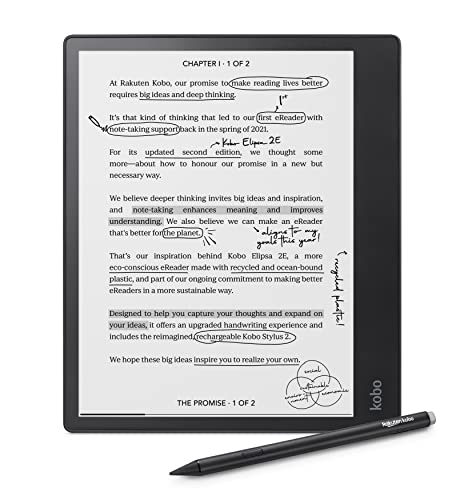
Kobo Elipsa 2E 10.3" eReader with Stylus
Best for: document annotation and large-screen reading
- Features
- Stylus, Stylus Pen, Glare-Free
- Screen Size
- 10.3"
- Storage Capacity
- 32GB
- Display Type
- E Ink Carta 1200
- Stylus Support
- includes Kobo Stylus 2
- Battery Life
- up to several weeks
The Kobo Elipsa 2E features a 10.3-inch glare-free E Ink Carta 1200 touchscreen with ComfortLight PRO. It includes the Kobo Stylus 2 for writing directly on eBooks and PDFs. With 32GB of storage, you can hold up to 24,000 books. This device suits readers who need a large display for documents and annotations while traveling.
- 10.3-inch high-resolution E Ink Carta 1200 display
- Includes Kobo Stylus 2 for direct annotation
- 32GB storage holds up to 24,000 eBooks
- ComfortLight PRO adjusts brightness and color temperature
- Heavier at 13.6 ounces compared to compact models
- Larger 10.3-inch screen is bulkier for one-handed use
- You need to annotate large PDFs or documents
- You prefer a larger screen for detailed work
- You want a stylus included for note-taking
- You prioritize a lightweight device for one-handed reading
- You only read standard-sized eBooks and need a smaller form factor
- You want a color display for images and comics
Verdict: Kobo Elipsa 2E 10.3" E-Reader with Stylus is ideal for professionals and students who need to markup documents on a large screen. It fits users who value annotation tools over portability.

Kobo Libra Colour 7-Inch E-Reader with Stylus
Best for: color reading and note-taking in a compact size
- Features
- Stylus, Stylus Pen, Waterproof, Glare-Free, Audiobooks, Dark Mode
- Screen Size
- 7"
- Display Type
- E Ink Kaleido 3
- Water Resistance
- IPX8
The Kobo Libra Colour is a 7-inch e-reader with a glare-free E Ink Kaleido 3 display. It supports color note-taking via the Kobo Stylus 2. The device includes page-turn buttons and offers IPX8 waterproof protection for up to 2 meters. It features dark mode and full font customization. This model suits readers who want color graphics in a portable, waterproof form factor.
- 7-inch glare-free Color E Ink display
- Kobo Stylus 2 compatibility for color annotations
- IPX8 waterproof rating for 2 meters depth
- Physical page-turn buttons for navigation
- 7-inch screen is smaller than the 10.3-inch Elipsa 2E
- E Ink color refresh rate is slower than LCD screens
- Battery life is limited by color rendering overhead
- You want to read comics and graphic novels in color
- You need a waterproof device for bath or poolside reading
- You prefer physical page-turn buttons over touch-only navigation
- You need a large canvas for detailed digital art
- You require instant refresh speeds like LCD tablets
- You only read black-and-white text books
Verdict: Kobo Libra Colour 7" eReader delivers color reading and stylus support in a compact, waterproof body. It fits users who prioritize portability and color visuals over large screen real estate.
Specifications side by side
| Spec | Kobo Elipsa 2E 10.3" eReader with Stylus | Kobo Libra Colour 7-Inch E-Reader with Stylus |
|---|---|---|
| Screen Size | 10.3" | 7" |
| Storage Capacity | 32GB | – |
| Display Type | E Ink Carta 1200 | E Ink Kaleido 3 |
| Stylus Support | includes Kobo Stylus 2 | – |
| Battery Life | up to several weeks | – |
| Water Resistance | – | IPX8 |
| Storage | 32GB | – |
| Features | Stylus, Stylus Pen, Glare-Free | Stylus, Stylus Pen, Waterproof, Glare-Free, Audiobooks, Dark Mode |
| Display | Touchscreen | Color E Ink |
| Color | Black | – |
| Dimensions | 8.95 × 0.31 × 7.59 inches | – |
| Weight | 13.6 ounces | – |
| Size | 10.3" touchscreen | – |
| Model | N605-KU-BK-K-BU | – |
Check storage and display specs
Match storage to your library
Check the internal storage capacity before buying. The Kobo Elipsa 2E includes 32GB of space. This amount holds many documents and books without needing external cards. If you annotate large files, ensure the device has enough room. More storage means you can keep more notes locally. Verify the spec sheet for the exact gigabyte count. This prevents running out of space during heavy use.
Select screen size for tasks
Choose the screen size that fits your workflow. The Elipsa 2E features a 10.3-inch display. This large area suits detailed document markup and side-by-side reading. The Libra Colour offers a 7-inch screen. This compact size is easier to hold for long periods. Decide if you need ample writing space or portability. The display dimensions directly impact your note-taking comfort and efficiency.
Consider color display needs
Decide if you need color visuals. The Libra Colour uses a Color E Ink display. This feature helps when reading graphic novels or color-coded notes. The Elipsa 2E uses a standard grayscale screen. Grayscale is better for long text reading and battery life. If you only read black text, color is not necessary. Check the display type in the specifications. This choice affects visual clarity and reading fatigue over time.
Look for waterproofing features
Check if the device resists water. The Libra Colour is listed as waterproof. This allows you to read in the bath or by the pool safely. The Elipsa 2E does not mention waterproofing in its specs. If you read near water, the waterproof model is safer. Verify this feature in the product attributes. It adds durability and peace of mind for casual reading environments.
Evaluate weight and portability
Compare the weight of each model. The Elipsa 2E weighs 13.6 ounces. This heavier device is less ideal for one-handed use. The Libra Colour is lighter due to its smaller size. A lighter device reduces hand strain during travel. Check the weight in the detailed specs. Choose the lighter option if you carry your reader frequently. This impacts comfort during long reading sessions on the go.
Frequently asked questions
Which Kobo eReader with stylus is best for annotating large documents?
The Kobo Elipsa 2E is the top choice for this task. It features a 10.3-inch glare-free touchscreen that provides ample space for markup. The device includes 32GB of storage to hold your files. Its larger size prioritizes annotation tools over portability, making it ideal for professionals.
Does the Kobo Libra Colour support color reading?
Yes, the Kobo Libra Colour features a 7-inch color E Ink display. This allows you to view color visuals while taking notes. It also supports audiobooks and dark mode. The compact body makes it easy to carry, fitting users who want portability without sacrificing color capability.
Is the Kobo Libra Colour waterproof?
Yes, the Kobo Libra Colour is designed to be waterproof. This feature adds durability for reading in various environments. It combines this protection with a 7-inch color display and stylus support. You get a compact device that handles both reading and note-taking safely.
How much internal storage does the Kobo Elipsa 2E have?
The Kobo Elipsa 2E comes with 32GB of internal storage. This capacity helps you store many documents and books without needing external cards. It is sufficient for users who annotate large files. The storage works alongside its 10.3-inch screen for a seamless experience.
What is the weight of the Kobo Elipsa 2E?
The Kobo Elipsa 2E weighs 13.6 ounces. Its dimensions are 7.59 inches in height and 8.95 inches in length. The device is 0.31 inches thick. This size and weight suit users who value a large screen for document annotation over extreme portability.
Can I use a stylus with the Kobo Libra Colour?
Yes, the Kobo Libra Colour supports a stylus for note-taking. It pairs this function with a 7-inch color E Ink display. The device is compact and waterproof, making it convenient for on-the-go use. You can annotate documents while enjoying color visuals in a small form factor.
Which model is better for color reading and note-taking?
The Kobo Libra Colour is better for color reading. It offers a 7-inch color E Ink display in a compact size. The Kobo Elipsa 2E focuses on a larger 10.3-inch black-and-white screen. Choose the Libra Colour if you prioritize color visuals and portability over screen size.
Does the Kobo Elipsa 2E have a glare-free screen?
Yes, the Kobo Elipsa 2E features a glare-free display. This 10.3-inch touchscreen ensures clear visibility in various lighting conditions. It is designed for document annotation and large-screen reading. The glare-free property enhances readability for professionals and students who markup documents frequently.