2 Best Silver Drawing Tablets, Compared
You need reliable input for your digital art, and finding the best silver drawing tablets can simplify that choice.

What this report covers
- Last updated
- 4 Nov 2026
Figures above are read from the product listings for the models named below. Scores are out of 10, based on listed specifications and buyer feedback.
As Amazon Associates, we earn from qualifying purchases. This means we may receive a small commission at no extra cost to you if you click through and make a purchase.
As an Amazon Associate we earn from qualifying purchases. Links on this page are affiliate links.
You need reliable input for your digital art, and finding the best silver drawing tablets can simplify that choice. We compared 2 models using only the specifications published on their listings. The Wacom Bamboo Capture Pen Tablet leads the list because its compact 6.9 by 10.9-inch size fits easily on any desk. It includes a stylus and suits basic sketching. This guide helps you decide which device matches your workspace and workflow needs.
Match your workflow to the tablet type
You must choose between a pen tablet and a pen display. The Wacom Bamboo Capture is a compact pen tablet that requires a separate monitor. The HUION Kamvas Pro 16 is a pen display with a 15.6-inch screen. Pick the tablet if you use an external monitor. Select the pen display if you want to draw directly on the device.
| # | Product | Best for | Price |
|---|---|---|---|
| 1 | Wacom Bamboo Capture Pen Tablet Best overall | basic sketching and photo editing | |
| 2 | HUION Kamvas Pro 16 4K Best 15.6-inch | detailed digital art on a 15.6-inch screen |
The best fit for you
- You want the most compact model on the list – Wacom Bamboo Capture Pen Tablet – It measures 10.9 inches by 6.9 inches and weighs 14.9 ounces.
- You need a large screen for detailed digital art – HUION Kamvas Pro 16 4K – It features a 15.6-inch full-laminated display with 4K resolution.
- You prefer a pen that does not require charging – HUION Kamvas Pro 16 4K – It includes a battery-free stylus pen for consistent use.
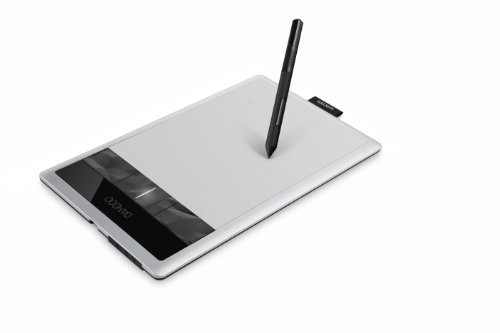
Wacom Bamboo Capture Pen Tablet
Best for: basic sketching and photo editing
- Color
- Silver
- Shortcut Controls
- 4 ExpressKeys
- Features
- Stylus, Stylus Pen
- Tablet Type
- Pen Tablet
- Dimensions
- 10.9 × 6.9 × 0.4 inches
- Weight
- 14.9 ounces
The Wacom Bamboo Capture is a silver pen tablet designed for digital drawing and photo editing. It measures 10.9 by 6.9 inches with a slim 0.4-inch profile. The device includes a pressure-sensitive pen and four express keys for shortcuts. It comes with downloadable creative software. This compact unit suits users who need a portable, basic input tool for sketching.
- Pressure-sensitive pen for natural drawing feel
- Four express keys for quick shortcuts
- Compact 10.9 x 6.9 inch active area
- Includes Photoshop Elements and Sketchbook Express software
- 14.9-ounce weight is heavier than typical pen displays
- No built-in screen requires an external monitor
- Basic 6.9-inch width limits large canvas work
- You want a compact tablet for basic sketching
- You already have a monitor for display
- You need express keys for workflow shortcuts
- You need a built-in screen for direct drawing
- You require a large active area for detailed work
- You prefer a lighter device for travel
Verdict: Wacom Bamboo Capture Silver Pen Tablet fits beginners who want a reliable, compact input device with included software. It works well for those who already use a separate monitor for their digital art.
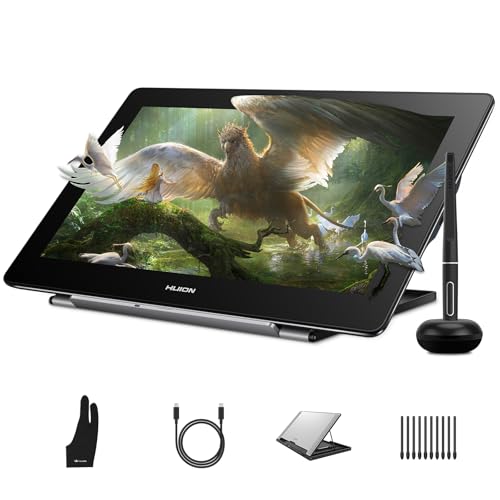
HUION Kamvas Pro 16 4K
Best for: detailed digital art on a 15.6-inch screen
- Color
- Silver
- Tablet Type
- Not standalone
- Screen Size
- 15.6"
- Display Resolution
- 4K (3840×2160)
- Pen Pressure
- 8192 levels
- Color Gamut
- 120% sRGB
The HUION Kamvas Pro 16 is a 15.6-inch silver pen display with 4K UHD resolution. It features a fully laminated anti-glare screen and a battery-free stylus with 8192 pressure levels. The device uses dual USB-C ports for connection to Windows, Mac, or Android systems. It includes an adjustable stand for ergonomic use. This tablet suits creators who need high pixel density for detailed work.
- 15.6-inch 4K UHD (3840×2160) display
- Fully laminated anti-glare screen
- Battery-free stylus with 8192 pressure levels
- Dual USB-C connectivity
- 15.6-inch screen is smaller than the 27-inch option available
- Requires connection to a host device as it is not standalone
- You need high-resolution clarity for intricate digital painting or photo retouching
- You work with Windows, Mac, or Android devices via USB-C
- You prefer a battery-free stylus for sketching and illustration
- You require a standalone tablet without a host computer
- You need a screen larger than 15.6 inches
- You are looking for a black color option
Verdict: The HUION Kamvas Pro 16 4K delivers sharp 4K visuals and precise pen tracking for detailed creative tasks. It fits designers and illustrators who prioritize screen clarity and direct connectivity over standalone operation.
Specifications side by side
| Spec | Wacom Bamboo Capture Pen Tablet | HUION Kamvas Pro 16 4K |
|---|---|---|
| Tablet Type | – | Not standalone |
| Screen Size | – | 15.6" |
| Display Resolution | – | 4K (3840×2160) |
| Pen Pressure | – | 8192 levels |
| Color Gamut | – | 120% sRGB |
| Display Finish | – | Fully laminated, anti-glare coating |
| Shortcut Controls | 4 ExpressKeys | – |
| Operating System | – | Android |
| Features | Stylus, Stylus Pen | Stylus, Stylus Pen, Battery-Free Pen |
| Display | – | Full-Laminated |
| Color | Silver | Silver |
| Dimensions | 10.9 × 6.9 × 0.4 inches | 13.6 × 7.65 × 0.1 inches |
| Weight | 14.9 ounces | – |
| Model | CTH470 | GT1561 |
| Size | – | 15.6inch |
Key Specs to Compare Before You Buy
Check Screen Type
You must decide if you need a pen tablet or a pen display. A pen tablet like the Wacom Bamboo Capture has no built-in screen. You draw on the device while looking at your computer monitor. This setup saves space but requires a separate display. A pen display like the HUION Kamvas Pro 16 shows your art directly on the tablet surface. This offers a more natural drawing experience. Choose based on whether you prefer direct feedback or a compact desk footprint.
Evaluate Display Size
Screen size determines your workspace and portability. The HUION Kamvas Pro 16 features a 15.6-inch display. This larger area allows for detailed work and precise strokes without constant cursor movement. It suits illustrators who need ample room for complex designs. Smaller tablets offer less drawing area but are easier to store. Consider your desk space and whether you move your device often. A larger screen improves precision but reduces portability. Match the size to your typical project complexity.
Review Operating System
The operating system affects connectivity and software compatibility. The HUION Kamvas Pro 16 supports Android. This allows it to function as a standalone device or connect to other systems. You can use it with compatible apps directly on the tablet. Other models may require a connected computer to function. Check if your preferred software runs on the tablet's OS. This ensures you can start drawing immediately without additional setup. Verify compatibility with your existing devices before purchasing.
Assess Portability Needs
Dimensions and weight impact how easy the tablet is to carry. The Wacom Bamboo Capture measures 10.9 inches by 6.9 inches and weighs 14.9 ounces. Its compact form factor fits easily into a bag or desk drawer. It is ideal for users who travel or have limited desk space. The HUION Kamvas Pro 16 is larger and heavier. It is better suited for a fixed workstation. If you need a mobile solution, prioritize smaller dimensions and lighter weight. Check the specs for exact measurements to plan your storage.
Consider Pen Features
The included stylus type influences your drawing comfort. Both models include a stylus pen. The HUION Kamvas Pro 16 specifies a battery-free pen. This means you do not need to charge or replace batteries for the pen. It reduces maintenance and ensures consistent performance. Some pens require batteries, which can run out during work. Check if the pen needs charging or batteries. A battery-free option offers greater convenience. Ensure the pen feels comfortable in your hand for long sessions.
Frequently asked questions
Is the Wacom Bamboo Capture good for beginners?
Yes, it is a reliable choice for those new to digital art. The device is compact and includes software to help you start. It works best if you already use a separate monitor for your creative projects. You can use the included stylus pen for basic sketching and photo editing tasks without confusion.
What is the difference between a pen tablet and a pen display?
A pen tablet requires a separate monitor, while a pen display has a built-in screen. The Wacom Bamboo Capture is a pen tablet, so you draw on the device while looking at your computer. The HUION Kamvas Pro 16 is a pen display with a 15.6-inch screen, allowing direct drawing on the visuals.
Does the HUION Kamvas Pro 16 support Android?
Yes, the HUION Kamvas Pro 16 supports the Android operating system. This feature allows for versatile connectivity and usage options. It also features a full-laminated display for sharp 4K visuals. You get precise pen tracking for detailed creative tasks, making it suitable for designers who prioritize screen clarity.
How large is the active area on the Wacom Bamboo Capture?
The Wacom Bamboo Capture measures 10.9 inches in length and 6.9 inches in width. This compact size makes it easy to fit on most desks. It weighs 14.9 ounces, so it is lightweight and portable. The device includes a stylus pen for input, fitting well for basic sketching needs.
Is the stylus on the HUION Kamvas Pro 16 battery-free?
Yes, the HUION Kamvas Pro 16 features a battery-free pen. This means you do not need to charge the stylus separately. It connects via full-laminated display technology for clear visuals. The pen tracking is precise, which helps you handle detailed digital art tasks without interruption or power concerns.
Which silver drawing tablet has the best screen resolution?
The HUION Kamvas Pro 16 offers 4K resolution on its 15.6-inch screen. This provides sharp visuals for detailed creative work. The Wacom Bamboo Capture does not have a built-in screen, so resolution depends on your monitor. If you need high clarity, the HUION model is the superior choice for screen quality.
Can I use the Wacom Bamboo Capture for photo editing?
Yes, the Wacom Bamboo Capture is suitable for photo editing. It is designed for basic sketching and photo editing tasks. The included software supports these functions. You will need a separate monitor to view your work, but the pen input provides the control needed for precise adjustments in your editing workflow.


