Best Wacom Drawing Tablets with Bluetooth: 6 Spec-Based Picks
Finding the best wacom drawing tablets with bluetooth requires checking specific hardware details.

What this report covers
- Last updated
- 4 Nov 2026
Figures above are read from the product listings for the models named below. Scores are out of 10, based on listed specifications and buyer feedback.
As Amazon Associates, we earn from qualifying purchases. This means we may receive a small commission at no extra cost to you if you click through and make a purchase.
As an Amazon Associate we earn from qualifying purchases. Links on this page are affiliate links.
Finding the best wacom drawing tablets with bluetooth requires checking specific hardware details. You need a wireless pen tablet that matches your workspace. We compared 6 models based strictly on the specifications published on the listings. The top pick is the Wacom Intuos Small Bluetooth. It leads because its compact 6.3 by 7.87 inch size fits limited desks. This guide helps you decide which wireless drawing tablet suits your student or professional needs.
Check the drawing surface size first
The primary difference among these wireless Wacom tablets is the active drawing area. The Intuos Small offers a compact 6.3 by 7.87 inch surface, while the Intuos Medium provides a larger 7.8 by 10.4 inch workspace. Choose the size that fits your desk and hand movement. Both options include Bluetooth connectivity and battery-free pens for immediate use.
| # | Product | Best for | Price |
|---|---|---|---|
| 1 | Wacom Intuos Small Bluetooth Best overall | compact student and teacher drawing needs | |
| 2 | Wacom Intuos Medium Bluetooth Pen Tablet Best premium | Students needing medium-sized wireless drawing | |
| 3 | Wacom Intuos Medium Wireless Drawing Tablet Best budget | Students needing a medium workspace | |
| 4 | Wacom Intuos Pro Small Bluetooth Tablet Best 6-inch | compact professional wireless drawing | |
| 5 | Wacom One Medium Bluetooth Tablet Best beginners | beginners and students needing a battery-free pen | |
| 6 | Wacom Intuos Pro Small Bluetooth Pen Tablet Best animation | Animators needing wireless precision |
The best fit for you
- You need the most compact wireless drawing tablet – Wacom Intuos Small Bluetooth – It weighs just 8.8 ounces and measures 6.3 by 7.87 inches.
- You want the largest workspace on the list – Wacom Intuos Medium Wireless Drawing Tablet – It offers a 10.4 by 7.8 inch active area for drawing.
- You are an animator needing high pressure levels – Wacom Intuos Pro Small Bluetooth Pen Tablet – It provides 8192 pressure levels for precise line control.

Wacom Intuos Small Bluetooth
Best for: compact student and teacher drawing needs
- Features
- Bluetooth, Shortcut Keys
- Shortcut Controls
- 4 Customizable ExpressKeys
- Operating System
- Android
- Tablet Type
- Pen Tablet
- Audience
- Students
- Dimensions
- 7.87 × 6.3 × 0.35 inches
This Wacom Intuos Small Bluetooth Graphics Drawing Tablet offers portable creative control. It measures 6.3 by 7.87 inches with a slim 0.35-inch profile. The device weighs 8.8 ounces, making it easy to carry. It connects wirelessly via Bluetooth or through a USB-A cable. The pen uses battery-free EMR technology for precise input. It suits students and teachers who need a compact, reliable drawing surface.
- Bluetooth wireless connectivity for flexible workspace setup
- Battery-free EMR pen technology for natural drawing feel
- Compact 6.3 by 7.87-inch active area
- Lightweight 8.8-ounce design for portability
- Smaller 6.3 by 7.87-inch active area compared to Medium and Pro models
- Single size option limits workspace flexibility
- 8.8-ounce weight adds bulk when carrying alongside other gear
- You need a compact tablet for small desks or classrooms
- You prefer wireless Bluetooth connectivity over wired connections
- You are a student looking for a portable drawing tool
- You require a large active area for detailed professional work
- You need multiple size options for different workflows
- You prioritize ultra-lightweight portability under 5 ounces
Verdict: Wacom Intuos Small Bluetooth Tablet fits students and teachers who need a compact, wireless drawing tool for classroom or desk use. Its small size suits limited spaces, while the battery-free pen ensures reliable performance.
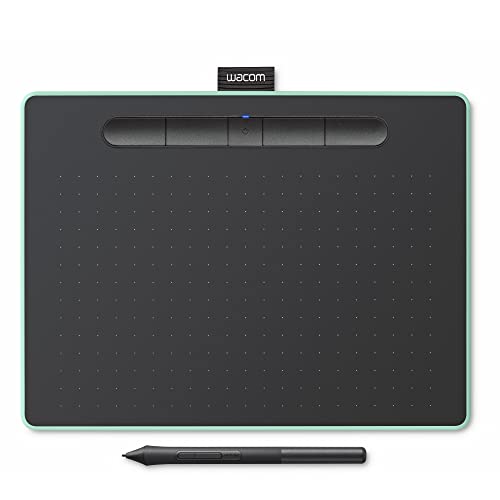
Wacom Intuos Medium Bluetooth Pen Tablet
Best for: Students needing medium-sized wireless drawing
- Features
- Bluetooth, Shortcut Keys
- Shortcut Controls
- 4 Customizable ExpressKeys
- Operating System
- Android
- Tablet Type
- Pen Tablet
- Audience
- Students
- Dimensions
- 10.4 × 7.8 × 0.35 inches
This Wacom Intuos Medium tablet offers wireless connectivity via Bluetooth or USB-A. It features a 10.4 x 7.8 inch active area and weighs 14.5 ounces. The device uses EMR battery-free pen technology for precise input. It includes shortcut keys and comes with creative software. This model suits students and teachers who need a portable, reliable drawing surface for digital creation.
- Bluetooth and USB-A connectivity options
- 10.4 x 7.8 inch active area
- EMR battery-free pen technology
- Includes creative software and training
- Shortcut keys for workflow efficiency
- Smaller 10.4 x 7.8 inch active area compared to larger models
- Heavier 14.5 ounces build than the Small variant
- Limited to Medium size without larger options
- You need wireless Bluetooth connectivity for your drawing setup
- You prefer a Medium-sized active area for detailed work
- You are a student or teacher needing included software
- You require a larger active area than 10.4 x 7.8 inches
- You need the lightest possible tablet under 14.5 ounces
- You prefer a Small or Pro model with different specs
Verdict: Wacom Intuos Medium Bluetooth provides a balanced medium-sized drawing surface with reliable wireless options. It fits students and creators who value included software and a sturdy, portable build for classroom or home use.

Wacom Intuos Medium Wireless Drawing Tablet
Best for: Students needing a medium workspace
- Features
- Stylus, Stylus Pen, Bluetooth, Battery-Free Pen, Shortcut Keys
- Shortcut Controls
- 4 ExpressKeys
- Operating System
- Windows
- Color
- Black
- Tablet Type
- Pen Tablet
- Audience
- Students
The Wacom Intuos Medium Bluetooth tablet offers a 10.4 by 7.8 inch active area for comfortable drawing. It connects wirelessly via Bluetooth or with a USB-A cable. The battery-free pen provides precise control without needing charging. You get shortcut keys and included creative software. This medium size suits users who need more space than a small tablet provides.
- Bluetooth wireless connectivity
- 10.4 by 7.8 inch active area
- Battery-free pen technology
- Includes shortcut keys
- Comes with creative software
- Heavier at 14.5 ounces compared to lighter portable options
- Thicker at 0.4 inches compared to slimmer designs
- Limited to Windows operating system support
- You need a larger drawing surface than a small tablet
- You want wireless Bluetooth connectivity for your desk
- You are a student looking for included training and software
- You require macOS compatibility
- You prefer a very thin and light portable device
- You only need a small active drawing area
Verdict: Wacom Intuos Medium Bluetooth is a solid choice for students and creators who value a generous 10.4 by 7.8 inch workspace and wireless convenience. It fits those who prioritize screen real estate and included software over ultra-portability.
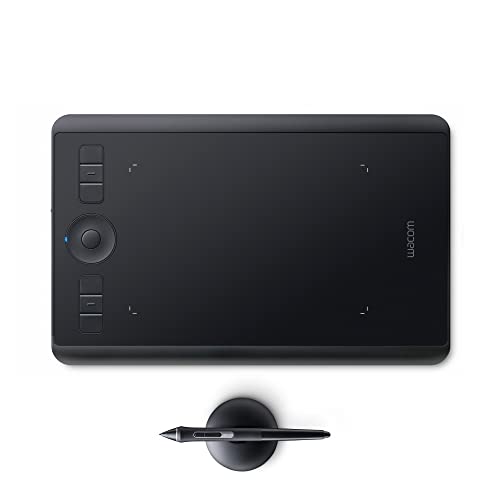
Wacom Intuos Pro Small Bluetooth Tablet
Best for: compact professional wireless drawing
- Features
- Stylus, Stylus Pen, Bluetooth
- Pen Pressure
- 8192 levels
- Shortcut Controls
- 6 ExpressKeys, Touch Ring
- Screen Size
- 6-Inch
- Operating System
- Windows
- Display
- Touchscreen
The Wacom Intuos Pro Small is a wireless graphics tablet with Bluetooth connectivity. It features a 6-inch active area and includes the Pro Pen 2 with 8192 levels of pressure sensitivity. The device offers tilt recognition and touch gestures. It connects via USB or Bluetooth to Mac or Windows PCs. This compact design suits creative professionals who need precision and portability.
- Pro Pen 2 includes tilt recognition
- 8192 levels of pressure sensitivity
- Connects via Bluetooth or USB
- Includes 6 ExpressKeys and Touch Ring
- Compact 6-inch active area
- 6-inch screen is smaller than the 9.5-inch Medium options
- 15.8-ounce weight is heavier than the Intuos Small
- 2-inch height is bulkier than the 0.31-inch profile
- You need Bluetooth connectivity for a Mac or Windows PC
- You want professional pressure sensitivity and tilt support
- You prefer a compact 6-inch drawing surface
- You require a larger 9.5-inch or 13-inch display
- You need the thinnest possible 0.31-inch profile
- You are looking for the lightest 15.8-ounce option
Verdict: Wacom Intuos Pro Small Wireless Tablet provides professional pen precision and wireless freedom for users who value a compact 6-inch workspace over a larger surface area.

Wacom One Medium Bluetooth Tablet
Best for: beginners and students needing a battery-free pen
- Features
- Stylus, Stylus Pen, Bluetooth, Battery-Free Pen
- Pen Pressure
- 4096 levels
- Operating System
- Windows
- Tablet Type
- Pen Tablet
- Audience
- Students, Beginners
- Dimensions
- 9.9 × 7.1 × 0.3 inches
The Wacom One Medium is a Bluetooth drawing tablet designed for beginners and students. It features a 9.9 x 7.1 inch footprint with an 8.5 x 5.3 inch active area. The included battery-free pen offers 4096 levels of pressure sensitivity and tilt recognition. It connects via USB-C to Windows, Mac, Chromebook, and Android devices. This model provides a solid entry point for digital art without requiring a power source for the stylus.
- Battery-free pen eliminates charging needs
- 4096 levels of pressure sensitivity for detailed work
- Supports tilt recognition for natural shading
- Compatible with Windows, Mac, Chromebook, and Android
- Smaller 8.5 x 5.3 inch active area than Medium Intuos models
- Heavier at 12.2 ounces compared to lighter portable options
- Only includes two customizable shortcut buttons on the pen
- You are a student or beginner starting with digital art
- You need a reliable pen tablet for Mac or Windows
- You prefer a battery-free stylus for convenience
- You require a large active area for professional illustration
- You need a display tablet with a built-in screen
- You want extensive shortcut keys on the device body
Verdict: Wacom One Medium Bluetooth Tablet is a practical entry-level choice for students and beginners who want a battery-free pen and broad device compatibility without the bulk of a display model.
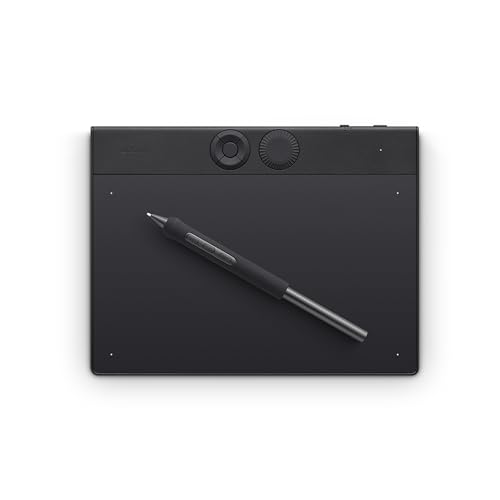
Wacom Intuos Pro Small Bluetooth Pen Tablet
Best for: Animators needing wireless precision
- Features
- Stylus, Stylus Pen, Bluetooth, Shortcut Keys
- Pen Pressure
- 8192
- Tablet Type
- Pen Tablet
- Audience
- Animation
- Length
- 8.46 inches
- Width
- 6.42 inches
This Wacom Intuos Pro Small tablet connects via Bluetooth or USB for flexible workspace setups. It features the Pro Pen 3 with 8192 pressure levels and tilt support for precise stroke control. The magnesium body is only 4mm thick and weighs 8.48 ounces. Its 16:9 aspect ratio suits wide monitors. Five ExpressKeys and a mechanical dial help streamline your creative workflow efficiently.
- Pro Pen 3 with 8192 pressure levels
- Tilt support for natural shading
- Bluetooth and USB connectivity options
- 4mm thick magnesium build
- Mechanical dial for quick adjustments
- Smaller active area than Medium or Large models
- Heavier than the standard Intuos Small at 8.48 ounces
- Only available in Small size for this specific model
- You need Bluetooth wireless freedom for a clean desk
- You work on wide 16:9 monitors
- You prefer a lightweight magnesium build
- You require a large active drawing area
- You want the lightest possible tablet
- You need multiple size options in one purchase
Verdict: Wacom Intuos Pro Small Bluetooth delivers professional pen precision with 8192 pressure levels in a compact 16:9 frame. It suits animators who value wireless connectivity and a slim magnesium profile.
Specifications side by side
| Spec | Wacom Intuos Small Bluetooth | Wacom Intuos Medium Bluetooth Pen Tablet | Wacom Intuos Medium Wireless Drawing Tablet | Wacom Intuos Pro Small Bluetooth Tablet | Wacom One Medium Bluetooth Tablet | Wacom Intuos Pro Small Bluetooth Pen Tablet |
|---|---|---|---|---|---|---|
| Pen Pressure | – | – | – | 8192 levels | 4096 levels | 8192 |
| Shortcut Controls | 4 Customizable ExpressKeys | 4 Customizable ExpressKeys | 4 ExpressKeys | 6 ExpressKeys, Touch Ring | – | – |
| Screen Size | – | – | – | 6-Inch | – | – |
| Operating System | Android | Android | Windows | Windows | Windows | – |
| Features | Bluetooth, Shortcut Keys | Bluetooth, Shortcut Keys | Stylus, Stylus Pen, Bluetooth, Battery-Free Pen, Shortcut Keys | Stylus, Stylus Pen, Bluetooth | Stylus, Stylus Pen, Bluetooth, Battery-Free Pen | Stylus, Stylus Pen, Bluetooth, Shortcut Keys |
| Display | – | – | – | Touchscreen | – | – |
| Color | Pistachio | Pistachio | Black | Black | White | – |
| Tablet Type | Pen Tablet | Pen Tablet | Pen Tablet | – | Pen Tablet | Pen Tablet |
| Audience | Students | Students | Students | – | Students, Beginners | Animation |
| Dimensions | 7.87 × 6.3 × 0.35 inches | 10.4 × 7.8 × 0.35 inches | 10.4 × 7.8 × 0.4 inches | 11.8 × 7.75 × 2 inches | 9.9 × 7.1 × 0.3 inches | – |
| Weight | 8.8 ounces | 14.5 ounces | 14.5 ounces | 15.8 ounces | 12.2 ounces | 8.48 ounces |
| Length | – | – | – | – | – | 8.46 inches |
| Width | – | – | – | – | – | 6.42 inches |
| Size | Small, Wireless | Medium, Wireless | Medium, Wireless (Pack of 1) | Small | Medium | Small |
| Model | CTL4100WLE0 | CTL6100WLE0 | CTL6100WLK0 | PTH460K0A | CTC6110WLW0A | PTK470K0A |
Key Specs to Check Before Buying
Check Wireless Connectivity
All models in this guide include Bluetooth for wireless use. You can connect via USB if you prefer a wired setup. This dual option ensures you can work at a desk or on the go. Wireless mode requires a power source, but the pen remains battery-free. Check the product listing to confirm if Bluetooth is included in the box. This feature adds convenience for students moving between classes or creators working in different spots.
Choose Surface Size
Select a size that fits your hand movement. The Small models, like the Intuos Small Bluetooth, offer a 6.3 by 7.87 inch surface. This fits tight desks and travel bags. The Medium options, such as the Intuos Medium Bluetooth, provide a 7.8 by 10.4 inch area. Larger surfaces allow for broader strokes and more natural hand positioning. Pick the size that matches your typical workspace dimensions and drawing style.
Verify Operating System
Ensure the tablet works with your device. Some models support Android, while others are designed for Windows. The Intuos Small Bluetooth lists Android compatibility. The Intuos Medium Wireless Drawing Tablet specifies Windows support. Check the operating system field in the specs. This prevents connection issues when you pair the tablet with your computer or mobile device. Matching the OS ensures smooth driver installation and full feature access.
Look for Shortcut Keys
Shortcut keys improve your workflow efficiency. Most listed tablets include physical shortcut keys on the device. You can map these keys to your most used tools in your software. The Intuos Small Bluetooth and Intuos Medium Bluetooth both feature these keys. Having quick access to commands reduces mouse usage. This is especially helpful for long drawing sessions or complex projects requiring frequent tool switches.
Consider Weight and Portability
Weight matters if you carry your tablet often. The Intuos Small Bluetooth weighs just 8.8 ounces. The Intuos Pro Small Bluetooth Pen Tablet is slightly heavier at 8.48 ounces. The Medium models are heavier, around 14.5 ounces. Lighter tablets are easier to pack in a backpack. Heavier models may offer more stability on a desk. Check the weight spec to decide what fits your carrying habits and usage environment.
Frequently asked questions
Which Wacom Bluetooth tablet is best for students?
The Wacom Intuos Small Bluetooth is the top choice for students. It features a compact 6.3 by 7.87 inch surface and weighs only 8.8 ounces. This size fits easily into backpacks and small desks. The battery-free pen ensures reliable performance without charging interruptions. It also includes shortcut keys for efficient workflow.
Do all these tablets include a battery-free pen?
Not all models include a battery-free pen. The Wacom One Medium Bluetooth Tablet and the Intuos Medium Wireless Drawing Tablet both feature battery-free styluses. This means you do not need to charge the pen to use it. Other models like the Intuos Pro Small may require battery charging for the stylus.
What is the largest drawing surface available?
The Wacom Intuos Medium Bluetooth Pen Tablet offers the largest active area on this list. Its drawing surface measures 7.8 by 10.4 inches. This provides ample space for detailed artwork and broad strokes. The tablet itself is slightly larger, measuring 10.4 inches in length and 7.8 inches in width.
Can I use these tablets with Android devices?
Yes, several models support Android operating systems. The Wacom Intuos Small Bluetooth and the Intuos Medium Bluetooth Pen Tablet are both compatible with Android. This allows you to connect directly to tablets or phones without a computer. Check the specific listing attributes to confirm compatibility with your device.
How many pressure levels does the Intuos Pro Small have?
The Wacom Intuos Pro Small Bluetooth Pen Tablet features 8192 pressure levels. This high sensitivity allows for precise line variation and natural shading. It is designed for animators and professionals who need detailed control. The compact 16:9 frame fits in the palm while delivering professional-grade responsiveness.
Which tablet is best for animators?
The Wacom Intuos Pro Small Bluetooth Pen Tablet is the best choice for animators. It offers 8192 pressure levels and a compact 16:9 frame. The slim magnesium profile makes it portable yet sturdy. Wireless connectivity allows you to work freely without cable restrictions. This precision supports detailed frame-by-frame animation work.
Are there shortcut keys on the Wacom One tablet?
The Wacom One Medium Bluetooth Tablet does not list shortcut keys in its published specifications. It focuses on a battery-free pen and broad device compatibility. If you need customizable buttons, consider the Intuos series models. Those tablets explicitly include shortcut keys for faster access to common tools.


