The Best Wacom Drawing Tablets in 2026: 15 Picks
Wacom makes best wacom drawing tablets for every workflow.

What this report covers
- Last updated
- 31 Oct 2026
Figures above are read from the product listings for the models named below. Scores are out of 10, based on listed specifications and buyer feedback.
As Amazon Associates, we earn from qualifying purchases. This means we may receive a small commission at no extra cost to you if you click through and make a purchase.
As an Amazon Associate we earn from qualifying purchases. Links on this page are affiliate links.
Wacom makes best wacom drawing tablets for every workflow. You can choose from compact pen tablets or large pen displays. The Wacom Bamboo Capture Pen Tablet leads as the best overall pick for beginners using a separate monitor. It offers a simple, wired connection in a small silver frame. We compared 15 models based strictly on published specifications. This guide focuses on physical dimensions, connectivity types, and screen sizes to help you find the right tool for your desk.
| # | Product | Best for | Price |
|---|---|---|---|
| 1 | Wacom Bamboo Capture Pen Tablet Best overall | beginners using a separate monitor | |
| 2 | Wacom 22HD Pen Display Best premium | stationary digital artists needing large screen space | |
| 3 | Wacom Cintiq 22HD Touch Pen Display Also great | artists needing a large touch-enabled screen | |
| 4 | Wacom Cintiq 13HD 13.3-Inch Pen Display Also great | Compact direct-screen drawing with tactile shortcuts | |
| 5 | Wacom Graphire Medium Pen Tablet Also great | Beginners needing basic pen input | |
| 6 | Wacom Intuos Small Bluetooth Best budget | portable student and teacher use | |
| 7 | Wacom Intuos Medium Bluetooth Pen Tablet Also great | portable digital drawing without a screen | |
| 8 | Wacom Intuos Medium Wireless Drawing Tablet Best battery-free pen | Wireless drawing with a medium active area | |
| 9 | Wacom Cintiq Pro 24 4K Touch Also great | Professional animators needing a large 4K stationary display | |
| 10 | Wacom Cintiq Pro 16 Black Also great | artists needing portable 4K color accuracy | |
| 11 | Wacom Cintiq Pro 24 4K Touch Display Best 8192 levels | Professional illustrators needing large 4K color accuracy | |
| 12 | Wacom Cintiq 16 15.4" Pen Display Best tilt support | artists needing tilt support and a dedicated screen | |
| 13 | Wacom Intuos Pro Small Bluetooth Tablet Best 6-inch | portable professional drawing on a small surface | |
| 14 | Wacom Cintiq 22 22-Inch Non-Touch Pen Display Also great | Large canvas digital artists needing precision | |
| 15 | Wacom One 13.3" HD Pen Display Best 13.3-inch | Hobbyists needing a 13.3-inch screen for PC or Mac |
Wacom Tablet Models Compared
Wacom offers pen tablets and pen displays to match your workflow. Pen tablets like the Bamboo Capture and Intuos Small connect via Bluetooth or wire. These compact devices fit students and beginners who draw on a separate monitor. They prioritize portability and simple setup over an integrated screen. You can choose small or medium sizes depending on your desk space. Pen displays like the Cintiq 22HD and Cintiq Pro 16 offer direct drawing on screen. These heavier units suit stationary artists who need large 4K resolution or touch controls. You select based on whether you prefer wireless freedom or a dedicated, high-resolution canvas.
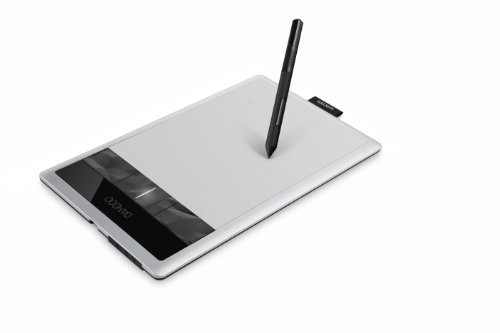
Wacom Bamboo Capture Pen Tablet
Best for: beginners using a separate monitor
- Shortcut Controls
- 4 ExpressKeys
- Features
- Stylus, Stylus Pen
- Color
- Silver
- Tablet Type
- Pen Tablet
- Dimensions
- 10.9 × 6.9 × 0.4 inches
- Weight
- 14.9 ounces
The Wacom Bamboo Capture is a compact pen tablet designed for drawing and photo editing. It measures 10.9 by 6.9 inches with a slim 0.4-inch profile. The device includes four express keys and a pressure-sensitive pen. It weighs 14.9 ounces. This model suits users seeking a basic, portable input device for creative software without a display screen.
- Includes four express keys for shortcuts
- Pressure-sensitive pen for natural drawing feel
- Compact 10.9 x 6.9 inch footprint
- Lightweight 14.9 ounce build
- Smaller active area than Cintiq display models
- No built-in screen for direct drawing
- Fewer express keys than professional Intuos Pro models
- You need a portable tablet for basic sketching
- You prefer using a separate monitor for your work
- You want a simple setup with included software
- You require a high-resolution display for precise work
- You need wireless connectivity for your workflow
- You want a large drawing surface for detailed illustrations
Verdict: Wacom Bamboo Capture Silver Pen Tablet is a basic, wired input device for beginners who draw on a separate monitor. It fits users who prioritize portability and simplicity over screen integration.

Wacom 22HD Pen Display
Best for: stationary digital artists needing large screen space
- Screen Size
- 21-Inch
- Display Resolution
- full HD resolution
- Shortcut Controls
- customizable express keys
- Features
- Stylus, Stylus Pen
- Color
- Black
- Tablet Type
- Pen Display
The Wacom Cintiq 22HD is a 21-inch pen display with full HD resolution. It lets you draw directly on the screen using a tilt-sensitive pen. The unit weighs 18.7 pounds and measures 25.5 inches long. You get customizable express keys for shortcuts. This large display suits stationary workspaces where screen real estate matters more than portability.
- 21-inch full HD display for wide viewing angles
- Direct screen drawing with tilt-sensitive pen technology
- Customizable express keys for workflow shortcuts
- 18.7 pounds weight makes it heavy to move
- 25.5-inch length requires a large desk surface
- 2.2-inch depth adds bulk to the setup
- You need a large canvas for detailed digital art
- You have a dedicated stationary workstation
- You prefer drawing directly on the screen
- You need a portable tablet for travel
- You have limited desk space
- You want a lightweight device
Verdict: Wacom Cintiq 22HD 21-Inch Pen Display offers a large drawing area for stationary artists. It fits professionals who prioritize screen size over portability.

Wacom Cintiq 22HD Touch Pen Display
Best for: artists needing a large touch-enabled screen
- Screen Size
- 21.5"
- Display Resolution
- 1920 x 1080
- Shortcut Controls
- ExpressKeys and Touch Strips
- Features
- Stylus, Stylus Pen
- Display
- Touchscreen
- Color
- Black
The Wacom Cintiq 22HD Touch is a 21.5-inch pen display with a 1920 x 1080 resolution and 16.7 million colors. It features multi-touch gestures for panning and zooming, plus ExpressKeys and Touch Strips for shortcuts. This 18.7-pound unit includes an adjustable ergonomic stand. It suits artists who need a large screen with touch capabilities and physical controls.
- 21.5-inch HD display with 1920 x 1080 resolution
- Multi-touch support for pan, zoom, and rotate gestures
- ExpressKeys and Touch Strips for personalized shortcuts
- Adjustable ergonomic stand for preferred working positions
- Heavier 18.7-pound build compared to portable models
- Lower 1080p resolution than 4K Cintiq Pro options
- Larger 25.6-inch footprint reduces desk space
- You want a large 21.5-inch screen for detailed work
- You prefer using multi-touch gestures for navigation
- You need physical ExpressKeys for workflow shortcuts
- You need a portable tablet under 10 pounds
- You require 4K resolution for professional color grading
- You have limited desk space for a 25.6-inch device
Verdict: Wacom Cintiq 22HD Touch Pen Display fits artists who prioritize a large touch-enabled screen and physical controls over portability or 4K resolution.

Wacom Cintiq 13HD 13.3-Inch Pen Display
Best for: Compact direct-screen drawing with tactile shortcuts
- Screen Size
- 13.3"
- Display Resolution
- 1920 X 1080
- Pen Pressure
- 2048 levels
- Shortcut Controls
- four ExpressKeys, Rocker ring
- Features
- Stylus, Stylus Pen
- Color
- Black
The Wacom Cintiq 13HD is a 13-inch pen display with a 1920 by 1080 resolution. It uses a pressure-sensitive Pro Pen with 2048 levels and tilt support. The unit weighs 2.64 pounds and measures 0.53 inches thick. You get four customizable ExpressKeys and a rocker ring for shortcuts. This compact screen suits artists who need direct drawing on a portable HD display.
- 13.3-inch Full HD display with 1920 x 1080 resolution
- Pro Pen with 2048 pressure levels and tilt sensitivity
- Four customizable ExpressKeys and a rocker ring
- Compact 13-inch size weighs 2.64 pounds
- 3-position adjustable display stand included
- HD resolution is lower than the 4K and Full HD screens on other picks
- 13-inch display area is smaller than the 22-inch and 24-inch options
- Heavier and thicker than the wireless Intuos tablet models
- You want a dedicated pen display for direct drawing
- You prefer a compact 13-inch screen for portability
- You need customizable shortcut keys for your workflow
- You require a 4K or higher resolution display
- You need a wireless connection without cables
- You want a larger screen for detailed work
Verdict: Wacom Cintiq 13HD Pen Display offers a solid HD drawing experience for artists who value a compact form factor and direct screen interaction. It fits creators who prioritize portability and tactile controls over maximum screen size or wireless freedom.

Wacom Graphire Medium Pen Tablet
Best for: Beginners needing basic pen input
- Pen Pressure
- 2048, tip only
- Features
- Stylus, Stylus Pen
- Color
- Black
- Tablet Type
- Pen Tablet
- Dimensions
- 8.27 × 0.34 × 5.75 inches
- Weight
- 8.82 ounces
This Wacom Graphire is a 10-inch pen tablet designed for basic digital input. It offers 2048 pressure levels for natural stroke variation. The battery-free stylus requires no charging. It connects via a standard USB Type-A port. This model suits users who need a simple, reliable drawing surface without wireless complexity or a built-in screen.
- 2048 pressure levels for detailed input
- Battery-free cordless stylus
- Compact 10-inch active area
- Standard USB Type-A connection
- Limited 2048 pressure levels compared to modern 8192+ standards
- Requires wired USB connection without Bluetooth support
- No built-in display for direct drawing
- You need a basic, affordable pen tablet for learning digital art
- You prefer a wired connection for stable input
- You are using an older computer with only USB Type-A ports
- You require wireless connectivity via Bluetooth
- You want a pen display with a built-in screen
- You need high-end pressure sensitivity for professional illustration
Verdict: Wacom Graphire Medium Pen Tablet is a straightforward input device for beginners. It fits students or hobbyists who prioritize simplicity and wired reliability over advanced features.

Wacom Intuos Small Bluetooth
Best for: portable student and teacher use
- Shortcut Controls
- 4 Customizable ExpressKeys
- Operating System
- Android
- Features
- Bluetooth, Shortcut Keys
- Tablet Type
- Pen Tablet
- Audience
- Students
- Dimensions
- 7.87 × 6.3 × 0.35 inches
The Wacom Intuos Small is a portable pen tablet designed for students and teachers. It features a 6.3-inch by 7.87-inch active area and weighs just 8.8 ounces. You connect via Bluetooth or a USB-A cable. The device uses battery-free EMR pen technology for precision. It includes creative software and training resources. This compact size makes it easy to carry in a bag.
- Compact 6.3-inch by 7.87-inch active drawing area
- Lightweight 8.8-ounce portable design
- Wireless Bluetooth connectivity option
- Battery-free EMR pen technology
- Small 6.3-inch active area limits workspace compared to larger models
- No built-in screen requires a separate display for visual feedback
- You need a portable tablet for classroom or travel use
- You are a student starting with digital art software
- You prefer a lightweight device that fits in small bags
- You require a large drawing surface for detailed professional work
- You want a pen display with an integrated screen
- You need a high-resolution 4K display for color-critical tasks
Verdict: Wacom Intuos Small Bluetooth Pen Tablet is a compact, lightweight option for students and teachers who need portability. It fits those who prioritize wireless connectivity and a small footprint over a large active area or integrated screen.
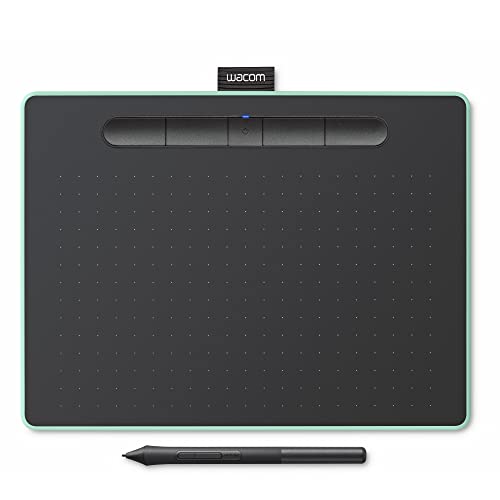
Wacom Intuos Medium Bluetooth Pen Tablet
Best for: portable digital drawing without a screen
- Shortcut Controls
- 4 Customizable ExpressKeys
- Operating System
- Android
- Features
- Bluetooth, Shortcut Keys
- Tablet Type
- Pen Tablet
- Audience
- Students
- Dimensions
- 10.4 × 7.8 × 0.35 inches
This Wacom Intuos Medium tablet offers a 10.4 by 7.8 inch active area for digital drawing. It connects via Bluetooth or USB-A cable. The device uses EMR battery-free pen technology for precise input. Weighing 14.5 ounces, it fits easily into bags. It includes creative software and online training. This model suits students and creators needing portable, wireless control.
- Bluetooth and USB-A connectivity options
- 10.4 by 7.8 inch active drawing area
- EMR battery-free pen technology
- Includes creative software and training
- Smaller 10.4 by 7.8 inch active area compared to Cintiq displays
- Heavier 14.5 ounce build compared to the Intuos Small model
- No built-in screen for direct visual feedback
- You need wireless connectivity for drawing on the go
- You prefer a medium-sized active area for detailed work
- You want included software and training resources
- You require a built-in display for direct drawing
- You need a 4K resolution screen
- You prefer a smaller portable size
Verdict: Wacom Intuos Medium Bluetooth Pen Tablet provides a reliable wireless drawing experience for students and creators. It fits those who value portability and software inclusion over a built-in screen.

Wacom Intuos Medium Wireless Drawing Tablet
Best for: Wireless drawing with a medium active area
- Shortcut Controls
- 4 ExpressKeys
- Operating System
- Windows
- Features
- Stylus, Stylus Pen, Bluetooth, Battery-Free Pen, Shortcut Keys
- Color
- Black
- Tablet Type
- Pen Tablet
- Audience
- Students
The Wacom Intuos Medium is a wireless pen tablet designed for digital creativity. It features a 10.4 by 7.8 inch active area and a slim 0.4 inch profile. The battery-free pen offers precise control without charging. You can connect via Bluetooth or USB-A cable. This medium size suits users who need ample space for drawing or editing photos and videos in any software.
- Battery-free EMR pen technology
- Wireless Bluetooth connectivity
- 4 express keys for shortcuts
- 10.4 x 7.8 inch active area
- Includes creative software and training
- No built-in display screen
- Heavier at 14.5 ounces
- Limited to USB-A cable option
- You want wireless freedom without screen clutter
- You need a medium-sized active area
- You use standard USB-A ports
- You require a pen display screen
- You prefer a smaller portable size
- You need USB-C connectivity
Verdict: Wacom Intuos Medium Bluetooth is a practical choice for artists who prioritize wireless convenience and a spacious drawing surface over a built-in screen. It fits users who want reliable pen input with minimal setup.

Wacom Cintiq Pro 24 4K Touch
Best for: Professional animators needing a large 4K stationary display
- Screen Size
- 24"
- Display Resolution
- 4K (3840 x 2160)
- Pen Pressure
- 8,192 levels
- Color Gamut
- 99% Adobe RGB
- Display Finish
- etched glass
- Shortcut Controls
- ExpressKey Remote (17 buttons)
The Wacom Cintiq Pro 24 is a 24-inch pen display featuring a 4K touchscreen with 99 percent Adobe RGB coverage. It offers 8,192 pressure levels and an etched glass surface for a natural drawing feel. The included Express Key Remote provides 17 programmable buttons. This unit weighs 15.9 pounds and measures 26.7 inches long, making it a substantial desktop workstation for professional animators.
- 24-inch 4K display with 99 percent Adobe RGB color accuracy
- 8,192 levels of pen pressure sensitivity with lag-free tracking
- Etched glass screen reduces glare and mimics paper texture
- 17 programmable buttons on the Express Key Remote
- Touchscreen capability for interactive navigation
- Heavy 15.9-pound build requires a sturdy desk surface
- Large 26.7-inch length limits portability compared to smaller tablets
- 1.9-inch height adds bulk to the desktop footprint
- You need a large 24-inch canvas for detailed animation work
- You want 4K resolution with high color accuracy for professional output
- You prefer tactile feedback from an etched glass screen
- You require a portable tablet for travel or mobile use
- You have limited desk space for a 26.7-inch wide device
- You do not need touchscreen interaction for your workflow
Verdict: Wacom Cintiq Pro 24 4K Touch Display is a heavy, stationary workstation for animators who need a large 4K screen and precise pressure sensitivity. It suits those with ample desk space who prioritize color accuracy and tactile drawing feedback over portability.
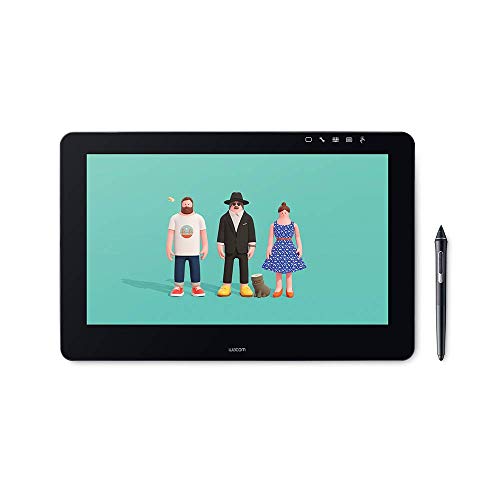
Wacom Cintiq Pro 16 Black
Best for: artists needing portable 4K color accuracy
- Screen Size
- 16"
- Display Resolution
- Up to 4K (3840 x 2160)
- Color Gamut
- 94% Adobe RGB
- Display Finish
- etched glass
- Color
- Black
- Dimensions
- 16.1 × 10.4 × 0.7 inches
This 16-inch pen display offers 4K resolution and 94% Adobe RGB coverage for precise creative work. It includes the Pro Pen 2 with high pressure sensitivity and multi-touch gestures. The integrated stand allows for an inclined working angle. It suits digital artists who need color accuracy and a portable screen size for their workflow.
- 16-inch Full HD display with 4K resolution
- 94% Adobe RGB color gamut for superior color quality
- Pro Pen 2 with 4x greater accuracy and pressure sensitivity
- Integrated stand for inclined working angle
- Multi-touch gestures and customizable Express keys
- Brightness is limited to 250 cd/m2
- Weight is 3.3 pounds, making it heavier than smaller tablets
- Screen size is smaller than the 22-inch and 24-inch Cintiq models
- You need a portable pen display with 4K clarity
- You require 94% Adobe RGB for color-critical work
- You prefer an integrated stand for natural drawing angles
- You need a larger 22-inch or 24-inch screen
- You require higher than 250 cd/m2 brightness
- You want a wireless-only tablet without a built-in screen
Verdict: Wacom Cintiq Pro 16 4K Pen Display delivers professional color accuracy and 4K resolution in a compact 16-inch form factor, making it ideal for artists who need portability without sacrificing display quality.

Wacom Cintiq Pro 24 4K Touch Display
Best for: Professional illustrators needing large 4K color accuracy
- Screen Size
- 23.6"
- Display Resolution
- 4K
- Pen Pressure
- 8,192 levels
- Color Gamut
- 99% Adobe RGB, 97% sRGB
- Display Finish
- Optical bonding
- Shortcut Controls
- ExpressKey Remote
This 24-inch pen display offers 4K resolution and 99% Adobe RGB color coverage for precise, true-to-life artwork. You get 8192 levels of pen pressure and tilt recognition for detailed drawing. The touchscreen supports multi-touch gestures and includes an ExpressKey Remote for shortcuts. It is a heavy, stationary unit suited for professional studios rather than portable work.
- 23.6-inch 4K touchscreen display with optical bonding
- 99% Adobe RGB and 1.07 billion colors (10-bit)
- Pro Pen 2 with 8192 pressure levels and tilt
- Multi-touch gestures and ExpressKey Remote included
- 15.9-pound weight makes it difficult to move
- 26.7-inch length requires a large desk space
- 24-inch size is larger than most competitors
- You need a large 4K canvas for detailed illustration
- You require 99% Adobe RGB color accuracy
- You want a stationary display with touch support
- You need a portable tablet for travel
- You have limited desk space
- You prefer a lighter, wireless setup
Verdict: Wacom Cintiq Pro 24 4K Touch Display is a heavy, large-format pen display for professionals who need 4K precision and color accuracy. It fits studios with ample space and stationary workflows.
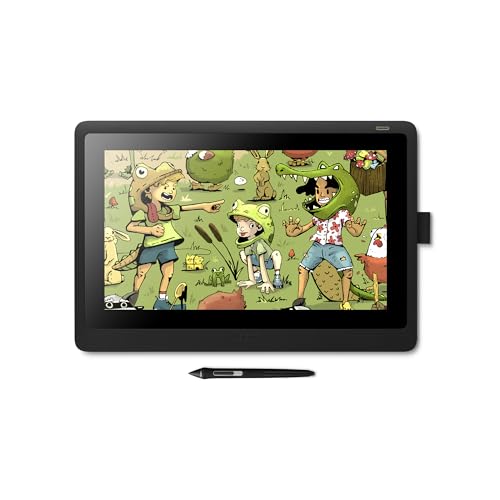
Wacom Cintiq 16 15.4" Pen Display
Best for: artists needing tilt support and a dedicated screen
- Screen Size
- 15.4"
- Display Resolution
- Full HD
- Pen Pressure
- 8192 levels
- Features
- Stylus, Stylus Pen, Full HD Display, Tilt Support
- Color
- Black
- Audience
- Animation
The Wacom Cintiq 16 is a 15.4-inch pen display designed for animation and creative work. It features a Full HD LCD screen with uniform brightness and true-to-life color quality. The included Pro Pen 2 offers 8192 levels of pressure sensitivity and tilt recognition. This tablet provides fingertip control with relaxed parallax. It suits students, hobbyists, and enthusiasts working on campus or in the studio.
- 15.4-inch Full HD LCD display with high resolution
- Pro Pen 2 includes tilt recognition and 8192 pressure levels
- Relaxed parallax for natural drawing feel
- Two customizable switches on the pen for shortcuts
- 15.4-inch screen is smaller than the 22-inch and 24-inch models in this guide
- 4.19-pound weight is higher than the portable Intuos series tablets
- 1-inch profile is bulkier than the slim Bamboo Capture tablet
- You need tilt support for natural shading
- You want a dedicated screen for drawing
- You require high pressure sensitivity for detailed work
- You prefer a portable tablet without a screen
- You need a larger 24-inch 4K display
- You want the lightest possible device for travel
Verdict: Wacom Cintiq 16 Pen Display fits artists who need a dedicated screen with tilt support and high pressure sensitivity for detailed animation or illustration work.
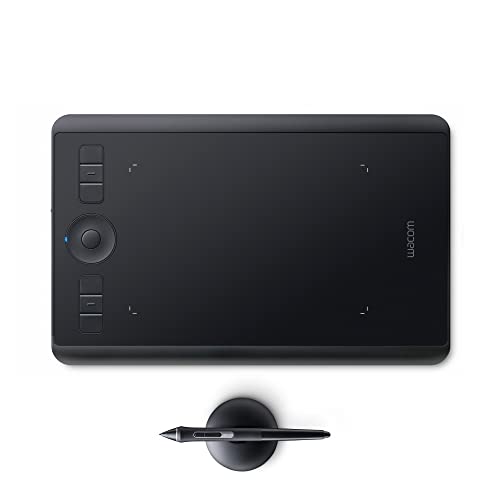
Wacom Intuos Pro Small Bluetooth Tablet
Best for: portable professional drawing on a small surface
- Pen Pressure
- 8192 levels
- Shortcut Controls
- 6 ExpressKeys, Touch Ring
- Screen Size
- 6-Inch
- Operating System
- Windows
- Features
- Stylus, Stylus Pen, Bluetooth
- Display
- Touchscreen
This is a small wireless drawing tablet with a 6-inch active area. It uses the Pro Pen 2 with 8192 pressure levels and tilt recognition. You get six ExpressKeys and a touch ring for shortcuts. It connects via Bluetooth or USB to Windows or Mac. The build is compact at 11.8 inches long and 15.8 ounces. It suits artists who want professional pen performance in a portable form factor.
- Pro Pen 2 with 8192 pressure levels and tilt recognition
- Bluetooth and USB connectivity for wireless or wired use
- Six ExpressKeys and a programmable Touch Ring for shortcuts
- Compact dimensions: 11.8 inches by 7.75 inches
- 6-inch active area is smaller than the 13-inch and 22-inch Cintiq models on this list
- 15.8-ounce weight is heavier than the Bamboo Capture and Graphire tablets
- Small size offers less drawing space than the Medium and Large options
- You need a portable tablet that connects via Bluetooth
- You want professional pen pressure levels in a compact size
- You prefer using shortcut keys and a touch ring
- You require a built-in display screen for direct drawing
- You need a large 22-inch or 24-inch drawing surface
- You want the lightest possible tablet for travel
Verdict: Wacom Intuos Pro Small Wireless Tablet delivers professional pen precision in a compact, wireless package. It fits artists who prioritize portability and shortcut efficiency over a large screen real estate.

Wacom Cintiq 22 22-Inch Non-Touch Pen Display
Best for: Large canvas digital artists needing precision
- Tablet Type
- Tethered pen display
- Screen Size
- 22"
- Display Resolution
- Full HD
- Pen Pressure
- 8192
- Features
- Stylus, Stylus Pen, Full HD Display
- Display
- Touchscreen
The Wacom Cintiq 22 is a 22-inch non-touch pen display designed for creative work. It features a Full HD LCD screen with true-to-life color quality and uniform brightness. The included Pro Pen 2 offers 8192 levels of pressure sensitivity, tilt recognition, and virtually lag-free tracking. Two customizable switches on the pen allow for shortcut access. This large workspace suits students, hobbyists, and professionals working in studios or at home.
- 22-inch Full HD LCD display for a large creative workspace
- Pro Pen 2 with 8192 levels of pressure sensitivity
- Tilt recognition and customizable pen switches
- Low parallax for natural drawing feel
- 22-inch size is heavier at 4.19 pounds compared to smaller portable models
- Non-touch screen limits interaction to pen input only
- Fixed 22-inch size offers less portability than smaller 13 or 16-inch options
- You need a large 22-inch canvas for detailed digital art
- You prefer precise pen control with tilt recognition and pressure sensitivity
- You work in a stationary studio or home office setup
- You require a portable tablet that fits easily in a bag
- You want to interact with the screen using your fingers
- You prefer a lighter device under 3 pounds
Verdict: The Wacom Cintiq 22 Full HD Pen Display is ideal for artists who prioritize screen real estate and precise pen performance over portability. It fits users who need a dedicated, large-format workspace for professional or serious hobbyist projects.

Wacom One 13.3" HD Pen Display
Best for: Hobbyists needing a 13.3-inch screen for PC or Mac
- Tablet Type
- Tethered pen display
- Screen Size
- 13.3 inch
- Features
- Stylus, Stylus Pen
- Dimensions
- 15.7 × 10.2 × 3.1 inches
- Weight
- 4.5 pounds
The Wacom One is a 13.3-inch high-definition pen display designed for hobbyists and visual thinkers. It offers a full color spectrum for drawing, photo editing, and video work. The included stylus features a customizable button for shortcuts like undo or copy-paste. This device connects to Mac or PC systems, providing a larger digital canvas than standard tablets. It serves as an effective second screen for creative tasks.
- 13.3-inch high-definition display with full color spectrum
- Customizable pen button for workflow shortcuts
- Compatible with Mac and PC software
- Compact 15.7 x 10.2 inch footprint
- Heavier at 4.5 pounds compared to portable Bluetooth tablets
- Smaller 13.3-inch screen compared to 16-inch and 22-inch Cintiq models
- Lower resolution than 4K Cintiq Pro displays
- You need a dedicated drawing screen for Mac or PC
- You prefer a 13.3-inch canvas for detailed work
- You want customizable pen shortcuts for efficiency
- You require wireless Bluetooth connectivity
- You need a 4K or higher resolution display
- You want a portable tablet without a screen
Verdict: Wacom One 13.3-Inch Pen Display is a solid entry-level display for users who need a wired, screen-based solution on Mac or PC. It fits hobbyists who prioritize a dedicated canvas over portability or high-end 4K resolution.
Specifications side by side
| Spec | Wacom Bamboo Capture Pen Tablet | Wacom 22HD Pen Display | Wacom Cintiq 22HD Touch Pen Display | Wacom Cintiq 13HD 13.3-Inch Pen Display | Wacom Graphire Medium Pen Tablet | Wacom Intuos Small Bluetooth | Wacom Intuos Medium Bluetooth Pen Tablet | Wacom Intuos Medium Wireless Drawing Tablet | Wacom Cintiq Pro 24 4K Touch | Wacom Cintiq Pro 16 Black | Wacom Cintiq Pro 24 4K Touch Display | Wacom Cintiq 16 15.4" Pen Display | Wacom Intuos Pro Small Bluetooth Tablet | Wacom Cintiq 22 22-Inch Non-Touch Pen Display | Wacom One 13.3" HD Pen Display |
|---|---|---|---|---|---|---|---|---|---|---|---|---|---|---|---|
| Tablet Type | – | – | – | – | – | – | – | – | – | – | – | – | – | Tethered pen display | Tethered pen display |
| Screen Size | – | 21-Inch | 21.5" | 13.3" | – | – | – | – | 24" | 16" | 23.6" | 15.4" | – | 22" | 13.3 inch |
| Display Resolution | – | full HD resolution | 1920 x 1080 | 1920 X 1080 | – | – | – | – | 4K (3840 x 2160) | Up to 4K (3840 x 2160) | 4K | Full HD | – | Full HD | – |
| Pen Pressure | – | – | – | 2048 levels | 2048, tip only | – | – | – | 8,192 levels | – | 8,192 levels | 8192 levels | 8192 levels | 8192 | – |
| Color Gamut | – | – | – | – | – | – | – | – | 99% Adobe RGB | 94% Adobe RGB | 99% Adobe RGB, 97% sRGB | – | – | – | – |
| Display Finish | – | – | – | – | – | – | – | – | etched glass | etched glass | Optical bonding | – | – | – | – |
| Shortcut Controls | 4 ExpressKeys | customizable express keys | ExpressKeys and Touch Strips | four ExpressKeys, Rocker ring | – | 4 Customizable ExpressKeys | 4 Customizable ExpressKeys | 4 ExpressKeys | ExpressKey Remote (17 buttons) | – | ExpressKey Remote | – | 6 ExpressKeys, Touch Ring | – | – |
| Operating System | – | – | – | – | – | Android | Android | Windows | – | – | – | – | Windows | – | – |
| Features | Stylus, Stylus Pen | Stylus, Stylus Pen | Stylus, Stylus Pen | Stylus, Stylus Pen | Stylus, Stylus Pen | Bluetooth, Shortcut Keys | Bluetooth, Shortcut Keys | Stylus, Stylus Pen, Bluetooth, Battery-Free Pen, Shortcut Keys | – | – | Stylus, Stylus Pen | Stylus, Stylus Pen, Full HD Display, Tilt Support | Stylus, Stylus Pen, Bluetooth | Stylus, Stylus Pen, Full HD Display | Stylus, Stylus Pen |
| Display | – | – | Touchscreen | – | – | – | – | – | Touchscreen | – | Touchscreen | – | Touchscreen | Touchscreen | – |
| Color | Silver | Black | Black | Black | Black | Pistachio | Pistachio | Black | Black | Black | Black | Black | Black | Black | black and white |
| Audience | – | – | – | – | – | Students | Students | Students | Animation | – | – | Animation | – | Animation | – |
| Dimensions | 10.9 × 6.9 × 0.4 inches | 25.5 × 2.2 × 15.7 inches | 25.6 × 2.7 × 15.7 inches | 14.8 × 0.53 × 9.76 inches | 8.27 × 0.34 × 5.75 inches | 7.87 × 6.3 × 0.35 inches | 10.4 × 7.8 × 0.35 inches | 10.4 × 7.8 × 0.4 inches | 26.7 × 15.5 × 1.9 inches | 16.1 × 10.4 × 0.7 inches | 26.7 × 15.5 × 0.1 inches | 16.6 × 11.2 × 1 inches | 11.8 × 7.75 × 2 inches | 16.6 × 11.2 × 1 inches | 15.7 × 10.2 × 3.1 inches |
| Weight | 14.9 ounces | 18.7 pounds | 18.7 pounds | 2.64 pounds | 8.82 ounces | 8.8 ounces | 14.5 ounces | 14.5 ounces | 15.9 pounds | 3.3 pounds | 15.9 pounds | 4.19 pounds | 15.8 ounces | 4.19 pounds | 4.5 pounds |
| Model | CTH470 | DTK2200 | DTH2200 | DTK1300 | CTL-672/K0-C | CTL4100WLE0 | CTL6100WLE0 | CTL6100WLK0 | DTK2420K0 | DTH1620AK0 | DTH2420K0 | DTK1660K0A | PTH460K0A | DTK2260K0A | DTC133W0C |
| Size | – | 22HD | 22HD Touch | 13" | 10 inches | Small, Wireless | Medium, Wireless | Medium, Wireless (Pack of 1) | Wacom Cintiq Pro 24 – 24 inch | 16" | 24 inch touch | 16" | Small | 22" non-touch | 13" |
Who Wacom Drawing Tablets Suit
Wacom covers a wide size range, from the 6-inch Intuos Pro to the 24-inch Cintiq Pro. You can choose between compact pen tablets and larger pen displays. Most models feature black or silver finishes, with the Intuos Small offering a pistachio option. Wireless connectivity appears in several Intuos models. However, none of these devices include built-in batteries for the pens, relying instead on battery-free technology. You also will not find any 10-inch or 12-inch screen sizes in this lineup. The selection jumps from small tablets to 13-inch and larger displays, leaving a gap for mid-sized portable screens.
If you prioritize conference calls and office tasks over pure stylus input, compare the best tablets for meetings instead.
How to Choose a Wacom Tablet
Select Tablet Type
You must decide between a pen tablet and a pen display. Pen tablets, such as the Bamboo Capture, require you to look at a separate monitor while drawing. This setup is simpler and often more portable. Pen displays, like the Cintiq 22HD, let you draw directly on the screen. This direct interaction can feel more natural for detailed work. Choose a tablet if you want a compact device. Choose a display if you need visual precision and direct feedback.
Check Screen Size
Screen size determines your workspace and portability. The Cintiq 13HD offers a compact 13.3-inch area, making it easy to move around. The Cintiq Pro 24 provides a large 24-inch canvas for stationary professional work. Larger screens allow for more detailed drawing without zooming. Smaller screens fit easily into bags and on small desks. Consider your desk space and how often you travel. A medium size balances workspace and weight for most users.
Evaluate Connectivity
Connectivity affects how you set up your device. The Intuos Small Bluetooth connects wirelessly, reducing cable clutter. This is ideal for clean desks or mobile use. Other models, like the Bamboo Capture, use wired connections. Wired connections offer reliable, constant power and data transfer. Wireless models may require charging or batteries. Check if your device supports Bluetooth if you need freedom from cables. Wired models are often simpler to set up immediately without drivers for basic use.
Consider Weight and Portability
Weight impacts how easily you can carry your tablet. The Graphire Medium weighs only 8.82 ounces, making it very light. The Cintiq 22HD weighs 18.7 pounds, which is heavy and stationary. If you travel frequently or teach in different locations, choose a light pen tablet. Heavy pen displays are best for fixed studios. Check the weight in the specs to ensure it fits your bag. Portability is crucial for students and mobile artists who move between classes or clients.
Review Special Features
Special features enhance your drawing experience. The Cintiq 22HD Touch allows direct finger interaction on the screen. The Intuos Pro Small includes a 6-inch touch ring for quick adjustments. Some models offer tilt support for realistic brush strokes. Shortcut keys can speed up your workflow by assigning common commands. Consider which features match your software needs. Touch is useful for navigation. Tilt adds depth to digital painting. Choose based on the tools you use most often.
Frequently asked questions
Does the Wacom Bamboo Capture have a built-in screen?
No, the Wacom Bamboo Capture Pen Tablet is a pen tablet without an integrated display. You must draw on the device while looking at a separate monitor. This design prioritizes simplicity and portability over screen integration. It fits beginners who want a basic, wired input device for their existing computer setup.
Which Wacom tablet supports Bluetooth connectivity?
Several Wacom models support Bluetooth for wireless use. The Intuos Small, Intuos Medium Bluetooth, and Intuos Pro Small all feature wireless connectivity. These tablets allow you to draw without cables, which is ideal for portable setups. They are particularly suitable for students and creators who value a clutter-free workspace and easy movement.
Are there Wacom tablets with touch screen capability?
Yes, certain Wacom pen displays include touch functionality. The Cintiq 22HD Touch and the Cintiq Pro 24 4K Touch models feature touchscreens. This allows you to navigate menus or zoom using your fingers while drawing with the stylus. These large-format displays are designed for stationary professionals who need direct interaction with their canvas.
What is the difference between a pen tablet and a pen display?
A pen tablet requires you to look at a separate monitor while drawing on the pad. Examples include the Bamboo Capture and Intuos series. A pen display, like the Cintiq or One series, has a built-in screen. You draw directly on the display, providing a more natural and intuitive experience that mimics traditional drawing on paper.
Does the Wacom Intuos Pro Small have a touchscreen?
Yes, the Wacom Intuos Pro Small Bluetooth Tablet includes a touchscreen feature. It combines professional pen precision in a compact, wireless package. This model is ideal for artists who prioritize portability and efficient shortcut usage. The touch capability adds versatility for navigation, making it a practical choice for mobile creative workflows.
Which Wacom model offers tilt support for drawing?
The Wacom Cintiq 16 Pen Display features tilt support. This allows the stylus to detect angle changes, enabling more natural shading and brush effects. It is well-suited for artists working on detailed animation or illustration projects. The dedicated screen and tilt functionality provide a professional drawing experience in a compact 16-inch form factor.
Is there a Wacom tablet with a 6-inch active area?
Yes, the Wacom Intuos Pro Small Bluetooth Tablet features a 6-inch active area. It delivers professional pen precision in a highly compact package. This size is perfect for artists who need portability and efficient use of desk space. It fits users who prioritize a small footprint over a larger drawing surface or built-in screen.



