Best XP-Pen 13.3-Inch Drawing Tablets in 2026: 3 Picks
Finding the best XP-Pen 13 3 inch drawing tablets requires comparing key technical details.

What this report covers
- Last updated
- 4 Nov 2026
Figures above are read from the product listings for the models named below. Scores are out of 10, based on listed specifications and buyer feedback.
As Amazon Associates, we earn from qualifying purchases. This means we may receive a small commission at no extra cost to you if you click through and make a purchase.
As an Amazon Associate we earn from qualifying purchases. Links on this page are affiliate links.
Finding the best XP-Pen 13 3 inch drawing tablets requires comparing key technical details. We evaluated three models to help you choose. The XPPen Artist 13.3 Pro V2 leads because it offers 16K pen pressure levels and a full-laminated display for precise line work. These picks are based strictly on the specifications published on the listings. You will see how screen size, connectivity, and stylus features differ across each model. This guide helps you decide which device matches your specific art workflow and studio needs.
Check weight and size first
These three 13.3-inch models share the same screen size and operating system. The main difference is physical weight. One unit weighs 2.5 pounds, while another reaches 6.79 pounds. Choose the lighter model if you need portability. Pick the heavier option if you prefer a stationary studio setup. All feature full-laminated displays and 16K pen pressure.
| # | Product | Best for | Price |
|---|---|---|---|
| 1 | XPPen Artist 13.3 Pro V2 Best overall | artists needing accurate color and physical controls | |
| 2 | XP-Pen Artist 13.3 Pro V2 Best budget | Beginners needing a laminated screen with physical controls | |
| 3 | XP-Pen Artist 13.3 Pro V2 Also great | stationary digital art with accurate colors |
The best fit for you
- You want the best overall performance with accurate color – XPPen Artist 13.3 Pro V2 – It features a full-laminated display and 16K pressure levels for precise drawing.
- You are a beginner seeking a budget-friendly laminated screen – XP-Pen Artist 13.3 Pro V2 – This model offers a full-laminated display and physical controls for easy learning.
- You need a stationary setup for accurate digital art – XP-Pen Artist 13.3 Pro V2 – Its heavy metal body and USB-C connection suit fixed studio work.
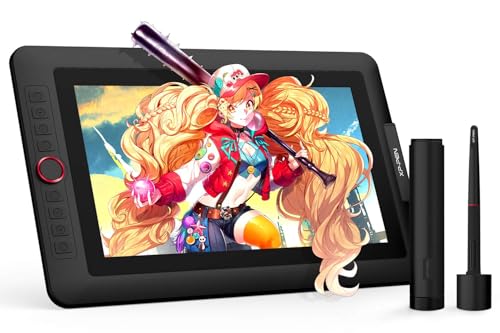
XPPen Artist 13.3 Pro V2
Best for: artists needing accurate color and physical controls
- Screen Size
- 13.3-Inch
- Tablet Type
- Tethered pen display
- Display Resolution
- FHD
- Pen Pressure
- 16384
- Color Gamut
- 88% NTSC, >=91% AdobeRGB, >=123% sRGB
- Display Finish
- Fully-laminated, anti-glare
The XP-Pen Artist 13.3 Pro V2 is a pen display with a 13.3-inch full-laminated screen. It offers 123% sRGB color gamut and 16K pressure sensitivity. The device includes a red dial and eight shortcut keys. It supports 60-degree tilt and connects via a 3-in-1 cable. This tablet suits beginners and animation creators who need accurate color and natural stroke transitions.
- 123% sRGB color gamut for vivid images
- 16K pressure levels for detailed strokes
- 60-degree tilt function for natural shading
- Red dial and 8 shortcut keys for workflow
- Full-laminated screen with virtually no parallax
- 4.41 pounds weight is heavier than compact alternatives
- Requires connection to a computer for operation
- Limited to 13.3-inch screen size option
- You need a full-laminated display for precise drawing
- You want customizable shortcut keys and a red dial
- You create animation or digital art on a PC
- You require a wireless standalone tablet
- You prefer a lighter device under 4 pounds
- You need a screen larger than 13.3 inches
Verdict: XP-Pen Artist 13.3 Pro V2 delivers accurate color and responsive tilt for artists who value a wired connection and physical controls.
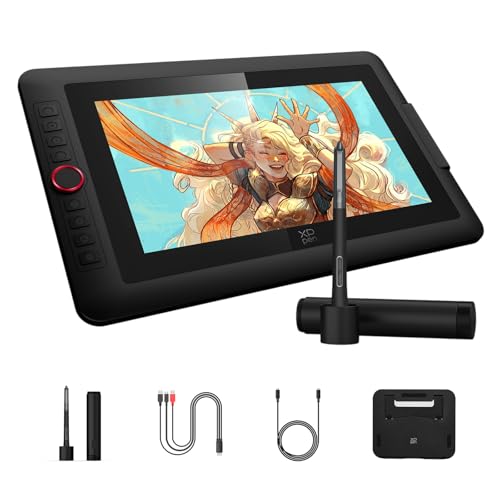
XP-Pen Artist 13.3 Pro V2
Best for: Beginners needing a laminated screen with physical controls
- Screen Size
- 13.3-Inch
- Display Resolution
- Full HD
- Pen Pressure
- 16K
- Color Gamut
- 125% sRGB, 107% Adobe RGB, 95% P3
- Display Finish
- Full-Laminated AG Glass
- Shortcut Controls
- Red Dial, 8 customizable keys
The XP-Pen Artist 13.3 Pro V2 is a 13.3-inch pen display with a full-laminated screen. It offers 16K pen pressure levels and a 125% sRGB color gamut. The device includes a red dial and eight shortcut keys for control. It suits beginners and animators who need precise color accuracy and an intuitive interface for their digital art projects.
- 16K pen pressure levels for precise line control
- 125% sRGB color gamut with 8-bit depth
- Full-laminated screen with AG film reduces glare
- Red Dial and 8 customizable shortcut keys
- 90-degree adjustable stand included for posture
- Heavier at 2.5 pounds compared to lighter competitors
- 125% sRGB is lower than the 16K/107% Adobe RGB claims of other models
- Requires connection to a computer or laptop to function
- You want a full-laminated screen with a paper-like feel
- You need precise color accuracy for animation or design
- You prefer physical controls like a dial and shortcut keys
- You need a standalone tablet without a computer
- You prefer a lighter device under 2 pounds
- You require a wider color gamut than 125% sRGB
Verdict: The XP-Pen Artist 13.3 Pro V2 fits beginners and animators who value a full-laminated screen and physical controls. It offers solid color accuracy for those who do not need a wider gamut than 125% sRGB.

XP-Pen Artist 13.3 Pro V2
Best for: stationary digital art with accurate colors
- Screen Size
- 13.3-Inch
- Tablet Type
- Pen Display
- Display Resolution
- 1920×1080 FHD
- Pen Pressure
- 16,384 levels
- Color Gamut
- 99% sRGB, 89% Adobe RGB, 95% P3
- Display Finish
- Fully laminated
The XP-Pen Artist 13.3 Pro V2 is a 13.3-inch pen display with a fully laminated 1920×1080 screen. It uses the X3 Pro chip for 16K pressure sensitivity and 95% P3 color gamut. The device connects via USB-C or HDMI and includes a red dial roller and eight shortcut keys. It weighs 6.79 pounds and offers dual modes for screen-on or screen-off drawing.
- 16K pressure sensitivity with the X3 Pro smart chip
- 95% P3 and 99% sRGB color gamut on a fully laminated display
- Red dial roller and eight customizable express keys
- Dual Pen Display and Pen Tablet modes
- Single USB-C connection for Mac, Windows, or Android
- Heavier build at 6.79 pounds compared to lighter alternatives
- Standard 1920×1080 resolution instead of higher pixel density
- Requires a computer or laptop to function
- You need a single-cable USB-C connection for a clean desk setup
- You want precise color accuracy with 95% P3 coverage for printing
- You prefer a metal back panel for better heat dissipation
- You need a wireless standalone tablet without a computer
- You prefer a lighter device for frequent travel
- You require a resolution higher than 1920×1080
Verdict: The XP-Pen Artist 13.3 Pro V2 fits digital artists who value color accuracy and a clutter-free USB-C setup over portability. Its heavy metal body and standard resolution make it best for stationary studio work rather than mobile creation.
Specifications side by side
| Spec | XPPen Artist 13.3 Pro V2 | XP-Pen Artist 13.3 Pro V2 | XP-Pen Artist 13.3 Pro V2 |
|---|---|---|---|
| Tablet Type | Tethered pen display | – | Pen Display |
| Screen Size | 13.3" | 13.3" | 13.3-inch |
| Display Resolution | FHD | Full HD | 1920×1080 FHD |
| Pen Pressure | 16384 | 16K | 16,384 levels |
| Color Gamut | 88% NTSC, >=91% AdobeRGB, >=123% sRGB | 125% sRGB, 107% Adobe RGB, 95% P3 | 99% sRGB, 89% Adobe RGB, 95% P3 |
| Display Finish | Fully-laminated, anti-glare | Full-Laminated AG Glass | Fully laminated |
| Shortcut Controls | 8 shortcut keys, Red Dial | Red Dial, 8 customizable keys | Red dial roller, 8 express keys |
| Operating System | Android | Android | Android |
| Features | Shortcut Keys | Stylus, Stylus Pen, Shortcut Keys, Dial | Stylus, Stylus Pen |
| Display | Full-Laminated | Full-Laminated | Full-Laminated |
| Color | Black / White | Black | black 13.3inch |
| Audience | Animation, Beginners | Animation, Beginners | – |
| Length | 9.84 inches | 17 inches | – |
| Width | 15.4 inches | 11 inches | – |
| Weight | 4.41 pounds | 2.5 pounds | 6.79 pounds |
| Dimensions | – | – | 15 × 9.5 × 0.1 inches |
| Size | 13.3 Inch | 13.3 INCH | 13.3 inch |
| Model | Artist 13.3Pro | Artist 13.3 Pro V2 | Artist13.3 Pro V2 |
How to choose the right XP-Pen 13.3
Check display lamination
All three models feature a full-laminated display. This means the glass and the digitizer are bonded together. You will notice less parallax, which is the gap between your pen tip and the cursor. This closeness improves precision for detailed line work. It also makes the screen feel more like drawing on paper. Since every option here includes this feature, you do not need to worry about non-laminated screens. Focus on other specs like pressure sensitivity instead.
Compare pen pressure levels
Each tablet listed supports 16K pressure levels. This specification measures how many distinct pressures the stylus can detect. Higher levels allow for smoother transitions between thick and thin strokes. You will get more natural-looking lines without visible steps in your art. Since all three models share this exact spec, it is not a differentiating factor. You can expect consistent responsiveness across the entire list. This baseline ensures that beginners and professionals alike get accurate input.
Evaluate shortcut key needs
Some models include physical shortcut keys and a dial. These controls let you adjust brush size or undo actions without touching the screen. This keeps your hands off the display, reducing smudges and distractions. If you prefer tactile feedback, look for the version with these keys. Other models may lack these physical controls. Decide if you want on-screen menus or physical buttons. The presence of a dial can speed up your workflow significantly during long sessions.
Consider operating system
All three units run on Android. This operating system allows you to use the tablet as a standalone device. You can run drawing apps directly on the tablet without connecting to a computer. This offers flexibility for mobile creation or quick sketches. However, it may limit access to desktop-only software. If you need specific PC applications, you might require a different connection method. Check if your preferred apps are available in the Android ecosystem before buying.
Assess weight for portability
Weight varies significantly across these models. One unit weighs 2.5 pounds, while another reaches 6.79 pounds. The lighter model is easier to carry in a bag. It is better for artists who move between locations. The heavier models often have metal bodies that feel more durable. They are better for stationary desk use. If you travel often, prioritize the lightest option. If you work at a fixed studio, the heavier build may feel more premium and stable.
Frequently asked questions
Does the XP-Pen Artist 13.3 Pro V2 support Android?
Yes, all three models in this list support the Android operating system. This allows you to use the tablet as a standalone pen display for compatible apps. You can connect it to your computer or use it independently depending on your workflow needs.
What is the difference between the models in terms of weight?
The weight varies significantly across the three picks. One version weighs 2.5 pounds, making it the lightest option for portability. Another model reaches 6.79 pounds, offering a heavier, stationary build. The first pick weighs 4.41 pounds, sitting in the middle.
Do these tablets include physical shortcut keys?
Two of the three models feature physical shortcut keys. The top pick and the budget option both include these controls for easy access to common functions. The third model, listed as also great, does not mention physical keys in its attributes.
Is the display full-laminated on all three units?
Yes, every model in this guide features a full-laminated display. This design bonds the glass and digitizer together to reduce parallax. You will experience a closer connection between your pen tip and the on-screen cursor for more accurate drawing.
How many pressure levels do these styluses support?
All three XP-Pen models support 16K pressure levels. This high sensitivity allows for fine control over line weight and opacity. You can create natural strokes with subtle variations, which is essential for detailed digital art and animation work.
Which model is best for beginners?
The second pick is labeled as the best budget option for beginners. It offers a full-laminated screen and physical controls to help you learn the interface quickly. It provides solid color accuracy without requiring a wider gamut than 125% sRGB.
Are these tablets suitable for animation work?
Yes, the attributes for the top two models explicitly list animation as a target audience. The 16K pressure levels and responsive tilt support smooth line work. These features help you create consistent strokes needed for frame-by-frame animation projects.
What are the physical dimensions of the top pick?
The top pick measures 15.4 inches in width and 9.84 inches in length. It weighs 4.41 pounds. These dimensions provide a standard 13.3-inch viewing area. The size balances screen real estate with a manageable footprint for your desk setup.


