Best XP-Pen 21.5-Inch Drawing Tablets in 2026: 3 Picks
Choosing the best XP-Pen 21 5 inch drawing tablets requires looking at specific hardware details.

What this report covers
- Last updated
- 11 Nov 2026
Figures above are read from the product listings for the models named below. Scores are out of 10, based on listed specifications and buyer feedback.
As Amazon Associates, we earn from qualifying purchases. This means we may receive a small commission at no extra cost to you if you click through and make a purchase.
As an Amazon Associate we earn from qualifying purchases. Links on this page are affiliate links.
Choosing the best XP-Pen 21 5 inch drawing tablets requires looking at specific hardware details. We compared 3 models based on the specifications published on the listings. The XP-Pen Artist 22R Pro 21.5-Inch leads as the top pick because it includes a dial and shortcut keys for studio artists needing color accuracy and controls. This guide helps you decide which pen display fits your workflow by comparing screen size, pressure levels, and physical features.
Prioritize physical controls and display type
The XP-Pen Artist 22R Pro 21.5-Inch includes a dial and shortcut keys. The Artist Pro 22 Gen 2 offers 16K pressure levels. The Artist 22 2nd Gen supports tilt. Choose the model with the controls and screen features that match your workflow needs. All three are pen displays with large 21.5-inch screens.
| # | Product | Best for | Price |
|---|---|---|---|
| 1 | XP-Pen Artist 22R Pro 21.5-Inch Best overall | Studio artists needing color accuracy and controls | |
| 2 | XP-Pen Artist 22 2nd 21.5-Inch Display Best budget | Digital artists needing large accurate color display | |
| 3 | XP-Pen Artist Pro 22 Gen 2 21.5-Inch Best 16k levels | professional artists needing color accuracy |
The best fit for you
- You need physical controls and a dial for studio work – XP-Pen Artist 22R Pro 21.5-Inch – It includes shortcut keys and a dial for tactile control.
- You want a budget-friendly large display with tilt support – XP-Pen Artist 22 2nd 21.5-Inch Display – It offers tilt support and 8192 pressure levels for accuracy.
- You require maximum pressure sensitivity for professional digital art – XP-Pen Artist Pro 22 Gen 2 21.5-Inch – It provides 16K pressure levels for precise line control.

XP-Pen Artist 22R Pro 21.5-Inch
Best for: Studio artists needing color accuracy and controls
- Screen Size
- 21.5-Inch
- Tablet Type
- Tethered pen display
- Display Resolution
- 1920 x 1080 FHD
- Pen Pressure
- 8192 levels
- Color Gamut
- ≥120% sRGB, ≥90% Adobe RGB, 88% NTSC
- Display Finish
- Full-laminated, anti-glare film
The XP-Pen Artist 22R Pro is a 21.5-inch pen display with Full HD resolution and a full-laminated screen. It covers 120% sRGB and 90% Adobe RGB for accurate color work. The battery-free stylus offers 8192 pressure levels and 60-degree tilt. Two dial wheels and 20 shortcut keys help you manage tools quickly. This tablet suits designers and illustrators who need a large, color-accurate workspace.
- 21.5-inch Full HD display with 120% sRGB coverage
- Battery-free stylus with 8192 pressure levels and 60-degree tilt
- 20 customizable shortcut keys and two dial wheels
- Full-laminated screen for reduced parallax
- Adjustable stand ranging from 16 to 90 degrees
- 15.4 pounds weight makes it heavier than smaller models
- 1000:1 contrast ratio is lower than premium 2.5K competitors
- 1920 x 1080 resolution is lower than 2.5K alternatives
- You need a large 21.5-inch canvas for detailed illustration
- You require high color accuracy for photo or video editing
- You want physical shortcut keys and dial wheels for workflow
- You prefer a lighter device under 10 pounds
- You need 2.5K resolution for sharper text and lines
- You want a portable tablet for travel
Verdict: The XP-Pen Artist 22R Pro 21.5-Inch is a solid choice for studio-based artists who prioritize color accuracy and physical controls over portability.

XP-Pen Artist 22 2nd 21.5-Inch Display
Best for: Digital artists needing large accurate color display
- Screen Size
- 21.5-Inch
- Tablet Type
- Tethered pen display
- Pen Pressure
- 8192 levels
- Color Gamut
- 86% NTSC (Adobe RGB≥90%, sRGB≥122%)
- Operating System
- Windows
- Features
- Stylus, Stylus Pen, Battery-Free Pen, Shortcut Keys, Tilt Support
This XP-Pen Artist 22 2nd is a 21.5-inch pen display designed for digital art and remote work. It features a color gamut covering 122% sRGB and 90% Adobe RGB for vivid visuals. The battery-free stylus offers 8,192 pressure levels and tilt support for precise strokes. You get a wide range of connectivity options, including USB-C and HDMI. This setup suits artists who need a large, accurate canvas for detailed work.
- 21.5-inch screen with 122% sRGB color coverage
- 8,192 pressure levels and 60-degree tilt support
- Battery-free stylus for consistent performance
- Adjustable stand with 16 to 90-degree angle range
- Includes USB-C to USB-C and HDMI cables
- Lower resolution compared to 2.5K models on the list
- 21.5-inch size is smaller than 22-inch alternatives
- Requires separate purchase for USB-C to USB-C connection cable
- You need a large canvas for detailed digital painting
- You want accurate color representation for graphic design
- You prefer a battery-free stylus for reliable drawing
- You require 2.5K resolution for ultra-sharp text
- You want a larger 22-inch or bigger screen
- You need built-in shortcut keys on the device
Verdict: XP-Pen Artist 22 2nd 21.5-Inch Display is a solid choice for artists who prioritize color accuracy and a large drawing area over higher resolution. It fits those who need a reliable, battery-free pen for professional digital artwork.
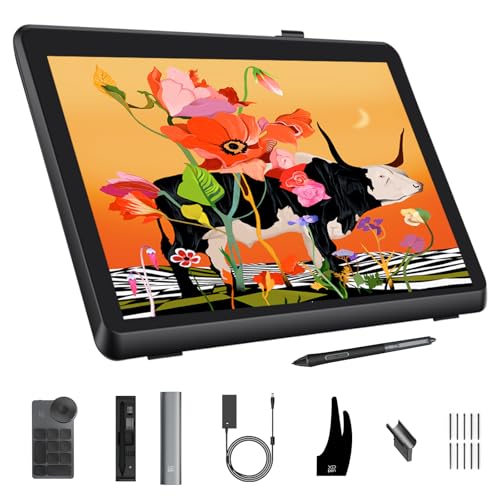
XP-Pen Artist Pro 22 Gen 2 21.5-Inch
Best for: professional artists needing color accuracy
- Screen Size
- 21.5-Inch
- Tablet Type
- Drawing display
- Display Resolution
- 2560 x 1440
- Pen Pressure
- 16K
- Color Gamut
- 99% Adobe RGB, 99% sRGB, 94% Display P3
- Display Finish
- AG Nano Etched Glass
This XP-Pen Artist Pro 22 Gen 2 is a 21.5-inch pen display with a 2.5K resolution. It features 16K pressure levels for precise input and Calman Verified color accuracy. The 99% Adobe RGB coverage ensures professional-grade color reproduction. You get a 1000:1 contrast ratio and 178-degree viewing angles. The package includes the ACK05 Wireless Keydial and an ergonomic stand. This setup suits artists who need high precision and reliable color matching.
- 16K pressure sensitivity with X3 Pro smart chip
- 99% Adobe RGB and 99% sRGB color coverage
- Calman Verified Delta E<1 color accuracy
- ACK05 Wireless Keydial with 40 customizable keys
- 2560 x 1440 resolution with 137 PPI
- 250 cd/m² peak brightness limits outdoor visibility
- 1000:1 contrast ratio is lower than premium displays
- 12.2-pound weight makes it less portable
- You need Calman Verified color accuracy for professional work
- You want 16K pressure levels for detailed drawing
- You prefer a physical dial for workflow efficiency
- You require 4K resolution for maximum pixel density
- You need a higher peak brightness for bright rooms
- You want a lighter device for frequent travel
Verdict: XP-Pen Artist Pro 22 Gen 2 21.5-Inch 2.5K delivers professional color accuracy and high pressure sensitivity for serious digital artists. It fits creators who prioritize color precision and tactile controls over portability or ultra-high resolution.
Specifications side by side
| Spec | XP-Pen Artist 22R Pro 21.5-Inch | XP-Pen Artist 22 2nd 21.5-Inch Display | XP-Pen Artist Pro 22 Gen 2 21.5-Inch |
|---|---|---|---|
| Tablet Type | Tethered pen display | Tethered pen display | Drawing display |
| Screen Size | 21.5 inch | 21.5" | 21.5-inch |
| Display Resolution | 1920 x 1080 FHD | – | 2560 x 1440 |
| Pen Pressure | 8192 levels | 8192 levels | 16K |
| Color Gamut | ≥120% sRGB, ≥90% Adobe RGB, 88% NTSC | 86% NTSC (Adobe RGB≥90%, sRGB≥122%) | 99% Adobe RGB, 99% sRGB, 94% Display P3 |
| Display Finish | Full-laminated, anti-glare film | – | AG Nano Etched Glass |
| Shortcut Controls | 20 shortcut keys, 2 red dials | – | 40 customizable keys, tactile dial |
| Operating System | – | Windows | – |
| Features | Stylus, Stylus Pen, Battery-Free Pen, Shortcut Keys, Dial | Stylus, Stylus Pen, Battery-Free Pen, Shortcut Keys, Tilt Support | – |
| Display | Full-Laminated | – | – |
| Color | Black | – | 21.5inch with 2.5K |
| Dimensions | 22.4 × 13.2 × 1.76 inches | 23.4 × 5.5 × 16.5 inches | – |
| Weight | 15.4 pounds | – | 12.2 pounds |
| Length | – | – | 21.5 inches |
| Width | – | – | 14 inches |
| Size | 21.5 Inch | 21.5 Inch | 21.6 Inch |
| Model | Artist 22R Pro | ArtistCD220F_US | Artist Pro 22 (Gen 2) |
How to choose the right XP-Pen tablet
Check for a control dial
Physical controls help you navigate software without reaching for the mouse. The XP-Pen Artist 22R Pro includes a dial and shortcut keys. This setup suits studio artists who need quick access to tools. If you prefer tactile feedback, this model is ideal. Other models in this guide lack this specific hardware. You should verify if your workflow benefits from dedicated knobs. This feature reduces hand movement and can improve speed during long sessions. It is a key differentiator for professional studio environments.
Compare pressure sensitivity levels
Pressure sensitivity determines how precisely the pen detects your drawing force. The XP-Pen Artist Pro 22 Gen 2 offers 16K levels. This is higher than the 8192 levels found on the Artist 22 2nd Gen. Higher levels provide smoother line variations. You should check this spec if you do detailed digital painting. It affects the natural feel of your strokes. Choose the model with the highest sensitivity if precision is your priority. This spec is critical for professional artwork that requires subtle gradations.
Verify tilt support availability
Tilt support allows the pen to detect angle changes. The XP-Pen Artist 22 2nd Gen includes this feature. It helps create realistic brush strokes that mimic traditional media. You should check if your software utilizes this data. It adds depth to your digital drawings. Not all tablets in this size range include tilt. The Artist 22R Pro does not list this feature in its attributes. Confirm this spec if you rely on angled shading techniques for your art style.
Assess screen lamination type
Full-laminated displays reduce the gap between the glass and the digitizer. The XP-Pen Artist 22R Pro features a full-laminated screen. This improves parallax, making the cursor appear closer to the pen tip. It enhances accuracy when drawing fine lines. You should look for this spec to ensure a natural drawing experience. The other models do not specify lamination in the provided data. A laminated screen is generally preferred for professional work due to better visual alignment.
Review physical dimensions and weight
Size and weight affect desk space and stability. The Artist 22R Pro weighs 15.4 pounds and measures 22.4 inches in length. The Artist Pro 22 Gen 2 is lighter at 12.2 pounds. You should measure your desk area before purchasing. Heavier tablets may stay in place better but take up more room. Check the width and height specs to ensure compatibility with your monitor setup. Portability is not a priority here, but space management is essential for your studio layout.
Frequently asked questions
Which XP-Pen 21.5-inch tablet has the best color accuracy?
The XP-Pen Artist 22R Pro 21.5-Inch is designed for studio artists who prioritize color accuracy. It features a full-laminated display to reduce parallax. This model also includes physical controls like a dial and shortcut keys for precise workflow management.
Does the XP-Pen Artist 22 2nd Gen support tilt?
Yes, the XP-Pen Artist 22 2nd 21.5-Inch Display supports tilt. This feature allows for natural brush variations based on pen angle. It also offers 8192 levels of pressure sensitivity for detailed digital artwork.
What is the highest pressure sensitivity among these models?
The XP-Pen Artist Pro 22 Gen 2 offers the highest pressure sensitivity at 16K levels. This provides extreme precision for professional artists. It delivers professional color accuracy and tactile controls for serious digital creation.
Are the stylus pens battery-free on these tablets?
Yes, the XP-Pen Artist 22R Pro and Artist 22 2nd Gen both use battery-free pens. This eliminates the need for charging and ensures consistent performance. The Artist Pro 22 Gen 2 also features a battery-free design for reliable use.
Which model is best for studio artists needing physical controls?
The XP-Pen Artist 22R Pro 21.5-Inch is the top choice for studio work. It includes a dial and shortcut keys for tactile control. This setup helps you navigate software quickly without reaching for the mouse.
How much does the XP-Pen Artist 22R Pro weigh?
The XP-Pen Artist 22R Pro 21.5-Inch weighs 15.4 pounds. It measures 22.4 inches in length and 13.2 inches in width. This size makes it suitable for stationary studio setups rather than portable use.
What resolution does the Artist Pro 22 Gen 2 have?
The XP-Pen Artist Pro 22 Gen 2 features a 2.5K resolution. It is marketed as a 21.5-inch model with this specific display quality. This resolution supports professional color accuracy for detailed digital artwork.
Which tablet is the best budget option for large displays?
The XP-Pen Artist 22 2nd 21.5-Inch Display is the best budget option. It provides a large drawing area with accurate color reproduction. It supports tilt and 8192 pressure levels for reliable performance.

