Best XP-Pen Drawing Tablets Under $300: 3 Spec-Based Picks
You need the best XP-Pen drawing tablets under $300 to match your workflow and budget.

What this report covers
- Last updated
- 4 Nov 2026
Figures above are read from the product listings for the models named below. Scores are out of 10, based on listed specifications and buyer feedback.
As Amazon Associates, we earn from qualifying purchases. This means we may receive a small commission at no extra cost to you if you click through and make a purchase.
As an Amazon Associate we earn from qualifying purchases. Links on this page are affiliate links.
You need the best XP-Pen drawing tablets under $300 to match your workflow and budget. We compared 3 models using only their published specifications. The XPPen Artist 13.3 Pro V2 leads because it offers 16K pressure sensitivity in a compact 13.3-inch package. This level of detail helps you capture fine lines without missing strokes. The list includes options with dial controls and full-laminated screens. Use these specs to decide which display size and pen features suit your art style.
Match screen size to your workflow
You should choose your tablet based on the screen size that fits your desk and style. The XPPen Artist 13.3 Pro V2 offers a 13.3-inch full-laminated display for detailed work. The Artist 12 provides a smaller 11.9-inch anti-glare screen with a physical dial. Both deliver 16K pressure sensitivity. Pick the size that feels most natural for your hands.
| # | Product | Best for | Price |
|---|---|---|---|
| 1 | XPPen Artist 13.3 Pro V2 Best overall | Beginners needing compact 13.3-inch color-accurate display | |
| 2 | XP-Pen Artist 13.3 Pro V2 Best budget | Compact screen drawing with 16K sensitivity | |
| 3 | XP-Pen Artist 12 11.9" Drawing Tablet Best dial | artists needing dial controls and color accuracy |
The best fit for you
- You need a compact, color-accurate display for beginners – XPPen Artist 13.3 Pro V2 – It features a 13.3-inch full-laminated screen with 123% sRGB color coverage.
- You want a sturdy build with a clean connection – XP-Pen Artist 13.3 Pro V2 – This model offers a metal build and USB-C connectivity for reliable use.
- You require physical dial controls for precise adjustments – XP-Pen Artist 12 11.9" Drawing Tablet – It includes a dedicated dial and shortcut keys for efficient workflow management.
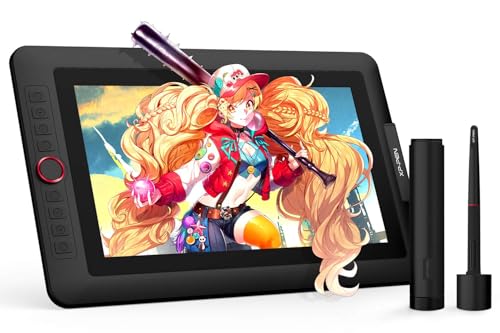
XPPen Artist 13.3 Pro V2
Best for: Beginners needing compact 13.3-inch color-accurate display
- Tablet Type
- Tethered pen display
- Screen Size
- 13.3"
- Display Resolution
- FHD
- Pen Pressure
- 16384
- Color Gamut
- 88% NTSC, >=91% AdobeRGB, >=123% sRGB
- Display Finish
- Fully-laminated, anti-glare
The XP-Pen Artist 13.3 Pro V2 is a 13.3-inch pen display designed for digital artists. It features a fully-laminated FHD screen with 123% sRGB coverage and 178-degree viewing angles. The device supports 16K pressure levels and 60-degree tilt for natural strokes. You get eight customizable shortcut keys and a red dial for workflow control. This model suits beginners and animators needing precise color accuracy and a distraction-free drawing surface.
- 13.3-inch fully-laminated FHD display with 123% sRGB color gamut
- 16K pressure sensitivity and 60-degree tilt recognition
- Eight customizable shortcut keys and a dedicated red dial
- Battery-free stylus with 220 RPS reporting speed
- Heavier at 4.41 pounds compared to lighter competitors
- Smaller 13.3-inch screen size versus 15.6-inch options
- Requires connection to a computer to function
- You want a compact 13.3-inch display for desk use
- You need high color accuracy with 123% sRGB coverage
- You prefer physical controls like a red dial and shortcut keys
- You need a larger 15.6-inch or bigger canvas
- You require a standalone tablet without a computer
- You prioritize a lighter weight under 4 pounds
Verdict: The XP-Pen Artist 13.3 Pro V2 Display offers precise 16K pressure sensitivity and vivid 123% sRGB colors for detailed work. It fits beginners and animators who value a compact 13.3-inch screen and tactile controls over larger sizes.

XP-Pen Artist 13.3 Pro V2
Best for: Compact screen drawing with 16K sensitivity
- Tablet Type
- Pen Display
- Screen Size
- 13.3-inch
- Display Resolution
- 1920×1080 FHD
- Pen Pressure
- 16,384 levels
- Color Gamut
- 99% sRGB, 89% Adobe RGB, 95% P3
- Display Finish
- Fully laminated
The XP-Pen Artist 13.3 Pro V2 is a 13.3-inch pen display with a fully laminated screen and 16K pressure sensitivity. It connects via a single USB-C cable to PCs, Macs, or Android devices. The device features a metal back for heat dissipation and includes a red dial roller. It suits digital artists needing accurate color and a clutter-free setup for drawing directly on the screen.
- 16K pressure sensitivity levels for precise line control
- Fully laminated 13.3-inch display with 95% P3 gamut
- Single USB-C connection for clean desk setups
- Red dial roller and 8 shortcut keys for workflow
- Heavier at 6.79 pounds compared to lighter competitors
- Smaller 13.3-inch screen compared to 15.4-inch options
- Requires a computer or laptop to function
- You want a fully laminated screen for minimal parallax
- You prefer a single-cable USB-C connection
- You need 16K pressure sensitivity for detailed art
- You need a larger 15.4-inch display area
- You are looking for a standalone tablet without a screen
- You require a lighter device under 6 pounds
Verdict: The XP-Pen Artist 13.3 Pro V2 fits artists who value a fully laminated screen and 16K pressure sensitivity in a compact 13.3-inch form factor. It is ideal for users who want a clean USB-C connection and do not mind the extra weight for a sturdy metal build.

XP-Pen Artist 12 11.9" Drawing Tablet
Best for: artists needing dial controls and color accuracy
- Tablet Type
- Tethered pen display
- Screen Size
- 11.9 inch
- Display Resolution
- 1920×1080 Full HD
- Pen Pressure
- 16,384 levels
- Color Gamut
- 99% sRGB
- Display Finish
- Full lamination, AG etched glass
The XP-Pen Artist 12 is an 11.9-inch pen display featuring a 1920×1080 resolution and 99% sRGB color coverage. It includes a 16K pressure-sensitive X4 pen and dual X-Dial wheels for quick adjustments. The anti-glare etched glass reduces eye strain during long sessions. This tablet suits digital artists and students who need a portable, accurate screen for sketching and design work on various operating systems.
- 11.9-inch Full HD display with 99% sRGB and ΔE<1.5 color accuracy
- X4 pen offers 16,384 pressure levels and 60-degree tilt support
- Dual X-Dial wheels allow instant brush size and zoom adjustments
- Anti-glare etched glass reduces glare and fingerprints for comfortable viewing
- Lightweight design at 1.58 lb for easy portability
- 11.9-inch screen is smaller than the 13.3-inch displays on other picks
- 1920×1080 resolution is lower than the higher-resolution options available
- 1.58 lb weight is slightly heavier than some ultra-portable alternatives
- You want precise color accuracy for professional design work
- You need quick access controls via dial wheels for efficiency
- You prefer a compact screen for portable drawing setups
- You require a screen larger than 11.9 inches
- You need a resolution higher than 1080p
- You prioritize the lightest possible device for travel
Verdict: The XP-Pen Artist 12 11.9" Drawing Tablet fits artists who value dial controls and accurate colors in a portable package. It is a solid choice for those who do not need a larger screen.
Specifications side by side
| Spec | XPPen Artist 13.3 Pro V2 | XP-Pen Artist 13.3 Pro V2 | XP-Pen Artist 12 11.9" Drawing Tablet |
|---|---|---|---|
| Tablet Type | Tethered pen display | Pen Display | Tethered pen display |
| Screen Size | 13.3" | 13.3-inch | 11.9 inch |
| Display Resolution | FHD | 1920×1080 FHD | 1920×1080 Full HD |
| Pen Pressure | 16384 | 16,384 levels | 16,384 levels |
| Color Gamut | 88% NTSC, >=91% AdobeRGB, >=123% sRGB | 99% sRGB, 89% Adobe RGB, 95% P3 | 99% sRGB |
| Display Finish | Fully-laminated, anti-glare | Fully laminated | Full lamination, AG etched glass |
| Shortcut Controls | 8 shortcut keys, Red Dial | Red dial roller, 8 express keys | Dual X-Dial wheels, 8 keys |
| Operating System | Android | Android | Android |
| Features | Shortcut Keys | Stylus, Stylus Pen | Stylus, Stylus Pen, Shortcut Keys, Dial |
| Display | Full-Laminated | Full-Laminated | Anti-Glare |
| Color | Black / White | black 13.3inch | Black |
| Audience | Animation, Beginners | – | Animation, Beginners |
| Length | 9.84 inches | – | 14.4 inches |
| Width | 15.4 inches | – | 9.17 inches |
| Weight | 4.41 pounds | 6.79 pounds | 2.48 pounds |
| Dimensions | – | 15 × 9.5 × 0.1 inches | – |
| Size | 13.3 Inch | 13.3 inch | 11.9 inch |
| Model | Artist 13.3Pro | Artist13.3 Pro V2 | Artist 12 3rd |
How to Choose Your XP-Pen Tablet
Check Pressure Sensitivity Levels
You should look for 16K pressure levels to ensure smooth line variation. All three models in this guide share this specification. This level of sensitivity allows for precise control when drawing fine details or thick strokes. It is a standard feature for modern pen displays. You do not need to worry about lower sensitivity tiers. This spec ensures your digital brush responds naturally to your hand movements. It is essential for both beginners and experienced animators who need accuracy.
Evaluate Screen Size Needs
You must decide between a 13.3-inch or 11.9-inch display. The XPPen Artist 13.3 Pro V2 offers more canvas space for detailed work. The Artist 12 provides a smaller 11.9-inch screen for portability. A larger screen reduces the need to zoom in frequently. A smaller screen fits better on compact desks. Consider your workspace limits before choosing. The 13.3-inch models are heavier, while the 11.9-inch option is lighter. Your choice depends on where you plan to use the device.
Review Physical Controls
You should check for shortcut keys or dial controls. The Artist 12 includes a physical dial for easy adjustments. This feature helps you change brush size or opacity quickly. The 13.3 Pro V2 models rely on shortcut keys. These keys are useful for accessing common functions without moving your hand. Decide which control style suits your workflow better. Dial controls offer tactile feedback for precise changes. Shortcut keys are faster for repetitive actions. Choose based on your preference for manual input methods.
Assess Display Technology
You need to compare display types like full-laminated or anti-glare. Full-laminated screens reduce parallax, making the pen tip align closely with the cursor. Both 13.3 Pro V2 models feature this technology for accurate drawing. The Artist 12 uses an anti-glare display to reduce reflections. This is helpful in bright environments. Laminated screens often provide better color accuracy. The 13.3 Pro V2 also offers 123% sRGB coverage. Your choice depends on your lighting conditions and need for color precision.
Consider Weight and Build
You should note the weight differences between models. The 13.3 Pro V2 weighs around 4.41 to 6.79 pounds. The heavier build suggests a sturdy metal construction. The Artist 12 is lighter at 2.48 pounds. This makes it easier to move or store. If you travel often, the lighter model is better. For a stationary desk setup, the heavier model provides stability. Check the dimensions to ensure it fits your desk space. Weight impacts portability and desk footprint significantly.
Frequently asked questions
Which XP-Pen tablet is best for beginners?
The XPPen Artist 13.3 Pro V2 is the top choice for beginners. It features a 13.3-inch full-laminated display and 16K pressure sensitivity. These specs allow for precise control and vivid colors. The compact size makes it easy to handle for new artists who need reliable tools without complexity.
Does the XP-Pen Artist 12 have a dial?
Yes, the XP-Pen Artist 12 includes a dial for quick adjustments. This model also offers 16K pressure levels and an anti-glare screen. The dial controls help artists manage tools efficiently. Its 11.9-inch size provides a portable yet functional workspace for detailed drawing tasks.
What is the difference between full-laminated and anti-glare displays?
Full-laminated screens, like those on the Artist 13.3 Pro V2, reduce parallax for a more natural drawing feel. Anti-glare displays, found on the Artist 12, minimize reflections in bright environments. Both options support 16K pressure sensitivity. You should choose based on your lighting conditions and preference for screen clarity.
Is the XP-Pen Artist 13.3 Pro V2 heavy?
The Artist 13.3 Pro V2 weighs approximately 4.41 to 6.79 pounds depending on the specific configuration. Its metal build adds durability but also weight. This sturdy construction helps keep the tablet stable during intense drawing sessions. You should ensure your desk can support this weight comfortably.
Can I use these tablets for animation?
Yes, the XPPen Artist 13.3 Pro V2 and Artist 12 are suitable for animation. Both models offer 16K pressure levels for smooth line variation. The Artist 12 is specifically noted for animation and beginner audiences. These specs allow for detailed frame-by-frame work and precise brush control.
What operating systems are supported by XP-Pen tablets?
The listed XP-Pen tablets list Android as the operating system in their attributes. This indicates compatibility with Android-based devices or drivers. You should verify specific driver support for your computer or tablet. The 16K pressure sensitivity works across compatible platforms to ensure consistent performance.
How portable is the XP-Pen Artist 12?
The XP-Pen Artist 12 is the most portable option in this group. It weighs only 2.48 pounds and measures 14.4 by 9.17 inches. Its compact size makes it easy to transport for on-the-go work. Despite its smaller 11.9-inch screen, it maintains high precision with 16K pressure levels.


