Fusion5 Built in USA 10.1” Review: Who It Fits and Who Should Skip It
This fusion5 built in usa 10 1 review covers a rugged tablet assembled in Florida.

What this report covers
- Last updated
- 4 Nov 2026
Figures above are read from the product listings for the models named below. Scores are out of 10, based on listed specifications and buyer feedback.
As Amazon Associates, we earn from qualifying purchases. This means we may receive a small commission at no extra cost to you if you click through and make a purchase.
As an Amazon Associate we earn from qualifying purchases. Links on this page are affiliate links.
This fusion5 built in usa 10 1 review covers a rugged tablet assembled in Florida. It runs Windows 11 Professional with an Intel 13th Gen N100 processor and 12GB of RAM. The device features a 512GB SSD and a 10.1-inch Full HD IPS display. It is built for demanding environments with shockproof and dustproof protection. The 6000mAh battery supports long shifts, while dual-band WiFi and Bluetooth 5.0 ensure stable connectivity. This unit weighs 1.4 pounds and measures 10 inches in length. It is designed for professionals who need reliable performance in industrial or outdoor settings.
- 10.1-inch Full HD IPS touchscreen with 500 nits brightness
- Intel 13th Gen Alder Lake N100 CPU with 12GB RAM
- 512GB SSD storage with expandable MicroSD support
- 2-year full warranty including accidental damage cover
- Rugged design resistant to drops, dust, and daily wear
Good fit for
This tablet suits field workers, industrial technicians, and outdoor professionals who need a durable device. The Windows 11 Professional OS allows you to run full desktop applications. The rugged build protects against harsh environments, while the bright display ensures visibility in sunlight. The 12GB RAM supports multitasking with demanding software. If you need a reliable work tool that can handle spills or drops, this unit fits your needs.
Who can skip it
You should look elsewhere if you prioritize portability above all else. At 1.4 pounds and 10 inches wide, this tablet is larger and heavier than typical consumer tablets. The 10.1-inch screen is good for work but less ideal for media consumption compared to larger displays. If you need a lightweight device for casual reading or browsing, a smaller consumer tablet may be more comfortable for extended handheld use.
Verdict
This rugged Windows tablet offers solid specs for professional use in demanding environments. It is a practical choice for workers who need durability and full desktop functionality.
Key specs explained for you
12GB RAM
This amount of memory allows you to run multiple applications simultaneously without significant slowdowns. You can switch between heavy productivity tools, web browsers, and communication apps smoothly. This is useful for professionals who need to multitask on the go. When comparing tablets, more RAM generally means better performance for demanding workflows and sustained use over time.
512GB SSD
A solid-state drive with this capacity provides ample space for your files, apps, and operating system. SSDs are faster than traditional hard drives, leading to quicker boot times and file access. You can store large documents, photos, and software locally. This is ideal if you work offline or need quick data retrieval without relying solely on cloud storage solutions.
Intel 13th Gen N100 CPU
This processor from Intel’s latest generation offers efficient performance for everyday tasks. It handles Windows 11 Professional well, supporting business applications and media playback. The chip balances power and efficiency, which helps maintain battery life during long shifts. When shopping, look for this tier of processor for reliable daily computing without excessive heat or noise.
10.1" 1920×1200 Full HD IPS
This screen size and resolution provide a clear, sharp display for reading and viewing content. The IPS panel ensures consistent colors and wide viewing angles, making it easier to share visuals with others. The 1920×1200 resolution offers more vertical space than standard 1080p screens, which is helpful for documents and spreadsheets. It delivers good clarity for both indoor and outdoor use.
6000mAh Battery
A battery of this capacity supports extended usage periods, potentially lasting through a full workday. You can use the tablet for navigation, data entry, or communication without frequent recharging. This is beneficial for field workers or travelers who may not have easy access to power outlets. Compare this capacity with other tablets to ensure it meets your daily power requirements.
Design and build quality
The Fusion5 tablet is assembled in Florida, according to the listing. This domestic production supports faster logistics and ensures American-level quality standards. The chassis is built to be rugged, shockproof, and dustproof. This construction allows you to use the device in industrial sites, outdoors, or classrooms where ordinary tablets might fail. The design prioritizes durability against drops, spills, and daily wear.
Physically, the device measures 10 inches in length and 6.7 inches in width. Its thickness is 0.43 inches, and it weighs 1.4 pounds. These dimensions create a compact form factor that is manageable for handheld use. The 10.1-inch Full HD IPS touchscreen is protected by 2.5D G+G glass. This glass choice helps provide clarity and resistance to scratches, making the display suitable for both indoor and outdoor viewing.
The build supports its intended use as a work tablet. The rugged exterior protects internal components like the 12GB RAM and 512GB SSD from physical stress. You can rely on this sturdy construction for demanding environments. The compact size and moderate weight make it portable for field work or travel. The durable materials ensure the device remains functional after exposure to dust or accidental impacts. This design philosophy targets professionals who need a reliable tool that can withstand harsh conditions without compromising performance.
Setup and daily use workflow
You begin by registering the device to activate its coverage. Scan the provided QR code to claim the two-year full warranty and accidental damage protection. This step secures your investment against drops, spills, or bumps during rugged use. The tablet arrives with Windows 11 Professional installed. You will use this operating system to run demanding productivity applications. The Intel 13th Gen Alder Lake N100 processor handles these tasks without slowing down. You can switch between heavy tools and web browsers smoothly thanks to the 12GB of RAM. Storage is managed by a 512GB SSD, which provides fast boot times and quick file access. You can expand capacity further by inserting a 512GB MicroSD card.
Connectivity is handled by dual-band WiFi at 2.4 and 5GHz. You stay connected in various environments, from industrial sites to home offices. Bluetooth 5.0 allows you to sync peripherals instantly. You can pair headphones, scanners, or keyboards without delay. The 10.1-inch Full HD IPS touchscreen offers 500 nits of brightness. You can view content clearly even in bright outdoor conditions. The dual full HD cameras support clear video calls for remote work or communication. Audio is delivered through dual speakers, suitable for media consumption after work.
Power comes from a 6000mAh battery. You can rely on this capacity for long shifts or travel days. The included 30W Type-C fast charger ensures the device is ready when you need it. The rugged design resists dust and shocks, making it suitable for daily wear and tear. You can use this tablet with confidence in challenging environments.
What To Consider Before Buying
This rugged Windows tablet fits industrial or outdoor workflows where durability matters. You likely need a protective case to maximize its shockproof design, though the chassis is already built for drops. Check your existing Bluetooth 5.0 accessories for compatibility, especially scanners or keyboards you rely on daily. The dual-band Wi-Fi ensures stable connections in varied environments, but verify your local network supports both 2.4 and 5GHz bands for optimal performance. Upkeep involves keeping the 10.1-inch Full HD IPS screen clean with appropriate wipes to maintain the 500-nit brightness clarity. Storage expansion via MicroSD is available if your 512GB SSD fills up during fieldwork. Compared to standard consumer tablets, this unit prioritizes resilience over sleek aesthetics. It suits professionals who need Windows 11 Pro reliability in harsh conditions. If you require lightweight portability for casual reading, other options in this guide may better match your needs. Consider your typical carrying method and power access before deciding.
Check before you buy
- Verify Bluetooth accessory compatibility with your current setup
- Confirm local Wi-Fi supports dual-band 2.4 and 5GHz
- Check if MicroSD card fits your storage needs
- Assess if rugged design matches your work environment
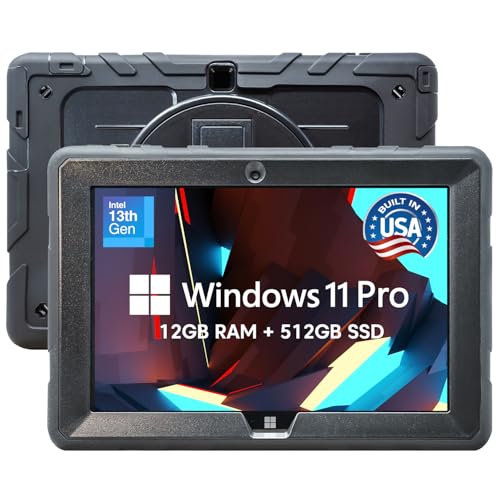
Fusion5 10.1" Rugged Windows 11 Tablet
Best for: rugged outdoor work and professional use
- Screen Size
- 10.1"
- Internal Storage
- 512 GB
- Processor
- Intel 13th Gen Alder Lake N100
- RAM
- 12 GB
- Display Type
- IPS
- Connectivity
- Dual-band Wi-Fi, Bluetooth 5.0
This Fusion5 tablet is a rugged Windows 11 device built in the USA. It features a 10.1-inch Full HD IPS display with 500 nits brightness and an Intel 13th Gen N100 processor. You get 12GB of RAM and a 512GB SSD for multitasking and storage. The 6000mAh battery supports long shifts, and dual-band WiFi keeps you connected. It suits professionals needing durability and reliable performance in industrial or outdoor settings.
- Intel 13th Gen N100 CPU with 12GB RAM
- 512GB SSD with expandable MicroSD support
- 10.1-inch 1920×1200 Full HD IPS display
- Rugged, shockproof, and dustproof construction
- 6000mAh battery with 30W fast charging
- 1.4-pound weight adds bulk for extended handheld use
- 0.43-inch thickness makes it less pocket-friendly
- N100 CPU limits performance for heavy gaming
- You need a durable tablet for industrial or outdoor work
- You require Windows 11 Professional for business applications
- You want a US-assembled device with a 2-year warranty
- You prioritize ultra-lightweight portability for all-day reading
- You need high-end graphics for intensive gaming
- You prefer a smaller 7-inch or 8-inch screen size
Verdict: Fusion5 10.1" Rugged Windows 11 Tablet is a solid choice for field workers and professionals who need a durable, US-made device with strong multitasking specs and a bright display for outdoor visibility.
Specifications side by side
| Spec | Fusion5 10.1" Rugged Windows 11 Tablet |
|---|---|
| Screen Size | 10.1" |
| Internal Storage | 512 GB |
| Processor | Intel 13th Gen Alder Lake N100 |
| RAM | 12 GB |
| Display Type | IPS |
| Connectivity | Dual-band Wi-Fi, Bluetooth 5.0 |
| Storage | 512GB |
| Operating System | Windows |
| Use | Outdoor Work |
| Features | Full HD Display |
| Color | Black |
| Dimensions | 10 × 6.7 × 0.43 inches |
| Weight | 1.4 pounds |
| Size | 512 GB SSD |
| Model | WIN PRO 12GB RAM |
Frequently asked questions
Is the Fusion5 10.1 tablet suitable for outdoor work?
Yes, this device is built for rugged outdoor environments. It features a shockproof and dustproof chassis designed to withstand drops and harsh conditions. The 10.1-inch Full HD IPS display provides clear visibility even in bright sunlight. You can rely on its durable construction for field work.
What operating system does this tablet run?
It runs Windows 11 Professional. This full desktop OS allows you to use standard Windows applications and manage files familiar to PC users. You get full compatibility with professional software suites. This makes it ideal for users who need a complete computing experience on a portable device.
How much storage space is included?
The tablet includes 512GB of SSD storage. This solid-state drive offers fast boot times and quick file access compared to older hard drives. You have ample space for documents, media files, and installed applications. The speed ensures smooth performance even when handling large datasets or multiple programs simultaneously.
Is this tablet made in the USA?
Yes, the device is assembled in Florida. This domestic production supports faster logistics and ensures American-level quality standards. You benefit from local manufacturing oversight. This origin may appeal to buyers who prioritize domestic supply chains and want to support local assembly operations for their professional hardware needs.
How heavy is the Fusion5 10.1 tablet?
It weighs 1.4 pounds. This weight balances portability with the need for a rugged, durable build. You can carry it comfortably during daily commutes or site visits without excessive strain. The dimensions are compact enough to fit in standard bags while providing a large enough screen for productivity tasks.
What is the screen resolution?
The display is Full HD. This resolution ensures sharp text and clear images for detailed work. You get a crisp viewing experience for documents, spreadsheets, and media. The 10.1-inch size offers a good balance between screen real estate and handheld usability. It is suitable for both professional tasks and casual entertainment.
Can I use this tablet for multitasking?
Yes, it is equipped with 12GB of RAM. This memory capacity allows you to run multiple applications simultaneously without significant slowdowns. You can switch between heavy productivity tools, web browsers, and communication apps smoothly. This setup supports professionals who need to manage complex workflows on a single device.


