6 Best Alternatives to the Fusion5 2026 Version 10.1″ Windows 11 Pro Tablet (2026)
You might be looking for fusion5 version 10 1 windows 11 pro tablet alternatives if you want a compact device but need different specs.

What this report covers
- Last updated
- 4 Nov 2026
Figures above are read from the product listings for the models named below. Scores are out of 10, based on listed specifications and buyer feedback.
As Amazon Associates, we earn from qualifying purchases. This means we may receive a small commission at no extra cost to you if you click through and make a purchase.
As an Amazon Associate we earn from qualifying purchases. Links on this page are affiliate links.
You might be looking for fusion5 version 10 1 windows 11 pro tablet alternatives if you want a compact device but need different specs. The Fusion5 Helios 10 offers a 10.1-inch FHD+ display, 12GB of DDR5 RAM, and active cooling. It is assembled in the USA with a metal body. These features suit users who prioritize domestic manufacturing and thermal management in a small form factor.
However, you may prefer a larger screen, a different processor, or cellular connectivity. Some buyers want more storage or a lighter weight. This list includes 6 options chosen because their specifications overlap with the original. You will find devices with varying screen sizes, from 10 to 13 inches. The selections cover different operating systems and performance tiers. Each alternative matches specific needs that the Fusion5 tablet may not address, such as LTE support or AI capabilities.
How these options differ from Fusion5
Microsoft Surface Pro 7+ 12.3" i7
The Surface Pro 7+ trades the Fusion5’s compact 10.1-inch screen for a larger 12.3-inch display. It uses a Core i7 processor and 16GB of RAM, offering significantly more raw power than the Fusion5’s Alder Lake N150. You get 512GB of storage, matching the Fusion5, but the device is heavier and thicker. This model suits users who need desktop-class performance for heavy multitasking or professional applications. It lacks the active cooling fan found in the Fusion5, relying on passive dissipation. If you prioritize screen real estate and processing speed over portability and thermal management, this is the stronger choice.
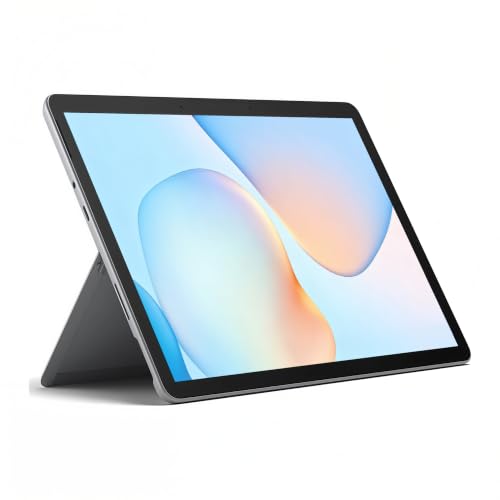
Microsoft Surface Go 10-inch Pentium
The Surface Go offers a similar 10-inch form factor but with much lighter specs. It features a Pentium processor and only 128GB of storage, which is less than the Fusion5’s 512GB SSD. The device is thinner at 0.33 inches compared to the Fusion5’s 0.43 inches, making it more pocketable. It runs Windows 11 Pro, ensuring compatibility with the same software ecosystem. However, it lacks DDR5 RAM and active cooling. This tablet is ideal for users who need a basic, lightweight device for email, web browsing, and light office work. It sacrifices speed and storage capacity for a smaller footprint and lower price point.
Microsoft Surface Pro 8 i7 LTE
The Surface Pro 8 LTE provides a 13-inch high-resolution display and Intel Evo i7 performance, far exceeding the Fusion5’s capabilities. It includes 16GB of RAM and 512GB of storage, matching the Fusion5’s capacity but with much faster processors. The LTE connectivity allows internet access without Wi-Fi, a feature the Fusion5 does not list. The device is larger and heavier, measuring 12.7 inches in length. It is designed for professionals who need powerful computing and cellular connectivity on the go. You give up the compact size and active cooling of the Fusion5 for a premium, versatile device suitable for creative work and business travel.
KibyBte 10.1" Android 16 Tablet 512GB
The KibyBte tablet runs Android 16 instead of Windows 11 Pro, making it incompatible with Windows applications. It offers 512GB of storage and a 10.1-inch display, similar in size to the Fusion5. The device includes a stylus and keyboard in the box, adding value for media consumption and light productivity. It is thinner and lighter than the Fusion5. This option fits users who prefer the Android ecosystem and want included accessories. You lose Windows compatibility and the active cooling system. It is best for those who need a versatile media tablet with touch and pen support rather than a full Windows PC experience.
Microsoft Surface Go 10-inch Pentium
This Surface Go model mirrors the other Go variant with a 10-inch screen and Pentium processor. It provides 128GB of storage, significantly less than the Fusion5’s 512GB. The device is very thin at 0.33 inches and lightweight, prioritizing portability over performance. It runs Windows 11 Pro, maintaining software compatibility. However, it lacks the DDR5 RAM and active cooling fan of the Fusion5. This tablet is suitable for users who need a basic, highly portable device for casual use. It sacrifices processing power and storage space for a smaller, lighter design. Choose this if you need a simple tablet for browsing and media rather than heavy multitasking.
Microsoft Surface Pro 2025 12-inch
The Surface Pro 2025 features a 12-inch display and Snapdragon processor with 16GB of RAM and 512GB of storage. It is a Copilot+ PC, emphasizing AI features and long battery life. The device is larger and thicker than the Fusion5, measuring 11.6 inches in length. It runs Windows 11 but uses a different architecture. The Fusion5 offers active cooling and a 10.1-inch screen, while this model focuses on efficiency and AI integration. This tablet suits users who want advanced AI capabilities and a larger screen. You trade the compact size and Windows 11 Pro familiarity for a modern, AI-focused device with different performance characteristics.
| # | Product | Best for | Price |
|---|---|---|---|
| 1 | Fusion5 Helios 10 10.1" Windows 11 Pro Tablet Best overall | US-assembled compact Windows 11 Pro tablets | |
| 2 | Microsoft Surface Pro 7+ 12.3" i7 Also great | Power users needing i7 performance and 512GB storage | |
| 3 | Microsoft Surface Go 10-inch Pentium Best budget | portable Windows 11 Pro tasks | |
| 4 | Microsoft Surface Pro 8 i7 LTE Best premium | professionals needing LTE and high-res display | |
| 5 | KibyBte 10.1" Android 16 Tablet 512GB Best android | Android users needing included accessories | |
| 6 | Microsoft Surface Go 10-inch Pentium Also great | casual use and portability | |
| 7 | Microsoft Surface Pro 2025 12-inch Also great | Users wanting Copilot+ AI and 16GB RAM |

Fusion5 Helios 10 10.1" Windows 11 Pro Tablet
Best for: US-assembled compact Windows 11 Pro tablets
- Screen Size
- 10.1"
- Internal Storage
- 512GB
- Processor
- Intel 15th Gen Alder Lake N150
- RAM
- 12GB DDR5
- Operating System
- Windows
- Dimensions
- 10 × 6.69 × 0.43 inches
The Fusion5 Helios 10 is a 10.1-inch tablet assembled in the USA. It features a 15th Gen Intel Alder Lake N150 processor, 12GB of DDR5 RAM, and a 512GB SSD. The device includes an active cooling fan to manage heat during heavy workloads. You get a 10.1-inch FHD+ display with a 16:10 aspect ratio. This configuration suits users who need reliable multitasking and portable productivity in a compact form factor.
- 15th Gen Intel Alder Lake N150 processor
- 12GB DDR5 RAM and 512GB SSD
- Active cooling fan prevents throttling
- 10.1-inch FHD+ 1920×1200 display
- Heavier at 1.4 pounds compared to lighter competitors
- Smaller 10.1-inch screen versus 12.3-inch or 12.9-inch options
- Lower 400-nit brightness compared to premium tablets
- You prioritize domestic assembly and build quality
- You need active cooling for sustained performance
- You want a compact 10-inch Windows tablet
- You require a larger display for media consumption
- You prefer a lighter device for travel
- You need a high-brightness screen for outdoor use
Verdict: Fusion5 Helios 10 10.1" Windows 11 Pro Tablet is a solid choice for users who value American assembly and active cooling in a compact Windows 11 Pro tablet.

Microsoft Surface Pro 7+ 12.3" i7
Best for: Power users needing i7 performance and 512GB storage
- Screen Size
- 12.3"
- Internal Storage
- 512GB
- Processor
- Intel Core i7-1165G7
- RAM
- 16GB
- Display Type
- PixelSense
- Connectivity
- Wi-Fi 6, Bluetooth 5.0
The Microsoft Surface Pro 7+ offers a 12.3-inch PixelSense display with 2736 x 1824 resolution. It runs Windows 11 Pro on an Intel Core i7 processor with 16GB RAM and 512GB SSD storage. The device weighs 1.70 pounds and includes USB-C, USB-A, and a microSDXC reader. This configuration suits users who need strong performance and ample storage in a portable 2-in-1 form factor.
- Intel Core i7-1165G7 processor with 16GB RAM
- 512GB SSD storage capacity
- 12.3-inch PixelSense display at 2736 x 1824 resolution
- Includes USB-A and USB-C ports plus microSDXC reader
- 12.3-inch screen is smaller than the 13-inch and 10.1-inch alternatives listed
- Wi-Fi only model lacks LTE connectivity found in other options
- 1.70-pound weight is heavier than the 1.2-pound Surface Go
- You need Windows 11 Pro and high-end i7 performance
- You require 512GB of internal storage for large files
- You prefer a 12.3-inch display for detailed work
- You need built-in cellular LTE connectivity
- You want the lightest possible tablet under 1.3 pounds
- You prefer a 10.1-inch screen size for portability
Verdict: Microsoft Surface Pro 7+ i7 16GB delivers strong processing power and storage for professionals needing Windows 11 Pro. It fits users who prioritize performance and screen real estate over cellular connectivity or minimal weight.
Microsoft Surface Go 10-inch Pentium
Best for: portable Windows 11 Pro tasks
- Screen Size
- 10 inches
- Internal Storage
- 128GB
- Processor
- Intel Pentium 4415Y
- RAM
- 8GB
- Display Type
- PixelSense
- Operating System
- Windows
This renewed Microsoft Surface Go offers a 10-inch PixelSense touchscreen with a 1800×1200 resolution. It runs Windows 11 Pro on an Intel Pentium 4415Y processor with 8GB of RAM and 128GB of storage. The compact 9.65 x 6.9 x 0.33-inch design makes it easy to carry. It suits you if you need a lightweight device for browsing, media, and light office work.
- 10-inch 1800×1200 PixelSense touchscreen
- 8GB RAM and 128GB SSD storage
- Windows 11 Pro with BitLocker encryption
- Compact 0.33-inch thin profile
- Intel Pentium 4415Y processor limits heavy multitasking
- 128GB storage is lower than 512GB options
- 10-inch screen is smaller than 12.3-inch models
- You need a lightweight tablet for travel
- You want Windows 11 Pro in a small form factor
- You prefer a device that fits easily in a bag
- You require high-performance gaming or video editing
- You need large internal storage for extensive media libraries
- You prefer a larger display for detailed creative work
Verdict: Microsoft Surface Go 10-inch Tablet is a compact Windows 11 Pro device for light daily tasks. It fits users who prioritize portability and basic productivity over raw power.

Microsoft Surface Pro 8 i7 LTE
Best for: professionals needing LTE and high-res display
- Screen Size
- 13"
- Internal Storage
- 512GB SSD
- Processor
- Intel Core i7-1165G7
- RAM
- 16GB
- Display Type
- PixelSense
- Connectivity
- 4G LTE
The Microsoft Surface Pro 8 is a 13-inch Windows 11 Pro tablet with an Intel Evo i7 processor, 16GB of RAM, and a 512GB SSD. It features a 2880 x 1920 PixelSense display with up to 120Hz refresh rate and includes LTE cellular connectivity. This device suits users who need a powerful, portable machine with high-resolution visuals and mobile data access for work or creative tasks.
- Intel Evo i7-1165G7 quad-core processor for strong performance
- 13-inch PixelSense touchscreen with 2880 x 1920 resolution
- Up to 120Hz refresh rate for smoother visuals
- 4G LTE unlocked cellular connectivity for on-the-go use
- Thunderbolt 4 USB-C ports for fast data transfer
- 13-inch screen is larger than the 10.1-inch Fusion5 and Surface Go tablets on this list
- 0.75-inch thickness is bulkier than the 0.35-inch profile of some thinner tablet variants
- 16GB RAM is less than the 32GB option available in other Surface Pro 8 configurations
- You need LTE cellular connectivity for mobile work
- You prefer a larger 13-inch display for detailed tasks
- You require Windows 11 Pro with enterprise-grade security features
- You want a smaller 10.1-inch tablet for one-handed use
- You need the maximum 32GB RAM configuration
- You prefer a thinner device under 0.5 inches thick
Verdict: Microsoft Surface Pro 8 13-inch LTE fits professionals who need a powerful Windows tablet with LTE and a high-resolution screen for creative or business work on the go.

KibyBte 10.1" Android 16 Tablet 512GB
Best for: Android users needing included accessories
- Screen Size
- 10.1 inches
- Internal Storage
- 512 GB
- Processor
- Octa-core
- RAM
- 32 GB
- Operating System
- Android
- Features
- Stylus, Stylus Pen, Octa-Core, Keyboard
This KibyBte tablet runs Android 16 on a 10.1-inch display. It offers 32GB of RAM and 512GB of internal storage to handle multitasking and media. The package includes a keyboard case, mouse, and stylus. It features an octa-core processor and a high-capacity battery. This device suits users who need a versatile Android tablet with included accessories for work and entertainment.
- Android 16 operating system
- 32GB RAM and 512GB ROM
- Includes keyboard case, mouse, and stylus
- Octa-core processor for multitasking
- High-capacity battery for extended use
- 10.1-inch screen is smaller than the 12.3-inch and 12-inch options on this list
- Android OS limits access to full Windows desktop applications
- 512GB storage is less than the 512GB SSD found in the Surface Pro 7+
- You want a complete Android tablet with included productivity accessories
- You prefer the Android operating system over Windows
- You need high RAM and storage for media and multitasking
- You require full Windows 11 desktop applications
- You need a larger display than 10.1 inches
- You are looking for a premium brand like Microsoft
Verdict: KibyBte Android 16 Tablet 10.1-Inch provides a complete Android experience with included accessories. It fits users who want a versatile tablet for media and light productivity without needing Windows.

Microsoft Surface Go 10-inch Pentium
Best for: casual use and portability
- Screen Size
- 10"
- Internal Storage
- 128GB SSD
- Processor
- Intel Pentium 4415Y
- RAM
- 8GB
- Display Type
- PixelSense
- Operating System
- Windows
This 10-inch tablet runs Windows 11 Pro on an Intel Pentium 4415Y processor with 8GB of RAM and 128GB of storage. It features a 10-inch 1800×1200 PixelSense touchscreen and a lightweight 0.33-inch profile. You get a certified renewed device that offers reliable daily performance for browsing and media. The adjustable kickstand allows for flexible viewing angles, making it suitable for on-the-go use.
- 10-inch 1800×1200 PixelSense touchscreen
- Intel Pentium 4415Y with 8GB RAM
- 128GB SSD storage
- Windows 11 Pro operating system
- Compact 0.33-inch thickness
- 128GB storage is lower than the 512GB SSD on the Surface Pro 7+
- Intel Pentium processor is less powerful than the i7 chips in the Surface Pro 8 and Pro 2-in-1
- 10-inch screen is smaller than the 12.3-inch display on the Surface Pro 7+
- You need a lightweight Windows tablet for casual browsing
- You want a compact device that fits easily in a bag
- You prefer a lower-cost renewed option
- You require high-performance computing for heavy multitasking
- You need a larger screen for detailed creative work
- You want the latest high-speed processors
Verdict: Microsoft Surface Go 10-inch Tablet is a compact Windows 11 Pro option for users who prioritize portability over raw power. It fits buyers who need a lightweight device for everyday tasks and media consumption.

Microsoft Surface Pro 2025 12-inch
Best for: Users wanting Copilot+ AI and 16GB RAM
- Screen Size
- 12"
- Internal Storage
- 512GB
- Processor
- Snapdragon X Plus
- RAM
- 16GB
- Display Type
- PixelSense
- Battery Life
- Up to 16 hours
This is a 2-in-1 tablet running Windows 11 Copilot+ PC. It features a 12-inch PixelSense touchscreen and a Snapdragon X Plus processor. The unit comes with 16GB of RAM and 512GB of SSD storage. You get up to 16 hours of battery life. It adapts from tablet to laptop mode. This model suits users who need strong AI performance and long battery life in a portable form.
- Snapdragon X Plus 8-core processor
- 16GB RAM and 512GB SSD storage
- Up to 16 hours of battery life
- 12-inch PixelSense touchscreen display
- 12-inch screen is larger than the 10.1-inch Fusion5
- Keyboard is sold separately
- Snapdragon processor differs from Intel chips in other options
- You want a Copilot+ PC with strong AI capabilities
- You need 16GB of RAM for multitasking
- You prefer a 12-inch display over smaller sizes
- You require an Intel processor
- You need a bundled keyboard
- You prefer a 10.1-inch screen size
Verdict: Microsoft Surface Pro 2025 12" Snapdragon is a powerful Copilot+ PC for users who prioritize AI features and long battery life. It fits those who want a larger 12-inch display and do not mind purchasing a keyboard separately.
Specifications side by side
| Spec | Fusion5 Helios 10 10.1" Windows 11 Pro Tablet | Microsoft Surface Pro 7+ 12.3" i7 | Microsoft Surface Go 10-inch Pentium | Microsoft Surface Pro 8 i7 LTE | KibyBte 10.1" Android 16 Tablet 512GB | Microsoft Surface Go 10-inch Pentium | Microsoft Surface Pro 2025 12-inch |
|---|---|---|---|---|---|---|---|
| Screen Size | 10.1" | 12.3" | 10 inches | 13" | 10.1 inches | 10" | 12" |
| Internal Storage | 512GB | 512GB | 128GB | 512GB SSD | 512 GB | 128GB SSD | 512GB |
| Processor | Intel 15th Gen Alder Lake N150 | Intel Core i7-1165G7 | Intel Pentium 4415Y | Intel Core i7-1165G7 | Octa-core | Intel Pentium 4415Y | Snapdragon X Plus |
| RAM | 12GB DDR5 | 16GB | 8GB | 16GB | 32 GB | 8GB | 16GB |
| Display Type | – | PixelSense | PixelSense | PixelSense | – | PixelSense | PixelSense |
| Connectivity | – | Wi-Fi 6, Bluetooth 5.0 | – | 4G LTE | – | – | – |
| Battery Life | – | – | – | – | – | – | Up to 16 hours |
| Storage | 512GB | 512GB | 128GB | 512GB | 512GB | 128GB | 512GB |
| Operating System | Windows | Windows | Windows | Windows | Android | Windows | Windows |
| Features | – | – | – | – | Stylus, Stylus Pen, Octa-Core, Keyboard | – | – |
| Display | – | – | Touchscreen | Touchscreen | – | Touchscreen | Touchscreen |
| Dimensions | 10 × 6.69 × 0.43 inches | – | 9.65 × 0.33 × 6.9 inches | 12.7 × 0.75 × 8.98 inches | 8.5 × 5.3 × 0.39 inches | 9.65 × 0.33 × 6.9 inches | 11.6 × 8.24 × 1.43 inches |
| Weight | 1.4 pounds | – | – | – | – | – | – |
| Size | 10.1" | Core i7 | Wi-Fi | 16GB | 512GB | Matte Black | 10 inches | Intel Evo i7 | 16GB | 512GB | Windows 11 Pro | 10.1-Inch | 10 inches | 16GB RAM, 512GB SSD |
| Model | Helios10 | 1ND-00016 | 754684036052 | Microsoft Surface Pro 8 | – | 754684034324 | – |
| Color | – | Matte Black | – | – | Silents Black | – | Ocean |
Frequently asked questions
Which tablet is best for US assembly and cooling?
The Fusion5 Helios 10 is the top choice for this need. It features active cooling to manage heat during use. The device is assembled in the US, which appeals to buyers wanting domestic manufacturing. It offers a compact 10.1-inch screen and 512GB of storage. This makes it a practical option for those prioritizing build origin and thermal management.
What is the best budget Windows tablet option?
The Microsoft Surface Go 10-inch Pentium serves as the best budget alternative. It provides a 10-inch touchscreen and 128GB of storage. The device is lightweight, measuring 9.65 inches in length and 0.33 inches thick. It runs Windows 11 Pro, making it suitable for light daily tasks and portable productivity without requiring high-end processing power.
Is there a Windows tablet with LTE connectivity?
Yes, the Microsoft Surface Pro 8 i7 LTE includes cellular connectivity. It features a 13-inch high-resolution touchscreen and an Intel Evo i7 processor. The tablet comes with 16GB of RAM and 512GB of storage. Its dimensions are 12.7 inches long and 0.75 inches thick. This model fits professionals who need reliable mobile internet access while working.
Which Android tablet comes with accessories included?
The KibyBte 10.1-inch Android 16 Tablet includes a stylus and keyboard. It offers 512GB of storage and an octa-core processor. The device measures 8.5 inches in length and 0.39 inches thick. It runs Android 16, providing a complete experience for media consumption and light productivity. This bundle is ideal for users who want ready-to-use accessories without separate purchases.
What is the best premium Windows tablet for professionals?
The Microsoft Surface Pro 8 i7 LTE is the best premium option. It combines an Intel Evo i7 processor with LTE connectivity. The 13-inch display offers high resolution for creative or business work. With 16GB of RAM and 512GB of storage, it handles demanding tasks efficiently. Its robust build supports professionals who need power and connectivity on the go.
Which tablet offers Copilot+ AI features?
The Microsoft Surface Pro 2025 12-inch Snapdragon includes Copilot+ AI capabilities. It features a 12-inch touchscreen and 16GB of RAM. The device has 512GB of SSD storage and an Ocean color finish. It measures 11.6 inches long and 1.43 inches thick. This model is designed for users who prioritize advanced AI features and a larger display for their workflow.
How does the Surface Pro 7+ compare in performance?
The Surface Pro 7+ i7 delivers strong processing power for professionals. It uses a Core i7 processor and 16GB of RAM. The tablet features a 12.3-inch display and 512GB of storage. It is available in Matte Black. This option fits users who prioritize raw performance and screen real estate over minimal weight or cellular connectivity.


