GAOMON vs Frunsi Drawing Tablets: Which Brand Fits You?
Choosing between GAOMON and Frunsi depends on your setup.

What this report covers
- Last updated
- 4 Nov 2026
Figures above are read from the product listings for the models named below. Scores are out of 10, based on listed specifications and buyer feedback.
As Amazon Associates, we earn from qualifying purchases. This means we may receive a small commission at no extra cost to you if you click through and make a purchase.
As an Amazon Associate we earn from qualifying purchases. Links on this page are affiliate links.
Choosing between GAOMON and Frunsi depends on your setup. Both brands offer drawing tablets with screens and pressure-sensitive pens for digital art. The GAOMON vs frunsi drawing tablet comparison highlights a key split: connectivity. One requires a computer, while the other works alone. You need to decide if you prefer a portable standalone device or a dedicated pen display for your desktop.
Tablet Type
Pen Display (requires computer)
Standalone (no computer needed)
Screen Size
11.6 Inch
10.1 Inch
Display Resolution
1920×1080
1920×1200
Processor
not listed
Octa-Core CPU
Battery
not listed
5800mAh (up to 5 hours)
Weight
1.91 pounds
not listed
Choose the first if
- You already use a Windows or Mac computer for your art software.
- You want a larger 11.6-inch screen for more drawing space.
- You prefer a lightweight device that connects via cable to your PC.
Choose the second if
- You need a fully independent tablet that runs its own apps.
- You want to draw anywhere without carrying a laptop or desktop.
- You prefer a slightly taller 1920×1200 aspect ratio for your canvas.
Verdict
Pick the GAOMON if you are anchored to a computer and want a larger display for your existing workflow. Choose the Frunsi if you need a self-contained device that operates independently for on-the-go sketching. Your choice depends entirely on whether you prioritize screen real estate or standalone mobility.
GAOMON vs Frunsi Key Differences
Connectivity
Edge: Frunsi RubensTab T11 Pro 10.1-Inch
The GAOMON PD1161 is a pen display that requires a connection to a Windows, Mac, or Chromebook computer to function. It does not have an internal operating system or processing power to work independently. In contrast, the Frunsi RubensTab T11 Pro is a standalone drawing tablet. It operates without any external device, allowing you to sketch and design anywhere. This independence makes the Frunsi suitable for on-the-go creativity, while the GAOMON is best for a fixed desk setup where you already have a capable computer nearby.
Screen Size
Edge: GAOMON PD1161 11.6" Pen Display
Screen real estate affects your drawing space and comfort. The GAOMON PD1161 features an 11.6-inch display, providing a larger canvas for detailed work or multi-window layouts. The Frunsi RubensTab T11 Pro offers a 10.1-inch screen, which is slightly more compact. Both screens deliver Full HD resolution, ensuring sharp details. If you prefer a wider workspace that mimics a larger sketchpad, the GAOMON has the advantage. The Frunsi’s smaller size may appeal to those who prioritize portability and a more compact footprint on their desk.
Battery Life
Edge: Frunsi RubensTab T11 Pro 10.1-Inch
Power management differs significantly between these two devices. The Frunsi RubensTab T11 Pro contains a built-in 5800mAh battery, providing up to five hours of continuous use. It supports USB-C charging and can even be powered by a mobile power bank during travel. The GAOMON PD1161 does not have an internal battery for operation. It draws power from your connected computer. While the GAOMON pen is battery-free, the tablet itself relies on a constant power source, making the Frunsi the only choice for truly untethered sessions.
Pressure Sensitivity
Edge: GAOMON PD1161 11.6" Pen Display
Both tablets use battery-free pens to deliver natural drawing strokes. The GAOMON PD1161 specifies 8192 levels of pressure sensitivity and includes tilt support, which helps in shading and creating varied line weights. The Frunsi RubensTab T11 Pro also uses a high-sensitivity pen that requires no battery. However, the provided data does not list the specific pressure level count or tilt support for the Frunsi. For artists who rely on precise tilt recognition and verified high-pressure levels, the GAOMON offers more detailed specifications.
Weight and Portability
Edge: Frunsi RubensTab T11 Pro 10.1-Inch
If you plan to carry your tablet frequently, weight matters. The GAOMON PD1161 weighs 1.9 pounds (866g), which is relatively light for an 11.6-inch display. The Frunsi RubensTab T11 Pro is smaller and likely lighter due to its 10.1-inch size, though exact weight is not listed. The Frunsi’s standalone nature means you only carry one device, whereas the GAOMON requires you to carry a laptop as well. For pure tablet portability, the Frunsi is more convenient, but the GAOMON is still manageable for travel if you already own a computer.
Choose your GAOMON or Frunsi tablet
You need a standalone tablet
Our pick: Frunsi RubensTab T11 Pro 10.1-Inch
The Frunsi RubensTab T11 Pro works without a computer. It features an octa-core CPU and a 5800mAh battery for up to five hours of use. You can draw anywhere using its 10.1-inch Full HD IPS display. This setup offers true portability for sketching or note-taking away from a desk.
You want a larger screen
Our pick: GAOMON PD1161 11.6" Pen Display
The GAOMON PD1161 provides an 11.6-inch IPS Full HD screen. This larger canvas suits digital artists who need more space for detailed work. It connects to your existing computer, leveraging its processing power. The 8192 pressure levels and tilt support ensure precise control for professional drawing and animation tasks.
You prefer shortcut keys
Our pick: GAOMON PD1161 11.6" Pen Display
The GAOMON PD1161 includes eight customizable shortcut keys on the left side. These keys help streamline your workflow by providing quick access to common functions. Combined with the battery-free pen and two programmable buttons, this setup reduces hand movement and increases efficiency during long creative sessions on your connected computer.

GAOMON PD1161 11.6" Pen Display
Best for: portable digital drawing with a computer
- Tablet Type
- Tethered pen display
- Screen Size
- 11.6"
- Display Resolution
- 1920×1080 Full HD
- Pen Pressure
- 8192
- Display Finish
- Anti-glare film
- Shortcut Controls
- 8 shortcut keys
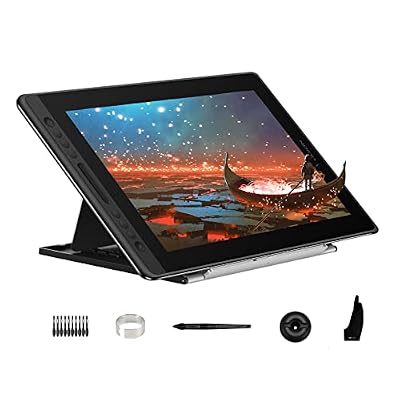
The GAOMON PD1161 is an 11.6-inch pen display with an IPS Full HD screen and 8192 levels of pressure sensitivity. It includes tilt support and a battery-free pen with two programmable buttons. Eight customizable shortcut keys sit on the left side. This device requires a Windows, Mac, or Chromebook computer to function, making it a portable tool for digital art and online teaching rather than a standalone unit.
- 11.6-inch IPS Full HD display with 1920×1080 resolution
- 8192 levels of pen pressure with tilt support
- Battery-free pen with two programmable buttons
- Eight customizable shortcut keys on the left side
- Lightweight design at 1.9 pounds
- Requires connection to a computer to operate
- 11.6-inch screen is smaller than larger options
- You need a portable drawing screen for a laptop setup
- You want customizable shortcut keys for your workflow
- You are using Windows, Mac, or Chromebook for digital art
- You need a standalone tablet that works without a computer
- You require a screen larger than 11.6 inches
- You want a device that operates independently of a host system
Verdict: GAOMON PD1161 11.6-Inch Pen Display is a practical choice for artists who already have a computer and want a lightweight, portable drawing screen. It fits students and professionals who need precise pressure sensitivity and shortcut keys for digital sketching.

Frunsi RubensTab T11 Pro 10.1-Inch
Best for: portable standalone digital art and note-taking
- Tablet Type
- Standalone
- Screen Size
- 10.1 inch
- Display Resolution
- 1920 x 1200 Full HD
- Features
- Octa-Core
- Color
- Black
- Audience
- Students, Beginners
The Frunsi RubensTab T11 Pro is a standalone drawing tablet with a 10.1-inch Full HD display. It uses an octa-core CPU and does not need a computer. The 5800mAh battery lasts up to 5 hours. You get a pressure-sensitive pen and multi-touch screen. It suits students and beginners who want to sketch or take notes without extra hardware.
- Standalone design requires no computer connection
- 10.1-inch FHD IPS screen with 1920×1200 resolution
- Octa-core CPU for independent operation
- 5800mAh battery provides up to 5 hours of use
- Includes adjustable stand case for portability
- Smaller 10.1-inch screen compared to the 11.6-inch GAOMON PD1161
- Shorter 5-hour battery life limit for extended sessions
- Heavier build at 0.39 inches thick and 6.69×7.87 inches
- You want a portable device that works without a PC
- You prefer a smaller screen for easy handling
- You need a standalone unit for classroom or meeting notes
- You require an 11.6-inch display or larger
- You need all-day battery life without charging
- You prefer a thinner, lighter device for travel
Verdict: Frunsi RubensTab T11 Pro 10.1 inch Standalone Tablet fits beginners who need a compact, all-in-one drawing tool. It is ideal for on-the-go sketching and note-taking where a computer is not available.
Specifications side by side
| Spec | GAOMON PD1161 11.6" Pen Display | Frunsi RubensTab T11 Pro 10.1-Inch |
|---|---|---|
| Tablet Type | Tethered pen display | Standalone |
| Screen Size | 11.6" | 10.1 inch |
| Display Resolution | 1920×1080 Full HD | 1920 x 1200 Full HD |
| Pen Pressure | 8192 | – |
| Display Finish | Anti-glare film | – |
| Shortcut Controls | 8 shortcut keys | – |
| Features | Battery-Free Pen, Shortcut Keys, Tilt Support | Octa-Core |
| Display | Anti-Glare | – |
| Color | Black | Black |
| Audience | Students, Animation, Beginners | Students, Beginners |
| Length | 14.2 inches | – |
| Width | 7.87 inches | – |
| Weight | 1.91 pounds | – |
| Dimensions | – | 7.87 × 6.69 × 0.39 inches |
| Size | 11.6 Inch | 10 inch |
| Model | A2.PD1161-0-EN0000-1-US | RubensTab |
Frequently asked questions
Is GAOMON or Frunsi better for beginners?
Both brands target beginners, but they suit different workflows. The GAOMON PD1161 offers 8192 pressure levels and tilt support for precise sketching when connected to a computer. The Frunsi RubensTab T11 Pro is a standalone device with an octa-core processor, ideal for on-the-go note-taking without needing external hardware.
Does the GAOMON PD1161 work without a computer?
No. The GAOMON PD1161 is a pen display that requires a connection to a Windows, Mac, or Chromebook computer to function. It lacks an internal operating system or processing power to operate independently. You must connect it to a host device to access its drawing features.
Can I draw standalone with the Frunsi RubensTab T11 Pro?
Yes. The Frunsi RubensTab T11 Pro is a standalone tablet that works without a computer. It features an octa-core CPU and a 5800mAh battery for up to five hours of use. You can draw anywhere using its 10.1-inch Full HD IPS screen, making it great for portability.
Which tablet has better pressure sensitivity?
The GAOMON PD1161 specifies 8192 levels of pen pressure. This allows for nuanced line weight variations in your digital art. The Frunsi RubensTab T11 Pro data does not list specific pressure levels, so you cannot compare that metric directly from the provided specifications for this model.
Are shortcut keys available on both tablets?
The GAOMON PD1161 includes shortcut keys for quick access to tools and functions. This helps streamline your workflow during digital sketching. The provided data for the Frunsi RubensTab T11 Pro does not mention shortcut keys, so you should assume they are not a highlighted feature for this device.
Which is lighter and more portable?
The GAOMON PD1161 weighs 1.91 pounds and measures 7.87 by 14.2 inches. The Frunsi RubensTab T11 Pro measures 6.69 by 7.87 inches with a height of 0.39 inches. While the Frunsi is thinner, the GAOMON is a connected display. The Frunsi is truly portable as it operates alone.
Does the GAOMON pen require a battery?
No. The GAOMON PD1161 features a battery-free pen. You do not need to charge the stylus to use it. It relies on electromagnetic resonance technology. This ensures you never run out of power in the middle of a drawing session, unlike active styluses that require charging.
What screen type does the GAOMON use?
The GAOMON PD1161 uses an anti-glare display. This reduces reflections and eye strain during long drawing sessions. It is an 11.6-inch pen display designed for clear visibility. The Frunsi RubensTab T11 Pro features a 10.1-inch Full HD IPS screen, offering vibrant colors for standalone digital art creation.