GrandPad Easy to Use Tablet Review (2026): A Spec-Based Look
This grandpad easy to use tablet review examines a device built for older adults.
What this report covers
- Last updated
- 4 Nov 2026
Figures above are read from the product listings for the models named below. Scores are out of 10, based on listed specifications and buyer feedback.
As Amazon Associates, we earn from qualifying purchases. This means we may receive a small commission at no extra cost to you if you click through and make a purchase.
As an Amazon Associate we earn from qualifying purchases. Links on this page are affiliate links.
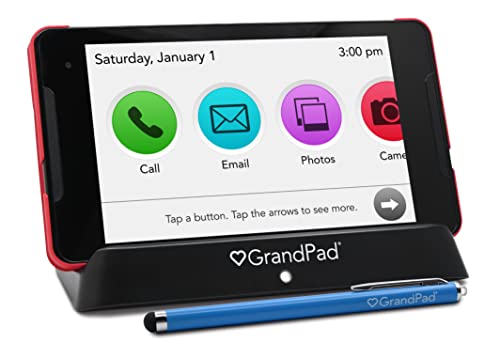
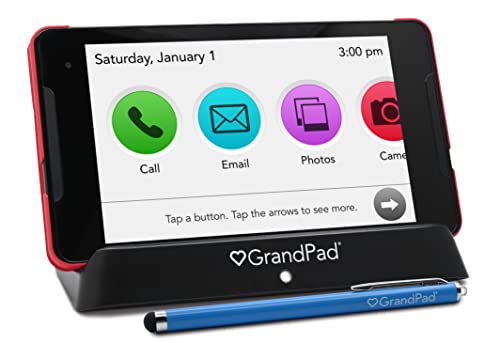
This grandpad easy to use tablet review examines a device built for older adults. It combines a tablet and phone into one unit. The screen measures 8.96 inches wide. The unit weighs 13.4 ounces. It includes Bluetooth connectivity. The device uses a specific model number 9R-X0QM-1FS2. It comes in black with a red case. GrandPad locks the software to prevent confusion. You cannot install third-party apps. This approach simplifies daily use for seniors who want to stay in touch with family without technical hurdles.
- Integrated tablet and phone hardware in one device
- Large 8.96-inch display for easy reading
- Lightweight 13.4-ounce design for comfortable holding
- Secure network that blocks spam and scams
- Companion apps for family photo sharing
Good fit for
This tablet suits seniors who want a simple way to call and video chat with family. It is ideal for users who find standard tablets too complex. The built-in fraud protection and spam blocking provide peace of mind. You should choose this if you want curated apps and do not need to install new software. The companion apps let family members share photos securely. It works well for those who value safety and simplicity over customization.
Who can skip it
You should look elsewhere if you need a standard Android or iOS tablet. This device is locked and does not support other wireless carriers like Consumer Cellular. You cannot use it without a GrandPad subscription plan. It lacks the flexibility to install your own apps. If you want to browse the open web or use diverse services, this locked ecosystem will feel restrictive. It is not a general-purpose computing device.
Verdict
The GrandPad offers a secure, simplified experience for seniors who prioritize safety and ease of use. It is a specialized tool for connection, not a general tablet.
GrandPad Key Specs Explained
Weight: 13.4 ounces
This weight makes the tablet easy to hold for extended periods. Older adults with less grip strength can manage it without fatigue. It is light enough to carry between rooms. You should compare this to heavier tablets that may cause strain. The low mass supports comfortable one-handed use for reading or browsing.
Width: 8.96 inches
This width defines the screen area available for viewing content. A wider display allows for larger icons and clearer text. This benefits users with vision challenges who need legible interfaces. You should compare this to smaller phones or larger laptops. The size balances portability with readability for video calls and photos.
Height: 0.38 inches
This thickness indicates a slim profile that fits easily in bags. It reduces bulk when carrying the device around the house. A thin design often feels less cumbersome during daily use. You should compare this to bulkier rugged tablets. The slim form factor aids in comfortable handling for seniors.
Color: Black with Red Case
The black device paired with a red case offers high contrast. This visual distinction helps users locate the tablet quickly. The red case may also provide a secure grip. You should compare this to uniform color schemes that blend into surroundings. The contrasting colors assist those with visual processing differences.
Features: Bluetooth
Bluetooth allows wireless connection to accessories like headphones or speakers. This enables private listening during video calls or music. You can connect audio devices without extra cables. Compare this to tablets requiring wired connections for audio. Bluetooth adds convenience for users who prefer wireless setups.
Design and Build Quality
The GrandPad tablet features a black finish paired with a red case, according to the listing. This color combination offers a distinct look that helps users identify the device quickly. The physical dimensions are 5.04 inches in length and 8.96 inches in width. The unit is 0.38 inches thick. These measurements create a compact form factor that fits comfortably in one hand. You can hold it for long periods without strain.
Weighing 13.4 ounces, the device is notably light. This low mass reduces hand fatigue during video calls or photo viewing. Older adults with weaker grip strength can manage the tablet easily. It is portable enough to move between rooms without difficulty. The single size option simplifies choices, as you do not need to compare multiple form factors.
Bluetooth connectivity is included, allowing wireless pairing with accessories. The model number is 9R-X0QM-1FS2. The build supports its role as an all-in-one tablet and phone. The sturdy case likely protects the screen during daily use. This design prioritizes ease of handling over premium materials. You get a straightforward, functional device focused on usability. The layout supports simple navigation for seniors. This approach ensures the hardware does not distract from the software experience.
Setup And Daily Use Guide
Setting up this tablet requires direct involvement from GrandPad. You must call the company to activate the device. You cannot use it with Consumer Cellular or other wireless carriers. The listing notes it is locked and not compatible with other networks. You choose from six plans, including Basic, Premium, or Ultimate options. These plans are available monthly or annually. All plans include curated apps. The device has limited functionality without an active subscription. The first month is free with certain plans. Daily use focuses on simplicity and security. The interface uses large icons and easy navigation. This design helps older adults connect with family safely. The private network blocks spam and scams. You can make voice and video calls easily. Photo sharing is built into the system. Family members can use companion apps for Android and iOS to share memories securely. The device includes multiplayer games and curated music. A virtual companion named Grandie is also available. You have access to world-class customer care based in the U.S. Select plans include 911 calling. Bluetooth connectivity allows for wireless accessories. The tablet combines a phone and tablet into one unit. This all-in-one approach reduces the need for multiple devices. The secure network ensures that your loved ones stay connected without exposure to online threats. The setup process is guided by the company to ensure everything works correctly from the start.
Before You Buy GrandPad
You need to verify network compatibility before purchasing. This tablet is locked and does not work with Consumer Cellular or other carriers. You must call GrandPad to activate service. You cannot use it with your existing phone plan. You should check if your household has reliable Wi-Fi for initial setup, though the device uses a private network for calls and apps. You will need a smartphone or computer to download the companion app for sharing photos and videos. The device requires a subscription plan to function fully. Without an active plan, the tablet has limited utility. You should consider if your family wants to use the companion tools. This option suits those who want a dedicated, simplified device rather than a general-purpose tablet. It fits alongside standard e-readers as a communication tool, not a reading device. You must decide if the locked ecosystem fits your needs.
Check before you buy
- Confirm the tablet is compatible with your wireless carrier.
- Check if you can call GrandPad for activation.
- Verify you have a smartphone for companion apps.
- Ensure you accept the required monthly subscription plan.
GrandPad 13.4 oz Senior Tablet
Best for: Seniors needing a secure, simple tablet
- Dimensions
- 5.04 × 8.96 × 0.38 inches
- Weight
- 13.4 ounces
This GrandPad tablet combines a 5.04 by 8.96 inch screen with a 13.4 ounce weight. It includes Bluetooth for connectivity. The device features a secure network that blocks spam and scams. You need a subscription plan to activate the device. It offers large icons and easy navigation for older adults. Family members can share photos using companion apps.
- 8.96 inch display size
- 13.4 ounce weight
- Bluetooth connectivity
- Secure network blocks spam
- Companion apps for photo sharing
- Requires a paid subscription plan for functionality
- Limited to one size option
- Not compatible with other wireless carriers
- You want a device with a secure network
- You need large icons for easy navigation
- You want to share photos with family
- You prefer to use your own carrier
- You want multiple size options
- You need full internet access without a plan
Verdict: GrandPad 8.96-inch Senior Tablet suits seniors who value a secure, spam-free environment and simple navigation over open internet access. It fits users who want a dedicated device for family connection rather than a general-purpose tablet.
Specifications side by side
| Spec | GrandPad 13.4 oz Senior Tablet |
|---|---|
| Dimensions | 5.04 × 8.96 × 0.38 inches |
| Weight | 13.4 ounces |
| Size | Only one size option |
| Color | Black with Red Case |
| Model | 9R-X0QM-1FS2 |
Frequently asked questions
Is the GrandPad tablet suitable for seniors with limited dexterity?
Yes, the device is designed for ease of use. It weighs only 13.4 ounces, making it lightweight and easy to hold. The compact dimensions of 5.04 by 8.96 inches also help users manage the device comfortably without straining their hands or wrists.
Does the GrandPad support Bluetooth connectivity?
Yes, the tablet includes Bluetooth features. This allows you to connect wireless accessories like headphones or speakers. The specific model number 9R-X0QM-1FS2 confirms these capabilities are built into the hardware for seamless peripheral pairing.
What are the physical dimensions of the GrandPad screen?
The screen width measures 8.96 inches. The device is 5.04 inches in length and 0.38 inches in height. These proportions create a portable form factor that fits easily in most hands or bags while providing a readable display area.
What color options are available for this tablet?
The listing specifies a black finish paired with a red case. This combination provides a distinct visual identity. You will receive the device in this specific color scheme, which helps in quickly identifying the tablet among other household items.
Can I use this tablet with my current phone carrier?
No, the device is locked and not compatible with other networks. You cannot use it with Consumer Cellular or other wireless carriers. Activation requires direct contact with GrandPad to set up the service properly for your specific needs.
Is there only one size option for the GrandPad?
Yes, the product listing indicates only one size option is available. You do not need to choose between different screen sizes or form factors. The single configuration ensures a consistent experience for all users who purchase this specific senior-focused tablet.


