HUION KAMVAS 22 120% sRGB Drawing Tablet Review (2026): A Spec-Based Look
This huion kamvas 22 120 srgb drawing tablet review covers a 21.5-inch pen display designed for digital artists.

What this report covers
- Last updated
- 4 Nov 2026
Figures above are read from the product listings for the models named below. Scores are out of 10, based on listed specifications and buyer feedback.
As Amazon Associates, we earn from qualifying purchases. This means we may receive a small commission at no extra cost to you if you click through and make a purchase.
As an Amazon Associate we earn from qualifying purchases. Links on this page are affiliate links.
This huion kamvas 22 120 srgb drawing tablet review covers a 21.5-inch pen display designed for digital artists. It features a full-laminated screen with 120% sRGB color gamut and 1920 x 1080 resolution. The device uses a battery-free stylus with 8192 pressure levels and tilt support. It connects to computers or Android devices via USB-C. The unit includes an adjustable stand for ergonomic comfort. You get a large, vivid workspace for your creative projects. This listing provides the essential specifications for evaluating its performance.
- 120% sRGB color gamut for vivid, accurate colors
- 21.5-inch full-laminated display with 1920 x 1080 resolution
- Battery-free PW517 stylus with 8192 pressure levels and tilt response
- Adjustable metallic stand allows angles from 20° to 80°
- Anti-glare matte film mimics paper texture
Good fit for
This tablet suits digital illustrators and graphic designers who need a large, color-accurate workspace. The 120% sRGB coverage helps you trust your color choices. The 21.5-inch screen offers plenty of room for complex compositions. If you use a Mac, Windows PC, or compatible Android device, this pen display integrates easily. The adjustable stand supports comfortable, long drawing sessions. It is ideal for users who prefer a traditional drawing angle and want a stable, laminated screen experience.
Who can skip it
You should look elsewhere if you need a standalone device. The data notes this is not a standalone product and requires a computer or laptop to function. It lacks built-in operating systems or wireless connectivity. If you prefer a portable solution without cables, this may not fit your workflow. Also, skip this if you require a larger 23.8-inch option or a different form factor. The reliance on wired connections means you need available USB ports on your host device.
Verdict
The HUION Kamvas 22 offers a large, color-accurate screen with precise pen tracking for connected devices. It is a solid choice for desktop artists who value screen size and color fidelity.
Key specs explained for this tablet
Screen Size: 21.5-inch
This diagonal measurement defines the physical workspace available on the display. A 21.5-inch screen offers a moderate canvas size that balances detail visibility with desk footprint. You get enough room to view full interfaces or large illustrations without the bulk of a 24-inch monitor. This size suits artists who want ample space but limited desk area.
Display Resolution: 1920 x 1080
This pixel count determines image sharpness and clarity on the screen. Full HD resolution ensures that lines, text, and brush strokes appear crisp and well-defined. You can zoom in to see fine details without immediate pixelation. This standard resolution is common in mid-range displays, providing a clear view for digital painting and graphic design tasks.
Color Gamut: 120% sRGB
This percentage indicates the range of colors the screen can reproduce compared to the standard sRGB color space. Covering 120% sRGB allows the display to show more vibrant and diverse hues than standard monitors. You benefit from more accurate and vivid color representation for digital art. This wide gamut is valuable for creators who need precise color control.
Pen Pressure: 8192 Levels
This specification measures how finely the stylus detects pressure applied to the screen. With 8192 levels, the tablet captures subtle variations in your stroke weight. You can create thin hairlines or thick, bold marks with smooth transitions. This high sensitivity mimics traditional pen and paper behavior, offering natural control for detailed digital illustration and sketching.
Display Type: Full-Laminated
Full lamination bonds the touch layer directly to the display panel, removing the air gap between them. This construction reduces parallax, making the cursor appear closer to your pen tip. You experience a more direct and intuitive drawing feel. This technology also improves image clarity and contrast by eliminating internal reflections within the screen layers.
Design and build overview
The HUION Kamvas 22 has a dark gray finish and measures 21.5 inches wide by 12.7 inches deep. Its thickness is listed as 0.75 inches, though some variations may be slightly deeper. The unit weighs 8.6 pounds, which gives it a solid feel on your desk. You can adjust the included metallic stand to angles between 20 and 80 degrees. This range lets you tilt the screen to a comfortable position for drawing, reducing neck strain during long sessions. The stand color matches the tablet body for a uniform look.
The screen surface features an anti-glare matte film. According to the listing, this finish mimics the texture of paper while reducing reflections from overhead lights. The display is fully laminated, which helps keep the pen tip close to the image layer. This construction choice supports a more natural drawing experience. The device connects via USB-C ports for video and power, with an additional USB-A port for peripherals. It requires a computer or compatible Android device to function. The design prioritizes stability and ergonomic adjustment for artists who need a reliable, fixed workspace.
Setup and everyday use guide
You must connect the HUION Kamvas 22 to an external device because it is not a standalone product. The display requires a computer, laptop, or compatible Android device to function. You can link the tablet using the included 3-in-1 cable or a separate USB-C to USB-C cable. This connection provides both power and data transfer. The unit also features a USB-A port, which allows you to attach external peripherals like a keyboard or USB drive directly to the display. This setup helps reduce cable clutter on your desk.
For daily use, the device supports Mac and Windows operating systems. You need MacOS 10.12 or later for Apple computers, and Windows 7 or later for PC users. Android compatibility depends on your device supporting USB 3.1 GEN1 or DisplayPort 1.2. If your phone or tablet meets these standards, you can use the tablet on the go.
The adjustable metallic stand lets you tilt the screen from 20° to 80°. This range helps you find a comfortable working angle that reduces neck strain. The anti-glare matte film on the screen mimics the texture of paper, which can improve your drawing experience. The battery-free pen with 8192 pressure levels and tilt response ensures accurate input. You do not need to charge the stylus, allowing for uninterrupted creative sessions.
Before you buy this tablet
You need a host device to use this display. It is not a standalone tablet. Ensure your computer runs Windows 7 or later, or macOS 10.12 or newer. Android users must verify their device supports USB 3.1 Gen 1 or DisplayPort 1.2. You will likely need a sturdy desk surface. The unit weighs 8.6 pounds and measures 21.5 inches wide. The included stand adjusts from 20 to 80 degrees. This angle range helps reduce neck strain during long sessions. Keep the matte screen clean. Use a soft, dry cloth to remove dust. Avoid harsh chemicals that might damage the anti-glare coating. This pen display sits alongside other creative tools in our guide. Unlike e-readers, it requires constant power and data connection. Unlike basic graphics tablets, it offers a direct screen experience. Check your cable availability. The 3-in-1 cable connects power, data, and video. Some users prefer separate USB-C cables for flexibility. Verify your port types before purchasing.
Check before you buy
- Confirm your computer OS is Windows 7+ or macOS 10.12+
- Verify Android device supports USB 3.1 Gen 1 or DP 1.2
- Ensure you have a stable desk surface for the 8.6 lb unit
- Check for available USB-C or DisplayPort outputs on your host device
- Have a soft dry cloth ready for matte screen maintenance
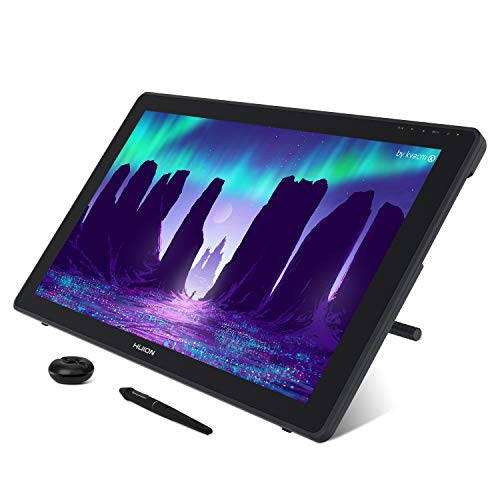
HUION Kamvas 22 21.5-Inch Pen Display
Best for: desktop digital art and illustration work
- Tablet Type
- Tethered pen display
- Screen Size
- 21.5 inch
- Display Resolution
- 1920 x 1080
- Pen Pressure
- 8192 levels
- Color Gamut
- 120% sRGB
- Display Finish
- Full-laminated, anti-glare matte film
The HUION Kamvas 22 is a 21.5-inch pen display with a 1920 x 1080 resolution and 120% sRGB color gamut. It features a full-laminated screen and supports 8192 pressure levels with tilt response. The included adjustable stand allows angles from 20 to 80 degrees. You need a computer, Mac, Windows, or compatible Android device to use it. This tablet is not standalone.
- 120% sRGB color gamut for vivid visuals
- 8192 levels of pen pressure and tilt support
- Full-laminated 1920 x 1080 anti-glare screen
- Adjustable stand with 20 to 80 degree range
- 8.6-pound weight makes it less portable
- Requires connection to a host device to function
- Standard 1000:1 contrast ratio limits deep blacks
- You need a large canvas for detailed digital art
- You want a stable stand with multiple angle options
- You use a PC or compatible Android device
- You require a standalone tablet without a computer
- You prioritize high portability and light weight
- You need a display with a higher contrast ratio
Verdict: HUION Kamvas 22 21.5-inch Pen Display suits artists who prioritize screen real estate and color accuracy over portability. It is a solid choice for desktop setups where you can connect it to a computer.
Specifications side by side
| Spec | HUION Kamvas 22 21.5-Inch Pen Display |
|---|---|
| Tablet Type | Tethered pen display |
| Screen Size | 21.5 inch |
| Display Resolution | 1920 x 1080 |
| Pen Pressure | 8192 levels |
| Color Gamut | 120% sRGB |
| Display Finish | Full-laminated, anti-glare matte film |
| Operating System | Android |
| Features | Stylus, Stylus Pen, Battery-Free Pen, Tilt Support |
| Display | Full-Laminated |
| Dimensions | 21.5 × 12.7 × 0.75 inches |
| Weight | 8.6 pounds |
| Size | 21.5-inch |
| Color | Dark Gray |
| Model | GS2201 |
Frequently asked questions
Does the HUION Kamvas 22 work with Android devices?
Yes, the tablet supports Android operating systems. You must verify that your device supports USB 3.1 Gen 1 or DisplayPort Alt Mode to ensure compatibility. This allows you to connect the pen display to compatible phones or tablets for portable drawing sessions.
What is the resolution of the HUION Kamvas 22 screen?
The display features a 1920 x 1080 resolution. This Full HD clarity ensures sharp lines and detailed images on the 21.5-inch canvas. It provides sufficient pixel density for most digital art and illustration tasks without requiring excessive GPU power from your host computer.
Is the stylus for the HUION Kamvas 22 battery-free?
Yes, the included stylus is battery-free. You do not need to charge it or replace batteries to use it. This design ensures consistent performance and eliminates the risk of the pen dying during a critical creative session, allowing for uninterrupted workflow.
Does the HUION Kamvas 22 support tilt functions?
Yes, the tablet offers tilt support for the stylus. This feature allows you to create natural shading effects by angling the pen, similar to traditional pencils or brushes. It adds depth and realism to your digital artwork by recognizing the tilt angle of the nib.
Can I use the HUION Kamvas 22 as a standalone tablet?
No, it is not a standalone device. You must connect it to an external computer, laptop, or compatible Android device to function. The pen display acts as a secondary monitor and input tool, requiring a host system to process your drawings and commands.
What color gamut does the HUION Kamvas 22 cover?
The screen covers 120% of the sRGB color gamut. This wide color range allows you to view and create images with vibrant, accurate hues. It is particularly beneficial for graphic designers and illustrators who need precise color representation for their digital projects and print workflows.
How heavy is the HUION Kamvas 22 pen display?
The unit weighs 8.6 pounds. This weight contributes to its stability on a desk, reducing the chance of accidental movement while you draw. However, it is not designed for frequent portability, so it is best suited for a fixed desktop art station.
What is the model number for the HUION Kamvas 22?
The model number for this device is GS2201. You can use this identifier to locate specific drivers, firmware updates, or replacement accessories on the manufacturer’s website. It helps distinguish this 21.5-inch display from other models in the HUION product lineup.


