HUION Kamvas 22 Plus QLED Drawing Tablet Review: Specs, Pros and Cons
In this huion kamvas 22 plus QLED drawing tablet review, we look at a pen display designed for digital artists who need a large, accurate workspace.

What this report covers
- Last updated
- 4 Nov 2026
Figures above are read from the product listings for the models named below. Scores are out of 10, based on listed specifications and buyer feedback.
As Amazon Associates, we earn from qualifying purchases. This means we may receive a small commission at no extra cost to you if you click through and make a purchase.
As an Amazon Associate we earn from qualifying purchases. Links on this page are affiliate links.
In this huion kamvas 22 plus QLED drawing tablet review, we look at a pen display designed for digital artists who need a large, accurate workspace. This 21.5-inch FHD monitor connects to your computer to provide a direct drawing surface. It uses Quantum Dot technology to deliver 140% sRGB color coverage, ensuring rich and consistent hues for your illustrations. The unit also features full lamination to reduce parallax, keeping your pen tip aligned with the cursor. It is not a standalone device, requiring a host machine to function.
- 21.5-inch FHD display with 140% sRGB color gamut
- Full-lamination technology for reduced parallax and clearer images
- PW517 battery-free stylus with 8192 pressure levels and tilt support
- Etched anti-glare glass for a natural pen-on-paper feel
- Dual USB-C ports with Android compatibility for mobile setups
Good fit for
This tablet suits illustrators, animators, and photo editors who value color accuracy and screen real estate. The 140% sRGB range helps professionals match their digital work to print standards. The large 21.5-inch FHD screen allows for complex compositions without constant zooming. Artists who prefer a natural writing feel will appreciate the textured, anti-glare glass. It is also ideal for creators who work with multiple operating systems, including Mac, PC, and Linux, thanks to its broad software compatibility.
Who can skip it
You should look elsewhere if you need a portable, standalone device. This pen display must connect to a computer or compatible Android device to work. It is not a tablet with its own operating system. Users who require wireless connectivity for drawing will find the wired USB-C connection restrictive. Additionally, those who prioritize a smaller footprint may find the 21.5-inch size too large for compact desks. If you do not have a host machine ready, this unit will not function independently.
Verdict
The HUION Kamvas 22 Plus offers a spacious, color-accurate workspace for serious digital artists. Its full-lamination screen and battery-free pen make it a practical choice for detailed creative work.
Key specs explained for this tablet
21.5-inch FHD display
This screen size gives you a large workspace for detailed artwork. The 1920×1080 resolution ensures sharp lines and clear text. You get more room for complex compositions without constant zooming. This is larger than standard tablet screens, making it better for professional design work where you need to see more of your canvas at once.
140% sRGB color gamut
This spec indicates the range of colors the display can show. A 140% sRGB rating means the screen covers more colors than standard monitors. You will see richer, more accurate hues in your digital art. This is crucial for illustrators who need consistent color representation. It ensures your final output matches what you see on the screen, reducing guesswork in color correction.
Full lamination technology
Full lamination bonds the touch layer directly to the display. This virtually eliminates parallax, so your pen tip aligns closely with the cursor. You get a more natural drawing feel with precise tracking. It also prevents dust from entering the screen and improves light transmission. This results in a clearer image and better durability compared to non-laminated displays.
8192 pressure levels
This number represents how many variations in line thickness or opacity the stylus can detect. With 8192 levels, you can create subtle gradients and precise lines. It allows for natural shading and detailed inking. This sensitivity is essential for artists who need fine control over their strokes. It mimics the response of a real pen on paper, offering greater artistic flexibility.
Design and Build Details
According to the listing, this HUION Kamvas 22 Plus has a black finish and measures 21.5 inches wide, 12.7 inches deep, and 0.75 inches high. It weighs 7.5 pounds. The screen features an advanced etched anti-glare glass. This textured surface provides friction for a natural pen-on-paper feel. It also resists scratches and corrosion. The display uses full-lamination technology. This bonds the layers to eliminate parallax. Your pen tip aligns closely with the cursor for precise work. The seamless bond also keeps dust out and improves light transmission. You get a clearer view for photo retouching or vector graphics.
The device uses a dual USB-C design. This makes connection simpler and more reliable. A side-cable outlet prevents cable bending. This keeps your setup tidy and reduces loose port issues. You must connect this pen display to a computer or laptop. It is not a standalone product. The listing notes compatibility with Android devices via USB 3.1 Gen 1. You can sketch on the go with a compatible phone or tablet. The battery-free PW517 stylus plugs directly into the unit. There are no separate charging steps for the pen. The compact footprint fits on most desks. The weight provides stability during intense drawing sessions. You do not need to worry about the unit sliding around while you work.
Setup and Daily Use Overview
This device is not standalone. You must connect it to a computer or laptop to function. Setup relies on its dual USB-C design. You can use a 3-in-1 cable or a direct USB-C to USB-C link. The side cable outlet helps prevent bending and keeps your workspace tidy. This reduces common connection issues like loose ports.
Compatibility is broad. It works with Mac running macOS 10.12 or later. It supports PC with Windows 7 or later. Linux users on Ubuntu can also use it. Android devices are supported if they run OS 6.0 or later and feature USB 3.1 Gen 1 with DP 1.2 or higher. This allows for on-the-go sketching from phones or tablets.
Daily use centers on the PW517 battery-free stylus. You do not need to charge the pen. It uses PenTech 3.0 technology with a 3.5mm magnetic core for precise tracking. You get 8192 pressure levels and ±60° tilt recognition. This allows for natural shading and precise line work. The full-lamination display reduces parallax. Your pen tip and cursor align closely. This ensures reliable accuracy for vector graphics or manga creation. The anti-glare glass minimizes reflections in bright studios. The textured surface offers friction similar to pen on paper. You can use it with major creative software including Photoshop, Clip Studio Paint, and Krita.
Before You Buy This Tablet
You need a compatible host device to use this tablet. It connects via USB-C to PCs, Macs, or Android devices. Check your computer for USB 3.1 Gen 1 and DisplayPort 1.2 support. Android users must verify OS version 6.0 or later. This pen display is not standalone. You must keep your host device nearby. The anti-glare glass requires regular cleaning with a soft, dry cloth. Avoid harsh chemicals. The textured surface resists scratches but still needs care. This unit sits alongside other Tablets & E-Readers as a dedicated creative tool. It lacks portability for casual reading. You should place it on a stable desk. Ensure your workspace has adequate lighting to minimize reflections. The dual USB-C ports help manage cable clutter. You may need a stand or mount for ergonomic comfort during long sessions. This setup suits fixed workstations rather than mobile use.
Check before you buy
- Verify your computer has USB-C and DP 1.2 support.
- Check Android device OS is version 6.0 or later.
- Ensure you have a stable desk for the 7.5 lb weight.
- Confirm compatibility with your preferred creative software.
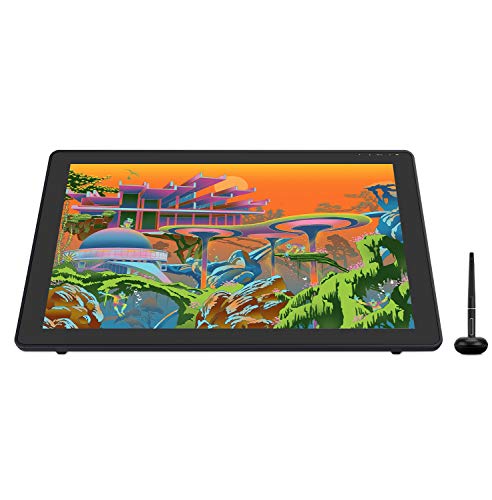
HUION Kamvas 22 Plus 21.5" Pen Display
Best for: Digital artists needing a large, color-accurate workspace
- Tablet Type
- Tethered pen display
- Screen Size
- 21.5 inch
- Display Resolution
- 1920 x 1080 FHD
- Pen Pressure
- 8192 levels
- Color Gamut
- 140% sRGB
- Display Finish
- Full-laminated, etched anti-glare glass
The HUION Kamvas 22 Plus is a 21.5-inch FHD pen display designed for digital artists. It features a QLED screen with 140% sRGB coverage and full lamination to reduce parallax. The device uses a battery-free PW517 stylus with 8192 pressure levels and tilt support. It connects via dual USB-C ports and works with Windows, Mac, Linux, and compatible Android devices. This large workspace suits detailed illustration and animation work.
- 21.5-inch FHD display with 140% sRGB color gamut
- Full lamination technology minimizes parallax for precise cursor alignment
- PW517 battery-free stylus offers 8192 pressure levels and ±60° tilt
- Dual USB-C design simplifies connection and improves stability
- Etched anti-glare glass reduces reflections and eye strain
- Weighs 7.5 pounds, making it heavier than smaller portable tablets
- Requires connection to a computer or Android device to function
- 21.5-inch size limits portability compared to smaller display options
- You need a large 21.5-inch workspace for detailed digital art
- You want accurate color representation with 140% sRGB coverage
- You prefer a battery-free pen that is always ready to use
- You require a standalone tablet that works without a computer
- You need a lightweight device for frequent travel
- You only have devices that do not support USB-C video output
Verdict: HUION Kamvas 22 Plus 21.5" QLED Pen Display provides a large, color-accurate workspace for artists who need precision and a natural pen feel. It fits professionals and hobbyists who prioritize screen real estate and stylus performance over portability.
Specifications side by side
| Spec | HUION Kamvas 22 Plus 21.5" Pen Display |
|---|---|
| Tablet Type | Tethered pen display |
| Screen Size | 21.5 inch |
| Display Resolution | 1920 x 1080 FHD |
| Pen Pressure | 8192 levels |
| Color Gamut | 140% sRGB |
| Display Finish | Full-laminated, etched anti-glare glass |
| Operating System | Android |
| Features | Stylus, Stylus Pen, Battery-Free Pen, Tilt Support |
| Display | Full-Laminated |
| Color | Black |
| Dimensions | 21.5 × 12.7 × 0.75 inches |
| Weight | 7.5 pounds |
| Size | 21.5 Inch |
| Model | GS2202-US |
Frequently asked questions
Is the HUION Kamvas 22 Plus a standalone tablet?
No, this device is a pen display, not a standalone tablet. It requires connection to a computer, laptop, or compatible Android device to function. You cannot use it independently without a host system. The listing confirms it runs on Android but relies on external processing power for operation.
Does the stylus require charging or batteries?
No, the included stylus is battery-free. It does not require charging or internal batteries to operate. This feature ensures you can draw continuously without interruption for power management. The pen also supports tilt functions for natural shading and line variation.
What is the screen size of this display?
The HUION Kamvas 22 Plus features a 21.5-inch screen. This large format provides ample space for detailed digital artwork and complex compositions. The full-laminated display reduces parallax, allowing your pen tip to align closely with the cursor on the screen.
How heavy is the HUION Kamvas 22 Plus?
The tablet weighs 7.5 pounds. Its dimensions are 21.5 inches in length, 12.7 inches in width, and 0.75 inches in height. This weight suggests it is designed for a stable desk setup rather than portable use. The black finish adds to its professional aesthetic.
What operating systems are supported?
The device supports Android, Windows, and macOS. You must connect it to a host computer via USB-C. Android users need version 6.0 or later. Ensure your computer supports USB 3.1 Gen 1 and DisplayPort 1.2 for optimal performance and connectivity.
Is the display full-laminated?
Yes, the screen is a full-laminated display. This technology bonds the digitizer directly to the glass, reducing the gap between your pen and the drawn line. It improves accuracy and creates a more natural writing experience compared to non-laminated screens.


