HUION KAMVAS Pad 12 2K+ Standalone Drawing Tablet Review: Who It Fits and Who Should Skip It
This huion kamvas pad 12 2k standalone drawing tablet review focuses on a self-contained device for digital artists.

What this report covers
- Last updated
- 4 Nov 2026
Figures above are read from the product listings for the models named below. Scores are out of 10, based on listed specifications and buyer feedback.
As Amazon Associates, we earn from qualifying purchases. This means we may receive a small commission at no extra cost to you if you click through and make a purchase.
As an Amazon Associate we earn from qualifying purchases. Links on this page are affiliate links.
This huion kamvas pad 12 2k standalone drawing tablet review focuses on a self-contained device for digital artists. It combines a 12.2-inch 2K+ display with a 90Hz refresh rate for smooth visuals. The tablet runs Android 16, allowing you to use drawing apps directly without a computer. Key specs include 16K pressure levels for precise line work and an 8-core processor with 8GB RAM. This setup offers a portable, all-in-one solution for sketching and illustration on the go.
- 12.2-inch 2K+ screen with 90Hz refresh rate for fluid drawing
- 16K pressure levels and ±60° tilt for natural shading
- Android 16 OS with preloaded apps like Clip Studio Paint
- 99% sRGB color accuracy with ΔE<1.8 factory calibration
- 8000mAh battery supporting a full day of independent use
Good fit for
This tablet suits artists who want a portable, standalone device for sketching and illustration. The Android 16 OS and included apps make it ideal for creators who do not always have a computer nearby. The 90Hz screen and 16K pressure levels provide the responsiveness needed for detailed digital art. Its lightweight design and long battery life also benefit students or professionals who travel frequently while maintaining creative workflows.
Who can skip it
Users who require a traditional pen display that connects to a desktop computer may find this device limiting. It lacks the processing power of a full PC, so complex 3D rendering or heavy video editing may be challenging. The 8GB RAM is sufficient for drawing but may struggle with extremely large, multi-layered projects. If you need maximum computational power for professional studio work, a connected tablet paired with a powerful computer is a better choice.
Verdict
The HUION KAMVAS Pad 12 2K+ is a capable, portable drawing tablet for artists who value independence from a computer. Its strong display and responsive pen make it a solid choice for on-the-go creation.
Key specs explained for you
12.2-inch 2K+ resolution
This screen size and pixel density give you a large, sharp canvas for detailed work. The 236 PPI count ensures text and lines look crisp, which matters if you read comics or edit high-res photos. Compare this to standard 1080p tablets where images may appear pixelated. The 3:2 aspect ratio also provides more vertical space for drawing or reading documents than typical widescreen devices.
90Hz refresh rate
A higher refresh rate means the display updates 90 times per second. This reduces motion blur when you draw quickly, making strokes appear instantly. It also makes scrolling through menus or watching videos smoother. If you are used to 60Hz screens, the difference in fluidity is noticeable. This spec is crucial for digital artists who need real-time feedback from their pen movements.
16K pressure levels
This specification refers to 16,384 levels of sensitivity detected by the stylus. It allows for subtle variations in line width and opacity, mimicking the feel of real ink or charcoal. Light touches create thin lines, while harder presses create bold strokes. This precision helps you achieve professional-looking shading and line art. Compare this to lower-end tablets that offer fewer levels, which can feel stiff or less responsive.
Android 16 operating system
This device runs the latest Android 16 OS, giving you direct access to the Google Play Store. You can download dedicated drawing apps like Clip Studio Paint or HiPaint without needing a computer. This standalone capability makes the tablet highly portable for artists on the go. It also supports standard Android apps for browsing, streaming, or note-taking, offering more versatility than basic e-ink readers.
8GB RAM and 256GB storage
8GB of RAM allows the tablet to run multiple apps or large drawing files without slowing down. 256GB of internal storage holds thousands of illustrations, videos, and documents. This capacity ensures you do not need to constantly manage files or use external drives. If you work with high-resolution layers or save 4K videos, this amount of memory and space prevents lag and storage errors during long sessions.
Design and build quality
The HUION KAMVAS Pad 12 Standalone measures 11.1 inches in length, 7.7 inches in width, and 0.31 inches in thickness. It weighs 1.47 pounds. These dimensions make it compact enough for a standard backpack. The listing describes a grey finish that is likely durable for daily transport. You can carry it to cafes or client meetings without significant bulk. The slim profile supports its role as a portable drawing tablet with screen.
According to the listing, the device uses Canvas Glass 3.0 with nano-etched technology. This reduces glare and eye strain during long sessions. The fully laminated panel ensures balanced brightness across the 12.2-inch area. A textured surface provides a paper-like feel, which improves pen control. An anti-glare coating resists fingerprints and keeps touch responsive. This finish matters if you work in bright environments or prefer tactile feedback.
The tablet features a standalone design with no external cables required for operation. This layout simplifies your workspace. You place it on any flat surface and begin drawing. The 0.35mm pen retraction keeps the nib stable. This mechanical detail supports precise line work. The build quality supports both stationary desk use and mobile creation. You get a unified device that handles power and display without clutter.
Setup and daily operation guide
You do not need a computer to use this device. It runs Android 16, which allows you to install drawing and note-taking apps directly from the App Store. The tablet comes preloaded with HiPaint, Clip Studio Paint, ibisPaint X, MediBang Paint, and Huion Note. This setup means you can start creating immediately without connecting to another system. The 8-core processor and 8GB of RAM handle multiple apps running in the background. You can keep several projects open without lag. The 256GB of internal storage holds large files, and you can expand it to 1TB if needed. Daily use relies on the 90Hz refresh rate. Strokes appear instantly as you draw, with no visible lag. The 16,384 pressure levels and ±60° tilt support allow for natural shading and line transitions. The 0.35mm pen retraction keeps the nib stable. The 99% sRGB color gamut ensures accurate colors without extra calibration. The 350 nits brightness and anti-glare coating help visibility in different lighting. The 8000mAh battery supports a full day of use on a single charge. You can carry it easily in a backpack due to its 1.47-pound weight. Parental controls are available for managing screen time. The device operates independently, making it a portable studio for your digital art.
What You Need To Know Before Buying
You already know the core specs. Now consider what you need to make it work. The pen is battery-free, so you do not need to charge it. You do need to charge the tablet itself. The 8000mAh battery lasts a full day, but you will need the included charger for daily use. Check your favorite apps on the Android 16 store. Not all desktop programs are available. You may need a case for protection. The screen is glass, so it can scratch. Keep it clean with a soft cloth. This device fits between standard e-readers and heavy laptops. It is lighter than most drawing laptops but more powerful than basic tablets. If you travel often, its 1.47-pound weight helps. If you need multi-monitor support, this standalone unit does not offer that. You must connect it to other displays via HDMI or USB-C if needed. Plan your workflow around its single-screen limit. It suits mobile artists who value portability over fixed desk setups. Consider your internet access for cloud backups. Storage expands to 1TB, but you need a card. This device is a complete system, yet it requires external accessories for full utility.
Check before you buy
- Verify app compatibility on Android 16 before buying.
- Check if you need external storage expansion.
- Confirm portability fits your travel routine.
- Ensure you have the correct charger.
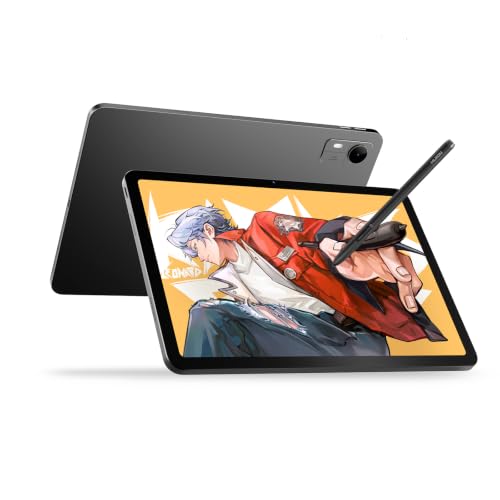
HUION KAMVAS Pad 12 Standalone
Best for: Portable digital sketching and Android-based art
- Tablet Type
- Standalone
- Screen Size
- 12.2"
- Display Resolution
- 2K+
- Pen Pressure
- 16384 levels
- Color Gamut
- 99% sRGB
- Refresh Rate
- 90Hz
This standalone drawing tablet features a 12.2-inch 2K+ display with a 90Hz refresh rate. It runs Android 16 with 8GB RAM and 256GB storage. The pen offers 16K pressure levels and tilt support. The 3:2 screen provides extra vertical space. It suits digital artists needing a portable, all-in-one device for sketching and painting without a PC.
- 12.2-inch 2K+ screen with 90Hz refresh rate
- 16K pressure levels with ±60° tilt support
- Android 16 OS with 8GB RAM and 256GB storage
- 99% sRGB color accuracy with factory calibration
- 8000mAh battery for all-day portable use
- 12.2-inch screen is smaller than larger standalone tablets
- 1.47-pound weight adds bulk to a backpack
- 0.31-inch thickness makes it less pocket-friendly
- You want a standalone tablet for digital art
- You need a 3:2 screen for vertical drawing space
- You prefer Android apps over desktop software
- You require a large 15-inch or bigger canvas
- You need a traditional PC-connected pen display
- You prioritize a lightweight sub-1-pound device
Verdict: HUION KAMVAS Pad 12 2K+ 12.2-Inch Tablet fits digital artists seeking a portable Android device with a high-refresh-rate screen and strong pen precision for sketching on the go.
Specifications side by side
| Spec | HUION KAMVAS Pad 12 Standalone |
|---|---|
| Tablet Type | Standalone |
| Screen Size | 12.2" |
| Display Resolution | 2K+ |
| Pen Pressure | 16384 levels |
| Color Gamut | 99% sRGB |
| Refresh Rate | 90Hz |
| Display Finish | Fully laminated nano-etched glass, AF |
| Storage | 256GB |
| Operating System | Android |
| Features | Stylus, Stylus Pen, Battery-Free Pen |
| Display | Anti-Glare |
| Dimensions | 11.1 × 7.7 × 0.1 inches |
| Weight | 1.47 pounds |
| Color | Grey |
| Model | KP1202 |
Frequently asked questions
Does the HUION KAMVAS Pad 12 2K+ require a computer to work?
No, it functions as a standalone device. It runs on Android 16, allowing you to install drawing apps directly from the App Store. You can sketch and paint without connecting to a PC or laptop, making it ideal for portable digital art creation on the go.
What is the screen resolution and refresh rate of this tablet?
The display offers 2K+ resolution with a 90Hz refresh rate. This combination provides smooth visuals and sharp details for your artwork. The 236 PPI count ensures that lines and text appear crisp, which is beneficial for detailed digital sketching and comic editing.
How much storage space is available on the HUION KAMVAS Pad 12?
The tablet includes 256GB of internal storage. This ample space allows you to save numerous projects, high-resolution images, and installed applications without needing external drives. It supports a full workflow for digital artists who generate large files during their creative process.
Is the stylus pen battery-free and how many pressure levels does it support?
Yes, the included stylus pen is battery-free. It supports 16K levels of pressure sensitivity. This feature allows for precise control over line thickness and opacity, mimicking the feel of traditional drawing tools while providing digital accuracy for detailed sketches and illustrations.
What are the physical dimensions and weight of this drawing tablet?
The device measures 11.1 inches in length, 7.7 inches in width, and 0.1 inches in thickness. It weighs 1.47 pounds. These compact dimensions and lightweight design make it easy to carry in a standard backpack, supporting mobile art workflows effectively.
Which drawing apps are preloaded or supported on this Android tablet?
The tablet comes preloaded with HiPaint, Clip Studio Paint, ibisPaint X, and MediBang. Since it runs Android 16, you can also install additional drawing and note-taking apps from the App Store. This variety supports different artistic styles and professional workflows.
What type of display surface does the HUION KAMVAS Pad 12 feature?
It features an anti-glare display surface. This coating reduces reflections and eye strain during long drawing sessions. The matte finish also helps prevent your pen from slipping, providing better control and a more natural drawing experience compared to glossy screens.
Who is the best target audience for this standalone drawing tablet?
It is best for portable digital sketching and Android-based art. The device suits artists who want a self-contained system with high precision and smooth visuals. It is ideal for those seeking a lightweight, high-refresh-rate screen for sketching on the go without a computer.


