Looking Beyond the HUION Kamvas Pro 16 Drawing Tablet? 6 Alternatives Worth a Look
The HUION Kamvas Pro 16 delivers a 15.6-inch full-laminated screen with 120% sRGB color coverage and an adjustable stand.

What this report covers
- Last updated
- 13 Nov 2026
Figures above are read from the product listings for the models named below. Scores are out of 10, based on listed specifications and buyer feedback.
As Amazon Associates, we earn from qualifying purchases. This means we may receive a small commission at no extra cost to you if you click through and make a purchase.
As an Amazon Associate we earn from qualifying purchases. Links on this page are affiliate links.
The HUION Kamvas Pro 16 delivers a 15.6-inch full-laminated screen with 120% sRGB color coverage and an adjustable stand. If you are searching for huion kamvas pro 16 drawing tablet alternatives, you might want a different size or control layout. Some artists prefer dial controls or a smaller footprint for portable setups. Others need a larger canvas for detailed desktop work.
This list includes 6 options that share key specifications with the original model. Each alternative features a full-laminated display and battery-free pen technology for responsive input. You will find choices ranging from compact 11.6-inch models to spacious 21.5-inch displays. These devices overlap with the Kamvas Pro 16 in core performance metrics like tilt support and shortcut keys. You can compare these specs to find the exact fit for your workflow.
How each alternative compares
HUION KAMVAS Pro 16 15.6-Inch Pen Display
This model shares the same 15.6-inch full-laminated screen and color accuracy as the original. It drops the touch bar but keeps the six express keys. The weight is lighter at 2.65 pounds, which helps with desk space. You get 8192 levels of pen pressure for detailed line work. It lacks the adjustable stand found on the Pro 16, so you need a separate mount or flat surface. Choose this if you want a lighter, simpler interface without sacrificing screen quality or color fidelity for your PC workflow.
GAOMON PD156Pro 15.6" Full-Laminated Tablet
The GAOMON PD156Pro offers a thinner profile at just 0.1 inches tall, making it highly portable compared to the bulkier original. It replaces the touch bar with a physical dial, which many artists find faster for adjusting brush size or opacity. The weight is similar at 2.87 pounds. You lose the dedicated shortcut keys in favor of the dial and fewer express buttons. The screen size remains 15.6 inches with full lamination. Pick this if you prefer tactile dial controls and a slimmer design over the original’s fixed key layout.
HUION KAMVAS 16 15.6-Inch Drawing Tablet
This HUION KAMVAS 16 features a 15.6-inch full-laminated display with 8192 levels of pen pressure. It is slightly lighter at 2.78 pounds and has a different aspect ratio in its dimensions. The original includes a touch bar and an adjustable stand, which this model does not list. You get tilt support and shortcut keys similar to the Pro 16. The operating system attribute lists Android, which may imply different connectivity or standalone potential, though it still requires a host. Choose this for a balanced mid-size option with precise input and a sturdy feel.
XP-Pen Artist 12 Pro 11.6-Inch
The XP-Pen Artist 12 Pro is significantly smaller at 11.6 inches, fitting compact desks better than the 15.6-inch original. It weighs more at 3.31 pounds despite the smaller screen. You get 8192 levels of pen pressure and tilt support, matching the original’s precision. It lacks the touch bar and has a different key layout. The full-laminated display ensures similar visual clarity. This is ideal if your workspace is limited and you do not need the larger canvas of the Kamvas Pro 16, offering precise art tools in a more footprint-friendly package.
GAOMON PD2200 21.5-Inch Drawing Tablet
The GAOMON PD2200 provides a much larger 21.5-inch canvas, nearly doubling the screen real estate of the original. It is substantially heavier at 8.49 pounds, requiring a sturdy desk. You get 8192 levels of pen pressure and tilt support. The full-laminated display offers clear visuals. It lacks the touch bar and adjustable stand of the original, relying on fixed positioning. This option is best for professionals who need a large drawing area and do not prioritize portability. It sacrifices the compactness of the 15.6-inch model for expanded creative space.
XPPen Artist 15.6 Pro V2
The XPPen Artist 15.6 Pro V2 offers 16K levels of pen pressure, doubling the precision of the original’s 8192 levels. The screen size is the same 15.6 inches with full lamination. It is notably heavier at 8.07 pounds, which is unusual for this size. The original includes a touch bar and adjustable stand, which this model does not list. You get shortcut keys for workflow efficiency. This choice suits artists who demand maximum pen precision and do not mind the extra weight, trading the ergonomic stand and touch controls for higher sensitivity.
| # | Product | Best for | Price |
|---|---|---|---|
| 1 | HUION Kamvas Pro 16 15.6-Inch Pen Display Best overall | artists needing accurate colors and an adjustable stand | |
| 2 | HUION KAMVAS Pro 16 15.6-Inch Pen Display Best budget | artists needing a color-accurate pen display for PC use | |
| 3 | GAOMON PD156Pro 15.6" Full-Laminated Tablet Best premium | artists needing dial controls and portability | |
| 4 | HUION KAMVAS 16 15.6-Inch Drawing Tablet Also great | Artists needing a portable, color-accurate 15.6-inch display | |
| 5 | XP-Pen Artist 12 Pro 11.6-Inch Best 11.6-inch | compact desk setups and precise digital art | |
| 6 | GAOMON PD2200 21.5-Inch Drawing Tablet Best 21.5-inch | Large desktop canvas needs | |
| 7 | XPPen Artist 15.6 Pro V2 Best 16k levels | artists needing high precision and color accuracy |
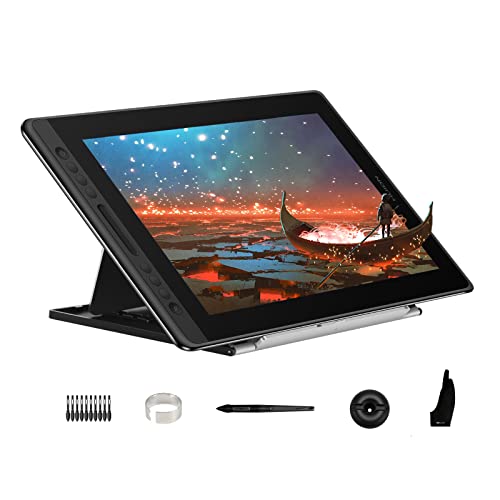
HUION Kamvas Pro 16 15.6-Inch Pen Display
Best for: artists needing accurate colors and an adjustable stand
- Tablet Type
- Tethered pen display
- Screen Size
- 15.6"
- Color Gamut
- 120% sRGB (92% AdobeRGB)
- Display Finish
- Fully laminated anti-glare glass
- Shortcut Controls
- 6 express keys, touch bar
- Operating System
- Windows
The HUION Kamvas Pro 16 is a 15.6-inch pen display with a full-laminated screen and anti-glare glass. It offers a 120% sRGB color gamut and 1000:1 contrast ratio for clear visuals. The device includes a battery-free pen with 60-degree tilt recognition and a touch bar for shortcuts. You need a computer to operate it, as it is not standalone. This tablet suits users seeking accurate color reproduction and an adjustable viewing angle.
- 120% sRGB color gamut for vibrant colors
- Full-laminated screen with anti-glare glass
- Battery-free pen with 60-degree tilt recognition
- Adjustable stand moves between 20 and 60 degrees
- Includes touch bar and six express keys
- 1000:1 contrast ratio is lower than the 130% sRGB or higher contrast specs of some competitors
- 2.98-pound weight is heavier than the 11.6-inch XPPen Artist12 Pro
- Requires connection to a computer to function
- You need a full-laminated screen with accurate color representation
- You prefer an adjustable stand to reduce neck strain
- You want shortcut controls via a touch bar
- You require a standalone tablet without a computer
- You need a screen larger than 15.6 inches
- You prefer a lighter device under 2.5 pounds
Verdict: HUION Kamvas Pro 16 15.6-Inch Pen Display fits artists who prioritize color accuracy and an ergonomic adjustable stand for their digital workflow.
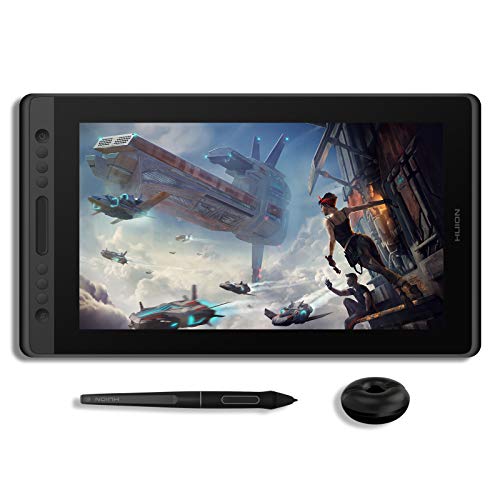
HUION KAMVAS Pro 16 15.6-Inch Pen Display
Best for: artists needing a color-accurate pen display for PC use
- Tablet Type
- Tethered pen display
- Screen Size
- 15.6"
- Pen Pressure
- 8192
- Display Finish
- Full-laminated anti-glare glass
- Shortcut Controls
- 6 express keys, 1 touch bar
- Features
- Stylus, Stylus Pen, Battery-Free Pen, Shortcut Keys, Tilt Support
The Huion Kamvas Pro 16 is a 15.6-inch pen display featuring a full-laminated screen with 120% sRGB color coverage. It uses a battery-free stylus with 8192 pressure levels and 60-degree tilt support. The device includes six express keys and a programmable touch bar. You need a computer to operate it. This setup suits digital artists who want accurate line work and vivid colors on a mid-sized display.
- Full-laminated screen reduces parallax for precise cursor tracking
- 120% sRGB color gamut provides vivid, accurate imagery
- Battery-free stylus offers 8192 pressure sensitivity and tilt support
- Includes a programmable touch bar for quick adjustments
- 15.6-inch screen is smaller than the 21.5-inch GAOMON PD2200 option
- Requires a connected computer and is not a standalone tablet
- Heavier at 2.65 pounds compared to lighter portable alternatives
- You need a dedicated drawing monitor with high color accuracy
- You want customizable shortcut keys and a touch bar
- You prefer a battery-free pen with tilt functionality
- You require a standalone tablet that works without a PC
- You need a screen larger than 15.6 inches
- You are looking for a display with more than 120% sRGB coverage
Verdict: Huion Kamvas Pro 16 15.6-Inch Pen Display delivers solid color accuracy and precise input for artists who already own a computer. It fits users who value a full-laminated screen and tactile controls over a larger, standalone display.
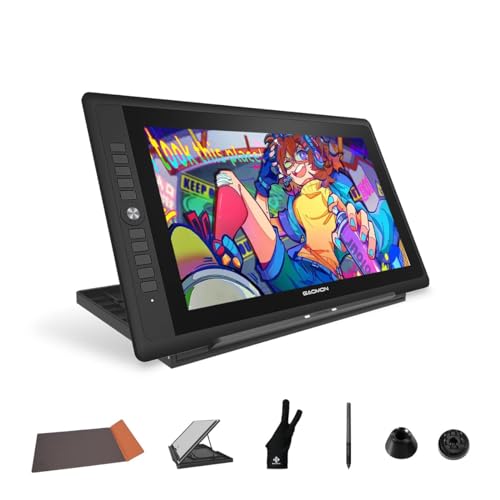
GAOMON PD156Pro 15.6" Full-Laminated Tablet
Best for: artists needing dial controls and portability
- Tablet Type
- Tethered pen display
- Screen Size
- 15.6 inch
- Display Resolution
- 1920 x 1080 FHD
- Pen Pressure
- 8192 levels
- Color Gamut
- 120% sRGB
- Display Finish
- Full-laminated, anti-glare film
The GAOMON PD156Pro is a 15.6-inch pen display with a full-laminated screen and 120% sRGB color gamut. It uses a battery-free stylus with 8192 pressure levels and tilt support. The device includes a dial and ten programmable keys for workflow control. It connects via a single 3-in-1 cable and weighs 2.87 pounds. This tablet suits digital artists who need a portable, paper-like drawing surface for creative software.
- 15.6-inch full-laminated screen with 120% sRGB color gamut
- Battery-free stylus with 8192 pressure levels and tilt recognition
- Includes a dial and ten programmable express keys
- Single-cable connection for power and data
- Lightweight design at 2.87 pounds with included leather case
- 120% sRGB color gamut is lower than the 130% found on the GAOMON PD2200
- 15.6-inch screen is smaller than the 21.5-inch display on the GAOMON PD2200
- Heavier and bulkier build compared to the 11.6-inch XPPen Artist12 Pro
- You need a portable pen display with a dedicated control dial
- You want a full-laminated screen with a matte anti-glare finish
- You prefer a lightweight tablet that connects via a single cable
- You require a standalone tablet that works without a computer
- You need a screen larger than 15.6 inches for detailed work
- You want a color gamut exceeding 120% sRGB
Verdict: GAOMON PD156Pro 15.6" Drawing Tablet is a solid choice for illustrators who value tactile controls and portability over maximum screen size or color range.

HUION KAMVAS 16 15.6-Inch Drawing Tablet
Best for: Artists needing a portable, color-accurate 15.6-inch display
- Tablet Type
- Tethered pen display
- Screen Size
- 15.6"
- Pen Pressure
- 8192 levels
- Color Gamut
- 120% sRGB
- Display Finish
- Full-laminated, anti-glare film
- Shortcut Controls
- 10 customizable shortcut keys
The HUION KAMVAS 16 (2021) is a 15.6-inch pen display with a full-laminated screen and 120% sRGB color gamut. It features an 8192-level pressure-sensitive battery-free pen and an anti-glare film for eye comfort. Weighing 2.78 pounds, it is portable enough for students or freelancers. The included adjustable stand and 10 shortcut keys help you work efficiently in various studio or desk setups.
- 15.6-inch full-laminated display reduces parallax for precise tracking
- 120% sRGB color gamut ensures vibrant, accurate colors
- Battery-free PW517 stylus with 8192 pressure levels and tilt support
- Anti-glare film minimizes eye strain in bright environments
- 10 programmable shortcut keys for faster workflow
- 15.6-inch screen is smaller than the 21.5-inch and 27-inch options available
- 2.78-pound weight is higher than some lighter 11.6-inch competitors
- 10 express keys provide fewer shortcuts than the 11-key setups on other models
- You need a portable pen display for sketching on the go
- You want a full-laminated screen with accurate color reproduction
- You prefer an ergonomic adjustable stand for comfortable drawing angles
- You require a screen larger than 15.6 inches for detailed work
- You need more than 10 programmable shortcut keys
- You are looking for the lightest possible drawing tablet
Verdict: The HUION KAMVAS 16 (2021) 15.6-Inch Pen Display is a solid mid-size option for artists who value color accuracy and portability. It fits users who want a balanced screen size and a sturdy stand without the bulk of larger monitors.

XP-Pen Artist 12 Pro 11.6-Inch
Best for: compact desk setups and precise digital art
- Tablet Type
- Tethered pen display
- Screen Size
- 11.6"
- Pen Pressure
- 8192
- Color Gamut
- 72% NTSC
- Display Finish
- Fully-laminated, anti-glare film
- Shortcut Controls
- 8 express keys, Red Dial
The XP-Pen Artist 12 Pro is an 11.6-inch pen display with a fully-laminated IPS screen. It features 8192 levels of pressure sensitivity and 60-degree tilt support. The device includes a tactile red dial and eight customizable shortcut keys. You need a host computer to use it. It works with Windows, macOS, ChromeOS, and Linux for digital art or document annotation.
- 11.6-inch fully-laminated IPS display with zero parallax
- 8192 levels of pressure sensitivity for precise strokes
- 60-degree natural tilt support for organic shading
- Red dial interface for accurate zoom and brush adjustments
- Battery-free stylus requires no charging
- 11.6-inch screen is smaller than the 15.6-inch and 21.5-inch alternatives on this list
- Weighs 3.31 pounds, making it bulkier than typical portable tablets
- Requires connection to a host device and cannot operate as a standalone tablet
- You want a compact drawing screen that fits on smaller desks
- You prefer a physical dial for precise brush control over a touch bar
- You use Windows, macOS, ChromeOS, or Linux for creative work
- You need a larger canvas for detailed professional illustration
- You want a standalone tablet that works without a computer
- You prioritize a lighter device for frequent travel
Verdict: The XP-Pen Artist 12 Pro 11.6-inch offers precise drawing capabilities in a compact form factor. It fits users who need a dedicated second screen for digital art or annotation on a limited desk space.
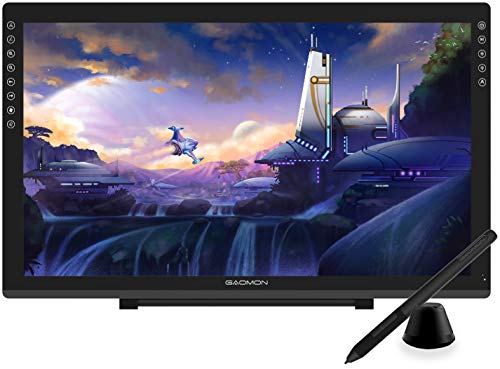
GAOMON PD2200 21.5-Inch Drawing Tablet
Best for: Large desktop canvas needs
- Tablet Type
- Tethered pen display
- Screen Size
- 21.5 inch
- Pen Pressure
- 8192 levels
- Color Gamut
- 130% sRGB, 92% NTSC
- Display Finish
- Full-laminated, anti-glare film
- Shortcut Controls
- 8 touch shortcut keys
The GAOMON PD2200 is a 21.5-inch pen display featuring a full-laminated screen and 130% sRGB color gamut. It uses a battery-free stylus with 8192 pressure levels and tilt support. The device includes eight customizable touch shortcut keys. It requires connection to a computer or laptop. This larger screen size suits users who need extra workspace for digital art or online teaching.
- 21.5-inch full-laminated display
- 130% sRGB color gamut
- 8192 pressure levels with tilt support
- Eight customizable touch shortcut keys
- Battery-free stylus pen
- Heavier at 8.49 pounds
- Larger footprint than 15.6-inch alternatives
- 25ms response time
- You need a large drawing area for detailed work
- You want a full-laminated screen with wide color coverage
- You prefer physical shortcut keys for workflow efficiency
- You need a portable tablet for travel
- You require a standalone device without a computer
- You prefer a lighter and more compact setup
Verdict: The GAOMON PD2200 21.5-Inch Pen Display offers a spacious canvas for desktop-based digital creation. It fits professionals who prioritize screen real estate and color accuracy over portability.

XPPen Artist 15.6 Pro V2
Best for: artists needing high precision and color accuracy
- Screen Size
- 15.6"
- Pen Pressure
- 16384
- Color Gamut
- 99% sRGB, 96% Adobe RGB, 96% Display P3
- Display Finish
- Full-laminated, anti-glare etched glass
- Shortcut Controls
- Red Dial, 8 shortcut keys
- Operating System
- Android
The XPPen Artist 15.6 Pro V2 is a pen display with a 15.6-inch full-laminated screen. It features 16K pressure sensitivity and 99% sRGB color coverage. The device includes a red dial for controls and eight express keys. You need a computer to use it. This tablet suits artists who want precise line work and accurate colors in a slim design.
- 16384 pressure levels for precise strokes
- 99% sRGB and 96% Adobe RGB color gamut
- Red Dial interface for smooth workflow control
- Full-laminated anti-glare glass reduces parallax
- Slim 11 mm profile with foldable stand
- Requires a computer connection to operate
- Heavier at 8.07 pounds than some peers
- 96% Adobe RGB is lower than 100% coverage
- You need high pressure sensitivity for detailed work
- You want accurate color representation for design
- You prefer a physical dial for quick adjustments
- You need a standalone tablet without a PC
- You prioritize maximum portability and light weight
- You require 100% Adobe RGB color coverage
Verdict: XPPen Artist 15.6 Pro V2 fits artists who need high precision and color accuracy. It works best for those who connect to a computer and value tactile controls over standalone portability.
Specifications side by side
| Spec | HUION Kamvas Pro 16 15.6-Inch Pen Display | HUION KAMVAS Pro 16 15.6-Inch Pen Display | GAOMON PD156Pro 15.6" Full-Laminated Tablet | HUION KAMVAS 16 15.6-Inch Drawing Tablet | XP-Pen Artist 12 Pro 11.6-Inch | GAOMON PD2200 21.5-Inch Drawing Tablet | XPPen Artist 15.6 Pro V2 |
|---|---|---|---|---|---|---|---|
| Tablet Type | Tethered pen display | Tethered pen display | Tethered pen display | Tethered pen display | Tethered pen display | Tethered pen display | – |
| Screen Size | 15.6" | 15.6" | 15.6 inch | 15.6" | 11.6" | 21.5 inch | 15.6" |
| Display Resolution | – | – | 1920 x 1080 FHD | – | – | – | – |
| Pen Pressure | – | 8192 | 8192 levels | 8192 levels | 8192 | 8192 levels | 16384 |
| Color Gamut | 120% sRGB (92% AdobeRGB) | – | 120% sRGB | 120% sRGB | 72% NTSC | 130% sRGB, 92% NTSC | 99% sRGB, 96% Adobe RGB, 96% Display P3 |
| Display Finish | Fully laminated anti-glare glass | Full-laminated anti-glare glass | Full-laminated, anti-glare film | Full-laminated, anti-glare film | Fully-laminated, anti-glare film | Full-laminated, anti-glare film | Full-laminated, anti-glare etched glass |
| Shortcut Controls | 6 express keys, touch bar | 6 express keys, 1 touch bar | 10 shortcut keys, 1 dial key | 10 customizable shortcut keys | 8 express keys, Red Dial | 8 touch shortcut keys | Red Dial, 8 shortcut keys |
| Operating System | Windows | – | Windows | Android | – | Windows | Android |
| Features | Shortcut Keys | Stylus, Stylus Pen, Battery-Free Pen, Shortcut Keys, Tilt Support | Stylus, Stylus Pen, Battery-Free Pen, Tilt Support, Dial | Stylus, Stylus Pen, Battery-Free Pen, Shortcut Keys, Tilt Support | Stylus, Stylus Pen, Battery-Free Pen, Shortcut Keys, Tilt Support | Stylus, Stylus Pen, Battery-Free Pen, Shortcut Keys, Tilt Support | Shortcut Keys |
| Display | Full-Laminated | Full-Laminated | Full-Laminated | Full-Laminated | Full-Laminated | Full-Laminated | Full-Laminated |
| Color | Black | Black | Black | Black | Black | Black | Black |
| Dimensions | 17.2 × 9.88 × 0.47 inches | – | 13.5 × 7.62 × 0.1 inches | – | 13.9 × 8.86 × 0.51 inches | 20.6 × 12.4 × 0.1 inches | – |
| Weight | 2.98 pounds | 2.65 pounds | 2.87 pounds | 2.78 pounds | 3.31 pounds | 8.49 pounds | 8.07 pounds |
| Length | – | 17.3 inches | – | 9.96 inches | – | – | – |
| Width | – | 9.84 inches | – | 16.7 inches | – | – | – |
| Size | 15.6 Inch | 15.6 Inch | 15.6 Inch | 15.6inch | 11.6 inch | 21.5 inch | 15.6 inch |
| Model | Kamvas Pro 16 | Huion KAMVAS Pro 16 | A2.PD156P-0-EN0000-0-1-CY-0 | GS1562 | Artist 12 Pro | GAOMON PD2200 | Artist 15.6 Pro V2 |
Frequently asked questions
Which tablet offers dial controls instead of a touch bar?
The GAOMON PD156Pro features a dial for tactile navigation, which differs from the HUION Kamvas Pro 16’s touch bar layout. It maintains a 15.6-inch full-laminated screen and supports tilt input. The device is relatively thin at 0.1 inches and weighs 2.87 pounds, making it a portable option for illustrators who prefer physical dials for their digital workflow.
Is there a smaller option for compact desk setups?
The XP-Pen Artist 12 Pro provides an 11.6-inch full-laminated display, which is smaller than the 15.6-inch screen on the Kamvas Pro 16. It supports 8192 levels of pen pressure and tilt recognition. Measuring 13.9 inches in length, it fits users who need a dedicated second screen for art or annotation in limited desk spaces.
What is the largest screen size available in these alternatives?
The GAOMON PD2200 offers a 21.5-inch full-laminated display, significantly larger than the 15.6-inch option. It weighs 8.49 pounds and is designed for desktop-based creation where portability is less important. This model prioritizes screen real estate and color accuracy, making it suitable for professionals who need a spacious canvas for their digital work.
Which model supports 16K levels of pen pressure?
The XPPen Artist 15.6 Pro V2 supports 16K levels of pen pressure, offering higher precision than the 8192 levels found in many other models. It features a 15.6-inch full-laminated screen and connects to a computer. This tablet is best for artists who value high precision and color accuracy over standalone portability.
Can I use a drawing tablet without a computer?
The HUION KAMVAS 16 (2021) lists Android as its operating system, suggesting it may function independently from a PC. It features a 15.6-inch full-laminated screen and supports tilt input with 8192 pressure levels. This makes it a balanced option for artists who want color accuracy and portability without the bulk of larger standalone monitors.
How do the dimensions of the XP-Pen Artist 12 Pro compare?
The XP-Pen Artist 12 Pro measures 13.9 inches in length and 8.86 inches in width, which is more compact than the 17.2-inch length of the HUION Kamvas Pro 16. It weighs 3.31 pounds and includes shortcut keys for efficient workflow. This form factor is ideal for users with limited desk space who still need precise digital drawing capabilities.


