Looking Beyond the Iflytek 8.2″ E-Ink Note-Taking Tablet? 6 Alternatives Worth a Look
The iflytek 8 2 e ink note taking tablet alternatives list helps you find devices that match its core strengths.

What this report covers
- Last updated
- 4 Nov 2026
Figures above are read from the product listings for the models named below. Scores are out of 10, based on listed specifications and buyer feedback.
As Amazon Associates, we earn from qualifying purchases. This means we may receive a small commission at no extra cost to you if you click through and make a purchase.
As an Amazon Associate we earn from qualifying purchases. Links on this page are affiliate links.
The iflytek 8 2 e ink note taking tablet alternatives list helps you find devices that match its core strengths. The iFLYTEK AINOTE Air 2 offers a compact 8.2-inch screen with extensive language transcription and AI tools. You get 132GB of storage and a paper-like writing experience with low latency. These specs make it ideal for portable note-taking and global communication.
However, you might need a larger display, color support, or a different operating system. Some users prefer physical keyboards or Android app flexibility. The alternatives in this guide were chosen because their specs overlap with the original. Each option provides distinct advantages, such as bigger screens, color annotation, or offline privacy. You can compare these 6 devices to find the right balance of size, features, and brand preference for your specific workflow.
How these alternatives differ
Penstar 10.3" eNote Pen-Only Paper Tablet
The Penstar eNote 10.3 replaces the 8.2-inch display with a larger 10.3-inch screen, offering more writing space. It measures 8.9 inches long and 7.8 inches wide, making it wider than the Iflytek. This model focuses on offline note-taking with physical keys, which differs from the Iflytek’s reliance on AI transcription. It lacks the extensive language support found in the Iflytek, which handles 18 languages for transcription. However, it provides a solid choice for users who prioritize physical controls and high-resolution writing. You get cloud connectivity for privacy, but you give up the compact portability of the 8.2-inch form factor. This device suits those who need a larger canvas and tangible buttons over advanced speech-to-text features.
Iflytek AINOTE 2 10.65" Tablet with Keyboard
The Iflytek AINOTE 2 Keyboard Bundle expands the screen size to 10.65 inches, significantly larger than the 8.2-inch original. It includes a physical keyboard, adding typing capabilities that the Air 2 lacks. The device is thinner at 0.17 inches, compared to the Air 2’s 1.08 inches. This bundle fits professionals who need typing speed alongside transcription workflows. You gain a larger writing area and the ability to type directly, but you lose the ultra-compact nature of the Air 2. The 10.65-inch screen offers more real estate for documents, making it better for detailed work. However, the larger size reduces portability. This option is ideal if you prioritize screen real estate and hybrid input methods over the minimal footprint of the original tablet.
PocketBook InkPad X Pro 10.3-Inch E-Note
The PocketBook InkPad X Pro features a 10.3-inch Android operating system, unlike the Iflytek’s specialized note-taking interface. It includes Bluetooth connectivity for audio, a feature not mentioned in the Iflytek specs. The device runs on Android, offering app flexibility that the closed Iflytek system does not provide. It measures 9.8 inches long and weighs 1.1 pounds, making it heavier and longer than the Iflytek. You get warm light and glare-free viewing on a larger screen, but you give up the dedicated AI transcription tools. This tablet suits users who want customization and Android app support. It is a capable choice for those who value operating system freedom over specialized note-taking automation and compact design.
Penstar eNote Pro Color 10.3-Inch Tablet
The Penstar eNote Pro Color 10.3 introduces color annotation capabilities, which the grayscale Iflytek Air 2 cannot provide. It features a 10.3-inch screen, larger than the 8.2-inch display, and includes AI productivity tools. The device weighs 15 ounces and measures 9.2 inches long, offering a substantial writing area. You get color support for highlights and drawings, a significant upgrade for visual note-takers. However, you trade the compact size and specific 18-language transcription of the Iflytek for broader color functionality. This tablet is best for users who need color in their notes. It suits those who value long battery life and a large writing area over the maximum text sharpness and portable form factor of the original.
Amazon Kindle Scribe 10.2-Inch 32GB
The Amazon Kindle Scribe 32GB offers a 10.2-inch screen with 300 ppi resolution, sharper than the Iflytek’s HD display. It includes 32GB of storage, matching the Iflytek’s local capacity but without the mentioned 100GB cloud add-on. The device weighs 15.3 ounces and measures 9.06 inches long, differing in dimensions from the Iflytek. It provides AI-assisted note-taking, similar to the Iflytek’s features, but focuses on reading and annotation workflows. You gain a high-resolution screen and Amazon ecosystem integration, but you lose the extensive multilingual transcription and physical keyboard options. This tablet is ideal for readers who want AI assistance on a larger, sharper screen. It suits those who do not need the specific language tools or compact size of the Iflytek.
Amazon Kindle Scribe 10.2" 16GB
The Amazon Kindle Scribe 16GB provides the same 10.2-inch 300 ppi screen as the 32GB model but with less storage. It weighs 15.3 ounces and measures 9.04 inches long, differing slightly in orientation from the Iflytek. It supports AI-assisted annotation for books, offering a reading-focused experience alongside note-taking. You get high display quality and Amazon’s ecosystem, but you give up the Iflytek’s 132GB total storage capacity and advanced transcription features. This 16GB version is suitable for users who prioritize display sharpness over maximum storage space. It is a solid choice for those who want to annotate books with AI help. However, it lacks the specialized language support and compact 8.2-inch form factor that define the original Iflytek tablet.
| # | Product | Best for | Price |
|---|---|---|---|
| 1 | iFLYTEK 8.2" E-Ink Note-Taking Tablet Best overall | portable note-taking and transcription | |
| 2 | Penstar 10.3" eNote Pen-Only Paper Tablet Best budget | Offline note-taking with physical keys | |
| 3 | Iflytek AINOTE 2 10.65" Tablet with Keyboard Best premium | typing and transcription workflows | |
| 4 | PocketBook InkPad X Pro 10.3-Inch E-Note Best android | Android app users needing Bluetooth audio on E Ink | |
| 5 | Penstar eNote Pro Color 10.3-Inch Tablet Best blue | color note-taking and AI productivity | |
| 6 | Amazon Kindle Scribe 10.2-Inch 32GB Best 32gb | AI-assisted note-taking on a 10.2-inch 300 ppi screen | |
| 7 | Amazon Kindle Scribe 10.2" 16GB Best 16gb | Reading and annotating books with AI |

iFLYTEK 8.2" E-Ink Note-Taking Tablet
Best for: portable note-taking and transcription
- Screen Size
- 8.2-inch
- Storage Capacity
- 32GB
- Display Type
- E-Ink
- Battery Life
- a full week
- Use
- Note-Taking
- Features
- Stylus, Stylus Pen
The iFLYTEK AINOTE Air 2 is an 8.2-inch E Ink tablet designed for note-taking and transcription. It features a 23ms latency display and 24-level adjustable lighting for comfortable writing in various conditions. The device offers 132GB of total storage, combining 32GB local space with 100GB of permanent cloud storage. It supports 113 languages for handwriting recognition and includes AI-powered meeting summaries. This tablet suits users who need portable, subscription-free productivity tools.
- 23ms ultra-low latency for natural writing flow
- 132GB total capacity with 100GB permanent cloud storage
- 24-level adjustable dual-color temperature reading lights
- Supports 113 languages for handwriting recognition
- 8.2-inch display is smaller than the 10.3-inch and 10.65-inch alternatives on this list
- 32GB local storage is less than the 32GB or 16GB options found in other tablets
- 2600mAh battery capacity may be lower than larger 10-inch tablets
- You need a compact device for portable note-taking
- You require extensive handwriting recognition across many languages
- You want permanent cloud storage without subscription fees
- You prefer a larger 10-inch or bigger screen for detailed work
- You need high-end graphics performance for media consumption
- You rely on specific apps not supported by E Ink displays
Verdict: The iFLYTEK AINOTE Air 2 8.2-inch is a compact, language-rich option for professionals who prioritize portability and extensive transcription features over screen real estate.

Penstar 10.3" eNote Pen-Only Paper Tablet
Best for: Offline note-taking with physical keys
- Screen Size
- 10.3"
- Pixel Density
- 300 PPI
- Use
- Note-Taking
- Features
- Stylus, Stylus Pen
- Display
- E Ink
- Color
- Gray
This 10.3-inch E Ink tablet offers a 300 PPI display for clear note-taking. It includes 8192 levels of pen pressure and nine physical shortcut keys. The device supports over 30 document types and syncs via cloud services. It works fully offline, which suits users handling private documents. This bundle is designed for focused writing and reading tasks.
- 300 PPI 10.3-inch E Ink display
- 9 physical shortcut keys
- 8192 levels of pen pressure
- Supports over 30 document types
- Smaller 10.3-inch screen compared to 10.65-inch and 10.2-inch competitors
- Higher bulk with 0.22-inch thickness
- Limited to 10.3-inch size option
- You need physical shortcut keys for fast navigation
- You prioritize offline privacy and cloud sync
- You want a 300 PPI display for clear text
- You require a larger 10.65-inch display
- You need a 7-inch compact tablet
- You prefer a tablet with a touchscreen interface
Verdict: Penstar eNote 10.3 E Ink Tablet fits users who value physical controls and high-resolution writing on a 10.3-inch screen. It is a solid choice for those who need offline privacy and cloud connectivity.

Iflytek AINOTE 2 10.65" Tablet with Keyboard
Best for: typing and transcription workflows
- Screen Size
- 10.65"
- Display Type
- E Ink
- Stylus Support
- included
- Battery Life
- up to 14 days
- Use
- Note-Taking
- Features
- Stylus, Stylus Pen, Keyboard
The iflytek AINOTE 2 Keyboard Bundle features a 10.65-inch E Ink display housed in an ultra-thin 4.2 mm chassis. It includes a magnetic keyboard case and stylus for immediate productivity. The device supports 18-language transcription and AI-assisted note organization. You get cross-device syncing via mobile and PC apps. This bundle suits users who want a comprehensive writing and typing solution in one portable package.
- 10.65-inch E Ink display for large writing area
- Ultra-thin 4.2 mm design for portability
- Includes magnetic keyboard case and stylus pen
- Supports 18-language transcription for meetings
- AI assistance for text summarization and organization
- Frontlight-free display limits visibility in dark rooms
- AI transcription and sync require active Wi-Fi
- Battery life drops to 14 days with heavy daily use
- You need a keyboard for typing notes alongside handwriting
- You want AI transcription for lectures or meetings
- You prefer an ultra-thin device for travel
- You require a frontlit screen for dark environments
- You need offline AI transcription capabilities
- You prefer a smaller 8.2-inch form factor
Verdict: iflytek AINOTE 2 Keyboard Bundle combines a large 10.65-inch screen with a compact 4.2 mm profile and included keyboard. It fits professionals who prioritize transcription and typing speed over frontlit readability.

PocketBook InkPad X Pro 10.3-Inch E-Note
Best for: Android app users needing Bluetooth audio on E Ink
- Screen Size
- 10.3"
- Display Type
- E-Ink Mobius
- Stylus Support
- Wacom stylus
- Pixel Density
- 227 PPI
- Operating System
- Android
- Use
- Note-Taking
The PocketBook InkPad X Pro is a 10.3-inch E Ink tablet running Android. It features a 227 PPI glare-free Mobius display and supports handwriting via a Wacom stylus. You can connect wireless headphones via Bluetooth for audiobooks. The adjustable SMARTlight offers warm or cool tones. This device suits readers who want a large screen and third-party app freedom on an e-ink device.
- 10.3-inch E Ink Mobius display with 227 PPI resolution
- Android operating system allows third-party app installation
- Bluetooth connectivity for wireless audio playback
- Adjustable SMARTlight with warm and cool tone settings
- Lower display resolution of 227 PPI compared to the 300 PPI Kindle Scribe
- Heavier build at 1.1 pounds compared to lighter e-readers
- Wider body width of 6.83 inches reduces portability
- You want to install third-party Android apps on an E Ink device
- You prefer listening to audiobooks via Bluetooth headphones
- You need a large 10.3-inch screen for note-taking
- You require the highest possible text sharpness at 300 PPI
- You prioritize a lightweight device under one pound
- You only need basic e-reading without Android flexibility
Verdict: PocketBook InkPad X Pro 10.3 Android is a capable E Ink tablet for users who value Android app flexibility and Bluetooth audio on a large 10.3-inch screen. It fits readers who want customization over maximum portability.

Penstar eNote Pro Color 10.3-Inch Tablet
Best for: color note-taking and AI productivity
- Screen Size
- 10.3"
- Storage Capacity
- 128GB
- Display Type
- Kaleido 3 color
- Stylus Support
- Included (Digital Stylus B6)
- Pixel Density
- 300ppi B/W, 150ppi color
- Battery Life
- Up to 3 weeks
The Penstar eNote Pro C offers a 10.3-inch Kaleido 3 color display with 150 ppi for color images. It includes a 300 ppi black-and-white mode for sharp text. The device runs Android 14 with 4 GB RAM and 128 GB storage. An octa-core CPU and 6500 mAh battery support up to three weeks of use. You get real-time voice-to-text and split-screen multitasking. This tablet suits users who need color annotation and AI tools.
- 10.3-inch Kaleido 3 color display with 150 ppi
- 300 ppi black-and-white resolution for crisp text
- Android 14 OS with 4 GB RAM and 128 GB storage
- AI features including voice-to-text and note summarization
- 6500 mAh battery provides up to three weeks of use
- 150 ppi color resolution is lower than the 300 ppi standard of other tablets on this list
- 15-ounce weight is heavier than the 10.2-inch Kindle Scribe models
- E-Ink technology is not optimized for fast scrolling or video playback
- You need color support for diagrams or illustrations
- You want AI-powered note organization and voice-to-text
- You prefer a large 10.3-inch writing surface
- You prioritize the sharpest possible text resolution
- You want a lightweight device for one-handed use
- You need fast video playback or smooth scrolling
Verdict: Penstar eNote Pro 10.3" Color E-Ink Tablet fits users who need color annotation and AI tools. It suits those who value long battery life and a large writing area over maximum text sharpness.

Amazon Kindle Scribe 10.2-Inch 32GB
Best for: AI-assisted note-taking on a 10.2-inch 300 ppi screen
- Screen Size
- 10.2"
- Storage Capacity
- 32GB
- Stylus Support
- Premium Pen included
- Pixel Density
- 300 ppi
- Battery Life
- Months reading, weeks writing
- Use
- Note-Taking
The Amazon Kindle Scribe 32GB offers a 10.2-inch 300 ppi E Ink display for writing and reading. It includes built-in AI tools to summarize or format notes. The device weighs 15.3 ounces and measures 9.06 by 7.72 inches. It suits users who want a dedicated note-taking tablet with strong display clarity and integrated AI features.
- 10.2-inch glare-free 300 ppi front-lit display
- 32GB internal storage capacity
- Built-in AI notebook tools for summarizing and formatting
- Premium Pen requires no setup or charging
- Smaller 10.2-inch screen compared to 10.3-inch or 10.65-inch competitors
- 15.3 ounces weight is heavier than some lighter e-readers
- Lower 32GB storage compared to higher-capacity models
- You need AI tools to summarize or change note tone
- You prefer a 300 ppi display for sharp text
- You want a device with 32GB of storage
- You require a screen larger than 10.2 inches
- You need more than 32GB of internal storage
- You prefer a lighter device under 15 ounces
Verdict: Amazon Kindle Scribe 32GB fits readers who value AI note assistance and a high-resolution 300 ppi screen. It is ideal for those who do not need a larger display than 10.2 inches or more than 32GB of space.
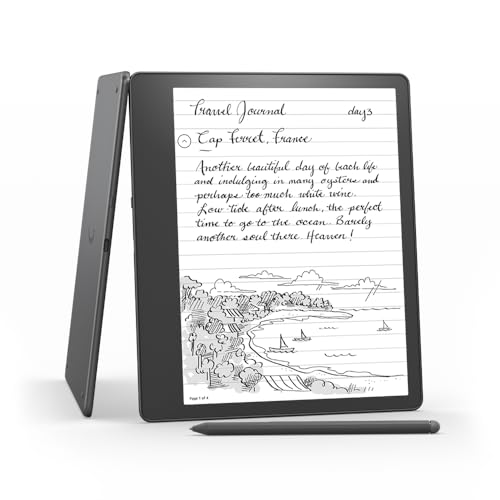
Amazon Kindle Scribe 10.2" 16GB
Best for: Reading and annotating books with AI
- Screen Size
- 10.2"
- Storage Capacity
- 16 GB
- Display Type
- Paperwhite
- Stylus Support
- includes Premium Pen
- Pixel Density
- 300 ppi
- Battery Life
- months of reading, weeks of writing
The Amazon Kindle Scribe (16 GB) combines a 10.2-inch 300 ppi Paperwhite display with note-taking tools. It measures 7.73 by 9.04 inches and weighs 15.3 ounces. This device lets you read and write in books or create notebooks. It includes AI tools to summarize notes. The 16 GB storage limits large file archives. It suits readers who also need a simple writing pad.
- 10.2-inch 300 ppi glare-free front-lit display
- Active Canvas expands margins for notes in books
- Built-in AI tools summarize and refine notes
- Months of battery life for reading
- 16 GB storage is lower than the 32 GB option
- 15.3 ounces is heavier than standard e-readers
- 10.2-inch screen is smaller than the 10.3-inch competitors
- You want a single device for reading and writing
- You prefer a 300 ppi display for sharp text
- You need AI tools to summarize handwritten notes
- You require more than 16 GB of storage
- You want a larger 10.3-inch or bigger screen
- You need a dedicated note-taking tablet with more RAM
Verdict: Amazon Kindle Scribe 16GB 10.2" fits readers who want to annotate books with AI assistance. It is a solid choice for those who prioritize display quality over maximum storage.
Specifications side by side
| Spec | iFLYTEK 8.2" E-Ink Note-Taking Tablet | Penstar 10.3" eNote Pen-Only Paper Tablet | Iflytek AINOTE 2 10.65" Tablet with Keyboard | PocketBook InkPad X Pro 10.3-Inch E-Note | Penstar eNote Pro Color 10.3-Inch Tablet | Amazon Kindle Scribe 10.2-Inch 32GB | Amazon Kindle Scribe 10.2" 16GB |
|---|---|---|---|---|---|---|---|
| Screen Size | 8.2-inch | 10.3" | 10.65" | 10.3" | 10.3" | 10.2" | 10.2" |
| Storage Capacity | 32GB | – | – | – | 128GB | 32GB | 16 GB |
| Display Type | E-Ink | – | E Ink | E-Ink Mobius | Kaleido 3 color | – | Paperwhite |
| Stylus Support | – | – | included | Wacom stylus | Included (Digital Stylus B6) | Premium Pen included | includes Premium Pen |
| Pixel Density | – | 300 PPI | – | 227 PPI | 300ppi B/W, 150ppi color | 300 ppi | 300 ppi |
| Battery Life | a full week | – | up to 14 days | – | Up to 3 weeks | Months reading, weeks writing | months of reading, weeks of writing |
| Storage | – | – | – | – | – | 32GB | 16GB |
| Operating System | – | – | – | Android | – | – | – |
| Use | Note-Taking | Note-Taking | Note-Taking | Note-Taking | Note-Taking | Note-Taking | Note-Taking |
| Features | Stylus, Stylus Pen | Stylus, Stylus Pen | Stylus, Stylus Pen, Keyboard | Stylus, Stylus Pen, Bluetooth, Warm Light, Glare-Free | Stylus, Stylus Pen | Stylus, Stylus Pen | Stylus, Stylus Pen |
| Display | E Ink | E Ink | E Ink | E Ink | E Ink | – | – |
| Color | Gray | Gray | Black | Mist Grey | Blue | Tungsten | Tungsten |
| Dimensions | – | 8.9 × 7.8 × 0.22 inches | 9.7 × 7 × 0.17 inches | 9.8 × 6.83 × 0.3 inches | 9.2 × 7.8 × 0.2 inches | 9.06 × 7.72 × 0.23 inches | 7.73 × 9.04 × 0.23 inches |
| Weight | – | – | – | 1.1 pounds | 15 ounces | 15.3 ounces | 15.3 ounces |
| Model | AINOTE Air 2 | – | – | PB1040D-M-WW | eNote Pro Color | C4A6T4 | C4A6T4 |
| Size | – | 10.3 inches | AINOTE 2 Keyboard Bundle | – | eNote Pro Color | 32 GB | 16 GB |
Frequently asked questions
Which alternative offers the largest screen for note-taking?
The Iflytek AINOTE 2 features a 10.65-inch display, the largest in this group. It includes a compact keyboard and measures 9.7 inches long. This setup suits professionals who prioritize typing speed and transcription workflows over portability. The large screen provides ample space for detailed documents and extensive annotations.
Is there a color E-ink tablet available as an alternative?
Yes, the Penstar eNote Pro Color 10.3-Inch Tablet supports color annotations. It measures 9.2 inches long and weighs 15 ounces. This model is designed for users who need color marking and AI productivity tools. It offers a large writing area, though it may sacrifice some text sharpness compared to grayscale models.
Which device runs Android and supports Bluetooth audio?
The PocketBook InkPad X Pro 10.3-Inch E-Note runs the Android operating system. It includes Bluetooth connectivity and warm light for comfortable reading. Weighing 1.1 pounds, it is slightly heavier than other options. This tablet fits users who value Android app flexibility and audio features on a large E-ink screen.
What is the best option for offline note-taking with physical keys?
The Penstar 10.3" eNote Pen-Only Paper Tablet is designed for offline privacy. It features physical keys and a 10.3-inch high-resolution screen. Measuring 8.9 inches long, it provides a solid writing experience. This model is ideal for users who need cloud connectivity without relying on constant online access for basic tasks.
Which tablet offers 32GB of storage for extensive notes?
The Amazon Kindle Scribe 10.2-Inch 32GB provides ample space for your documents. It features a high-resolution 300 ppi screen and AI-assisted note-taking tools. Weighing 15.3 ounces, it balances portability with capacity. This model is ideal for readers who do not need more than 32GB or a larger display size.
How does the Iflytek AINOTE 2 compare in thickness to others?
The Iflytek AINOTE 2 Keyboard Bundle is notably thin at 0.17 inches. It measures 7 inches wide and 9.7 inches long. This compact profile makes it easy to handle despite its large 10.65-inch screen. The included keyboard complements its slim design for efficient typing and transcription workflows.
Which device is best for annotating books with AI assistance?
The Amazon Kindle Scribe 16GB 10.2" is optimized for reading and annotation. It offers AI assistance for managing your notes and highlights. Weighing 15.3 ounces, it remains lightweight for extended reading sessions. This model prioritizes display quality and AI features over maximum storage capacity, making it suitable for book-focused workflows.