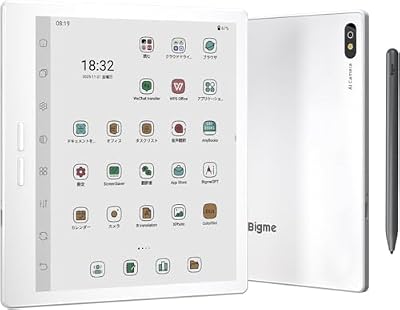
Iflytek AINOTE 2 10.65″ Tablet Review: Specs, Pros and Cons
This iflytek ainote 2 10 65 tablet review focuses on a device built for one purpose: writing.

What this report covers
- Last updated
- 4 Nov 2026
Figures above are read from the product listings for the models named below. Scores are out of 10, based on listed specifications and buyer feedback.
As Amazon Associates, we earn from qualifying purchases. This means we may receive a small commission at no extra cost to you if you click through and make a purchase.
As an Amazon Associate we earn from qualifying purchases. Links on this page are affiliate links.
This iflytek ainote 2 10 65 tablet review focuses on a device built for one purpose: writing. It features a 10.65-inch frontlight-free E Ink display and measures just 4.2 mm thick. You get a bundle that includes a keyboard case and stylus. The screen mimics paper, offering low-latency handwriting with eight brush styles. It is not a multimedia hub. Instead, it is a dedicated digital notebook for capturing thoughts, meetings, and study materials. The hardware prioritizes battery life and portability over colorful visuals or app ecosystems.
- 10.65-inch frontlight-free E Ink display for paper-like writing.
- Ultra-thin 4.2 mm profile for lightweight portability.
- 18-language transcription support for meetings and lectures.
- Up to 14 days of usage time with daily use.
Good fit for
This device suits students and professionals who take handwritten notes daily. If you need to convert speech to text in meetings, the 18-language transcription is useful. It also works well for readers who prefer E Ink in bright light. The included keyboard case helps when you need to type quickly. You will appreciate the cross-device sync with mobile and PC apps for organizing your work.
Who can skip it
Look elsewhere if you want a tablet for media consumption. This device lacks a frontlight, so it is hard to use in dark rooms. It is not for gaming or watching videos, as the E Ink screen is slow for motion. You also need Wi-Fi for AI features and transcription. If you require a colorful, high-refresh-rate display for creative work or entertainment, this specialized notebook is not the right tool.
Verdict
The Iflytek AINOTE 2 is a focused tool for note-takers who value paper-like feel and long battery life. It is not a general-purpose tablet, but it excels at its specific job.
Key specs explained for Ainote 2
Display: E Ink
This screen technology mimics the look of printed paper rather than glowing like a standard tablet. It reflects ambient light, which reduces eye strain during long reading or writing sessions. You will not experience the glare or blue light exposure common with LCD or OLED panels. This makes it ideal for users who prioritize comfort and readability in bright environments over vibrant video playback.
Thickness: 4.2 mm
The device is exceptionally thin, measuring just 0.17 inches. This slim profile allows it to slip easily into bags or pockets alongside other essentials. You benefit from a lightweight form factor that reduces hand fatigue during extended note-taking. When comparing e-readers, this dimension signals a focus on portability and minimal bulk for daily carry.
Screen Size: 10.65 inches
This diagonal measurement provides ample space for writing and reading documents without feeling cramped. You can view more content on the screen at once, which is helpful for annotating PDFs or taking structured notes. This size bridges the gap between small e-readers and larger tablets, offering a balance between portability and usable workspace for professional or academic tasks.
Bundle: Keyboard Case
The package includes a magnetic folio case with an integrated keyboard. This accessory allows you to type directly on the device or cover the screen for protection. You gain the flexibility to switch between handwritten notes and typed text without carrying separate peripherals. This all-in-one approach simplifies your workflow for meetings, lectures, or daily planning sessions.
Battery Life: Up to 14 days
The device offers extended usage time, lasting up to two weeks with typical daily use. This longevity means you spend less time searching for chargers and more time working. You can rely on it for travel or long days without frequent power interruptions. This spec is crucial for users who need a dependable tool for extended periods without access to power outlets.
Design and build quality
The iflytek AINOTE 2 Keyboard Bundle presents a streamlined physical form factor. According to the listing, the device measures 9.7 inches in length, 7 inches in width, and 0.17 inches in height. This specific geometry contributes to its ultra-thin profile, which the manufacturer describes as approximately 4.2 mm thick. The finish is listed as Star Grey, providing a neutral aesthetic suitable for professional environments. The slim dimensions are designed to facilitate lightweight portability, making it easier to carry in bags for daily work, travel, or study sessions.
The bundle includes a magnetic folio keyboard case that serves as both a protective cover and a functional input method. This accessory helps shield the E Ink display from everyday scratches while keeping the stylus and keyboard ready for immediate use. The device supports a schedule and note management layout that integrates with Google Calendar. You can mark notes with stars, triangles, or circles for task tracking. This organizational structure is synced across AINOTE Mobile and PC apps, allowing you to maintain continuity between your tablet and desktop.
The physical controls are minimal, focusing on the writing experience. The included stylus pen offers low-latency performance with eight brush styles to mimic pen on paper. The frontlight-free E Ink screen relies on ambient light, meaning you must have adequate indoor or outdoor lighting to view the content clearly. The device is not intended for low-light or dark-room writing without external illumination. This design choice prioritizes eye comfort and battery efficiency over versatility in varied lighting conditions.
Setup and everyday use
Setting up the iflytek AINOTE 2 involves pairing the included magnetic keyboard case and stylus pen. The device connects via Wi-Fi to enable its smart features. You must have an active internet connection to access AI assistance, which helps with text summarization and organization. Without Wi-Fi, you can still write, but advanced tools remain unavailable. The tablet syncs with AINOTE Mobile and PC apps, allowing you to view and edit notes across devices. This setup supports a seamless workflow between your tablet and desktop.
In daily use, the AINOTE 2 functions as a digital notebook for meetings, lectures, and interviews. The frontlight-free E Ink display provides clear visibility in indoor and outdoor lighting, though it is not suitable for dark rooms. You can choose from eight brush styles to mimic pen-on-paper writing. The low-latency performance ensures your handwriting appears quickly on screen.
The device also offers multi-language transcription, converting spoken content into text for easier review. This feature requires good audio quality and an internet connection. You can manage schedules through Google Calendar and mark notes with stars or triangles for task tracking. The battery life supports up to 14 days of active use, defined as 30 minutes per day, with standby time reaching 113 days. This makes it a practical tool for extended note-taking sessions without frequent charging.
Before You Buy This E Ink Tablet
You should verify your internet stability before purchasing. The AI transcription and smart assistance features require a constant Wi-Fi connection to function. If you often work in areas with poor signal, these capabilities will remain inaccessible. You must also check your existing calendar setup. The device syncs with Google Calendar, so ensure your workflow integrates smoothly with this specific service. Consider your lighting conditions carefully. Since the display lacks a frontlight, you need adequate ambient light for comfortable writing. This makes it less suitable for dark rooms compared to other e-readers in this category. Keep the stylus and charging cable nearby to maintain battery health. The battery lasts up to fourteen days with moderate daily use. This device fits best alongside traditional tablets as a dedicated writing tool rather than a general-purpose computer.
Check before you buy
- Confirm reliable Wi-Fi access for AI and sync features.
- Ensure sufficient ambient lighting for the frontlight-free screen.
- Verify Google Calendar compatibility with your current workflow.
- Check if you need a frontlit display for dark rooms.

Iflytek AINOTE 2 10.65" Tablet with Keyboard
Best for: handwritten notes and reading
- Screen Size
- 10.65"
- Display Type
- E Ink
- Stylus Support
- included
- Battery Life
- up to 14 days
- Use
- Note-Taking
- Features
- Stylus, Stylus Pen, Keyboard
The iflytek AINOTE 2 is a 10.65-inch E Ink tablet designed for note-taking and reading. It features an ultra-thin 4.2 mm profile and includes a keyboard case, stylus, and USB cable. The device supports 18-language transcription and AI assistance, though these require Wi-Fi. You can sync notes across mobile and PC apps. This bundle offers a streamlined digital notebook experience for daily work and study tasks.
- 10.65-inch frontlight-free E Ink display for comfortable viewing
- Ultra-thin 4.2 mm design for lightweight portability
- Includes keyboard case, stylus pen, and USB cable
- Supports 18-language transcription for meetings and lectures
- Cross-device sync via AINOTE Mobile and PC apps
- Requires Wi-Fi for AI assistance and transcription services
- Not intended for low-light or dark-room writing without external lighting
- Battery life varies significantly based on usage frequency
- You need a portable device for handwritten notes and reading
- You require multi-language transcription for meetings or lectures
- You want to sync notes across mobile and desktop devices
- You need to work in dark rooms without external light
- You require fully offline AI features without internet
- You need professional-grade word-for-word transcription accuracy
Verdict: iflytek AINOTE 2 10.65" E Ink Tablet suits professionals and students who prioritize handwriting and reading over multimedia. It fits users who need transcription and cross-device sync, provided they have Wi-Fi access.
Specifications side by side
| Spec | Iflytek AINOTE 2 10.65" Tablet with Keyboard |
|---|---|
| Screen Size | 10.65" |
| Display Type | E Ink |
| Stylus Support | included |
| Battery Life | up to 14 days |
| Use | Note-Taking |
| Features | Stylus, Stylus Pen, Keyboard |
| Display | E Ink |
| Color | Black |
| Dimensions | 9.7 × 7 × 0.17 inches |
| Size | AINOTE 2 Keyboard Bundle |
Frequently asked questions
Is the Iflytek AINOTE 2 suitable for watching videos?
No, this device is not built for multimedia consumption. It features an E Ink display that lacks the refresh rate and color vibrancy required for smooth video playback. The screen mimics printed paper to reduce eye strain. You should choose this tablet only if your primary goal is reading documents or taking handwritten notes rather than watching movies or shows.
What is included in the Iflytek AINOTE 2 bundle?
The package includes the tablet, a stylus pen, and a keyboard case. These accessories are designed to enhance your productivity and writing experience. The keyboard allows for faster text entry when needed, while the stylus provides precise input for handwriting. This combination supports both digital note-taking and efficient document editing for students and professionals.
Does the Iflytek AINOTE 2 have a backlit screen?
No, the display does not have a backlight. It uses an E Ink screen that reflects ambient light rather than emitting its own glow. This design reduces eye strain during long reading sessions. You need sufficient surrounding light to see the content clearly. This feature makes it ideal for reading in natural light or under standard indoor lighting conditions.
How thick is the Iflytek AINOTE 2 tablet?
The device measures 0.17 inches in height. This slim profile contributes to its lightweight and portable design. You can easily carry it in a bag or hold it for extended periods without fatigue. The compact dimensions of 9.7 inches in length and 7 inches in width also make it convenient for use on small desks or laps.
Can I use the Iflytek AINOTE 2 offline?
You can use the basic writing and reading functions offline. However, key features like AI transcription and cross-device sync require a Wi-Fi connection. Without internet access, these smart assistance tools will remain inactive. You must ensure you have a stable network connection to fully utilize the device's advanced capabilities for note management and editing.
What type of display does the Iflytek AINOTE 2 use?
It uses an E Ink display technology. This screen mimics the look of printed paper rather than glowing like standard LCD or OLED panels. It reflects ambient light, which significantly reduces eye strain during long reading or writing sessions. This makes it particularly suitable for users who prioritize text clarity and comfort over colorful visual experiences.
Is the Iflytek AINOTE 2 good for students?
Yes, it is well-suited for students who need to take handwritten notes and read digital textbooks. The E Ink screen provides a paper-like writing experience with the stylus. You can sync your notes across devices when connected to Wi-Fi. This setup helps you organize lecture materials efficiently without the distraction of multimedia apps found on standard tablets.