Lenovo Idea Tab 11″ 2.5K Tablet Review: Who It Fits and Who Should Skip It
This lenovo idea tab 11 2 5k tablet review focuses on a device built for students who need reliable performance without complexity.

What this report covers
- Last updated
- 4 Nov 2026
Figures above are read from the product listings for the models named below. Scores are out of 10, based on listed specifications and buyer feedback.
As Amazon Associates, we earn from qualifying purchases. This means we may receive a small commission at no extra cost to you if you click through and make a purchase.
As an Amazon Associate we earn from qualifying purchases. Links on this page are affiliate links.
This lenovo idea tab 11 2 5k tablet review focuses on a device built for students who need reliable performance without complexity. The tablet features an 11-inch 2.5K IPS touchscreen that delivers sharp visuals for reading and note-taking. It is powered by a MediaTek Dimensity 6300 processor, which handles multitasking and AI-enhanced tasks efficiently. The device includes 8 GB of memory and 256 GB of storage, providing ample space for apps and files. With a focus on study efficiency and media consumption, this tablet aims to support both academic work and leisure. It is designed to stay powered through long days with up to 12 hours of video playback.
- 11-inch 2.5K IPS touchscreen display with 90Hz refresh rate for smooth visuals.
- MediaTek Dimensity 6300 processor with AI-enhanced multitasking capabilities.
- 256 GB storage and 8 GB RAM for ample app and file space.
- Quad Dolby Atmos-tuned speakers with 72% NTSC color gamut for immersive audio.
- Up to 12 hours of YouTube playback on a single charge.
Good fit for
This tablet suits college students and casual users who prioritize a high-resolution display for reading and note-taking. The large 256 GB storage is ideal for those who store many documents, apps, and media files locally. The inclusion of AI-powered study apps like Lenovo AI Note and Nebo makes it a strong choice for academic workflows. If you need a device that balances schoolwork with streaming entertainment, the 90Hz screen and Dolby Atmos speakers provide a pleasant experience. The all-day battery life ensures you can attend classes without carrying a charger.
Who can skip it
You should look elsewhere if you require a compact tablet for one-handed use, as the 11-inch screen and 1.05-pound weight make it less portable. The device does not mention cellular connectivity, so it is limited to Wi-Fi connections. If you need high-end gaming performance, the Dimensity 6300 is positioned for efficiency rather than intensive graphics. The 20W charging speed is adequate but not rapid compared to newer fast-charging standards. Additionally, if you prefer a smaller form factor, this model may feel too large for your bag or lap.
Verdict
The Lenovo Idea Tab 11 offers a compelling mix of a sharp 2.5K display and ample storage for students. It is a practical choice for academic tasks and media consumption within a Wi-Fi-only ecosystem.
Key specs explained for this tablet
Screen Size: 11-Inch
This display size offers a balanced canvas for reading documents, watching videos, and taking notes. It is large enough to split screens for multitasking but compact enough to hold comfortably. You get more real estate than a standard 10-inch tablet, which helps when comparing textbooks side by side. It fits well in backpacks without taking up excessive space during your daily commute or class sessions.
Display: Touchscreen
A touchscreen allows you to interact with the interface directly using your fingers or a stylus. This feature is essential for navigating menus, scrolling through content, and drawing notes. It eliminates the need for external mice or keyboards for basic tasks. When shopping for Tablets & E-Readers, this confirms you can use the device as a primary input method for writing and drawing applications efficiently.
Features: Stylus, Stylus Pen
Support for a stylus pen lets you write, sketch, and annotate documents with precision. This is crucial for students who prefer handwriting notes over typing. You can draw diagrams or highlight text naturally. This feature distinguishes it from basic media tablets. When comparing options, ensure the stylus is included or compatible, as it transforms the device into a digital notebook for lectures and study sessions.
Storage: 256GB
This storage capacity provides ample space for apps, photos, videos, and large course files. You can store numerous PDFs, e-books, and streaming content without worrying about running out of room. It is significantly higher than the 64GB or 128GB found in many budget tablets. This ensures you can keep your library and projects organized locally, which is helpful when internet access is limited or slow.
Design and Build Overview
The Lenovo Idea Tab 11 arrives in a Luna Gray finish, measuring 10 inches wide and 6.54 inches long. Its profile is 0.28 inches thick. The listing states the device weighs 1.05 pounds. This mass places it firmly in the mid-weight category for an 11-inch tablet. You can hold it with one hand for short periods, but extended reading or note-taking sessions will likely benefit from two-handed support or a stand. The dimensions suggest a design prioritizing screen real estate over pocketability. It fits easily into a backpack but requires a dedicated sleeve for protection.
According to the listing, the chassis supports stylus input, indicating a layout that accommodates digital writing. The presence of a stylus pen feature implies dedicated buttons or gestures for quick access to note-taking tools. The flat, rectangular form factor is standard for productivity devices. It lacks the curved edges found on some premium models, which may affect grip comfort. The 0.28-inch thickness is substantial enough to house a large battery, supporting the claimed 12-hour video playback. This build choice favors longevity and performance over sleek minimalism. You get a sturdy, functional device designed for study environments rather than casual lounging. The Luna Gray color helps mask minor fingerprints and smudges during heavy use. Overall, the design is utilitarian, focusing on durability and screen access for students who need a reliable tool for campus life.
Setup and Daily Use Guide
Setting up the Lenovo Idea Tab 11 involves basic initial configuration. The device runs on Android and integrates with Google services. You can sign in with your Google account to access the Play Store. The tablet supports Smart Connect, which allows you to transition tasks across devices. This feature helps you move files without using cables or email attachments. You will need to pair compatible devices to use this ecosystem effectively.
Daily use centers on the MediaTek Dimensity 6300 processor. This chip handles multitasking and AI-enhanced features. You can run multiple apps simultaneously for study sessions. The 8 GB of memory supports smooth operation. Storage capacity is 256 GB, providing ample space for documents, apps, and media. You can store large files without frequent management.
The 11-inch 2.5K IPS touchscreen responds to touch and stylus input. You can use the Lenovo Tab Pen for writing and sketching. The display refreshes at 90 Hz, which reduces motion blur. Circle to Search with Google lets you circle items on screen for instant results. You do not need to switch apps for translations or searches.
Battery life supports up to 12 hours of YouTube playback. The 20W charger provides quick power boosts. Quad Dolby Atmos speakers deliver clear sound. TÜV Rheinland Low Blue Light hardware protects your eyes during long sessions. The tablet is designed for students who need reliable performance for learning and entertainment.
Before You Buy This Tablet
You should consider what accessories you need before finalizing your purchase. The listing offers a variation with a Folio Case, which may save you from buying a separate cover. If you prefer writing notes or sketching, check whether the Lenovo Tab Pen is included or sold separately. The device supports Smart Connect, so verify that your other gadgets are compatible with this ecosystem for seamless file transfers. For upkeep, the 20W charger is sufficient for quick boosts, but keep the charging port clean. This tablet fits well into the broader market of Tablets & E-Readers as a strong contender for students. It balances display quality and processing power for everyday tasks. Unlike premium models, it focuses on essential features without extra complexity. You get a solid device for study and light entertainment. Just ensure your apps and peripherals work with its Android setup.
Check before you buy
- Check if the Folio Case is included in your selected variation.
- Verify if the Lenovo Tab Pen is sold separately or bundled.
- Confirm your other devices support Smart Connect for file transfers.
- Ensure your preferred apps are compatible with the Android OS.
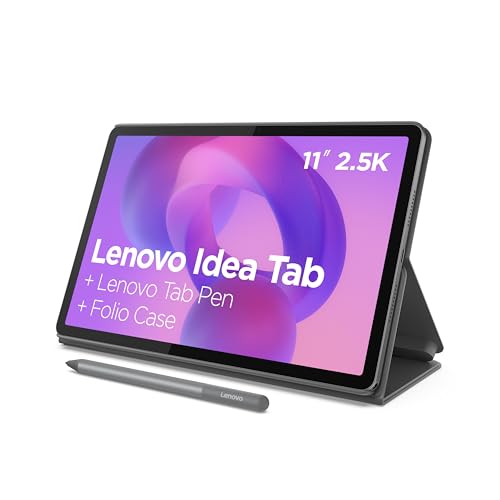
Lenovo Idea Tab 11" 2.5K Tablet
Best for: students needing large screens and ample storage
- Screen Size
- 11″
- Internal Storage
- 256 GB
- Processor
- MediaTek Dimensity 6300
- RAM
- 8 GB
- Display Type
- IPS
- Battery Life
- Up to 12 hours
The Lenovo Idea Tab 11 features an 11-inch 2.5K IPS touchscreen with a 90Hz refresh rate. It uses the MediaTek Dimensity 6300 processor and includes 8 GB of memory with 256 GB of storage. The device weighs 1.05 pounds and measures 0.28 inches thick. It supports stylus input and offers up to 12 hours of video playback. This tablet suits students and media consumers who need a sharp display and solid multitasking performance.
- 11-inch 2.5K IPS display with 90Hz refresh rate
- MediaTek Dimensity 6300 processor with 8 GB memory
- 256 GB internal storage capacity
- Quad Dolby Atmos-tuned speakers
- Up to 12 hours of video battery life
- Heavier at 1.05 pounds compared to lighter 10-inch tablets
- Thicker 0.28-inch profile limits pocket portability
- 20W charging speed is modest for fast top-ups
- You need a large 11-inch screen for reading and note-taking
- You want high-resolution visuals for streaming and study materials
- You require ample 256 GB storage for apps and media
- You prefer ultra-lightweight devices under 1 pound
- You need the fastest possible charging speeds
- You prioritize compact 10-inch screens for one-handed use
Verdict: Lenovo Idea Tab 11 2.5K fits students and media users who value a sharp 11-inch screen and strong multitasking specs. It is ideal for those who prioritize display quality and storage over extreme portability.
Specifications side by side
| Spec | Lenovo Idea Tab 11" 2.5K Tablet |
|---|---|
| Screen Size | 11″ |
| Internal Storage | 256 GB |
| Processor | MediaTek Dimensity 6300 |
| RAM | 8 GB |
| Display Type | IPS |
| Battery Life | Up to 12 hours |
| Storage | 256GB |
| Features | Stylus, Stylus Pen |
| Display | Touchscreen |
| Dimensions | 6.54 × 10 × 0.28 inches |
| Weight | 1.05 pounds |
| Size | Idea Tab 11" |
| Color | Luna Gray |
| Model | ZAFR0920US |
Frequently asked questions
Is the Lenovo Idea Tab 11 good for students?
Yes, it is well-suited for students. The 11-inch 2.5K display provides ample space for reading documents and taking notes. It includes support for a stylus pen, which is essential for writing and sketching. The 256GB storage ensures you have plenty of room for textbooks and apps without clutter.
Does this tablet support a stylus for note-taking?
It does support a stylus. The product attributes list both a stylus and a stylus pen as available features. This allows you to write directly on the 2.5K touchscreen for precise input. You can use it for handwritten notes or digital drawing, making it a practical tool for study sessions.
How much storage does the Lenovo Idea Tab 11 have?
The device comes with 256GB of internal storage. This capacity is sufficient for storing numerous apps, photos, and large files. You do not need to worry about running out of space quickly. It is ideal for users who keep their media and documents locally on the tablet.
What is the screen resolution of this tablet?
The screen features a 2.5K resolution. This high pixel density ensures sharp text and clear images on the 11-inch IPS display. You will notice crisp details when watching videos or reading e-books. The touchscreen response is also optimized for accurate touch input during daily use.
How heavy is the Lenovo Idea Tab 11?
The tablet weighs 1.05 pounds. This places it in the mid-weight category for 11-inch devices. It is manageable to hold for short periods but may feel heavy during long reading sessions. The dimensions are 10 inches wide and 6.54 inches long, fitting comfortably in most bags.
Can I use this tablet for multitasking?
Yes, the large screen supports multitasking. The 11-inch display allows you to split the screen for running two apps simultaneously. You can view a document while taking notes or watch a video while browsing. The ample 256GB storage also helps keep your workflow smooth without lag.
What color options are available for this model?
The listed model comes in Luna Gray. This neutral color offers a professional look suitable for both school and work environments. The specific model number is ZAFR0920US. You can expect a sleek finish that complements the device's practical design and sturdy build quality.


