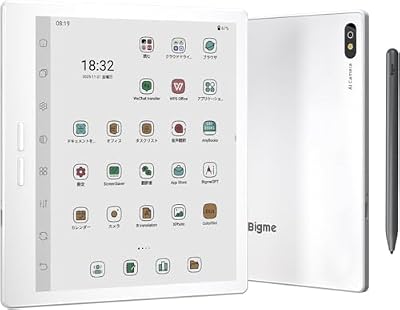
Penstar 10.3″ eNote Pen-Only Paper Tablet Review (2026): A Spec-Based Look
This penstar 10 3 enote pen only paper tablet review focuses on a dedicated writing device built for clarity and focus.

What this report covers
- Last updated
- 4 Nov 2026
Figures above are read from the product listings for the models named below. Scores are out of 10, based on listed specifications and buyer feedback.
As Amazon Associates, we earn from qualifying purchases. This means we may receive a small commission at no extra cost to you if you click through and make a purchase.
As an Amazon Associate we earn from qualifying purchases. Links on this page are affiliate links.
This penstar 10 3 enote pen only paper tablet review focuses on a dedicated writing device built for clarity and focus. The Penstar eNote features a 10.3-inch E Ink display with 300 PPI resolution. It lacks a backlight and touch input, prioritizing a paper-like writing feel. The device includes a stylus with 8192 levels of pressure sensitivity. It supports over 30 document types and offers AI voice-to-text conversion. This spec-based look explains who benefits from these specific hardware choices and workflow tools.
- 10.3-inch E Ink display with 300 PPI resolution and no backlight.
- Stylus with 8192 levels of pressure sensitivity for natural handwriting.
- Nine reprogrammable physical shortcut keys for fast navigation.
- AI-powered real-time voice-to-text support for 52 languages.
- Offline functionality without requiring sign-ins or subscriptions.
Good fit for
You will like this device if you take extensive handwritten notes and want a distraction-free screen. The 10.3-inch size fits A4 documents well. The physical keys help you navigate quickly without touching the display. If you handle sensitive materials, the offline mode keeps your data private. The voice-to-text feature helps during meetings or lectures. Professionals who prefer typing over tapping will appreciate the dedicated writing interface and paper-like feel.
Who can skip it
Skip this model if you need a color screen for photos or videos. The E Ink display is monochrome and refreshes slowly. You should look elsewhere if you want to browse the web or use apps like social media. There is no touch input, so you cannot swipe or pinch. The device is pen-only, meaning you cannot use your finger to write. If you need a tablet for entertainment or general computing, this dedicated notebook is not the right choice.
Verdict
The Penstar eNote is a focused tool for writers who value clarity and offline privacy. Its pen-only design and physical keys create a distraction-free environment for serious note-taking.
Key specs explained for Penstar 10.3
10.3-inch E Ink display
This screen size offers ample space for writing notes or reading documents without the glare of a backlight. The E Ink technology mimics the look of real paper, which reduces eye strain during long study or work sessions. You get a matte finish that feels natural under the stylus. This setup is ideal for readers who prefer a distraction-free environment over the vibrant colors of an LCD tablet.
300 PPI resolution
Pixels Per Inch measures the sharpness of the text and lines on the screen. At 300 PPI, the text appears crisp and clear, similar to printed ink on paper. This high density ensures that your handwritten notes and PDF annotations look professional and easy to read. It is a key standard for premium e-readers, providing clarity that lower resolution screens cannot match.
8192 levels of pressure sensitivity
This specification refers to the stylus ability to detect how hard you press against the screen. With 8192 levels, the tip can produce thin or thick lines based on your pressure, allowing for natural handwriting and detailed sketches. This feature is essential for artists and note-takers who want expressive control. It ensures that your digital writing feels responsive and organic rather than uniform and rigid.
9 physical shortcut keys
These dedicated buttons allow you to navigate the device without touching the screen. You can reprogram them for quick access to tools like home, back, or screenshot functions. This physical control speeds up your workflow significantly, especially when wearing gloves or when the screen is dirty. It is a practical feature for professionals who need fast, reliable access to core functions during meetings or lectures.
Gray color
The device comes in a gray finish, which is a neutral and professional aesthetic choice. This color is often preferred in business or academic settings as it does not distract from the screen content. It also tends to show fewer fingerprints and smudges compared to lighter colors. This practical choice supports a clean look that blends well with office environments and study desks.
Design and build details
The Penstar 10.3 measures 8.9 inches in length, 7.8 inches in width, and 0.22 inches in height. The listing identifies the color as Gray. These dimensions suggest a device that fits comfortably in one hand or slips into a standard bag. The thin profile supports portability, allowing you to carry it to meetings or classes without bulk.
You get nine physical shortcut keys on the device. The listing states these are reprogrammable to your preferred tools or workflows. This layout minimizes screen interaction, which helps preserve battery life and keeps your focus on writing rather than navigating menus. The absence of a touchscreen and backlight, as noted in the specs, reinforces the paper-like experience. You write directly on the surface without accidental touches or screen glare.
According to the listing, the device is designed for note-taking and writing. The build supports a pen-only interface, meaning you do not need to touch the screen to operate basic functions. This design choice suits users who prefer a distraction-free environment. The compact size and physical controls make it practical for long writing sessions where you want to avoid digital interruptions. The Gray finish is neutral and professional, fitting well in office or academic settings.
Setup and everyday use guide
You can set up this device for offline use without creating accounts or paying for subscriptions. This makes it suitable for private workflows where you want full control over your documents. If you need cloud connectivity, you can sync files via Google Drive, OneDrive, or Dropbox. You can also sync notes using the Penstar app on your phone, laptop, or iPad. This ensures your work stays accessible whether you are in an office or a coffee shop.
For daily note-taking, the device relies on a stylus with 8192 levels of pressure sensitivity. This allows you to sketch, brainstorm, and markup documents with precision. The screen lacks touch input, which reduces distractions and mimics the feel of real paper. You can customize your workflow using nine physical shortcut keys. Each key is reprogrammable, allowing you to create tailored profiles for writing or reading. This saves time by reducing the need to tap the screen.
The device supports more than 30 document types, including PDF, EPUB, Mobi, and TXT files. You can open, edit, and annotate these formats directly. For meetings or lectures, you can use the AI-powered voice-to-text feature. This converts speech into text in real time across 52 languages, but it requires a network connection. You can also share notes via email or as direct PDF files. The combination of physical controls and digital tools supports a focused, paperless workflow.
Before You Buy This Penstar
This device is a dedicated writing tool, not a general tablet. You will need a compatible stylus, as the listing specifies a pen-only experience with 8192 levels of pressure sensitivity. The display lacks touch input, so you cannot navigate by tapping. You should verify that your notes sync correctly with your preferred cloud service, such as Google Drive or OneDrive, if you rely on multi-device workflows. The device supports over 30 file types, including PDF and EPUB, but you must ensure your documents are in these formats for seamless annotation. Since it works offline, you do not need to worry about constant internet connections for basic note-taking. However, voice-to-text features require a network connection. Keep the screen clean with a soft cloth, as E Ink displays are sensitive to abrasives. This option suits readers who prioritize focus over multimedia consumption.
Check before you buy
- Confirm you only need writing, not touch navigation or apps.
- Check if your cloud provider syncs with the Penstar app.
- Ensure your documents are in supported formats like PDF or EPUB.
- Verify you have a compatible stylus with sufficient pressure sensitivity.
- Decide if offline use is sufficient for your privacy needs.

Penstar 10.3" eNote Pen-Only Paper Tablet
Best for: Focused note-taking and document annotation
- Screen Size
- 10.3"
- Pixel Density
- 300 PPI
- Use
- Note-Taking
- Features
- Stylus, Stylus Pen
- Display
- E Ink
- Color
- Gray
This 10.3-inch eNote is a pen-only writing tablet with a 300 PPI E Ink display. It features 8192 levels of pressure sensitivity for natural handwriting. The device includes nine physical shortcut keys for fast navigation. It supports real-time voice-to-text in 52 languages. You can sync files via cloud services or use it fully offline. It suits note-takers who prefer focused, distraction-free screens.
- 10.3-inch 300 PPI E Ink display for clear writing
- 8192 levels of pressure sensitivity in the stylus
- Nine reprogrammable physical shortcut keys
- Supports over 30 document types including PDF and EPUB
- Real-time voice-to-text in 52 languages
- Pen-only interface limits touch interaction options
- Voice-to-text requires a network connection
- Syncing relies on third-party cloud services
- You need a distraction-free screen for deep focus
- You prefer physical keys for quick navigation
- You handle sensitive documents requiring offline use
- You require a color display for media
- You need touch gestures for navigation
- You want built-in cloud storage without setup
Verdict: Penstar 10.3 eNote Pen-Only Tablet is a focused tool for writers and professionals who prioritize paper-like clarity and physical controls. It fits users who value offline privacy and structured note-taking over multimedia features.
Specifications side by side
| Spec | Penstar 10.3" eNote Pen-Only Paper Tablet |
|---|---|
| Screen Size | 10.3" |
| Pixel Density | 300 PPI |
| Use | Note-Taking |
| Features | Stylus, Stylus Pen |
| Display | E Ink |
| Color | Gray |
| Dimensions | 8.9 × 7.8 × 0.22 inches |
| Size | 10.3 inches |
Frequently asked questions
Is the Penstar 10.3 display touch-enabled?
No, the Penstar 10.3 does not support touch input. The listing specifies a pen-only experience, meaning you must use the included stylus to navigate and write. This design choice helps mimic the feel of writing on real paper, reducing accidental touches while you are focused on note-taking or document annotation.
What is the thickness of the Penstar tablet?
The device is 0.22 inches thick. This slim profile contributes to a lightweight form factor that is easy to hold for extended periods. Combined with its 10.3-inch screen size, the thin build allows you to carry it in standard bags without adding significant bulk to your daily carry.
Does this tablet have a backlight for night reading?
The Penstar 10.3 lacks a backlight. It relies on E Ink technology, which reflects ambient light much like traditional paper. This means you need external lighting to use it in dark environments. The absence of a backlight reduces eye strain and extends battery life by eliminating power-hungry LED components.
What colors is the Penstar 10.3 available in?
The listing identifies the color as Gray. This neutral tone is practical for professional settings and helps hide minor scuffs or fingerprints. The color option is straightforward, focusing on a clean, utilitarian appearance that complements the device’s purpose as a dedicated tool for writing and reading documents.
Can I use the Penstar 10.3 for general tablet tasks?
This device is built for focused note-taking and document annotation, not general computing. It lacks the multimedia features and broad app support of standard tablets. You should view it as a specialized tool for writers and professionals who prioritize paper-like clarity and offline privacy over entertainment or web browsing capabilities.
How large is the screen on this eNote?
The screen measures 10.3 inches diagonally. This size provides ample space for writing detailed notes or viewing complex documents side-by-side. It strikes a balance between portability and readability, offering more real estate than smaller 7-inch models while remaining compact enough to fit comfortably on a desk or lap.
Is the Penstar 10.3 suitable for students?
Yes, it is suitable for students who need a distraction-free environment. The E Ink display reduces eye strain during long study sessions, and the lack of internet connectivity helps minimize distractions. You can annotate lecture slides or take handwritten notes without the interruptions typical of multimedia tablets, supporting a focused learning workflow.