reMarkable 7.3″ Paper Pro Move Review: Who It Fits and Who Should Skip It
This remarkable 7 3 paper pro move review focuses on a compact, distraction-free tablet designed for pure note-taking.

What this report covers
- Last updated
- 4 Nov 2026
Figures above are read from the product listings for the models named below. Scores are out of 10, based on listed specifications and buyer feedback.
As Amazon Associates, we earn from qualifying purchases. This means we may receive a small commission at no extra cost to you if you click through and make a purchase.
As an Amazon Associate we earn from qualifying purchases. Links on this page are affiliate links.
This remarkable 7 3 paper pro move review focuses on a compact, distraction-free tablet designed for pure note-taking. It features a 7.3-inch Canvas Color display that mimics the look and feel of paper. The device is built for portability, measuring 8.98 inches in length and weighing just 1.05 pounds. It fits easily into bags or jacket pockets. The package includes the tablet, a Marker Plus pen, and a Basalt Book Folio. With USB-C connectivity and cloud sync, it keeps your handwritten notes organized and accessible across devices. It is a streamlined tool for focused work.
- 7.3-inch Canvas Color E Ink display for paper-like writing
- Ultraportable design weighing 1.05 pounds and measuring 8.98 inches long
- Includes Marker Plus pen and Basalt Book Folio for immediate use
- Cloud sync and search capabilities for handwritten notes with Connect subscription
Good fit for
This tablet suits professionals and students who need a dedicated, distraction-free device for meetings and lectures. Its compact size and light weight make it ideal for travelers who want to capture ideas without the bulk of a laptop. If you value the tactile feel of handwriting and need to convert notes to text, this device fits your workflow. The included folio and pen provide a complete setup right out of the box, requiring no additional purchases for basic functionality.
Who can skip it
You should look elsewhere if you require a full Android or Windows operating system for general app usage. This device lacks a keyboard, stylus pressure sensitivity data for professional drawing, and offline note conversion without a subscription. If you need to run complex productivity suites, browse the web extensively, or use specialized creative software, this dedicated e-ink tablet will not meet your needs. It is strictly for note-taking and document viewing.
Verdict
The reMarkable Paper Pro Move offers a focused, portable experience for dedicated note-takers. Its compact color display and included accessories make it a practical choice for distraction-free work.
Key specs explained
Display: Color E Ink
You get a color screen that uses E Ink technology. This means the image stays visible without power, just like paper. You can read in bright sunlight without glare. The color helps distinguish highlights or charts. It suits readers who want visual clarity without eye strain. Compare this to LCD tablets that require backlights and cause fatigue during long sessions.
Size: 7.3"
The screen measures 7.3 inches diagonally. This size offers enough space for detailed notes or reading documents. It is larger than a standard phone but smaller than a full laptop. You can hold it comfortably with one hand. It fits well in small bags. Compare this to 10-inch tablets that offer more space but are harder to carry daily.
Weight: 1.05 pounds
The device weighs 1.05 pounds. This is light enough for all-day carrying. You can keep it in a jacket pocket or small tote. It reduces arm fatigue when writing for hours. Compare this to heavier tablets that feel burdensome during commutes. The light weight supports its design as a portable note-taking tool for travelers.
Dimensions: 8.98 x 5.51 x 2.01 inches
The tablet measures 8.98 inches long, 5.51 inches wide, and 2.01 inches thick. The compact footprint fits easily into standard bags. The height allows for comfortable grip. The thickness suggests a slim profile. You can slip it into tight spaces. Compare these dimensions to bulkier e-readers that require dedicated sleeves or larger compartments for storage.
Design and Build Quality
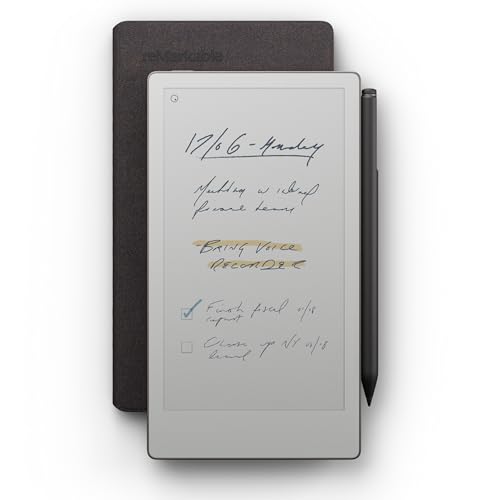
The reMarkable Paper Pro Move features a silver finish, as listed in the product attributes. According to the listing, the device measures 8.98 inches in length, 5.51 inches in width, and 2.01 inches in height. This compact footprint allows it to slip into a bag or jacket pocket. You can carry it without bulk, making it suitable for travel or quick meetings where space is limited.
The tablet weighs 1.05 pounds. This weight balances portability with a solid feel. The listing notes it includes a Basalt Book Folio in the Mosaic weave. This folio protects the screen and likely provides a comfortable grip. You do not need to carry a separate case, which simplifies your daily carry. The design prioritizes distraction-free use, so there are no unnecessary buttons or complex layouts to navigate.
Its size is smaller than a standard paperback book. This makes it easy to hold with one hand or place on a small table. The color display adds visual clarity without sacrificing the paper-like experience. You get a device that looks sleek and professional. The silver color and minimalist design fit well in office or academic settings. It is built for focused note-taking rather than entertainment. You can rely on its sturdy build for daily use. The included folio ensures it stays protected when not in use. This design choice supports its role as a portable digital notebook.
Setup and Daily Use
You set up the reMarkable Paper Pro Move by connecting the included USB-C cable to your power source. The device syncs with cloud services when you subscribe to Connect. This subscription enables you to search through handwritten notes and convert them to typed text. You can share your work with a single tap. The tablet works with mobile and desktop apps, ensuring your notes are available across your devices. You do not need to worry about losing your work, as the system keeps everything organized. You can use tags and folders to sort your documents and notes. This structure helps you find specific items quickly when you need them. The 7.3-inch Canvas Color display provides a distraction-free environment. There are no notifications or apps that interrupt your flow. You can focus entirely on the content in front of you. The device feels and sounds like paper, which makes the writing experience natural. You can take notes during meetings or capture ideas while traveling. The compact size allows it to slip into a bag or jacket pocket. You carry all your thoughts in a digital notebook that is smaller than a paperback. The included Marker Plus and six spare tips ensure you have the tools you need. You can write comfortably for extended periods. The color display helps you distinguish highlights or charts effectively. You get a practical tool for pure note-taking without the clutter of other features.
Before You Buy This Tablet
You should check your workflow before buying the reMarkable Paper Pro Move. It is not a general-purpose tablet. You cannot run standard apps or browse the web. It is built for pure note-taking and document reading. You must subscribe to Connect to use cloud syncing and handwriting search. Without that subscription, your notes stay local. You should verify that your mobile and desktop apps support the file formats you use. The device includes a Marker Plus and a Book Folio. You may need spare tips for the pen over time. The listing mentions six spare tips are included. This helps with upkeep. It fits well alongside other e-readers if you want color. It differs from basic black-and-white models by offering a Canvas Color display. If you need multitasking, this device is not for you. It is strictly for focused work.
Check before you buy
- Confirm you only need note-taking, not web browsing.
- Check if you want to pay for Connect subscription.
- Verify mobile app compatibility with your current workflow.
- Ensure you prefer color E Ink over standard black and white.
reMarkable 7.3" Paper Pro Move with Folio
Best for: compact color e-ink note-taking
- Screen Size
- 7.3"
- Display Type
- Canvas Color, E Ink
- Use
- Note-Taking
- Color
- Silver
- Dimensions
- 8.98 × 5.51 × 2.01 inches
- Weight
- 1.05 pounds
The reMarkable Paper Pro Move is an ultraportable digital paper tablet with a 7.3-inch Canvas Color display. It weighs 1.05 pounds and measures 8.98 by 5.51 inches. The device includes a Marker Plus and Basalt Book Folio. You can convert handwriting to text and sync notes to the cloud. This color e-ink tablet suits those who want a distraction-free writing experience that fits in a jacket pocket.
- 7.3-inch Canvas Color display
- Ultraportable build at 1.05 pounds
- Includes Marker Plus and Basalt Book Folio
- Search and convert handwritten notes to text
- Syncs notes to cloud via Connect subscription
- Heavier than standard paper notebooks at 1.05 pounds
- Requires Connect subscription for handwriting search and cloud sync
- Limited to 7.3-inch display size
- You want a distraction-free color e-ink tablet
- You need to convert handwriting to typed text
- You prefer a device that slips into a jacket pocket
- You need a large screen larger than 7.3 inches
- You want to search notes without a subscription
- You prefer a device lighter than 1.05 pounds
Verdict: reMarkable Paper Pro Move 7.3" Color fits professionals who value a compact, color e-ink display for distraction-free note-taking and text conversion. It is ideal for those who carry their tablet in a pocket or small bag.
Specifications side by side
| Spec | reMarkable 7.3" Paper Pro Move with Folio |
|---|---|
| Screen Size | 7.3" |
| Display Type | Canvas Color, E Ink |
| Use | Note-Taking |
| Display | Color E Ink |
| Color | Silver |
| Dimensions | 8.98 × 5.51 × 2.01 inches |
| Weight | 1.05 pounds |
| Size | 7.3" |
| Model | RM03A |
Frequently asked questions
Is the reMarkable Paper Pro Move good for students?
It suits students who need compact color note-taking. The 7.3-inch Canvas Color display helps distinguish highlights or charts. This size fits easily in small bags or pockets. You get distraction-free writing without standard app clutter. The device focuses on pure note-taking and document reading. It is ideal for those who value portability and clear text conversion.
Does it have a color screen?
Yes, it features a color E Ink display. This screen mimics the look and feel of paper while showing color. You can use color to distinguish highlights or charts. The technology keeps the image visible without power. This means no glare in bright sunlight. It is designed for clear, paper-like reading and writing.
How heavy is the tablet?
The device weighs 1.05 pounds. This weight contributes to its portability. It measures 8.98 inches in length and 5.51 inches in width. The compact footprint allows it to fit in small bags. You can carry it easily during commutes or meetings. The silver finish adds to its sleek design.
Can I use it without an internet subscription?
You can use the device for basic note-taking offline. However, syncing with cloud services requires a Connect subscription. This subscription enables handwritten note search and text conversion. Without it, you miss out on cloud features. The device is built for pure note-taking and document reading. It does not run standard apps.
What is the screen size?
The screen is 7.3 inches. This size offers a balance between portability and readability. It fits in pockets or small bags. The compact design is ideal for professionals on the go. You get a distraction-free experience for note-taking. The color E Ink technology enhances clarity for charts and highlights.
Is it a good alternative to an iPad?
It is not a general-purpose tablet. You cannot run standard apps or browse the web. It is built for pure note-taking and document reading. If you need a distraction-free tool, it fits. It lacks the versatility of an iPad. It focuses on compact, color e-ink note-taking with paper-like feel.