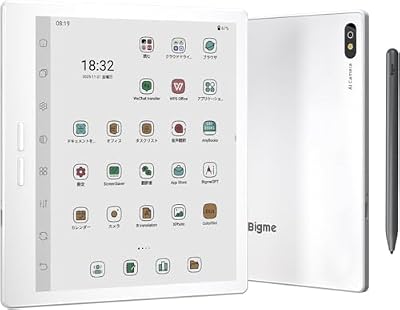
Septpenta E Reader Review: Who It Fits and Who Should Skip It
This septpenta e reader review focuses on a 7-inch color device designed for clear text and image display.

What this report covers
- Last updated
- 4 Nov 2026
Figures above are read from the product listings for the models named below. Scores are out of 10, based on listed specifications and buyer feedback.
As Amazon Associates, we earn from qualifying purchases. This means we may receive a small commission at no extra cost to you if you click through and make a purchase.
As an Amazon Associate we earn from qualifying purchases. Links on this page are affiliate links.
This septpenta e reader review focuses on a 7-inch color device designed for clear text and image display. It features an 800×480 resolution screen that renders graphics with noticeable clarity. The unit weighs 1.12 pounds, offering a portable form factor for handheld reading sessions. You can choose between 4GB, 8GB, or 16GB of internal storage, with support for up to 16GB via memory card expansion. This flexibility allows you to store a substantial library of documents without constant management. The device includes a mechanical navigation button for easy page turning and comes with a protective cover to safeguard the screen during transport and daily use.
- 7-inch HD color screen with 800×480 resolution for clear visuals
- Mechanical navigation button for intuitive page turning
- Supports EPUB, PDF, TXT, FB2, and PDB file formats
- Storage options include 4GB, 8GB, and 16GB variants
Good fit for
This reader suits users who prioritize color graphics and tactile controls. If you frequently read PDFs or documents with images, the color display and file format support are practical assets. The mechanical button helps those who prefer physical feedback over touch gestures. It is also a good fit for readers who want expandable storage without buying the largest internal capacity model upfront. The included protective cover adds convenience for travelers who need a quick, all-around shield for their device.
Who can skip it
Look elsewhere if you need a high-resolution black-and-white e-ink display for superior battery life in bright sunlight. This device uses a color LCD, which consumes more power than traditional e-readers. It is not ideal for users who demand 300 PPI sharpness for small text, as the 800×480 resolution is lower than premium models. If you require a lightweight device under one pound, the 1.12-pound weight may feel heavier. Users seeking advanced font rendering or wireless syncing features will find this model limited.
Verdict
The Septpenta 7in Color E-Reader with Buttons offers a practical color display and mechanical controls for users who value tactile navigation and graphic clarity. It is a solid choice for casual readers who prioritize format support and expandable storage over e-ink efficiency.
Key specs explained
7-Inch 800×480 Screen
This display size offers a comfortable reading area for most books. The 800×480 resolution provides clear text and decent image detail. You will notice sharper graphics compared to standard black-and-white e-readers. This setup works well for comics, magazines, or PDFs. It balances screen real estate with portability, making it easier to read for extended periods without straining your eyes.
8GB Storage
The 8GB internal memory allows you to store a substantial library of text files. You can keep thousands of novels or documents on the device without needing an internet connection. This capacity is sufficient for casual readers who do not store large video files. If you need more space, the device supports expansion cards up to 16GB, giving you flexibility to grow your collection over time.
Mechanical Navigation Button
A physical button lets you turn pages or navigate menus without touching the screen. This feature reduces fingerprints and smudges on the display. It also provides tactile feedback, which helps you find buttons by feel in low light. You will appreciate this for one-handed reading. It offers a reliable alternative to swipe gestures, ensuring precise control over your reading experience.
1.12 Pounds Weight
Weighing 1.12 pounds makes this device lightweight and easy to hold for long sessions. You can carry it in a bag or hold it with one hand without fatigue. This weight is slightly heavier than basic e-ink models but still portable. It strikes a balance between durability and comfort. You will find it manageable for travel, commuting, or relaxing in bed without causing arm strain.
Design and Build Details
According to the listing, this device features a protective cover that shields the unit from all sides. This inclusion suggests the manufacturer expects you to handle the e-reader frequently or transport it in bags. The cover allows for free operation, meaning you can likely navigate the interface without removing the shell. This design choice prioritizes durability over a sleek, minimalist aesthetic. It is a practical solution for readers who want added peace of mind while traveling.
The unit weighs 1.12 pounds. This weight is substantial for a handheld device, which may affect comfort during long reading sessions. You might find it slightly heavy to hold with one hand for extended periods. However, the mass could also contribute to a feeling of sturdiness. The 7-inch screen size strikes a balance between portability and readability. It is large enough to display text clearly without being unwieldy.
Controls are simplified by a mechanical navigation button. This physical switch supports previous and next page functions. Mechanical buttons offer tactile feedback that touchscreens sometimes lack. You can use them to turn pages without looking at the screen. This layout is useful for reading in low light or when your hands are wet. The combination of a physical button and a protective cover indicates a focus on functional, everyday use rather than premium materials.
Setup And Daily Use Guide
Setting up this Septpenta e-reader involves transferring files to the device. The listing confirms support for EPUB, PDF, TXT, FB2, and PDB formats. You will need to copy these files into the internal storage or onto a microSD card. The device supports expansion up to 16GB, allowing you to carry a substantial library. Choosing between the 4GB, 8GB, or 16GB variants depends on your existing collection size. The 8GB model offers a balanced middle ground for most users.
Daily use is guided by the mechanical navigation buttons. These physical controls allow you to flip forward and backward through pages. This feature provides a tactile experience that mimics turning pages in a physical book. You do not need to rely solely on touch gestures. This can be helpful if your hands are wet or if you prefer precise control. The 7-inch HD color screen displays content at 800×480 resolution. This setup ensures that text and images appear with noticeable clarity. The color display makes comics and magazines more engaging than standard monochrome screens.
The protective cover shields the device from all sides. It allows for free operation, meaning you can use the screen and buttons without removing the cover. The unit weighs 1.12 pounds. This weight makes it portable enough for handheld reading sessions. You can hold it comfortably for extended periods. The combination of physical buttons and a color display suits readers who want a versatile tool for various file types. It is a practical choice for those who value tactile navigation and color graphics.
Before You Buy This Septpenta E-Reader
Before you commit to this Septpenta e-reader, consider your file library. You must verify that your current books are in supported formats like EPUB, PDF, TXT, FB2, or PDB. If you use Kindle or Apple Books ecosystems, this device will not work for you. You will need to convert files or source compatible ones. The 8GB storage is modest. You should plan to use a microSD card for larger libraries. The mechanical buttons are a nice touch for page turning, but you still need to manage files via a computer. This unit sits between basic black-and-white readers and full tablets. It offers color without the weight or complexity of a tablet. It is ideal for casual readers who want color graphics without managing apps. You get a protective cover included, which is helpful for travel. Just ensure your workflow supports manual file transfer.
Check before you buy
- Check if your books are EPUB, PDF, or TXT.
- Confirm you can transfer files via computer.
- Verify you want color over black-and-white.
- Ensure you have a microSD card ready.

Septpenta 7in Color E-Reader with Buttons
Best for: Color screen reading with physical buttons
- Screen Size
- 7in
- Storage Capacity
- 8GB
- Weight
- 1.12 pounds
This Septpenta e reader features a 7-inch HD color screen with 800×480 resolution. It includes a mechanical navigation button for page turning and supports EPUB, PDF, and TXT formats. You get 8GB of internal storage, expandable via a memory card. The device weighs 1.12 pounds and comes with a protective cover. It suits readers who want color graphics and tactile controls.
- 7-inch HD color display with 800×480 resolution
- Mechanical navigation button for page turning
- Supports EPUB, PDF, TXT, FB2, and PDB formats
- Includes a protective cover
- 8GB storage with 16GB expansion option
- 800×480 resolution is lower than typical high-density e ink screens
- 1.12 pounds weight is heavier than standard monochrome readers
- Limited to 7-inch screen size compared to larger options
- You want a color screen for images or comics
- You prefer physical buttons for navigation
- You need support for multiple file formats like EPUB and PDF
- You require a high-resolution black and white display
- You want a lightweight device for one-handed reading
- You prefer a larger screen size for better readability
Verdict: Septpenta 7in Color E Reader with 8GB offers a color screen and physical buttons for a tactile reading experience. It fits users who value color graphics and tactile controls over high resolution or light weight.
Specifications side by side
| Spec | Septpenta 7in Color E-Reader with Buttons |
|---|---|
| Screen Size | 7in |
| Storage Capacity | 8GB |
| Storage | 8GB |
| Weight | 1.12 pounds |
| Color | 8GB |
Frequently asked questions
Does the Septpenta e-reader have physical buttons?
Yes, this model includes physical buttons for navigation. You get a tactile experience for turning pages and moving through menus. This feature is useful if you prefer manual control over touch gestures. The buttons are integrated into the device design alongside the 7-inch screen.
What is the storage capacity of this device?
The device comes with 8GB of internal storage. This space holds a reasonable number of books and documents. You can also expand storage using a microSD card. The listing confirms support for expansion up to 32GB, giving you flexibility for larger file libraries.
Is the screen color or black and white?
The screen is a color display. It offers 800×480 resolution for clear text and image rendering. This setup is ideal for comics, magazines, or documents with graphics. You will see colors instead of grayscale, which changes how you view illustrated content.
How heavy is the Septpenta e-reader?
The unit weighs 1.12 pounds. This weight makes it portable for handheld reading sessions. It is heavier than some basic black-and-white e-readers due to the color screen and button hardware. You should consider this balance when holding the device for long periods.
Can I read PDF files on this e-reader?
Yes, the device supports PDF files. It also handles EPUB, TXT, FB2, and PDB formats. You need to copy these files to the internal storage or a microSD card. The device does not connect to online stores like Kindle or Apple Books for direct downloads.
Who is this e-reader best suited for?
It fits users who value color graphics and tactile controls. The physical buttons and color screen distinguish it from standard e-readers. You will like this device if you read comics or magazines often. It is less suitable if you prioritize high resolution or ultra-lightweight portability.
Does it support cloud reading services?
No, the device does not mention cloud services. You must manually transfer files via USB or card. It works with local files in supported formats like PDF and EPUB. You cannot sync with Kindle or Apple Books ecosystems directly through the device interface.