TABWEE 2026 Upgraded 12.2 inch Tablet Review: Who It Fits and Who Should Skip It
In this tabwee upgraded 12 2 inch tablet review, we look at a device designed for productivity and media consumption.

What this report covers
- Last updated
- 4 Nov 2026
Figures above are read from the product listings for the models named below. Scores are out of 10, based on listed specifications and buyer feedback.
As Amazon Associates, we earn from qualifying purchases. This means we may receive a small commission at no extra cost to you if you click through and make a purchase.
As an Amazon Associate we earn from qualifying purchases. Links on this page are affiliate links.
In this tabwee upgraded 12 2 inch tablet review, we look at a device designed for productivity and media consumption. The TABWEE T60 features a 12.2-inch 2.5K QHD display that covers 99% of the sRGB color gamut. This provides sharp visuals for gaming and art. It runs on Android 16, offering a bloatware-free experience with integrated AI tools. The system includes 48GB of total RAM, combining physical and virtual memory to handle multitasking. With 256GB of expandable storage, it holds plenty of files. This setup targets users who need a large screen for work or entertainment.
- 12.2-inch 2.5K QHD CSOT display with 99% sRGB coverage
- Android 16 operating system with Gemini AI integration
- 48GB total RAM (12GB physical + 36GB virtual)
- 256GB UFS storage expandable to 1TB
- 10000mAh battery with built-in GPS navigation
Good fit for
This tablet suits students, remote workers, and travelers who need a large screen for split-screen multitasking. The included keyboard, mouse, and stylus transform it into a mobile office. Users who watch 4K content or edit video in CapCut will appreciate the high-resolution display and ample RAM. The built-in GPS makes it useful for road trips or navigation without relying on a phone. If you want a device that handles heavy apps and offers all-day battery life, this model fits your needs.
Who can skip it
You should look elsewhere if you require a traditional laptop with a physical trackpad and dedicated operating system. This is an Android tablet, so it lacks desktop-grade software compatibility. If you need high-end gaming performance beyond mobile titles, the ARM-based processor may not suffice. Users who prioritize a smaller, more portable device for one-handed use will find the 12.2-inch size too bulky. Those who do not need GPS or a large battery might find the added weight unnecessary.
Verdict
The TABWEE T60 offers a large, color-accurate screen and strong multitasking specs for its category. It is a practical choice for users who need a versatile, large-display Android device for work or media.
Key specs explained for you
12.2 Inch Display
This screen size offers more real estate than standard 10-inch tablets. You get a larger canvas for split-screen multitasking and detailed work. It fits comfortably in most sleeves but requires a larger bag than compact devices. If you read documents or edit photos, the extra width reduces the need to zoom. Compare this against smaller 8-inch models if you prioritize portability over workspace.
2.5K QHD Display
This resolution packs more pixels into the screen than standard HD panels. Text appears sharper and edges look cleaner. You benefit from clearer details when reading e-books or watching high-definition video. It reduces eye strain during long sessions by making images more defined. When shopping, check if competitors offer lower 1080p panels, which may look pixelated on this large surface area.
256GB Storage
This capacity holds a substantial amount of apps, photos, and offline media. You can store hundreds of movies or large game files without worrying about running out of space. It supports expandable storage up to 1TB for additional flexibility. If you rely on the device for local media libraries or extensive app collections, this amount provides ample room. Compare this against models with only 32GB or 64GB, which fill up quickly.
Android Operating System
This platform gives you access to the Google Play Store and familiar apps. You can use productivity tools, games, and streaming services seamlessly. The interface supports multitasking and customizations that enhance your daily workflow. It allows you to install specific tools for drawing or office work. When comparing, consider if you prefer this open ecosystem over more restricted alternatives that limit app installation options.
Design and build overview
According to the listing, the TABWEE T60 measures 9.5 inches in length, 6.4 inches in width, and 0.3 inches in height. You will find the device in an Ash Gray finish. The 12.2-inch screen size provides a larger canvas than standard 10-inch tablets. This extra real estate supports split-screen multitasking and detailed creative work. The 0.3-inch thickness keeps the profile slim for portable use.
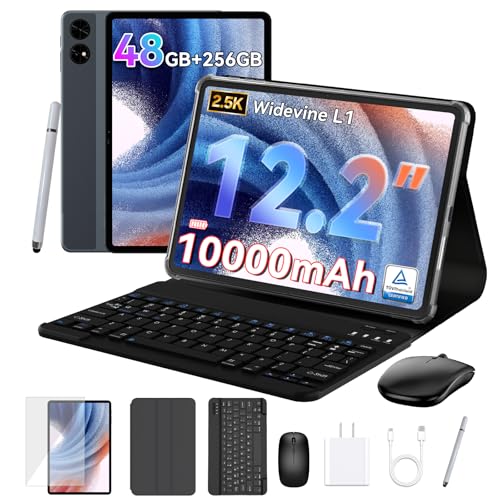
The product includes a magnetic keyboard, mouse, stylus pen, and protective case. These accessories transform the tablet into a mobile office setup. You can attach the keyboard instantly for typing essays or managing documents. The included case offers physical protection during transport. This bundle allows you to switch between media consumption and productivity tasks without carrying a heavy laptop.
The listing notes the device weighs enough to require a larger bag than compact tablets. You should plan your carrying case accordingly. The Ash Gray color provides a neutral look suitable for professional environments. The included accessories mean you do not need to purchase separate peripherals. This all-in-one approach simplifies setup for students and remote workers. You get a complete productivity kit right out of the box.
Setup and daily operation details
The TABWEE T60 ships with Android 16, which the listing describes as a bloatware-free interface. This operating system includes Gemini AI to manage background apps and assist with writing summaries. You also get Private Space for data security and Predictive Back navigation. These software features aim to keep the device responsive over time.
For physical setup, the tablet comes with an 8-in-1 productivity bundle. This includes a magnetic keyboard, mouse, stylus pen, and protective case. These accessories allow you to switch to desktop mode instantly. You can use Android 16’s Desktop Windowing Mode to run Zoom calls alongside Google Docs. This setup supports split-screen multitasking effectively.
In daily use, the 48GB of RAM (12GB physical plus 36GB virtual) handles multiple apps simultaneously. The 256GB UFS storage, expandable to 1TB, holds large files like 4K videos. The 12.2-inch 2.5K QHD CSOT display covers 99% of the sRGB gamut. It features anti-glare technology and eye comfort protection for long viewing sessions.
The 10000mAh battery supports all-day usage. Built-in GPS navigation works without WiFi, making it suitable for travel. The device measures 9.5 inches by 6.4 inches by 0.3 inches. It runs on an octa-core processor. The combination of hardware and software specs suggests a workflow focused on media consumption and document editing. You can store hundreds of HD movies offline. The tablet supports resource-heavy tasks like video editing and gaming without freezing.
Before you buy this tablet
You should verify that your mobile carrier supports the GPS connectivity if you plan to use the tablet for navigation without Wi-Fi. The included magnetic keyboard and stylus are essential for the desktop mode, so ensure you have a flat surface to use them comfortably. Keep the 10,000mAh battery charged regularly, as heavy gaming or video editing will drain it faster than light reading. This device sits between standard tablets and laptops in the 1 options reviewed here. It suits users who need a large screen for creative work but want to avoid the weight of a laptop. Check that your apps support the Android 16 interface before purchasing. The 256GB storage may fill up quickly if you download many 4K videos or games, so consider using a microSD card for extra space. This tablet is best for those who prioritize screen real estate and multitasking over portability.
Check before you buy
- Confirm GPS works with your carrier for offline navigation
- Ensure your apps support Android 16 features
- Check if 256GB storage meets your media needs
- Verify desk space for keyboard and stylus use
TABWEE 12.2 Inch Android 16 Tablet
Best for: students and remote workers needing a mobile office
- Screen Size
- 12.2 Inch
- Internal Storage
- 256GB
- Processor
- Octa-Core
- RAM
- 48GB
- Display Type
- LCD
- Operating System
- Android
This TABWEE tablet features a 12.2-inch 2.5K display and runs Android 16 with Gemini AI. It includes 48GB of RAM and 256GB of storage, expandable to 1TB. The device comes with a magnetic keyboard, mouse, stylus, and case. It has a 10000mAh battery and built-in GPS. You get a pure interface without bloatware. This bundle suits students and remote workers needing a mobile office setup.
- 12.2-inch 2.5K CSOT display with 99% sRGB coverage
- 48GB RAM (12GB physical + 36GB virtual) for multitasking
- Android 16 OS with Gemini AI assistance
- Includes magnetic keyboard, mouse, stylus, and case
- 10000mAh battery with built-in GPS navigation
- 12.2-inch screen adds bulk at 0.3 inches thick
- 256GB storage is limited compared to higher-end models
- Virtual RAM relies on system resources for performance
- You need a large screen for gaming or art
- You want a complete productivity bundle with accessories
- You require GPS navigation for travel or driving
- You prefer a compact device for one-handed use
- You need maximum internal storage without expansion
- You want a device under 12 inches in size
Verdict: TABWEE 12.2 inch Android 16 Tablet fits users who need a large display and a full accessory bundle for work or study. It is ideal for those who value multitasking power and GPS navigation.
Specifications side by side
| Spec | TABWEE 12.2 Inch Android 16 Tablet |
|---|---|
| Screen Size | 12.2 Inch |
| Internal Storage | 256GB |
| Processor | Octa-Core |
| RAM | 48GB |
| Display Type | LCD |
| Storage | 256GB |
| Operating System | Android |
| Features | Octa-Core, Keyboard |
| Dimensions | 9.5 × 6.4 × 0.3 inches |
| Size | 12.2 Inch |
| Color | Ash Gray |
| Model | T60 |
Frequently asked questions
Is the TABWEE 12.2 inch tablet good for students?
Yes, it is designed for students and remote workers needing a mobile office. The large 12.2-inch display supports split-screen multitasking for research and note-taking. You also get a full accessory bundle, including a keyboard, which helps with writing assignments and organizing study materials efficiently.
What operating system does the TABWEE T60 run?
The device runs Android 16. This version includes Gemini AI to manage background apps and assist with writing summaries. It also features Private Space for data security and predictive text tools. The listing describes the interface as bloatware-free for a cleaner experience.
How much storage does the TABWEE 12.2 inch tablet have?
It comes with 256GB of storage. This capacity allows you to save numerous documents, photos, and apps without worrying about space. The octa-core processor helps keep the system responsive even when many files are stored locally, supporting smooth performance for daily tasks.
Can I use the TABWEE tablet for GPS navigation?
Yes, the device supports GPS connectivity for navigation. However, you should verify that your mobile carrier supports this feature if you plan to use it without Wi-Fi. The large screen provides a clear view for maps, making it suitable for travel or commuting.
What is included in the accessory bundle for the TABWEE tablet?
The bundle includes a magnetic keyboard and a stylus. These accessories are essential for using the desktop mode effectively. The keyboard allows for comfortable typing, while the stylus supports precise input for drawing or detailed work on the 12.2-inch canvas.
Is the TABWEE T60 suitable for remote work?
It fits users who need a mobile office setup. The combination of a large display, octa-core processor, and included keyboard supports productivity tasks. You can manage emails, documents, and video calls with ease, making it a practical choice for working from various locations.


