Tapo Camera Hub Comparison: Choosing the Best Smart Setup
Selecting the right tapo camera hub requires understanding how different central controllers handle local recording storage, device capacity limits, and smart automation protocols.

What this report covers
- Models assessed
- 6
- Buyer rating range
- 4.1 – 4.9 of 5
- Last updated
- 25 Sep 2026
Figures above are read from the product listings for the models named below. Ratings are the average left by Amazon buyers, not a score awarded here.
As Amazon Associates, we earn from qualifying purchases. This means we may receive a small commission at no extra cost to you if you click through and make a purchase.
Selecting the right tapo camera hub requires understanding how different central controllers handle local recording storage, device capacity limits, and smart automation protocols. Homeowners and busy professionals building an integrated security system must decide whether they need decentralized microSD storage for a handful of battery cameras, an expandable multi-terabyte network recorder for constant monitoring, or a simple low-power bridge for contact sensors and sirens. Because coordinating wireless surveillance involves balancing battery efficiency against recording limits, finding which tapo hub to buy hinges on your specific camera hardware and notification preferences.
The Tapo smart hub range is structured into clear tiers based on storage hardware, communication protocols, and device roles. At the core of the surveillance lineup are dedicated camera bridges like the H200 and the high-capacity Tapo CentralHub H500, which manage local footage and coordinate security chimes. Alongside these surveillance-centric hubs, the brand provides lightweight sub-GHz IoT bridges like the H100, hybrid infrared Matter bridges like the H110, touchscreen smart displays bundled with Tapo lighting, and tactile accessories like the S200D switch. Reviewing this tapo hub comparison reveals distinct capabilities across storage expansion, sensor management, and ecosystem integration.
Criteria matrix What each model in this report is credited with
Rows are the criteria that come up in the pros and cons listed for this lineup. A check means the criterion is named in this report’s write-up of that model; a dash means it is not. Criteria that apply to every model, or to only one, are left out because they separate nothing.
| Criterion | Tapo Smart Hub with 4.6★ | Tapo CentralHub for Smart 4.1★ | Tapo Smart Hub with Built-in 4.9★ | Echo Hub with TP-Link 4.9★ | Tapo Smart IR & 4.8★ | Tapo Smart Button 4.4★ |
|---|---|---|---|---|---|---|
| Storage | Named | Named | Not named | Named | Named | Not named |
| Sensors | Named | Named | Named | Not named | Named | Not named |
| Battery | Named | Named | Named | Not named | Not named | Named |
| Sensor | Named | Not named | Named | Named | Named | Not named |
| Video | Named | Named | Named | Not named | Named | Not named |
| Audible alarm | Not named | Not named | Named | Not named | Named | Not named |
| Local camera | Not named | Not named | Not named | Named | Named | Not named |
| SATA drive | Not named | Named | Not named | Not named | Named | Not named |
| Criteria named | 5 / 8 | 5 / 8 | 5 / 8 | 3 / 8 | 7 / 8 | 1 / 8 |
Built from the wording of this report, not from a bench test. A dash is not a fault: it only means the write-up does not mention that point for that model. Star figures are the average rating left by Amazon buyers, read from the product listing.
Tapo Camera Hub Lineup at a Glance
| Model | Device Capacity | Storage Support | Primary Function |
|---|---|---|---|
| Tapo Smart Hub with Built-in Chime (H200) | 64 sensors/switches + 4 cameras/doorbells | MicroSD up to 512 GB | Wire-free camera storage hub and chime |
| Tapo CentralHub for Smart Devices (H500) | 64 Sub-G sensors + 16 cameras | 16GB built-in + 2.5-inch SATA up to 16TB | Central AI video hub with HDMI monitoring |
| Tapo Smart Hub with Built-in Chime (H100) | Up to 64 Tapo sensors/switches/buttons | None | Sub-1G low-power sensor bridge and 90dB siren |
| Echo Hub with TP-Link Tapo Smart | Touchscreen panel + 1 smart bulb | Cloud / live camera display | Wall-mounted Alexa smart home display panel |
| Tapo Smart IR & IoT Hub (H110) | 18 appliance types + Tapo IoT devices | None | Matter-certified IR universal remote and chime |
| Tapo Smart Button (S200D) | Accessory (pairs with Tapo hub) | None | Wireless remote dimmer and doorbell trigger |
The Models in Detail
Tapo Smart Hub with Built-in Chime
Best for: Low-power sensor networks without video needs
Pros
- Connects up to 64 devices
- Built-in 90 dB warning siren
- Sub-1G low-power protocol
Cons
- No local video storage
- Cannot directly link Wi-Fi plugs

Best for: Wireless camera setups needing local storage
Pros
- 512 GB microSD storage
- Connects 64 sensors and 4 cameras
- Adjustable 90 dB siren chime
Cons
- Caps camera connections at 4
- MicroSD card sold separately
The Tapo Smart Hub with Built-in Chime, designated as model H200, serves as a compact dedicated bridge engineered to integrate wire-free cameras and battery accessories. According to the listing, this wireless hub connects up to 64 switches, sensors, or buttons alongside up to 4 cameras or video doorbells. It coordinates directly with hardware such as the Tapo C420 and C400 wire-free security cameras, as well as a tapo door bell camera like the D230. For media retention, the hub houses a local microSD slot that accepts cards up to 512 GB (sold separately), keeping motion clips accessible locally without mandatory subscriptions. The unit connects over 2.4GHz Wi-Fi, offers a 30-meter wireless range, and includes an RJ45 Ethernet cable, power adapter, and quick start guide in the box.
Beyond video storage, the H200 functions as an audible alert center. It features an adjustable smart alarm and chime with sound levels reaching up to 90dB, offering customizable ringtones that sound when a doorbell button is pressed or when an outdoor camera detects motion. By utilizing an ultra-low power wireless communication protocol, the hub helps battery-powered sensors and buttons operate up to 10 times longer than they would over conventional Wi-Fi connections. Voice assistant management is supported through Amazon Alexa and Google Home, allowing automated routines alongside smartphone control via the Tapo app.
This model is best suited for homeowners installing modest battery camera systems who prioritize local microSD video recording without recurring monthly cloud fees. With its hard ceiling of 4 camera or doorbell connections, households planning larger surveillance setups across wider properties will find the H200 gives way to higher-tier solutions like the Tapo CentralHub H500.
Tapo CentralHub for Smart Devices

Best for: Multi-camera surveillance with continuous recording
Pros
- Supports 16TB SATA hard drive
- Adds onboard facial recognition
- Direct HDMI video output
Cons
- Continuous recording capped at 4 cameras
- Internal SATA drive sold separately
The Tapo CentralHub for Smart Devices, designated as the H500, represents the brand’s most capable on-premises surveillance processor and storage controller. The listing states that this corded electric centralized hub connects and manages up to 16 Tapo cameras and 64 Tapo Sub-G sensors on a unified platform. Media retention is highly expandable: the H500 includes 16GB of built-in flash storage and supports an internal 2.5-inch SATA hard drive or solid-state drive up to 16TB (5V power, 10W maximum operating watts, sold separately). For users incorporating high-resolution cameras such as a tapo 4k security camera, the hub supports continuous 24/7 recording for up to 4 cameras simultaneously. Offline mode guarantees footage saves straight to the local disk during network outages.
Intelligence and interface connectivity are major operational upgrades on the H500. The hub adds onboard facial recognition processing to existing Tapo cameras, allowing the system to filter familiar household members and issue push alerts only when unrecognized visitors appear. Viewing options are flexible: users can review recorded clips and event summaries through the Tapo app on mobile devices or output up to four live camera streams to an external monitor via the built-in HDMI port. Built-in network defense includes WPA3 encryption, while an integrated 110dB alarm and chime warns against intruders and acts as a loud doorbell chime.
The H500 is built for users requiring property-wide surveillance coverage with terabyte-scale local storage, facial recognition filtering, and direct monitor output. Those operating only one or two battery cameras without continuous recording requirements will find the H500 far more hardware than their setup necessitates, making the smaller H200 a more practical choice.
Tapo Smart Hub with Built-in Chime
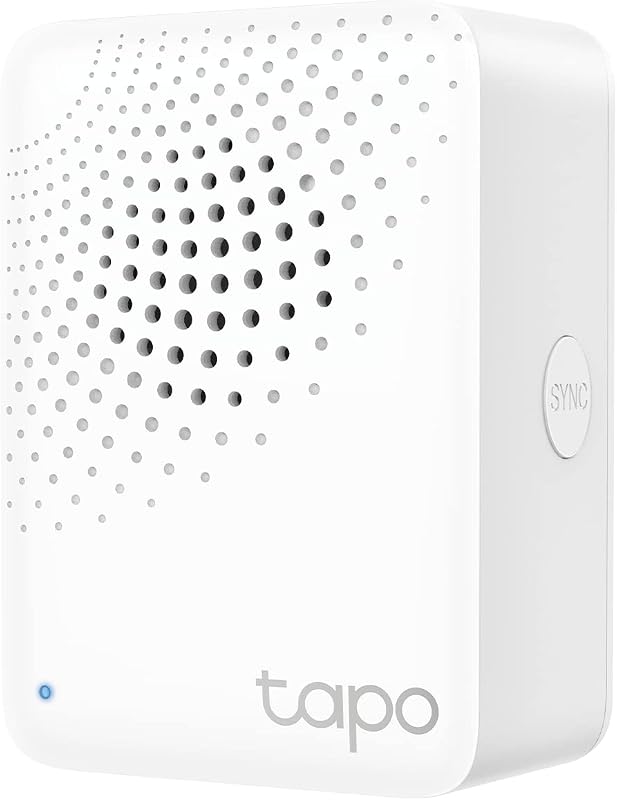
The Tapo Smart Hub with Built-in Chime, model H100, is designed strictly as an IoT sensor bridge rather than a video recorder. The listing specifies that the H100 acts as a 3-in-1 control center connecting up to 64 Tapo smart sensors, switches, and buttons across an operating distance of up to 30 meters. It communicates using a lower-frequency broadband protocol that minimizes radio interference and extends connected sensor battery life by up to 10 times. Setting up the hub requires a standard 2.4GHz Wi-Fi connection, though the listing clarifies that the H100 cannot directly connect to Tapo smart plugs or smart lighting, which instead connect over Wi-Fi and coordinate through the app.
Automation routines and security sirens are the core functions of the H100. Through the Tapo app, users can create Smart Actions that trigger shortcuts across connected appliances when a sensor registers movement or a door opens. The built-in siren reaches volumes up to 90 dB, sounding an alert to deter intruders or notify occupants of triggered door contacts and water leak detectors. The device is compact, weighing just 0.07 kg, plugs directly into standard wall outlets, and is backed by a 7-year EU spare part availability timeline.
This model is the ideal match for apartment dwellers and property owners who want a dedicated sensor network, environmental monitoring, and an audible alarm system without managing security cameras. Because it has no microSD card slots, internal drive bays, or video decoding pipelines, it cannot store video clips, meaning shoppers looking for the best tapo hub for cameras must step up to the H200 or H500.
Echo Hub with TP-Link Tapo Smart
Best for: Touchscreen smart control with visual feeds
Pros
- Interactive Alexa smart display
- Includes dimmable color smart bulb
- Frustration-Free Setup support
Cons
- Third-party display hardware platform
- Lacks Sub-1G sensor coordination
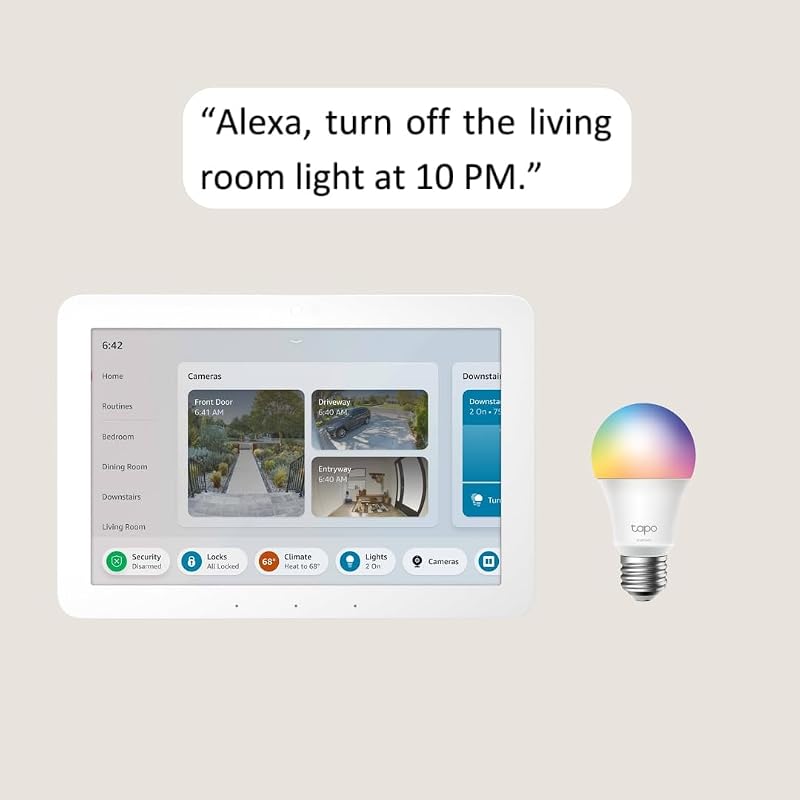
The Echo Hub with TP-Link Tapo Smart bundle pairs Amazon’s dedicated wall-mountable smart home control panel with a TP-Link Tapo L531E smart color bulb. The Echo Hub provides an interactive touchscreen and Alexa voice interface, giving users a physical command center to view live camera feeds, switch smart plugs, and adjust lighting scenes across the home. When paired with smart surveillance gear such as an indoor tapo window camera, the display allows users to check camera streams with a tap or voice prompt. Alexa Frustration-Free Setup simplifies the installation process for compatible TP-Link hardware.
The bundled Tapo smart color bulb offers comprehensive lighting adjustments, delivering 16 million colors and tunable white illumination from 2500K to 6500K. The bulb features an 800-lumen output, a wide 220-degree beam angle, high color accuracy with a CRI rating over 90, and dimming from 1 percent to 100 percent. Through the Tapo app, users can track energy usage in real time, examine historical power consumption, and schedule Away Mode routines that simulate presence while away. The bulb consumes less than 0.2W in standby mode, aiding energy conservation.
This bundle suits households centered on Alexa voice automation that want a tactile, wall-mounted touch interface to view camera feeds and control connected lighting. However, the Echo Hub functions as a display and cloud smart panel rather than a local storage bridge; it lacks Tapo Sub-G sensor radios and local camera storage slots, so users seeking decentralized footage storage must still deploy an H200 or H500.
Tapo Smart IR & IoT Hub
Best for: Bridging infrared home appliances with Matter
Pros
- Universal IR controls 8000+ brands
- Matter-certified multi-ecosystem hub
- Built-in 93 dB audible alarm
Cons
- No local camera video storage
- Wall-mount corded power only
The Tapo Smart IR & IoT Hub, designated as model H110, bridges smart automation with traditional home appliances. The listing defines the H110 as a Matter-certified IoT hub and universal infrared remote capable of controlling over 8,000 brands across 18 appliance categories, including televisions, air conditioners, set-top boxes, fans, and robot vacuums. Operating over 2.4 GHz Wi-Fi and 5V DC corded power, it features an expansive operating range of up to 130 meters. An integrated IR learning function enables the hub to record signals from existing legacy remotes, bringing older appliances into automated schedules and routines.
Security and signaling features are embedded directly into the chassis. The H110 houses a 93 dB alarm that delivers immediate audible alerts when connected Tapo motion or door sensors detect activity. Through its Matter certification, the hub allows cross-platform voice management via Amazon Alexa, Google Assistant, or Apple Siri. The Tapo app supports geofencing with location-based GPS triggers that turn climate appliances on or off automatically based on your proximity. TP-Link also highlights its cybersecurity compliance under the CISA Secure-by-Design pledge, alongside a 7-year spare part availability guarantee.
The H110 is tailored for users who want to modernize infrared climate and entertainment equipment while building a Matter-compatible sensor network with an audible siren. Because it does not feature microSD or SATA drive storage, it cannot store security camera footage, leaving dedicated surveillance archiving duties to the H200 or H500.
Tapo Smart Button
Best for: Tactile lighting dimming and chime triggers
Pros
- Customizable tap and rotate actions
- Over one year battery life
- Functions as chime doorbell trigger
Cons
- Requires separate H100 hub
- No standalone Wi-Fi operation
The Tapo Smart Button, model S200D, is a physical control accessory designed to integrate seamlessly into an established Tapo ecosystem. The listing notes that operating the S200D requires a Tapo H100 hub (sold separately) and a secured 2.4 GHz Wi-Fi network connection. The button communicates with the hub via the low-power Sub-1G wireless protocol, which maximizes signal range across the home and delivers battery endurance exceeding one year from a single included C battery. The unit weighs 0.13 kg and can be wall-mounted or placed on a tabletop.
Physical customization is the core strength of the S200D. Users can program unique smart actions for a single tap, a double tap, and rotational adjustments. When connected to Tapo smart lights, it serves as a remote dimmer switch, letting occupants rotate the dial to adjust illumination levels smoothly or tap to toggle power. When paired with a Tapo chime hub, the button can function as a wireless doorbell with 19 selectable ringtones, or act as an emergency alert button that triggers sirens and app notifications instantly.
This button is an ideal accessory for households already utilizing a Tapo H100 hub that desire tactile control over lighting and automation routines without reaching for a phone. It is strictly an input switch rather than an independent hub, meaning users assembling a surveillance system must choose a central camera hub like the H200 or H500 to coordinate their recording hardware.
Matching a Model to Your Setup
- Small wire-free camera setups: Select the Tapo Smart Hub with Built-in Chime (H200) to record up to 4 battery cameras locally on a 512 GB microSD card while keeping an audible 90dB chime indoors.
- High-capacity home surveillance: Choose the Tapo CentralHub for Smart Devices (H500) to coordinate up to 16 cameras, support continuous recording on up to 4 cameras via a 16TB SATA drive, and utilize onboard facial recognition.
- Sensor-only automation networks: Deploy the Tapo Smart Hub with Built-in Chime (H100) to connect up to 64 low-power contact and motion sensors without adding unneeded camera storage hardware.
- Interactive visual control: Install the Echo Hub with TP-Link Tapo Smart bundle to view live camera streams and manage smart bulbs from a dedicated wall-mounted touchscreen display.
- Appliance modernization with Matter: Pick the Tapo Smart IR & IoT Hub (H110) to control infrared air conditioners and televisions alongside Matter-enabled smart home devices.
- Tactile lighting and doorbell control: Add the Tapo Smart Button (S200D) to an existing H100 hub setup to gain physical dimming control and manual chime triggers.
Before You Buy
Before purchasing hardware from this lineup, check the storage media and accessory requirements specified in the listings. Camera recording hubs do not ship with storage media included in the box. The Tapo H200 requires a separate microSD card (up to 512 GB) to store video clips, while the Tapo H500 CentralHub requires a user-supplied 2.5-inch SATA hard drive or solid-state drive (up to 16TB, 5V operating power) to utilize its expanded storage bay beyond its 16GB internal memory. Furthermore, accessory controllers like the S200D smart button cannot connect directly to Wi-Fi and require a compatible Tapo hub, such as the H100, to operate.
Network requirements and recording constraints also require careful attention. The H200, H100, and H110 hubs require a 2.4GHz Wi-Fi network connection for setup and cannot operate on isolated 5GHz bands. When setting up extensive camera networks on the H500 CentralHub, note that while the device manages up to 16 camera connections simultaneously, continuous 24/7 video recording is capped at 4 cameras. The listings do not specify outdoor weatherproofing or IP water-resistance ratings for these hubs, meaning all central hub units must be installed indoors in dry environments.
FAQ
Can the Tapo H100 record video footage from Tapo cameras?
No, the Tapo Smart Hub H100 does not provide video storage or camera connectivity. The listing specifies that the H100 connects smart sensors, switches, and buttons, operating without microSD slots or hard drive bays. To save video clips locally from Tapo cameras, you must select the Tapo H200, which supports microSD cards up to 512 GB, or the Tapo CentralHub H500, which supports internal SATA storage up to 16TB.
How many cameras can the Tapo CentralHub H500 record continuously?
The Tapo CentralHub H500 supports continuous 24/7 recording for up to 4 cameras simultaneously, even though it can link and control up to 16 Tapo cameras across your network for event monitoring. Storing continuous footage requires installing an optional 2.5-inch SATA hard drive or SSD up to 16TB in the hub’s drive bay.
Does the Tapo Smart Button S200D work without a hub?
No, the Tapo S200D smart button cannot operate independently. The listing explicitly states that a Tapo H100 hub (sold separately) and a 2.4 GHz Wi-Fi network connection are required. The button uses the low-power Sub-1G wireless protocol to communicate with the hub, which translates button taps and rotations into smart actions.
What is the difference between the Tapo H200 and Tapo H100?
The primary difference centers on camera integration and local storage. The Tapo H200 acts as a camera bridge, linking up to 4 cameras or video doorbells alongside 64 sensors and offering local recording storage on a microSD card up to 512 GB. The Tapo H100 is strictly an IoT bridge for up to 64 sensors, switches, and buttons, lacking camera connections and storage slots.
Can the Tapo H110 control traditional air conditioners and TVs?
Yes, the Tapo H110 features an integrated universal infrared remote that supports over 8,000 brands across 18 appliance types, including air conditioners, televisions, set-top boxes, and fans. It also features an IR learning function to capture commands from existing remotes, allowing legacy electronics to be automated via the Tapo app or Matter voice commands.