Wacom Cintiq 16 Drawing Tablet Review: Who It Fits and Who Should Skip It
This wacom cintiq 16 drawing tablet review focuses on a pen display that bridges the gap between traditional sketching and digital creation.
What this report covers
- Last updated
- 4 Nov 2026
Figures above are read from the product listings for the models named below. Scores are out of 10, based on listed specifications and buyer feedback.
As Amazon Associates, we earn from qualifying purchases. This means we may receive a small commission at no extra cost to you if you click through and make a purchase.
As an Amazon Associate we earn from qualifying purchases. Links on this page are affiliate links.
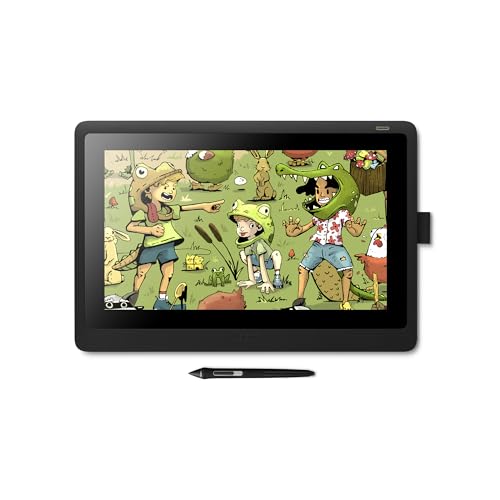
This wacom cintiq 16 drawing tablet review focuses on a pen display that bridges the gap between traditional sketching and digital creation. It features a 15.4-inch Full HD LCD screen and the included Pro Pen 2. The 8192 levels of pressure sensitivity allow for nuanced line work, while tilt recognition adds depth to your strokes. This combination of precise input and vibrant color reproduction makes it a practical tool for digital artists who need accuracy without unnecessary bulk.
- Pro Pen 2 with 8192 pressure levels and tilt recognition
- 15.4-inch Full HD display with true-to-life color quality
- Relaxed parallax for natural fingertip and pen control
- Two customizable switches on the pen for quick shortcuts
Good fit for
This device suits creative hobbyists, students, and enthusiasts who work in studios or on campus. If you need a reliable pen display for animation or graphic arts, the optimized screen and premium pen technology fit well. The included 3-in-1 connectivity cable simplifies setup for Windows and macOS users. It is ideal for those who want a dedicated drawing surface that feels natural and responsive during long creative sessions.
Who can skip it
You should look elsewhere if you require a portable tablet without a screen. This unit is a pen display, meaning it must be connected to a computer to function. It is not a standalone device. If you need a lightweight, battery-powered tablet for travel, this 4.19-pound unit with its AC adapter is too bulky. It is also not suitable if you prefer a screen larger than 15.4 inches.
Verdict
The Wacom Cintiq 16 offers precise pen control and a clear display for digital artists. It is a solid choice for studio work or campus use.
Key specs explained
15.4" Full HD Display
This screen size offers a balanced workspace for drawing without taking up too much desk space. The Full HD resolution ensures sharp lines and clear details when you are sketching or editing images. You get a uniform brightness and true-to-life colors, which helps you see your work accurately. This display type is ideal for students and hobbyists who need a portable yet capable tool for digital art on campus or at home.
8192 levels of pressure sensitivity
This spec measures how hard you press the pen against the screen. With 8192 levels, the tablet detects subtle changes in your touch, allowing for smooth variations in line thickness and opacity. This precision makes your digital strokes feel natural, similar to using a traditional pencil or brush. It benefits artists who need nuanced control for detailed illustrations, shading, and complex animations without lag or jitter.
Pro Pen 2 with Tilt Recognition
The included Pro Pen 2 supports tilt recognition, meaning you can change the angle of the pen to alter the stroke width, just like tilting a real brush. This feature adds versatility to your drawing style. The pen also features virtually lag-free tracking, ensuring your hand movements appear on screen instantly. This responsiveness helps maintain your creative flow, making the experience feel direct and intuitive rather than disconnected.
4.19 pounds weight
Weighing just over four pounds, this pen display is relatively light for a device with an integrated screen. This portability allows you to move it between your studio, home office, or campus with ease. It is heavy enough to stay stable on a desk during intense drawing sessions but light enough to pack into a bag. This balance makes it suitable for creators who need a dedicated drawing station that can travel with them.
Design and Build Quality
The Wacom Cintiq 16 features a black finish that aligns with standard studio aesthetics. According to the listing, the device measures 16.6 inches in length and 11.2 inches in width. Its height is listed at just 1 inch, creating a low-profile silhouette. This compact footprint allows you to place it on smaller desks without overwhelming your workspace. The unit weighs 4.19 pounds, making it manageable for occasional relocation but stable during intensive drawing sessions.
The layout centers around the 15.4-inch Full HD display. You interact with the screen using the included Pro Pen 2, which offers tilt recognition and 8192 levels of pressure sensitivity. This pen technology ensures that your strokes respond naturally to your hand movements. The listing notes that the display provides uniform brightness and true-to-life color quality, which helps you judge your artwork accurately.
Control is simplified through the pen’s two customizable switches. These allow you to access shortcuts without reaching for a keyboard. The package also includes three replacement nibs and a nib remover, ensuring you can maintain the pen’s performance over time. A 3-in-1 connectivity cable and AC adapter are provided for power and data transfer. This setup supports a direct connection to your computer, reducing cable clutter on your desk. The design prioritizes functionality for animation and graphic arts, fitting well in home studios or campus environments.
Setup and Daily Use Guide
Setting up the Wacom Cintiq 16 involves connecting the included 3-in-1 connectivity cable and the AC adapter. The package also provides a quick start guide to help you navigate the initial configuration. You connect the display to your computer, ensuring compatibility with both Windows and macOS operating systems as noted in the product details. This straightforward connection process allows you to begin using the tablet quickly without complex hardware requirements.
In daily use, the device functions as a pen display rather than a standard input tablet. The included Pro Pen 2 offers tilt recognition and virtually lag-free tracking, which helps you maintain a natural drawing flow. With 8192 levels of pressure sensitivity, you can create lines with varying thickness and opacity depending on how hard you press. The pen also features two customizable switches, allowing you to assign frequent shortcuts for easier access while you work.
The 15.4-inch Full HD LCD screen provides a vibrant workspace with uniform brightness and true-to-life color quality. This display size balances detail visibility with desk space efficiency. The relaxed parallax ensures your cursor stays aligned with your pen tip, reducing eye strain during long sessions. You can also use your fingertips for navigation, adding flexibility to your workflow. The tablet weighs 4.19 pounds and measures 16.6 by 11.2 inches, making it stable for studio or home use. Three replacement nibs and a nib remover are included, so you can maintain the pen’s performance over time.
Before You Buy This Pen Display
You need a computer to use this device. It is not a standalone tablet. Check your laptop or desktop ports. The 3-in-1 cable helps, but your host machine must support the connection. This pen display sits in a unique spot. It is not an e-reader for books. It is not a casual media tablet. It is a tool for artists. If you draw, it fits well. If you only read, look elsewhere. Keep the spare nibs. The Pro Pen 2 wears down. You will need replacements. Clean the screen gently. Use a soft cloth. Avoid harsh chemicals. The 16-inch size needs desk space. Measure your area first. This device complements your workflow. It bridges sketching and digital creation. It suits students and hobbyists. It does not replace your main computer. It extends it. Ensure your software supports tilt. The pen offers tilt recognition. This adds depth to your strokes. Verify your operating system. It works with Windows and macOS. Check your driver compatibility. Updates matter for performance. This is a serious tool. It requires setup. It demands attention. It rewards precision.
Check before you buy
- Confirm your computer has compatible video ports.
- Check if your software supports tilt recognition.
- Measure your desk for the 16-inch footprint.
- Verify Windows or macOS driver support.
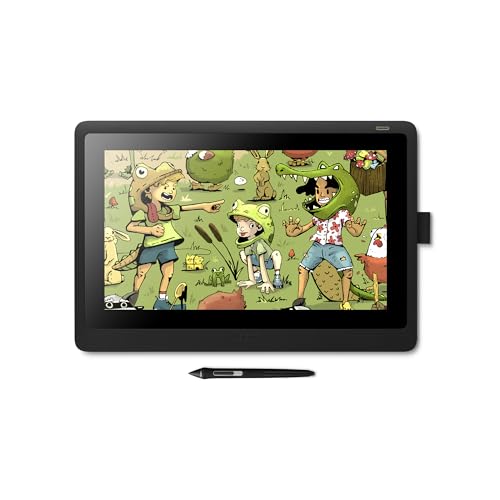
Wacom Cintiq 16 15.4" Pen Display
Best for: students and animators needing precision
- Screen Size
- 15.4"
- Display Resolution
- Full HD
- Pen Pressure
- 8192 levels
- Features
- Stylus, Stylus Pen, Full HD Display, Tilt Support
- Color
- Black
- Audience
- Animation
The Wacom Cintiq 16 is a 16-inch pen display designed for creative work on Windows and macOS. It features a Full HD LCD screen with true-to-life color quality and uniform brightness. The included Pro Pen 2 offers 8192 pressure levels and tilt recognition for precise input. Weighing 4.19 pounds, it provides a stable surface for drawing. This tablet suits hobbyists, students, and animators looking for a reliable digital canvas.
- 15.4-inch Full HD LCD display with high resolution
- Pro Pen 2 with 8192 levels of pressure sensitivity
- Tilt recognition for natural drawing angles
- Customizable pen switches for shortcut access
- 16-inch screen size limits workspace compared to larger models
- 4.19-pound weight makes it less portable than smaller tablets
- You need a dedicated screen for digital drawing and animation
- You value precise pressure sensitivity and tilt support
- You work on Windows or macOS computers
- You require a portable tablet with a battery for off-grid use
- You need a screen larger than 16 inches for detailed work
- You prefer a pen display with wireless connectivity options
Verdict: Wacom Cintiq 16 16-inch Pen Display fits students and animators who need a stable, high-precision drawing surface. It is a solid choice for desktop creative work but not for mobile artists.
Specifications side by side
| Spec | Wacom Cintiq 16 15.4" Pen Display |
|---|---|
| Screen Size | 15.4" |
| Display Resolution | Full HD |
| Pen Pressure | 8192 levels |
| Features | Stylus, Stylus Pen, Full HD Display, Tilt Support |
| Color | Black |
| Tablet Type | Pen Display |
| Audience | Animation |
| Dimensions | 16.6 × 11.2 × 1 inches |
| Weight | 4.19 pounds |
| Size | 16" |
| Model | DTK1660K0A |
Frequently asked questions
Is the Wacom Cintiq 16 good for beginners?
Yes, it is a solid choice for students and animators who need precision. The 15.4-inch Full HD display provides a balanced workspace that is not too large for a desk. The included Pro Pen 2 offers 8192 levels of pressure sensitivity, allowing for nuanced control as you learn digital sketching techniques.
Does this tablet work without a computer?
No, the Wacom Cintiq 16 is a pen display, not a standalone tablet. You must connect it to a computer via the included 3-in-1 connectivity cable. It relies entirely on your host machine for processing power and software, so it is designed for desktop creative work rather than mobile use.
How heavy is the Wacom Cintiq 16?
The device weighs 4.19 pounds. Its physical dimensions are 16.6 inches in length and 11.2 inches in width. This weight and size make it suitable for a fixed desk setup. It is not designed for portability, so you should plan to keep it in one location for your creative projects.
What kind of screen does the Cintiq 16 have?
It features a 15.4-inch Full HD LCD screen. This resolution ensures sharp lines and clear details when you are sketching or editing images. The screen size offers a balanced workspace, providing enough room for detailed work without taking up excessive desk space, which is ideal for most studio environments.
Does the stylus support tilt recognition?
Yes, the included Pro Pen 2 supports tilt. This feature allows you to achieve more natural shading and brush effects by angling the pen. Combined with 8192 levels of pressure sensitivity, it provides the precision needed for professional animation and detailed digital art creation on this specific pen display.
Is the Wacom Cintiq 16 portable?
No, it is not a mobile device. With a weight of 4.19 pounds and a need for a computer connection, it is built for desktop use. The design prioritizes stability and precision over portability. You should treat it as a fixed workstation accessory rather than a device you carry around frequently.


