Wacom Cintiq Pro 16 Review (2026): A Spec-Based Look
This wacom cintiq pro 16 review covers the DTH167K0A model, a professional-grade drawing tablet designed for digital artists.

What this report covers
- Last updated
- 4 Nov 2026
Figures above are read from the product listings for the models named below. Scores are out of 10, based on listed specifications and buyer feedback.
As Amazon Associates, we earn from qualifying purchases. This means we may receive a small commission at no extra cost to you if you click through and make a purchase.
As an Amazon Associate we earn from qualifying purchases. Links on this page are affiliate links.
This wacom cintiq pro 16 review covers the DTH167K0A model, a professional-grade drawing tablet designed for digital artists. It features a 16-inch LCD display with 4K resolution (3840 x 2160 pixels) and 98% Adobe RGB color accuracy. The device pairs this screen with the ProPen 2, offering 8,192 levels of pressure sensitivity and virtually lag-free tracking. Weighing 4.19 pounds, it includes an etched glass screen to reduce glare and provide a tactile drawing experience. This setup bridges the gap between digital precision and traditional sketching feel for creative workflows.
- 4K resolution (3840 x 2160 pixels) on a 16-inch LCD for sharp detail
- 98% Adobe RGB color accuracy for precise hue reproduction
- ProPen 2 with 8,192 pressure levels and virtually lag-free tracking
- Etched glass screen that reduces glare and mimics pen-on-paper texture
- 8 ExpressKeys and two pen side switches for one-touch shortcuts
Good fit for
This tablet suits animators and illustrators who need high color fidelity and precise input. The 98% Adobe RGB coverage ensures your work matches professional standards. The etched glass and pressure-sensitive pen make it ideal for those who prefer a tactile drawing surface over smooth glass. Users who value multi-touch gestures and customizable ExpressKeys will appreciate the efficient workflow. It fits well into desktop setups where space allows for a 16.1-inch wide display.
Who can skip it
Buyers looking for a portable, standalone computer should look elsewhere. This device is a display and input tool, not a full computer. It lacks a built-in operating system or battery, requiring a host machine. If you need a lightweight, all-in-one tablet for on-the-go sketching without a PC, this is not the right choice. The 4.19-pound weight and 16.1-inch length also limit its portability compared to smaller, self-contained tablets.
Verdict
The Wacom Cintiq Pro 16 delivers professional-grade color accuracy and pen performance for serious digital artists. It is best suited for desktop setups where display quality and tactile feedback are priorities.
Key specs for Wacom Cintiq Pro 16
4K resolution (3840 x 2160 pixels)
This display offers four times the pixel density of standard 1080p screens. You will see sharper lines and finer details when drawing or editing photos. The high pixel count ensures text remains crisp and images look clean. This resolution is ideal for professionals who need precise control over their digital canvas. It provides a clear advantage over lower-resolution tablets for detailed work.
98% Adobe RGB color accuracy
This metric indicates the range of colors the screen can reproduce. A 98% Adobe RGB coverage means the device displays a wide spectrum of hues, closely matching professional printing standards. You can trust the colors you see on the screen to be accurate for design work. This is crucial for illustrators and photographers who need consistent results. It exceeds the capabilities of many standard consumer tablets.
8,192 levels of pressure sensitivity
This specification defines how finely the pen detects your pressing force. With 8,192 levels, the device captures subtle variations in your stroke pressure. You can create thin, light lines or thick, bold marks with natural fluidity. This level of detail mimics traditional drawing tools. It allows for nuanced expression in digital art. This feature is essential for artists seeking realistic and responsive input control.
16-inch LCD display
The screen size provides a substantial workspace for your creative projects. A 16-inch diagonal measurement offers enough room for complex compositions without requiring excessive hand movement. This size balances portability with usability for desktop use. You get ample space to view your entire canvas or reference materials simultaneously. It is larger than many portable drawing tablets, offering a more immersive drawing experience for stationary setups.
Design and Build Quality
The Wacom Cintiq Pro 16 measures 16.1 inches in length, 10.5 inches in width, and 0.9 inches in height. It weighs 4.19 pounds. These dimensions define a compact footprint suitable for desk setups. The device is black. The listing describes an etched glass screen. This finish reduces glare and reflections. It also provides a tactile surface that mimics the feel of pen on paper. This texture helps you draw with more natural control.
You have access to multiple input methods. The display supports multi-touch gestures. There are eight ExpressKeys on the rear edge for one-touch shortcuts. Two pen side switches offer additional control options. These physical controls allow you to assign functions without reaching for software menus. This layout keeps your workflow efficient during long sessions.
According to the listing, the unit is the DTH167K0A model. It is designed for animation audiences. The build focuses on utility and precision. The compact size allows for easy transport, though the weight requires a stable surface. The combination of physical keys and touch capabilities gives you flexible ways to interact with your creative software. The design prioritizes direct control over your digital canvas.
Setup and daily workflow details
Setting up this drawing tablet involves connecting the display to your computer. The device relies on external software for functionality. You do not get an operating system built into the screen itself. Instead, you use the ProPen 2 for input. This pen offers 8,192 levels of pressure sensitivity. It also features eraser functionality and tracking that the listing describes as virtually lag-free. This means your strokes appear on the screen almost instantly. The etched glass screen reduces glare and reflections. It provides a tactile feel similar to pen on paper. This surface texture helps you draw with more control. You can adjust your workflow using the controls on the device. There are eight ExpressKeys on the rear edge. These keys offer one-touch shortcuts for your most used functions. Two pen side switches allow you to assign additional commands. The touchscreen supports multi-touch gestures. You can use these for zooming or rotating your canvas. On-screen controls are also available for quick adjustments. The display covers 98% of the Adobe RGB color space. This ensures your colors match professional standards. You can register the device to receive 90-day trials for software like Toon Boom Harmony, Storyboard Pro, and Capture One. These trials are available for customers in the Americas. This setup allows you to start creating immediately after installation. The compact size fits well on most desks.
Before You Buy This Tablet
This device is a display, not a standalone computer. You must connect it to a compatible host machine. Check that your computer has the necessary video outputs and sufficient processing power for 4K input. The Wacom Cintiq Pro 16 requires external power and data cables for operation. You will need to install specific drivers from Wacom to enable the ProPen 2 and ExpressKeys. The etched glass screen offers a tactile drawing experience, but you should clean it regularly with appropriate materials to maintain clarity. This tablet sits alongside other tablets and e-readers in our guide, but it serves a distinct professional niche. It is designed for artists who need color accuracy and pen precision. It is not intended for casual reading or media consumption. Consider your workflow needs carefully. If you require a portable, all-in-one device, this may not be the right choice. However, for a dedicated drawing station, it provides a robust foundation. Ensure your desk space can accommodate its 16.1-inch footprint and 4.19-pound weight. The included software trials are a bonus, but you will need your own creative applications.
Check before you buy
- Verify your computer supports 4K display output and has enough ports.
- Confirm you have space for a 16-inch external drawing monitor.
- Check that you have compatible creative software installed or purchased.
- Ensure you have the required cables for power and data connection.
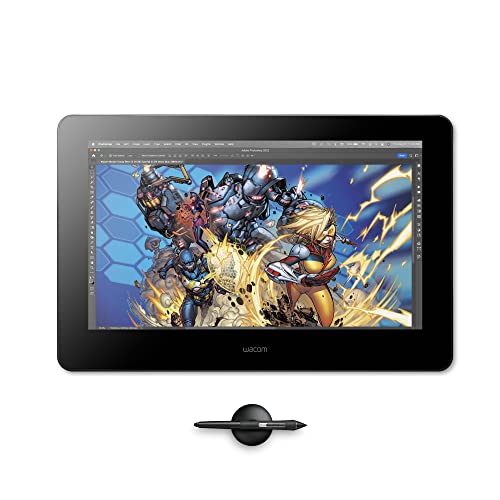
Wacom Cintiq Pro 16 4K Touchscreen
Best for: professional animation and color-critical drawing
- Screen Size
- 16"
- Display Resolution
- 4K (3840 x 2160)
- Pen Pressure
- 8,192 levels
- Color Gamut
- 98% Adobe RGB
- Display Finish
- Etched glass
- Shortcut Controls
- 8 ExpressKeys
The Wacom Cintiq Pro 16 is a 16-inch drawing tablet featuring a 4K (3840 x 2160) touchscreen. It delivers 98% Adobe RGB color accuracy and 8,192 pressure levels via the ProPen 2. The etched glass screen reduces glare and mimics paper texture. This device suits animation professionals who need precise color reproduction and tactile feedback for digital creation.
- 4K resolution (3840 x 2160 pixels) for sharp detail
- 98% Adobe RGB color gamut for accurate shading
- 8,192 levels of pressure sensitivity for natural strokes
- Etched glass screen reduces glare and reflections
- Heavier build at 4.19 pounds compared to portable options
- 16-inch display size limits portability for travel
- 300 cd/m2 brightness may struggle in very bright rooms
- You need high color accuracy for professional animation work
- You prefer a tactile drawing experience on etched glass
- You require multi-touch gestures and express keys for shortcuts
- You need a lightweight device for frequent travel
- You are looking for a budget-friendly entry-level tablet
- You require a display larger than 16 inches
Verdict: Wacom Cintiq Pro 16 4K Display is a solid choice for animators who prioritize color precision and pen feel over portability. It fits users who want a dedicated, high-resolution workspace.
Specifications side by side
| Spec | Wacom Cintiq Pro 16 4K Touchscreen |
|---|---|
| Screen Size | 16" |
| Display Resolution | 4K (3840 x 2160) |
| Pen Pressure | 8,192 levels |
| Color Gamut | 98% Adobe RGB |
| Display Finish | Etched glass |
| Shortcut Controls | 8 ExpressKeys |
| Display | Touchscreen |
| Color | Black |
| Audience | Animation |
| Dimensions | 16.1 × 10.5 × 0.9 inches |
| Weight | 4.19 pounds |
| Size | Wacom Cintiq Pro 16 – 16 inch |
| Model | DTH167K0A |
Frequently asked questions
Is the Wacom Cintiq Pro 16 a standalone tablet?
No, this device is a display-only pen tablet. It requires connection to a computer to function. The product data lists it as a drawing display rather than an all-in-one computer. You must use external software and a host machine to operate the screen and pen input.
What resolution does the Wacom Cintiq Pro 16 have?
The screen features a 4K resolution of 3840 x 2160 pixels. This high pixel density provides sharp lines and fine detail for digital art. The 16-inch LCD panel ensures precise color rendering, making it suitable for color-critical work and professional animation tasks.
Does the Wacom Cintiq Pro 16 support touch input?
Yes, the display includes touchscreen capabilities. This feature allows you to interact with your software using your fingers in addition to the ProPen. The touchscreen function complements the pen input for a more intuitive drawing and navigation experience on the 16-inch panel.
How much does the Wacom Cintiq Pro 16 weigh?
The unit weighs 4.19 pounds. This weight reflects the build quality of the 16-inch display panel. While not ultra-light, the mass provides stability during use. The dimensions are 16.1 inches long, 10.5 inches wide, and 0.9 inches high.
Who is the Wacom Cintiq Pro 16 best for?
It is best for professional animators and digital artists. The device prioritizes color precision and pen feel. Users who need a dedicated, high-resolution workspace for detailed drawing will find it suitable. It is less ideal for those needing maximum portability.
What is the model number for this Wacom device?
The specific model number is DTH167K0A. This identifier corresponds to the Wacom Cintiq Pro 16 with the 4K touchscreen. You can use this code to verify compatibility with drivers and accessories when setting up your digital art workflow.

