6 Best Alternatives to the Wacom Cintiq Pro 24 Creative (2026)
The Wacom Cintiq Pro 24 Creative delivers professional-grade color accuracy and a large 4K touchscreen for detailed digital work.

What this report covers
- Last updated
- 4 Nov 2026
Figures above are read from the product listings for the models named below. Scores are out of 10, based on listed specifications and buyer feedback.
As Amazon Associates, we earn from qualifying purchases. This means we may receive a small commission at no extra cost to you if you click through and make a purchase.
As an Amazon Associate we earn from qualifying purchases. Links on this page are affiliate links.
The Wacom Cintiq Pro 24 Creative delivers professional-grade color accuracy and a large 4K touchscreen for detailed digital work. You might seek wacom cintiq pro 24 creative alternatives if you need a smaller footprint, a different price point, or specific features like touch navigation on a 22-inch screen. This list compares seven pen displays based on their published specifications to help you find a suitable replacement.
We selected these options because their core specs overlap with the original model. You will find choices ranging from compact 11.6-inch displays to large 22-inch models. Each product offers 8192 levels of pen pressure, ensuring precision regardless of size. Some include full-laminated screens to reduce parallax, while others provide multi-touch gestures or shortcut keys. We focused on display size, pen technology, and connectivity to match your workflow needs. This guide helps you compare dimensions, weight, and color performance to choose the right tool for your studio or desk.
How alternatives differ from Wacom
Wacom 22HD Pen Display
The Wacom 22HD Pen Display offers a 22-inch canvas, which is slightly smaller than the 24-inch Cintiq Pro 24. It weighs 18.7 pounds, making it heavier than the Pro model at 15.9 pounds. This display lacks 4K resolution and touch capabilities, focusing instead on a stable, large workspace for studio use. You get a stylus pen with standard pressure sensitivity, but you give up the high color gamut and multi-touch gestures of the Pro 24. Choose this if you need a dedicated, stationary drawing surface and do not require the sharpest image or touch controls.
Wacom Cintiq 22HD Touch Pen Display
The Wacom Cintiq 22HD Touch Pen Display matches the 22-inch size of the previous option but adds touch functionality. It weighs 18.7 pounds, similar to the non-touch 22HD. This model includes shortcut keys for one-touch access, a feature the Pro 24 also offers via its remote. However, it does not provide the 4K resolution or the 99% Adobe RGB color accuracy of the Pro 24. You trade high-end color precision for a slightly more compact form factor with physical controls. Pick this alternative if you want touch navigation and shortcut keys on a slightly smaller screen without the bulk of the 24-inch Pro.
XP-PEN Artist12 11.6-Inch Pen Display
The XP-PEN Artist12 is a significant step down in size, featuring an 11.6-inch screen compared to the 24-inch display of the Cintiq Pro 24. It weighs only 2 pounds, making it highly portable versus the 15.9-pound Pro. It offers 8192 levels of pen pressure, matching the Pro 24, but lacks the larger canvas and professional color grading capabilities. You get a battery-free pen and a compact footprint suitable for beginners or those with limited desk space. Choose this if portability and budget are your main concerns, and you do not need a large, high-resolution workspace for detailed professional work.
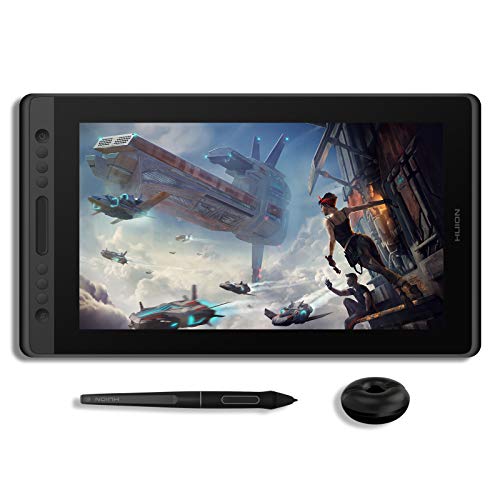
HUION KAMVAS Pro 16 15.6-Inch Pen Display
The HUION KAMVAS Pro 16 provides a 15.6-inch full-laminated display, which reduces parallax compared to the non-laminated screens of many competitors. It weighs 2.65 pounds, far lighter than the 15.9-pound Cintiq Pro 24. This model supports tilt and offers 8192 levels of pressure, similar to the Pro 24. However, it lacks the 4K resolution and the extensive color gamut of the Wacom. You gain a mid-size, portable option with tactile shortcut keys but lose the massive canvas and professional color accuracy. Select this if you want a balanced, portable pen display with good precision without the weight of a large studio monitor.
XP-Pen Artist 12 Pro 11.6-Inch
The XP-Pen Artist 12 Pro features an 11.6-inch full-laminated screen, offering a compact alternative to the 24-inch Cintiq Pro 24. It weighs 3.31 pounds, making it easy to move around compared to the heavy Pro model. It includes tilt support and 8192 levels of pressure, matching the Pro 24's pen sensitivity. You give up the large 4K touchscreen and professional color accuracy for a smaller, fully-laminated display with shortcut keys. This is ideal for artists who prioritize portability and accuracy in a small package. Choose this if you need a secondary drawing screen or have limited desk space.
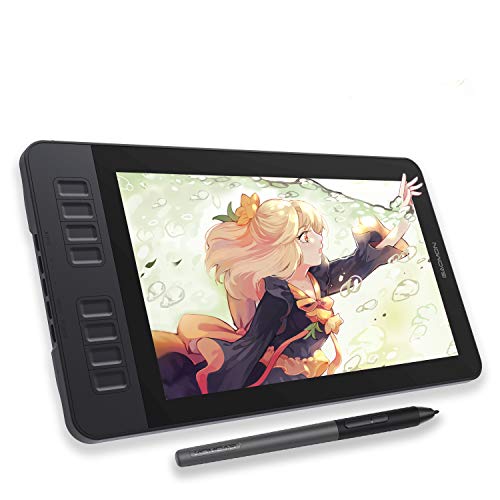
GAOMON PD1161 11.6-Inch Anti-Glare Pen Display
The GAOMON PD1161 is an 11.6-inch anti-glare pen display that weighs just 1.9 pounds, offering extreme portability compared to the 15.9-pound Cintiq Pro 24. It supports tilt and includes shortcut keys, features the Pro 24 also has. However, it lacks the 4K resolution, touch capability, and professional color range of the Wacom. You get a battery-free pen and a lightweight design suitable for beginners or Windows users. Pick this alternative if you need a small, affordable drawing tool for casual use or limited desk space, and do not require the high-end specifications of a professional studio display.
| # | Product | Best for | Price |
|---|---|---|---|
| 1 | Wacom Cintiq Pro 24 4K Touch Display Best overall | Professional digital artists needing large 4K color accuracy | |
| 2 | Wacom 22HD Pen Display Best premium | studio-based digital artists needing large screens | |
| 3 | Wacom Cintiq 22HD Touch Pen Display Also great | Artists needing multi-touch and shortcut keys | |
| 4 | XP-PEN Artist12 11.6-Inch Pen Display Best budget | compact drawing on a budget | |
| 5 | HUION KAMVAS Pro 16 15.6-Inch Pen Display Best 15.6-inch | artists needing a 15.6-inch laminated pen display | |
| 6 | XP-Pen Artist 12 Pro 11.6-Inch Also great | compact desktop digital art setups | |
| 7 | GAOMON PD1161 11.6-Inch Anti-Glare Pen Display Best windows | beginners with limited desk space |

Wacom Cintiq Pro 24 4K Touch Display
Best for: Professional digital artists needing large 4K color accuracy
- Screen Size
- 23.6"
- Display Resolution
- 4K
- Pen Pressure
- 8,192 levels
- Color Gamut
- 99% Adobe RGB, 97% sRGB
- Display Finish
- Optical bonding
- Shortcut Controls
- ExpressKey Remote
This 24-inch pen display offers 4K resolution and 99% Adobe RGB color coverage for precise creative work. It includes a Pro Pen 2 with 8,192 pressure levels and tilt recognition. The touchscreen supports multi-touch gestures and comes with an ExpressKey Remote for shortcuts. It is a heavy, large-format solution for professional digital artists who need high color accuracy and a direct drawing experience.
- 23.6-inch 4K touchscreen display
- 99% Adobe RGB color gamut
- 8,192 levels of pen pressure
- Includes ExpressKey Remote
- Heavier at 15.9 pounds
- Larger 24-inch footprint
- Shorter 3-month software trial
- You need 4K color accuracy for professional design
- You prefer a large 24-inch drawing surface
- You want touch and pen input on one device
- You need a portable device under 15 pounds
- You require a smaller 11-inch or 16-inch screen
- You want a permanent software license
Verdict: Wacom Cintiq Pro 24 24-Inch 4K Touch is a heavy, large-format display suited for stationary studio work where color precision matters more than portability.

Wacom 22HD Pen Display
Best for: studio-based digital artists needing large screens
- Screen Size
- 21-Inch
- Display Resolution
- full HD resolution
- Shortcut Controls
- customizable express keys
- Features
- Stylus, Stylus Pen
- Color
- Black
- Tablet Type
- Pen Display
The Wacom Cintiq 22HD is a 22-inch pen display with full HD resolution. It features a 25.5-inch width and 18.7-pound weight. The device includes customizable express keys and tilt-sensitive pen technology. This setup suits creators who need a large, stable screen for sketching and editing. It offers a wide viewing angle for comfortable work sessions.
- 22-inch HD display with full HD resolution
- Tilt-sensitive pen technology for natural drawing
- Customizable express keys for faster workflow
- Extra wide viewing angle
- Heavier at 18.7 pounds compared to lighter alternatives
- Lower HD resolution compared to 4K models on this list
- Wider 25.5-inch footprint requires more desk space
- You need a large 22-inch screen for detailed work
- You value Wacom's established pen technology
- You have a sturdy desk to support the weight
- You require 4K resolution for critical color accuracy
- You need a portable display under 15 pounds
- You prefer a smaller 16-inch screen size
Verdict: Wacom Cintiq 22HD Pen Display fits professionals who prioritize a large, stable workspace over portability or ultra-high resolution. It is ideal for studio setups where desk space is available.

Wacom Cintiq 22HD Touch Pen Display
Best for: Artists needing multi-touch and shortcut keys
- Screen Size
- 21.5"
- Display Resolution
- 1920 x 1080
- Shortcut Controls
- ExpressKeys and Touch Strips
- Features
- Stylus, Stylus Pen
- Display
- Touchscreen
- Color
- Black
This 21.5-inch pen display offers 1920 x 1080 resolution with 16.7 million colors. It supports multi-touch gestures for panning and zooming. The stand adjusts to your preferred working position. ExpressKeys and Touch Strips provide personalized shortcuts. You get professional pen-pressure and tilt sensitivity. This model weighs 18.7 pounds and measures 25.6 inches long.
- 21.5-inch HD display with 1920 x 1080 resolution
- Multi-touch gestures for panning, zooming, and rotating
- Adjustable ergonomic stand for custom working positions
- ExpressKeys and Touch Strips for shortcuts
- 1080p resolution is lower than the 4K display on the Cintiq Pro 24
- 18.7-pound weight is heavier than smaller 11.6-inch alternatives
- You need multi-touch gestures for navigation
- You want ExpressKeys and Touch Strips for shortcuts
- You prefer a larger 21.5-inch canvas
- You require 4K resolution for detailed work
- You need a lightweight portable display
- You prefer a smaller 11.6-inch screen
Verdict: Wacom Cintiq 22HD Touch Pen Display fits artists who value multi-touch navigation and physical shortcut keys. It suits those who prioritize a larger canvas over higher resolution.

XP-PEN Artist12 11.6-Inch Pen Display
Best for: compact drawing on a budget
- Screen Size
- 11.6"
- Display Resolution
- 1920×1080 FHD
- Pen Pressure
- 8192
- Color Gamut
- 72% NTSC (100% sRGB)
- Display Finish
- anti-reflective screen protector
- Shortcut Controls
- 6 shortcut keys, slim touch bar
The XP-PEN Artist12 is an 11.6-inch pen display with an FHD 1920×1080 IPS screen and 72% NTSC color gamut. It uses a battery-free P06 stylus with 8192 pressure levels. The slim touch bar and six shortcut keys allow for quick adjustments. You need a computer with HDMI and USB-A ports to use it. This compact unit suits digital artists who need a portable, budget-friendly drawing surface.
- 11.6-inch FHD IPS display with 72% NTSC color gamut
- Battery-free P06 stylus with 8192 pressure levels
- Programmable slim touch bar and six customizable shortcut keys
- Universal compatibility with Windows, Mac, and Linux systems
- Smaller 11.6-inch screen compared to the 21- and 24-inch Cintiq models
- Lower 72% NTSC color gamut compared to professional-grade displays
- Heavier 2-pound build for its class
- You need a compact drawing tablet for small desks
- You want a budget-friendly entry into pen displays
- You use standard HDMI and USB-A connections
- You require a large 21-inch or 24-inch canvas
- You need professional-grade color accuracy above 72% NTSC
- You prefer a wireless or battery-free standalone tablet
Verdict: XP-PEN Artist12 11.6-Inch Pen Display offers a compact, affordable entry point for artists who prioritize portability and basic pen features over large screen real estate. It fits beginners or those with limited desk space who need a reliable secondary display for digital creation.
HUION KAMVAS Pro 16 15.6-Inch Pen Display
Best for: artists needing a 15.6-inch laminated pen display
- Tablet Type
- Tethered pen display
- Screen Size
- 15.6"
- Pen Pressure
- 8192
- Display Finish
- Full-laminated anti-glare glass
- Shortcut Controls
- 6 express keys, 1 touch bar
- Features
- Stylus, Stylus Pen, Battery-Free Pen, Shortcut Keys, Tilt Support
The HUION KAMVAS Pro 16 is a 15.6-inch pen display featuring a full-laminated anti-glare screen with 120% sRGB color volume. It uses a battery-free stylus with 8192 pressure levels and 60-degree tilt support for accurate drawing. The device includes six customizable express keys and one touch bar for workflow control. You need a computer to operate it, as it is not a standalone tablet. It connects to Windows, Mac, or Linux systems.
- Full-laminated screen reduces parallax for precise cursor tracking
- 8192 pressure sensitivity with 60-degree tilt support
- 120% sRGB color gamut for vivid image reproduction
- Six customizable express keys and one programmable touch bar
- Battery-free stylus ensures consistent performance without charging
- 15.6-inch display is smaller than the 21-inch or 24-inch options on this list
- Requires a computer connection, so it is not a standalone device
- Weight of 2.65 pounds adds bulk compared to smaller 11.6-inch models
- You want a full-laminated screen with low parallax for detailed work
- You need a 15.6-inch display that fits on a standard desk
- You prefer a battery-free pen with tilt recognition
- You require a standalone tablet that works without a computer
- You need a 4K resolution display for maximum detail
- You prefer a larger 21-inch or 24-inch screen area
Verdict: The HUION KAMVAS Pro 16 15.6-inch Pen Display offers a solid balance of color accuracy and pen precision for artists who need a mid-size screen. It fits users who want a laminated display and tilt support without the bulk of a 24-inch monitor.

XP-Pen Artist 12 Pro 11.6-Inch
Best for: compact desktop digital art setups
- Tablet Type
- Tethered pen display
- Screen Size
- 11.6"
- Pen Pressure
- 8192
- Color Gamut
- 72% NTSC
- Display Finish
- Fully-laminated, anti-glare film
- Shortcut Controls
- 8 express keys, Red Dial
The XP-Pen Artist 12 Pro is an 11.6-inch pen display designed for digital artists who need a compact, fully-laminated screen. It features 8192 levels of pressure sensitivity and 60-degree tilt support for precise strokes. The device includes a tactile red dial and eight shortcut keys to streamline your workflow. You connect it to a computer to use it as a drawing monitor. This setup suits those seeking a portable, accurate input tool for creative software.
- Fully-laminated IPS display with zero parallax
- 8192 levels of pressure sensitivity
- 60-degree natural tilt support
- Battery-free stylus pen
- Red dial and 8 customizable shortcut keys
- 11.6-inch screen is smaller than the 21-inch and 24-inch Cintiq models on this list
- Weighs 3.31 pounds, adding bulk compared to lighter portable options
- Requires a host device to function and cannot operate standalone
- You want a fully-laminated screen with zero parallax for precise drawing
- You need a compact 11.6-inch display for a smaller desk setup
- You prefer tactile controls like a red dial and shortcut keys
- You require a large 24-inch 4K display for professional studio work
- You need a standalone tablet that works without a computer
- You prefer a larger 15.6-inch or bigger screen for detailed work
Verdict: XP-Pen Artist 12 Pro 11.6-Inch Pen Display is a compact, fully-laminated pen display ideal for artists who need high precision in a portable form factor. It fits users with limited desk space who prioritize accuracy and tactile controls over large screen real estate.
GAOMON PD1161 11.6-Inch Anti-Glare Pen Display
Best for: beginners with limited desk space
- Tablet Type
- Tethered pen display
- Screen Size
- 11.6"
- Display Resolution
- Full HD
- Pen Pressure
- 8192
- Color Gamut
- 72% NTSC (100% sRGB)
- Display Finish
- Anti-glare, matte film
The GAOMON PD1161 is an 11.6-inch FHD pen display designed for direct on-screen drawing. It features an anti-glare IPS screen with 72% NTSC color coverage. The included battery-free stylus offers 8192 pressure levels and tilt support. Eight customizable shortcut keys help streamline your workflow. This device connects to Windows or Mac computers and suits beginners looking for a compact drawing solution.
- 11.6-inch Full HD IPS screen with anti-glare finish
- Battery-free stylus with 8192 pressure sensitivity levels
- Tilt support for natural drawing angles
- 8 customizable shortcut keys for workflow efficiency
- 72% NTSC color gamut for vivid image reproduction
- 11.6-inch screen is smaller than the 21- and 24-inch options on this list
- Requires connection to a computer and is not a standalone device
- 1.9-pound weight adds portability but limits desk space flexibility
- You need a compact drawing tablet for a small workspace
- You want a battery-free pen for uninterrupted sketching sessions
- You are a beginner artist seeking an affordable entry point
- You require a large screen for detailed professional work
- You need a standalone tablet without a computer connection
- You prioritize high-resolution displays over portability
Verdict: The GAOMON PD1161 11.6-Inch Pen Display fits beginners who need a portable, computer-connected drawing tool with a battery-free stylus. It is ideal for those with limited desk space who do not require a large standalone screen.
Specifications side by side
| Spec | Wacom Cintiq Pro 24 4K Touch Display | Wacom 22HD Pen Display | Wacom Cintiq 22HD Touch Pen Display | XP-PEN Artist12 11.6-Inch Pen Display | HUION KAMVAS Pro 16 15.6-Inch Pen Display | XP-Pen Artist 12 Pro 11.6-Inch | GAOMON PD1161 11.6-Inch Anti-Glare Pen Display |
|---|---|---|---|---|---|---|---|
| Tablet Type | – | – | – | – | Tethered pen display | Tethered pen display | Tethered pen display |
| Screen Size | 23.6" | 21-Inch | 21.5" | 11.6" | 15.6" | 11.6" | 11.6" |
| Display Resolution | 4K | full HD resolution | 1920 x 1080 | 1920×1080 FHD | – | – | Full HD |
| Pen Pressure | 8,192 levels | – | – | 8192 | 8192 | 8192 | 8192 |
| Color Gamut | 99% Adobe RGB, 97% sRGB | – | – | 72% NTSC (100% sRGB) | – | 72% NTSC | 72% NTSC (100% sRGB) |
| Display Finish | Optical bonding | – | – | anti-reflective screen protector | Full-laminated anti-glare glass | Fully-laminated, anti-glare film | Anti-glare, matte film |
| Shortcut Controls | ExpressKey Remote | customizable express keys | ExpressKeys and Touch Strips | 6 shortcut keys, slim touch bar | 6 express keys, 1 touch bar | 8 express keys, Red Dial | 8 shortcut keys |
| Operating System | – | – | – | – | – | – | Windows |
| Features | Stylus, Stylus Pen | Stylus, Stylus Pen | Stylus, Stylus Pen | Stylus, Stylus Pen, Battery-Free Pen | Stylus, Stylus Pen, Battery-Free Pen, Shortcut Keys, Tilt Support | Stylus, Stylus Pen, Battery-Free Pen, Shortcut Keys, Tilt Support | Stylus, Stylus Pen, Battery-Free Pen, Shortcut Keys, Tilt Support |
| Display | Touchscreen | – | Touchscreen | – | Full-Laminated | Full-Laminated | Anti-Glare |
| Color | Black | Black | Black | Black | Black | Black | Black |
| Dimensions | 26.7 × 15.5 × 0.1 inches | 25.5 × 2.2 × 15.7 inches | 25.6 × 2.7 × 15.7 inches | 14.3 × 8.58 × 0.31 inches | – | 13.9 × 8.86 × 0.51 inches | 14.2 × 7.9 × 0.1 inches |
| Weight | 15.9 pounds | 18.7 pounds | 18.7 pounds | 2 pounds | 2.65 pounds | 3.31 pounds | 1.9 pounds |
| Length | – | – | – | – | 17.3 inches | – | – |
| Width | – | – | – | – | 9.84 inches | – | – |
| Size | 24 inch touch | 22HD | 22HD Touch | 11.6 inch | 15.6 Inch | 11.6 inch | 11.6 inch |
| Model | DTH2420K0 | DTK2200 | DTH2200 | Artist 12_SML | Huion KAMVAS Pro 16 | Artist 12 Pro | GAOMON PD1161 |
Frequently asked questions
Which alternative offers the largest screen size?
The Wacom 22HD Pen Display provides a 22-inch canvas, making it the largest option in this list. It measures 25.5 inches in length and weighs 18.7 pounds. This model suits professionals who prioritize a large, stable workspace over portability or ultra-high resolution. It is ideal for studio setups where desk space is available.
Are there lightweight options for portable art?
Yes, the GAOMON PD1161 is the lightest choice at just 1.9 pounds. It measures 14.2 inches in length and includes a battery-free pen. This display fits beginners who need a portable, computer-connected drawing tool. It is ideal for those with limited desk space who do not require a large standalone screen.
Which pen displays support tilt recognition?
The HUION KAMVAS Pro 16, XP-Pen Artist 12 Pro, and GAOMON PD1161 all support tilt. These models allow you to vary stroke width based on pen angle. The HUION KAMVAS Pro 16 offers a 15.6-inch laminated screen. The XP-Pen and GAOMON models provide 11.6-inch displays for more compact setups.
Do any alternatives include physical shortcut keys?
The Wacom Cintiq 22HD Touch, HUION KAMVAS Pro 16, XP-Pen Artist 12 Pro, and GAOMON PD1161 include shortcut keys. These buttons allow you to access common functions without using the on-screen menu. The Wacom model also adds multi-touch navigation for additional control during your creative workflow.
Which model is best for a small desk?
The XP-PEN Artist12 and GAOMON PD1161 are the most compact. Both feature 11.6-inch screens and weigh under 2 pounds. The XP-PEN Artist12 measures 14.3 inches in length. The GAOMON PD1161 is slightly shorter at 14.2 inches. These fit beginners or those with limited desk space who need a reliable secondary display.
Is there a fully laminated display option?
The HUION KAMVAS Pro 16 and XP-Pen Artist 12 Pro feature full-laminated displays. Lamination reduces the gap between the glass and the image layer, improving precision. The HUION model offers a larger 15.6-inch screen. The XP-Pen provides a smaller 11.6-inch form factor for users who prioritize accuracy in a portable size.
Which alternative supports Windows operating systems?
The GAOMON PD1161 explicitly supports Windows. It connects to your computer to function as a drawing tool. This display includes a battery-free stylus and tilt support. It is designed for beginners who need a portable solution without requiring a large standalone screen setup.
What is the heaviest pen display on this list?
The Wacom 22HD Pen Display and Wacom Cintiq 22HD Touch are tied for the heaviest at 18.7 pounds. Both measure over 25 inches in length. These models suit stationary studio work where color precision and a large canvas matter more than portability. They are not designed for frequent movement.


