6 Best Alternatives to the Wacom Intuos Medium Bluetooth Graphics Drawing Tablet (2026)
You might be looking for wacom intuos medium bluetooth graphics drawing tablet alternatives if you need a different size or a screen.

What this report covers
- Last updated
- 13 Nov 2026
Figures above are read from the product listings for the models named below. Scores are out of 10, based on listed specifications and buyer feedback.
As Amazon Associates, we earn from qualifying purchases. This means we may receive a small commission at no extra cost to you if you click through and make a purchase.
As an Amazon Associate we earn from qualifying purchases. Links on this page are affiliate links.
You might be looking for wacom intuos medium bluetooth graphics drawing tablet alternatives if you need a different size or a screen. The original Wacom Intuos Medium Bluetooth offers a spacious 10.4 by 7.8 inch canvas. It connects wirelessly via Bluetooth and includes shortcut keys. This setup suits students and creators who prefer a large drawing area without a built-in display. The battery-free pen technology provides precision that feels like pen on paper. You can use it with any software program for digital art or document markup.
However, you may want a more portable option or a device with an integrated screen. Some buyers prioritize a smaller footprint for travel. Others need a pen display to draw directly on the image. This list covers seven alternatives chosen because their specifications overlap with the original. You will find options ranging from compact wireless tablets to portable pen displays. Each product shares core features like Bluetooth connectivity or stylus support. Review the specs to find the best fit for your workflow.
How each alternative compares
Wacom Intuos Small Bluetooth
The Wacom Intuos Small Bluetooth shrinks the canvas to 7.87 by 6.3 inches, making it significantly more portable than the Medium. It weighs just 8.8 ounces, compared to 14.5 ounces for the original. You still get Bluetooth connectivity and shortcut keys, so the core experience remains similar. This smaller footprint is ideal if you travel often or have limited desk space. It sacrifices drawing area for easier storage and transport. Choose this if you prefer a compact device for sketching on the go rather than a large workspace for detailed projects.
Wacom Intuos Medium Wireless Drawing Tablet
The Wacom Intuos Medium Wireless is nearly identical to the original in size, measuring 10.4 by 7.8 inches. It differs in color, offering black instead of pistachio, and has a slightly thicker profile at 0.4 inches. The weight remains the same at 14.5 ounces. This model emphasizes a battery-free pen and broader software compatibility. It is a solid choice if you prefer a standard black aesthetic or need specific Windows integration. The drawing experience is consistent with the original, focusing on precision and wireless freedom without significant changes to the physical form factor.
GAOMON PD1161 11.6" Pen Display
The GAOMON PD1161 introduces a screen, which is a major shift from the original tablet. This 11.6-inch display allows you to draw directly on the image. It supports 8192 pressure levels and tilt, offering more artistic control than the original pen tablet. The device weighs 1.91 pounds, making it heavier and less portable. It is designed for beginners who want a dedicated drawing monitor. You gain visual feedback but lose the lightweight, pocketable nature of the original. Pick this if you need to see your strokes in real time on a portable screen.
GAOMON PD1320 13.3-Inch Gray Pen Display
The GAOMON PD1320 expands the screen size to 13.3 inches, providing a much larger workspace than the original tablet. It features a full-laminated display and 8192 pressure levels with tilt support. This model weighs 1.94 pounds, which is substantially heavier than the 14.5-ounce original. It is best for users who want a dedicated drawing monitor with ample space. You trade the original’s portability and simplicity for a larger, more immersive drawing experience. This choice suits those who prioritize screen real estate and advanced pen features over a compact, screenless design.
Wacom One Medium Bluetooth Tablet
The Wacom One Medium Bluetooth offers a slightly smaller canvas at 9.9 by 7.1 inches compared to the original’s 10.4 by 7.8 inches. It is thinner at 0.3 inches and lighter at 12.2 ounces. This model targets beginners with essential features like Bluetooth and a battery-free pen. It lacks the shortcut keys found on the original, simplifying the interface. The white color provides a clean look. Choose this if you want a more affordable entry point with slightly reduced dimensions. It maintains Wacom’s precision but streamlines the features for new users.
Wacom Intuos Pro Small Bluetooth Pen Tablet
The Wacom Intuos Pro Small is a compact professional tablet measuring 8.46 by 6.42 inches. It is lighter at 8.48 ounces and built with a magnesium frame. This model focuses on professional precision and portability, lacking the larger canvas of the original. It includes shortcut keys and Bluetooth connectivity. The smaller size makes it ideal for animators and artists who need to move around. You sacrifice the spacious 10.4-inch area for a highly portable, durable device. Pick this if you value professional-grade performance in a small, lightweight package.
| # | Product | Best for | Price |
|---|---|---|---|
| 1 | Wacom Intuos Medium Bluetooth Pen Tablet Best overall | students and creators needing a large canvas | |
| 2 | Wacom Intuos Small Bluetooth Best budget | portable digital sketching and student use | |
| 3 | Wacom Intuos Medium Wireless Drawing Tablet Also great | Users wanting a large wireless pen tablet | |
| 4 | GAOMON PD1161 11.6" Pen Display Best premium | portable digital art on a budget | |
| 5 | GAOMON PD1320 13.3-Inch Gray Pen Display Best 13.3-inch | beginners needing a large portable screen | |
| 6 | Wacom One Medium Bluetooth Tablet Also great | beginners wanting a standard pen tablet | |
| 7 | Wacom Intuos Pro Small Bluetooth Pen Tablet Also great | portable professional drawing |
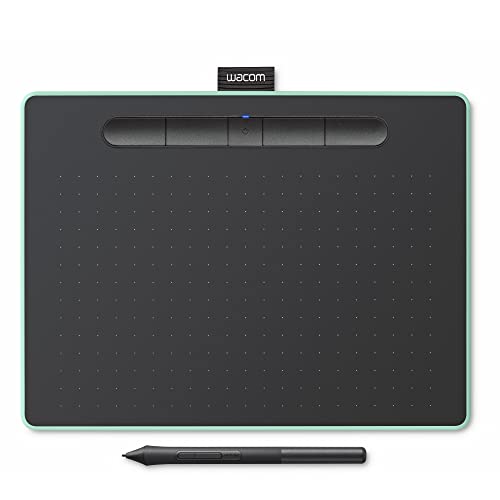
Wacom Intuos Medium Bluetooth Pen Tablet
Best for: students and creators needing a large canvas
- Shortcut Controls
- 4 Customizable ExpressKeys
- Operating System
- Android
- Features
- Bluetooth, Shortcut Keys
- Tablet Type
- Pen Tablet
- Audience
- Students
- Dimensions
- 10.4 × 7.8 × 0.35 inches
This Wacom Intuos Medium tablet offers a 10.4 by 7.8 inch active area for precise digital drawing. It connects wirelessly via Bluetooth or through a USB-A cable. The device weighs 14.5 ounces and measures 0.35 inches thick. It uses EMR battery-free pen technology for natural control. This model suits students and creators who need a reliable pen tablet without a built-in display.
- Medium 10.4 by 7.8 inch active area
- Wireless Bluetooth connectivity
- EMR battery-free pen technology
- Includes creative software and training
- 14.5-ounce weight is heavier than the Small variant
- 0.35-inch thickness is bulkier than some competitors
- No built-in screen for direct viewing
- You need a larger writing area than the Small model
- You want wireless Bluetooth connectivity
- You are a student or creator starting out
- You require a built-in display for drawing
- You need the lightest possible portable tablet
- You prefer a smaller active area
Verdict: Wacom Intuos Medium Bluetooth provides a spacious 10.4 by 7.8 inch area for detailed work. It fits students and creators who prefer a larger canvas over portability.

Wacom Intuos Small Bluetooth
Best for: portable digital sketching and student use
- Shortcut Controls
- 4 Customizable ExpressKeys
- Operating System
- Android
- Features
- Bluetooth, Shortcut Keys
- Tablet Type
- Pen Tablet
- Audience
- Students
- Dimensions
- 7.87 × 6.3 × 0.35 inches
The Wacom Intuos Small Bluetooth Graphics Drawing Tablet offers a compact 6.3 by 7.87 inch active area for precise digital input. Weighing just 8.8 ounces, it connects wirelessly via Bluetooth or through a USB-A cable. This pen tablet supports shortcut keys and includes creative software. It is designed for students and creators who need a portable, battery-free pen solution for drawing and photo editing on various devices.
- Compact 6.3 by 7.87 inch active area
- Lightweight 8.8 ounce portable design
- Bluetooth and USB-A connectivity options
- Includes creative software and training
- Battery-free EMR pen technology
- Smaller 6.3 by 7.87 inch active area compared to Medium and 11-13 inch screen alternatives
- Heavier 8.8 ounce build compared to typical paper sheets, though lighter than many laptops
- Non-display pen tablet requires looking at a separate screen while drawing
- You need a highly portable tablet for travel or classroom use
- You prefer wireless Bluetooth connectivity over wired connections
- You are a student or beginner starting with digital art
- You require a large active area for detailed illustration work
- You want a built-in screen for direct drawing feedback
- You need professional-grade pressure sensitivity levels found in Pro models
Verdict: Wacom Intuos Small Bluetooth Tablet is a practical entry point for students and casual creators who prioritize portability and wireless convenience over screen size.

Wacom Intuos Medium Wireless Drawing Tablet
Best for: Users wanting a large wireless pen tablet
- Shortcut Controls
- 4 ExpressKeys
- Operating System
- Windows
- Features
- Stylus, Stylus Pen, Bluetooth, Battery-Free Pen, Shortcut Keys
- Color
- Black
- Tablet Type
- Pen Tablet
- Audience
- Students
The Wacom Intuos Medium is a wireless pen tablet designed for digital creativity. It features a 10.4 by 7.8 inch active area and connects via Bluetooth or USB-A. The battery-free pen offers precise control without charging. It includes shortcut keys for workflow efficiency. This medium-sized tablet suits students and designers who need a reliable, portable drawing surface for various software programs.
- Medium 10.4 by 7.8 inch active area
- Wireless Bluetooth connectivity
- Battery-free pen technology
- Four express shortcut keys
- Includes creative software and training
- Heavier at 14.5 ounces compared to smaller models
- Thicker profile at 0.4 inches height
- No built-in screen for direct drawing
- You need a larger drawing area than the small version
- You prefer working without cables via Bluetooth
- You are a student or beginner starting digital art
- You want a screen to draw directly on
- You need the most compact portable size available
- You require professional-grade tilt recognition
Verdict: Wacom Intuos Medium Wireless is a solid choice for users who want a spacious drawing surface with wireless freedom. It fits those who prioritize pen precision and software integration over screen-based drawing.

GAOMON PD1161 11.6" Pen Display
Best for: portable digital art on a budget
- Tablet Type
- Tethered pen display
- Screen Size
- 11.6"
- Display Resolution
- 1920×1080 Full HD
- Pen Pressure
- 8192
- Display Finish
- Anti-glare film
- Shortcut Controls
- 8 shortcut keys
This GAOMON PD1161 is an 11.6-inch pen display with a 1920×1080 IPS screen. It features a battery-free pen with 8192 pressure levels and tilt support. The unit includes eight customizable shortcut keys on the left side. You need a Windows, Mac, or Chromebook to use it. It weighs 1.9 pounds, making it portable for students and beginners.
- 11.6-inch IPS Full HD screen with 1920×1080 resolution
- Battery-free pen with 8192 pressure levels and tilt support
- Eight customizable shortcut keys on the left side
- Lightweight design at 1.9 pounds for portability
- Smaller 11.6-inch screen compared to the 13.2-inch GAOMON PD1320
- Requires a host computer to function as a standalone display
- Pre-applied anti-glare film may affect screen clarity until removed
- You need a portable drawing screen for travel or school
- You want precise pressure sensitivity for digital art and sketching
- You prefer shortcut keys for faster workflow customization
- You require a large screen for detailed professional work
- You want a tablet that works without a computer
- You need a display larger than 11.6 inches
Verdict: GAOMON PD1161 11.6-Inch Pen Display fits beginners and students who need a compact, portable screen for digital art. It offers solid pressure sensitivity and a lightweight build for on-the-go creativity.

GAOMON PD1320 13.3-Inch Gray Pen Display
Best for: beginners needing a large portable screen
- Tablet Type
- Tethered pen display
- Screen Size
- 13.3"
- Pen Pressure
- 8192 levels
- Color Gamut
- 120% sRGB
- Display Finish
- Full-laminated
- Operating System
- Android
The GAOMON PD1320 is a 13.3-inch pen display designed for digital art and education. It features a full-laminated screen with 120% sRGB color gamut and 8192 levels of pen pressure. The device supports tilt recognition and connects via USB-C. It weighs 1.94 pounds and operates without a separate power adapter when linked to a computer. This unit suits students and beginners needing a portable drawing monitor.
- 13.3-inch full-laminated display with 120% sRGB color gamut
- 8192 levels of pen pressure sensitivity
- Supports 60-degree tilt recognition
- Weighs 1.94 pounds for portability
- 13.3-inch screen is smaller than the 15.6-inch and 21.5-inch options available
- 120% sRGB color gamut is lower than the 100% sRGB standard found on some competitors
- You need a large 13.3-inch screen for detailed drawing
- You want a lightweight pen display under 2 pounds
- You use Windows or Mac computers for digital art
- You require a screen larger than 13.3 inches
- You need a tablet without a built-in screen
- You rely on Android devices without Desktop Mode support
Verdict: The GAOMON PD1320 13.3-Inch Pen Display offers a balanced mix of screen size and portability for students and beginners. It fits users who prioritize a dedicated drawing monitor over a traditional graphics tablet.

Wacom One Medium Bluetooth Tablet
Best for: beginners wanting a standard pen tablet
- Pen Pressure
- 4096 levels
- Operating System
- Windows
- Features
- Stylus, Stylus Pen, Bluetooth, Battery-Free Pen
- Tablet Type
- Pen Tablet
- Audience
- Students, Beginners
- Dimensions
- 9.9 × 7.1 × 0.3 inches
The Wacom One Medium is a pen tablet with a 9.9 x 7.1 x 0.3 inch body and an 8.5 x 5.3 inch active area. It features a battery-free pen with 4096 pressure levels and tilt recognition. You can connect via USB-C to Windows, Mac, or Android devices. This model suits beginners who want a reliable entry into digital drawing without a screen.
- 4096 levels of pressure sensitivity
- Natural tilt recognition on the pen
- Battery-free pen design
- Two customizable shortcut switches
- Heavier at 12.2 ounces than the Wacom Intuos Small
- Thicker 0.3-inch profile compared to slimmer variants
- Smaller 8.5 x 5.3 inch active area than screen tablets
- You are a beginner looking for an affordable entry point
- You prefer a traditional pen-on-paper feel without a screen
- You need compatibility with Mac or Windows PCs
- You require a built-in display for direct drawing
- You need a smaller footprint for tight spaces
- You want a lighter device for frequent travel
Verdict: Wacom One Medium Bluetooth Tablet offers solid entry-level specs for students and beginners who do not need a screen. It fits those who prioritize precision and compatibility over portability.
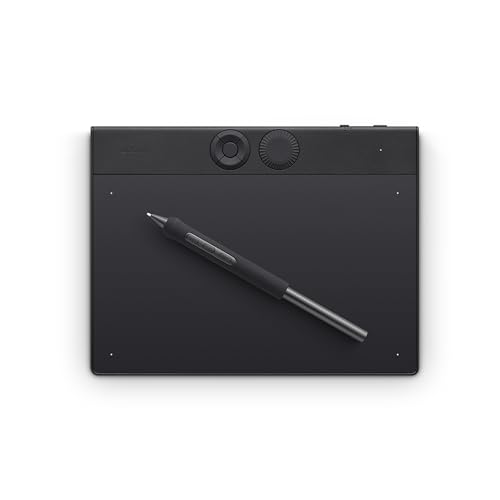
Wacom Intuos Pro Small Bluetooth Pen Tablet
Best for: portable professional drawing
- Pen Pressure
- 8192
- Features
- Stylus, Stylus Pen, Bluetooth, Shortcut Keys
- Tablet Type
- Pen Tablet
- Audience
- Animation
- Length
- 8.46 inches
- Width
- 6.42 inches
The Wacom Intuos Pro Small is a professional pen tablet designed for precision and portability. It features the Pro Pen 3 with 8192 pressure levels and tilt support for smooth strokes. The device uses a magnesium body, measuring 4mm thin and weighing 8.48 ounces. It offers wireless Bluetooth connectivity and USB options. Its 16:9 format fits modern wide monitors. This model suits animators and digital artists who need a compact, durable tool for their workflow.
- Pro Pen 3 provides 8192 pressure levels and tilt support
- Magnesium body is only 4mm thick and weighs 8.48 ounces
- Connects via Bluetooth or USB for wireless freedom
- Includes 5 customizable ExpressKeys and a mechanical dial
- Small active area is 8.46 by 6.42 inches
- Weighs 8.48 ounces, which is heavier than some compact alternatives
- You need professional-grade pen precision with tilt support
- You want a lightweight tablet for portability
- You use wide monitors with a 16:9 aspect ratio
- You require a large drawing surface for detailed work
- You prefer a lighter device under 8 ounces
- You do not need wireless Bluetooth connectivity
Verdict: Wacom Intuos Pro Small delivers professional precision in a compact magnesium frame. It fits animators and artists who value portability and advanced pen features.
Specifications side by side
| Spec | Wacom Intuos Medium Bluetooth Pen Tablet | Wacom Intuos Small Bluetooth | Wacom Intuos Medium Wireless Drawing Tablet | GAOMON PD1161 11.6" Pen Display | GAOMON PD1320 13.3-Inch Gray Pen Display | Wacom One Medium Bluetooth Tablet | Wacom Intuos Pro Small Bluetooth Pen Tablet |
|---|---|---|---|---|---|---|---|
| Tablet Type | – | – | – | Tethered pen display | Tethered pen display | – | – |
| Screen Size | – | – | – | 11.6" | 13.3" | – | – |
| Display Resolution | – | – | – | 1920×1080 Full HD | – | – | – |
| Pen Pressure | – | – | – | 8192 | 8192 levels | 4096 levels | 8192 |
| Color Gamut | – | – | – | – | 120% sRGB | – | – |
| Display Finish | – | – | – | Anti-glare film | Full-laminated | – | – |
| Shortcut Controls | 4 Customizable ExpressKeys | 4 Customizable ExpressKeys | 4 ExpressKeys | 8 shortcut keys | – | – | – |
| Operating System | Android | Android | Windows | – | Android | Windows | – |
| Features | Bluetooth, Shortcut Keys | Bluetooth, Shortcut Keys | Stylus, Stylus Pen, Bluetooth, Battery-Free Pen, Shortcut Keys | Battery-Free Pen, Shortcut Keys, Tilt Support | Tilt Support | Stylus, Stylus Pen, Bluetooth, Battery-Free Pen | Stylus, Stylus Pen, Bluetooth, Shortcut Keys |
| Display | – | – | – | Anti-Glare | Full-Laminated | – | – |
| Color | Pistachio | Pistachio | Black | Black | Gray | White | – |
| Audience | Students | Students | Students | Students, Animation, Beginners | Students, Beginners | Students, Beginners | Animation |
| Dimensions | 10.4 × 7.8 × 0.35 inches | 7.87 × 6.3 × 0.35 inches | 10.4 × 7.8 × 0.4 inches | – | 13.5 × 9.17 × 0.53 inches | 9.9 × 7.1 × 0.3 inches | – |
| Weight | 14.5 ounces | 8.8 ounces | 14.5 ounces | 1.91 pounds | 1.94 pounds | 12.2 ounces | 8.48 ounces |
| Length | – | – | – | 14.2 inches | – | – | 8.46 inches |
| Width | – | – | – | 7.87 inches | – | – | 6.42 inches |
| Size | Medium, Wireless | Small, Wireless | Medium, Wireless (Pack of 1) | 11.6 Inch | 13.3 inch | Medium | Small |
| Model | CTL6100WLE0 | CTL4100WLE0 | CTL6100WLK0 | A2.PD1161-0-EN0000-1-US | GAOMON PD1320 (Gray) | CTC6110WLW0A | PTK470K0A |
Frequently asked questions
Is there a smaller Wacom tablet with Bluetooth?
Yes, the Wacom Intuos Small Bluetooth is available. It features a 7.87 by 6.3 inch active area, which is significantly more compact than the Medium model. It weighs only 8.8 ounces and includes Bluetooth connectivity and shortcut keys for portable sketching.
What is the best graphics tablet with a screen?
The GAOMON PD1161 11.6-Inch Pen Display is a strong option. It provides an 11.6-inch anti-glare screen with 8192 levels of pressure sensitivity and tilt support. The device weighs 1.91 pounds and includes shortcut keys for on-the-go digital art creation.
Does the Wacom One Medium have wireless capabilities?
Yes, the Wacom One Medium Bluetooth Tablet supports wireless connection. It offers a 9.9 by 7.1 inch drawing surface and includes a battery-free pen. The tablet weighs 12.2 ounces and is designed for beginners who need precision without a display.
Which tablet is best for professional animators?
The Wacom Intuos Pro Small Bluetooth Pen Tablet is suitable for professional work. It features a compact magnesium frame measuring 8.46 by 6.42 inches. The device includes a stylus pen and shortcut keys, making it ideal for animators who value portability and advanced features.
Is there a 13.3-inch pen display available?
Yes, the GAOMON PD1320 13.3-Inch Gray Pen Display is available. It features a full-laminated screen with 8192 levels of pressure sensitivity and tilt support. The tablet weighs 1.94 pounds and is designed for beginners needing a large portable screen for drawing.
Do these tablets require batteries for the pen?
Several models include battery-free pens. The Wacom Intuos Medium Wireless, Wacom One Medium, and Wacom Intuos Pro Small all feature battery-free styluses. The GAOMON PD1161 also includes a battery-free pen, simplifying use by removing the need for charging or replacing batteries.
What is the largest wireless Wacom tablet size?
The Wacom Intuos Medium Bluetooth and the Wacom Intuos Medium Wireless both offer a 10.4 by 7.8 inch canvas. These are the largest wireless options in this group. They provide ample space for detailed work while maintaining a portable form factor.
Can I use these tablets with Android devices?
Some models support Android operating systems. The Wacom Intuos Medium Bluetooth, Wacom Intuos Small Bluetooth, and GAOMON PD1320 are listed with Android compatibility. This allows you to connect these tablets directly to Android devices for drawing and note-taking.


