Looking Beyond the Wacom Intuos Pro Drawing Tablet? 6 Alternatives Worth a Look
If you are looking for wacom intuos pro drawing tablet alternatives, you likely need a device that matches specific professional requirements.

What this report covers
- Last updated
- 13 Nov 2026
Figures above are read from the product listings for the models named below. Scores are out of 10, based on listed specifications and buyer feedback.
As Amazon Associates, we earn from qualifying purchases. This means we may receive a small commission at no extra cost to you if you click through and make a purchase.
As an Amazon Associate we earn from qualifying purchases. Links on this page are affiliate links.
If you are looking for wacom intuos pro drawing tablet alternatives, you likely need a device that matches specific professional requirements. The Wacom Intuos Pro Small Bluetooth Tablet offers precision pen control with 8192 levels of pressure sensitivity and tilt recognition. It connects via Bluetooth or USB and includes customizable ExpressKeys and a touch ring for productivity. This compact design fits users who value portability and wireless freedom over a built-in screen.
However, you might prefer a different screen size, a direct pen display, or a more budget-friendly option. Some artists need a larger canvas for detailed work, while others prioritize a dedicated monitor for a more natural drawing experience. The alternatives in this list were chosen because their specifications overlap with the original model. We focused on devices that provide similar pen accuracy, connectivity options, and form factors. Whether you need a medium-sized tablet, a full HD display, or a 4K professional monitor, these options cover the key specs that matter for digital illustration.
How alternatives compare to Wacom
Wacom Intuos Medium Wireless Drawing Tablet
The Wacom Intuos Medium Wireless Drawing Tablet shares the wireless connectivity and Bluetooth features of the Intuos Pro. However, it is thinner at 0.4 inches and lighter at 14.5 ounces. It lacks the touch ring and express keys found on the Pro. You get a battery-free pen and shortcut keys instead. This model suits students or hobbyists who want reliable pen input without the bulk of a display. It fits users who already use a monitor and value portability over advanced customization options. The medium size offers a larger active area than the small Pro model.
Wacom Cintiq 22HD Touch Pen Display
The Wacom Cintiq 22HD Touch Pen Display replaces a non-screen tablet with a 21.5-inch canvas. It weighs 18.7 pounds, making it a stationary device rather than a portable pad. It includes touch controls and physical shortcuts for detailed digital illustration. This option fits professionals who need a dedicated, ergonomic station. You gain a direct drawing surface but lose the ability to carry the device easily. The display allows you to see your work while drawing. It is ideal for artists who prioritize a large, accurate screen over the compact, wireless nature of the Intuos Pro.
Wacom Graphire Medium Pen Tablet
The Wacom Graphire Medium Pen Tablet is a straightforward choice for beginners. It weighs only 8.82 ounces and measures 8.27 inches in length. It lacks wireless connectivity and advanced features like tilt recognition or pressure sensitivity levels beyond basic input. This tablet is designed for basic sketching and simple digital art. You get a stylus and pen for direct input. It is ideal for users who prioritize simplicity and portability over professional-grade control. The small footprint makes it easy to store. It fits those who do not need the precision or programmable buttons of the Intuos Pro.
Wacom Cintiq Pro 24 4K Touch Display
The Wacom Cintiq Pro 24 4K Touch Display is a heavy, large-format pen display weighing 15.9 pounds. It offers a 24-inch screen with 4K color accuracy. This device suits professionals needing a big, accurate screen for stationary work. You gain significant screen real estate and color fidelity. You lose all portability and wireless convenience. The 8192 levels of pen pressure match the Intuos Pro. It is ideal for artists who prioritize color accuracy and a large canvas over a compact, wireless tablet. The touch functionality adds another layer of interaction. It replaces the need for a separate monitor.
XP-PEN Artist12 11.6-Inch Pen Display
The XP-PEN Artist12 11.6-Inch Pen Display provides an 11.6-inch screen with 8192 levels of pressure sensitivity. It weighs 2 pounds, which is heavier than the Intuos Pro but lighter than large displays. It offers a dedicated pen display experience for digital artists. You gain a tactile drawing surface with a battery-free pen. You lose the wireless connectivity and compact form factor of the Intuos Pro. It is a solid choice for those who prioritize a tactile drawing experience over wireless convenience. The screen allows for direct interaction. It fits artists who need a dedicated screen without the bulk of a 24-inch display.
Wacom Cintiq 22 22-Inch Non-Touch Pen Display
The Wacom Cintiq 22 22-Inch Non-Touch Pen Display features a 22-inch Full HD display. It weighs 4.19 pounds, making it heavier than the Intuos Pro but lighter than the 24-inch Pro. It lacks touch capabilities, focusing on precise pen control and color accuracy. This option fits artists who prioritize a large, color-accurate screen over touch features. You gain a spacious canvas for detailed work. You lose the wireless connectivity and portability of the Intuos Pro. It is ideal for large workspace digital artists and animators. The non-touch design simplifies the interface. It suits professionals who need a dedicated, stationary station for digital illustration.
| # | Product | Best for | Price |
|---|---|---|---|
| 1 | Wacom Intuos Pro Small Bluetooth Tablet Best overall | compact professional illustration setups | |
| 2 | Wacom Intuos Medium Wireless Drawing Tablet Best budget | students and hobbyists needing wireless pen input | |
| 3 | Wacom Cintiq 22HD Touch Pen Display Best premium | Artists needing touch and physical shortcuts | |
| 4 | Wacom Graphire Medium Pen Tablet Also great | basic sketching and simple digital art | |
| 5 | Wacom Cintiq Pro 24 4K Touch Display Also great | professionals needing large 4K color accuracy | |
| 6 | XP-PEN Artist12 11.6-Inch Pen Display Best 11.6-inch | digital artists needing a dedicated pen display | |
| 7 | Wacom Cintiq 22 22-Inch Non-Touch Pen Display Best full hd display | Large workspace digital artists and animators |
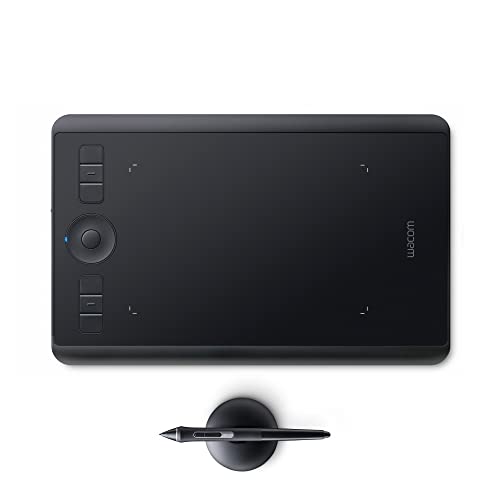
Wacom Intuos Pro Small Bluetooth Tablet
Best for: compact professional illustration setups
- Pen Pressure
- 8192 levels
- Shortcut Controls
- 6 ExpressKeys, Touch Ring
- Screen Size
- 6-Inch
- Operating System
- Windows
- Features
- Stylus, Stylus Pen, Bluetooth
- Display
- Touchscreen
The Wacom Intuos Pro Small is a wireless graphics tablet designed for creative professionals. It features a compact 10.6 x 6.7 inch active area and connects via Bluetooth or USB. The included Pro Pen 2 offers 8192 pressure levels and tilt recognition. You get six ExpressKeys and a touch ring for customization. This model suits users who need precision without a large desk footprint.
- Pro Pen 2 with 8192 pressure sensitivity levels
- Bluetooth and USB connectivity options
- Tilt recognition for natural drawing angles
- Six customizable ExpressKeys and a Touch Ring
- Compact Small size fits tight spaces
- Small active area limits large canvas workflows
- Heavier at 15.8 ounces compared to lighter pads
- No built-in screen requires looking at a monitor
- You work in a small workspace
- You need precise pen input for illustration
- You prefer wireless connectivity
- You require a large drawing surface
- You need an all-in-one pen display
- You want a lightweight portable pad
Verdict: Wacom Intuos Pro Small Wireless Tablet fits illustrators who value precision and portability over screen integration. It is ideal for users with limited desk space who need professional-grade pen control.

Wacom Intuos Medium Wireless Drawing Tablet
Best for: students and hobbyists needing wireless pen input
- Shortcut Controls
- 4 ExpressKeys
- Operating System
- Windows
- Features
- Stylus, Stylus Pen, Bluetooth, Battery-Free Pen, Shortcut Keys
- Color
- Black
- Tablet Type
- Pen Tablet
- Audience
- Students
The Wacom Intuos Medium is a wireless pen tablet designed for digital creativity. It features a 10.4 by 7.8 inch active area and connects via Bluetooth or USB. The battery-free pen offers precise input. This model suits students and beginners who need reliable performance without a screen. It includes shortcut keys for efficient workflow management.
- Wireless Bluetooth connectivity for flexible placement
- Battery-free pen technology for natural drawing
- Four express keys for quick shortcuts
- Includes creative software and training access
- No built-in display requires a separate monitor
- Medium size is smaller than Cintiq Pro 24
- Limited to 10.4 by 7.8 inch active area
- You need a portable tablet for sketching on the go
- You prefer a battery-free pen for long sessions
- You want wireless freedom without a screen
- You require a built-in display for direct drawing
- You need a large 4K screen for detailed work
- You only want wired USB connections
Verdict: Wacom Intuos Medium Bluetooth Tablet is a practical choice for students and hobbyists who want wireless freedom and reliable pen input without the bulk of a display. It fits those who already use a monitor and value portability.

Wacom Cintiq 22HD Touch Pen Display
Best for: Artists needing touch and physical shortcuts
- Screen Size
- 21.5"
- Display Resolution
- 1920 x 1080
- Shortcut Controls
- ExpressKeys and Touch Strips
- Features
- Stylus, Stylus Pen
- Display
- Touchscreen
- Color
- Black
The Wacom Cintiq 22HD Touch is a 21.5-inch interactive pen display with 1920 x 1080 resolution. It features a touchscreen for multi-touch gestures and an ergonomic stand. The unit weighs 18.7 pounds and measures 25.6 inches long. It includes ExpressKeys and Touch Strips for shortcuts. This model suits artists who want a dedicated drawing screen with touch capabilities.
- 21.5-inch HD display with 1920 x 1080 resolution
- Multi-touch support for pan, zoom, and rotate gestures
- ExpressKeys and Touch Strips for personalized shortcuts
- Ergonomic stand adjusts to preferred working positions
- Professional pen-pressure and pen-tilt sensitivity
- 1080p resolution is lower than the 4K screen on the Cintiq Pro 24
- 18.7-pound weight is heavier than the portable Intuos Pro tablet
- 21.5-inch size is smaller than the 24-inch Cintiq Pro 24
- You need a large, dedicated screen for drawing
- You want to use multi-touch gestures in your software
- You prefer physical shortcut keys and touch strips
- You need 4K resolution for detailed color work
- You want a portable tablet that fits in a bag
- You prefer a smaller 13-inch or 16-inch display
Verdict: The Wacom Cintiq 22HD Touch Pen Display offers a solid 21.5-inch canvas with touch controls for artists who value physical shortcuts. It fits professionals who need a dedicated, ergonomic station for detailed digital illustration.

Wacom Graphire Medium Pen Tablet
Best for: basic sketching and simple digital art
- Pen Pressure
- 2048, tip only
- Features
- Stylus, Stylus Pen
- Color
- Black
- Tablet Type
- Pen Tablet
- Dimensions
- 8.27 × 0.34 × 5.75 inches
- Weight
- 8.82 ounces
The Wacom Graphire is a medium-sized pen tablet measuring 10 inches. It offers 2048 pressure levels for detailed input. The battery-free pen connects via a standard USB Type-A port. It works with Windows 7 and macOS 10.10 or later. This model suits users who need a basic, reliable drawing surface without complex features.
- 10-inch active area for ample drawing space
- 2048 pressure levels for nuanced strokes
- Battery-free cordless pen technology
- Lightweight build at 8.82 ounces
- Only 2048 pressure levels compared to higher counts on other models
- Single pen tip sensitivity without side button support
- Requires USB Type-A port connection
- You need a simple, reliable pen tablet for basic sketching
- You prefer a lightweight device that is easy to carry
- You use Windows 7 or macOS 10.10 or later
- You require wireless connectivity for your drawing workflow
- You need a pen display with a built-in screen
- You want advanced pressure levels above 2048
Verdict: Wacom Graphire Medium Pen Tablet is a straightforward choice for beginners who prioritize simplicity and portability over advanced features or screen integration.

Wacom Cintiq Pro 24 4K Touch Display
Best for: professionals needing large 4K color accuracy
- Screen Size
- 23.6"
- Display Resolution
- 4K
- Pen Pressure
- 8,192 levels
- Color Gamut
- 99% Adobe RGB, 97% sRGB
- Display Finish
- Optical bonding
- Shortcut Controls
- ExpressKey Remote
The Wacom Cintiq Pro 24 is a 24-inch touchscreen pen display designed for high-end creative work. It features a 4K resolution screen with 99% Adobe RGB color coverage and 8,192 levels of pen pressure. The unit includes an ExpressKey Remote and supports multi-touch gestures. Its 15.9-pound weight and large footprint make it a substantial addition to your workspace.
- 24-inch 4K touchscreen display for detailed work
- 99% Adobe RGB color accuracy with 1.07 billion colors
- Pro Pen 2 with 8,192 pressure levels and tilt recognition
- Includes ExpressKey Remote for one-touch shortcuts
- Optical bonding eliminates parallax for precise input
- Heavier 15.9-pound build compared to smaller tablets
- Larger 26.7-inch length requires significant desk space
- Limited to 24-inch size option unlike smaller alternatives
- You need a large 4K screen for detailed illustration
- You require professional color accuracy for print or digital media
- You prefer using a remote control for shortcuts
- You need a portable tablet for travel
- You have limited desk space for a large display
- You prefer a smaller 13-inch or 16-inch screen
Verdict: Wacom Cintiq Pro 24 4K Pen Display is a heavy, large-format pen display that fits professionals needing a big, accurate screen for stationary work. It suits those who prioritize color fidelity and screen real estate over portability.

XP-PEN Artist12 11.6-Inch Pen Display
Best for: digital artists needing a dedicated pen display
- Screen Size
- 11.6"
- Display Resolution
- 1920×1080 FHD
- Pen Pressure
- 8192
- Color Gamut
- 72% NTSC (100% sRGB)
- Display Finish
- anti-reflective screen protector
- Shortcut Controls
- 6 shortcut keys, slim touch bar
The XP-PEN Artist12 is an 11.6-inch pen display with a 1920×1080 resolution and 72% NTSC color gamut. It features an 8192-level pressure-sensitive battery-free stylus. The device includes a programmable touch bar and six shortcut keys. You need a computer with HDMI and USB-A ports to connect it. This setup suits digital artists who want a dedicated screen for drawing.
- 11.6-inch FHD IPS display with 1920×1080 resolution
- 8192 levels of pen pressure sensitivity
- Battery-free P06 stylus with digital eraser
- Programmable touch bar and six shortcut keys
- 72% NTSC color gamut is lower than the 100% sRGB standard
- 2-pound weight is heavier than the 10.6-inch Wacom Intuos Pro
- Requires HDMI and USB-A connections, limiting portability
- You need a dedicated pen display for digital drawing
- You prefer a battery-free stylus for a traditional feel
- You want customizable shortcut keys for your workflow
- You require a wireless connection without a computer
- You need a color gamut wider than 72% NTSC
- You are looking for a tablet without a built-in screen
Verdict: The XP-PEN Artist12 11.6-Inch Pen Display fits artists who need a dedicated screen with high pressure sensitivity. It is a solid choice for those who prioritize a tactile drawing experience over wireless convenience.

Wacom Cintiq 22 22-Inch Non-Touch Pen Display
Best for: Large workspace digital artists and animators
- Tablet Type
- Tethered pen display
- Screen Size
- 22"
- Display Resolution
- Full HD
- Pen Pressure
- 8192
- Features
- Stylus, Stylus Pen, Full HD Display
- Display
- Touchscreen
The Wacom Cintiq 22 is a 22-inch non-touch creative pen display designed for students and hobbyists. It features a Full HD LCD screen with true-to-life color quality and uniform brightness. The included Pro Pen 2 offers 8192 levels of pressure sensitivity, tilt recognition, and virtually lag-free tracking. This setup provides a large workspace for animation and digital art on Windows or macOS systems.
- 22-inch Full HD LCD display for a large creative workspace
- Pro Pen 2 with 8192 levels of pressure sensitivity
- Tilt recognition for natural drawing angles
- Virtually lag-free tracking for precise input
- Non-touch screen limits direct interaction compared to touch-enabled models
- Heavier at 4.19 pounds compared to smaller portable tablets
- Smaller 22-inch display area versus the 24-inch and 4K options available from Wacom
- You need a large 22-inch screen for detailed digital art or animation work
- You prefer a dedicated pen display with high pressure sensitivity over a standard tablet
- You want a reliable Wacom display for home or studio use on Windows or macOS
- You require a touch-enabled screen for direct manipulation of the interface
- You need a 4K resolution display for maximum pixel density
- You are looking for a compact, lightweight tablet for travel
Verdict: Wacom Cintiq 22 22-Inch Display fits artists who prioritize a large, color-accurate screen and precise pen control over touch capabilities or portability.
Specifications side by side
| Spec | Wacom Intuos Pro Small Bluetooth Tablet | Wacom Intuos Medium Wireless Drawing Tablet | Wacom Cintiq 22HD Touch Pen Display | Wacom Graphire Medium Pen Tablet | Wacom Cintiq Pro 24 4K Touch Display | XP-PEN Artist12 11.6-Inch Pen Display | Wacom Cintiq 22 22-Inch Non-Touch Pen Display |
|---|---|---|---|---|---|---|---|
| Tablet Type | – | – | – | – | – | – | Tethered pen display |
| Screen Size | – | – | 21.5" | – | 23.6" | 11.6" | 22" |
| Display Resolution | – | – | 1920 x 1080 | – | 4K | 1920×1080 FHD | Full HD |
| Pen Pressure | 8192 levels | – | – | 2048, tip only | 8,192 levels | 8192 | 8192 |
| Color Gamut | – | – | – | – | 99% Adobe RGB, 97% sRGB | 72% NTSC (100% sRGB) | – |
| Display Finish | – | – | – | – | Optical bonding | anti-reflective screen protector | – |
| Shortcut Controls | 6 ExpressKeys, Touch Ring | 4 ExpressKeys | ExpressKeys and Touch Strips | – | ExpressKey Remote | 6 shortcut keys, slim touch bar | – |
| Operating System | Windows | Windows | – | – | – | – | – |
| Features | Stylus, Stylus Pen, Bluetooth | Stylus, Stylus Pen, Bluetooth, Battery-Free Pen, Shortcut Keys | Stylus, Stylus Pen | Stylus, Stylus Pen | Stylus, Stylus Pen | Stylus, Stylus Pen, Battery-Free Pen | Stylus, Stylus Pen, Full HD Display |
| Display | Touchscreen | – | Touchscreen | – | Touchscreen | – | Touchscreen |
| Color | Black | Black | Black | Black | Black | Black | Black |
| Audience | – | Students | – | – | – | – | Animation |
| Dimensions | 11.8 × 7.75 × 2 inches | 10.4 × 7.8 × 0.4 inches | 25.6 × 2.7 × 15.7 inches | 8.27 × 0.34 × 5.75 inches | 26.7 × 15.5 × 0.1 inches | 14.3 × 8.58 × 0.31 inches | 16.6 × 11.2 × 1 inches |
| Weight | 15.8 ounces | 14.5 ounces | 18.7 pounds | 8.82 ounces | 15.9 pounds | 2 pounds | 4.19 pounds |
| Size | Small | Medium, Wireless (Pack of 1) | 22HD Touch | 10 inches | 24 inch touch | 11.6 inch | 22" non-touch |
| Model | PTH460K0A | CTL6100WLK0 | DTH2200 | CTL-672/K0-C | DTH2420K0 | Artist 12_SML | DTK2260K0A |
Frequently asked questions
Which Wacom tablet is best for small workspaces?
The Wacom Intuos Pro Small Bluetooth Tablet is the top choice for compact setups. It measures 11.8 inches by 7.75 inches and weighs only 15.8 ounces. This size fits users with limited desk space who still need professional-grade precision. It connects via Bluetooth for a clean, cable-free experience.
What is the best budget-friendly wireless drawing tablet?
The Wacom Intuos Medium Wireless Drawing Tablet is the best budget option. It offers wireless connectivity and a battery-free pen for reliable input. At 10.4 inches by 7.8 inches, it provides a larger writing area than the small model. It is ideal for students and hobbyists who already use a monitor.
Which pen display offers the best color accuracy for professionals?
The Wacom Cintiq Pro 24 4K Touch Display is designed for professionals needing high color fidelity. It features a 24-inch screen with 4K resolution and touch capability. The device weighs 15.9 pounds, indicating it is built for stationary use. It supports 8192 levels of pen pressure for detailed work.
Is there a drawing tablet with a built-in screen under 12 inches?
Yes, the XP-PEN Artist12 11.6-Inch Pen Display fits this category. It provides a dedicated 11.6-inch screen for a tactile drawing experience. The tablet supports 8192 levels of pressure sensitivity and includes a battery-free pen. It weighs 2 pounds, making it portable enough for artists who travel frequently.
Which Wacom model is best for animation work?
The Wacom Cintiq 22 22-Inch Non-Touch Pen Display is suited for animators. It features a Full HD display and precise pen control. The screen measures 25.6 inches by 15.7 inches, offering ample space for timeline navigation. It weighs 4.19 pounds, providing a stable base for long drawing sessions.
What is the lightest drawing tablet on this list?
The Wacom Graphire Medium Pen Tablet is the lightest option at 8.82 ounces. It measures 8.27 inches by 5.75 inches with a thin profile of 0.34 inches. This model is designed for beginners who prioritize simplicity and portability. It lacks advanced features but offers straightforward sketching capabilities.
Which tablet supports touch controls for better workflow?
The Wacom Cintiq 22HD Touch Pen Display supports touch controls for enhanced workflow. It features a 21.5-inch canvas with physical shortcut keys. The device weighs 18.7 pounds and includes a touchscreen display. It is ideal for artists who value ergonomic control and direct interaction with their digital canvas.


