Wacom Intuos Pro Small Review: Specs, Pros and Cons
This wacom intuos pro small review covers the PTK470K0A, a professional-grade pen tablet designed for creative workflows.

What this report covers
- Last updated
- 4 Nov 2026
Figures above are read from the product listings for the models named below. Scores are out of 10, based on listed specifications and buyer feedback.
As Amazon Associates, we earn from qualifying purchases. This means we may receive a small commission at no extra cost to you if you click through and make a purchase.
As an Amazon Associate we earn from qualifying purchases. Links on this page are affiliate links.
This wacom intuos pro small review covers the PTK470K0A, a professional-grade pen tablet designed for creative workflows. It combines a compact 8.4” x 6.4” active area with robust magnesium construction, keeping the device lightweight at 8.48 ounces. The tablet features the Pro Pen 3, which delivers 8192 pressure levels and tilt support for precise input. You can connect via USB or Bluetooth, allowing wireless freedom across multiple computers. Its 16:9 format aligns well with modern wide displays, making it a versatile tool for digital artists who need reliability and portability in a small footprint.
- Pro Pen 3 with 8192 pressure levels and tilt support for lag-free tracking
- Compact 8.4” x 6.4” active area with a small 4mm magnesium body
- Wireless Bluetooth connectivity or USB wired connection for flexible setup
- Five customizable ExpressKeys and a mechanical dial for efficient workflow control
Good fit for
This tablet suits animation professionals and digital artists who value precision and portability. The 8192 pressure levels and tilt support ensure accurate strokes for detailed work. The 16:9 format complements modern wide monitors, while the compact footprint saves desk space. Wireless Bluetooth connectivity allows you to switch between computers easily. If you need a sturdy, professional tool that fits in a bag, this small model offers the necessary features for creative productivity without bulk.
Who can skip it
You should look at another option if you require a large drawing surface. This small model has a limited active area compared to the Medium or Large variations. If you need extensive space for complex compositions, the compact size may feel restrictive. Additionally, if you prefer a wired-only connection, the wireless functionality might be unnecessary. Buyers needing a built-in display should consider a different product category, as this is a pen tablet that requires a separate monitor.
Verdict
The Wacom Intuos Pro Small delivers professional precision in a portable, durable package. It is an ideal choice for artists who prioritize accuracy and wireless flexibility over a large drawing surface.
Key specs explained
Pro Pen 3 with 8192 pressure levels
The included stylus detects 8192 distinct pressure points. This high resolution allows you to create fine lines that fade gradually or thick strokes that appear bold instantly. You get smooth, lag-free tracking for precise digital art. This level of sensitivity is standard for professional drawing tablets, ensuring your digital brush mimics real ink or pencil behavior on paper.
Tilt support
The pen recognizes the angle at which you hold it. You can tilt the nib to create broad, shaded areas similar to a charcoal stick or a brush. This feature adds depth to your artwork without needing to change tools. It is a key specification for illustrators and animators who require natural, expressive strokes in their creative workflows.
8.4” x 6.4” active area
The Small size offers a compact writing surface that fits easily on most desks. Despite its small footprint, the active area is large enough for comfortable drawing and navigation. You can map this space to your monitor screen, allowing for precise cursor control. This size is ideal for users with limited desk space who still need a professional-grade input device.
Bluetooth wireless connectivity
You can connect the tablet to multiple computers without using a USB cable. This wireless freedom keeps your workspace tidy and allows you to switch between devices easily. You maintain full functionality while moving around your desk. This feature is essential for users who want a clutter-free setup or need to move the tablet between different workstations.
Design and build details
The listing describes the Wacom Intuos Pro Small as having a sleek and sturdy magnesium chassis. This material choice contributes to its robust durability while keeping the unit lightweight. The tablet measures 8.46 inches in length and 6.42 inches in width. It weighs just 8.48 ounces, which aligns with its small form factor. At its thinnest point, the device is only 4mm thick. This slim profile allows it to sit flat on your desk without taking up much space. The compact footprint makes it suitable for both office environments and travel.
According to the listing, the active area follows a 16:9 format. This versatile aspect ratio is designed to work well with modern wide displays and multiple monitors. The layout includes five customizable ExpressKeys and a mechanical dial positioned at the top. This placement keeps controls conveniently close to your keyboard, helping you stay in your creative flow. You can adjust the Pro Pen 3’s grip, balance, and button layout for better comfort. The tablet supports both USB and Bluetooth connections, offering wireless freedom for your setup.
Setup and everyday use guide
The Wacom Intuos Pro Small offers flexible connectivity for your workspace. You can connect the device via a USB cable or use Bluetooth to pair it wirelessly. A simple switch on the tablet lets you toggle between these modes. This feature allows you to connect to multiple computers without unplugging cables. The tablet is designed to work with modern monitors. Its 16:9 aspect ratio matches wide displays and multi-monitor setups. This format ensures your drawing area aligns well with your screen layout. The compact footprint measures 8.4 inches by 6.4 inches. This size fits easily on most desks without taking up excessive space. You can place it near your keyboard for efficient workflow. The device includes five customizable ExpressKeys and a mechanical dial. These controls sit close to the top edge for quick access. You can adjust the button layout and pen balance to suit your grip preference. The Pro Pen 3 provides tilt support and lag-free tracking. This technology ensures your strokes appear smoothly on screen. The tablet is built for both office use and mobile work. Its magnesium chassis provides durability while keeping the weight low. You can carry it in a bag or leave it on your desk. The small size does not compromise the active area. It offers a large drawing surface relative to its physical dimensions. This setup supports animation and other creative tasks. The wireless freedom helps keep your desk tidy. You can switch between devices quickly. The design prioritizes efficiency and precision for professional users.
Before You Buy Wacom Intuos Pro
You should verify your creative software supports this pen tablet before purchasing. The listing notes it is designed for animation, so check compatibility with your preferred apps. You will need a USB cable for wired connections, though Bluetooth allows wireless pairing with multiple computers. Keep the magnesium chassis clean with a dry cloth to maintain its sleek look. This small footprint fits well on desks with wide monitors. It sits alongside other tablets in our 1 product guide. Unlike e-readers, this device requires power and software drivers. You may want extra stylus tips for heavy use, as they wear down over time. The Pro Pen 3 offers tilt support, which helps if you sketch with shading. Ensure your workspace has room for the 8.46 by 6.42 inch active area. This model suits professionals who need precision and portability. It does not replace a full computer but enhances your digital workflow efficiently.
Check before you buy
- Check software compatibility with your creative apps
- Ensure desk space fits the small active area
- Verify Bluetooth pairing with your target computers
- Confirm you have a USB cable handy
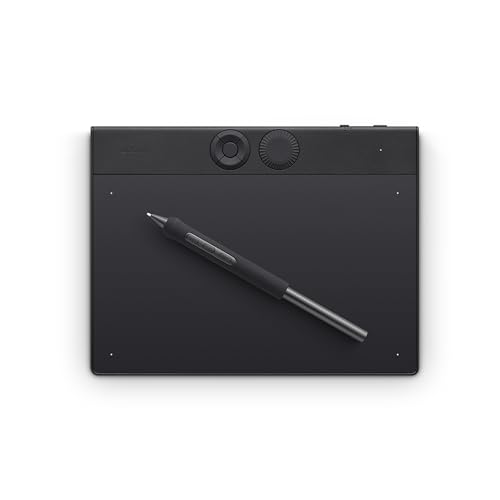
Wacom Intuos Pro Small Bluetooth Pen Tablet
Best for: Professional animators needing precision
- Pen Pressure
- 8192
- Features
- Stylus, Stylus Pen, Bluetooth, Shortcut Keys
- Tablet Type
- Pen Tablet
- Audience
- Animation
- Length
- 8.46 inches
- Width
- 6.42 inches
This Wacom Intuos Pro Small is a pen tablet designed for animation and digital art. It features the Pro Pen 3 with 8192 pressure levels and tilt support. The device includes a mechanical dial and five ExpressKeys for workflow efficiency. Its 16:9 active area fits modern wide monitors. The magnesium body measures 4mm thick and weighs 8.48 ounces. You can connect via USB or Bluetooth.
- Pro Pen 3 offers 8192 pressure levels and tilt support
- Mechanical dial and five customizable ExpressKeys
- 16:9 format active area suits wide displays
- Lightweight magnesium build at 8.48 ounces
- Wireless Bluetooth connectivity option
- Small size limits active drawing area compared to larger models
- 8.48 ounces is heavier than basic plastic tablets
- You need precise pressure sensitivity for professional animation
- You want wireless freedom with Bluetooth connectivity
- You prefer a compact footprint for your desk
- You require a large active drawing area
- You need a display tablet with a screen
- You prefer a lightweight plastic construction
Verdict: Wacom Intuos Pro Small Drawing Tablet provides professional-grade pen precision for animators who value a compact, wireless workflow. It fits users who need high pressure sensitivity in a portable form factor.
Specifications side by side
| Spec | Wacom Intuos Pro Small Bluetooth Pen Tablet |
|---|---|
| Pen Pressure | 8192 |
| Features | Stylus, Stylus Pen, Bluetooth, Shortcut Keys |
| Tablet Type | Pen Tablet |
| Audience | Animation |
| Length | 8.46 inches |
| Width | 6.42 inches |
| Weight | 8.48 ounces |
| Size | Small |
| Model | PTK470K0A |
Frequently asked questions
Is the Wacom Intuos Pro Small suitable for professional animators?
Yes, it is designed for professional animators needing precision. The tablet features the Pro Pen 3, which detects 8192 distinct pressure points. This high resolution allows for fine lines or bold strokes. It fits users who need high pressure sensitivity in a portable form factor.
What are the exact dimensions of the Wacom Intuos Pro Small?
The active area measures 8.46 inches in length and 6.42 inches in width. This compact size makes it easy to fit on smaller desks. The device is also lightweight, weighing only 8.48 ounces, which supports a portable workflow for creatives on the go.
Does this tablet support Bluetooth connectivity?
Yes, the Wacom Intuos Pro Small includes Bluetooth capability. You can toggle between wireless and wired connections using a switch on the tablet. This flexibility allows you to pair it wirelessly with multiple computers or use a USB cable for a stable wired connection.
What type of stylus does the Wacom Intuos Pro Small use?
It comes with the Pro Pen 3 stylus. This tool offers 8192 levels of pressure sensitivity for precise control. The pen allows you to create smooth, lag-free tracking for detailed digital artwork. It is designed to provide professional-grade pen precision for your creative projects.
Who is the best audience for this pen tablet?
This tablet is best for animation professionals. It is specifically designed for users who value a compact, wireless workflow. If you need high pressure sensitivity and precision in a portable form factor, this device meets those needs. It supports creative workflows requiring detailed input.
How heavy is the Wacom Intuos Pro Small?
The tablet weighs 8.48 ounces. This light weight is achieved through its magnesium construction. The sturdy yet lightweight design contributes to its robust durability. You can easily move it around your workspace or take it with you without adding significant bulk to your bag.
What connectivity options are available for this device?
You can connect via USB cable or Bluetooth. A simple switch on the tablet lets you toggle between these modes. This provides flexible connectivity for your workspace. You can pair it wirelessly with multiple computers or use a wired connection for consistent performance during long sessions.
What is the model number for this tablet?
The model number is PTK470K0A. This identifier corresponds to the Wacom Intuos Pro Small Bluetooth Pen Tablet. You can use this model number to verify compatibility with your software or to find replacement accessories. It ensures you are referencing the correct professional-grade device.


