6 Best Alternatives to the Wacom Movink 13 (2026)
The Wacom Movink 13 delivers exceptional portability with its lightweight OLED display and high color accuracy.

What this report covers
- Last updated
- 4 Nov 2026
Figures above are read from the product listings for the models named below. Scores are out of 10, based on listed specifications and buyer feedback.
As Amazon Associates, we earn from qualifying purchases. This means we may receive a small commission at no extra cost to you if you click through and make a purchase.
As an Amazon Associate we earn from qualifying purchases. Links on this page are affiliate links.
The Wacom Movink 13 delivers exceptional portability with its lightweight OLED display and high color accuracy. It is an ideal choice for mobile artists who prioritize screen quality and weight over raw screen size. However, you might want wacom movink 13 alternatives if you need a larger canvas, a different budget, or specific touch controls. Some users prefer stationary setups, while others seek more affordable entry points or distinct pen technologies.
We selected these alternatives because their specifications overlap with the original device. Each option shares key traits like pen display functionality and stylus support. You can choose based on your specific needs for size, resolution, or portability. Whether you require a compact secondary monitor or a heavy workstation, this list covers the best matches. We focused on practical specs to help you find the right tool for your creative workflow without unnecessary fluff.
Comparing the Top Alternatives
Wacom Cintiq 22HD Touch Pen Display
The Wacom Cintiq 22HD Touch is a stationary option that sacrifices portability for a much larger canvas. At 18.7 pounds, it is far heavier than the 14.8-ounce Movink 13. You gain a 22-inch display and physical ExpressKeys for shortcuts. The Movink offers OLED color accuracy and touch gestures in a travel-friendly form. Choose the Cintiq 22HD if you work at a desk and need touch controls and shortcut keys. It is not suitable for mobile artists who value weight over screen size.
Wacom Cintiq Pro 24 4K Touch Display
The Wacom Cintiq Pro 24 4K is a heavy workstation designed for color-critical designers. It weighs 15.9 pounds and measures 26.7 inches long, making it the opposite of the Movink 13’s portable design. You get 4K precision and a larger 24-inch screen. The Movink provides OLED vibrancy and a 13-inch size that fits on any lap. Pick the Cintiq Pro 24 if you prioritize screen size and physical controls over portability. It is ideal for stationary professionals needing high-resolution clarity.
Wacom 22HD Pen Display
The Wacom Cintiq 22HD offers a spacious 22-inch canvas for stationary creative work. It weighs 18.7 pounds, which is significantly heavier than the Movink 13’s 14.8 ounces. This model lacks the OLED display and touch capabilities found in the Movink. It is designed for artists who prioritize screen real estate over portability. If you need a large drawing surface for detailed work at a desk, this is a solid choice. Mobile artists should stick with the Movink 13 for its compact and lightweight design.
Wacom Cintiq 13HD 13.3-Inch Pen Display
The Wacom Cintiq 13HD is a compact pen display that weighs 2.64 pounds. It is portable but still heavier than the Movink 13, which weighs just 14.8 ounces. The Movink features an OLED touchscreen with superior color accuracy and thinner profile. The Cintiq 13HD offers a reliable 13-inch HD screen for users with limited desk space. Choose this alternative if you need a budget-friendly portable option. It is ideal for artists who prioritize mobility over the Movink’s premium OLED display and touch interface.
XP-PEN Artist12 11.6-Inch Pen Display
The XP-PEN Artist12 is a compact 11.6-inch pen display weighing 2 pounds. It is lighter than most desktop alternatives but heavier than the Movink 13. The Movink offers an OLED display with 10-bit color and touch capabilities. The Artist12 provides a Full HD screen and a battery-free pen for budget-conscious users. It is suitable for artists needing a portable, secondary monitor for digital creation. Pick this if you want a smaller screen size and lower cost. It lacks the Movink’s premium color accuracy and touch navigation.
Wacom Cintiq 16 15.4" Pen Display
The Wacom Cintiq 16 is a 16-inch pen display weighing 4.19 pounds. It is larger and heavier than the Movink 13, which weighs 14.8 ounces. The Movink features an OLED touchscreen with high color accuracy. The Cintiq 16 offers Full HD performance and tilt support for entry-level creatives. It is a practical fit for students or hobbyists who prioritize portability and Wacom’s pen technology. Choose this if you need a larger screen than the Movink 13. It is not ideal for mobile artists who value the thinnest profile.
| # | Product | Best for | Price |
|---|---|---|---|
| 1 | Wacom Movink 13 OLED Touch Display Best overall | Portable, high-color-accuracy digital art | |
| 2 | Wacom Cintiq 22HD Touch Pen Display Best budget | artists needing touch controls and shortcut keys | |
| 3 | Wacom Cintiq Pro 24 4K Touch Display Best premium | color-critical designers needing 4K precision | |
| 4 | Wacom 22HD Pen Display Also great | stationary artists needing large canvas space | |
| 5 | Wacom Cintiq 13HD 13.3-Inch Pen Display Also great | Portable drawing on a tight budget | |
| 6 | XP-PEN Artist12 11.6-Inch Pen Display Best 11.6-inch | compact digital drawing on a secondary screen | |
| 7 | Wacom Cintiq 16 15.4" Pen Display Best full hd display | Students and hobbyists needing a compact drawing tablet |

Wacom Movink 13 OLED Touch Display
Best for: Portable, high-color-accuracy digital art
- Tablet Type
- Tethered pen display
- Pen Pressure
- 8K levels
- Shortcut Controls
- ExpressKeys
- Features
- Stylus, Stylus Pen
- Display
- Touchscreen
- Color
- Black
The Wacom Movink 13 is a portable pen display with a 13-inch OLED touchscreen. It weighs 14.8 ounces and measures 4–6.6 mm thick. The Pro Pen 3 offers 8k pressure sensitivity. It supports 10-bit color with hardware presets for Adobe RGB and DCI-P3. You get touch gestures and customizable ExpressKeys. This compact unit suits artists who need a lightweight, color-accurate drawing tablet for mobile or desk use.
- OLED display with 100,000:1 contrast ratio
- Pro Pen 3 with 8k pressure sensitivity
- Weighs less than 1 lb and is 4–6.6 mm thick
- Hardware presets for Adobe RGB, sRGB, and DCI-P3
- 13-inch screen is smaller than the 22-inch and 24-inch options on this list
- 14.8-ounce weight is slightly heavier than typical 13-inch non-OLED tablets due to the OLED panel
- You prioritize color accuracy and contrast in a portable form factor
- You need a lightweight tablet that fits easily in a bag
- You work with Adobe RGB or DCI-P3 color spaces
- You require a larger 22-inch or 24-inch display for detailed work
- You prefer a standard LCD panel over an OLED display
- You need a tablet with a larger screen real estate
Verdict: Wacom Movink 13 OLED Pen Display delivers exceptional color and portability for mobile artists. It is the ideal choice for creators who value screen quality and weight over raw screen size.

Wacom Cintiq 22HD Touch Pen Display
Best for: artists needing touch controls and shortcut keys
- Screen Size
- 21.5"
- Display Resolution
- 1920 x 1080
- Shortcut Controls
- ExpressKeys and Touch Strips
- Features
- Stylus, Stylus Pen
- Display
- Touchscreen
- Color
- Black
The Wacom Cintiq 22HD Touch is a 21.5-inch pen display with a 1920 x 1080 resolution. It supports multi-touch gestures for panning and zooming. The device includes ExpressKeys and Touch Strips for shortcuts. Weighing 18.7 pounds, it requires a sturdy stand. This model suits artists who want a large canvas with touch control.
- 21.5-inch HD display with 1920 x 1080 resolution
- Multi-touch gestures for panning, zooming, and rotating
- ExpressKeys and Touch Strips for personalized shortcuts
- Professional pen-pressure and pen-tilt sensitivity
- Resolution is 1080p, lower than the 4K option on this list
- Weight of 18.7 pounds makes it heavier than smaller tablets
- Screen size is smaller than the 24-inch and 22-inch HD models listed
- You need a large 21.5-inch canvas for detailed work
- You prefer using multi-touch gestures for navigation
- You want physical shortcut keys and touch strips
- You require a 4K display for maximum detail
- You need a lightweight, portable device for travel
- You want a screen larger than 22 inches
Verdict: Wacom Cintiq 22HD Touch Pen Display offers a solid middle ground between size and resolution. It fits professionals who prioritize touch controls and physical shortcuts over 4K clarity.

Wacom Cintiq Pro 24 4K Touch Display
Best for: color-critical designers needing 4K precision
- Screen Size
- 23.6"
- Display Resolution
- 4K
- Pen Pressure
- 8,192 levels
- Color Gamut
- 99% Adobe RGB, 97% sRGB
- Display Finish
- Optical bonding
- Shortcut Controls
- ExpressKey Remote
The Wacom Cintiq Pro 24 is a 24-inch touchscreen pen display designed for high-end creative work. It features 4K resolution and covers 99% of the Adobe RGB color gamut for precise, true-to-life colors. The included Pro Pen 2 offers 8,192 levels of pressure sensitivity and tilt recognition. Optical bonding reduces parallax for a natural drawing feel. This device suits professionals who need a large, color-accurate workspace for detailed graphic design.
- 23.6-inch 4K touchscreen display
- 99% Adobe RGB color coverage
- 8,192 levels of pen pressure
- Includes ExpressKey Remote
- Heavier at 15.9 pounds
- Larger 24-inch footprint
- Shorter 3-month software trials
- You need a large 4K canvas
- You require accurate Adobe RGB colors
- You prefer physical shortcut keys
- You need a portable device
- You have a limited desk space
- You want long-term free software
Verdict: Wacom Cintiq Pro 24 4K Pen Display is a heavy, large-format workstation for pros needing 4K precision. It fits color-critical designers who prioritize screen size and physical controls over portability.

Wacom 22HD Pen Display
Best for: stationary artists needing large canvas space
- Screen Size
- 21-Inch
- Display Resolution
- full HD resolution
- Shortcut Controls
- customizable express keys
- Features
- Stylus, Stylus Pen
- Color
- Black
- Tablet Type
- Pen Display
The Wacom Cintiq 22HD is a 21-inch pen display designed for direct screen drawing. It features a full HD resolution and an extra-wide viewing angle. The unit includes customizable express keys for shortcuts. It weighs 18.7 pounds and measures 25.5 inches in length. This large format suits artists who need a spacious canvas for sketching and editing.
- 21-inch wide format display
- Full HD resolution
- Extra-wide viewing angle
- Customizable express keys
- Heavier build at 18.7 pounds
- Larger footprint than 13-inch alternatives
- You need a large drawing surface
- You prefer a fixed desk setup
- You want direct screen interaction
- You require a portable device
- You have limited desk space
- You want a lighter weight tool
Verdict: Wacom Cintiq 22HD 21-Inch Pen Display offers a spacious canvas for stationary creative work. It fits professionals who prioritize screen real estate over portability.

Wacom Cintiq 13HD 13.3-Inch Pen Display
Best for: Portable drawing on a tight budget
- Screen Size
- 13.3"
- Display Resolution
- 1920 X 1080
- Pen Pressure
- 2048 levels
- Shortcut Controls
- four ExpressKeys, Rocker ring
- Features
- Stylus, Stylus Pen
- Color
- Black
This Wacom Cintiq 13HD is a 13.3-inch HD pen display with a 1920×1080 resolution. It uses a pressure-sensitive stylus with 2048 levels and tilt support. The device weighs 2.64 pounds and includes a 3-position stand. You can connect it to a PC or Mac using a single 3-in-1 cable. It features four customizable ExpressKeys and a rocker ring for quick access to tools.
- 13.3-inch HD display with 1920×1080 resolution
- 2048 levels of pressure sensitivity
- Tilt-sensitive Pro Pen included
- Compact design at 2.64 pounds
- Four customizable ExpressKeys and rocker ring
- HD resolution is lower than the 4K or Full HD options on this list
- 13.3-inch screen is smaller than the 16-inch or 22-inch alternatives here
- Older DTK1300 model version
- You need a lightweight, portable drawing tablet for travel
- You prefer a smaller 13-inch screen for a compact desk setup
- You want a simple setup with a single cable connection
- You require a 4K or higher resolution display
- You need a screen larger than 13 inches
- You are looking for the latest model generation
Verdict: Wacom Cintiq 13HD 13-Inch Pen Display offers a compact, portable solution for artists who prioritize mobility over screen size. It is ideal for users with limited desk space who still need reliable pressure sensitivity and tilt support for their creative work.

XP-PEN Artist12 11.6-Inch Pen Display
Best for: compact digital drawing on a secondary screen
- Screen Size
- 11.6"
- Display Resolution
- 1920×1080 FHD
- Pen Pressure
- 8192
- Color Gamut
- 72% NTSC (100% sRGB)
- Display Finish
- anti-reflective screen protector
- Shortcut Controls
- 6 shortcut keys, slim touch bar
The XP-PEN Artist12 is an 11.6-inch pen display with a 1920×1080 IPS screen and 72% NTSC color gamut. It features an 8192-level battery-free stylus and a programmable touch bar. This compact device weighs 2 pounds and measures 0.31 inches thick. It connects via HDMI and USB-A. You will need a computer to use it. It suits digital artists who need a portable, secondary display for drawing and editing.
- 11.6-inch Full HD IPS display with 1920×1080 resolution
- 8192 levels of pen pressure sensitivity
- Battery-free P06 stylus with hexagonal grip
- Programmable touch bar and six shortcut keys
- 72% NTSC color gamut for vibrant images
- 11.6-inch screen is smaller than the 13-inch and 16-inch options on this list
- 72% NTSC color gamut is lower than the 4K and HD models listed
- 2-pound weight is heavier than smaller tablet alternatives
- You need a compact secondary display for your computer
- You prefer a battery-free pen for traditional feel
- You want programmable shortcuts for your workflow
- You require a standalone device without a computer
- You need a 4K or higher resolution display
- You want a larger 13-inch or 16-inch screen
Verdict: XP-PEN Artist12 11.6-inch Pen Display offers a compact drawing experience with a Full HD screen and battery-free pen. It fits artists who need a portable, budget-friendly secondary monitor for digital creation.
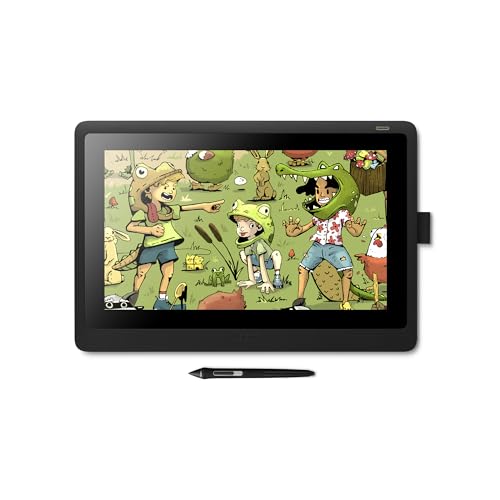
Wacom Cintiq 16 15.4" Pen Display
Best for: Students and hobbyists needing a compact drawing tablet
- Screen Size
- 15.4"
- Display Resolution
- Full HD
- Pen Pressure
- 8192 levels
- Features
- Stylus, Stylus Pen, Full HD Display, Tilt Support
- Color
- Black
- Audience
- Animation
The Wacom Cintiq 16 is a 16-inch Full HD pen display designed for creative work on Windows and macOS. It features a 15.4-inch LCD screen with true-to-life color quality and uniform brightness. The included Pro Pen 2 offers 8,192 levels of pressure sensitivity and tilt recognition. This tablet weighs 4.19 pounds and measures 16.6 by 11.2 inches. It suits students and hobbyists who need a reliable drawing surface for studio or campus use.
- 16-inch Full HD LCD display with high resolution
- Pro Pen 2 with 8,192 pressure sensitivity levels
- Tilt recognition for natural drawing angles
- Two customizable pen switches for shortcuts
- 16-inch screen is smaller than the 22-inch and 24-inch options on this list
- 4.19-pound weight is heavier than the 13-inch Movink alternative
- Standard HD resolution is lower than the 4K display on the Cintiq Pro 24
- You need a compact 16-inch display for limited desk space
- You want Wacom's Pro Pen 2 with tilt support
- You are a student or hobbyist on a budget
- You require a 4K resolution for detailed professional work
- You prefer a lighter tablet under 4 pounds
- You need a screen larger than 16 inches
Verdict: The Wacom Cintiq 16 16-inch Pen Display offers solid Full HD performance and precise pen tracking for entry-level creatives. It is a practical fit for students or hobbyists who prioritize portability and Wacom's proven pen technology over maximum screen size or 4K clarity.
Specifications side by side
| Spec | Wacom Movink 13 OLED Touch Display | Wacom Cintiq 22HD Touch Pen Display | Wacom Cintiq Pro 24 4K Touch Display | Wacom 22HD Pen Display | Wacom Cintiq 13HD 13.3-Inch Pen Display | XP-PEN Artist12 11.6-Inch Pen Display | Wacom Cintiq 16 15.4" Pen Display |
|---|---|---|---|---|---|---|---|
| Tablet Type | Tethered pen display | – | – | – | – | – | – |
| Screen Size | – | 21.5" | 23.6" | 21-Inch | 13.3" | 11.6" | 15.4" |
| Display Resolution | – | 1920 x 1080 | 4K | full HD resolution | 1920 X 1080 | 1920×1080 FHD | Full HD |
| Pen Pressure | 8K levels | – | 8,192 levels | – | 2048 levels | 8192 | 8192 levels |
| Color Gamut | – | – | 99% Adobe RGB, 97% sRGB | – | – | 72% NTSC (100% sRGB) | – |
| Display Finish | – | – | Optical bonding | – | – | anti-reflective screen protector | – |
| Shortcut Controls | ExpressKeys | ExpressKeys and Touch Strips | ExpressKey Remote | customizable express keys | four ExpressKeys, Rocker ring | 6 shortcut keys, slim touch bar | – |
| Features | Stylus, Stylus Pen | Stylus, Stylus Pen | Stylus, Stylus Pen | Stylus, Stylus Pen | Stylus, Stylus Pen | Stylus, Stylus Pen, Battery-Free Pen | Stylus, Stylus Pen, Full HD Display, Tilt Support |
| Display | Touchscreen | Touchscreen | Touchscreen | – | – | – | – |
| Color | Black | Black | Black | Black | Black | Black | Black |
| Audience | – | – | – | – | – | – | Animation |
| Dimensions | 12.6 × 0.26 × 0.1 inches | 25.6 × 2.7 × 15.7 inches | 26.7 × 15.5 × 0.1 inches | 25.5 × 2.2 × 15.7 inches | 14.8 × 0.53 × 9.76 inches | 14.3 × 8.58 × 0.31 inches | 16.6 × 11.2 × 1 inches |
| Weight | 14.8 ounces | 18.7 pounds | 15.9 pounds | 18.7 pounds | 2.64 pounds | 2 pounds | 4.19 pounds |
| Size | Movink 13 for Windows/Mac computers | 22HD Touch | 24 inch touch | 22HD | 13" | 11.6 inch | 16" |
| Model | Movink 13 | DTH2200 | DTH2420K0 | DTK2200 | DTK1300 | Artist 12_SML | DTK1660K0A |
Frequently asked questions
Which Wacom pen display is the lightest for travel?
The Wacom Movink 13 OLED Touch Display is the lightest option at just 14.8 ounces. It measures 0.26 inches thick and fits in a small bag. This makes it ideal for mobile artists who need high color accuracy without the bulk of a traditional studio setup.
Is there a Wacom tablet with a 4K screen?
Yes, the Wacom Cintiq Pro 24 4K Touch Display offers 4K precision. It is designed for color-critical designers who need a large 24-inch canvas. While it weighs 15.9 pounds, it provides the highest resolution available in this lineup for detailed professional work.
What is the best budget-friendly Wacom pen display?
The Wacom Cintiq 22HD Touch Pen Display is the best budget choice here. It provides a 22-inch screen and touch controls. It weighs 18.7 pounds, so it is not portable, but it offers a solid middle ground between size and cost for stationary artists.
Can I find a smaller 13-inch Wacom display?
The Wacom Cintiq 13HD 13.3-Inch Pen Display is a compact alternative. It weighs 2.64 pounds and measures 0.53 inches thick. It is perfect for users with limited desk space who still need reliable pressure sensitivity and tilt support for their creative work on the go.
Does the Wacom Cintiq 16 support tilt?
Yes, the Wacom Cintiq 16 15.4" Pen Display includes tilt support. It features a Full HD display and precise pen tracking. Weighing 4.19 pounds, it is a practical fit for students or hobbyists who prioritize portability and Wacom's proven pen technology over maximum screen size.
Is there a non-Wacom alternative with an 11.6-inch screen?
The XP-PEN Artist12 11.6-Inch Pen Display is a compact non-Wacom option. It features a Full HD screen and a battery-free pen. Weighing only 2 pounds, it is a budget-friendly secondary monitor for digital creation, offering 8192 levels of pen pressure for detailed drawing.
Which display is best for stationary artists needing a large canvas?
The Wacom Cintiq 22HD 21-Inch Pen Display offers a spacious canvas for stationary work. It weighs 18.7 pounds and measures 25.5 inches long. It fits professionals who prioritize screen real estate over portability, providing a large workspace for detailed creative projects at a desk.


