Wacom vs GAOMON Drawing Tablets: Which Brand Fits You?
When you compare the wacom vs GAOMON drawing tablet options, you face a choice between a compact pen tablet and a full pen display.

What this report covers
- Last updated
- 4 Nov 2026
Figures above are read from the product listings for the models named below. Scores are out of 10, based on listed specifications and buyer feedback.
As Amazon Associates, we earn from qualifying purchases. This means we may receive a small commission at no extra cost to you if you click through and make a purchase.
As an Amazon Associate we earn from qualifying purchases. Links on this page are affiliate links.
When you compare the wacom vs GAOMON drawing tablet options, you face a choice between a compact pen tablet and a full pen display. Both devices support digital art and sketching with pressure-sensitive pens. The main difference lies in the interface. The Wacom Bamboo Capture is a traditional pen tablet without a screen. The GAOMON PD1161 is a pen display with an integrated 11.6-inch monitor. This changes how you interact with your software.
Display Type
No screen (Pen Tablet)
11.6-inch IPS screen (Pen Display)
Screen Resolution
Not listed
1920×1080 (Full HD)
Pressure Sensitivity
Pressure sensitive pen
8192 Levels with Tilt Support
Shortcut Keys
4 ExpressKeys
8 customizable Shortcut Keys
Dimensions
10.9 x 6.9 x 0.4 inches
14.2 x 7.87 x 0.1 inches
Weight
14.9 ounces
1.91 pounds
Choose the first if
- You prefer a lightweight, portable device that connects to your existing monitor
- You want a simpler setup with fewer cables and no display calibration
- You are on a budget and need basic drawing tools without a screen
Choose the second if
- You want to draw directly on the screen for a natural hand-eye coordination
- You need tilt support and high pressure sensitivity for detailed digital art
- You require more shortcut keys and a larger working area for your workflow
Verdict
The Wacom Bamboo Capture suits those who already have a monitor and want a simple, portable pen input. The GAOMON PD1161 is better for artists who want an all-in-one pen display with a high-resolution screen. Your choice depends on whether you prefer a traditional tablet or a direct screen drawing experience.
Wacom vs GAOMON Spec Comparison
Display type
Edge: GAOMON PD1161 11.6" Pen Display
The Wacom Bamboo Capture is a pen tablet, meaning you draw on a flat surface while looking at your computer monitor. It relies on hand-eye coordination. The GAOMON PD1161 is a pen display with an 11.6-inch IPS screen. You draw directly on the image you see. This display offers a 1920×1080 resolution and an anti-glare film. The direct-view approach of the GAOMON often feels more natural for beginners and professionals who prefer seeing their strokes in real time on the pad itself.
Pressure sensitivity
Edge: GAOMON PD1161 11.6" Pen Display
The GAOMON PD1161 specifies 8192 levels of pressure sensitivity. This allows for nuanced line weight changes as you vary the force applied with the pen. The Wacom Bamboo Capture listing does not state a specific pressure level count. While Wacom devices are known for precision, the published data for this model omits the exact metric. If precise pressure gradation is a key requirement for your digital ink, the GAOMON provides a clear, quantified specification that the Wacom data does not confirm.
Size and portability
Edge: Wacom Bamboo Capture Pen Tablet
The Wacom Bamboo Capture is significantly smaller and lighter. It measures 10.9 by 6.9 inches and weighs just 14.9 ounces. It is easy to store in a bag or on a small desk. The GAOMON PD1161 is larger at 14.2 by 7.87 inches and weighs 1.91 pounds. While the GAOMON is described as portable, its size and the need for a computer connection make it bulkier. For users who need a minimal footprint or travel frequently, the Wacom is the more compact choice.
Shortcut keys
Edge: GAOMON PD1161 11.6" Pen Display
The Wacom Bamboo Capture includes four ExpressKeys for quick shortcuts. These allow you to assign common commands to reduce mouse usage. The GAOMON PD1161 offers eight customizable shortcut keys on the left side of the device. This double the number of physical controls available. If you rely heavily on keyboard shortcuts for software like Photoshop or Clip Studio Paint, the GAOMON provides more physical access points to streamline your workflow without reaching for the keyboard.
Pen features
Edge: GAOMON PD1161 11.6" Pen Display
Both devices use battery-free pens, which is convenient as you never need to charge or replace batteries. The GAOMON pen includes two programmable buttons and supports tilt functionality, allowing for natural shading techniques. The Wacom Bamboo Capture listing mentions a pressure-sensitive pen but does not specify tilt support or programmable buttons on the pen itself. For artists who utilize tilt for brush effects or want extra pen buttons, the GAOMON offers more advanced pen capabilities.
Choose Your Ideal Drawing Tablet
Users wanting a simple, portable pen tablet
Our pick: Wacom Bamboo Capture Pen Tablet
The Wacom Bamboo Capture offers a compact design measuring 10.9 by 6.9 inches. It weighs only 14.9 ounces, making it easy to carry. You get four express keys for shortcuts and a pressure-sensitive pen. This setup lets you draw while looking at your main monitor, which suits those who prefer hand-eye coordination over direct screen drawing.
Artists needing a direct screen display
Our pick: GAOMON PD1161 11.6" Pen Display
The GAOMON PD1161 features an 11.6-inch IPS screen with a 1920×1080 resolution. You draw directly on the display, eliminating hand-eye coordination issues. It supports 8192 pressure levels and tilt detection for natural lines. The battery-free pen includes programmable buttons. This pen display is ideal for digital art, sketching, and graphic design tasks requiring visual precision.
Professionals requiring tilt support and shortcuts
Our pick: GAOMON PD1161 11.6" Pen Display
This GAOMON model provides eight customizable shortcut keys on the left side. It includes tilt support for varied brush strokes. The 8192 pressure levels ensure smooth, neat lines. You also get eight replacement nibs. The device connects to Windows, Mac, or Chromebook systems, supporting software like Photoshop and Clip Studio Paint for professional digital workflows.
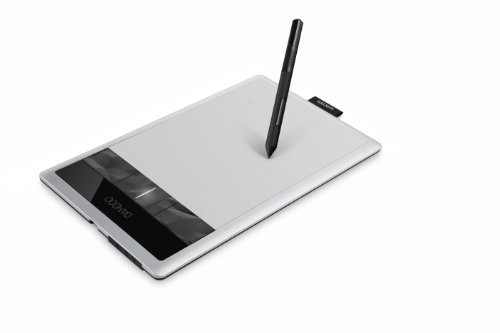
Wacom Bamboo Capture Pen Tablet
Best for: desktop digital art and photo editing
- Shortcut Controls
- 4 ExpressKeys
- Features
- Stylus, Stylus Pen
- Color
- Silver
- Tablet Type
- Pen Tablet
- Dimensions
- 10.9 × 6.9 × 0.4 inches
- Weight
- 14.9 ounces
The Wacom Bamboo Capture is a silver pen tablet measuring 10.9 by 6.9 inches. It weighs 14.9 ounces and includes four express keys for shortcuts. The device uses a pressure-sensitive pen for drawing and photo editing. You get free software like Photoshop Elements and Sketchbook Express. This compact tablet suits users who need a simple, portable input device for digital art on a desktop.
- Pressure-sensitive pen for natural drawing feel
- Four express keys for quick shortcuts
- Includes free creative software downloads
- Compact 10.9 x 6.9 inch size
- Heavier at 14.9 ounces than screen tablets
- Smaller active area than 11.6-inch models
- No tilt recognition for shading
- You want a dedicated pen input device
- You prefer physical shortcut keys
- You need a compact desktop tablet
- You need a built-in display screen
- You require tilt sensitivity for shading
- You want a lightweight portable design
Verdict: Wacom Bamboo Capture Pen Tablet fits users who prioritize tactile pen input and physical keys over a built-in screen. It is a solid desktop tool for basic digital drawing and photo editing.

GAOMON PD1161 11.6" Pen Display
Best for: Beginners and students needing a portable drawing display
- Tablet Type
- Tethered pen display
- Screen Size
- 11.6"
- Display Resolution
- 1920×1080 Full HD
- Pen Pressure
- 8192
- Display Finish
- Anti-glare film
- Shortcut Controls
- 8 shortcut keys
The GAOMON PD1161 is an 11.6-inch pen display designed for digital art and sketching. It features an IPS Full HD screen with 1920×1080 resolution and supports 8192 levels of pen pressure with tilt recognition. The device includes a battery-free pen and eight customizable shortcut keys. Weighing 1.9 pounds, it connects to Windows, Mac, or Chromebook computers for drawing, online teaching, or annotating documents.
- 11.6-inch IPS Full HD screen with 1920×1080 resolution
- 8192 levels of pen pressure with tilt support
- Battery-free pen with two programmable buttons
- Eight customizable shortcut keys on the left side
- Lightweight build at 1.9 pounds for portability
- Smaller 11.6-inch screen compared to larger 15.6-inch options
- Requires connection to a computer to function
- Includes an anti-glare film that may affect clarity
- You need a portable drawing display for sketching or digital art
- You want a budget-friendly option with tilt support
- You use the tablet for online teaching or document annotation
- You require a standalone tablet without a computer
- You prefer a screen larger than 11.6 inches
- You need a display with higher resolution than 1080p
Verdict: The GAOMON PD1161 11.6" Pen Display suits beginners and students who need a lightweight, computer-connected drawing tablet with solid pressure sensitivity. It is a practical tool for digital art and online education.
Specifications side by side
| Spec | Wacom Bamboo Capture Pen Tablet | GAOMON PD1161 11.6" Pen Display |
|---|---|---|
| Tablet Type | – | Tethered pen display |
| Screen Size | – | 11.6" |
| Display Resolution | – | 1920×1080 Full HD |
| Pen Pressure | – | 8192 |
| Display Finish | – | Anti-glare film |
| Shortcut Controls | 4 ExpressKeys | 8 shortcut keys |
| Features | Stylus, Stylus Pen | Battery-Free Pen, Shortcut Keys, Tilt Support |
| Display | – | Anti-Glare |
| Color | Silver | Black |
| Audience | – | Students, Animation, Beginners |
| Dimensions | 10.9 × 6.9 × 0.4 inches | – |
| Weight | 14.9 ounces | 1.91 pounds |
| Length | – | 14.2 inches |
| Width | – | 7.87 inches |
| Model | CTH470 | A2.PD1161-0-EN0000-1-US |
| Size | – | 11.6 Inch |
Frequently asked questions
Is Wacom better than GAOMON for beginners?
GAOMON offers a more beginner-friendly experience with its PD1161 pen display. It features an 11.6-inch screen, allowing you to draw directly on the display rather than looking away at a monitor. This reduces the learning curve for hand-eye coordination. The included tilt support and battery-free pen also simplify the setup process for new digital artists.
Which tablet is more portable?
The Wacom Bamboo Capture is the more portable option. It weighs just 14.9 ounces and measures 10.9 by 6.9 inches. You can easily slip it into a laptop bag. The GAOMON PD1161 is heavier at 1.91 pounds and larger, making it less ideal for frequent travel despite its compact screen size.
Do I need a computer for these tablets?
Yes, both devices require a connected computer to function. The Wacom Bamboo Capture is a pen tablet that maps your hand movements to your screen. The GAOMON PD1161 is a pen display that connects via video cables. Neither unit operates independently without an external host device to process your input.
What is the difference between a pen tablet and a pen display?
A pen tablet, like the Wacom Bamboo Capture, is a flat surface you draw on while looking at your separate monitor. It relies on hand-eye coordination. A pen display, like the GAOMON PD1161, has a built-in screen. You draw directly on the image you see, which feels more natural and intuitive for many users.
Does the GAOMON PD1161 support tilt?
Yes, the GAOMON PD1161 includes tilt support. This feature allows the pen to detect angles, enabling natural shading and brush effects similar to traditional pencils. The Wacom Bamboo Capture does not list tilt support in its specifications, focusing instead on basic pressure sensitivity and shortcut keys.
Which tablet is better for photo editing?
The Wacom Bamboo Capture is well-suited for photo editing tasks. Its compact size and physical express keys provide precise control for detailed work. The GAOMON PD1161 is also capable, but its larger screen and direct drawing interface may be overkill for simple editing tasks that do not require large canvas space.


