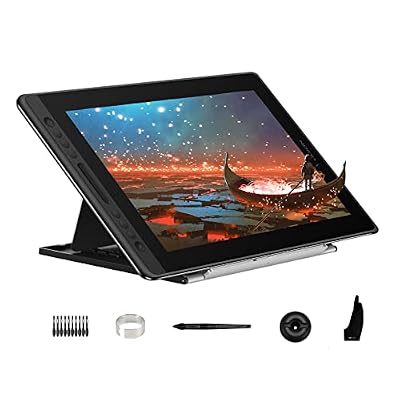
XP-Pen Drawing Tablet Review (2026): A Spec-Based Look
This xp pen drawing tablet review focuses on the Artist 22 2nd, a 21.5-inch pen display designed for digital artists.

What this report covers
- Last updated
- 4 Nov 2026
Figures above are read from the product listings for the models named below. Scores are out of 10, based on listed specifications and buyer feedback.
As Amazon Associates, we earn from qualifying purchases. This means we may receive a small commission at no extra cost to you if you click through and make a purchase.
As an Amazon Associate we earn from qualifying purchases. Links on this page are affiliate links.
This xp pen drawing tablet review focuses on the Artist 22 2nd, a 21.5-inch pen display designed for digital artists. It features a screen with 122% sRGB coverage and a battery-free stylus offering 8,192 pressure levels. The device connects via USB-C or HDMI and supports tilt functions up to 60 degrees. You get a large canvas for sketching, painting, and online teaching. The included stand adjusts from 16 to 90 degrees. This setup provides a precise cursor position across the entire display area. It is built for users who need a dedicated monitor for creative software on Windows or Mac systems.
- 122% sRGB color gamut for vibrant artwork
- 8,192 pressure sensitivity levels in the stylus
- 21.5-inch active display area for detailed work
- Battery-free pen with 60-degree tilt support
- Adjustable stand with 16 to 90-degree angle range
Good fit for
This tablet suits digital artists and remote educators who need a large, color-accurate canvas. The 122% sRGB range helps you create vivid images with sharp details. The battery-free pen reduces maintenance, while the tilt function adds natural stroke variation. Its compatibility with Windows and Mac OS makes it versatile for various setups. If you use Adobe Photoshop, Krita, or Zoom for teaching, this display integrates well. The adjustable stand also supports comfortable long-duration sessions.
Who can skip it
Skip this model if you need a portable, battery-powered tablet. The Artist 22 2nd requires a constant power adapter and a computer connection. It is not a standalone device. You also should look elsewhere if you prefer a smaller screen, as the 21.5-inch size takes up significant desk space. The lack of built-in wireless connectivity means you must manage cables. Users wanting a compact, all-in-one solution without a host PC will find this option too bulky and tethered.
Verdict
The XP-Pen Artist 22 2nd is a solid choice for desktop artists seeking a large, color-rich display. Its precise pen and adjustable stand make it practical for detailed creative work.
Key specs explained for this tablet
Screen Size: 21.5-Inch
This size offers a generous canvas for detailed digital artwork, sketching, and photo editing. You get enough space to view full interfaces and zoom into fine details without constant scrolling. For comparison, standard e-readers are much smaller, while larger tablets can be cumbersome. This mid-size balance suits most desks and provides a comfortable working area for extended creative sessions.
Color Gamut: 122% sRGB
This metric indicates the range of colors the display can show. A 122% sRGB rating means the screen reproduces more vibrant and varied hues than standard displays. You will see richer reds, deeper greens, and more accurate skin tones in your artwork. This is crucial for designers who need color accuracy. It outperforms basic screens that might wash out your creative output.
Pen Pressure: 8192 Levels
This spec defines how many distinct pressure points the stylus can detect. With 8,192 levels, the tablet captures subtle variations in your hand pressure. You can create thin lines with light touches and thick strokes with firm presses. This precision mimics traditional drawing tools. It allows for nuanced shading and texture control, which is essential for professional digital illustration and painting tasks.
Tilt Support: 60 degrees
Tilt support allows the stylus to detect the angle at which you hold it. With 60 degrees of tilt, you can simulate brush or pencil angles. This feature lets you create natural shading effects, like charcoal smudges or brush strokes, by simply changing your hand position. It adds realism to your digital art. This functionality is standard in high-quality pen displays but absent in basic mice.
Tablet Type: Pen Display
A pen display is a tablet with a built-in screen where you draw directly on the surface. Unlike standard tablets that require you to look at a separate monitor, this device lets you focus on your creation. You connect it to a computer, and the cursor matches your pen tip. This direct interaction reduces hand-eye coordination gaps, making the drawing process more intuitive and natural.
Design and build details
The listing describes the XP-Pen Artist 22 2nd as a 21.5-inch pen display with a specific physical footprint. According to the listing, the unit measures 23.4 inches in length, 16.5 inches in height, and 5.5 inches in width. This substantial size provides a large canvas for your artwork. You can view full application interfaces and zoom into fine details without needing to scroll constantly. The width of 5.5 inches likely refers to the depth or bezel area, contributing to a stable base for drawing.
A key design feature is the adjustable stand. You can change the screen angle from 16 to 90 degrees. This allows you to position the display for comfortable drawing or viewing. The design also includes a specially shaped cable slot and a detachable back cover. These elements help keep your cables protected and organized. This layout reduces clutter on your desk, which is useful for both home studios and office environments.
The tablet supports USB-C to USB-C connections. This lets you link directly to iMacs, MacBook Pros, or compatible Windows computers without extra adapters. The package includes various cables like HDMI and USB-A to USB-C options. This flexibility means you can set up the device in different workspaces. The battery-free stylus and included accessories, such as a drawing glove, complete the practical setup for digital creation.
Setup and everyday use guide
Setting up this pen display involves connecting your computer to the screen. You can use a USB-C to USB-C cable if your device supports it. This direct connection works well with iMacs and MacBook Pros. If you need an adapter, the listing includes a USB-A to USB-C cable and an HDMI cable. You also plug in the power adapter and cord. The package comes with a pen holder containing eight replacement nibs, a cleaning cloth, and a quick guide. You can adjust the screen angle from 16 to 90 degrees using the adjustable stand. The detachable back cover and cable slot help keep your workspace organized. This tablet supports Windows 10, 8, and 7, as well as Mac OS X 10.10 and higher. It works with popular digital art software like Adobe Photoshop, Illustrator, GIMP, Krita, and Blender3D. You can also use it for online teaching, remote work, and E-signatures. The battery-free stylus provides 8,192 pressure levels and tilt support up to 60 degrees. This allows for precise cursor positioning even at the corners of the screen. The 122% sRGB color gamut ensures vibrant colors in your artwork. You can use shortcut keys to streamline your workflow. The device replaces a mouse for more precise handwritten notes and signatures. It fits comfortably on a desk for long drawing sessions. The physical dimensions allow you to view full interfaces without constant scrolling. You get a black drawing glove to reduce friction while sketching.
Before you buy this tablet
You should verify your computer’s ports before purchasing. The listing notes that the USB-C to USB-C cable is sold separately. You need this for direct connections to iMacs or MacBook Pros. If your device lacks USB-C, you will require an adapter or the included HDMI cable. Check that your system runs Windows 10 or later, or Mac OS X 10.10 and higher. You must also confirm that your digital art software, such as Photoshop or Krita, is compatible. Keep the screen clean with the included cloth. This pen display fits into the Tablets & E-Readers category as a specialized tool. Unlike standard e-readers, it requires a host computer. It suits artists who need a large, color-accurate canvas. Ensure you have space for its 23.4-inch length. The adjustable stand helps reduce neck strain during long sessions. This setup is ideal for detailed drawing and online teaching.
Check before you buy
- Check if your computer has USB-C ports for direct connection.
- Verify your OS is Windows 10+ or Mac OS X 10.10+.
- Confirm your art software is compatible with this device.
- Ensure you have space for the 23.4-inch screen size.

XP-Pen Artist 22 2nd 21.5-Inch Display
Best for: Professional digital art and detailed illustration work
- Tablet Type
- Tethered pen display
- Screen Size
- 21.5"
- Pen Pressure
- 8192 levels
- Color Gamut
- 86% NTSC (Adobe RGB≥90%, sRGB≥122%)
- Operating System
- Windows
- Features
- Stylus, Stylus Pen, Battery-Free Pen, Shortcut Keys, Tilt Support
The XP-Pen Artist 22 2nd is a 21.5-inch pen display designed for digital artists and remote workers. It features a screen with 122% sRGB color coverage and supports 8,192 levels of pen pressure with tilt recognition. The device includes a battery-free stylus and an adjustable stand for comfortable viewing angles. It connects via USB-C or HDMI and works with major creative software on Windows and Mac systems.
- 21.5-inch screen with 122% sRGB color gamut
- 8,192 pressure sensitivity levels for precise strokes
- Supports 60 degrees of tilt function
- Includes adjustable stand for 16 to 90 degree angles
- Compatible with USB-C to USB-C direct connection
- 21.5-inch screen size is smaller than the 27-inch variation option
- Requires separate power adapter and cables for connection
- Standard style without integrated shortcut keys
- You need a large drawing surface for detailed digital art
- You require accurate color reproduction for professional work
- You want a versatile display for online teaching and signatures
- You prefer a compact portable tablet under 15 inches
- You need a model with built-in shortcut keys
- You only use Windows and want the smallest available option
Verdict: XP-Pen Artist 22 2nd 21.5-Inch Pen Display fits digital artists who prioritize color accuracy and a spacious canvas for their workflow. It is the right choice for those who need a stable, adjustable display for professional creative tasks.
Specifications side by side
| Spec | XP-Pen Artist 22 2nd 21.5-Inch Display |
|---|---|
| Tablet Type | Tethered pen display |
| Screen Size | 21.5" |
| Pen Pressure | 8192 levels |
| Color Gamut | 86% NTSC (Adobe RGB≥90%, sRGB≥122%) |
| Operating System | Windows |
| Features | Stylus, Stylus Pen, Battery-Free Pen, Shortcut Keys, Tilt Support |
| Dimensions | 23.4 × 5.5 × 16.5 inches |
| Size | 21.5 Inch |
| Model | ArtistCD220F_US |
Frequently asked questions
What is the best XP-Pen drawing tablet for professional digital art?
The XP-Pen Artist 22 2nd is the top choice for professional digital artists. It features a large 21.5-inch screen that provides ample space for detailed illustration work. The device includes a battery-free stylus with 8,192 pressure levels. This setup supports tilt functions and shortcut keys for a smooth workflow.
Does the XP-Pen Artist 22 2nd require batteries for the pen?
No, the stylus for this tablet is battery-free. You do not need to charge or replace batteries for the pen. This feature ensures consistent performance without interruption. The pen also supports tilt functions, allowing for natural shading and line variation during your creative process.
How large is the screen on the XP-Pen Artist 22 2nd?
The screen size is 21.5 inches. This generous canvas allows you to view full interfaces and zoom into fine details without constant scrolling. The physical dimensions are 23.4 inches in length and 16.5 inches in height. It is designed to fit comfortably on a desk for extended work sessions.
What operating systems are supported by this drawing tablet?
The listing specifies Windows as the supported operating system. You can connect the device to your computer using the included cables. The tablet functions as a pen display, mirroring your screen for direct drawing. Ensure your system meets the connectivity requirements for optimal performance.
What is the pen pressure sensitivity of this tablet?
The pen pressure sensitivity is 8,192 levels. This high resolution allows for precise control over line weight and opacity. You can create subtle gradients and detailed textures with ease. The battery-free pen ensures reliable transmission of these pressure data points to your software.
Is the XP-Pen Artist 22 2nd suitable for detailed illustration work?
Yes, it is specifically designed for detailed illustration work. The combination of a large 21.5-inch display and high pressure sensitivity supports professional creative tasks. Shortcut keys and tilt support further enhance the user experience. This makes it a stable and efficient tool for digital artists.