XP-Pen XPPen Artist 13.3 Pro V2 Drawing Tablet Review: Who It Fits and Who Should Skip It
This xp pen xppen artist 13 3 pro v2 drawing tablet review covers a 13.3-inch pen display built for precision.

What this report covers
- Last updated
- 4 Nov 2026
Figures above are read from the product listings for the models named below. Scores are out of 10, based on listed specifications and buyer feedback.
As Amazon Associates, we earn from qualifying purchases. This means we may receive a small commission at no extra cost to you if you click through and make a purchase.
As an Amazon Associate we earn from qualifying purchases. Links on this page are affiliate links.
This xp pen xppen artist 13 3 pro v2 drawing tablet review covers a 13.3-inch pen display built for precision. It features 16K pressure levels and a full-laminated screen with anti-glare coating. The device connects to computers via USB-C and includes an adjustable stand. You get 99% sRGB color accuracy and 8 customizable shortcut keys. The included stylus offers low latency for smooth line work. This setup targets digital artists who need accurate color reproduction and responsive input. It is not a standalone unit but requires a host device to function properly.
- 16K pen pressure levels for precise line control
- 13.3-inch full-laminated display with anti-glare film
- 99% sRGB color gamut for accurate color reproduction
- Red Dial and 8 shortcut keys for quick adjustments
- Compatible with Windows, macOS, Chrome OS, and Android
Good fit for
This tablet suits aspiring graphic designers and junior illustrators who value ease of use. The included adjustable stand promotes better posture during long sessions. Beginners benefit from the intuitive driver setup and clear instructions. Artists working in animation or digital painting will appreciate the wide viewing angles and color fidelity. Users with Windows, Mac, or Chrome devices can integrate it into their existing workflow. It fits those who want a paper-like feel without complex calibration.
Who can skip it
You should look elsewhere if you need a portable, standalone device. This unit requires a computer, laptop, or compatible Android phone to operate. It is not a self-contained tablet with its own operating system. If you lack a host device with USB-C support, this product will not work for you. Users seeking a wireless experience without cables may find the setup restrictive. It is also less ideal for those who prefer smaller screens under 13 inches.
Verdict
The XP-Pen Artist 13.3 Pro V2 offers solid color accuracy and responsive input for connected workflows. It is a practical choice for beginners and professionals who already have a compatible host device.
Key specs explained
16K Pressure Levels
The stylus detects 16,384 distinct pressure points. This high resolution allows for extremely subtle variations in line weight and opacity. You can create fine hair strands or bold strokes with equal precision. This level of detail matters for digital painting and illustration. It reduces the chance of broken lines during fast movements. Compare this to lower-end tablets that may feel stiff or unresponsive.
13.3-Inch Screen Size
The display measures 13.3 inches diagonally. This size offers a balanced workspace for drawing without taking up too much desk space. It is large enough for detailed work but portable enough for travel. The 11-inch option exists for those needing a smaller footprint. This size suits both beginners and professionals who want a dedicated drawing area.
Full-Laminated Display
The glass and display layers are bonded together. This reduces parallax, the gap between the pen tip and the cursor. You feel a direct connection to the screen, similar to writing on paper. It also improves image clarity and reduces glare. This technology enhances the overall drawing experience. Non-laminated screens often feel disconnected and less precise for detailed artistic work.
99% sRGB Color Gamut
The screen covers 99 percent of the sRGB color space. This ensures accurate and vibrant colors for most digital projects. You see what others see on standard monitors. It supports 16.7 million colors for smooth gradients. This accuracy is vital for graphic design and photo editing. Check this spec when buying tablets for creative work to avoid washed-out images.
Red Dial Quick Key
A physical dial allows quick control over brush size or zoom. You can adjust settings without moving your hand from the drawing position. This reduces wrist strain during long sessions. It simplifies the interface for beginners. The eight additional keys offer further customization. This hardware feature streamlines your workflow compared to using only on-screen menus.
Design and Build Overview
The XP-Pen Artist 13.3 Pro V2 is a pen display with a black finish. According to the listing, the unit measures 17 inches in length and 11 inches in width. It weighs 2.5 pounds. The 13.3-inch screen uses a full-laminated panel with an anti-glare film. This construction reduces parallax and glare, creating a paper-like feel. The device is not a standalone tablet. You must connect it to a computer or laptop via the included USB-C cable.
The layout prioritizes efficiency for long sessions. An easy-control red dial sits near the top edge. This scroll wheel simplifies interface adjustments for brush size and zoom. You can maintain a natural hand position, which reduces wrist strain. Eight customizable shortcut keys are also present. These allow you to assign frequent functions, minimizing workflow interruptions. The adjustable stand supports the tablet at a 90-degree angle. This promotes better posture and improves heat dissipation.
The build targets aspiring graphic designers and junior illustrators. The compact size fits standard desks without overwhelming the workspace. The full-laminated screen ensures vibrant colors and sharp details from wide viewing angles. You get 125% sRGB color gamut coverage. This allows for accurate color fidelity in your art projects. The design balances precision tools with user-friendly setup. It suits those who need a reliable, connected drawing surface.
Setup and Everyday Use
You connect the tablet to your computer using the included full-featured USB-C cable. The listing notes this is not a standalone device, so it requires a host system. It supports Windows 7 or later, macOS 10.13 or later, Chrome OS 88 or later, and Android devices with USB-C support. Linux users need driver support. Setup involves installing the updated driver. The interface allows you to configure the drawing screen and pen with a single installation. You can adjust brightness, contrast, and color temperature on Windows systems. This straightforward process helps beginners start creating quickly.
In daily use, the 13.3-inch full-laminated screen with AG film reduces parallax and glare. The 178-degree viewing angle keeps colors sharp from various positions. The 16K pressure levels detect 16,384 distinct points, allowing precise line weight control. The stylus has a 90ms response rate, minimizing lag. You use the red dial for quick adjustments like brush size and zoom. Eight customizable shortcut keys let you assign frequent functions. The adjustable stand supports angles up to 90 degrees, promoting better posture during long sessions. The tablet works with popular software like Photoshop, Illustrator, Krita, and Blender 3D. This combination of hardware and software integration supports a streamlined workflow for digital artists and designers.
Before You Buy This Tablet
This device is a pen display, not a standalone tablet. You must connect it to a computer, laptop, or compatible Android device via the included USB-C cable. It does not have its own operating system or internal storage. Check your host machine’s ports to ensure you have the necessary USB-C output. The listing confirms support for Windows 7 or later, macOS 10.13 or later, Chrome OS 88 or later, and Android with USB-C support. You may need an additional stand if the included adjustable base does not fit your desk setup. This product belongs in the Tablets & E-Readers category, but it serves a different role than iPads or Kindles. It is a peripheral for creative work. Keep the screen clean with a microfiber cloth. Avoid harsh chemicals. Verify your drawing software compatibility before starting. This unit sits alongside other creative tools rather than replacing your primary computing device.
Check before you buy
- Confirm your computer has a compatible USB-C port.
- Check if your operating system meets the minimum version.
- Verify your drawing software supports external pen displays.
- Ensure you have space for the adjustable stand.
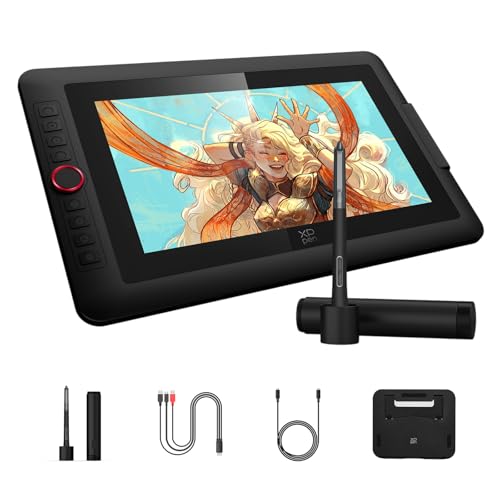
XP-Pen Artist 13.3 Pro V2
Best for: beginners needing precise pressure sensitivity
- Screen Size
- 13.3"
- Display Resolution
- Full HD
- Pen Pressure
- 16K
- Color Gamut
- 125% sRGB, 107% Adobe RGB, 95% P3
- Display Finish
- Full-Laminated AG Glass
- Shortcut Controls
- Red Dial, 8 customizable keys
The XP-Pen Artist 13.3 Pro V2 is a 13.3-inch pen display with a full-laminated screen and AG glass. It features 16K pressure levels and 99% sRGB color accuracy. The Red Dial and 8 shortcut keys simplify your workflow. This tablet suits beginners and junior illustrators who need precise control and easy setup for digital art projects.
- 16K pressure levels for precise line control
- Full-laminated screen with AG film reduces glare
- 99% sRGB and 107% Adobe RGB color gamut
- Red Dial and 8 customizable shortcut keys
- Compatible with Android via USB-C
- 13.3-inch screen is smaller than larger display options
- 2.5-pound weight adds bulk to your workspace
- Limited to 250 cd/m² brightness output
- You want a full-laminated display for reduced parallax
- You need a Red Dial for quick brush adjustments
- You work with Android devices via USB-C
- You require a screen larger than 13.3 inches
- You need a standalone tablet without a computer
- You prefer a lighter device under 2 pounds
Verdict: XP-Pen Artist 13.3 Pro V2 fits beginners and junior illustrators who value precise pressure sensitivity and an intuitive Red Dial for daily digital art tasks.
Specifications side by side
| Spec | XP-Pen Artist 13.3 Pro V2 |
|---|---|
| Screen Size | 13.3" |
| Display Resolution | Full HD |
| Pen Pressure | 16K |
| Color Gamut | 125% sRGB, 107% Adobe RGB, 95% P3 |
| Display Finish | Full-Laminated AG Glass |
| Shortcut Controls | Red Dial, 8 customizable keys |
| Operating System | Android |
| Features | Stylus, Stylus Pen, Shortcut Keys, Dial |
| Display | Full-Laminated |
| Color | Black |
| Tablet Type | Pen Display |
| Audience | Animation, Beginners |
| Length | 17 inches |
| Width | 11 inches |
| Weight | 2.5 pounds |
| Size | 13.3 INCH |
| Model | Artist 13.3 Pro V2 |
Frequently asked questions
Is the XP-Pen Artist 13.3 Pro V2 good for beginners?
Yes, it fits beginners and junior illustrators who value precise pressure sensitivity. The device includes an intuitive Red Dial for daily digital art tasks. You get 16K pressure levels for accurate line control. This setup helps new users learn digital drawing without a steep learning curve.
Does this tablet work with Android devices?
Yes, the listing specifies Android as an operating system. You can connect it to compatible Android devices via the included USB-C cable. It is not a standalone tablet, so it relies on the host system for power and processing. Check your device ports before purchasing.
What is the screen size of this drawing tablet?
The screen size is 13.3 inches. The unit itself measures 17 inches in length and 11 inches in width. It features a full-laminated display for better pen-to-cursor alignment. The black finish helps reduce visual distractions while you work on your digital art projects.
How many pressure levels does the stylus support?
The stylus detects 16,384 distinct pressure points. This high resolution allows for subtle variations in line weight and opacity. You can create fine details or bold strokes with equal precision. This feature is essential for realistic digital painting and illustration workflows.
Does the XP-Pen Artist 13.3 Pro V2 have shortcut keys?
Yes, the product attributes list shortcut keys as a feature. The device also includes a dedicated dial for quick adjustments. These controls help streamline your workflow during daily digital art tasks. You can map these keys to your preferred software functions for efficiency.
Is this a standalone tablet or a pen display?
It is a pen display, not a standalone tablet. You must connect it to a computer or compatible Android device. It does not have its own operating system or internal storage. The unit weighs 2.5 pounds and requires a host system to function.
Who is this drawing tablet best suited for?
It is best for beginners and those focused on animation. The precise pressure sensitivity supports detailed illustration work. The intuitive dial aids in daily digital art tasks. If you need a reliable tool for learning or creating 2D art, this device meets your needs.


