Best Drawing Tablets Under $1000: 6 Spec-Based Picks
Finding the best drawing tablets under $1000 requires careful comparison of published specifications.

What this report covers
- Last updated
- 4 Nov 2026
Figures above are read from the product listings for the models named below. Scores are out of 10, based on listed specifications and buyer feedback.
As Amazon Associates, we earn from qualifying purchases. This means we may receive a small commission at no extra cost to you if you click through and make a purchase.
As an Amazon Associate we earn from qualifying purchases. Links on this page are affiliate links.
Finding the best drawing tablets under $1000 requires careful comparison of published specifications. We evaluated 6 pen displays to help you choose the right tool for your creative workflow. Each pick is based strictly on the specs listed by manufacturers, ensuring you know exactly what you are getting. The Wacom Cintiq Pro 16 Black leads this list because its compact 16-inch 4K screen delivers professional-grade color accuracy without taking up excessive desk space. This guide breaks down the key differences between these models so you can decide which display size, resolution, and pen features best fit your specific art style and workspace constraints.
Match screen size to your workflow
Your primary choice should be screen size, which ranges from 15.6 to 24 inches. The Wacom Cintiq Pro 16 offers a compact 16-inch 4K display for portability. In contrast, the XPPen Artist 24 Pro provides a spacious 23.8-inch 2.5K canvas for detailed illustration. Select the size that fits your desk space and drawing style.
| # | Product | Best for | Price |
|---|---|---|---|
| 1 | Wacom Cintiq Pro 16 Black Best overall | compact 4K color-accurate drawing | |
| 2 | XPPen Artist 24 Pro 23.8-Inch Pen Display Best budget | Large-screen digital painting and illustration | |
| 3 | HUION KAMVAS Pro 24 4K 23.8-Inch Best premium | desktop artists needing large 4K color accuracy | |
| 4 | HUION KAMVAS Pro 19 18.4-Inch 4K Touchscreen Also great | Color-accurate digital art and design | |
| 5 | XP-Pen Artist Ultra 16 15.6" Touchscreen Best 15.6-inch | Portable professional illustration with color accuracy | |
| 6 | DIGIDRAW Turing Pro 19 18.4-inch Pen Display Best anti-glare | glare-free professional color work |
The best fit for you
- You want the most compact 4K model for professional work – Wacom Cintiq Pro 16 Black – The 16-inch 4K screen and 3.3-pound weight fit compact workflows.
- You need a large screen with physical shortcut keys – XPPen Artist 24 Pro 23.8-Inch Pen Display – The 23.8-inch 2.5K display and dedicated shortcut keys aid illustration.
- You prefer a large 4K screen with Bluetooth connectivity – HUION KAMVAS Pro 24 4K 23.8-Inch – The 23.8-inch 4K display and Bluetooth support suit desktop artists.
- You want a color-accurate display with touch input – HUION KAMVAS Pro 19 18.4-Inch 4K Touchscreen – The 18.4-inch 4K touchscreen offers precision for focused design tasks.
- You prioritize portability with a 15.6-inch color-accurate screen – XP-Pen Artist Ultra 16 15.6" Touchscreen – The 15.6-inch 3.37-pound display balances color fidelity and portability.
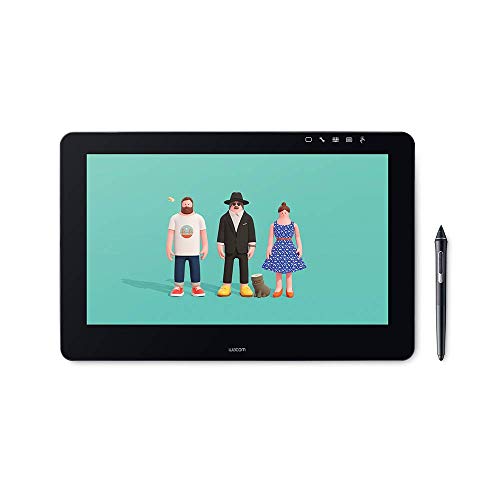
Wacom Cintiq Pro 16 Black
Best for: compact 4K color-accurate drawing
- Screen Size
- 16"
- Display Resolution
- Up to 4K (3840 x 2160)
- Color Gamut
- 94% Adobe RGB
- Display Finish
- etched glass
- Color
- Black
- Dimensions
- 16.1 × 10.4 × 0.7 inches
The Wacom Cintiq Pro 16 is a 16-inch drawing tablet with a 4K UHD display. It covers 94 percent Adobe RGB and shows 16.7 million colors. The screen has a 250 cd/m2 brightness level. It uses the Wacom Pro Pen 2 with high accuracy. This model suits artists who need precise color work and a reliable pen on a compact screen.
- 16-inch 4K UHD display with 3840 x 2160 resolution
- 94 percent Adobe RGB color gamut for accurate color reproduction
- Wacom Pro Pen 2 offers high accuracy and pressure sensitivity
- Integrated stand allows for inclined working angles
- Etched glass screen provides a natural drawing feel
- 16-inch screen is smaller than the 24-inch or 19-inch models on this list
- 250 cd/m2 brightness is lower than typical 4K professional displays
- 3.3 pounds weight is heavier than smaller portable tablets
- You need a 4K resolution for detailed work
- You prefer a 16-inch screen size for portability
- You want 94 percent Adobe RGB color coverage
- You require a screen larger than 16 inches
- You need brightness levels above 250 cd/m2
- You want a lighter device under 3 pounds
Verdict: Wacom Cintiq Pro 16" 4K Display fits professionals who prioritize color accuracy and pen precision on a compact 16-inch 4K screen. It is ideal for artists who need Adobe RGB coverage and do not require a larger display.

XPPen Artist 24 Pro 23.8-Inch Pen Display
Best for: Large-screen digital painting and illustration
- Tablet Type
- Tethered pen display
- Screen Size
- 23.8 inch
- Display Resolution
- 2560 x 1440 2.5K QHD
- Pen Pressure
- 8192 levels
- Color Gamut
- 118% sRGB, 90% Adobe RGB, 84% NTSC
- Display Finish
- Anti-glare film
The XP-Pen Artist 24 Pro is a 23.8-inch pen display with 2.5K QHD resolution. It covers 118% sRGB color gamut for accurate visuals. The included battery-free stylus offers 8192 pressure levels and tilt support. You get 20 customizable shortcuts and dual dial wheels. This setup suits digital artists who need a large, color-accurate screen for detailed work.
- 23.8-inch IPS display with 2.5K QHD resolution
- 118% sRGB color gamut and 16.7M color depth
- 8192 levels of pen pressure with 60° tilt support
- 20 customizable shortcuts and dual red dial wheels
- Battery-free stylus with 220 RPS report rate
- 2.5K resolution is lower than the 4K UHD panels on competing models
- 15.4-pound weight makes it heavier than smaller tablet alternatives
- 118% sRGB coverage is less extensive than 140% sRGB on rivals
- You need a large 23.8-inch screen for detailed artwork
- You prioritize color accuracy with 118% sRGB coverage
- You want physical shortcut keys and dial wheels for workflow
- You require 4K UHD resolution for maximum pixel density
- You prefer a lighter device under 10 pounds
- You need a standalone tablet without a computer
Verdict: The XP-Pen Artist 24 Pro 23.8-Inch Pen Display offers a large, color-accurate canvas for illustrators. It fits users who value physical controls and a spacious 2.5K screen over 4K resolution.

HUION KAMVAS Pro 24 4K 23.8-Inch
Best for: desktop artists needing large 4K color accuracy
- Tablet Type
- Pen display (not standalone)
- Screen Size
- 23.8"
- Display Resolution
- 4K UHD (3840×2160)
- Pen Pressure
- 8192
- Color Gamut
- 140% sRGB
- Display Finish
- Full lamination, anti-glare glass
The HUION KAMVAS Pro 24 is a 23.8-inch pen display with 4K UHD resolution. It features full lamination and a 140% sRGB color gamut for accurate color reproduction. The device includes an 8192-level pressure stylus and a customizable Keydial Mini. It connects via HDMI, DP, or USB-C to Windows, Mac, or Android devices. This large screen suits professionals needing a spacious, high-resolution workspace.
- 23.8-inch 4K UHD display for detailed work
- 140% sRGB color gamut with Quantum Dot technology
- Full lamination eliminates air gap between screen and glass
- Includes customizable Keydial Mini for workflow shortcuts
- Supports HDMI, DP, and USB-C connections
- Heavier at 13.7 pounds compared to smaller models
- Requires connection to a host device; not standalone
- 8192 pressure levels lower than some competitors
- You need a large 23.8-inch screen for multitasking
- You prioritize high color accuracy with 140% sRGB
- You want a dedicated pen display for your desktop
- You require a portable, standalone tablet with battery
- You prefer a lighter device under 10 pounds
- You need more than 8192 pressure levels
Verdict: The HUION KAMVAS Pro 24 4K Pen Display is a heavy, desktop-focused solution for artists who need a large, color-accurate screen. It fits professionals who value screen real estate and precise color over portability.

HUION KAMVAS Pro 19 18.4-Inch 4K Touchscreen
Best for: Color-accurate digital art and design
- Tablet Type
- Tethered pen display
- Screen Size
- 18.4-inch
- Display Resolution
- 3840×2160 4K UHD
- Pen Pressure
- 16,384 levels
- Color Gamut
- 99% sRGB, 96% Adobe RGB, 98% DCI-P3
- Display Finish
- Fully laminated, etched canvas glass 2.0
The HUION KAMVAS Pro 19 is an 18.4-inch pen display with 4K UHD resolution. It covers 96% Adobe RGB and 98% DCI-P3 for accurate color work. The screen supports multi-touch gestures on Windows. It includes a Bluetooth keypad with a dial for shortcuts. The unit weighs 8.82 pounds and connects via USB-C. It suits artists needing high clarity and color depth.
- 4K UHD (3840×2160) resolution for sharp detail
- 96% Adobe RGB and 98% DCI-P3 color coverage
- 16,384 levels of pen pressure with tilt support
- Bluetooth keypad with customizable dial function
- Multi-touch gestures supported on Windows
- Heavier build at 8.82 pounds compared to lighter competitors
- Smaller 18.4-inch screen size versus 24-inch options
- Mac OS multi-touch support is currently in beta
- You need precise color reproduction for design work
- You want a high-resolution 4K display for detail
- You prefer using shortcut keys and a dial
- You require a larger screen for wide workflows
- You need a lighter device for frequent travel
- You rely on full multi-touch on Mac
Verdict: The HUION KAMVAS Pro 19 18.4-Inch 4K offers high-resolution clarity and accurate color for focused creative tasks. It fits designers who value color precision and shortcut controls over larger screen real estate.

XP-Pen Artist Ultra 16 15.6" Touchscreen
Best for: Portable professional illustration with color accuracy
- Tablet Type
- Tethered pen display
- Screen Size
- 15.6"
- Display Resolution
- 3840 x 2160 UHD
- Pen Pressure
- 16384
- Color Gamut
- 99% Adobe RGB, 99% sRGB, 98% Display P3
- Display Finish
- Laminated, etched glass, AF coating
The XP-Pen Artist Ultra 16 is a 15.6-inch drawing tablet featuring a 4K OLED touchscreen. It delivers 99% Adobe RGB color coverage and 16K pen pressure sensitivity. The device supports multi-point touch gestures and includes a customizable shortcut remote. You get dual USB-C connections for flexible setup with computers or laptops. This display suits professionals needing precise color accuracy and responsive input for digital art creation.
- 15.6-inch 4K OLED display with 99% Adobe RGB coverage
- 16K pen pressure levels with 60-degree tilt support
- Multi-point touchscreen with customizable gesture zones
- Includes ACK05 shortcut remote with 40 customizable keys
- Heavier at 3.37 pounds compared to smaller 14-inch alternatives
- Smaller 15.6-inch screen size versus 19-inch and 24-inch competitors
- Requires connection to a computer or laptop to function
- You need a portable display with professional color accuracy
- You want touchscreen gestures for canvas navigation
- You prefer a compact 15.6-inch form factor
- You require a standalone tablet without a computer
- You need a screen larger than 15.6 inches
- You want a built-in battery for wireless use
Verdict: XP-Pen Artist Ultra 16 15.6-inch offers high-resolution visuals and touch controls for artists who prioritize color fidelity and portability over screen size.

DIGIDRAW Turing Pro 19 18.4-inch Pen Display
Best for: glare-free professional color work
- Tablet Type
- Pen display
- Screen Size
- 18.4"
- Display Resolution
- 4K UHD
- Pen Pressure
- 16,384 levels
- Display Finish
- AG+AF matte anti-glare
- Features
- Stylus, Stylus Pen
The DIGIDRAW Turing Pro 19 is an 18.4-inch 4K UHD pen display with an anti-glare screen. It features 16K pressure sensitivity and factory calibration to ΔE < 1.3. The device includes 10-point touch and a wireless remote with 11 shortcuts. It weighs 4.41 pounds. This model suits artists who need color accuracy and glare reduction for professional design work.
- 18.4-inch 4K UHD display with anti-glare coating
- Factory-calibrated to ΔE < 1.3 for color accuracy
- 16,384 levels of pen pressure sensitivity
- Includes K30 wireless remote with 11 shortcut keys
- 18.4-inch screen is smaller than the 24-inch and 16-inch OLED options on this list
- 4.41-pound weight is heavier than many portable tablets
- Standard IPS panel rather than the OLED displays found in some competitors
- You work in bright environments and need an anti-glare screen
- You require precise color calibration for professional photo editing
- You want physical shortcut keys via a wireless remote
- You prefer a lighter, more portable device under 3 pounds
- You want the largest possible canvas on this list
- You specifically need an OLED display for deep blacks
Verdict: The DIGIDRAW Turing Pro 19 4K AG Pen Display fits designers who prioritize color fidelity and glare reduction over screen size. It offers professional calibration and remote control efficiency in a standard IPS format.
Specifications side by side
| Spec | Wacom Cintiq Pro 16 Black | XPPen Artist 24 Pro 23.8-Inch Pen Display | HUION KAMVAS Pro 24 4K 23.8-Inch | HUION KAMVAS Pro 19 18.4-Inch 4K Touchscreen | XP-Pen Artist Ultra 16 15.6" Touchscreen | DIGIDRAW Turing Pro 19 18.4-inch Pen Display |
|---|---|---|---|---|---|---|
| Tablet Type | – | Tethered pen display | Pen display (not standalone) | Tethered pen display | Tethered pen display | Pen display |
| Screen Size | 16" | 23.8 inch | 23.8" | 18.4-inch | 15.6" | 18.4" |
| Display Resolution | Up to 4K (3840 x 2160) | 2560 x 1440 2.5K QHD | 4K UHD (3840×2160) | 3840×2160 4K UHD | 3840 x 2160 UHD | 4K UHD |
| Pen Pressure | – | 8192 levels | 8192 | 16,384 levels | 16384 | 16,384 levels |
| Color Gamut | 94% Adobe RGB | 118% sRGB, 90% Adobe RGB, 84% NTSC | 140% sRGB | 99% sRGB, 96% Adobe RGB, 98% DCI-P3 | 99% Adobe RGB, 99% sRGB, 98% Display P3 | – |
| Display Finish | etched glass | Anti-glare film | Full lamination, anti-glare glass | Fully laminated, etched canvas glass 2.0 | Laminated, etched glass, AF coating | AG+AF matte anti-glare |
| Shortcut Controls | – | 20 shortcut keys, 2 red dials | Keydial Mini | Keydial Mini with 18 keys and dial | ACK05 shortcut remote (40 keys) | – |
| Operating System | – | Windows | – | – | Android | – |
| Features | – | Stylus, Stylus Pen, Battery-Free Pen, Shortcut Keys, Tilt Support | Stylus, Stylus Pen, Bluetooth, Battery-Free Pen | Stylus, Stylus Pen | Stylus, Stylus Pen, Dial | Stylus, Stylus Pen |
| Display | – | – | Full-Laminated | Touchscreen | Touchscreen | Anti-Glare |
| Color | Black | Black | Black | Dark Grey | – | Black |
| Dimensions | 16.1 × 10.4 × 0.7 inches | 24.9 × 14.6 × 1.76 inches | 23.2 × 14.3 × 0.89 inches | 17.7 × 10.7 × 0.1 inches | – | – |
| Weight | 3.3 pounds | 15.4 pounds | 13.7 pounds | 8.82 pounds | 3.37 pounds | 4.41 pounds |
| Length | – | – | – | – | 15.9 inches | 17.8 inches |
| Width | – | – | – | – | 13.5 inches | 11.6 inches |
| Size | 16" | 23.8 Inch | 23.8-inch | 18.4-Inch | 15.6" | 19 inch |
| Model | DTH1620AK0 | Artist24 Pro | GT2401 | GT1902 | Ultra16 | TURING PRO 19 touch |
Choosing the Right Drawing Tablet
Prioritize Screen Resolution
Screen resolution determines the clarity of your digital canvas. Higher pixel counts allow for finer detail in your artwork. The Wacom Cintiq Pro 16 and HUION KAMVAS Pro 24 both offer 4K displays for sharp visuals. The XPPen Artist 24 Pro uses a 2.5K screen, which remains clear but has slightly fewer pixels. Choose 4K if you need maximum precision. Select 2.5K if you prefer a larger physical screen area over the highest possible pixel density.
Check Pen Pressure Levels
Pen pressure levels define how sensitive your stylus is to your touch. More levels mean smoother transitions between thick and thin lines. Most tablets in this guide offer 8,192 levels of pressure. However, the HUION KAMVAS Pro 19 and XP-Pen Artist Ultra 16 provide 16K levels. This increased sensitivity can help with subtle shading. If you require extreme nuance in your strokes, look for the 16K specification. Otherwise, 8,192 levels are sufficient for most professional illustration tasks.
Evaluate Display Finish
The surface finish of your screen affects visibility and texture. An anti-glare coating reduces reflections from overhead lights or windows. The DIGIDRAW Turing Pro 19 features an anti-glare display for comfortable work in bright environments. Most other models use standard glossy or matte finishes without specific glare reduction noted. If you work near windows or under strong lights, prioritize the anti-glare specification. This feature helps maintain color accuracy and reduces eye strain during long sessions.
Consider Touch Capability
Touchscreen functionality allows you to interact with the interface using your fingers. This can speed up navigation and zooming. The HUION KAMVAS Pro 19 and XP-Pen Artist Ultra 16 both include touchscreens. Other models in this list do not mention touch support. If you prefer using hand gestures to navigate your software, select a model with this feature. If you rely solely on the stylus and keyboard shortcuts, touch capability is less critical for your workflow.
Review Physical Controls
Physical controls provide quick access to common functions without reaching for the mouse. The XPPen Artist 24 Pro includes dedicated shortcut keys on the device. The XP-Pen Artist Ultra 16 features a dial for precise adjustments. Other models do not list specific physical controls in their attributes. If you value tactile feedback and rapid access to tools, look for shortcut keys or dials. These features can improve efficiency and reduce hand fatigue during intensive creative work.
Frequently asked questions
Which drawing tablet offers the highest pen pressure sensitivity?
The HUION KAMVAS Pro 19 and XP-Pen Artist Ultra 16 both provide 16K levels of pen pressure. This specification allows for extremely fine control over line weight and opacity. You will notice smoother transitions in your strokes compared to models with 8192 levels. This sensitivity is ideal for detailed digital painting and professional illustration work.
What is the lightest drawing tablet on this list?
The Wacom Cintiq Pro 16 and the XP-Pen Artist Ultra 16 are the lightest options at 3.3 pounds and 3.37 pounds respectively. These weights make them easier to move between workspaces. The DIGIDRAW Turing Pro 19 is also relatively light at 4.41 pounds. Heavier models like the XPPen Artist 24 Pro weigh 15.4 pounds and are designed for stationary desk use.
Do any of these tablets include touch screen functionality?
Yes, the HUION KAMVAS Pro 19 and the XP-Pen Artist Ultra 16 both feature touch screens. This allows you to zoom, pan, or scroll using your fingers while drawing. The XP-Pen Artist Ultra 16 also includes a dial for additional control. Other models in this list do not list touch capabilities in their specifications.
Which model is best for reducing screen glare?
The DIGIDRAW Turing Pro 19 is specifically designed with an anti-glare display. This feature helps reduce reflections during long creative sessions. It provides professional calibration and clear visibility in various lighting conditions. This makes it a strong choice for designers who work in brightly lit environments or near windows.
How large is the screen on the best budget option?
The XPPen Artist 24 Pro features a 23.8-inch screen. This large canvas provides ample space for detailed illustration and layout work. It offers a 2.5K resolution, which balances clarity with performance. The physical size is substantial, measuring 24.9 inches in length, making it a desktop-focused tool rather than a portable one.
Which tablet supports Bluetooth connectivity?
The HUION KAMVAS Pro 24 includes Bluetooth support. This allows for wireless connection to compatible devices, reducing cable clutter on your desk. It also features a battery-free pen for consistent pressure detection. Most other models in this list do not list Bluetooth as a standard feature in their published specifications.
What is the thinnest drawing tablet available?
The HUION KAMVAS Pro 19 is the thinnest model at just 0.1 inches in height. This slim profile makes it easy to store or place on a desk without taking up much vertical space. In contrast, the XPPen Artist 24 Pro is significantly thicker at 1.76 inches due to its larger internal components and stand design.


