Best Drawing Tablets Under $200 in 2026: 13 Picks Ranked by Specs
Finding the best drawing tablets under $200 requires looking past marketing claims.

What this report covers
- Last updated
- 1 Nov 2026
Figures above are read from the product listings for the models named below. Scores are out of 10, based on listed specifications and buyer feedback.
As Amazon Associates, we earn from qualifying purchases. This means we may receive a small commission at no extra cost to you if you click through and make a purchase.
As an Amazon Associate we earn from qualifying purchases. Links on this page are affiliate links.
Finding the best drawing tablets under $200 requires looking past marketing claims. We compared 13 models using only the specifications published on their listings. The Wacom Bamboo Capture Pen Tablet leads this list. It wins because its compact 6.9-inch width fits easily into a bag for users wanting portability. This guide helps you decide between pen displays, standalone devices, and traditional pen tablets based on your specific workflow needs.
Choose between pen displays and pen tablets
Your first decision is whether you need a screen. Pen displays like the XP-Pen Artist12 offer an 11.6-inch view for direct drawing. Pen tablets like the Wacom Bamboo Capture lack a screen, requiring you to look at your computer monitor. Select the type that matches your workflow. Both styles fit under $200.
| # | Product | Best for | Price |
|---|---|---|---|
| 1 | Wacom Bamboo Capture Pen Tablet Best overall | Users wanting a compact pen tablet with included software | |
| 2 | Wacom Graphire Medium Pen Tablet Also great | Beginners needing a portable, cordless pen tablet | |
| 3 | Wacom Intuos Medium Bluetooth Pen Tablet Also great | Wireless pen input without a built-in screen | |
| 4 | XP-PEN Artist12 11.6-Inch Pen Display Also great | artists needing a color-accurate pen display | |
| 5 | Wacom Intuos Pro Small Bluetooth Tablet Best budget | professional illustrators needing precision | |
| 6 | GAOMON PD1161 11.6" Pen Display Best premium | Computer-connected digital sketching | |
| 7 | Frunsi RubensTab T11 Pro 10.1-Inch Also great | portable standalone sketching and design | |
| 8 | GAOMON PD1320 13.3-Inch Gray Pen Display Best gray | artists needing a large 13.3-inch color-accurate display | |
| 9 | Frunsi RubensTab T8 8-Inch Standalone Tablet Best 8-inch | beginners seeking portable standalone art tools | |
| 10 | Simbans PicassoTab A10 10-Inch Best 128gb | Beginners needing a standalone tablet | |
| 11 | HUION Kamvas 13 (Gen 3) 13.3-Inch Pen Display Also great | desktop artists needing color accuracy | |
| 12 | Callsky-Kids 12-Inch Blue Standalone Tablet Best 256gb | portable standalone art creation with cellular data | |
| 13 | VEIKK VK1200 V3 11.6-Inch Pen Display Also great | artists needing a laminated pen display |
The best fit for you
- You want the most compact pen tablet with included software – Wacom Bamboo Capture Pen Tablet – The Wacom Bamboo Capture measures 10.9 by 6.9 inches and weighs 14.9 ounces for easy portability.
- You need a lightweight, cordless pen tablet for beginners – Wacom Graphire Medium Pen Tablet – The Wacom Graphire Medium weighs just 8.82 ounces and connects via simple USB for hassle-free use.
- You prefer wireless pen input without a built-in screen – Wacom Intuos Medium Bluetooth Pen Tablet – The Wacom Intuos Medium supports Bluetooth connectivity, allowing you to draw wirelessly from any angle.
- You want a color-accurate pen display with tactile controls – XP-PEN Artist12 11.6-Inch Pen Display – The XP-Pen Artist12 features an 11.6-inch screen and 8192 levels of pen pressure for precise art.
- You need a large 13.3-inch display for desktop artists – HUION Kamvas 13 (Gen 3) 13.3-Inch Pen Display – The HUION Kamvas 13 offers a 13.3-inch screen with 16K pressure levels for detailed work.
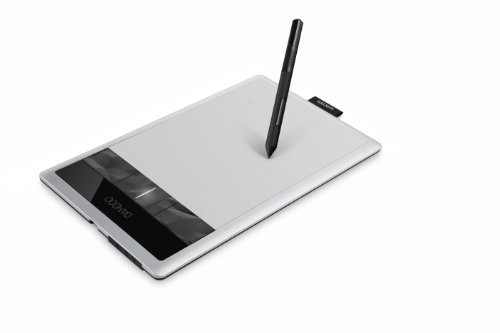
Wacom Bamboo Capture Pen Tablet
Best for: Users wanting a compact pen tablet with included software
- Shortcut Controls
- 4 ExpressKeys
- Features
- Stylus, Stylus Pen
- Color
- Silver
- Tablet Type
- Pen Tablet
- Dimensions
- 10.9 × 6.9 × 0.4 inches
- Weight
- 14.9 ounces
The Wacom Bamboo Capture is a pen tablet designed for drawing and photo editing. It features a 10.9 by 6.9 inch active area and includes four express keys. The device measures 0.4 inches thick and weighs 14.9 ounces. It comes with free creative software. This tablet suits users who want a reliable, compact input device for digital art without needing a built-in screen.
- Includes 4 express keys for quick shortcuts
- Compact dimensions of 10.9 by 6.9 inches
- Lightweight build at 14.9 ounces
- Comes with free downloadable creative software
- Smaller active area than screen-based tablets on this list
- Heavier than many standalone tablets in this category
- Requires connection to a computer for operation
- You need a compact, portable pen tablet
- You want included software for starting digital art
- You prefer a traditional pen-on-pad workflow
- You want a display tablet with a built-in screen
- You need wireless connectivity for tablet input
- You require a larger drawing surface for detailed work
Verdict: Wacom Bamboo Capture Pen Tablet offers a compact, software-included solution for traditional pen input. It fits users who prioritize portability and a familiar drawing pad experience over a screen-based display.

Wacom Graphire Medium Pen Tablet
Best for: Beginners needing a portable, cordless pen tablet
- Pen Pressure
- 2048, tip only
- Features
- Stylus, Stylus Pen
- Color
- Black
- Tablet Type
- Pen Tablet
- Dimensions
- 8.27 × 0.34 × 5.75 inches
- Weight
- 8.82 ounces
The Wacom Graphire is a 10-inch pen input tablet designed for digital drawing. It offers 2048 pressure levels for nuanced line weight control. The cordless, battery-free stylus requires no charging. It connects via a standard USB port to Windows 7 or later, and macOS 10.10 or later. This compact device suits users who need a reliable, basic drawing surface for computer-based art.
- 2048 pressure levels for detailed line variation
- Cordless, battery-free stylus for uninterrupted use
- Compact 10-inch active drawing area
- Lightweight design at 8.82 ounces
- Lower 2048 pressure level count compared to competitors offering 4096 levels
- Smaller 10-inch size versus many 11.6-inch or larger screen tablets in this guide
- Basic corded USB connection instead of wireless Bluetooth capability
- You want a lightweight, portable drawing surface for travel
- You prefer a cordless pen that never needs charging
- You use a computer for drawing and need a simple plug-and-play setup
- You need a built-in screen to draw directly on your artwork
- You require wireless Bluetooth connectivity for a clutter-free desk
- You need high pressure sensitivity above 2048 levels for professional illustration
Verdict: Wacom Graphire Medium Pen Tablet offers essential drawing specs in a lightweight, cordless package. It fits beginners who prioritize portability and simple USB connectivity over screen displays or high pressure levels.
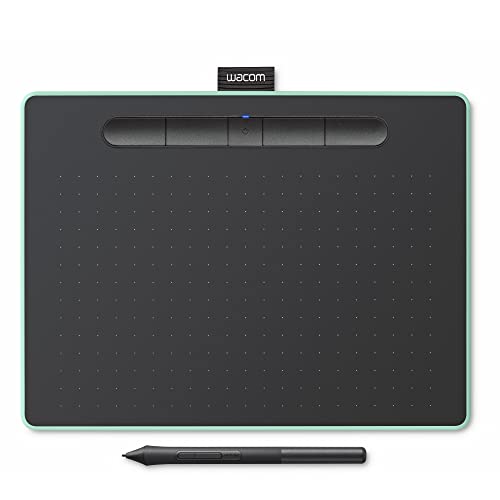
Wacom Intuos Medium Bluetooth Pen Tablet
Best for: Wireless pen input without a built-in screen
- Shortcut Controls
- 4 Customizable ExpressKeys
- Operating System
- Android
- Features
- Bluetooth, Shortcut Keys
- Tablet Type
- Pen Tablet
- Audience
- Students
- Dimensions
- 10.4 × 7.8 × 0.35 inches
The Wacom Intuos Medium is a pen tablet with Bluetooth wireless connectivity and USB-A wired support. It features a 10.4 by 7.8 inch active area and weighs 14.5 ounces. This device uses EMR battery-free pen technology for precise input. It includes shortcut keys and works with standard creative software. It suits students and creators who need reliable wireless control without a built-in screen.
- Bluetooth wireless connectivity for flexible workspace setup
- EMR battery-free pen technology for natural feel
- 10.4 by 7.8 inch active drawing area
- Includes shortcut keys for efficient workflow
- Compatible with all major creative software programs
- Smaller 10.4 inch active area compared to 11.6 inch display tablets on this list
- Heavier 14.5 ounce build compared to smaller pen tablets
- Requires a separate computer or device as it lacks a built-in display
- You want wireless Bluetooth connectivity for a clean desk setup
- You prefer a dedicated pen tablet over a screen-based display
- You need reliable precision with EMR battery-free pen technology
- You need a built-in display to draw directly on a screen
- You require a larger active area than 10.4 inches
- You want a standalone tablet that operates without a computer
Verdict: Wacom Intuos Medium Bluetooth Tablet offers reliable wireless pen input for users who prefer a dedicated tablet over a screen. It fits students and creators who value precision and software compatibility over a built-in display.

XP-PEN Artist12 11.6-Inch Pen Display
Best for: artists needing a color-accurate pen display
- Screen Size
- 11.6"
- Display Resolution
- 1920×1080 FHD
- Pen Pressure
- 8192
- Color Gamut
- 72% NTSC (100% sRGB)
- Display Finish
- anti-reflective screen protector
- Shortcut Controls
- 6 shortcut keys, slim touch bar
The XP-Pen Artist12 is an 11.6-inch pen display with a 1920×1080 resolution and 100% sRGB color gamut. It features 8192 levels of pen pressure and a battery-free stylus. The device includes a programmable touch bar and six customizable shortcut keys. You need a computer with HDMI and USB-A ports to use it. This setup suits digital artists who want a dedicated drawing screen.
- 1920×1080 FHD IPS display
- 100% sRGB color gamut
- 8192 levels of pen pressure
- Battery-free P06 stylus
- Programmable touch bar and six shortcut keys
- Requires a computer connection via HDMI and USB-A
- Heavier at 2 pounds compared to lighter portable options
- Limited to 11.6-inch screen size option
- You want a dedicated screen for drawing without needing a separate monitor
- You need accurate color representation with 100% sRGB coverage
- You prefer a battery-free pen for a traditional feel
- You need a standalone tablet that works without a computer
- You require wireless connectivity via Bluetooth
- You prefer a larger screen size than 11.6 inches
Verdict: The XP-Pen Artist12 11.6" Pen Display fits artists who want a vibrant, color-accurate screen and tactile controls, provided you have a computer with the necessary ports to connect it.
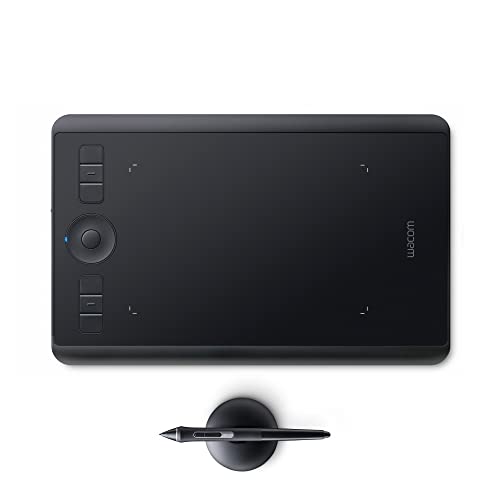
Wacom Intuos Pro Small Bluetooth Tablet
Best for: professional illustrators needing precision
- Pen Pressure
- 8192 levels
- Shortcut Controls
- 6 ExpressKeys, Touch Ring
- Screen Size
- 6-Inch
- Operating System
- Windows
- Features
- Stylus, Stylus Pen, Bluetooth
- Display
- Touchscreen
The Wacom Intuos Pro Small is a wireless graphics tablet designed for precision work. It features a 6-inch active area and supports Bluetooth or USB connection. The included Pro Pen 2 offers 8192 levels of pressure sensitivity and tilt recognition. You get six ExpressKeys and a Touch Ring for custom shortcuts. This compact device suits professionals who need reliable input without a screen.
- 8192 levels of pressure sensitivity
- Tilt recognition for natural shading
- Bluetooth and USB connectivity
- 6 customizable ExpressKeys
- Touch Ring for quick adjustments
- 6-inch screen size is smaller than the 11.6-inch or 13-inch displays on other list items
- 15.8-ounce weight is higher than the typical 8-10 ounce weight of non-screen pen tablets like the Bamboo Capture
- Requires a separate computer or device to function as a display, unlike the standalone tablets on this list
- You need high-precision pressure sensitivity for professional illustration
- You prefer a compact 6-inch active area for portability
- You want wireless Bluetooth connectivity to reduce cable clutter
- You want an all-in-one display tablet that does not require a computer
- You need a larger 11-inch or 13-inch viewing area for drawing
- You are looking for the most affordable option under $200
Verdict: Wacom Intuos Pro Small Wireless Tablet delivers professional-grade pressure sensitivity and tilt support in a compact form factor. It fits you if you prioritize precision and wireless freedom over a built-in screen.

GAOMON PD1161 11.6" Pen Display
Best for: Computer-connected digital sketching
- Tablet Type
- Tethered pen display
- Screen Size
- 11.6"
- Display Resolution
- 1920×1080 Full HD
- Pen Pressure
- 8192
- Display Finish
- Anti-glare film
- Shortcut Controls
- 8 shortcut keys
The GAOMON PD1161 is an 11.6-inch pen display designed for digital art and sketching. It features an IPS Full HD screen with 1920×1080 resolution and 8192 levels of pen pressure. The included battery-free pen supports tilt recognition. It weighs 1.91 pounds and includes eight customizable shortcut keys. This device requires a Windows, Mac, or Chromebook to function.
- 8192 levels of pen pressure
- IPS Full HD display
- Battery-free pen with tilt support
- Eight customizable shortcut keys
- 11.6-inch screen is smaller than many competitors
- 1.91-pound weight is heavier than some portable options
- Requires connection to a computer to operate
- You need a dedicated drawing screen for your computer
- You want high pressure sensitivity for detailed work
- You prefer physical shortcut keys for workflow
- You want a standalone tablet without a computer
- You need a screen larger than 11.6 inches
- You require wireless connectivity without a host device
Verdict: The GAOMON PD1161 11.6-Inch Pen Display offers solid pressure sensitivity and a clear screen for users who need a dedicated monitor for their computer. It fits beginners and students who want a portable, wired drawing solution.

Frunsi RubensTab T11 Pro 10.1-Inch
Best for: portable standalone sketching and design
- Tablet Type
- Standalone
- Screen Size
- 10.1 inch
- Display Resolution
- 1920 x 1200 Full HD
- Features
- Octa-Core
- Color
- Black
- Audience
- Students, Beginners
The Frunsi RubensTab T11 Pro is a standalone drawing tablet that requires no computer. It features a 10.1-inch Full HD IPS display with a 1920×1200 resolution. An octa-core CPU powers the device, which includes a 5800mAh battery for up to 5 hours of use. The pen has no battery requirement and offers pressure sensitivity. This unit suits artists who need a portable, self-contained solution for sketching and design work.
- 10.1-inch Full HD IPS screen with 1920×1200 resolution
- Octa-core CPU for standalone operation
- 5800mAh battery provides up to 5 hours of use
- Battery-free pressure-sensitive pen for natural strokes
- USB-C charging for quick power replenishment
- 5-hour battery life is lower than many standalone competitors
- 10.1-inch screen is smaller than the 11.6-inch or 12-inch displays on other list picks
- 12-month warranty is shorter than the typical 2-year coverage found on premium graphics tablets
- You want a drawing tablet that works without a computer
- You need a portable device with a Full HD screen for sketching
- You prefer a standalone unit with an octa-core processor
- You require a screen larger than 10.1 inches for detailed work
- You need a battery that lasts longer than 5 hours on a single charge
- You want a device with a warranty longer than 12 months
Verdict: The Frunsi RubensTab T11 Pro 10.1-inch Standalone Tablet fits artists who need a portable, self-contained device with a Full HD screen. It is best for those who prioritize standalone functionality over larger display sizes or extended battery life.

GAOMON PD1320 13.3-Inch Gray Pen Display
Best for: artists needing a large 13.3-inch color-accurate display
- Tablet Type
- Tethered pen display
- Screen Size
- 13.3"
- Pen Pressure
- 8192 levels
- Color Gamut
- 120% sRGB
- Display Finish
- Full-laminated
- Operating System
- Android
The GAOMON PD1320 is a 13.3-inch pen display with a full-laminated screen and 120% sRGB color gamut. It offers 8192 levels of pen pressure and tilt support for precise digital art. Weighing 1.94 pounds, it is portable and can connect to Android devices supporting Dex mode. This gray model suits beginners and students looking for a vivid, responsive drawing monitor.
- 13.3-inch full-laminated display reduces parallax
- 120% sRGB color gamut for vivid images
- 8192 levels of pen pressure sensitivity
- 60-degree tilt support for natural strokes
- Battery-free pen requires no charging
- 8192 pressure levels are lower than the 16K or 4096-level specs found on other list items
- 13.3-inch screen is larger than the 11.6-inch displays on several competing models
- Requires an AC power plug when connecting to Android phones for sufficient power
- You want a full-laminated screen with low parallax for drawing
- You need a 13.3-inch display with 120% sRGB coverage
- You use Android devices that support Dex or Desktop mode
- You prefer a smaller 11.6-inch portable display
- You require a standalone tablet that does not need a computer
- You want a pen with more than 8192 pressure levels
Verdict: GAOMON PD1320 13.3-Inch Gray Pen Display is a solid choice for artists who prioritize screen size and color accuracy over maximum pressure resolution. It fits users who need a dedicated display for digital sketching and design work.

Frunsi RubensTab T8 8-Inch Standalone Tablet
Best for: beginners seeking portable standalone art tools
- Tablet Type
- Standalone
- Screen Size
- 8"
- Display Resolution
- 1200×800
- Features
- Octa-Core
- Color
- Black
- Audience
- Students, Beginners
The Frunsi RubensTab T8 is an 8-inch standalone drawing tablet running Android 13. It features a 1200×800 resolution display and an MTK quad-core processor with 4GB RAM. The device includes 64GB of storage, expandable to 256GB, and a 4000mAh battery rated for up to 20 hours of use. This compact unit suits beginners and students who need portable, computer-free digital art creation.
- 8-inch standalone screen with Android 13 OS
- MTK quad-core CPU with 4GB RAM
- 64GB storage expandable to 256GB
- 4000mAh battery provides up to 20 hours of use
- 8-inch display is smaller than most competitors on this list
- 1200×800 resolution is lower than the Full HD screens found on other options
- You want a portable, standalone tablet for digital art
- You are a beginner looking for pre-installed drawing apps
- You need a lightweight device for on-the-go sketching
- You require a high-resolution display for detailed professional work
- You need a screen larger than 8 inches
- You prefer a device with a faster octa-core processor
Verdict: Frunsi RubensTab T8 8-Inch Standalone Tablet is a compact option for beginners who prioritize portability and standalone functionality over screen size and resolution.

Simbans PicassoTab A10 10-Inch
Best for: Beginners needing a standalone tablet
- Tablet Type
- Standalone
- Screen Size
- 10"
- Pen Pressure
- 4096 Level
- Display Finish
- Paper-Like Laminated Screen
- Storage
- 128GB
- Features
- Stylus, Stylus Pen, Octa-Core
The Simbans PicassoTab A10 is a 10-inch standalone drawing tablet that requires no computer. It features a paper-like laminated display and a 4096-level pressure-sensitive stylus for natural sketching. The device includes 6GB of RAM and 128GB of storage, expandable up to 1TB. It is designed for beginners, offering preloaded creative apps and lifetime tutorials. This compact unit weighs 3.31 pounds, making it a portable option for portable digital art.
- 10-inch laminated screen reduces parallax
- 4096-level pressure-sensitive stylus included
- 128GB storage expands to 1TB
- 6GB RAM with octa-core processor
- Standalone operation without a PC
- 10-inch screen is smaller than the 11.6-inch and 12-inch displays found on competing models
- 3.31-pound weight is heavier than many slimmer pen tablets in this category
- You want a standalone tablet that does not need a computer
- You need expandable storage for large drawing files
- You are a beginner looking for guided tutorials
- You prefer a larger screen for detailed work
- You want a lighter device for travel
- You require a pen display connected to a PC
Verdict: Simbans PicassoTab 10" Standalone Tablet fits beginners who need a self-contained device with ample storage and learning tools. It suits those prioritizing ease of use over screen size.
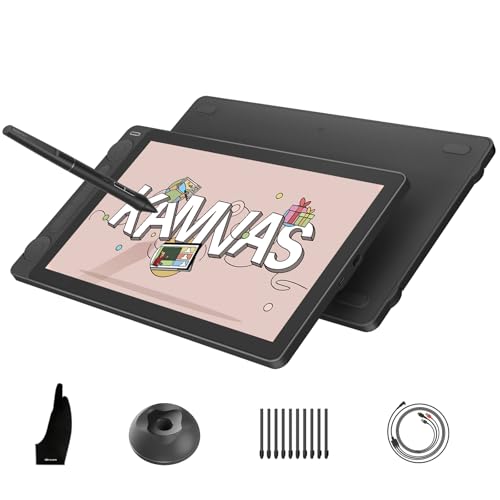
HUION Kamvas 13 (Gen 3) 13.3-Inch Pen Display
Best for: desktop artists needing color accuracy
- Tablet Type
- Pen Display
- Screen Size
- 13.3-inch
- Pen Pressure
- 16384
- Display Finish
- Canvas Glass 2.0, full-laminated
- Shortcut Controls
- 2 dial controllers, 5 silent press keys
- Color
- Black
This 13.3-inch pen display connects to your computer to create digital art. It features a full-laminated screen with 99% sRGB coverage and 16K pressure sensitivity. The device includes dual dials and five silent keys for precise control. Each unit is factory-calibrated for color accuracy. You get a natural drawing feel with reduced glare. This setup suits artists who need a dedicated screen for their workstation.
- 16,384 levels of pen pressure sensitivity
- 99% sRGB and 90% Adobe RGB color coverage
- Full-laminated display with anti-glare glass
- Dual dial controllers and five silent press keys
- Factory-calibrated with Delta E < 1.5 accuracy
- Heavier at 4.17 pounds compared to many portable options
- Requires a computer connection as it is not standalone
- 13.3-inch size is smaller than some 15.6-inch competitors
- You want a dedicated screen for drawing on your computer
- You need high color accuracy for professional artwork
- You prefer physical dials for adjusting brush settings
- You need a standalone tablet that works without a computer
- You want a lighter device for frequent travel
- You prefer a larger 15.6-inch display area
Verdict: HUION Kamvas 13 (Gen 3) 13.3-Inch Pen Display offers precise color and tactile controls for desktop artists. It fits users who prioritize screen quality and physical input over portability.
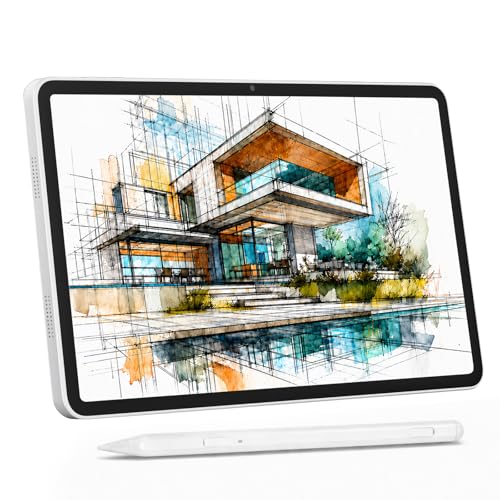
Callsky-Kids 12-Inch Blue Standalone Tablet
Best for: portable standalone art creation with cellular data
- Tablet Type
- Standalone
- Screen Size
- 12-inch
- Display Resolution
- 2000 x 1200
- Pen Pressure
- 4096 levels
- Color Gamut
- 100% sRGB
- Display Finish
- Full-lamination, anti-glare protector
This 12-inch standalone drawing tablet runs Android 15 with 16GB of RAM and 256GB of storage. You get a 2000×1200 IPS display with 100% sRGB coverage and full lamination for accurate pen placement. The included stylus offers 4096 pressure levels and 60-degree tilt support. It also features a 4G LTE dual-SIM slot and an 8000mAh battery with reverse charging. This setup suits creators who want a portable, all-in-one studio without needing a computer.
- 256GB internal storage for extensive artwork libraries
- 16GB RAM ensures smooth performance with multiple apps
- 100% sRGB color gamut for accurate color reproduction
- 4G LTE dual-SIM connectivity for on-the-go use
- 8000mAh battery supports extended drawing sessions
- 15.9-ounce weight is heavier than many 10-inch competitors
- 2000×1200 resolution is lower than the 1920×1080 FHD standard found on many 11.6-inch models
- 12-inch screen size is smaller than the 13.3-inch options available in this category
- You need a standalone device that does not require a computer
- You want large internal storage for saving many projects locally
- You prefer cellular connectivity for drawing outside your home
- You require a 4K display for maximum detail
- You prioritize the lowest possible weight for travel
- You want a screen size larger than 12 inches
Verdict: Callsky-Kids 12-Inch Standalone Tablet provides a robust standalone experience with ample storage and cellular options. It fits you best if you need a portable, all-in-one creative tool that works independently of a PC.

VEIKK VK1200 V3 11.6-Inch Pen Display
Best for: artists needing a laminated pen display
- Tablet Type
- Pen display
- Screen Size
- 11.6"
- Display Resolution
- Full HD 1920×1080
- Pen Pressure
- 16,384 levels
- Display Finish
- Full-laminated, anti-glare matte
- Features
- Stylus, Stylus Pen, Battery-Free Pen
The VEIKK VK1200 V3 is an 11.6-inch full-laminated pen display with a 1920×1080 IPS screen. It features 16384 levels of pressure sensitivity and 60-degree tilt support. The package includes two battery-free styluses and an adjustable stand. You get full-featured USB-C connectivity for video and data. This setup suits artists who want a direct drawing experience on a matte, anti-glare surface.
- 16384 levels of pen pressure sensitivity
- 11.6-inch full-laminated 1920×1080 IPS display
- Supports 60-degree tilt function
- Includes two battery-free styluses
- Single USB-C cable for power and data
- 16384 pressure levels are lower than the 16K or 4096-level specs of other list items
- 15.9-ounce weight is heavier than many portable competitors
- 11.6-inch screen size is smaller than the 12-inch or 13-inch options available
- You want a full-laminated screen to reduce parallax
- You prefer a single USB-C connection for setup
- You need a matte anti-glare surface for drawing
- You require a standalone tablet without a computer
- You need a screen larger than 11.6 inches
- You want a model with higher pressure sensitivity levels
Verdict: The VEIKK VK1200 V3 11.6" Pen Display fits artists who value a direct, laminated drawing surface and straightforward USB-C connectivity. It is a solid choice for those who do not need a standalone device or a larger screen.
Specifications side by side
| Spec | Wacom Bamboo Capture Pen Tablet | Wacom Graphire Medium Pen Tablet | Wacom Intuos Medium Bluetooth Pen Tablet | XP-PEN Artist12 11.6-Inch Pen Display | Wacom Intuos Pro Small Bluetooth Tablet | GAOMON PD1161 11.6" Pen Display | Frunsi RubensTab T11 Pro 10.1-Inch | GAOMON PD1320 13.3-Inch Gray Pen Display | Frunsi RubensTab T8 8-Inch Standalone Tablet | Simbans PicassoTab A10 10-Inch | HUION Kamvas 13 (Gen 3) 13.3-Inch Pen Display | Callsky-Kids 12-Inch Blue Standalone Tablet | VEIKK VK1200 V3 11.6-Inch Pen Display |
|---|---|---|---|---|---|---|---|---|---|---|---|---|---|
| Tablet Type | – | – | – | – | – | Tethered pen display | Standalone | Tethered pen display | Standalone | Standalone | Pen Display | Standalone | Pen display |
| Screen Size | – | – | – | 11.6" | – | 11.6" | 10.1 inch | 13.3" | 8" | 10" | 13.3-inch | 12-inch | 11.6" |
| Display Resolution | – | – | – | 1920×1080 FHD | – | 1920×1080 Full HD | 1920 x 1200 Full HD | – | 1200×800 | – | – | 2000 x 1200 | Full HD 1920×1080 |
| Pen Pressure | – | 2048, tip only | – | 8192 | 8192 levels | 8192 | – | 8192 levels | – | 4096 Level | 16384 | 4096 levels | 16,384 levels |
| Color Gamut | – | – | – | 72% NTSC (100% sRGB) | – | – | – | 120% sRGB | – | – | – | 100% sRGB | – |
| Display Finish | – | – | – | anti-reflective screen protector | – | Anti-glare film | – | Full-laminated | – | Paper-Like Laminated Screen | Canvas Glass 2.0, full-laminated | Full-lamination, anti-glare protector | Full-laminated, anti-glare matte |
| Shortcut Controls | 4 ExpressKeys | – | 4 Customizable ExpressKeys | 6 shortcut keys, slim touch bar | 6 ExpressKeys, Touch Ring | 8 shortcut keys | – | – | – | – | 2 dial controllers, 5 silent press keys | – | – |
| Storage | – | – | – | – | – | – | – | – | – | 128GB | – | 256GB | – |
| Operating System | – | – | Android | – | Windows | – | – | Android | – | – | – | Android | – |
| Features | Stylus, Stylus Pen | Stylus, Stylus Pen | Bluetooth, Shortcut Keys | Stylus, Stylus Pen, Battery-Free Pen | Stylus, Stylus Pen, Bluetooth | Battery-Free Pen, Shortcut Keys, Tilt Support | Octa-Core | Tilt Support | Octa-Core | Stylus, Stylus Pen, Octa-Core | – | Stylus, Stylus Pen | Stylus, Stylus Pen, Battery-Free Pen |
| Display | – | – | – | – | Touchscreen | Anti-Glare | – | Full-Laminated | – | – | Full-Laminated | Anti-Glare | Full-Laminated |
| Color | Silver | Black | Pistachio | Black | Black | Black | Black | Gray | Black | – | Black | Blue | Black |
| Audience | – | – | Students | – | – | Students, Animation, Beginners | Students, Beginners | Students, Beginners | Students, Beginners | Beginners | – | Students, Beginners | – |
| Dimensions | 10.9 × 6.9 × 0.4 inches | 8.27 × 0.34 × 5.75 inches | 10.4 × 7.8 × 0.35 inches | 14.3 × 8.58 × 0.31 inches | 11.8 × 7.75 × 2 inches | – | 7.87 × 6.69 × 0.39 inches | 13.5 × 9.17 × 0.53 inches | – | – | 14.2 × 7.98 × 0.1 inches | 9.48 × 6.31 × 0.34 inches | – |
| Weight | 14.9 ounces | 8.82 ounces | 14.5 ounces | 2 pounds | 15.8 ounces | 1.91 pounds | – | 1.94 pounds | – | 3.31 pounds | 4.17 pounds | 15.9 ounces | 15.9 ounces |
| Length | – | – | – | – | – | 14.2 inches | – | – | – | 14.2 inches | – | – | 10 inches |
| Width | – | – | – | – | – | 7.87 inches | – | – | – | 8.66 inches | – | – | 6 inches |
| Model | CTH470 | CTL-672/K0-C | CTL6100WLE0 | Artist 12_SML | PTH460K0A | A2.PD1161-0-EN0000-1-US | RubensTab | GAOMON PD1320 (Gray) | RubensTab T8 | A10 | GS1333 | Ctab12-Pro | Vk1200v3 |
| Size | – | 10 inches | Medium, Wireless | 11.6 inch | Small | 11.6 Inch | 10 inch | 13.3 inch | 8 inch | 10 Inch Compact Screen | 13.3 Inch | 12-Inch | 11.6" with stand |
If you need general computing hardware alongside pen input, compare the best tablets under 200 for broader operating system support.
How to Choose the Right Drawing Tablet
Check standalone needs
Decide if you want a device that works without a computer. Standalone tablets like the Frunsi RubensTab T11 Pro or the Simbans PicassoTab run on their own operating systems. These are ideal if you need portability and do not want to carry a laptop. If you already have a desktop or laptop, a pen display or pen tablet is sufficient. Pen displays, such as the GAOMON PD1161, require a computer connection to function. They act as a second monitor for your creative work. Choose standalone only if wireless independence is a priority for your workflow.
Compare screen sizes
Screen size determines your drawing area and portability. Small standalone tablets like the Frunsi RubensTab T8 offer an 8-inch display. This size fits easily into a backpack for on-the-go sketching. Medium displays, such as the XP-Pen Artist12, provide an 11.6-inch canvas. This is a standard size for desktop work. Large options like the GAOMON PD1320 give you a 13.3-inch view. This extra space helps with detailed illustration work. Measure your desk space before buying. Larger screens require more room and may reduce portability.
Look at pressure levels
Pen pressure sensitivity affects line thickness and opacity. Most modern pen displays offer 8192 levels of pressure. This is sufficient for most digital artists and beginners. The HUION Kamvas 13 and VEIKK VK1200 V3 provide 16K levels. Higher numbers allow for finer control over subtle variations in your strokes. Pen tablets like the Wacom Bamboo Capture do not list pressure levels in their specs. They rely on basic pen input. If you need precise control over line weight, check the pressure spec. Higher levels generally mean a more responsive drawing experience.
Verify connectivity options
Connectivity determines how you link the tablet to your computer. Wireless models like the Wacom Intuos Medium use Bluetooth. This reduces cable clutter on your desk. Wired models like the XP-Pen Artist12 connect via USB. They offer stable connections without battery management. Some standalone tablets, like the Callsky-Kids, offer cellular data options. This allows internet access without Wi-Fi. Check your computer ports before buying. Ensure your device has the necessary inputs. Wired connections are often more reliable for long drawing sessions.
Consider tilt support
Tilt support allows the pen to detect angle changes. This feature mimics real pencils and brushes. The GAOMON PD1161 and GAOMON PD1320 include tilt support. This helps create natural shading effects. Basic pen tablets like the Wacom Graphire Medium do not mention tilt in their attributes. They focus on simple 2D input. If you want to simulate brush strokes or shading, look for tilt support in the specs. This feature adds realism to your digital artwork. It is a key differentiator for advanced drawing techniques.
Frequently asked questions
Is a pen display better than a pen tablet?
A pen display is better if you want to draw directly on the screen. The XP-Pen Artist12 features an 11.6-inch view for direct input. Pen tablets like the Wacom Bamboo Capture lack a screen, requiring you to look at your monitor while drawing. Choose a display for natural hand-eye coordination. Select a tablet for portability and lower weight.
Which drawing tablet supports tilt sensitivity?
Several models in this list support tilt sensitivity for more natural shading. The GAOMON PD1161 and GAOMON PD1320 both include tilt support. The Wacom Intuos Pro Small also offers tilt support alongside Bluetooth connectivity. These features help you vary line width based on pen angle, which is useful for shading and calligraphy.
Do I need a standalone tablet or one that connects to a PC?
You need a standalone tablet if you want to draw without a computer. The Frunsi RubensTab T11 Pro and Simbans PicassoTab A10 are standalone options. They run on their own operating systems. Pen displays like the HUION Kamvas 13 require a computer connection. Choose standalone for portability. Choose a display for higher pressure levels and color accuracy.
What is the difference between 8192 and 16K pressure levels?
Pressure levels determine how sensitive the pen is to your hand pressure. The XP-Pen Artist12 and GAOMON PD1161 offer 8192 levels. The HUION Kamvas 13 and VEIKK VK1200 V3 provide 16K levels. Higher numbers mean finer gradations in line weight. This allows for more subtle variations in stroke thickness, which is helpful for detailed digital painting.
Are battery-free pens better than those with batteries?
Battery-free pens are generally lighter and require less maintenance. The XP-Pen Artist12 and VEIKK VK1200 V3 use battery-free pens. The Wacom Graphire Medium also uses a cordless, battery-free stylus. These pens do not need charging or battery replacement. They often provide a more consistent weight, which reduces hand fatigue during long drawing sessions.
Which drawing tablet is best for students?
The GAOMON PD1161 is a strong choice for students. It is a 11.6-inch pen display with tilt support and shortcut keys. The Frunsi RubensTab T11 Pro is also listed for students. It is a standalone tablet with an octa-core processor. Both options offer solid performance for learning digital art without requiring a separate computer setup.
How large is the active drawing area on the Wacom Bamboo Capture?
The Wacom Bamboo Capture has a compact active area. It measures 10.9 inches in length and 6.9 inches in width. The device itself is 0.4 inches thick and weighs 14.9 ounces. This size fits easily into a bag. It is ideal for users who prioritize portability and a familiar drawing pad experience over a larger screen.


