Best Drawing Tablets Under $300: 13 Spec-Based Picks
Finding the best drawing tablets under $300 requires looking at specific hardware details.

What this report covers
- Last updated
- 1 Nov 2026
Figures above are read from the product listings for the models named below. Scores are out of 10, based on listed specifications and buyer feedback.
As Amazon Associates, we earn from qualifying purchases. This means we may receive a small commission at no extra cost to you if you click through and make a purchase.
As an Amazon Associate we earn from qualifying purchases. Links on this page are affiliate links.
Finding the best drawing tablets under $300 requires looking at specific hardware details. We compared 13 models based on the specifications published on their listings. The top pick is the HUION Kamvas Pro 16 15.6-Inch Pen Display. It leads because it offers a large 15.6-inch full-laminated screen for precise digital work. This guide helps you decide which device matches your workflow. You will see options for standalone Android units and connected pen displays. Each choice balances screen size, pressure sensitivity, and portability for different artist needs.
Match the tablet type to your setup
You must decide between pen displays and standalone tablets first. Pen displays like the HUION Kamvas Pro 16 connect to a computer for a large, color-accurate workspace. Standalone devices like the PicassoTab X14 run Android independently. This choice determines whether you need a separate host machine or want a portable, self-contained drawing solution.
| # | Product | Best for | Price |
|---|---|---|---|
| 1 | HUION Kamvas Pro 16 15.6-Inch Pen Display Best overall | artists needing a large, color-accurate pen display | |
| 2 | HUION KAMVAS Pro 16 15.6-Inch Pen Display Also great | desktop artists needing a large, accurate pen display | |
| 3 | XPPen Artist 13.3 Pro V2 Also great | Compact drawing with high color accuracy | |
| 4 | GAOMON PD156Pro 15.6" Full-Laminated Tablet Also great | artists needing a large, connected pen display | |
| 5 | HUION KAMVAS 16 15.6-Inch Drawing Tablet Also great | artists needing a large standalone Android drawing screen | |
| 6 | PicassoTab X14 14-inch Standalone Tablet Best premium | portable standalone drawing on a large screen | |
| 7 | Wacom Intuos Pro Small Bluetooth Pen Tablet Best budget | Portable professional drawing with external monitors | |
| 8 | HUION Kamvas Slate 11 Standalone Tablet Best 11-inch | portable standalone sketching without a PC | |
| 9 | Wacom One 14 Pen Display Best full hd display | beginners needing a connected pen display | |
| 10 | XP-Pen Artist 13.3 Pro V2 Also great | artists needing accurate color on a compact screen | |
| 11 | Simbans PicassoTab 12 Standalone Tablet Also great | portable standalone drawing with ample storage | |
| 12 | HUION Kamvas Slate 11 Standalone Tablet Also great | compact standalone Android drawing | |
| 13 | XP-Pen Artist 12 11.9" Drawing Tablet Also great | Portable digital art with tactile dial controls |
The best fit for you
- You need a large, color-accurate screen for desktop art – HUION Kamvas Pro 16 15.6-Inch Pen Display – The 15.6-inch full-laminated display offers a spacious, accurate workspace for digital illustration.
- You want a compact, portable device for sketching on the go – Wacom Intuos Pro Small Bluetooth Pen Tablet – This small pen tablet weighs only 8.48 ounces and connects via Bluetooth for maximum portability.
- You need a standalone tablet without a computer connection – PicassoTab X14 14-inch Standalone Tablet – The 14-inch standalone model features an octa-core processor and 128GB of internal storage.
- You are a beginner needing an easy-to-use connected display – Wacom One 14 Pen Display – The 14-inch Full HD pen display provides a laminated screen and reliable pen performance.
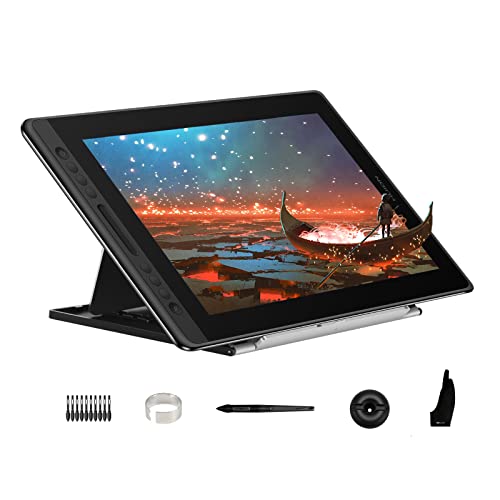
HUION Kamvas Pro 16 15.6-Inch Pen Display
Best for: artists needing a large, color-accurate pen display
- Tablet Type
- Tethered pen display
- Screen Size
- 15.6"
- Color Gamut
- 120% sRGB (92% AdobeRGB)
- Display Finish
- Fully laminated anti-glare glass
- Shortcut Controls
- 6 express keys, touch bar
- Operating System
- Windows
This pen display features a 15.6-inch full-laminated screen with anti-glare glass. It offers 120% sRGB color coverage and a 1000:1 contrast ratio for clear details. The included battery-free pen supports 60° tilt and 8192 pressure levels. Six express keys and a touch bar streamline your workflow. It connects via a single USB-C cable to Windows, macOS, or Linux computers.
- 15.6-inch full-laminated screen with anti-glare glass
- 120% sRGB color gamut volume
- Battery-free pen with 60° tilt recognition
- Six express keys and a touch bar
- Adjustable stand moves between 20 and 60 degrees
- Requires connection to a computer to function
- 1000:1 contrast ratio is lower than some competitors
- Weighs 2.98 pounds
- You need a large 15.6-inch canvas for detailed work
- You want accurate color reproduction with 120% sRGB
- You prefer a single-cable connection setup
- You require a standalone tablet without a PC
- You need a higher contrast ratio than 1000:1
- You prefer a lighter device under 2.5 pounds
Verdict: HUION Kamvas Pro 16 15.6-Inch Pen Display suits artists who need a large, color-accurate screen connected to a computer. It provides a solid workspace for digital illustration and photo editing tasks.
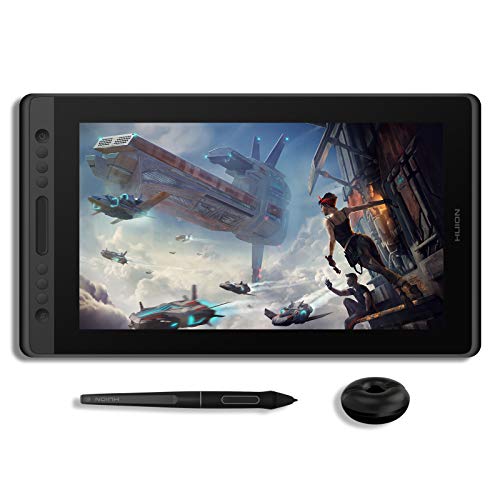
HUION KAMVAS Pro 16 15.6-Inch Pen Display
Best for: desktop artists needing a large, accurate pen display
- Tablet Type
- Tethered pen display
- Screen Size
- 15.6"
- Pen Pressure
- 8192
- Display Finish
- Full-laminated anti-glare glass
- Shortcut Controls
- 6 express keys, 1 touch bar
- Features
- Stylus, Stylus Pen, Battery-Free Pen, Shortcut Keys, Tilt Support
The HUION KAMVAS Pro 16 is a 15.6-inch pen display designed for connected creative work. It features a full-laminated screen with 120% sRGB color volume and an anti-glare finish. The battery-free stylus offers 8192 pressure levels and 60-degree tilt support. A touch bar and six express keys provide quick access to tools. This tablet suits artists who need a large, accurate workspace connected to a computer.
- 15.6-inch full-laminated display with 120% sRGB color gamut
- 8192 levels of pen pressure with 60° tilt support
- Battery-free stylus with 266PPS report rate for smooth lines
- Includes a programmable touch bar and six express keys
- 2.65-pound weight makes it less portable than smaller models
- Requires connection to a computer; not a standalone device
- You need a large 15.6-inch canvas for detailed digital art
- You want a full-laminated screen to reduce parallax
- You prefer physical shortcut keys and a touch bar for workflow
- You need a standalone tablet that works without a computer
- You prioritize a lightweight device for frequent travel
- You require a smaller 13.3-inch or 11-inch display
Verdict: HUION KAMVAS Pro 16 15.6-Inch Pen Display delivers a spacious, color-accurate workspace for desktop artists. It fits creators who value a large laminated screen and tactile controls over portability.
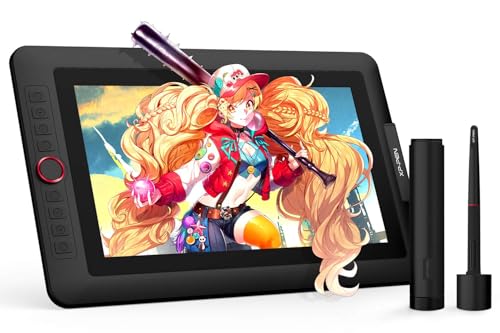
XPPen Artist 13.3 Pro V2
Best for: Compact drawing with high color accuracy
- Tablet Type
- Tethered pen display
- Screen Size
- 13.3"
- Display Resolution
- FHD
- Pen Pressure
- 16384
- Color Gamut
- 88% NTSC, >=91% AdobeRGB, >=123% sRGB
- Display Finish
- Fully-laminated, anti-glare
The XP-Pen Artist 13.3 Pro V2 is a pen display with a 13.3-inch fully-laminated FHD screen. It offers 123% sRGB color gamut and 16K pen pressure levels. The device includes a Red Dial and eight shortcut keys. You need to connect it to a computer to use it. This setup suits beginners and animation artists who want a compact, accurate drawing surface.
- 123% sRGB color gamut for vivid images
- 16K pen pressure levels for natural strokes
- Fully-laminated screen reduces parallax
- Supports 60 degrees of tilt function
- Includes Red Dial and eight shortcut keys
- 13.3-inch screen is smaller than the 15.6-inch options on this list
- Requires a computer connection rather than standalone use
- Weighs 4.41 pounds, which is heavier than slate-style tablets
- You want a compact drawing display with high color accuracy
- You prefer using shortcut keys and a dial for workflow
- You are a beginner or animation artist needing tilt support
- You need a standalone tablet that works without a computer
- You prefer a larger 15.6-inch or bigger screen area
- You want a portable slate that weighs under 4 pounds
Verdict: The XP-Pen Artist 13.3 Pro V2 fits artists who prioritize color accuracy and a compact footprint. You get precise control through its 16K pressure levels and tilt support, provided you have a computer to connect it to.
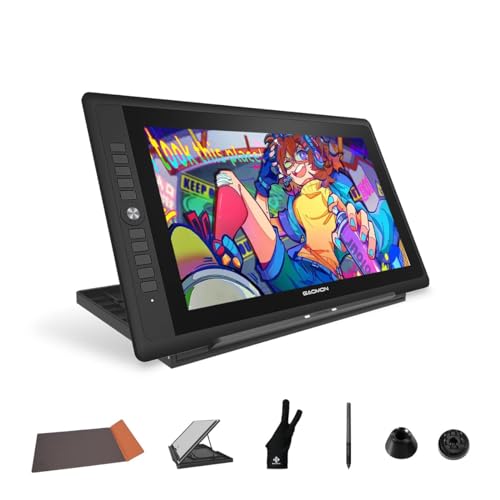
GAOMON PD156Pro 15.6" Full-Laminated Tablet
Best for: artists needing a large, connected pen display
- Tablet Type
- Tethered pen display
- Screen Size
- 15.6 inch
- Display Resolution
- 1920 x 1080 FHD
- Pen Pressure
- 8192 levels
- Color Gamut
- 120% sRGB
- Display Finish
- Full-laminated, anti-glare film
The GAOMON PD156Pro is a 15.6-inch pen display that requires a computer to function. It features a full-laminated 1920×1080 screen with 120% sRGB color gamut. The battery-free stylus offers 8192 pressure levels and tilt support. Ten programmable keys and a control dial assist your workflow. This device suits artists who need a large, vibrant display connected to a laptop or desktop.
- 15.6-inch full-laminated 1920×1080 display with 120% sRGB
- Battery-free stylus with 8192 pressure levels and tilt support
- 10 programmable shortcut keys and a customizable dial
- Lightweight 2.87-pound build with single-cable connection
- Requires a computer connection and is not standalone
- Heavier at 2.87 pounds compared to smaller slate tablets
- Limited to 1920×1080 resolution versus higher options
- You need a large 15.6-inch screen for detailed work
- You prefer a dial and shortcut keys for efficiency
- You already have a compatible computer to connect to
- You need a standalone tablet that works without a PC
- You prioritize a lighter, more portable slate design
- You require a higher resolution than 1080p
Verdict: The GAOMON PD156Pro 15.6-Inch Pen Display fits digital artists who want a large, color-accurate screen with tactile controls. It is ideal for those who already use a computer and value a dedicated drawing monitor.

HUION KAMVAS 16 15.6-Inch Drawing Tablet
Best for: artists needing a large standalone Android drawing screen
- Tablet Type
- Tethered pen display
- Screen Size
- 15.6"
- Pen Pressure
- 8192 levels
- Color Gamut
- 120% sRGB
- Display Finish
- Full-laminated, anti-glare film
- Shortcut Controls
- 10 customizable shortcut keys
The HUION Kamvas 16 is a 15.6-inch pen display with a full-laminated screen and 120% sRGB color gamut. It features 8192 levels of pen pressure and tilt support for precise control. The included battery-free stylus and 10 express keys streamline your workflow. This standalone Android tablet suits artists who need a portable, high-color-accuracy screen for digital painting and design tasks.
- 120% sRGB color gamut for vibrant, accurate colors
- Full-laminated display reduces parallax for precise cursor tracking
- 8192 levels of pen pressure with tilt support
- 10 programmable express keys for faster workflow
- Battery-free PW517 stylus eliminates charging needs
- 120% sRGB gamut is lower than the 100% Adobe RGB found in some competitors
- 15.6-inch size is larger and heavier than the 13.3-inch or 11.9-inch options on the list
- Anti-glare film may reduce screen sharpness compared to glossy displays
- You need a large 15.6-inch canvas for detailed illustration
- You want a standalone Android tablet that works without a computer
- You prioritize color accuracy with a 120% sRGB coverage
- You prefer a smaller, more portable 11.6-inch or 13.3-inch screen
- You require a wider color gamut like 100% Adobe RGB
- You need a tablet with a touch bar or dial controls
Verdict: The HUION Kamvas 16 15.6" Drawing Tablet offers a solid balance of size and color accuracy for artists who need a standalone Android display. It fits those who value a large canvas and precise pen control over ultra-portability.

PicassoTab X14 14-inch Standalone Tablet
Best for: portable standalone drawing on a large screen
- Tablet Type
- Standalone
- Screen Size
- 14-inch
- Display Resolution
- FHD
- Pen Pressure
- 4096 levels
- Display Finish
- Fully laminated
- Storage
- 128GB
The PicassoTab X14 is a 14-inch standalone drawing tablet that operates without a computer. It features an octa-core CPU, 6GB of RAM, and 128GB of expandable storage. The laminated screen offers a paper-like feel with a 4096-level pressure pen. This device suits artists who want a portable, all-in-one solution for drawing and streaming.
- 14-inch fully laminated screen for reduced parallax
- Octa-core CPU with 6GB RAM for smooth multitasking
- 128GB storage expandable to 1TB
- 4096-level active pen for precise strokes
- Includes lifetime PRO upgrade for Concepts app
- Heavier at 5.05 pounds compared to smaller slate tablets
- Lower 4096-level pen pressure versus 8192 or 16K options on other picks
- Smaller 1-year warranty compared to industry standards
- You want a standalone tablet without needing a computer
- You prefer a larger 14-inch canvas for detailed work
- You need expandable storage for large project files
- You require a pen with 8192 or higher pressure levels
- You prefer a lighter device under 3 pounds
- You need a longer warranty than one year
Verdict: The PicassoTab X14 14-inch Standalone Tablet fits artists who prioritize a large, portable screen and internal processing power over maximum pen sensitivity.
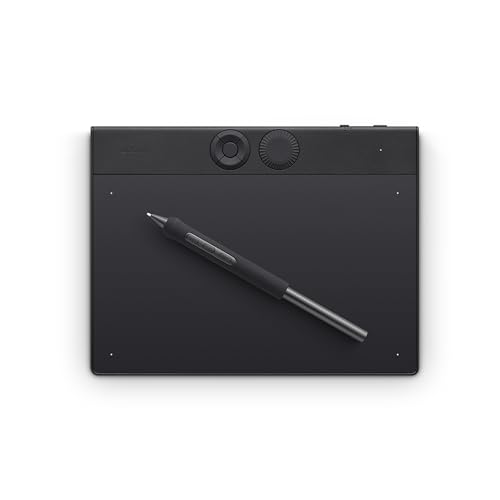
Wacom Intuos Pro Small Bluetooth Pen Tablet
Best for: Portable professional drawing with external monitors
- Pen Pressure
- 8192
- Features
- Stylus, Stylus Pen, Bluetooth, Shortcut Keys
- Tablet Type
- Pen Tablet
- Audience
- Animation
- Length
- 8.46 inches
- Width
- 6.42 inches
The Wacom Intuos Pro Small is a pen tablet designed for animation and digital art. It features the Pro Pen 3 with 8192 pressure levels and tilt support. The device includes a mechanical dial and five customizable ExpressKeys for workflow efficiency. It connects via USB or Bluetooth. The magnesium body measures 4mm thin and weighs 8.48 ounces. This small footprint suits users with limited desk space.
- Pro Pen 3 provides 8192 pressure levels and tilt support.
- Mechanical dial and five customizable ExpressKeys enhance productivity.
- Bluetooth connectivity allows wireless use with multiple computers.
- Lightweight magnesium build at 8.48 ounces.
- Small active area limits workspace compared to larger tablets.
- No built-in screen requires a separate monitor for drawing.
- You need a portable, lightweight tablet for travel.
- You want precise pen control with tilt support.
- You prefer wireless connectivity for your setup.
- You require a built-in display for direct drawing.
- You need a large active area for detailed work.
- You prefer a tablet with physical shortcut buttons only.
Verdict: Wacom Intuos Pro Small Pen Tablet fits artists who prioritize portability and precision over a built-in screen. It is ideal for users with limited desk space who connect to an external monitor.

HUION Kamvas Slate 11 Standalone Tablet
Best for: portable standalone sketching without a PC
- Tablet Type
- Standalone
- Screen Size
- 10.95-inch
- Display Resolution
- FHD+ (1920*1200)
- Pen Pressure
- 4096 levels
- Color Gamut
- 99% sRGB
- Refresh Rate
- 90Hz
The HUION Kamvas Slate 11 is a standalone drawing tablet that requires no computer connection. It features a 10.95-inch Full HD screen with a 90Hz refresh rate and 99% sRGB color gamut. Powered by an 8-core CPU, 8GB of RAM, and 128GB of storage, it runs Android 14. The device includes a pen with 4096 pressure levels and an 8000mAh battery, making it a portable option for artists on the go.
- Standalone design with Android 14 OS for independent use
- 90Hz refresh rate for smooth visual feedback
- 99% sRGB color gamut for accurate color representation
- 8000mAh battery for extended drawing sessions
- 10.95-inch screen is smaller than the 15.6-inch and 16-inch models on this list
- 128GB internal storage is lower than the 256GB or 512GB capacities found in other standalone tablets here
- 4096 pressure levels are fewer than the 8192 levels offered by several competing pens
- You want a portable drawing device that works without a PC
- You prefer a lighter, smaller screen for travel
- You need a long-lasting battery for outdoor sketching
- You require a screen larger than 11 inches for detailed work
- You need 8192 levels of pen pressure for professional illustration
- You want a tablet with more than 128GB of built-in storage
Verdict: The HUION Kamvas Slate 11 Standalone Tablet fits artists who need a portable, computer-free drawing solution with a smooth 90Hz display. It is ideal for sketching on the go, though those needing larger screens or higher pressure sensitivity should look at the bigger models.
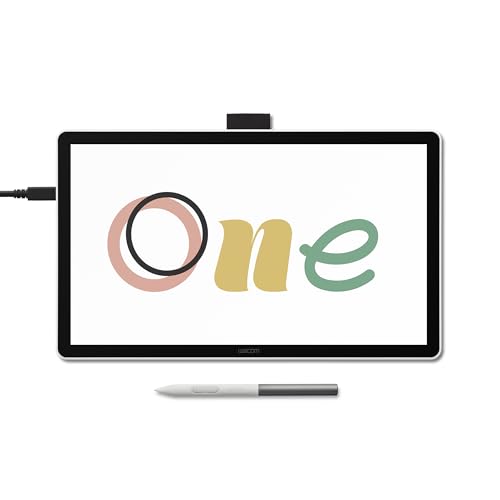
Wacom One 14 Pen Display
Best for: beginners needing a connected pen display
- Tablet Type
- Pen display
- Screen Size
- 14"
- Display Resolution
- Full HD
- Color Gamut
- 98% sRGB
- Display Finish
- Laminated, paper-like texture
- Operating System
- Windows
The Wacom One 14 is a 14-inch pen display designed for students and beginners. It features a laminated IPS Full HD screen with 98% sRGB color accuracy and a paper-like texture. The device uses a battery-free pen with responsive pressure sensitivity. It connects via USB-C to Windows, Mac, or Chromebook systems. The package includes trials for creative software and training courses.
- 14-inch laminated IPS Full HD display
- 98% sRGB color accuracy
- Battery-free pen with pressure sensitivity
- Paper-like screen texture
- 14-inch screen is smaller than the 15.6-inch displays on other picks
- 1.65-pound weight is heavier than the 14-inch standalone tablet option
- Requires a converter and power adapter for HDMI connections
- You want a reliable pen display with a paper-like texture
- You need 98% sRGB color accuracy for creative work
- You prefer a battery-free pen that never needs charging
- You require a standalone tablet that works without a computer
- You need a screen larger than 14 inches for more canvas space
- You want a device that connects via HDMI without extra adapters
Verdict: Wacom One 14" Pen Display suits beginners who value a laminated screen and reliable pen performance. It is a practical choice for students needing a connected display with accurate colors.

XP-Pen Artist 13.3 Pro V2
Best for: artists needing accurate color on a compact screen
- Tablet Type
- Pen Display
- Screen Size
- 13.3-inch
- Display Resolution
- 1920×1080 FHD
- Pen Pressure
- 16,384 levels
- Color Gamut
- 99% sRGB, 89% Adobe RGB, 95% P3
- Display Finish
- Fully laminated
The XP-Pen Artist 13.3 Pro V2 is a 13.3-inch pen display designed for precise digital drawing. It features a fully laminated screen with 95% P3 color gamut and 16K pressure sensitivity. The device connects via USB-C or HDMI to computers. It includes a red dial roller and eight shortcut keys for workflow control. This model suits artists who need accurate color and responsive pen input.
- 16K pressure sensitivity levels
- Fully laminated 13.3-inch display
- 95% P3 cinema-grade color gamut
- Red dial roller and 8 shortcut keys
- Dual USB-C and HDMI connectivity
- Smaller 13.3-inch screen compared to 15-inch competitors
- Heavier 6.79-pound build
- Requires connection to a computer
- You need high color accuracy for print work
- You prefer a compact drawing surface
- You want customizable shortcut keys
- You require a standalone tablet without a computer
- You prefer a larger 15-inch display area
- You need a lightweight portable device
Verdict: The XP-Pen Artist 13.3 Pro V2 delivers professional-grade color and pen precision for artists who prioritize accuracy over screen size. It is an ideal fit for desktop creators who value a compact, feature-rich drawing experience.

Simbans PicassoTab 12 Standalone Tablet
Best for: portable standalone drawing with ample storage
- Tablet Type
- Standalone device
- Screen Size
- 12"
- Display Resolution
- 2K
- Pen Pressure
- 4096
- Display Finish
- Laminated
- Storage
- 128GB
The Simbans PicassoTab A12 is a 12-inch standalone drawing tablet that runs on Android. It features an octa-core CPU, 6GB of RAM, and 128GB of storage. The laminated display works with a pen offering 4096 pressure levels. This device allows you to sketch and paint without a computer. It suits users who want a portable, all-in-one drawing station with ample internal space for apps and projects.
- 12-inch laminated screen for reduced parallax
- Octa-core CPU with 6GB RAM
- 128GB expandable storage
- 4096 pen pressure levels
- 4096 pressure levels are lower than the 8192 or 16K found on other list models
- 12-inch screen is smaller than the 15-inch or 16-inch displays on competing tablets
- You want a standalone tablet that does not require a computer
- You need extra internal storage for apps and files
- You prefer a 12-inch screen size over larger options
- You need ultra-high pressure sensitivity above 4096 levels
- You prefer a larger 15-inch or 16-inch display
- You already have a computer and want a pen display to connect to it
Verdict: Simbans PicassoTab 12 Standalone Tablet offers a capable standalone experience with strong internal specs. It fits artists who want a portable, self-contained device with plenty of storage.
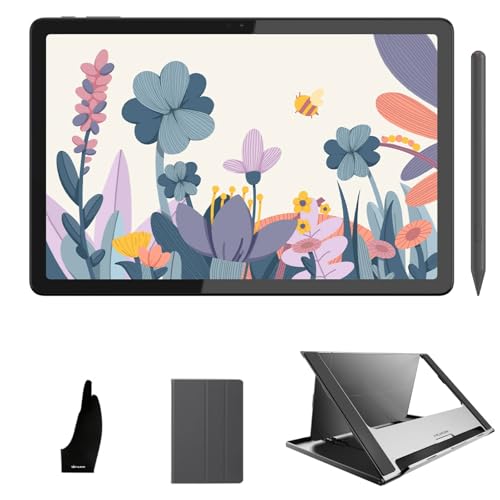
HUION Kamvas Slate 11 Standalone Tablet
Best for: compact standalone Android drawing
- Tablet Type
- Standalone
- Screen Size
- 10.95 Inch
- Display Resolution
- FHD+ (1920*1200)
- Pen Pressure
- 4096 levels
- Color Gamut
- 99% sRGB
- Refresh Rate
- 90Hz
This standalone drawing tablet runs Android and features an 11-inch FHD+ display with a 90Hz refresh rate. It includes 128GB of storage and supports 4096 pressure levels with tilt recognition. The anti-glare screen and aluminum back make it portable. It suits artists who need a self-contained device for sketching on the go without a computer.
- 128GB internal storage for standalone use
- 90Hz refresh rate for smooth visuals
- 4096 pressure levels with tilt support
- Full-laminated anti-glare screen
- 11-inch screen is smaller than the 15-inch and 16-inch options on this list
- 4096 pressure levels are lower than the 8192 levels found in other models here
- 99% sRGB color gamut is narrower than the 120% sRGB of competing tablets
- You want a standalone tablet that does not require a computer
- You prefer a compact 11-inch screen for portability
- You need 128GB of local storage for your files
- You require a screen larger than 11 inches
- You need professional-grade 120% sRGB color accuracy
- You prefer 8192 pressure levels for maximum detail
Verdict: HUION Kamvas Slate 11 Standalone offers a portable, self-contained drawing experience with 128GB storage and a 90Hz display. It fits artists who prioritize compact size and standalone Android functionality over larger screens or higher pressure sensitivity.

XP-Pen Artist 12 11.9" Drawing Tablet
Best for: Portable digital art with tactile dial controls
- Tablet Type
- Tethered pen display
- Screen Size
- 11.9 inch
- Display Resolution
- 1920×1080 Full HD
- Pen Pressure
- 16,384 levels
- Color Gamut
- 99% sRGB
- Display Finish
- Full lamination, AG etched glass
The XP-Pen Artist 12 3rd is an 11.9-inch pen display with a Full HD anti-glare screen. It features 16K pen pressure levels and 60-degree tilt support for precise control. The device includes dual X-Dial wheels and eight shortcut keys for efficient workflow. Weighing 2.48 pounds, it offers portable connectivity via a single USB-C cable for various operating systems.
- 16,384 pressure levels with 60-degree tilt support
- Dual X-Dial wheels for quick adjustments
- 99% sRGB color gamut with factory calibration
- Anti-glare etched glass reduces eye strain
- Heavier at 2.48 pounds compared to lighter competitors
- Smaller 11.9-inch screen size versus 15-inch models
- Single USB-C connection limits cable management options
- You need a portable tablet for sketching on the go
- You want tactile dial controls for brush adjustments
- You require high color accuracy for professional design work
- You prefer a larger 15-inch or 16-inch display area
- You need a standalone device without a computer
- You require Bluetooth wireless connectivity for your workflow
Verdict: XP-Pen Artist 12 3rd 11.9" Drawing Tablet fits artists who value portability and tactile dial controls. It suits those who need precise pressure sensitivity in a compact, color-accurate package.
Specifications side by side
| Spec | HUION Kamvas Pro 16 15.6-Inch Pen Display | HUION KAMVAS Pro 16 15.6-Inch Pen Display | XPPen Artist 13.3 Pro V2 | GAOMON PD156Pro 15.6" Full-Laminated Tablet | HUION KAMVAS 16 15.6-Inch Drawing Tablet | PicassoTab X14 14-inch Standalone Tablet | Wacom Intuos Pro Small Bluetooth Pen Tablet | HUION Kamvas Slate 11 Standalone Tablet | Wacom One 14 Pen Display | XP-Pen Artist 13.3 Pro V2 | Simbans PicassoTab 12 Standalone Tablet | HUION Kamvas Slate 11 Standalone Tablet | XP-Pen Artist 12 11.9" Drawing Tablet |
|---|---|---|---|---|---|---|---|---|---|---|---|---|---|
| Tablet Type | Tethered pen display | Tethered pen display | Tethered pen display | Tethered pen display | Tethered pen display | Standalone | – | Standalone | Pen display | Pen Display | Standalone device | Standalone | Tethered pen display |
| Screen Size | 15.6" | 15.6" | 13.3" | 15.6 inch | 15.6" | 14-inch | – | 10.95-inch | 14" | 13.3-inch | 12" | 10.95 Inch | 11.9 inch |
| Display Resolution | – | – | FHD | 1920 x 1080 FHD | – | FHD | – | FHD+ (1920*1200) | Full HD | 1920×1080 FHD | 2K | FHD+ (1920*1200) | 1920×1080 Full HD |
| Pen Pressure | – | 8192 | 16384 | 8192 levels | 8192 levels | 4096 levels | 8192 | 4096 levels | – | 16,384 levels | 4096 | 4096 levels | 16,384 levels |
| Color Gamut | 120% sRGB (92% AdobeRGB) | – | 88% NTSC, >=91% AdobeRGB, >=123% sRGB | 120% sRGB | 120% sRGB | – | – | 99% sRGB | 98% sRGB | 99% sRGB, 89% Adobe RGB, 95% P3 | – | 99% sRGB | 99% sRGB |
| Refresh Rate | – | – | – | – | – | – | – | 90Hz | – | – | – | 90Hz | – |
| Display Finish | Fully laminated anti-glare glass | Full-laminated anti-glare glass | Fully-laminated, anti-glare | Full-laminated, anti-glare film | Full-laminated, anti-glare film | Fully laminated | – | Full-Laminated Anti-Glare Screen | Laminated, paper-like texture | Fully laminated | Laminated | Full-laminated, nano-etching glass | Full lamination, AG etched glass |
| Shortcut Controls | 6 express keys, touch bar | 6 express keys, 1 touch bar | 8 shortcut keys, Red Dial | 10 shortcut keys, 1 dial key | 10 customizable shortcut keys | – | – | – | – | Red dial roller, 8 express keys | – | – | Dual X-Dial wheels, 8 keys |
| Storage | – | – | – | – | – | 128GB | – | 128GB | – | – | 128GB | 128GB | – |
| Operating System | Windows | – | Android | Windows | Android | – | – | Android | Windows | Android | Android | Android | Android |
| Use | – | – | – | – | – | – | – | Note-Taking | – | – | – | – | – |
| Features | Shortcut Keys | Stylus, Stylus Pen, Battery-Free Pen, Shortcut Keys, Tilt Support | Shortcut Keys | Stylus, Stylus Pen, Battery-Free Pen, Tilt Support, Dial | Stylus, Stylus Pen, Battery-Free Pen, Shortcut Keys, Tilt Support | Stylus, Stylus Pen, Octa-Core | Stylus, Stylus Pen, Bluetooth, Shortcut Keys | Stylus, Stylus Pen, Tilt Support | Stylus, Stylus Pen, Full HD Display | Stylus, Stylus Pen | Stylus, Stylus Pen, Octa-Core | Stylus, Stylus Pen, Tilt Support | Stylus, Stylus Pen, Shortcut Keys, Dial |
| Display | Full-Laminated | Full-Laminated | Full-Laminated | Full-Laminated | Full-Laminated | – | – | Anti-Glare | – | Full-Laminated | – | Anti-Glare | Anti-Glare |
| Color | Black | Black | Black / White | Black | Black | Black | – | – | White | black 13.3inch | – | – | Black |
| Audience | – | – | Animation, Beginners | – | – | – | Animation | – | Students, Animation, Beginners | – | – | – | Animation, Beginners |
| Dimensions | 17.2 × 9.88 × 0.47 inches | – | – | 13.5 × 7.62 × 0.1 inches | – | – | – | 10.1 × 6.63 × 0.1 inches | – | 15 × 9.5 × 0.1 inches | – | – | – |
| Weight | 2.98 pounds | 2.65 pounds | 4.41 pounds | 2.87 pounds | 2.78 pounds | 5.05 pounds | 8.48 ounces | 1.12 pounds | 1.65 pounds | 6.79 pounds | – | – | 2.48 pounds |
| Length | – | 17.3 inches | 9.84 inches | – | 9.96 inches | 8.2 inches | 8.46 inches | – | 13.2 inches | – | 15.7 inches | – | 14.4 inches |
| Width | – | 9.84 inches | 15.4 inches | – | 16.7 inches | 13.3 inches | 6.42 inches | – | 7.91 inches | – | 9.45 inches | – | 9.17 inches |
| Size | 15.6 Inch | 15.6 Inch | 13.3 Inch | 15.6 Inch | 15.6inch | 14 Inch Screen | Small | 11 Inch | 14" Display | 13.3 inch | 12 Inch Large Screen | – | 11.9 inch |
| Model | Kamvas Pro 16 | Huion KAMVAS Pro 16 | Artist 13.3Pro | A2.PD156P-0-EN0000-0-1-CY-0 | GS1562 | PCX14 | PTK470K0A | KT1101 | DTC141W0 | Artist13.3 Pro V2 | A12 | KT1101 | Artist 12 3rd |
If you need a standalone device, the best tablets under 300 cover general mobile hardware specs.
How to choose the right one
Check screen size needs
Screen size determines your workspace. A 15.6-inch display, like the HUION Kamvas Pro 16, provides a spacious area for detailed illustration. It suits desktop artists who need room to maneuver. If you prefer portability, consider the 11-inch HUION Kamvas Slate 11. It is lighter and easier to carry. The 13.3-inch XP-Pen Artist 13.3 Pro V2 offers a middle ground. Match the size to your desk space and mobility requirements. Larger screens offer more precision but less convenience.
Select the right OS
Your operating system dictates independence. Standalone tablets like the PicassoTab X14 run Android and work without a computer. They are ideal for sketching anywhere. Pen displays, such as the Wacom One 14, require a connected PC or Mac. They rely on external software. Choose a standalone device if you want all-in-one functionality. Select a pen display if you already have a powerful computer. Your workflow determines this choice. Standalone units offer freedom, while connected displays offer desktop power.
Evaluate pressure sensitivity
Pressure sensitivity affects line variation. Higher levels allow for finer control. The XP-Pen Artist 13.3 Pro V2 offers 16K levels. This provides smooth transitions in line weight. The HUION Kamvas Pro 16 offers 8192 levels. This is sufficient for most digital artists. Check the specs if you do detailed work. More levels mean subtler changes. However, 8192 levels is often enough for professional results. Compare these numbers to ensure the device meets your precision needs. It impacts the natural feel of your strokes.
Consider connectivity options
Connectivity defines how you use the device. The Wacom Intuos Pro Small uses Bluetooth for wireless connection. It is great for portable setups with external monitors. Most pen displays require USB cables. They connect directly to your computer. Standalone tablets use Wi-Fi and Bluetooth for apps. Decide if you need wireless freedom or wired stability. Wired connections often offer lower latency. Wireless options reduce desk clutter. Your current setup should guide this decision. Ensure your computer has the necessary ports or Bluetooth support.
Look at storage capacity
Storage matters for standalone devices. The PicassoTab X14 and Simbans PicassoTab 12 offer 128GB. This allows you to save projects locally. You do not need to upload everything to the cloud. Pen displays do not have internal storage. They rely on your computer. If you buy a standalone tablet, check the capacity. 128GB is a good baseline. It holds many apps and files. Less storage may limit your workflow. Ensure the device can store your library of brushes and documents.
Frequently asked questions
Do I need a computer to use these drawing tablets?
It depends on the tablet type. Pen displays like the HUION Kamvas Pro 16 connect to a computer for a large, color-accurate workspace. Standalone devices like the PicassoTab X14 run Android independently. You choose based on whether you need a connected monitor or a portable, self-contained device.
What is the difference between a pen display and a pen tablet?
Pen displays, such as the Wacom One 14, have built-in screens where you draw directly on the glass. Pen tablets, like the Wacom Intuos Pro Small, are flat pads you draw on while looking at an external monitor. The choice depends on your desk space and workflow preferences.
Which tablet offers the best portability for sketching on the go?
The HUION Kamvas Slate 11 Standalone Tablet is ideal for portable sketching. It weighs only 1.12 pounds and features a smooth 90Hz display. It operates without a PC, making it easy to carry. This compact size suits artists who prioritize mobility over a large, stationary workspace.
How important is pen pressure sensitivity for digital art?
High pressure sensitivity allows for nuanced line weights and shading. Models like the XP-Pen Artist 13.3 Pro V2 offer 16K pressure levels for precise control. This feature helps create natural-looking strokes. If you prioritize accuracy, look for higher pressure levels in the specifications.
Can I use these tablets for Android apps without a PC?
Yes, standalone tablets like the HUION Kamvas Slate 11 run Android independently. They offer 128GB of storage for your apps and files. This setup allows you to draw without connecting to a computer. It is a practical solution for artists who want a self-contained drawing experience.
What screen size is best for professional digital illustration?
A 15.6-inch screen provides a spacious area for detailed work. The HUION Kamvas Pro 16 offers a full-laminated display for accurate color representation. This size suits desktop artists who need room to maneuver. Larger screens generally offer a more comfortable drawing experience for complex projects.
Do these drawing tablets support tilt recognition?
Many models support tilt support for natural shading effects. The HUION KAMVAS Pro 16 and GAOMON PD156Pro include this feature. It allows the stylus to mimic the angle of a real pencil. Check the attributes list to confirm if your chosen tablet includes tilt functionality.


