9 Best Drawing Tablets with Bluetooth, Compared
Finding the best drawing tablets with bluetooth requires comparing specific hardware details.

What this report covers
- Last updated
- 3 Nov 2026
Figures above are read from the product listings for the models named below. Scores are out of 10, based on listed specifications and buyer feedback.
As Amazon Associates, we earn from qualifying purchases. This means we may receive a small commission at no extra cost to you if you click through and make a purchase.
As an Amazon Associate we earn from qualifying purchases. Links on this page are affiliate links.
Finding the best drawing tablets with bluetooth requires comparing specific hardware details. We evaluated 9 models based strictly on published specifications. The Wacom Intuos Small Bluetooth leads because its 6.3-inch active area fits students seeking portable digital sketching. This compact size supports wireless simplicity without screen integration. Our picks reflect these exact data points. Use this guide to decide which wireless pen tablet matches your workspace and precision needs.
Choose between pen tablets and displays
You must decide between pen tablets and pen displays. Pen tablets like the Wacom Intuos Small Bluetooth offer portability and wireless freedom without a screen. Pen displays like the HUION KAMVAS Pro 24 provide a large 23.8-inch color-accurate workspace. Your choice depends on whether you prioritize a compact, wireless setup or a stationary, high-resolution drawing surface.
| # | Product | Best for | Price |
|---|---|---|---|
| 1 | Wacom Intuos Small Bluetooth Best overall | Students and portable digital sketching | |
| 2 | Wacom Intuos Medium Bluetooth Pen Tablet Also great | Wireless drawing with a medium active area | |
| 3 | Wacom Intuos Medium Wireless Drawing Tablet Best budget | Wireless drawing without a screen | |
| 4 | Wacom Intuos Pro Small Bluetooth Tablet Best 6-inch | precise wireless drawing on small pads | |
| 5 | HUION KAMVAS Pro 24 4K 23.8-Inch Best premium | professional artists needing large color-accurate displays | |
| 6 | Wacom One Medium Bluetooth Tablet Best beginners | beginners seeking a portable drawing tablet | |
| 7 | XPPen Deco Pro LW 11-Inch Wireless Tablet Best 11-inch | Illustrators wanting large wireless workspace | |
| 8 | Wacom Intuos Pro Small Bluetooth Pen Tablet Also great | compact wireless drawing on wide monitors | |
| 9 | HUION Kamvas Pro 24 Gen 3 Also great | Large canvas digital art and design |
The best fit for you
- You want the best overall portable tablet for students – Wacom Intuos Small Bluetooth – It weighs 8.8 ounces and measures 7.87 by 6.3 inches for easy carrying.
- You need a large wireless display for professional art – HUION KAMVAS Pro 24 4K 23.8-Inch – This 23.8-inch full-laminated screen offers 8192 levels of pen pressure.
- You are a beginner seeking an easy entry option – Wacom One Medium Bluetooth Tablet – It features a lightweight design at 12.2 ounces with basic Bluetooth connectivity.
- You want a large wireless pad for illustrators – XPPen Deco Pro LW 11-Inch Wireless Tablet – It provides an 11-inch active area with 16K pen pressure levels.

Wacom Intuos Small Bluetooth
Best for: Students and portable digital sketching
- Features
- Bluetooth, Shortcut Keys
- Shortcut Controls
- 4 Customizable ExpressKeys
- Operating System
- Android
- Tablet Type
- Pen Tablet
- Audience
- Students
- Dimensions
- 7.87 × 6.3 × 0.35 inches
The Wacom Intuos Small is a portable pen tablet designed for students and creators. It connects wirelessly via Bluetooth or with a USB-A cable. The active area measures 6.3 by 7.87 inches with a slim 0.35-inch profile. It uses battery-free EMR technology for precise control. This model supports Android and includes shortcut keys for efficient workflow.
- Bluetooth wireless connectivity for flexible placement
- Battery-free EMR pen technology for natural feel
- Compact 6.3 by 7.87-inch active area
- Includes creative software and online training
- Small active area limits large canvas work
- No built-in display requires a separate screen
- Lightweight 8.8-ounce build may feel less stable
- You need a portable tablet for classroom use
- You want wireless connectivity without battery charging
- You are a student starting digital art
- You require a large drawing surface
- You need a tablet with an integrated screen
- You primarily use Windows or macOS desktops
Verdict: Wacom Intuos Small Bluetooth Tablet offers reliable pen input for students and small-space users. It fits buyers who prioritize portability and wireless simplicity over screen integration.
Wacom Intuos Medium Bluetooth Pen Tablet
Best for: Wireless drawing with a medium active area
- Features
- Bluetooth, Shortcut Keys
- Shortcut Controls
- 4 Customizable ExpressKeys
- Operating System
- Android
- Tablet Type
- Pen Tablet
- Audience
- Students
- Dimensions
- 10.4 × 7.8 × 0.35 inches
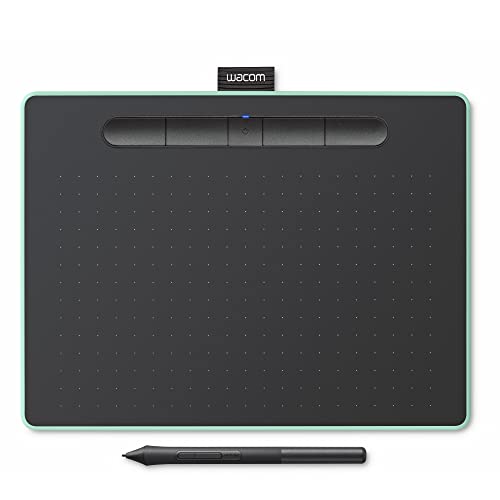
The Wacom Intuos Medium offers a 10.4 by 7.8 inch active area for drawing. It connects wirelessly via Bluetooth or through a USB-A cable. The device weighs 14.5 ounces and includes shortcut keys for workflow efficiency. It uses Wacom's EMR battery-free pen technology. This tablet suits students and creators who need reliable precision in a portable form factor.
- Bluetooth wireless connectivity for flexible placement
- 10.4 by 7.8 inch active drawing area
- EMR battery-free pen technology for natural feel
- Includes shortcut keys for faster input
- Smaller 10.4 inch active area compared to larger competitors
- No built-in display requires looking at a separate screen
- Heavier at 14.5 ounces than the Wacom Intuos Small
- You want a reliable wireless pen tablet for digital art
- You prefer a medium-sized active area for detailed work
- You need shortcut keys for efficient creative workflows
- You require a built-in screen for direct drawing
- You need a larger active area than 10.4 inches
- You prioritize the lightest possible portable tablet
Verdict: Wacom Intuos Medium Bluetooth Tablet provides a solid medium-sized drawing surface with wireless freedom. It fits students and creators who need precision without the bulk of a display tablet.

Wacom Intuos Medium Wireless Drawing Tablet
Best for: Wireless drawing without a screen
- Features
- Stylus, Stylus Pen, Bluetooth, Battery-Free Pen, Shortcut Keys
- Shortcut Controls
- 4 ExpressKeys
- Operating System
- Windows
- Color
- Black
- Tablet Type
- Pen Tablet
- Audience
- Students
This Wacom Intuos Medium tablet offers wireless Bluetooth connectivity and a 10.4 by 7.8 inch active area. It uses a battery-free pen for precise input. The device weighs 14.5 ounces and includes shortcut keys. It suits students and digital artists who need reliable, portable performance without charging the stylus.
- Bluetooth wireless connectivity
- Battery-free EMR pen
- 10.4 by 7.8 inch active area
- Includes shortcut keys
- No built-in display screen
- 14.5 ounces weight is heavier than small variants
- You need a reliable wireless drawing surface
- You prefer a larger active area than small tablets
- You want a battery-free pen for convenience
- You require a screen tablet for direct drawing
- You need the smallest possible portable size
- You prefer a wired-only connection
Verdict: Wacom Intuos Medium Wireless fits artists who want a spacious, wireless drawing surface without the bulk of a display tablet. It is ideal for those who prioritize pen precision and portability over screen integration.
Wacom Intuos Pro Small Bluetooth Tablet
Best for: precise wireless drawing on small pads
- Features
- Stylus, Stylus Pen, Bluetooth
- Pen Pressure
- 8192 levels
- Shortcut Controls
- 6 ExpressKeys, Touch Ring
- Screen Size
- 6-Inch
- Operating System
- Windows
- Display
- Touchscreen
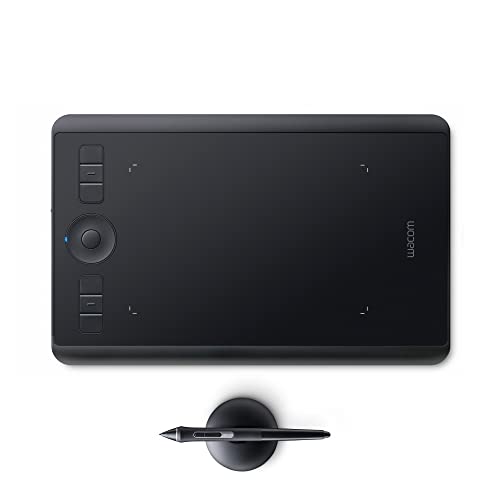
The Wacom Intuos Pro Small is a wireless graphics tablet designed for precision drawing. It features a 6-inch active area and connects via Bluetooth or USB. The included Pro Pen 2 offers 8192 levels of pressure sensitivity and tilt recognition. You get six express keys and a touch ring for customization. This compact device suits creative professionals who need reliable, lag-free tracking for illustration and editing tasks.
- Pro Pen 2 with 8192 pressure levels
- Bluetooth and USB connectivity
- 6 express keys and touch ring
- Tilt recognition support
- 6-inch screen size limits workspace
- 15.8-ounce weight adds bulk
- Small active area restricts large strokes
- You need precise pressure sensitivity
- You prefer wireless connectivity
- You work on detailed illustrations
- You require a large drawing area
- You want a built-in display
- You need a lightweight device
Verdict: Wacom Intuos Pro Small Drawing Tablet fits artists who prioritize pen precision and wireless convenience over screen size. It is ideal for those who work on detailed digital art and need customizable controls.

HUION KAMVAS Pro 24 4K 23.8-Inch
Best for: professional artists needing large color-accurate displays
- Features
- Stylus, Stylus Pen, Bluetooth, Battery-Free Pen
- Tablet Type
- Pen display (not standalone)
- Screen Size
- 23.8"
- Display Resolution
- 4K UHD (3840×2160)
- Pen Pressure
- 8192
- Color Gamut
- 140% sRGB
This pen display offers a large 23.8-inch 4K UHD screen with full lamination for precise cursor tracking. It covers 140% of the sRGB color gamut, making it suitable for professional artists who need accurate color reproduction. The tablet includes a customizable Keydial Mini and supports Bluetooth connectivity for wireless pen use. You get a stable metal stand and multiple connection ports for a clean workspace setup.
- 23.8-inch 4K UHD display with full lamination
- 140% sRGB color gamut and 1.07 billion colors
- Bluetooth-enabled battery-free stylus pen
- Customizable Keydial Mini for workflow shortcuts
- Multiple ports including USB-C, HDMI, and DP
- Heavy 13.7-pound build limits portability
- Requires constant connection to a host device
- 23.8-inch size takes up significant desk space
- You need a large canvas for detailed digital painting
- You prioritize color accuracy for professional design work
- You want a dedicated monitor for your creative software
- You need a portable tablet for travel
- You want a standalone device without a computer
- You have limited desk space for large monitors
Verdict: HUION KAMVAS Pro 24 4K 23.8-Inch fits professional artists who need a large, color-accurate workspace. It is ideal for stationary setups where screen real estate and precision matter more than portability.

Wacom One Medium Bluetooth Tablet
Best for: beginners seeking a portable drawing tablet
- Features
- Stylus, Stylus Pen, Bluetooth, Battery-Free Pen
- Pen Pressure
- 4096 levels
- Operating System
- Windows
- Tablet Type
- Pen Tablet
- Audience
- Students, Beginners
- Dimensions
- 9.9 × 7.1 × 0.3 inches
The Wacom One Medium is a Bluetooth drawing tablet designed for students and beginners. It features a 9.9 x 7.1 inch body with an 8.5 x 5.3 inch active area. The included battery-free pen offers 4096 pressure levels and tilt recognition. You can connect via USB-C to Windows, Mac, or Android devices. Two customizable shortcut buttons help streamline your workflow.
- Battery-free pen with 4096 pressure sensitivity
- Natural tilt recognition for precise strokes
- Two customizable shortcut buttons on the pen
- Connects to Mac, Windows, and Android via USB-C
- Lightweight at 12.2 ounces
- Smaller active area than the HUION KAMVAS Pro 24
- Fewer shortcut buttons than the XPPen Deco Pro
- Lower pressure levels than the Wacom Intuos Pro
- You are a student starting with digital art
- You need a portable tablet for travel
- You want a simple setup with Bluetooth connectivity
- You require a large screen for drawing
- You need high-end professional pressure sensitivity
- You want multiple customizable shortcut keys
Verdict: Wacom One Medium Bluetooth Tablet is a practical entry-level option for beginners who value portability and ease of use. It fits users who prioritize a lightweight design and basic pen features over advanced professional specifications.

XPPen Deco Pro LW 11-Inch Wireless Tablet
Best for: Illustrators wanting large wireless workspace
- Features
- Stylus, Stylus Pen, Bluetooth, Dial
- Pen Pressure
- 16384 levels
- Shortcut Controls
- Keypad with physical scroll wheel
- Screen Size
- 11-Inch
- Operating System
- Android
- Color
- Black
The XP-Pen Deco Pro LW 2nd is an 11-inch wireless drawing tablet with Bluetooth 5.0 connectivity. It offers 16,384 pressure levels and a 90ms response time for precise input. The device includes a 3030mAh battery providing over 10 hours of use. You get a programmable wireless shortcut remote with a scroll wheel. The panel features a simulated paper texture for natural friction.
- 11-inch active workspace with 16K pressure sensitivity
- Dual Bluetooth 5.0 for stable wireless connection
- Includes ACK05 wireless remote with physical scroll wheel
- Over 10 hours of battery life on a single charge
- Simulated paper texture coating for tactile feedback
- 90ms initial response time is slower than the 5ms typical of premium Wacom models
- 11-inch size is smaller than the 23.8-inch display of the HUION KAMVAS Pro 24
- Battery capacity is lower than the 5000mAh found in many larger wireless tablets
- You want a large 11-inch workspace for detailed digital illustration
- You need a wireless setup with a dedicated shortcut remote for efficiency
- You prefer a textured surface that mimics traditional paper friction
- You require a built-in screen for direct drawing feedback
- You need a response time under 50ms for professional animation work
- You prefer a compact 7-inch tablet for maximum portability
Verdict: The XP-Pen Deco Pro LW 2nd 11-inch Tablet suits illustrators who value a large wireless workspace and tactile paper-like feedback over the fastest possible pen response times.
Wacom Intuos Pro Small Bluetooth Pen Tablet
Best for: compact wireless drawing on wide monitors
- Features
- Stylus, Stylus Pen, Bluetooth, Shortcut Keys
- Pen Pressure
- 8192
- Tablet Type
- Pen Tablet
- Audience
- Animation
- Length
- 8.46 inches
- Width
- 6.42 inches
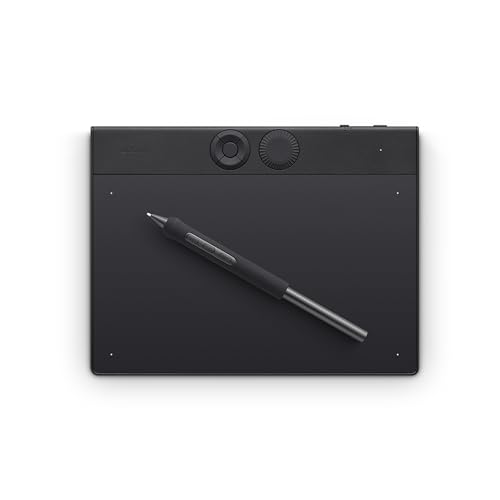
This Wacom Intuos Pro Small is a Bluetooth pen tablet designed for animation and professional workflows. It features the Pro Pen 3 with 8192 pressure levels and tilt support for precise strokes. The device uses a 16:9 format that fits modern wide monitors. Weighing 8.48 ounces, it offers wireless freedom via Bluetooth or USB. The magnesium body is only 4mm thick, making it portable for office or travel use.
- Pro Pen 3 provides 8192 pressure levels and tilt support
- Bluetooth connectivity allows wireless use with multiple computers
- 16:9 aspect ratio matches modern wide displays
- Lightweight magnesium build at 8.48 ounces
- Includes mechanical dial and 5 customizable ExpressKeys
- Small active area limits workspace compared to medium or large models
- 8192 pressure levels are lower than high-end competitors
- No built-in screen requires a separate monitor for drawing
- You need a compact tablet for wide-screen monitors
- You want wireless Bluetooth connectivity for multiple devices
- You prefer a lightweight magnesium build for portability
- You require a large active drawing area
- You want a tablet with an integrated display
- You need pressure sensitivity higher than 8192 levels
Verdict: Wacom Intuos Pro Small Bluetooth Tablet fits artists who value portability and wireless freedom. It suits those using wide monitors who need precise pen input without a screen.

HUION Kamvas Pro 24 Gen 3
Best for: Large canvas digital art and design
- Features
- Stylus, Stylus Pen, Bluetooth, Dial
- Tablet Type
- Tethered pen display
- Screen Size
- 23.8 inch
- Display Resolution
- 4K UHD
- Pen Pressure
- 16384 levels
- Color Gamut
- 99% sRGB, 99% Adobe RGB, 98% DCI-P3
This 23.8-inch pen display offers a 4K UHD screen with Quantum Dot technology for vivid colors. It features PenTech 4.0 with 16384 pressure levels and Bluetooth connectivity. The tablet includes multi-touch gestures and a dedicated keyboard for shortcuts. Its 14-pound weight and large footprint suit stationary desks. It covers 99% sRGB and 99% Adobe RGB for accurate color work.
- 23.8-inch 4K UHD display with Quantum Dot technology
- PenTech 4.0 stylus with 16384 pressure levels
- Bluetooth wireless connectivity and multi-touch support
- 99% sRGB and 99% Adobe RGB color coverage
- Hardware color calibration with 3D LUT for accuracy
- 14-pound weight makes it less portable than smaller tablets
- 23.8-inch screen size requires more desk space than compact models
- 14.3-inch width is bulkier than standard 10-inch or 13-inch tablets
- You need a large canvas for detailed digital art
- You want accurate color representation for professional design work
- You prefer wireless connectivity without a USB cable for data
- You need a lightweight tablet for travel or on-the-go use
- You have limited desk space for a 23.8-inch display
- You prefer a smaller screen size for easier maneuverability
Verdict: HUION KAMVAS Pro 24 Gen 3 23.8-Inch suits artists who need a large, color-accurate workspace. Its high resolution and wireless features make it ideal for stationary creative setups.
Specifications side by side
| Spec | Wacom Intuos Small Bluetooth | Wacom Intuos Medium Bluetooth Pen Tablet | Wacom Intuos Medium Wireless Drawing Tablet | Wacom Intuos Pro Small Bluetooth Tablet | HUION KAMVAS Pro 24 4K 23.8-Inch | Wacom One Medium Bluetooth Tablet | XPPen Deco Pro LW 11-Inch Wireless Tablet | Wacom Intuos Pro Small Bluetooth Pen Tablet | HUION Kamvas Pro 24 Gen 3 |
|---|---|---|---|---|---|---|---|---|---|
| Tablet Type | – | – | – | – | Pen display (not standalone) | – | – | – | Tethered pen display |
| Screen Size | – | – | – | – | 23.8" | – | – | – | 23.8 inch |
| Display Resolution | – | – | – | – | 4K UHD (3840×2160) | – | – | – | 4K UHD |
| Pen Pressure | – | – | – | 8192 levels | 8192 | 4096 levels | 16384 levels | 8192 | 16384 levels |
| Color Gamut | – | – | – | – | 140% sRGB | – | – | – | 99% sRGB, 99% Adobe RGB, 98% DCI-P3 |
| Display Finish | – | – | – | – | Full lamination, anti-glare glass | – | – | – | Full-laminated, Canvas Glass 3.0 |
| Shortcut Controls | 4 Customizable ExpressKeys | 4 Customizable ExpressKeys | 4 ExpressKeys | 6 ExpressKeys, Touch Ring | Keydial Mini | – | Keypad with physical scroll wheel | – | Wireless Keydial |
| Operating System | Android | Android | Windows | Windows | – | Windows | Android | – | – |
| Features | Bluetooth, Shortcut Keys | Bluetooth, Shortcut Keys | Stylus, Stylus Pen, Bluetooth, Battery-Free Pen, Shortcut Keys | Stylus, Stylus Pen, Bluetooth | Stylus, Stylus Pen, Bluetooth, Battery-Free Pen | Stylus, Stylus Pen, Bluetooth, Battery-Free Pen | Stylus, Stylus Pen, Bluetooth, Dial | Stylus, Stylus Pen, Bluetooth, Shortcut Keys | Stylus, Stylus Pen, Bluetooth, Dial |
| Display | – | – | – | Touchscreen | Full-Laminated | – | – | – | Full-Laminated |
| Color | Pistachio | Pistachio | Black | Black | Black | White | Black | – | – |
| Audience | Students | Students | Students | – | – | Students, Beginners | Animation | Animation | – |
| Dimensions | 7.87 × 6.3 × 0.35 inches | 10.4 × 7.8 × 0.35 inches | 10.4 × 7.8 × 0.4 inches | 11.8 × 7.75 × 2 inches | 23.2 × 14.3 × 0.89 inches | 9.9 × 7.1 × 0.3 inches | – | – | 23.2 × 14.3 × 0.1 inches |
| Weight | 8.8 ounces | 14.5 ounces | 14.5 ounces | 15.8 ounces | 13.7 pounds | 12.2 ounces | – | 8.48 ounces | 14 pounds |
| Length | – | – | – | – | – | – | 13.1 inches | 8.46 inches | – |
| Width | – | – | – | – | – | – | 10.2 inches | 6.42 inches | – |
| Size | Small, Wireless | Medium, Wireless | Medium, Wireless (Pack of 1) | Small | 23.8-inch | Medium | 11 Inch | Small | 23.8-Inch |
| Model | CTL4100WLE0 | CTL6100WLE0 | CTL6100WLK0 | PTH460K0A | GT2401 | CTC6110WLW0A | Deco Pro LW (Gen 2)+ACK05 | PTK470K0A | GT2402 |
If you need mobile data away from Wi-Fi, you can evaluate modem specifications among the best tablets with cellular.
Key Specs for Choosing Bluetooth Tablets
Match Active Area to Workflow
The active drawing area determines how much space you have to sketch. The Wacom Intuos Small Bluetooth offers a 6.3-inch width, which is ideal for portability and small desks. If you need more room, the Wacom Intuos Medium Bluetooth provides a 7.8-inch width. Larger tablets like the XP-Pen Deco Pro LW feature an 11-inch surface. Choose a size that fits your workspace and drawing style.
Check Operating System Compatibility
Ensure the tablet works with your device. Most models, including the Wacom Intuos Small Bluetooth, support Android. Some devices, like the Wacom Intuos Pro Small, are listed for Windows. The HUION KAMVAS Pro 24 also supports Android. Verify your computer or tablet runs a compatible operating system before purchasing. This step prevents connectivity issues and ensures the stylus functions correctly with your software.
Decide Between Tablet and Display
You must choose between a pen tablet and a pen display. Pen tablets like the Wacom One Medium Bluetooth require you to look at your screen while drawing. Pen displays like the HUION KAMVAS Pro 24 offer a 23.8-inch full-laminated screen. This allows you to draw directly on the image. Displays provide better precision for detailed work but are less portable than compact pen tablets.
Evaluate Pen Pressure Sensitivity
Pen pressure levels affect line variation. The HUION KAMVAS Pro 24 supports 8192 levels of pressure. The XP-Pen Deco Pro LW offers 16K levels for even finer control. Standard models like the Wacom Intuos Small Bluetooth focus on reliable input without specifying high pressure counts. Higher levels help create natural-looking strokes. Check this spec if you plan to do detailed digital painting or illustration work.
Consider Weight for Portability
Weight matters if you travel or move your setup often. The Wacom Intuos Small Bluetooth weighs only 8.8 ounces. The Wacom One Medium Bluetooth is slightly heavier at 12.2 ounces. Large displays like the HUION KAMVAS Pro 24 weigh 13.7 pounds. These are stationary tools. Choose a lightweight pen tablet if you need to carry your device in a bag. Heavier units are better for fixed desks.
Frequently asked questions
Which drawing tablet with Bluetooth is best for students?
The Wacom Intuos Small Bluetooth is the top choice for students. It weighs only 8.8 ounces and measures 7.87 by 6.3 inches. This compact size fits easily in a backpack. It offers reliable pen input and wireless simplicity. Students can sketch digitally without the bulk of a screen. The pistachio color adds a personal touch to your setup.
What is the largest Bluetooth drawing tablet available?
The HUION KAMVAS Pro 24 Gen 3 features a 23.8-inch display. It provides a large canvas for digital art and design. The tablet weighs 14 pounds and includes a dial for control. It supports 16K levels of pen pressure for detailed work. This full-laminated display is ideal for stationary creative setups where screen real estate matters most.
Does the Wacom Intuos Pro Small have Bluetooth connectivity?
Yes, the Wacom Intuos Pro Small Bluetooth Tablet includes Bluetooth. It offers precise pen input for detailed digital art. The device weighs 15.8 ounces and measures 11.8 inches in length. It fits artists who prioritize wireless convenience over screen size. You can customize controls for a tailored drawing experience.
Which tablet is best for beginners seeking portability?
The Wacom One Medium Bluetooth Tablet is a practical entry-level option. It weighs 12.2 ounces and features a medium-sized active area. The white design is lightweight and easy to carry. It includes a battery-free pen for immediate use. Beginners value this model for its ease of use and basic pen features.
How many levels of pen pressure does the HUION KAMVAS Pro 24 have?
The HUION KAMVAS Pro 24 supports 8192 levels of pen pressure. This specification allows for smooth and natural line variation. It is suitable for professional artists needing color-accurate displays. The full-laminated screen enhances the drawing feel. You get precision and responsiveness for detailed artwork.
Is there a Bluetooth tablet with an 11-inch active area?
The XP-Pen Deco Pro LW 11-Inch Wireless Tablet offers an 11-inch workspace. It weighs 10.2 inches in width and 13.1 inches in length. This model suits illustrators wanting a large wireless area. It includes a dial for added control. The tactile feedback supports a natural drawing experience for animation work.
What is the difference between the Wacom Intuos Medium models?
The Wacom Intuos Medium Bluetooth Pen Tablet (CTL6100WLE0) and the Wacom Intuos Medium Wireless Drawing Tablet (CTL6100WLK0) differ slightly in design. Both provide a medium-sized drawing surface with wireless freedom. One is pistachio and the other is black. Both weigh 14.5 ounces. They fit creators who need precision without the bulk of a display tablet.
Which Bluetooth tablet is best for animation?
The Wacom Intuos Pro Small Bluetooth Pen Tablet is ideal for animation. It supports stylus pen input and shortcut keys. The device weighs 8.48 ounces and measures 8.46 inches in length. It fits artists using wide monitors who need precise pen input. The compact size allows for easy movement between workspaces.


