Best Drawing Tablets with Dial: 12 Spec-Based Picks
Finding the best drawing tablets with dial requires matching physical controls to your workflow.

What this report covers
- Last updated
- 1 Nov 2026
Figures above are read from the product listings for the models named below. Scores are out of 10, based on listed specifications and buyer feedback.
As Amazon Associates, we earn from qualifying purchases. This means we may receive a small commission at no extra cost to you if you click through and make a purchase.
As an Amazon Associate we earn from qualifying purchases. Links on this page are affiliate links.
Finding the best drawing tablets with dial requires matching physical controls to your workflow. We compared 12 models based strictly on published specifications. The XP-Pen Artist 15.6 Pro leads because it combines a large 15.6-inch laminated display with a dedicated red dial for tactile control. Each pick highlights a specific spec advantage, from screen size to connectivity options. This guide helps you decide which dial-equipped pen display fits your desk setup and creative needs.
Match screen size to your desk space
Screen sizes range from 11 to 23.8 inches. Choose based on your available desk space and portability needs. The XP-Pen Artist 15.6 Pro offers a large 15.6-inch laminated display with a dedicated dial. For tighter spaces, the XPPen Artist 12 provides an 11.9-inch screen. Verify physical dimensions before buying to ensure the device fits your workspace comfortably.
| # | Product | Best for | Price |
|---|---|---|---|
| 1 | XP-Pen Artist 15.6 Pro Drawing Tablet Best overall | artists needing a large screen and dial control | |
| 2 | GAOMON PD156Pro 15.6" Full-Laminated Tablet Best windows | Windows users needing dial integration | |
| 3 | XPPen Artist Pro 14 Gen2 14-Inch Pen Display Also great | artists needing a compact 14-inch dial display | |
| 4 | XPPen Deco Pro LW 11-Inch Wireless Tablet Best budget | Wireless drawing with a physical dial | |
| 5 | HUION Kamvas 13 (Gen 3) 13.3" Pen Display Also great | Compact dual-dial drawing setups | |
| 6 | XPPen Artist Pro 19 Gen2 18.4-Inch 4K Best premium | large-screen 4K color-accurate design work | |
| 7 | XPPen Artist Pro 24 Gen2 23.8-inch Also great | Large screen creators needing 165Hz refresh rate | |
| 8 | XP-Pen Artist 13.3 Pro V2 Also great | Beginners wanting a dial and compact size | |
| 9 | HUION Kamvas 13 (Gen 3) 13.3" Dual Dial Also great | Compact professional drawing with dual dial control | |
| 10 | XP-Pen Artist Ultra 16 15.6" Touchscreen Best touchscreen | Professional illustrators needing color accuracy and touch | |
| 11 | HUION Kamvas Pro 24 Gen 3 Also great | Large canvas professional illustration and design | |
| 12 | XP-Pen Artist 12 11.9" Drawing Tablet Also great | Beginners needing dial controls and portability |
The best fit for you
- You want the best overall display with a dial – XP-Pen Artist 15.6 Pro Drawing Tablet – It features a 15.6-inch full-laminated screen and a dedicated red dial for tactile control.
- You need dial integration on a Windows system – GAOMON PD156Pro 15.6" Full-Laminated Tablet – This model supports Windows and includes a full-laminated screen with dial functionality.
- You prefer a compact 14-inch dial display – XPPen Artist Pro 14 Gen2 14-Inch Pen Display – It offers a compact 14-inch full-laminated screen with 16K pressure sensing and dial support.
- You want wireless drawing with a physical dial – XPPen Deco Pro LW 11-Inch Wireless Tablet – This 11-inch tablet provides wireless freedom via Bluetooth and includes a physical dial.
- You need a large 4K screen with a dial – XPPen Artist Pro 19 Gen2 18.4-Inch 4K – It delivers a high-resolution 4K UHD panel with a dedicated physical dial for color work.

XP-Pen Artist 15.6 Pro Drawing Tablet
Best for: artists needing a large screen and dial control
- Features
- Stylus, Stylus Pen, Shortcut Keys, Tilt Support, Dial
- Screen Size
- 15.6"
- Display Resolution
- 1920×1080 FHD
- Pen Pressure
- 16384 levels
- Color Gamut
- 88% NTSC (120% sRGB)
- Display Finish
- Full-laminated
The XP-Pen Artist 15.6 Pro is a pen display with a 15.6-inch full HD screen and full-laminated glass. It features 16K pressure levels, tilt support, and a programmable red dial for smooth navigation. The 11 mm slim profile and 8 customizable shortcut keys help you work efficiently. This model suits artists who want a large, clear canvas with tactile controls for zooming and scrolling.
- 15.6-inch full HD display with full-laminated technology
- 16,384 levels of pressure sensitivity and tilt support
- Programmable red dial for efficient workflow control
- 8 customizable shortcut keys for quick access
- Slim 11 mm profile for comfortable desk use
- 1920×1080 resolution is lower than the 4K UHD options on this list
- 88% NTSC color gamut is narrower than the 156% sRGB coverage of other picks
- 7.28 pound weight is heavier than the smaller 13-inch or 11-inch models
- You need a large 15.6-inch canvas for detailed work
- You prefer physical dials and keys for navigation
- You want a full-laminated screen for parallax-free drawing
- You require 4K UHD resolution for maximum detail
- You need a wider color gamut than 120% sRGB
- You want a lighter, more portable 13-inch tablet
Verdict: The XP-Pen Artist 15.6 Pro offers a large, laminated display and a dedicated red dial for artists who value tactile control over portability or ultra-high resolution.
GAOMON PD156Pro 15.6" Full-Laminated Tablet
Best for: Windows users needing dial integration
- Features
- Stylus, Stylus Pen, Battery-Free Pen, Tilt Support, Dial
- Tablet Type
- Tethered pen display
- Screen Size
- 15.6 inch
- Display Resolution
- 1920 x 1080 FHD
- Pen Pressure
- 8192 levels
- Color Gamut
- 120% sRGB
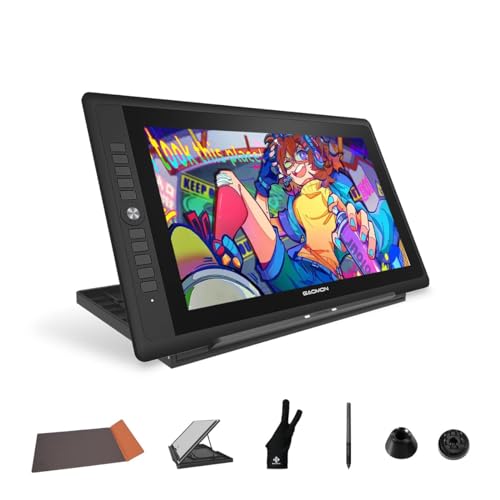
The GAOMON PD156Pro is a 15.6-inch pen display with a 1920×1080 screen and 120% sRGB color gamut. It features a battery-free stylus with 8192 pressure levels and a dial compatible with Windows Radial protocol. The device connects via a single cable and weighs 2.87 pounds. It suits digital artists who need a full-laminated screen with anti-glare film for precise work on Windows or Mac systems.
- 15.6-inch FHD screen with 120% sRGB color gamut
- Windows Radial protocol dial for function switching
- 8192 pressure levels with 266PPS report rate
- Full-laminated technology reduces parallax
- Single-cable connection for power and data
- 120% sRGB gamut is lower than the 156% sRGB on the XPPen Artist Pro 19 Gen2
- 8192 pressure levels are fewer than the 16K levels found on most other tablets in this list
- 2.87-pound weight is heavier than the 2.3-pound HUION Kamvas 13 Gen 3
- You use Windows 10 or later and want dial integration
- You prefer a larger 15.6-inch canvas for detailed work
- You need a lightweight tablet under 3 pounds for portability
- You require 4K UHD resolution for maximum detail
- You need 16K pen pressure for ultra-fine control
- You want a standalone device without a computer
Verdict: The GAOMON PD156Pro 15.6-Inch Drawing Tablet fits Windows users who value dial control and a large, full-laminated screen over higher pressure levels or color gamut specs.

XPPen Artist Pro 14 Gen2 14-Inch Pen Display
Best for: artists needing a compact 14-inch dial display
- Features
- Stylus, Stylus Pen, Battery-Free Pen, Tilt Support, Dial
- Tablet Type
- Tethered pen display
- Screen Size
- 14"
- Pen Pressure
- 16384 levels
- Color Gamut
- 99% sRGB, 123% sRGB
- Display Finish
- Full laminated, anti-glare etched glass
The XP-Pen Artist Pro 14 Gen2 is a 14-inch pen display with a built-in dial and full-laminated anti-glare screen. It features 16K pressure levels and 99% sRGB coverage with a 178° viewing angle. You need a computer to use it, as it is not standalone. The package includes a wireless shortcut remote and a foldable stand. It supports Windows, macOS, and Android.
- 16K pressure-sensitive stylus with tilt support
- 14-inch full-laminated anti-glare display
- 99% sRGB color gamut with △E < 2.2 accuracy
- Built-in dial and wireless shortcut remote
- Foldable stand and X-Edge wrist rest
- 14-inch screen is smaller than the 15.6-inch and 19-inch options on this list
- 99% sRGB coverage is lower than the 156% sRGB option available here
- Requires connection to a computer; it is not a standalone device
- You want a compact 14-inch workspace with a dial
- You need full-laminated display technology for reduced parallax
- You use Windows, macOS, or Android with USB-C DP
- You prefer a screen larger than 14 inches
- You need a standalone tablet that works without a computer
- You require more than 99% sRGB color coverage
Verdict: The XP-Pen Artist Pro 14 Gen2 14" Dial Tablet offers precise 16K pressure sensing and a compact 14-inch full-laminated screen for artists who need a portable, dial-equipped display connected to a computer.

XPPen Deco Pro LW 11-Inch Wireless Tablet
Best for: Wireless drawing with a physical dial
- Features
- Stylus, Stylus Pen, Bluetooth, Dial
- Pen Pressure
- 16384 levels
- Shortcut Controls
- Keypad with physical scroll wheel
- Screen Size
- 11-Inch
- Operating System
- Android
- Color
- Black
This wireless drawing tablet offers an 11-inch active area with 16K pressure sensitivity. It connects via Bluetooth 5.0 for cable-free use with a battery lasting over 10 hours. The included ACK05 remote features a physical dial for shortcut control. The panel has a simulated paper texture for natural friction. It suits artists who need portability and a dedicated dial without a screen.
- 11×7 inch spacious workspace
- 16,384 pressure levels with 90ms response
- Over 10-hour battery life
- ACK05 remote with physical scroll wheel
- Simulated paper-like texture
- 11-inch size is smaller than the 15.6-inch and 24-inch screens on other picks
- No built-in display requires a separate monitor
- iOS compatibility limited to specific apps
- You want a wireless setup with a physical dial
- You prefer a paper-like surface feel
- You work with large external monitors
- You need a built-in screen
- You require compatibility with all iOS drawing apps
- You need a larger active area than 11 inches
Verdict: XPPen Deco Pro LW 2nd 11" Wireless Tablet is a practical choice for artists who prioritize wireless freedom and a tactile dial over a built-in display.

HUION Kamvas 13 (Gen 3) 13.3" Pen Display
Best for: Compact dual-dial drawing setups
- Features
- Dial
- Tablet Type
- Tethered pen display
- Screen Size
- 13.3 inches
- Pen Pressure
- 16,384 levels
- Display Finish
- Fully laminated, Canvas Glass 2.0
- Shortcut Controls
- 5 shortcut keys, dual dials
The HUION Kamvas 13 (Gen 3) is a 13.3-inch pen display designed for connected desktop or laptop setups. It features dual dials and five programmable shortcut keys to streamline your workflow. The screen uses full lamination and Canvas Glass 2.0 to reduce glare. You get 16,384 pressure levels and 99% sRGB color coverage. This model is a compact option for artists who need precise control without a large footprint.
- Dual dials for intuitive control
- 16,384 pressure levels with PenTech 4.0
- 99% sRGB color coverage
- Full-laminated screen with Canvas Glass 2.0
- Factory calibrated with Avg. ΔE<1.5
- Smaller 13.3-inch display compared to 15.6-inch and 24-inch options on this list
- Heavier at 1.96 pounds compared to many competitors
- Requires a computer connection; not a standalone device
- You want dual dials for faster navigation
- You need a compact 13.3-inch screen for limited desk space
- You prioritize color accuracy with factory calibration
- You require a larger 15.6-inch or bigger display
- You need a standalone tablet with its own operating system
- You prefer a lighter device under 1.5 pounds
Verdict: HUION Kamvas 13 Gen 3 13.3-Inch offers precise color and dual dials for artists needing a compact, connected pen display. It suits those who value factory calibration and a smaller footprint over screen size.

XPPen Artist Pro 19 Gen2 18.4-Inch 4K
Best for: large-screen 4K color-accurate design work
- Features
- Stylus, Stylus Pen, Shortcut Keys, Dial
- Tablet Type
- Tethered pen display
- Screen Size
- 18.4 inches
- Display Resolution
- 3840×2160 4K UHD
- Pen Pressure
- 16,384 levels
- Color Gamut
- 99.8% sRGB, 96% Adobe RGB, 98% P3
The XPPen Artist Pro 19 Gen2 is an 18.4-inch pen display with a 4K UHD screen and 156% sRGB coverage. It features a Calman-verified panel with 1.07 billion colors and a physical dial on the wireless ACK05 remote. The dual stylus system includes a roller pen and a slim pen with 16,384 pressure levels. This large-format tablet suits designers who need high resolution and color accuracy for detailed work.
- 18.4-inch 4K UHD (3840×2160) display
- 156% sRGB and 99.8% sRGB color gamut
- Physical dial on wireless ACK05 remote
- Dual stylus set with 16,384 pressure levels
- Full-laminated anti-glare AG etched glass
- 18.4-inch screen is smaller than the 23.8-inch and 27-inch options on this list
- 156% sRGB coverage is lower than the 4K OLED model's 99% Adobe RGB rating
- Requires two USB-C cables for power and data connection
- You need a large 18.4-inch canvas for detailed illustration or design work
- You require Calman-verified color accuracy with a △E < 1.5
- You prefer a physical dial for precise control without touching the screen
- You want a screen larger than 18.4 inches
- You prefer a wireless tablet that does not require USB-C cables
- You are looking for a 4K OLED display
Verdict: XPPen Artist Pro 19 Gen2 18.4-Inch 4K offers a high-resolution 4K UHD panel and a dedicated physical dial for users who prioritize color accuracy and screen real estate. It fits professionals who need a large, calibrated display for detailed creative tasks.

XPPen Artist Pro 24 Gen2 23.8-inch
Best for: Large screen creators needing 165Hz refresh rate
- Features
- Stylus, Stylus Pen, Dial
- Tablet Type
- Tethered pen display
- Screen Size
- 23.8 inches
- Display Resolution
- 2560×1440 2.5K QHD
- Pen Pressure
- 16,384 levels
- Color Gamut
- 99% Adobe RGB, 99% sRGB, 94% P3
This 23.8-inch pen display offers 2.5K QHD resolution and a 165Hz refresh rate for smooth visuals. It includes a physical dial and ten customizable keys on the ACK05 wireless keyboard for precise control. The screen features full lamination and covers 99% Adobe RGB with professional color accuracy. You get two battery-free styluses with 16,384 pressure levels. This setup suits creators who need a large, high-refresh-rate workspace with dedicated hardware controls.
- 23.8-inch 2.5K QHD display with 165Hz refresh rate
- ACK05 wireless keyboard includes a physical dial and 10 keys
- Two battery-free styluses with 16,384 pressure levels and 60° tilt
- 99% Adobe RGB and 94% P3 color gamut coverage
- Full-laminated display with anti-glare coating
- Heavier at 19 pounds compared to smaller competitors
- Lower brightness at 250 cd/m² than many professional displays
- 1000:1 contrast ratio is lower than typical OLED options
- You need a large 23.8-inch screen for detailed work
- You prefer physical dials and shortcut keys for workflow
- You want a high 165Hz refresh rate for smooth video
- You require a standalone tablet without a computer
- You need a portable device under 15 pounds
- You want a 4K resolution display
Verdict: XPPen Artist Pro 24 Gen2 23.8" 165Hz is a large-format pen display ideal for animators and designers who value a high refresh rate and physical dial controls. It fits users who prioritize screen real estate and color accuracy over portability.
XP-Pen Artist 13.3 Pro V2
Best for: Beginners wanting a dial and compact size
- Features
- Stylus, Stylus Pen, Shortcut Keys, Dial
- Screen Size
- 13.3"
- Display Resolution
- Full HD
- Pen Pressure
- 16K
- Color Gamut
- 125% sRGB, 107% Adobe RGB, 95% P3
- Display Finish
- Full-Laminated AG Glass
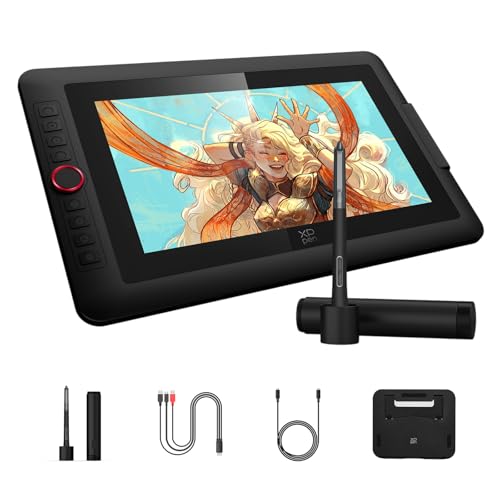
The XPPen Artist 13.3 Pro V2 is a 13.3-inch pen display with a red dial and 8 shortcut keys. It features a full-laminated AG glass screen, 16K pressure levels, and 125% sRGB color gamut. This tablet suits beginners and junior illustrators who want an easy setup. The included adjustable stand helps maintain good posture. It connects via USB-C to Windows, macOS, or Android devices.
- 16K pressure levels for precise line control
- Red dial simplifies brush size and navigation
- 125% sRGB color gamut with 107% Adobe RGB
- Full-laminated screen reduces parallax
- Adjustable stand included for ergonomic drawing
- 13.3-inch screen is smaller than the 15.6-inch and 24-inch options on this list
- 125% sRGB coverage is lower than the 156% sRGB found on the Artist Pro 19 Gen2
- 250 cd/m² brightness is lower than typical high-end displays
- You want a dedicated dial for quick control adjustments
- You need a compact 13.3-inch display for limited desk space
- You are a beginner looking for an easy-to-use setup
- You require a screen larger than 13.3 inches
- You need 4K OLED resolution for maximum color fidelity
- You prefer a wireless Bluetooth connection without cables
Verdict: The XPPen Artist 13.3 Pro V2 fits beginners who want a simple dial and a compact 13.3-inch screen. It offers solid color accuracy and an included stand for comfortable use.

HUION Kamvas 13 (Gen 3) 13.3" Dual Dial
Best for: Compact professional drawing with dual dial control
- Features
- Shortcut Keys, Dial
- Tablet Type
- Tethered pen display
- Screen Size
- 13.3"
- Pen Pressure
- 16384
- Display Finish
- Full-laminated Canvas Glass 2.0
- Shortcut Controls
- 2 dial controllers, 5 press keys
The HUION Kamvas 13 (Gen 3) is a 13.3-inch pen display designed for connected computer use. It features a full-laminated screen with 99% sRGB coverage and a factory-calibrated Delta E of less than 1.5. You get 16K pressure sensitivity from PenTech 4.0 and dual dial controllers for workflow control. This model suits artists who need precise color accuracy and tactile controls in a compact form factor.
- Dual dial controllers for precise parameter adjustment
- 99% sRGB color gamut with Delta E < 1.5 calibration
- 16,384 pressure levels with PenTech 4.0
- Full-laminated glass with anti-glare Canvas 2.0
- 13.3-inch screen is smaller than the 15.6-inch and 24-inch options on this list
- 90% Adobe RGB coverage is lower than the 156% sRGB rating of other models
- 5-pound weight is heavier than the 11-inch and 13-inch alternatives
- You prefer a compact 13.3-inch workspace
- You need dual dials for brush and canvas control
- You require factory-calibrated color accuracy for professional work
- You need a standalone tablet without a computer
- You require a screen larger than 13.3 inches
- You prioritize maximum Adobe RGB coverage over sRGB
Verdict: HUION Kamvas 13 (Gen 3) 13.3" Dual Dial offers high color fidelity and dual dials for artists who want precise control in a smaller, portable package.

XP-Pen Artist Ultra 16 15.6" Touchscreen
Best for: Professional illustrators needing color accuracy and touch
- Features
- Stylus, Stylus Pen, Dial
- Tablet Type
- Tethered pen display
- Screen Size
- 15.6"
- Display Resolution
- 3840 x 2160 UHD
- Pen Pressure
- 16384
- Color Gamut
- 99% Adobe RGB, 99% sRGB, 98% Display P3
The XPPen Artist Ultra 16 is a 15.6-inch drawing tablet featuring a 4K OLED touchscreen. It offers 99% Adobe RGB color accuracy and 16K pen pressure levels. The display includes multi-point touch controls and an anti-glare coating. You get two styluses and a customizable remote. This unit suits professionals needing precise color reproduction and interactive touch gestures for their digital workflow.
- 15.6-inch 4K OLED display with 99% Adobe RGB coverage
- Multi-point touchscreen with customizable gesture support
- Includes dual 16K pressure styluses and ACK05 remote
- Full lamination and <1 ms response time
- Heavier build at 3.37 pounds compared to lighter peers
- 15.6-inch screen is smaller than the 24-inch options in this guide
- Requires connection to a computer to operate
- You need professional color accuracy for print or photo work
- You want to use touch gestures to zoom or rotate your canvas
- You prefer a 4K OLED display for high contrast visuals
- You need a wireless tablet that operates without a computer
- You prefer a larger 24-inch screen for more workspace
- You want a lighter device under 3 pounds
Verdict: XPPen Artist Ultra 16 15.6" 4K OLED Touchscreen delivers professional color fidelity and touch interaction for artists who prioritize display quality and gesture control over portability.

HUION Kamvas Pro 24 Gen 3
Best for: Large canvas professional illustration and design
- Features
- Stylus, Stylus Pen, Bluetooth, Dial
- Tablet Type
- Tethered pen display
- Screen Size
- 23.8 inch
- Display Resolution
- 4K UHD
- Pen Pressure
- 16384 levels
- Color Gamut
- 99% sRGB, 99% Adobe RGB, 98% DCI-P3
The HUION Kamvas Pro 24 Gen 3 is a 23.8-inch pen display designed for large-scale digital art. It features a 4K UHD screen with Quantum Dot technology for wide color coverage, including 99% Adobe RGB. The tablet includes a dial for quick access to tools and supports multi-touch gestures. Its PenTech 4.0 stylus offers 16K pressure levels with low activation force. This model suits professionals needing a spacious, color-accurate workspace.
- 23.8-inch 4K UHD display for sharp detail
- 99% Adobe RGB and 98% DCI-P3 color coverage
- Dual dial and independent keyboard for shortcuts
- PenTech 4.0 stylus with 16K pressure levels
- Factory calibrated with 3D LUT for ΔE<1 accuracy
- Heavier at 14 pounds compared to smaller models
- Larger footprint requires more desk space
- Requires USB 3.1 and DP 1.2 for Android connection
- You need a large canvas for detailed illustration
- You require professional-grade color accuracy for print
- You prefer physical dials for tool navigation
- You need a portable tablet for travel
- You have limited desk space for a 23.8-inch screen
- You want a lightweight device under 10 pounds
Verdict: The HUION Kamvas Pro 24 Gen 3 is a heavy-duty 23.8-inch display for artists who prioritize screen real estate and color fidelity. It fits professionals who need a stable, large workspace and do not mind the weight.

XP-Pen Artist 12 11.9" Drawing Tablet
Best for: Beginners needing dial controls and portability
- Features
- Stylus, Stylus Pen, Shortcut Keys, Dial
- Tablet Type
- Tethered pen display
- Screen Size
- 11.9 inch
- Display Resolution
- 1920×1080 Full HD
- Pen Pressure
- 16,384 levels
- Color Gamut
- 99% sRGB
The XPPen Artist 12 is an 11.9-inch pen display with dual X-Dial wheels for quick adjustments. It features a Full HD 1920×1080 screen with 99% sRGB coverage and 16K pressure sensitivity. The anti-glare etched glass reduces glare by 85%. This portable unit weighs 2.48 pounds and includes a foldable stand. It suits beginners and animators needing precise color accuracy and ergonomic dial controls.
- Dual X-Dial wheels for instant brush and zoom control
- 16K pressure levels with 60-degree tilt support
- 99% sRGB color gamut with Delta E < 1.5 accuracy
- Anti-glare etched glass display reduces 85% glare
- Full lamination technology ensures zero parallax
- 11.9-inch screen is smaller than the 13.3-inch and larger models on this list
- 1080p resolution is lower than the 4K UHD options available from other brands
- 2.48-pound weight is heavier than some 11-inch competitors
- You need dial controls for efficient workflow adjustments
- You want a portable screen under 12 inches for travel
- You require accurate color matching for design work
- You prefer a screen larger than 12 inches
- You need 4K UHD resolution for detailed pixel work
- You want a lighter device under 2 pounds
Verdict: The XPPen Artist 12 11.9" Drawing Tablet fits students and beginners who value dial precision and portability over maximum screen real estate or 4K resolution.
Specifications side by side
| Spec | XP-Pen Artist 15.6 Pro Drawing Tablet | GAOMON PD156Pro 15.6" Full-Laminated Tablet | XPPen Artist Pro 14 Gen2 14-Inch Pen Display | XPPen Deco Pro LW 11-Inch Wireless Tablet | HUION Kamvas 13 (Gen 3) 13.3" Pen Display | XPPen Artist Pro 19 Gen2 18.4-Inch 4K | XPPen Artist Pro 24 Gen2 23.8-inch | XP-Pen Artist 13.3 Pro V2 | HUION Kamvas 13 (Gen 3) 13.3" Dual Dial | XP-Pen Artist Ultra 16 15.6" Touchscreen | HUION Kamvas Pro 24 Gen 3 | XP-Pen Artist 12 11.9" Drawing Tablet |
|---|---|---|---|---|---|---|---|---|---|---|---|---|
| Tablet Type | – | Tethered pen display | Tethered pen display | – | Tethered pen display | Tethered pen display | Tethered pen display | – | Tethered pen display | Tethered pen display | Tethered pen display | Tethered pen display |
| Screen Size | 15.6" | 15.6 inch | 14" | – | 13.3 inches | 18.4 inches | 23.8 inches | 13.3" | 13.3" | 15.6" | 23.8 inch | 11.9 inch |
| Display Resolution | 1920×1080 FHD | 1920 x 1080 FHD | – | – | – | 3840×2160 4K UHD | 2560×1440 2.5K QHD | Full HD | – | 3840 x 2160 UHD | 4K UHD | 1920×1080 Full HD |
| Pen Pressure | 16384 levels | 8192 levels | 16384 levels | 16384 levels | 16,384 levels | 16,384 levels | 16,384 levels | 16K | 16384 | 16384 | 16384 levels | 16,384 levels |
| Color Gamut | 88% NTSC (120% sRGB) | 120% sRGB | 99% sRGB, 123% sRGB | – | – | 99.8% sRGB, 96% Adobe RGB, 98% P3 | 99% Adobe RGB, 99% sRGB, 94% P3 | 125% sRGB, 107% Adobe RGB, 95% P3 | – | 99% Adobe RGB, 99% sRGB, 98% Display P3 | 99% sRGB, 99% Adobe RGB, 98% DCI-P3 | 99% sRGB |
| Refresh Rate | – | – | – | – | – | – | 165Hz | – | – | – | – | – |
| Display Finish | Full-laminated | Full-laminated, anti-glare film | Full laminated, anti-glare etched glass | – | Fully laminated, Canvas Glass 2.0 | Full-laminated, AG etched glass | Full-laminated, AG etched, AF glass | Full-Laminated AG Glass | Full-laminated Canvas Glass 2.0 | Laminated, etched glass, AF coating | Full-laminated, Canvas Glass 3.0 | Full lamination, AG etched glass |
| Shortcut Controls | 8 shortcut keys, Red Dial | 10 shortcut keys, 1 dial key | Wireless Shortcut Remote | Keypad with physical scroll wheel | 5 shortcut keys, dual dials | Wireless remote (10 keys, dial) | Wireless remote (10 keys, dial) | Red Dial, 8 customizable keys | 2 dial controllers, 5 press keys | ACK05 shortcut remote (40 keys) | Wireless Keydial | Dual X-Dial wheels, 8 keys |
| Operating System | – | Windows | – | Android | Android | – | – | Android | – | Android | – | Android |
| Features | Stylus, Stylus Pen, Shortcut Keys, Tilt Support, Dial | Stylus, Stylus Pen, Battery-Free Pen, Tilt Support, Dial | Stylus, Stylus Pen, Battery-Free Pen, Tilt Support, Dial | Stylus, Stylus Pen, Bluetooth, Dial | Dial | Stylus, Stylus Pen, Shortcut Keys, Dial | Stylus, Stylus Pen, Dial | Stylus, Stylus Pen, Shortcut Keys, Dial | Shortcut Keys, Dial | Stylus, Stylus Pen, Dial | Stylus, Stylus Pen, Bluetooth, Dial | Stylus, Stylus Pen, Shortcut Keys, Dial |
| Display | Full-Laminated | Full-Laminated | Full-Laminated | – | Full-Laminated | Anti-Glare | Full-Laminated | Full-Laminated | Full-Laminated | Touchscreen | Full-Laminated | Anti-Glare |
| Color | Red | Black | Black | Black | Black | Dark Silver | 23.8inch with 165hz | Black | Pink | – | – | Black |
| Audience | – | – | – | Animation | – | – | – | Animation, Beginners | – | – | – | Animation, Beginners |
| Dimensions | 17.4 × 11 × 0.51 inches | 13.5 × 7.62 × 0.1 inches | – | – | 14.2 × 7.98 × 0.1 inches | 19 × 14 × 0.1 inches | 29.1 × 19.3 × 0.1 inches | – | 14.2 × 7.98 × 0.1 inches | – | 23.2 × 14.3 × 0.1 inches | – |
| Weight | 7.28 pounds | 2.87 pounds | – | – | 1.96 pounds | – | 19 pounds | 2.5 pounds | 5 pounds | 3.37 pounds | 14 pounds | 2.48 pounds |
| Length | – | – | 5.02 inches | 13.1 inches | – | – | – | 17 inches | – | 15.9 inches | – | 14.4 inches |
| Width | – | – | 14 inches | 10.2 inches | – | – | – | 11 inches | – | 13.5 inches | – | 9.17 inches |
| Size | 15.6 Inch | 15.6 Inch | 14 inch | 11 Inch | 13.3 Inch | 18.4 Inch | 23.8 Inch-165hz | 13.3 INCH | 13.3 Inch | 15.6" | 23.8-Inch | 11.9 inch |
| Model | Artist 15.6 Pro | A2.PD156P-0-EN0000-0-1-CY-0 | MD140FH | Deco Pro LW (Gen 2)+ACK05 | GS1333 | Artist Pro 19 Gen2 | MD240QH-US-XP | Artist 13.3 Pro V2 | 51376899-4b6f-4b12-9e13-98abd7b4cfc5 | Ultra16 | GT2402 | Artist 12 3rd |
If you want an E Ink display instead, you can compare hardware specifications across the best BOOX tablets.
Key Specs for Dial Tablets
Choose Screen Size
Screen size determines your workspace. The XP-Pen Artist 15.6 Pro offers a large 15.6-inch laminated display for expansive drawing. If you need portability, consider the XPPen Deco Pro LW 11-Inch Wireless Tablet. Its smaller 11-inch size fits smaller desks or travel bags. Larger screens like the XPPen Artist Pro 24 Gen2 provide more room but require more space. Match the physical dimensions to your available desk area before buying.
Check Operating System
Verify your device compatibility. The GAOMON PD156Pro 15.6" is listed for Windows users. This ensures the dial and drivers integrate smoothly with your operating system. Other models like the XPPen Artist 12 support Android. This makes them suitable for use with tablets or phones. Check the listed operating system in the attributes. This prevents driver conflicts and ensures the dial functions correctly with your creative software.
Select Display Type
The display type affects visual clarity. Many models, like the XP-Pen Artist 15.6 Pro, use full-laminated screens. This reduces parallax and improves pen-to-cursor accuracy. Some options, like the XPPen Artist Ultra 16, offer 4K OLED touchscreens. These provide high color fidelity and touch interaction. Others, like the XPPen Artist Pro 19 Gen2, use anti-glare panels. Choose based on your need for color accuracy or reduced reflections in bright environments.
Review Dial Features
Dials provide tactile control. The HUION Kamvas 13 (Gen 3) Dual Dial model includes two dials for complex shortcuts. This suits professionals needing precise adjustments. Most other models, like the GAOMON PD156Pro, feature a single dedicated dial. This is sufficient for volume or brush size changes. Check if the dial is integrated into the screen or attached to a wireless tablet. The XPPen Deco Pro LW uses a wireless dial for flexibility.
Assess Weight and Portability
Weight impacts portability. The HUION Kamvas 13 (Gen 3) weighs 1.96 pounds, making it easy to move. In contrast, the XPPen Artist Pro 24 Gen2 weighs 19 pounds. This large display is fixed to a desk. If you travel, choose a lighter model like the XPPen Artist 13.3 Pro V2 at 2.5 pounds. Check the weight in the specs. Heavier models offer larger screens but lack mobility. Lighter models are better for artists on the go.
Frequently asked questions
Which drawing tablet with a dial is best for large screens?
The XPPen Artist Pro 24 Gen2 is ideal for those needing maximum screen real estate. It features a 23.8-inch display with a 165Hz refresh rate. This high refresh rate benefits animators and designers who prioritize smooth motion. The tablet includes a physical dial for precise control. It weighs 19 pounds, so it is best suited for a stationary desk setup rather than portability.
Do any drawing tablets with dials support touch input?
Yes, the XPPen Artist Ultra 16 includes touch functionality alongside its dial. This 15.6-inch 4K OLED touchscreen allows for gesture control and direct interaction. It delivers professional color fidelity, making it suitable for illustrators who want both precision and touch. The device connects to a computer and includes a stylus with 16K pressure levels for detailed work.
What is the most portable drawing tablet with a dial?
The HUION Kamvas 13 (Gen 3) is the most compact option listed. It features a 13.3-inch full-laminated screen and weighs only 1.96 pounds. This lightweight design makes it easy to transport for artists on the go. It includes a dial for tactile control and supports Android operating systems. Its small footprint fits well in tight spaces without sacrificing drawing quality.
Are there wireless drawing tablets with a physical dial?
The XPPen Deco Pro LW 11-Inch Wireless Tablet offers wireless freedom with a physical dial. It connects via Bluetooth and supports Android devices. This model is practical for artists who want to draw without cables. It features an 11-inch screen and 16K pen pressure levels. The dial provides tactile control for adjusting tools, making it a versatile choice for mobile creative workflows.
Which dial tablet is best for Windows users?
The GAOMON PD156Pro 15.6-Inch Drawing Tablet is optimized for Windows systems. It features a full-laminated screen and a dedicated dial for tactile control. This model fits users who value dial integration on a Windows platform. It includes a battery-free pen and tilt support. The 15.6-inch size provides a comfortable workspace for digital art and design tasks on compatible computers.
Do any models offer dual dial controls?
Yes, the HUION Kamvas 13 (Gen 3) Dual Dial variant includes two physical dials. This setup allows for simultaneous control of different tools or parameters. It features a 13.3-inch full-laminated screen and 16K pen pressure levels. The dual dials enhance precision for professional drawing. This model is ideal for artists who want advanced control options in a compact, portable package.
What is the largest 4K drawing tablet with a dial?
The XPPen Artist Pro 19 Gen2 offers a 4K UHD panel with a dedicated dial. It features an 18.4-inch display, providing high resolution and color accuracy. This model is designed for professionals who need detailed screen real estate. It includes shortcut keys and a stylus with 16K pressure levels. The anti-glare display ensures clear visibility during long creative sessions.
Is there a beginner-friendly drawing tablet with a dial?
The XPPen Artist 12 11.9" Drawing Tablet is suitable for beginners. It features an 11.9-inch anti-glare display and a physical dial for easy navigation. This model includes shortcut keys and 16K pen pressure levels. It is lightweight at 2.48 pounds, making it portable for students. The dial provides tactile feedback, helping new users adjust settings intuitively while learning digital art techniques.


