Best Drawing Tablets with Touchscreen: 11 Spec-Based Picks
Finding the best drawing tablets with touchscreen requires looking at published specifications rather than marketing claims.

What this report covers
- Last updated
- 2 Nov 2026
Figures above are read from the product listings for the models named below. Scores are out of 10, based on listed specifications and buyer feedback.
As Amazon Associates, we earn from qualifying purchases. This means we may receive a small commission at no extra cost to you if you click through and make a purchase.
As an Amazon Associate we earn from qualifying purchases. Links on this page are affiliate links.
Finding the best drawing tablets with touchscreen requires looking at published specifications rather than marketing claims. We compared 11 models to identify the top options for your workflow. The Wacom Cintiq 22HD Touch Pen Display leads because its 25.6-inch length and 22-inch canvas provide ample space for artists needing physical shortcuts. Each pick is based strictly on the specs listed on the product pages. This guide helps you decide which size, resolution, and connectivity features match your specific artistic needs.
Check screen size and weight first
Screen size and weight vary widely across these 11 models. The Wacom Cintiq 22HD Touch offers a large 22-inch canvas but weighs 18.7 pounds. In contrast, the Wacom One 13 Touch provides a compact 13-inch display at just 1.9 pounds. Match the physical dimensions to your desk space and portability needs before choosing.
| # | Product | Best for | Price |
|---|---|---|---|
| 1 | Wacom Cintiq 22HD Touch Pen Display Best overall | Large canvas artists needing physical shortcuts | |
| 2 | Wacom Cintiq Pro 24 4K Touch Best premium | Professional animators needing large color-accurate canvas | |
| 3 | Wacom Cintiq Pro 24 4K Touch Display Best 8192 levels | Professional artists needing a large 4K color-accurate canvas | |
| 4 | Wacom Intuos Pro Small Bluetooth Tablet Best budget | portable professional illustration with touch controls | |
| 5 | Wacom Cintiq 22 22-Inch Non-Touch Pen Display Also great | students and hobbyists needing a large 22-inch workspace | |
| 6 | Wacom Cintiq Pro 16 4K Touchscreen Also great | artists needing 4K color accuracy in a 16-inch format | |
| 7 | Wacom Cintiq Pro 27 27-inch Also great | Large canvas animation professionals | |
| 8 | HUION KAMVAS Pro 19 18.4-Inch 4K Touchscreen Also great | large-screen 4K color-critical digital art | |
| 9 | Wacom Movink 13 OLED Touch Display Also great | portable artists needing OLED color accuracy | |
| 10 | XP-Pen Artist Ultra 16 15.6" Touchscreen Best 15.6-inch | Large canvas desktop illustration | |
| 11 | Wacom One 13 Touch 13-inch Best 13-inch | beginners needing a small 13-inch touchscreen |
The best fit for you
- You need a large canvas with physical shortcut keys – Wacom Cintiq 22HD Touch Pen Display – The 22-inch display and physical buttons suit large-canvas artists needing tactile controls.
- You want the most compact model for travel – Wacom Cintiq Pro 27 27-inch – The 14.8-ounce weight and small footprint make it ideal for portable illustration.
- You require professional color accuracy in a 16-inch size – Wacom Cintiq Pro 16 4K Touchscreen – The 16-inch 4K touchscreen delivers high-fidelity color in a compact package.
- You need high pen pressure sensitivity for detailed work – HUION KAMVAS Pro 19 18.4-Inch 4K Touchscreen – The 16K pen pressure levels provide precise control for professional digital art.

Wacom Cintiq 22HD Touch Pen Display
Best for: Large canvas artists needing physical shortcuts
- Display
- Touchscreen
- Screen Size
- 21.5"
- Display Resolution
- 1920 x 1080
- Shortcut Controls
- ExpressKeys and Touch Strips
- Features
- Stylus, Stylus Pen
- Color
- Black
The Wacom Cintiq 22HD Touch is a 21.5-inch pen display with a Full HD touchscreen. It features 1920 x 1080 resolution and 16.7 million colors. You get multi-touch gestures for panning and zooming. The unit weighs 18.7 pounds and includes ExpressKeys and Touch Strips. This setup suits artists who want a large, responsive canvas with physical shortcut controls.
- 21.5-inch 1920 x 1080 HD display
- Full touchscreen support for multi-touch gestures
- ExpressKeys and Touch Strips for shortcuts
- 16.7 million color range
- Adjustable ergonomic stand
- 18.7-pound weight is heavier than smaller 13-inch or 16-inch models
- 1920 x 1080 resolution is lower than the 4K UHD options on this list
- 18.7-pound build is bulkier than portable tablet options
- You need a large 21.5-inch screen for detailed work
- You want to use multi-touch gestures for navigation
- You prefer physical ExpressKeys and Touch Strips for shortcuts
- You require 4K UHD resolution for maximum detail
- You need a lightweight device for portability
- You prefer a smaller 13-inch or 16-inch workspace
Verdict: Wacom Cintiq 22HD Touch fits artists who prioritize a large 21.5-inch canvas and physical shortcut keys over 4K resolution or portability.

Wacom Cintiq Pro 24 4K Touch
Best for: Professional animators needing large color-accurate canvas
- Display
- Touchscreen
- Screen Size
- 24"
- Display Resolution
- 4K (3840 x 2160)
- Pen Pressure
- 8,192 levels
- Color Gamut
- 99% Adobe RGB
- Display Finish
- etched glass
This 24-inch drawing tablet features a 4K touchscreen with 99% Adobe RGB color accuracy. It includes 8,192 pressure levels and an etched glass screen for a natural drawing feel. The package comes with an Express Key Remote for shortcuts. It is designed for animation professionals who need precise color and touch input.
- 4K resolution (3840 x 2160 pixels)
- 99% Adobe RGB color accuracy
- 8,192 levels of pressure sensitivity
- Includes Express Key Remote with 17 buttons
- Etched glass screen reduces glare
- Heavier at 15.9 pounds compared to smaller models
- 24-inch size is larger than 13-inch or 16-inch options
- Uses LCD display instead of OLED found on some competitors
- You need a large 24-inch canvas for detailed work
- You require high color accuracy for professional animation
- You want touch input combined with pen precision
- You need a portable device under 10 pounds
- You prefer a smaller 13-inch or 16-inch screen
- You want an OLED display for deeper blacks
Verdict: Wacom Cintiq Pro 24 4K Touchscreen offers a large, color-accurate canvas for serious creators. It fits professionals who prioritize screen real estate and touch integration over portability.

Wacom Cintiq Pro 24 4K Touch Display
Best for: Professional artists needing a large 4K color-accurate canvas
- Display
- Touchscreen
- Screen Size
- 23.6"
- Display Resolution
- 4K
- Pen Pressure
- 8,192 levels
- Color Gamut
- 99% Adobe RGB, 97% sRGB
- Display Finish
- Optical bonding
This 24-inch pen display features a 4K touchscreen with 99% Adobe RGB color coverage. It includes a Pro Pen 2 offering 8,192 pressure levels and tilt recognition. The device weighs 15.9 pounds and supports multi-touch gestures. You get a dedicated remote for shortcuts. This setup suits artists who need high color accuracy and a large canvas for detailed work.
- 23.6-inch 4K touchscreen display
- 99% Adobe RGB color performance
- Pro Pen 2 with 8,192 pressure levels
- Includes ExpressKey Remote
- Heavier 15.9-pound build compared to smaller models
- Lower resolution than 4K OLED options on the list
- You need a large 24-inch canvas for detailed illustrations
- You require 99% Adobe RGB color accuracy for professional work
- You want physical shortcuts via the ExpressKey Remote
- You prefer a lightweight device under 10 pounds
- You want a 16-inch or smaller portable screen
- You need a 120 Hz refresh rate for video work
Verdict: Wacom Cintiq Pro 24 4K Touch delivers professional color accuracy and a large 4K canvas. It fits artists who prioritize a spacious, high-fidelity workspace over portability.
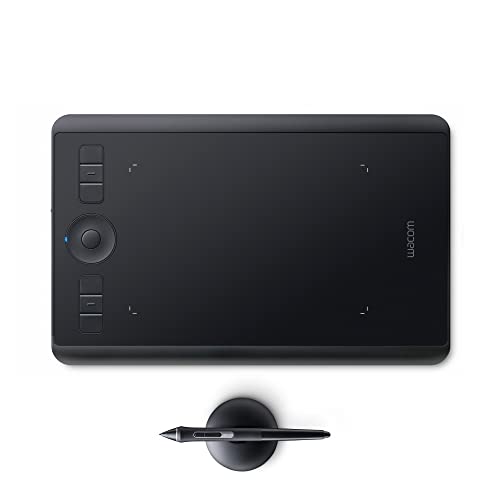
Wacom Intuos Pro Small Bluetooth Tablet
Best for: portable professional illustration with touch controls
- Display
- Touchscreen
- Pen Pressure
- 8192 levels
- Shortcut Controls
- 6 ExpressKeys, Touch Ring
- Screen Size
- 6-Inch
- Operating System
- Windows
- Features
- Stylus, Stylus Pen, Bluetooth
This is a small, wireless graphics tablet with a touchscreen. It features the Pro Pen 2 with 8192 pressure levels and tilt recognition. The device includes six ExpressKeys, a Touch Ring, and multi-touch gestures. You can connect via Bluetooth or USB. It weighs 15.8 ounces and measures 11.8 by 7.75 inches. This model suits artists who need portable precision.
- Pro Pen 2 offers 8192 levels of pressure sensitivity
- Includes tilt recognition for natural drawing
- Connects via Bluetooth or USB cable
- Features six ExpressKeys and a Touch Ring
- Supports multi-touch gestures
- Screen size is 6 inches, smaller than the 13 to 27-inch displays on other list picks
- Weight is 15.8 ounces, which is heavier than typical small non-touch tablets
- Thickness is 2 inches in one configuration, bulkier than the 0.31-inch option
- You want a compact drawing pad with wireless connectivity
- You need precise pressure sensitivity for detailed illustration
- You prefer physical controls like keys and a ring
- You require a large screen for full canvas work
- You need a 4K or high-resolution display
- You want a lightweight, ultra-thin portable device
Verdict: Wacom Intuos Pro Small Drawing Tablet provides professional pen precision in a compact form. It fits artists who prioritize portability and tactile controls over large screen real estate. This model is ideal for those who work in tight spaces or travel frequently.

Wacom Cintiq 22 22-Inch Non-Touch Pen Display
Best for: students and hobbyists needing a large 22-inch workspace
- Display
- Touchscreen
- Tablet Type
- Tethered pen display
- Screen Size
- 22"
- Display Resolution
- Full HD
- Pen Pressure
- 8192
- Features
- Stylus, Stylus Pen, Full HD Display
The Wacom Cintiq 22 is a 22-inch creative pen display with a Full HD screen. It includes the Pro Pen 2, which offers 8192 levels of pressure sensitivity and tilt recognition. The device features fingertip control for touch interaction and delivers true-to-life color quality. This tablet suits hobbyists, students, and animation enthusiasts who need a large workspace for studio or home use.
- 22-inch Full HD LCD display for a large creative workspace
- Pro Pen 2 with 8192 levels of pressure sensitivity and tilt recognition
- Fingertip touch control for relaxed parallax and natural drawing
- Includes customizable switches on the pen for shortcut access
- Full HD resolution is lower than the 4K displays on other list picks
- 22-inch size is smaller than the 24-inch and 27-inch options available
- Weight of 4.19 pounds makes it heavier than smaller 13-inch or 16-inch models
- You want a large 22-inch screen for detailed animation or illustration work
- You need reliable pressure sensitivity with 8192 levels for precise strokes
- You prefer a display that supports both pen input and touch gestures
- You require 4K resolution for ultra-high-definition color accuracy
- You need a portable device under 16 inches for travel
- You want a 120 Hz refresh rate for smoother motion
Verdict: Wacom Cintiq 22 Full HD Drawing Tablet is a solid choice for students and hobbyists who prioritize a large 22-inch canvas over higher resolution. It fits users who value established pen technology and touch support in a studio setting.
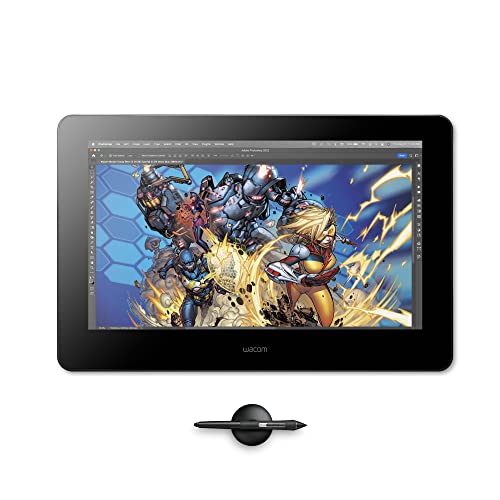
Wacom Cintiq Pro 16 4K Touchscreen
Best for: artists needing 4K color accuracy in a 16-inch format
- Display
- Touchscreen
- Screen Size
- 16"
- Display Resolution
- 4K (3840 x 2160)
- Pen Pressure
- 8,192 levels
- Color Gamut
- 98% Adobe RGB
- Display Finish
- Etched glass
The Wacom Cintiq Pro 16 features a 16-inch 4K touchscreen display with 98% Adobe RGB color accuracy. It includes an etched glass screen for a tactile drawing feel and supports 8,192 pressure levels. The device offers multi-touch gestures and customizable ExpressKeys. Its compact 16-inch form factor suits artists who need high resolution in a smaller footprint.
- 4K resolution (3840 x 2160 pixels) on a 16-inch LCD
- 98% Adobe RGB color accuracy for precise output
- Etched glass screen reduces glare and mimics paper texture
- 8,192 levels of pen pressure sensitivity
- Smaller 16-inch display compared to 22-inch or 24-inch competitors
- Heavier build at 4.19 pounds relative to its screen size
- Lower brightness at 300 cd/m2 compared to higher-end models
- You need 4K color accuracy in a portable 16-inch format
- You prefer an etched glass surface for tactile feedback
- You work primarily with animation or illustration tools
- You require a display larger than 16 inches
- You need maximum brightness for very bright environments
- You prioritize a lighter weight device under 3 pounds
Verdict: The Wacom Cintiq Pro 16 4K Touchscreen delivers professional color accuracy in a compact 16-inch package, making it ideal for artists who value portability without sacrificing resolution.

Wacom Cintiq Pro 27 27-inch
Best for: Large canvas animation professionals
- Display
- Touchscreen
- Screen Size
- 27"
- Display Resolution
- 4K UHD (3840X2160)
- Pen Pressure
- 8,192 levels
- Color Gamut
- 99% Adobe RGB, 98% DCI-P3
- Refresh Rate
- 120 Hz
The Wacom Cintiq Pro 27 offers a 27-inch 4K UHD touchscreen with 120 Hz refresh rate. It features 8,192 pressure levels and 99% Adobe RGB color accuracy. The display supports 10-bit color and 98% DCI-P3. This large format suits animation professionals who need immersive, high-resolution screens. It includes customizable ExpressKeys and multi-touch gestures for efficient workflow.
- 27-inch 4K UHD resolution display
- 120 Hz refresh rate for smooth interaction
- 99% Adobe RGB and 98% DCI-P3 color coverage
- 8,192 levels of pen pressure sensitivity
- 8 customizable ExpressKeys for workflow control
- 15.9 pounds weight makes it heavy to move
- 25.1 inches width requires significant desk space
- 1.2 inches depth adds bulk to the setup
- You need a large 27-inch canvas for detailed animation work
- You prioritize high color accuracy with 99% Adobe RGB coverage
- You want a high refresh rate for smooth pen response
- You have limited desk space for a 25.1-inch wide device
- You need a portable tablet under 10 pounds
- You prefer a smaller 16-inch or 17-inch screen size
Verdict: Wacom Cintiq Pro 27 4K Touchscreen delivers a massive, color-accurate workspace for serious animators. Its large footprint and weight demand a dedicated, sturdy desk setup.

HUION KAMVAS Pro 19 18.4-Inch 4K Touchscreen
Best for: large-screen 4K color-critical digital art
- Display
- Touchscreen
- Tablet Type
- Tethered pen display
- Screen Size
- 18.4-inch
- Display Resolution
- 3840×2160 4K UHD
- Pen Pressure
- 16,384 levels
- Color Gamut
- 99% sRGB, 96% Adobe RGB, 98% DCI-P3
The HUION KAMVAS Pro 19 is an 18.4-inch drawing tablet with a 4K UHD touchscreen. It covers 96% Adobe RGB and 98% DCI-P3 for accurate color work. The device supports multi-touch gestures and includes a programmable keypad with a dial. You get 16,384 levels of pen pressure and tilt support. This large display suits professionals needing high resolution and color accuracy.
- 4K UHD (3840×2160) resolution for sharp detail
- 96% Adobe RGB and 98% DCI-P3 color coverage
- Multi-touch support for zooming and scrolling
- 16,384 pen pressure levels with tilt function
- Programmable keypad with customizable dial
- 18.4-inch screen is smaller than the 24-inch and 27-inch options on this list
- Weight of 8.82 pounds is heavier than the 4-pound 18.4-inch variant listed in attributes
- MacOS multi-touch is currently in beta testing
- You need a large 4K display for detailed digital art
- You require accurate color reproduction for print or cinema work
- You want multi-touch gestures for navigation
- You prefer a lighter portable tablet under 5 pounds
- You need immediate full multi-touch support on MacOS
- You want a screen larger than 18.4 inches
Verdict: The HUION KAMVAS Pro 19 18.4-inch 4K Touchscreen offers high-resolution clarity and color accuracy for professionals. It fits artists who prioritize screen real estate and precise color gamuts over portability.

Wacom Movink 13 OLED Touch Display
Best for: portable artists needing OLED color accuracy
- Display
- Touchscreen
- Tablet Type
- Tethered pen display
- Pen Pressure
- 8K levels
- Shortcut Controls
- ExpressKeys
- Features
- Stylus, Stylus Pen
- Color
- Black
The Wacom Movink 13 is a portable pen display with a 13-inch OLED touchscreen. It features a 10-bit color depth and a 100,000:1 contrast ratio for accurate visuals. The device includes the Pro Pen 3 with 8k pressure sensitivity. Weighing 14.8 ounces, it is lightweight for mobile use. It supports touch gestures and customizable ExpressKeys for workflow efficiency.
- OLED display with 100,000:1 contrast ratio
- Pro Pen 3 with 8k pressure sensitivity
- 10-bit color depth with hardware presets
- Touchscreen with customizable ExpressKeys
- Weighs 14.8 ounces for portability
- 13-inch screen is smaller than the 22-inch and 27-inch Cintiq models on this list
- 14.8-ounce weight is heavier than the 13-inch Wacom One Touch
- Limited to a single size option unlike the multi-size Intuos Pro
- You need a lightweight, portable pen display for travel
- You want OLED color accuracy with a 100,000:1 contrast ratio
- You prefer a compact 13-inch screen for desk use
- You require a large 24-inch or larger canvas for detailed work
- You need a 4K resolution display for maximum pixel density
- You prefer a non-touch matte screen for glare-free drawing
Verdict: Wacom Movink 13 OLED Touch Display is a compact, color-accurate option for artists who prioritize portability and OLED contrast over large screen real estate.

XP-Pen Artist Ultra 16 15.6" Touchscreen
Best for: Large canvas desktop illustration
- Display
- Touchscreen
- Tablet Type
- Tethered pen display
- Screen Size
- 15.6"
- Display Resolution
- 3840 x 2160 UHD
- Pen Pressure
- 16384
- Color Gamut
- 99% Adobe RGB, 99% sRGB, 98% Display P3
This 15.6-inch drawing tablet features a 4K OLED touchscreen with 99% Adobe RGB coverage. It includes dual 16K pressure styluses and an X-Touch interface for multi-point gestures. The device connects via dual USB-C cables and supports HDMI input. It suits artists who need high color accuracy and touch navigation on a large display.
- 15.6-inch 4K OLED display with 99% Adobe RGB
- Dual 16K pressure styluses with 60° tilt
- X-Touch multi-point gesture support
- ACK05 remote with 40 customizable keys
- Heavier build at 3.37 pounds
- Requires constant computer connection
- Larger footprint than 13-inch models
- You need a large 15.6-inch canvas
- You want precise 4K color accuracy
- You prefer touch gesture navigation
- You need a standalone Android device
- You want a lightweight portable tablet
- You prefer a smaller 13-inch screen
Verdict: XP-Pen Artist Ultra 16 15.6-inch delivers professional color grading and touch control for desktop artists. It fits those who prioritize screen real estate and gesture efficiency over portability.

Wacom One 13 Touch 13-inch
Best for: beginners needing a small 13-inch touchscreen
- Display
- Touchscreen
- Tablet Type
- Pen display
- Screen Size
- 13.3"
- Display Resolution
- Full HD
- Pen Pressure
- 4096 levels
- Display Finish
- Laminated, anti-glare
The Wacom One 13 Touch is a 13-inch pen display with a Full HD touchscreen. It features a 13.3-inch HD laminated screen with anti-glare coating. The included pen offers 4096 levels of pressure sensitivity and tilt recognition. Two customizable shortcut buttons are on the pen. It connects via USB-C to Windows, Mac, Chromebook, or Android devices. This model suits beginners and students starting with digital art.
- 13.3-inch Full HD laminated touchscreen display
- 4096 levels of pressure sensitivity on the pen
- Natural tilt recognition for precise strokes
- Two customizable shortcut switches on the pen
- Compatible with Windows, Mac, Chromebook, and Android
- 13-inch display is smaller than most 16-inch or 24-inch options on this list
- Full HD resolution is lower than the 4K UHD screens found on many competitors
- 1.9-pound weight is heavier than non-display tablets in the same category
- You need a compact 13-inch screen for limited desk space
- You want a touchscreen for intuitive navigation while drawing
- You are a beginner looking for a straightforward pen display
- You require 4K resolution for detailed professional work
- You prefer a larger 16-inch or 24-inch canvas
- You need a wireless tablet without a display
Verdict: Wacom One 13 Touch 13-inch offers a compact 13-inch Full HD touchscreen for beginners. It fits users who want a small, connected pen display with basic pressure sensitivity.
Specifications side by side
| Spec | Wacom Cintiq 22HD Touch Pen Display | Wacom Cintiq Pro 24 4K Touch | Wacom Cintiq Pro 24 4K Touch Display | Wacom Intuos Pro Small Bluetooth Tablet | Wacom Cintiq 22 22-Inch Non-Touch Pen Display | Wacom Cintiq Pro 16 4K Touchscreen | Wacom Cintiq Pro 27 27-inch | HUION KAMVAS Pro 19 18.4-Inch 4K Touchscreen | Wacom Movink 13 OLED Touch Display | XP-Pen Artist Ultra 16 15.6" Touchscreen | Wacom One 13 Touch 13-inch |
|---|---|---|---|---|---|---|---|---|---|---|---|
| Tablet Type | – | – | – | – | Tethered pen display | – | – | Tethered pen display | Tethered pen display | Tethered pen display | Pen display |
| Screen Size | 21.5" | 24" | 23.6" | – | 22" | 16" | 27" | 18.4-inch | – | 15.6" | 13.3" |
| Display Resolution | 1920 x 1080 | 4K (3840 x 2160) | 4K | – | Full HD | 4K (3840 x 2160) | 4K UHD (3840X2160) | 3840×2160 4K UHD | – | 3840 x 2160 UHD | Full HD |
| Pen Pressure | – | 8,192 levels | 8,192 levels | 8192 levels | 8192 | 8,192 levels | 8,192 levels | 16,384 levels | 8K levels | 16384 | 4096 levels |
| Color Gamut | – | 99% Adobe RGB | 99% Adobe RGB, 97% sRGB | – | – | 98% Adobe RGB | 99% Adobe RGB, 98% DCI-P3 | 99% sRGB, 96% Adobe RGB, 98% DCI-P3 | – | 99% Adobe RGB, 99% sRGB, 98% Display P3 | – |
| Refresh Rate | – | – | – | – | – | – | 120 Hz | – | – | – | – |
| Display Finish | – | etched glass | Optical bonding | – | – | Etched glass | – | Fully laminated, etched canvas glass 2.0 | – | Laminated, etched glass, AF coating | Laminated, anti-glare |
| Shortcut Controls | ExpressKeys and Touch Strips | ExpressKey Remote (17 buttons) | ExpressKey Remote | 6 ExpressKeys, Touch Ring | – | 8 ExpressKeys | 8 ExpressKeys | Keydial Mini with 18 keys and dial | ExpressKeys | ACK05 shortcut remote (40 keys) | – |
| Operating System | – | – | – | Windows | – | – | – | – | – | Android | Windows |
| Features | Stylus, Stylus Pen | – | Stylus, Stylus Pen | Stylus, Stylus Pen, Bluetooth | Stylus, Stylus Pen, Full HD Display | – | – | Stylus, Stylus Pen | Stylus, Stylus Pen | Stylus, Stylus Pen, Dial | Stylus, Stylus Pen, Full HD Display |
| Display | Touchscreen | Touchscreen | Touchscreen | Touchscreen | Touchscreen | Touchscreen | Touchscreen | Touchscreen | Touchscreen | Touchscreen | Touchscreen |
| Color | Black | Black | Black | Black | Black | Black | Black | Dark Grey | Black | – | White |
| Audience | – | Animation | – | – | Animation | Animation | Animation | – | – | – | Students, Animation, Beginners |
| Dimensions | 25.6 × 2.7 × 15.7 inches | 26.7 × 15.5 × 1.9 inches | 26.7 × 15.5 × 0.1 inches | 11.8 × 7.75 × 2 inches | 16.6 × 11.2 × 1 inches | 16.1 × 10.5 × 0.9 inches | 14.9 × 25.1 × 1.2 inches | 17.7 × 10.7 × 0.1 inches | 12.6 × 0.26 × 0.1 inches | – | 13.2 × 8.7 × 0.1 inches |
| Weight | 18.7 pounds | 15.9 pounds | 15.9 pounds | 15.8 ounces | 4.19 pounds | 4.19 pounds | 15.9 pounds | 8.82 pounds | 14.8 ounces | 3.37 pounds | 1.9 pounds |
| Length | – | – | – | – | – | – | – | – | – | 15.9 inches | – |
| Width | – | – | – | – | – | – | – | – | – | 13.5 inches | – |
| Size | 22HD Touch | Wacom Cintiq Pro 24 – 24 inch | 24 inch touch | Small | 22" non-touch | Wacom Cintiq Pro 16 – 16 inch | Wacom Cintiq Pro 27 – 27 inch | 18.4-Inch | Movink 13 for Windows/Mac computers | 15.6" | 13" Display |
| Model | DTH2200 | DTK2420K0 | DTH2420K0 | PTH460K0A | DTK2260K0A | DTH167K0A | DTH271K0A | GT1902 | Movink 13 | Ultra16 | DTH134W0A |
If you prefer standard everyday hardware, you can evaluate display specifications across the best TCL tablets.
Specs That Matter for Drawing Tablets
Check screen resolution
Resolution determines how sharp your artwork appears. The Wacom Cintiq Pro 24 4K Touch offers a high-resolution canvas for professional animators who need precise detail. Most models provide Full HD clarity, which is sufficient for general illustration. If you work with fine lines, a 4K display reduces pixelation. Compare the pixel density to ensure your strokes look smooth. Higher resolution helps when zooming in on complex layers. It does not affect pen pressure, but it improves visual feedback during detailed work.
Evaluate pen pressure levels
Pressure sensitivity controls line thickness and opacity. The HUION KAMVAS Pro 19 supports 16K levels, offering nuanced control for shading and texture. The Wacom Cintiq Pro 24 lists 8192 levels, which is standard for professional artists. More levels allow for smoother gradients. You do not need the highest number for basic sketching. Check if the pen includes tilt support. This feature adds realism to brush strokes. Match the pressure specs to your artistic style and software requirements.
Consider portability and weight
Weight affects how easily you can move your setup. The Wacom Intuos Pro Small weighs only 15.8 ounces, making it ideal for travel. The Wacom Cintiq 22HD Touch is heavier at 18.7 pounds, requiring a stable desk. Choose a lighter model if you attend conventions or work remotely. Heavier units often come with larger screens and better stands. Assess your workspace stability before buying a heavy display. Portability also depends on screen size and connectivity options for your workflow.
Review connectivity options
Connectivity determines how you link the tablet to your computer. The Wacom Intuos Pro Small includes Bluetooth for wireless use. Other models like the Wacom One 13 require wired connections to Windows or Mac systems. Check if your computer has the necessary ports. HDMI and USB-C are common standards. Wireless options reduce cable clutter on your desk. Ensure your setup supports the required bandwidth for smooth data transfer. Compatibility with your existing hardware is essential for a seamless experience.
Assess display technology
Display technology impacts color accuracy and contrast. The Wacom Movink 13 OLED Touch uses OLED panels for deep blacks and vibrant colors. LCD screens are common in models like the Wacom Cintiq 22. OLED offers better contrast ratios, while LCDs may have wider viewing angles. Consider your color-critical work needs. If you edit photos or animate, color gamut coverage matters. Check the panel type to ensure it matches your visual standards. This spec influences how your final artwork appears on screen.
Frequently asked questions
Which drawing tablet has the largest screen?
The Wacom Cintiq Pro 27 features a 27-inch display, making it the largest option in this list. It measures 14.9 inches in length and weighs 15.9 pounds. This model is designed for professionals who need a massive, color-accurate workspace for serious animation work.
What is the lightest drawing tablet with touch?
The Wacom Movink 13 OLED Touch Display is the lightest model at just 14.8 ounces. Its compact design makes it ideal for portable artists. It offers OLED color accuracy and touch support in a small package that weighs significantly less than standard pen displays.
Do any of these tablets support Bluetooth?
Yes, the Wacom Intuos Pro Small Bluetooth Tablet supports wireless connectivity. It connects via Bluetooth to Windows systems. This model provides professional pen precision in a compact 6-inch form factor, allowing for a clutter-free workspace without the need for USB cables.
Which tablet offers the highest pen pressure levels?
The HUION KAMVAS Pro 19 and the XP-Pen Artist Ultra 16 both support 16K pressure levels. These high sensitivity levels allow for nuanced line weight variations. The HUION model features an 18.4-inch 4K touchscreen, while the XP-Pen offers a 15.6-inch display.
Are there 4K resolution options available?
Several models offer 4K resolution for high-fidelity detail. The Wacom Cintiq Pro 24 4K Touch and the Wacom Cintiq Pro 16 4K Touchscreen provide professional color accuracy. The HUION KAMVAS Pro 19 also delivers 4K clarity on its 18.4-inch canvas for color-critical digital art.
Which model is best for beginners?
The Wacom One 13 Touch is designed for beginners. It features a compact 13-inch Full HD touchscreen and basic pressure sensitivity. This model is ideal for students or new artists who want a small, connected pen display without the complexity of professional-grade hardware.
Does the Wacom Cintiq 22 support touch input?
Yes, the Wacom Cintiq 22HD Touch Pen Display includes touch functionality. It features a 22-inch canvas and physical shortcut keys for large-canvas artists. This model prioritizes a spacious workspace and tactile controls over 4K resolution or portability, fitting a studio setting well.


