Best GAOMON 11.6-Inch Drawing Tablets in 2026: 2 Picks
Finding the best GAOMON 11 6 inch drawing tablets requires checking published specifications rather than relying on subjective claims.

What this report covers
- Last updated
- 4 Nov 2026
Figures above are read from the product listings for the models named below. Scores are out of 10, based on listed specifications and buyer feedback.
As Amazon Associates, we earn from qualifying purchases. This means we may receive a small commission at no extra cost to you if you click through and make a purchase.
As an Amazon Associate we earn from qualifying purchases. Links on this page are affiliate links.
Finding the best GAOMON 11 6 inch drawing tablets requires checking published specifications rather than relying on subjective claims. We compared 2 models to help you choose based on tangible data. The GAOMON PD1161 11.6" Pen Display leads this list because it offers 8192 levels of pen pressure, ensuring precise control for portable digital sketching and online teaching. This pressure sensitivity allows for nuanced line weight variations that are essential for detailed work. These picks are based strictly on the specifications published on the listings. Use this guide to decide which device matches your workflow needs.
Check tilt support and screen finish
Both GAOMON PD1161 models share 11.6-inch screens and 8192 levels of pen pressure. The key difference is tilt support. The top pick includes it for natural shading. The second option lacks tilt data. If you need angled brush strokes, choose the model with tilt. Otherwise, the anti-glare display on both suits most users.
| # | Product | Best for | Price |
|---|---|---|---|
| 1 | GAOMON PD1161 11.6" Pen Display Best overall | portable digital sketching and online teaching | |
| 2 | GAOMON PD1161 11.6-Inch Anti-Glare Pen Display Best windows | artists using Windows or Mac computers |
The best fit for you
- You need a compact drawing tool for students – GAOMON PD1161 11.6" Pen Display – It features 8192 levels of pressure sensitivity and tilt support for precise sketching.
- You require a portable display for Windows computers – GAOMON PD1161 11.6-Inch Anti-Glare Pen Display – This model offers a dedicated anti-glare screen with accurate color reproduction for artists.
- You want a lightweight tablet for travel – GAOMON PD1161 11.6" Pen Display – Weighing just 1.91 pounds, it fits easily into bags for on-the-go work.

GAOMON PD1161 11.6" Pen Display
Best for: portable digital sketching and online teaching
- Screen Size
- 11.6-Inch
- Tablet Type
- Tethered pen display
- Display Resolution
- 1920×1080 Full HD
- Pen Pressure
- 8192
- Display Finish
- Anti-glare film
- Shortcut Controls
- 8 shortcut keys
The GAOMON PD1161 is an 11.6-inch pen display featuring an IPS screen with 1920×1080 resolution. It supports 8192 levels of pen pressure and tilt recognition for precise digital art. The device includes eight customizable shortcut keys and a battery-free stylus. Weighing 1.9 pounds, it is designed for portability. You need a computer to use this display, as it is not standalone.
- 8192 levels of pen pressure
- Tilt support for natural shading
- Eight customizable shortcut keys
- 1920×1080 IPS Full HD screen
- Battery-free stylus with two programmable buttons
- 11.6-inch screen is smaller than the 15.6-inch option
- 1.9-pound weight is higher than lighter tablet models
- Requires connection to a computer to function
- You need a portable drawing screen for school or travel
- You want customizable shortcut keys for faster workflow
- You require tilt support for realistic brush strokes
- You need a standalone tablet without a computer
- You prefer a larger 15.6-inch display area
- You require a lighter device under 1.5 pounds
Verdict: GAOMON PD1161 11.6-Inch Pen Display is a compact drawing tool for students and beginners who need tilt support and shortcut keys. It suits those who travel with a laptop and want precise pressure sensitivity.
GAOMON PD1161 11.6-Inch Anti-Glare Pen Display
Best for: artists using Windows or Mac computers
- Screen Size
- 11.6-Inch
- Tablet Type
- Tethered pen display
- Display Resolution
- Full HD
- Pen Pressure
- 8192
- Color Gamut
- 72% NTSC (100% sRGB)
- Display Finish
- Anti-glare, matte film
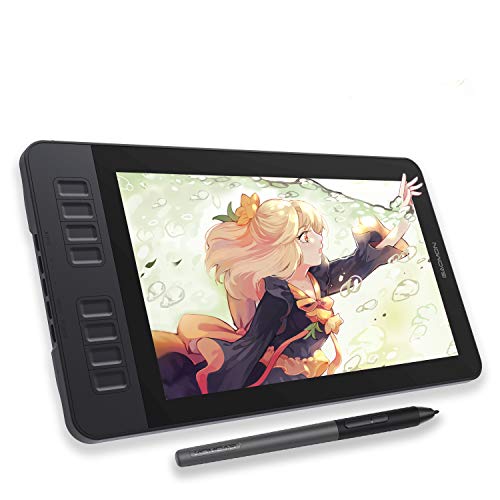
The GAOMON PD1161 is an 11.6-inch pen display tablet designed for direct on-screen drawing. It features an FHD IPS screen with a matte finish to reduce glare and a 72% NTSC color gamut for accurate colors. The included battery-free stylus offers 8192 pressure levels and tilt support. You need a Windows or Mac computer to operate it. This setup suits artists who want a portable, dedicated drawing surface connected to their main workstation.
- 11.6-inch FHD IPS display with anti-glare matte film
- Battery-free stylus with 8192 pressure levels and tilt support
- 8 customizable shortcut keys and 2 pen buttons
- 72% NTSC color gamut for lifelike color reproduction
- Requires connection to a Windows or Mac computer to function
- 1.9-pound weight is heavier than typical portable tablets
- Limited to 11.6-inch screen size option in this model
- You want to draw directly on screen with a computer
- You prefer a battery-free stylus for convenience
- You need customizable shortcut keys for workflow efficiency
- You need a standalone tablet without a computer
- You require a larger display than 11.6 inches
- You want a tablet with built-in battery power
Verdict: The GAOMON PD1161 11.6-Inch Pen Display is a solid choice for artists who need a dedicated, portable screen for their Windows or Mac computer. It delivers accurate colors and pressure sensitivity in a compact form factor.
Specifications side by side
| Spec | GAOMON PD1161 11.6" Pen Display | GAOMON PD1161 11.6-Inch Anti-Glare Pen Display |
|---|---|---|
| Tablet Type | Tethered pen display | Tethered pen display |
| Screen Size | 11.6" | 11.6" |
| Display Resolution | 1920×1080 Full HD | Full HD |
| Pen Pressure | 8192 | 8192 |
| Color Gamut | – | 72% NTSC (100% sRGB) |
| Display Finish | Anti-glare film | Anti-glare, matte film |
| Shortcut Controls | 8 shortcut keys | 8 shortcut keys |
| Operating System | – | Windows |
| Features | Battery-Free Pen, Shortcut Keys, Tilt Support | Stylus, Stylus Pen, Battery-Free Pen, Shortcut Keys, Tilt Support |
| Display | Anti-Glare | Anti-Glare |
| Color | Black | Black |
| Audience | Students, Animation, Beginners | – |
| Length | 14.2 inches | – |
| Width | 7.87 inches | – |
| Weight | 1.91 pounds | 1.9 pounds |
| Dimensions | – | 14.2 × 7.9 × 0.1 inches |
| Size | 11.6 Inch | 11.6 inch |
| Model | A2.PD1161-0-EN0000-1-US | GAOMON PD1161 |
How to Choose Your Drawing Tablet
Check Screen Finish
You should look at the display coating before buying. Both GAOMON models use anti-glare screens. This finish reduces reflections from overhead lights or windows. It helps you see your canvas clearly without distracting shine. If you work in a bright room, this matte surface is practical. It keeps the view steady. You do not need to adjust your position to avoid glare. The spec is simple but affects your daily comfort while drawing.
Verify Tilt Support
Tilt support changes how your pen behaves. The top pick includes this feature. It allows the software to detect the angle of your stylus. This creates natural shading and varied line weights. You can mimic traditional pencil strokes more easily. The second model does not list tilt data. If you need angled brush effects, choose the first option. Check the attributes section for this detail. It is essential for realistic digital art techniques.
Confirm OS Compatibility
Operating system support matters for setup. One model lists Windows compatibility. You must ensure your computer runs this system. The other model mentions both Windows and Mac. This makes it versatile for different users. You should check your device specifications first. Incompatible software can cause connection issues. Verify the listed operating systems match your hardware. This step prevents frustration during installation. It ensures the tablet works with your existing tools.
Assess Portability Needs
Weight and size affect mobility. The first model weighs 1.91 pounds. Its dimensions are 14.2 by 7.87 inches. This size fits in most laptop bags. You can take it to classes or cafes. The second model is slightly lighter at 1.9 pounds. Both are compact for an 11.6-inch display. If you travel often, these specs suit you. Check the weight and length in the data. A lighter device reduces strain during long sessions.
Review Shortcut Keys
Shortcut keys improve your workflow. Both models include these physical buttons. They let you access common functions quickly. You can map them to erase or zoom. This saves time compared to using menus. You should check if they are customizable. The presence of keys aids efficiency. It keeps your hands on the device. This feature is useful for students and professionals. Verify the specs list these keys for convenience.
Frequently asked questions
Does the GAOMON PD1161 support tilt recognition?
Yes, the top-ranked model includes tilt support. This feature allows the pen to detect angles, enabling natural shading techniques. The second listed option does not provide data on tilt capabilities. If you require angled brush strokes for realistic art, the first choice is the suitable option.
What is the weight of the GAOMON PD1161 display?
The tablet weighs approximately 1.9 to 1.91 pounds. This lightweight design makes it easy to carry for students or artists who travel. It fits well in a bag alongside a laptop, offering a portable solution for sketching on the go without adding significant bulk to your gear.
Does this drawing tablet work with Mac computers?
Yes, the second listed model is explicitly described as suitable for Mac computers. It serves as a dedicated screen for macOS users. The first model also supports Windows and Mac. Both options provide a functional interface for artists using either operating system without requiring additional hardware adapters.
Is the screen finish anti-glare on these tablets?
Both models feature an anti-glare display. This coating reduces reflections from overhead lights or windows, helping you see your canvas clearly. It prevents distracting shine during long drawing sessions. This finish is practical for various lighting conditions, ensuring your focus remains on your artwork rather than screen glare.
How many levels of pen pressure do these tablets have?
Both tablets offer 8192 levels of pen pressure sensitivity. This specification ensures precise control over line thickness and opacity. It allows for detailed shading and smooth gradients. This level of sensitivity is standard for professional digital sketching, providing accurate feedback as you apply varying amounts of pressure with the stylus.
Are shortcut keys included on the GAOMON PD1161?
Yes, both models include shortcut keys. These buttons allow you to assign common functions to specific areas on the tablet. This feature streamlines your workflow by reducing the need to reach for your keyboard. It is particularly useful for artists who frequently use tools like erasers or undo commands.
What are the physical dimensions of the 11.6-inch display?
The tablet measures approximately 14.2 inches in length and 7.9 inches in width. The thickness is around 0.1 inches. These compact dimensions fit comfortably on most desks. The size provides ample space for drawing while remaining portable enough for travel, making it ideal for students and beginners.


