Best GAOMON 15.6-Inch Drawing Tablets: 2 Spec-Based Picks
Finding the best GAOMON 15 6 inch drawing tablets requires looking closely at published specifications.

What this report covers
- Last updated
- 4 Nov 2026
Figures above are read from the product listings for the models named below. Scores are out of 10, based on listed specifications and buyer feedback.
As Amazon Associates, we earn from qualifying purchases. This means we may receive a small commission at no extra cost to you if you click through and make a purchase.
As an Amazon Associate we earn from qualifying purchases. Links on this page are affiliate links.
Finding the best GAOMON 15 6 inch drawing tablets requires looking closely at published specifications. We compared 2 models to help you choose based on actual data rather than marketing claims. The top pick is the GAOMON PD1561 15.6-Inch Drawing Tablet. It leads because its 8192 levels of pen pressure supports detailed digital art and animation on a large screen. Each selection focuses on practical features like tilt support and display type. This guide helps you decide which screen real estate and connectivity options fit your creative workflow.
Choose based on display and controls
Your main choice is between an anti-glare screen and a full-laminated display. The top pick offers a spacious 1920 x 1080 canvas with tilt support. The second option features a full-laminated panel and includes a control dial. Select the laminated model if you need precise input tools for Windows workflows. Both provide battery-free pens and 8192 levels of pressure sensitivity.
| # | Product | Best for | Price |
|---|---|---|---|
| 1 | GAOMON PD1561 15.6-Inch Drawing Tablet Best overall | Detailed digital art and animation on a large screen | |
| 2 | GAOMON PD156Pro 15.6" Full-Laminated Tablet Best windows | Windows-based digital art and illustration workflows |
The best fit for you
- You need a large screen for detailed animation work – GAOMON PD1561 15.6-Inch Drawing Tablet – It offers a 1920 x 1080 resolution and 8192 pressure levels for precise drawing.
- You use Windows and want precise control with a dial – GAOMON PD156Pro 15.6" Full-Laminated Tablet – This model includes a dial and full-laminated display optimized for Windows creative workflows.
- You prioritize portability with a lighter and thinner device – GAOMON PD156Pro 15.6" Full-Laminated Tablet – It weighs 2.87 pounds and is only 0.1 inches thick compared to the larger model.

GAOMON PD1561 15.6-Inch Drawing Tablet
Best for: Detailed digital art and animation on a large screen
- Screen Size
- 15.6-Inch
- Tablet Type
- Tethered pen display
- Display Resolution
- 1920×1080 Full HD
- Pen Pressure
- 8192
- Display Finish
- Anti-glare, pre-applied film
- Shortcut Controls
- 10 shortcut keys
The GAOMON PD1561 is a 15.6-inch pen display with a 1920 x 1080 IPS screen. It features an 8192-level pressure-sensitive battery-free pen with tilt support. The device includes 10 customizable shortcut keys and an adjustable stand. It connects to Windows or Mac computers for digital art and online teaching. This model suits users needing a large, clear workspace for detailed drawing tasks.
- 15.6-inch 1920 x 1080 IPS display
- 8192 levels of pen pressure
- Tilt support for natural shading
- 10 customizable shortcut keys
- Battery-free AP50 pen
- Heavier at 3.48 pounds
- Thicker at 0.77 inches
- Lower resolution than 4K models
- You need a large 15.6-inch canvas for detailed work
- You prefer a battery-free pen for long sessions
- You want customizable shortcut keys for workflow efficiency
- You require a portable device under 2 pounds
- You need a standalone tablet without a computer
- You want a 4K ultra-high definition display
Verdict: GAOMON PD1561 15.6-Inch Pen Display offers a spacious 1920 x 1080 canvas and precise tilt support for artists who prioritize screen real estate and pen responsiveness over portability.
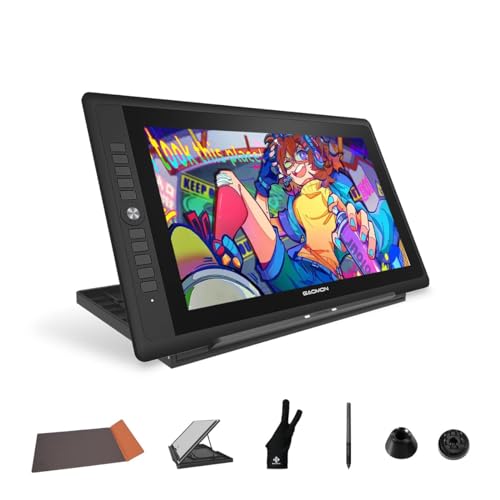
GAOMON PD156Pro 15.6" Full-Laminated Tablet
Best for: Windows-based digital art and illustration workflows
- Screen Size
- 15.6-Inch
- Tablet Type
- Tethered pen display
- Display Resolution
- 1920 x 1080 FHD
- Pen Pressure
- 8192 levels
- Color Gamut
- 120% sRGB
- Display Finish
- Full-laminated, anti-glare film
The GAOMON PD156Pro is a 15.6-inch pen display with a full-laminated 1920×1080 screen and 120% sRGB color gamut. It uses a battery-free stylus with 8192 pressure levels and tilt support. The device includes a dial and ten programmable keys. It connects via a single cable and weighs 2.87 pounds. This model suits Windows users seeking a dedicated drawing monitor for creative software.
- Full-laminated 1920×1080 display with 120% sRGB
- Battery-free stylus with 8192 pressure levels
- Includes dial and 10 programmable shortcut keys
- Single-cable connection for simplified setup
- Requires connection to a computer to function
- Heavier at 2.87 pounds compared to lighter alternatives
- Limited to Windows 7/8/10 or later for dial support
- You need a dedicated screen for Windows drawing software
- You prefer a full-laminated display with anti-glare film
- You want customizable shortcut keys and a dial
- You require a standalone device without a computer
- You prioritize a lighter weight under 2 pounds
- You need native macOS dial support
Verdict: GAOMON PD156Pro 15.6-Inch Pen Display fits Windows users who need a high-resolution, full-laminated screen with a dial for precise control in creative applications.
Specifications side by side
| Spec | GAOMON PD1561 15.6-Inch Drawing Tablet | GAOMON PD156Pro 15.6" Full-Laminated Tablet |
|---|---|---|
| Tablet Type | Tethered pen display | Tethered pen display |
| Screen Size | 15.6" | 15.6 inch |
| Display Resolution | 1920×1080 Full HD | 1920 x 1080 FHD |
| Pen Pressure | 8192 | 8192 levels |
| Color Gamut | – | 120% sRGB |
| Display Finish | Anti-glare, pre-applied film | Full-laminated, anti-glare film |
| Shortcut Controls | 10 shortcut keys | 10 shortcut keys, 1 dial key |
| Operating System | – | Windows |
| Features | Battery-Free Pen, Shortcut Keys, Tilt Support | Stylus, Stylus Pen, Battery-Free Pen, Tilt Support, Dial |
| Display | Anti-Glare | Full-Laminated |
| Color | Black | Black |
| Audience | Animation | – |
| Dimensions | 17.8 × 9.92 × 0.77 inches | 13.5 × 7.62 × 0.1 inches |
| Weight | 3.48 pounds | 2.87 pounds |
| Size | 15.6 inch | 15.6 Inch |
| Model | GAOMON PD1561 Pen Display | A2.PD156P-0-EN0000-0-1-CY-0 |
Key Specs for Choosing GAOMON Tablets
Check screen resolution
You should look at the pixel count to ensure your artwork appears sharp. The top pick features a 1920 x 1080 resolution, providing a spacious canvas for detailed work. Higher resolution allows for finer lines and clearer text when you are editing or illustrating. Verify the screen size matches your desk space. A 15.6-inch display offers ample room for complex projects without taking up too much room. Check the width and length dimensions in the specs to confirm fit.
Evaluate pen pressure levels
Pen pressure sensitivity determines how naturally your digital strokes mimic real media. You need at least 8192 levels for smooth gradients and variable line weights. This spec ensures the tablet responds accurately to how hard you press. More levels offer greater control for shading and texture creation. Verify the pressure rating in the specifications. Models with higher levels provide better responsiveness. This is critical for professional digital art and animation where subtle variations matter. Check the attributes for this number.
Assess display type
The display technology affects how you see your work. You can choose between an anti-glare screen or a full-laminated panel. Anti-glare surfaces reduce reflections in bright rooms, which helps during long sessions. Full-laminated displays offer a more direct feel, reducing the gap between pen and cursor. This creates a more natural writing experience. Decide which environment you work in most. If you use bright lights, anti-glare is practical. For precision, full-lamination is often preferred. Check the display attribute carefully.
Verify operating system
Compatibility is essential for seamless integration with your computer. Some models are optimized for specific operating systems. For instance, one option is tailored for Windows users, ensuring smooth performance with creative applications. You must check the supported OS before buying. Mismatched software can lead to driver issues or limited functionality. Verify the operating system requirement in the product attributes. This ensures your tablet works correctly with your existing setup. Proper compatibility saves time during installation and setup.
Review physical controls
Physical controls enhance your workflow efficiency. You may prefer shortcut keys for frequent commands or a dial for precise adjustments. The second pick includes a control dial, which is useful for zooming or rotating canvases in creative software. Shortcut keys allow quick access to tools without using the mouse. Decide which control method suits your style. Dial users benefit from granular control, while key users prefer speed. Check the features list for these elements. This helps you choose the right interface for your daily tasks.
Frequently asked questions
Which GAOMON 15.6-inch tablet is best for Windows users?
The GAOMON PD156Pro is the top choice for Windows workflows. It features a full-laminated display and includes a control dial for precise adjustments in creative applications. The model is optimized specifically for Windows operating systems, ensuring smooth integration with your digital art software.
Does the GAOMON PD1561 support tilt recognition?
Yes, the GAOMON PD1561 includes tilt support. This feature allows the pen to detect angles, adding natural shading and line variation to your drawings. It pairs with an 8192-level pressure sensitivity battery-free pen for responsive and accurate input during detailed animation or art projects.
What is the difference between the PD1561 and PD156Pro displays?
The PD1561 uses an anti-glare display, while the PD156Pro features a full-laminated screen. Lamination reduces the gap between the glass and the display, improving pen tracking accuracy. The PD1561 offers a spacious 1920 x 1080 canvas, whereas the PD156Pro focuses on precision with its laminated panel.
How heavy is the GAOMON PD1561 compared to the PD156Pro?
The GAOMON PD1561 weighs 3.48 pounds, making it slightly heavier than the PD156Pro, which weighs 2.87 pounds. The PD1561 is also thicker at 0.77 inches, while the PD156Pro is much thinner at 0.1 inches. Consider your need for portability versus screen real estate.
Does the GAOMON PD156Pro come with a dial for control?
Yes, the GAOMON PD156Pro includes a dedicated control dial. This hardware feature provides precise control within creative applications, allowing you to adjust settings or brush sizes quickly. It complements the full-laminated display and Windows optimization for a streamlined digital art workflow.
What resolution does the top-rated GAOMON tablet offer?
The top-rated GAOMON PD1561 offers a 1920 x 1080 resolution. This full HD canvas provides ample space for detailed digital art and animation. The high pixel count ensures that your artwork appears sharp and clear, supporting intricate line work and complex designs.

